---
url: 'https://docs.workato.com/en/workato-api/folders.md'
description: >-
Reference for the Workato folders API to list, create, update, and manage
folders and projects in your workspace.
---
# Developer API - Folders
Use the following endpoints to manage folders and projects (top-level folders) in your workspace:
> **ENDPOINT ACCESS**
>
> To access these endpoints, your [API client](/en/workato-api/api-clients#api-client-benefits) must have the appropriate privileges. This is determined by the [API client role](/en/workato-api/api-clients#create-a-client-role).
>
> To enable endpoint access:
>
> You can enable access to these endpoints by editing an existing API client role, or by creating a new API client role:
>
> 1. Navigate to **Workspace admin > API clients > Client roles**.
>
> Select the role you plan to edit.
>
> Alternatively, click **\+ Add client role** to create a new API client role.
>
> 2. Select **Projects** and navigate to **Project assets > Projects & folders**.
>
> 3. Select the checkboxes next to the endpoints you plan to enable for this role. The following options are available:
>
> - **Projects & folders**
> - Select this option to enable all endpoints for this role.
> - **List projects** `GET /api/projects`
> - **List folders** `GET /api/folders`
> - **Get folder** `GET /api/folders/:id`
> - **Create project or folder** `POST /api/folders`
> - **Delete folder** `DELETE /api/folders/:id`
> - **Update folder** `PUT /api/folders/:id`
> - **Delete project** `DELETE /api/projects/:id`
> - **Update project** `PUT /api/projects/:id`
>
> 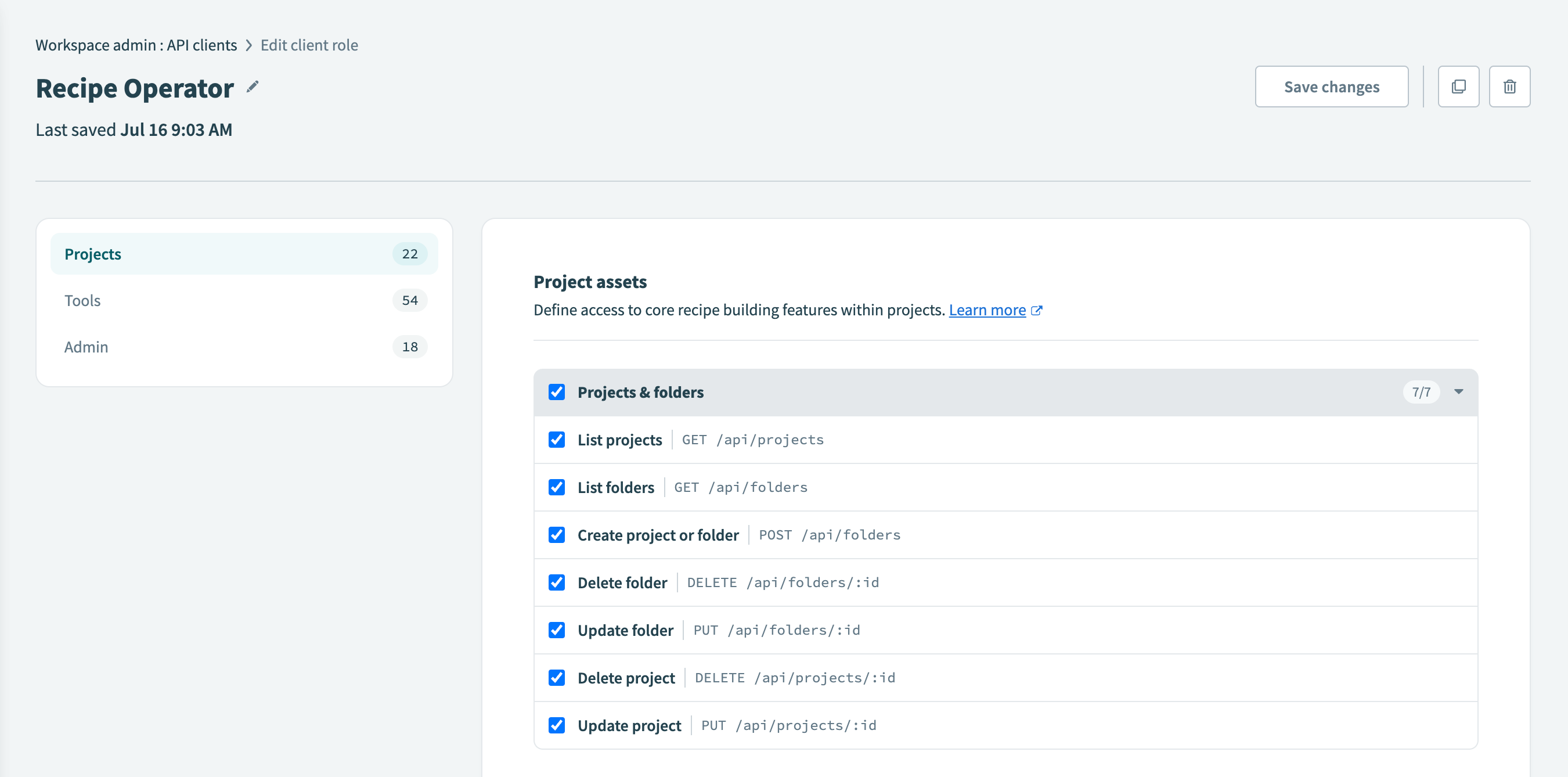_Select the endpoints you plan to enable_
>
## Rate limits
Folder resources have the following rate limits:
| Type | Resource | Quota |
| --- | --- | --- |
| All | All [Folders](/en/workato-api/folders.html) endpoints | 60 requests per minute |
### Quick reference
| Type | Resource | Description |
| --- | --- | --- |
| GET | [/api/folders](/en/workato-api/folders#list-folders) | List folders. |
| GET | [/api/projects](/en/workato-api/folders#list-projects) | List projects. |
| GET | [/api/folders/:folder\_id](/en/workato-api/folders#get-a-folder) | Get a folder. |
| POST | [/api/folders](/en/workato-api/folders#create-folder) | Create a project or folder. |
| PUT | [/api/folders/:folder\_id](/en/workato-api/folders#update-a-folder) | Update a folder. |
| PUT | [/api/projects/:project\_id](/en/workato-api/folders#update-a-project) | Update a project. |
| DELETE | [/api/folders/:folder\_id](/en/workato-api/folders#delete-a-folder) | Delete a folder. |
| DELETE | [/api/projects/:project\_id](/en/workato-api/folders#delete-a-project) | Delete a project. |
## List folders
Lists all folders.
```
GET https://YOUR_DATA_CENTER/api/folders
```
### Query parameters
| Name | Type | Description |
| --- | --- | --- |
| parent\_id | **string** | Parent folder ID. Defaults to Home folder. |
| page | **integer** | Page number. Defaults to 1. |
| per\_page | **integer** | Page size. Defaults to 100 (maximum is 100). |
| with\_nested\_folders | **boolean** _optional_ | If false, returns all immediate child folders under root, excluding root. The default is false. |
| updated\_after | **string** _optional_ | Filter the list of folders to include only those updated after the date and time you specify. The date and time must be provided in ISO 8601 format according to the following pattern: `YYYY-MM-DDTHH:MM:SSZ`. |
#### Sample request
```shell
curl -X GET 'https://YOUR_DATA_CENTER/api/folders?parent_id=:parent_id_value' \
-H 'Authorization: Bearer ' \
-H 'Content-Type: application/json' \
```
### Response
```json
[
{
"id": 7498,
"name": "Netsuite production",
"parent_id": 3319,
"is_project": false,
"project_id": 4567,
"created_at": "2020-07-31T03:08:29.486-07:00",
"updated_at": "2020-07-31T03:08:29.493-07:00"
},
{
"id": 7302,
"name": "Automation HR",
"parent_id": 3319,
"is_project": true,
"project_id": null,
"created_at": "2020-07-09T14:37:47.789-07:00",
"updated_at": "2020-07-09T14:37:47.802-07:00"
}
]
```
## List projects
Lists all projects. Projects are top-level folders that normally encompass a single use case.
```
GET https://YOUR_DATA_CENTER/api/projects
```
### Query parameters
| Name | Type | Description |
| --- | --- | --- |
| page | **integer** | Page number. Defaults to 1. |
| per\_page | **integer** | Page size. Defaults to 100 (maximum is 100). |
| updated\_after | **string** _optional_ | Filter the list of projects to include only those updated after the date and time you specify. The date and time must be provided in ISO 8601 format according to the following pattern: `YYYY-MM-DDTHH:MM:SSZ`. |
#### Sample request
```shell
curl -X GET 'https://YOUR_DATA_CENTER/api/projects' \
-H 'Authorization: Bearer ' \
-H 'Content-Type: application/json' \
```
### Response
```json
[
{
"id": 649122,
"description": "Coupa to Netsuite automations",
"folder_id": 1563029,
"name": "Procure to Pay"
},
{
"id": 604202,
"description": "Salesforce to Netsuite automations",
"folder_id": 1486330,
"name": "Order to Cash"
},
]
```
## Get a folder
Fetch a single folder within your workspace by its ID.
```
GET https://YOUR_DATA_CENTER/api/folders/:folder_id
```
### URL parameters
| Name | Type | Description |
| --- | --- | --- |
| folder\_id | **string** _required_ | The ID of the folder you plan to fetch. You can retrieve a list of folder IDs by calling the [List folders](#list-folders) endpoint. |
### Sample request
```shell
curl -X GET https://YOUR_DATA_CENTER/api/folders/:folder_id \
-H 'Authorization: Bearer ' \
-H 'Content-Type: application/json' \
```
### Responses
Successful response
```json
{
"id": 7498,
"name": "Netsuite production",
"parent_id": 3319,
"project_id": 4567,
"is_project": false,
"created_at": "2020-07-31T03:08:29.486-07:00",
"updated_at": "2020-07-31T03:08:29.493-07:00"
}
```
Unsuccessful response
Workato returns the following response if you request a folder that doesn't exist:
```json
{
"message": "Not found"
}
```
## Create a project or folder
Creates a new folder in the specified parent folder. If you do not specify a parent folder ID, the system creates the folder as a top-level folder in the home folder.
```
POST https://YOUR_DATA_CENTER/api/folders
```
### Payload
| Name | Type | Description |
| --- | --- | --- |
| name | **string** _required_ | Name of the folder. |
| parent\_id | **string** | Parent folder ID. Defaults to Home folder. |
#### Sample request
```shell
curl -X POST https://YOUR_DATA_CENTER/api/folders \
-H 'Authorization: Bearer ' \
-H 'Content-Type: application/json' \
-d '{
"name": ":name",
"parent_id": ":parent_id"
}'
```
### Response
```json
{
"id": 3498583,
}
```
## Update a folder
Use this endpoint to update a folder name or move it to a different folder within your workspace. You can change the folder's name and update its `parent_id` if the folder is not a project. If the folder is a project, you can only change the project name using this endpoint.
Refer to the [Update a project](/en/workato-api/folders#update-a-project) endpoint documentation for additional options in the request payload for projects.
```
PUT https://YOUR_DATA_CENTER/api/folders/:folder_id
```
> **FOLDER AND PROJECT CONVERSION**
>
> You can't use this endpoint to convert a folder into a project or a project into a folder.
### URL parameters
| Name | Type | Description |
| --- | --- | --- |
| folder\_id | **string** _required_ | The ID of the folder you plan to update. You can retrieve a list of folder IDs by calling the [List folders](#list-folders) endpoint. |
### Payload
| Name | Type | Description |
| --- | --- | --- |
| name | **string** _optional_ | The new name for the folder. |
| parent\_id | **string** _optional_ | The ID of the parent folder to which you plan to move the folder. |
> **FOLDER NAME**
>
> The folder name cannot include the `/` or `\` characters.
### Sample request
```shell
curl -X PUT https://YOUR_DATA_CENTER/api/folders/:folder_id \
-H 'Authorization: Bearer ' \
-H 'Content-Type: application/json' \
-d '{
"name": ":name",
"parent_id": :parent_id_value
}'
```
### Responses
Successful response
```json
{
"id": 12345,
"name": "My updated folder name",
"parent_id": 67890,
"created_at": "2024-08-02T13:35:11.691-07:00",
"updated_at": "2024-08-02T14:26:30.365-07:00"
}
```
Unsuccessful responses
#### Changing the parent folder of a project
Projects are top-level folders. Attempting to change the parent folder of a project returns the following error:
```json
{
"message": "Parent can't be changed for project folder"
}
```
Refer to the [Update a project](/en/workato-api/folders#update-a-project) endpoint documentation to see the available options for the request payload.
#### Invalid characters in folder name
Attempting to update a folder name to include the `/` or `\` characters returns the following error:
```json
{
"message": "Folder name can't contain the folder path"
}
```
## Update a project
Update a project in your workspace. Projects are top-level folders that typically encompass a single use case. Use this endpoint to change a project's name and description.
```
PUT https://YOUR_DATA_CENTER/api/projects/:project_id
```
> **FOLDER AND PROJECT CONVERSION**
>
> You can't use this endpoint to convert a folder into a project or a project into a folder.
### URL parameters
| Name | Type | Description |
| --- | --- | --- |
| project\_id | **string** _required_ | The ID of the project you plan to update. This is distinct from the project's `folder_id`. Retrieve a list of projects in your workspace by calling the [List projects](#list-projects) endpoint. |
### Payload
| Name | Type | Description |
| --- | --- | --- |
| name | **string** _required_ | The new name for the project. |
| description | **string** _optional_ | The new description for the project. |
> **PROJECT NAME**
>
> The project name cannot include the `/` or `\` characters.
### Sample request
```shell
curl -X PUT https://YOUR_DATA_CENTER/api/projects/:project_id \
-H 'Authorization: Bearer ' \
-H 'Content-Type: application/json' \
-d '{
"name": ":name",
"description": ":description"
}'
```
### Responses
Successful response
```json
{
"id": 54321,
"description": "My updated project description",
"folder_id": 09876,
"name": "My updated project name"
}
```
Unsuccessful response
Attempting to update your project name to include the `/` or `\` character returns the following error:
```json
{
"message": "Name is invalid"
}
```
## Delete a folder
Delete a folder within your workspace.
> **WARNING**
>
> This action deletes a folder and all of its contents (recipes and connections).
To use this endpoint, your API client role must have the following privilege:
- [**Delete folder**](#folders) `DELETE /api/folders/:id`
```
DELETE https://YOUR_DATA_CENTER/api/folders/:folder_id
```
### URL parameters
| Name | Type | Description |
| --- | --- | --- |
| folder\_id | **string** _required_ | The ID of the folder you plan to delete. You can retrieve a list of folder IDs by calling the [List folders](#list-folders) endpoint. |
### Query parameters
| Name | Type | Description |
| --- | --- | --- |
| force | **boolean** _optional_ | Set this parameter to `true` to delete a folder that is not empty. When `true`, the folder you specify using the `folder_id` parameter, and its contents (all recipes and connections) within the folder are deleted. If set to `false`, this action can only delete an empty folder. |
### Sample request
```shell
curl -X DELETE 'https://YOUR_DATA_CENTER/api/folders/:folder_id?force=:true_or_false' \
-H 'Authorization: Bearer '
```
### Response
Successful response
```json
{
"success": "true"
}
```
Unsuccessful response
If you attempt to delete a folder that isn't empty, but do not set the `force` parameter to `true` Workato cannot delete the folder you've specified.
If the folder contains a connection, Workato provides the following response:
```json
{
"message": "can't remove a folder with connections"
}
```
If the folder contains a recipe, Workato provides the following response:
```json
{
"message": "can't remove a folder with recipe"
}
```
## Delete a project
Delete a project within your workspace. Projects are top-level folders that typically encompass a single use case.
> **WARNING**
>
> This action deletes a project and all of its contents. This includes all child folders, recipes, connections, and Workflow apps assets (if applicable) inside the project.
To use this endpoint, your API client role must have the following privilege:
- [**Delete projects**](#folders) `DELETE /api/projects/:id`
```
DELETE https://YOUR_DATA_CENTER/api/projects/:project_id
```
### URL parameters
| Name | Type | Description |
| --- | --- | --- |
| project\_id | **string** _required_ | The ID of the project you plan to delete. Retrieve a list of all projects in your workspace by calling the [List projects](#list-projects) endpoint. |
### Sample request
```shell
curl -X DELETE 'https://YOUR_DATA_CENTER/api/projects/:project_id' \
-H 'Authorization: Bearer '
```
### Response
Successful response
```json
{
"success": "true"
}
```
Unsuccessful response
If you attempt to delete a project and do not have the appropriate privileges, Workato returns the following response.
```json
{
"message": "Cannot destroy folder"
}
```