---
url: 'https://docs.workato.com/en/workato-api/static-assets.md'
description: >-
Reference for the Workato resources API to list, upload, download, and delete
static asset files within a project.
---
# Developer API - Resources
Use the following endpoints to manage [resources](/en/resources) in your workspace.
## Permissions
Go to the [Create client role](/en/workato-api/api-clients#create-a-client-role) or [Edit client role](/en/workato-api/api-clients#edit-a-client-role) page and edit the **Projects > Project assets > Resources** section to configure a client role's access to resource endpoints.
Refer to the [Role-based access control](/en/resources#role-based-access-control) section to configure resource access using collaborator and project roles.
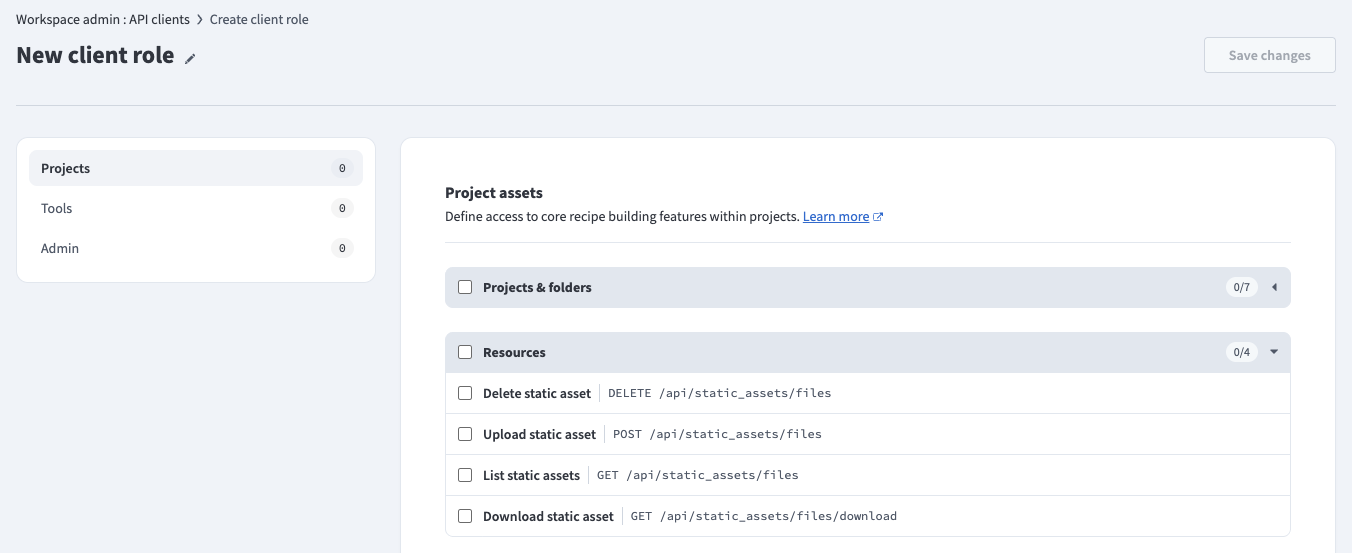_API client permissions_
## Rate limits
Resources have the following rate limits:
| Type | Resource | Quota |
| --- | --- | --- |
| All | All [Resources](/en/workato-api/static-assets.html) endpoints | 60 requests per minute |
## Quick reference
| Type | Resource | Description |
| --- | --- | --- |
| GET | [/api/static\_assets/files](#list-resources) | List resources. |
| POST | [/api/static\_assets/files](#upload-a-resource) | Upload a resource. |
| GET | [/api/static\_assets/files/download](#download-a-resource) | Download a resource. |
| DELETE | [/api/static\_assets/files](#delete-a-resource) | Delete a resource. |
## List resources
Retrieves all resources in a folder.
```
GET https://YOUR_DATA_CENTER/api/static_assets/files
```
### Query parameters
| Name | Type | Description |
| --- | --- | --- |
| project\_name | **string** _required_ | The name of the project. |
| path | **string** _required_ | The path to the folder within the project. For example: `/Assets` |
### Sample request
```shell
curl -X GET 'https://YOUR_DATA_CENTER/api/static_assets/files?project_name=:project_name_value&path=:path_value' \
-H 'Authorization: Bearer '
```
### Response
```json
{
"items": [
{
"filename": "template.xslt",
"updated_by": "user@example.com",
"updated_at": "2026-03-20T12:00:00.000Z"
}
]
}
```
## Upload a resource
Uploads a resource to a folder. If a resource with the same filename already exists, this creates a new version. Refer to the [Upload resources](/en/resources/resource-management#upload-resources) guide to upload a resource using the Workato UI.
```
POST https://YOUR_DATA_CENTER/api/static_assets/files
```
### Request body
Send the request as `multipart/form-data`.
| Name | Type | Description |
| --- | --- | --- |
| project\_name | **string** _required_ | The name of the project. |
| path | **string** _required_ | The path to the folder within the project. For example: `/Assets` |
| file | **file** _required_ | The resource file to upload. The maximum file size is 50 MB. Accepted file types are `.xsd`, `.xslt`, `.wsdl`, `.rb`, `.js`, `.py`, and `.wel`. |
### Sample request
```shell
curl -X POST 'https://YOUR_DATA_CENTER/api/static_assets/files' \
-H 'Authorization: Bearer ' \
-F 'project_name=:project_name_value' \
-F 'path=:path_value' \
-F 'file=@:file_path'
```
### Response
```json
{
"success": true
}
```
400 BAD REQUEST
A `400 Bad Request` error occurs when the file size exceeds the 50 MB quota.
```json
{
"errors": [
{
"code": "bad_request",
"title": "File size exceeds maximum allowed (50MB)"
}
]
}
```
## Download a resource
Downloads a resource. Refer to the [Download a resource](/en/resources/resource-management#download-a-resource) guide to download a resource using the Workato UI.
```
GET https://YOUR_DATA_CENTER/api/static_assets/files/download
```
### Query parameters
| Name | Type | Description |
| --- | --- | --- |
| project\_name | **string** _required_ | The name of the project. |
| path | **string** _required_ | The path to the resource within the project, including the filename. For example: `/Assets/template.xslt` |
### Sample request
```shell
curl -X GET 'https://YOUR_DATA_CENTER/api/static_assets/files/download?project_name=:project_name_value&path=:path_value' \
-H 'Authorization: Bearer ' \
--output template.xslt
```
### Response
A successful request returns the raw file content with the following headers:
- `Content-Type: application/octet-stream`
- `Content-Disposition: attachment; filename=template.xslt`
## Delete a resource
Deletes a resource. Refer to the [Delete a resource](/en/resources/resource-management#delete-a-resource) guide to delete a resource using the Workato UI.
```
DELETE https://YOUR_DATA_CENTER/api/static_assets/files
```
### Query parameters
| Name | Type | Description |
| --- | --- | --- |
| project\_name | **string** _required_ | The name of the project. |
| path | **string** _required_ | The path to the resource within the project, including the filename. For example: `/Assets/template.xslt` |
### Sample request
```shell
curl -X DELETE 'https://YOUR_DATA_CENTER/api/static_assets/files?project_name=:project_name_value&path=:path_value' \
-H 'Authorization: Bearer '
```
### Response
```json
{
"success": true
}
```