ZoomInfo B2B Intelligence MCP server
The ZoomInfo B2B Intelligence MCP server enables LLMs to search and enrich B2B company and contact data from ZoomInfo through natural conversation. It provides tools to find companies and contacts, discover accounts showing buying intent, enrich records with full profiles, retrieve intent signals, news, scoops, corporate hierarchy, organization charts, and technology stacks without requiring direct interaction with the ZoomInfo interface.
ZoomInfo operates on a credit-based model where search operations return free previews and enrichment operations consume credits. The server enforces a strict preview-then-enrich pattern in which search tools return identification-level data at no cost, and enrichment tools consume credits only when you explicitly approve.
Uses
Use the ZoomInfo B2B Intelligence MCP server to perform the following actions:
- Look up valid filter values for search and enrichment parameters
- Check current API credit balance and usage limits
- Search companies by firmographic and technographic criteria
- Search contacts by title, seniority, department, and company attributes
- Discover companies showing buying intent for specified topics
- Enrich a company record with its full ZoomInfo profile
- Enrich a contact record with full profile details
- Retrieve intent signals and recommended contacts for a known company
- Get recent news articles and proprietary scoops for a company
- Retrieve parent/subsidiary structure and company locations
- Map organizational reporting relationships at a company
- Retrieve the technology stack installed at a company
Example prompts
Use the following example prompts to invoke ZoomInfo B2B Intelligence MCP server tools:
Find SaaS companies in Texas with 200–500 employees.Search for VP of Sales contacts at mid-market financial services firms.Which companies are showing buying intent for cybersecurity?Enrich the company profile for Acme Corp.Get full contact details for this lead before I reach out.What are the intent signals for Salesforce this week?What's in the news for HubSpot lately?Show me the corporate hierarchy for Microsoft.Who reports to the CTO at Stripe?What technologies does Shopify have installed?How many credits do I have remaining?
ZoomInfo B2B Intelligence MCP server tools
The ZoomInfo B2B Intelligence MCP server provides the following tools:
| Tool | Description |
|---|---|
| lookup_filter_values | Returns valid filter values for ZoomInfo search and enrichment parameters. |
| check_usage | Returns current API credit balance, request limits, and record limits. |
| search_companies | Searches ZoomInfo companies by firmographic and technographic criteria. Returns free preview records. |
| search_contacts | Searches contacts by title, seniority, department, and company attributes. Returns free previews. |
| search_intent | Discovers companies showing buying intent for topics you specify across the ZoomInfo database. |
| enrich_company | Retrieves the full ZoomInfo company profile. Consumes 1 credit per new record. |
| enrich_contact | Retrieves the full ZoomInfo contact profile. Consumes 1 credit per new record. |
| get_intent_signals | Retrieves intent signal scores and recommended contacts for a specific company. Consumes 1 credit per company. |
| get_company_news | Retrieves recent news articles and proprietary scoops for a company. Consumes 1 credit per company. |
| get_corporate_hierarchy | Retrieves parent/subsidiary structure and company locations. Consumes 1 credit per company. Requires Advanced+ tier. |
| get_org_chart | Retrieves organizational chart and reporting relationships at a company. Consumes 1 credit per company. Requires Advanced+ tier. |
| get_company_technologies | Retrieves the technology stack installed at a company. Consumes 1 credit per company. Requires Advanced+ tier. |
Install the ZoomInfo B2B Intelligence MCP server
Complete the following steps to install a prebuilt MCP server to your project:
Sign in to your Workato account.
Go to AI Hub > MCP servers.
Click + Create MCP server.
Go to the Start with pre-built MCP Servers using your connected apps section and select the prebuilt MCP server you plan to use.
Click Use this server.
Provide a name for your MCP server in the Server name field.
Use the Location drop-down menu to select the project for the MCP server.
Go to the Connections section and connect to your app account.
Select the connection type you plan to use for the MCP server template.
- User's connection: MCP server tools perform actions based on the identity and permissions of the user who connects to the application. Users authenticate with their own credentials to execute the skill.
- Your connection: This option uses the connection established by the recipe builder and follows the same principles as normal app connections.
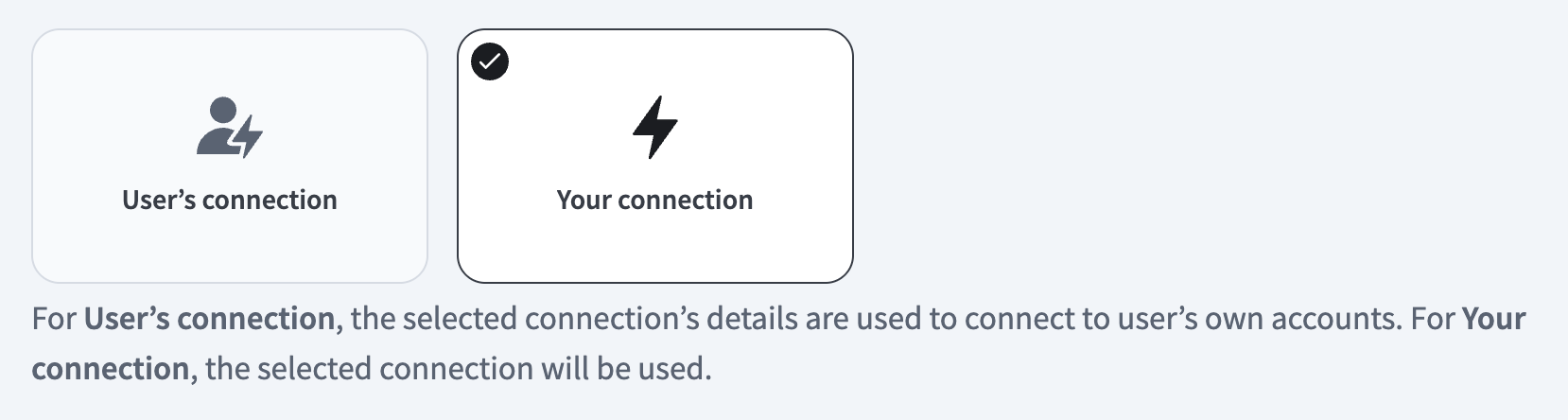 Select your connection type
VERIFIED USER ACCESS AUTHENTICATION REQUIREMENTS
Only app connections that use OAuth 2.0 authorization code grant are available for user's connection. Refer to Verified user access for more information.
Complete the app-specific connection setup steps in the following section.
ZoomInfo connection setup
View ZoomInfo connection setup steps
Complete the following steps to set up your ZoomInfo connection:
REQUIRED ZOOMINFO PERMISSIONS
Your ZoomInfo account must have ZoomInfo API access permissions to connect to Workato.
Enter a name for your connection in the Connection name field.
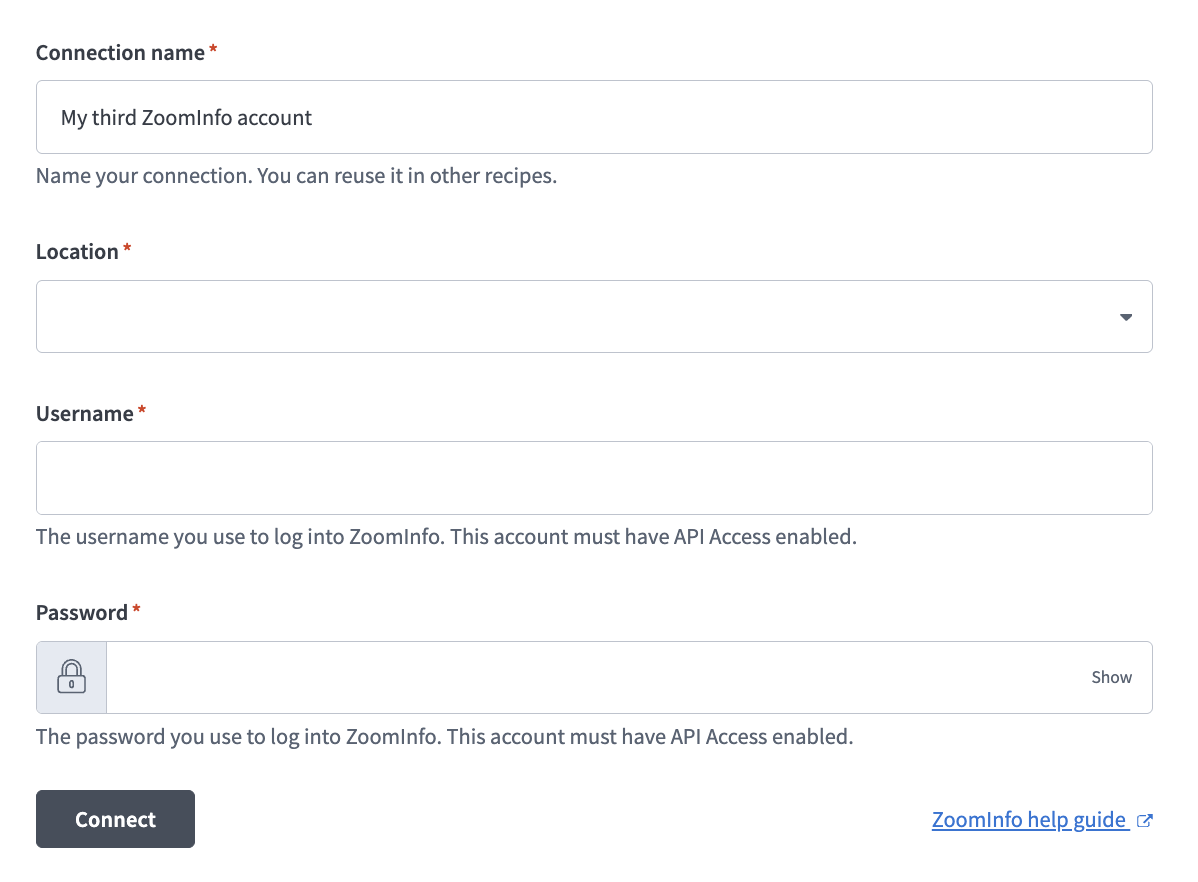 Set up your ZoomInfo connection
Use the Location drop-down menu to select the project where you plan to store your connection.
Enter your ZoomInfo username in the Username field.
Enter your ZoomInfo password in the Password field.
Click Connect.
Project property configuration
The ZoomInfo B2B Intelligence MCP server supports the following project-level properties to control behavior and defaults:
| Project-level property | Description |
|---|---|
max_search_results | Maximum records per search call. Defaults to the maximum allowed: 25. |
max_news_results | Maximum news/scoop items per get_company_news call. Defaults to 25. |
max_intent_topics | Maximum intent topics per request. Defaults to the maximum allowed: 50. |
default_output_fields | Default field set for enrich tools when output_fields are omitted. |
credit_confirmation | LLM must confirm with the user before calling credit-consuming tools. Estimate total cost and seek batch approval for multi-tool workflows. Set to true by default. |
credits_consumed_in_response | All credit-consuming tools include a credits_consumed field in their response for running cost tracking. Set to true by default. |
smart_filter_resolution | For common filters, such as industry or seniority, the server resolves natural-language terms internally. Subscription-scoped filters, such as intent topics, require explicit lookup. |
api_rate_limit | ZoomInfo API rate limit. Server handles 429 with backoff. Defaults to 1500/min. |
View project-level property configuration steps
Complete the following steps to configure your project-level properties:
Sign in to your Workato account and go to Projects.
Go to the project that contains your MCP server.
Click the Settings tab.
 Click the Settings tab.
Select Project properties.
Go to the project property you plan to update and click the Edit (pencil) icon.
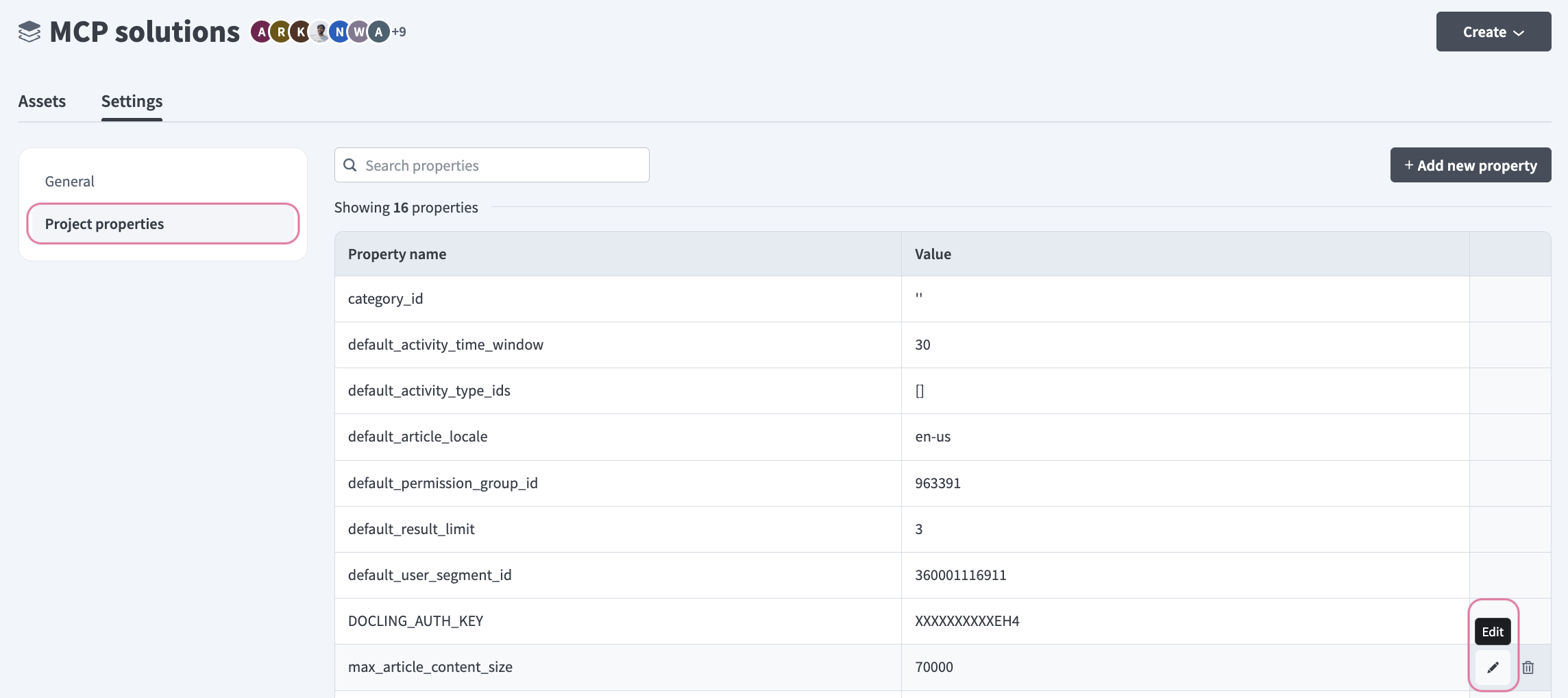 Click the Edit (pencil) icon.
Go to the Value field and make your changes. For example, set max_search_results to 15 or max_intent_topics to 25.
How to use ZoomInfo B2B Intelligence MCP server tools
Refer to the following sections for detailed information on available tools:
lookup_filter_values tool
The lookup_filter_values tool returns valid filter values for ZoomInfo search and enrichment parameters. Your LLM uses this tool when you mention an industry, title, technology, or intent topic by name.
Try asking:
What industries are available as search filters?Show me valid intent topics for my subscription.What title filters can I use for contact search?Look up valid values for the technology filter.
check_usage tool
The check_usage tool returns your current API credit balance, request limits, and record limits. Your LLM uses this tool before running workflows that call multiple enrichment tools, or when you ask about remaining credits.
Try asking:
How many credits do I have left?Check my API usage before I run this enrichment.What are my current request limits?Am I close to hitting my record limits?
search_companies tool
The search_companies tool searches ZoomInfo companies by firmographic and technographic criteria and returns free preview records. Your LLM uses this tool to find companies by criteria, such as industry, size, location, or technology, and to build prospecting lists of target accounts.
Try asking:
Find SaaS companies in California with 200–500 employees.Search for manufacturing companies using Salesforce.Show me Series B startups in the healthcare industry.Build a list of logistics companies headquartered in Chicago.
search_contacts tool
The search_contacts tool searches contacts by title, seniority, department, and company attributes and returns free previews. Your LLM uses this tool to find people by role or department, locate decision-makers at companies, or build a contact list for outreach.
Try asking:
Find VP of Sales contacts at mid-market financial services firms.Search for IT decision-makers at enterprise healthcare companies.Show me marketing directors at companies using HubSpot.Find C-suite contacts at Series A startups in New York.
search_intent tool
The search_intent tool discovers companies showing buying intent for topics you specify across the ZoomInfo database. Your LLM uses this tool to find new accounts by intent signals and prioritize outreach by identifying high-intent accounts. Intent topics are subscription-scoped.
Try asking:
Which companies are showing buying intent for cybersecurity?Find accounts with high intent for cloud migration tools.Discover companies researching HR software right now.Show me high-intent accounts for data analytics.
enrich_company tool
The enrich_company tool retrieves the full ZoomInfo company profile. This tool consumes 1 credit per new record. Your LLM confirms with you before calling this tool, and estimates total credits upfront when part of a multi-tool workflow.
Try asking:
Enrich the company profile for Acme Corp.Get full firmographic details for this account.I want the complete ZoomInfo profile for Stripe.Enrich this company record before the meeting.
enrich_contact tool
The enrich_contact tool retrieves the full ZoomInfo contact profile, including email, phone, and employment history. This tool consumes 1 credit per new record. Your LLM confirms with you before calling this tool and estimates total credits upfront for batch enrichment.
Try asking:
Get full contact details for this lead before I reach out.Enrich this contact record with email and phone.I need the complete profile for this decision-maker.Enrich these 5 contacts before the outreach campaign.
get_intent_signals tool
The get_intent_signals tool retrieves intent signal scores and recommended contacts for a specific known company. This tool consumes 1 credit per company. Your LLM calls lookup_filter_values first to confirm valid intent topics for your subscription.
Try asking:
What are the intent signals for Salesforce this week?Check buying signals for this target account.Show me intent scores and recommended contacts at HubSpot.What topics is this company researching right now?
get_company_news tool
The get_company_news tool retrieves recent news articles and proprietary scoops for a company. This tool consumes 1 credit per company. Your LLM uses this tool when you ask what's happening at a company, need context for account briefings, or need to surface signals like funding rounds, leadership changes, or expansion activity.
Try asking:
What's in the news for HubSpot lately?Prepare an account briefing for Stripe with recent news.Has this company had any leadership changes recently?Show me recent funding or expansion news for this account.
get_corporate_hierarchy tool
The get_corporate_hierarchy tool retrieves parent/subsidiary structure and company locations for an account. This tool consumes 1 credit per company and requires an Advanced+ tier subscription. Use this tool to understand corporate structure before multi-entity engagement. Use get_org_chart for reporting relationships between people.
If Advanced+ is unavailable, your LLM will suggest enrich_company as a fallback for basic parent company information.
Try asking:
Show me the corporate hierarchy for Microsoft.What subsidiaries does this enterprise account have?Who is the parent company of this organization?Map the corporate structure for this account before the deal review.
get_org_chart tool
The get_org_chart tool retrieves the organizational chart and reporting relationships at a company. This tool consumes 1 credit per company and requires an Advanced+ tier subscription. Use this tool to map a buying committee or decision-making chain. Use get_corporate_hierarchy for parent/subsidiary corporate structure.
Try asking:
Who reports to the CTO at Stripe?Map the buying committee at this target account.Show me the org chart for the engineering division.Who are the direct reports to the VP of Marketing here?
get_company_technologies tool
The get_company_technologies tool retrieves the technology stack installed at a company. This tool consumes 1 credit per company and requires an Advanced+ tier subscription. Use this tool for competitive displacement analysis or to assess solution fit based on existing tech. Use search_companies with a tech filter to search for companies by technology.
Try asking:
What technologies does Shopify have installed?Is this account running Salesforce or HubSpot?Check the tech stack at this company before the demo.Does this prospect use any of our competitor's products?
Getting started
View and manage your MCP server tools in the Overview page Tools section. Tool management provides the following capabilities:
TOOLS MUST BE STARTED
Your LLM can only access active tools in your MCP server connector.
Last updated: