Azure Monitor
Azure Monitorは、Azureリソース向けの包括的な監視およびオブザーバビリティプラットフォームです。 Azure Monitorコネクターは、WorkatoレシピからAzure Monitor Logsにカスタムログを送信し、一元的な監視、トラブルシューティング、コンプライアンス追跡を実現できます。
このコネクターは、プラットフォームアクティビティの可視性を高めるために、Workatoのaudit logsをAzure Monitorにストリーミングすることもサポートしています。
APIバージョン
Azure Monitorコネクターは、認証方式に応じて次のいずれかのAPIを使用します:
- Logs Ingestion API: Client credentials認証で使用します。これは、すべての新規連携に推奨されるAPIです。
- HTTP Data Collector API: Shared key認証で使用します。このAPIは非推奨であり、2026年9月以降は機能しなくなります。
移行が必要
Microsoftは、Shared key認証を使用するSend custom logアクションで使用されるHTTP Data Collector APIを非推奨にしました。アクションと認証方式の両方が2025年12月8日に非推奨になります。その後、APIは2026年9月に動作を停止します。
新しいInject custom logsアクションとClient credentials認証への移行をお勧めします。このアクションはLogs Ingestion APIを使用します。
前提条件
Azure Monitorに接続する前に、次を用意してください:
- 有効なAzureサブスクリプション
- Log Analytics workspace
- Azure portalでアプリ登録を作成するための適切な権限
Azure Monitorへの接続方法
Azure Monitorコネクターは、次の認証方法をサポートしています:
ネットワーク要件に応じて、標準のクラウドコネクションを作成するか、オンプレミスグループ経由でコネクションをルーティングできます。オンプレミスエージェントの仕組みについては、オンプレミスへのアクセスを参照してください。
Microsoft MFAの強制適用
Microsoftは、必須の多要素認証(MFA)を、さまざまなアプリケーションおよびアカウントに段階的にロールアウトしています。この強制適用は、2025年以降も継続されます。詳細については、MicrosoftのAzureおよび管理ポータルに対する必須の多要素認証ドキュメントを参照してください。
短期間の通知による強制適用の変更でサービスが中断されることを避けるため、Workatoで使用するすべてのMicrosoftアカウントについて、今すぐMFAを有効にすることを強くお勧めします。
サービスを中断なく維持するには、次の手順を実行します。
Microsoft MFA設定ガイドに従って、Microsoft組織のMFAを有効にします。詳細については、Microsoft 365の多要素認証を設定するを参照してください。
WorkatoでMicrosoftコネクションに再接続します。
プロンプトが表示されたら、MFAでOAuthフローを完了します。
レシピをテストして、更新されたコネクションで動作することを確認します。
Client credentials
この方式はAzure Monitor Logs Ingestion APIを使用し、次が必要です:
- Tenant ID
- Client ID
- Client secret
- Data collection endpoint
Azure PortalでWorkatoアプリを登録する
次の手順を実行してWorkatoアプリを登録し、Client credentials grantコネクション用のTenant ID、Client ID、Client secretを取得します。
Azure PortalでWorkatoアプリを登録
AzureポータルでWorkatoアプリを登録するには、次の手順を実行します:
Azureポータルにサインインします。
アプリの登録>+ 新規登録を選択します。
アプリケーションの一意の名前を入力します。
サポートされているアカウントの種類ドロップダウンメニューを使用して、アカウントの種類を選択します。
プラットフォームの選択ドロップダウンメニューからWebを選択します。
リダイレクトURIには次のURIを使用します:
https://www.workato.com/oauth/callback登録を選択します。
クライアントシークレットを生成
クライアントシークレットを生成するには、次の手順を完了します。
管理>証明書とシークレット>クライアントシークレットに移動します。
+ New client secretをクリックします。
クライアントシークレットの説明を入力し、有効期限の日付を指定します。
Addをクリックします。
Workatoで使用するために、シークレット IDではなくクライアントシークレットの値をコピーして保存します。
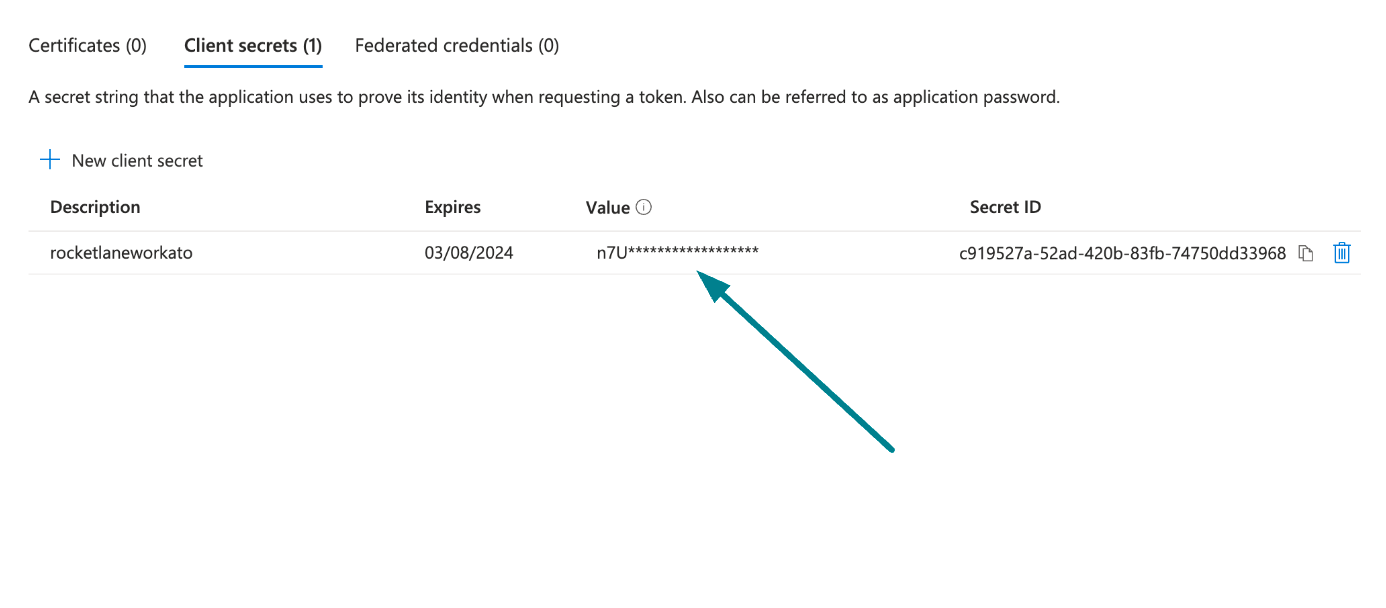 クライアントシークレット値をコピーして保存
Azure Portalからアプリケーション (クライアント) IDとディレクトリ (テナント) IDを取得する
概要>基本セクションに移動します。
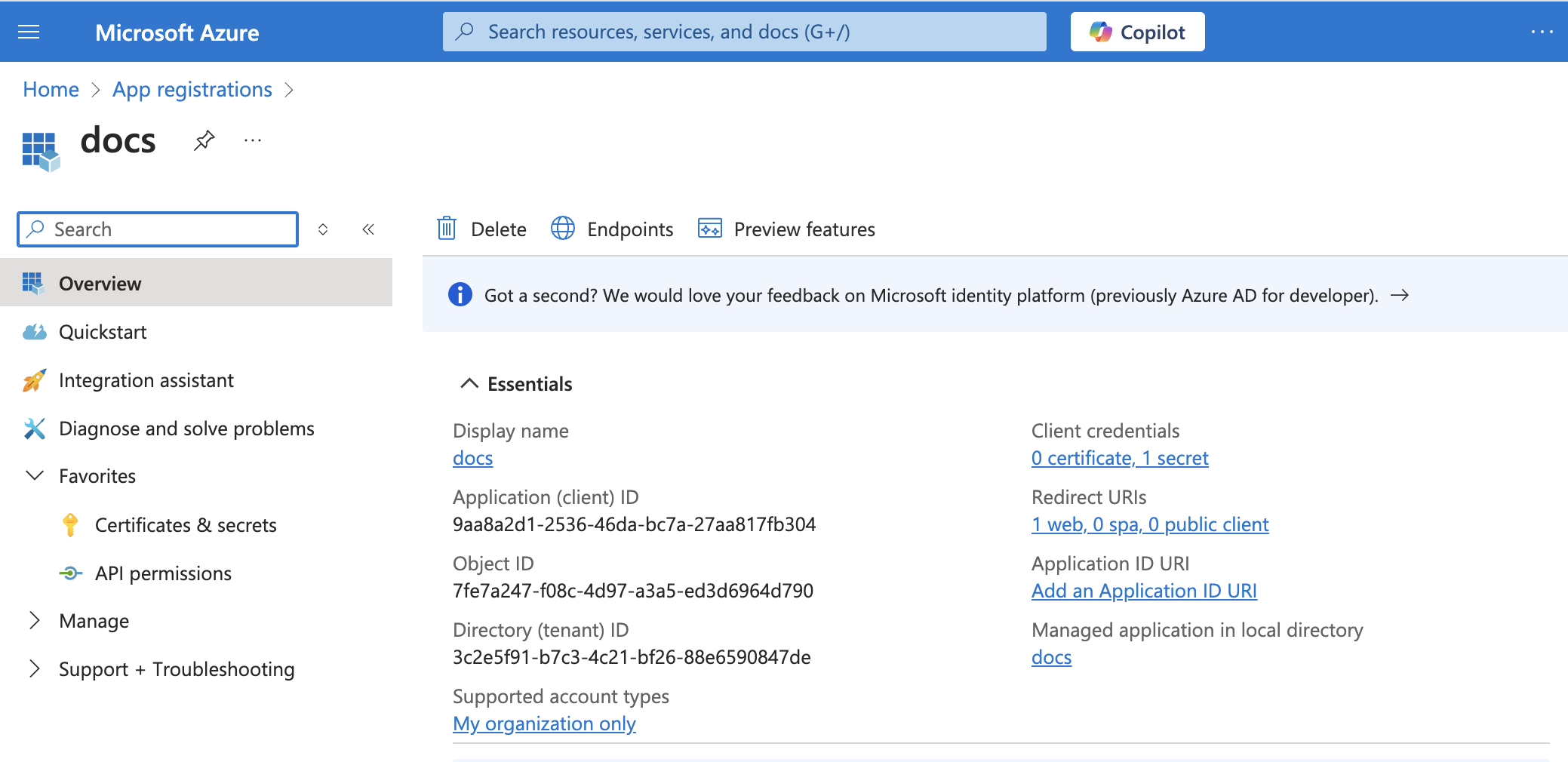 アプリの詳細
Workatoで使用するため、Application (client) IDとDirectory (tenant) IDをコピーします。
データ収集エンドポイントを作成してログ取り込みURLを取得する
Monitorに移動し、SettingsセクションからData Collection Endpointsを選択します。
Createをクリックして、新しいData collection endpointを作成します。
Data collection endpointのNameを入力します。
ドロップダウンメニューからSubscriptionとResource groupを選択します。
Regionを選択します。最適なパフォーマンスを得るために、Log Analytics workspaceの場所と一致するリージョンを選択します。
Review + createをクリックします。
設定を確認し、Createをクリックします。
デプロイメントが完了したら、作成したData collection endpointを開きます。
Workatoで使用するLogs Ingestion URLをコピーします。
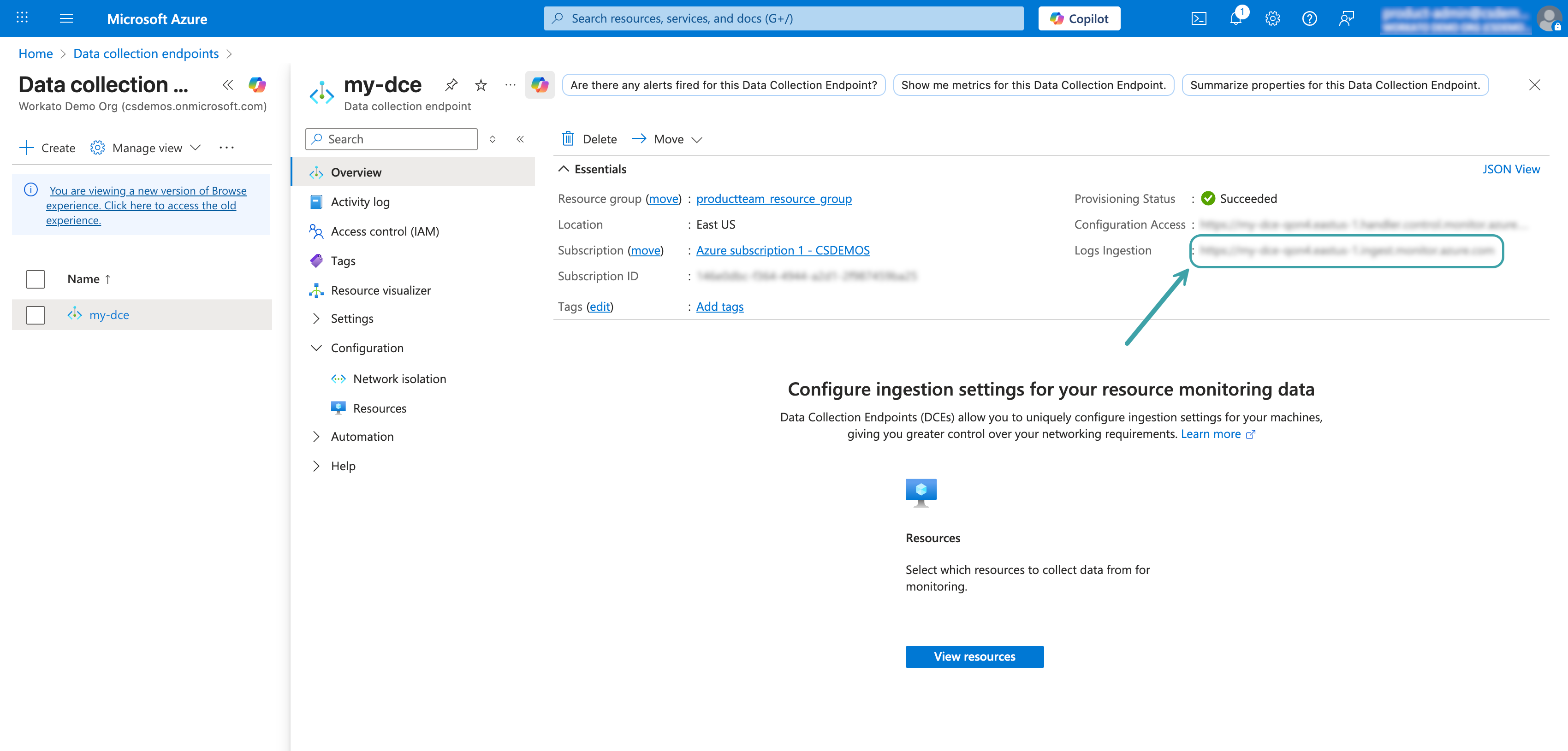 Logs Ingestion URLをコピーする
詳細については、MicrosoftのData collection endpointsドキュメントを参照してください。
データ収集ルールを作成して権限を割り当てる
Data collection ruleは、データの収集方法と送信先を定義します。これらの手順では、カスタムテーブルを作成し、Data collection ruleを構成し、アプリ登録に必要な権限を付与する方法を説明します。
新しいテーブルの作成
このステップでは、既存のテーブル名を入力した場合でも、新しいテーブルとデータ収集ルールが作成されます。既存のテーブル名を入力すると、そのテーブルの過去のログデータが削除される可能性があります。既存のテーブルを編集するには、Microsoftのテーブルと列の追加または削除ドキュメントを参照してください。
Azure portalでLog Analytics workspaceに移動します。
SettingsセクションからTablesを選択します。
クリックします:作成>新しいカスタムログ(DCRベース)。
カスタムテーブルのTable nameを入力します。 Azureによりテーブル名に_CL(custom log)が自動的に追加されることに注意してください。たとえば、WorkatoLogsと入力した場合、完全なテーブル名はWorkatoLogs_CLです。
Create a new data collection ruleをクリックします。
Data collection rule nameを入力します。
ドロップダウンメニューからSubscriptionとResource groupを選択します。
Data collection endpointドロップダウンメニューを使用して、前の手順で作成したData collection endpointを選択します。
次へをクリックします。
テーブルスキーマを自動生成するには、次のサンプルログイベントを入力します:
サンプルログイベントJSON
[
  {
    "source": "apim-mcp-gateway",
    "log_level": "INFO",
    "job_handle": "j-AYETNJfP-xYGrB6-B6",
    "date_time": "2026-02-26T11:23:29.694Z",
    "user_id": 32443,
    "flow_id": 477766,
    "log_entry_sequence": 1,
    "data": "{\"message_type\":\"tool_call\",\"environment_id\":32443,\"auth_method\":\"token\",\"ip_address\":\"192.0.2.255\",\"user_agent\":\"Ruby\",\"request_id\":\"ad29825db1224a53b77d4b6c71159abc\",\"server_name\":\"CarData - MCP Server Auto Test\",\"duration_seconds\":2.734584499,\"details\":{\"input\":\"{\\\"make\\\":\\\"Subaru\\\",\\\"model\\\":\\\"Impreza\\\"}\",\"method\":\"tools/call\",\"name\":\"Search_CarData_by_make_and_model\",\"output\":\"{\\\"car_data\\\":{\\\"make\\\":\\\"Subaru\\\",\\\"model\\\":\\\"Impreza\\\",\\\"year\\\":1999,\\\"price\\\":70000.0,\\\"is_sold\\\":false}}\",\"succeeded\":true}}"
  },
  {
    "source": "data-pipeline-conductor",
    "log_level": "INFO",
    "job_handle": "dpr-AYEXsoer-BARdJk-B6#019c9a41-ceff-7889-9dcc-5db023c97dea",
    "date_time": "2026-02-26T14:02:16.000Z",
    "user_id": 32443,
    "project_id": 35489,
    "log_entry_sequence": 4,
    "pipeline_event_type": "OBJECT_RUN_CANCEL",
    "pipeline_id": "dpr-AYEXsoer-BARdJk-B6",
    "pipeline_workato_id": 0,
    "pipeline_sync_id": "019c9a41-9cb9-74e1-8310-f3d554f32006",
    "pipeline_object_name": "test",
    "pipeline_object_run_id": "019c9a41-ceff-7889-9dcc-5db023c97dea",
    "operation": "test#OBJECT_RUN_CANCEL",
    "data": "{\"context\":{\"event\":\"OBJECT_RUN_CANCEL\",\"start_time\":\"2026-02-26T14:02:08.303Z\",\"end_time\":\"2026-02-26T14:02:16.366Z\",\"pipeline_id\":\"dpr-AYEXsoer-BARdJk-B6\",\"workato_pipeline_id\":0,\"pipeline_sync_id\":\"019c9a41-9cb9-74e1-8310-f3d554f32006\",\"object_run_id\":\"019c9a41-ceff-7889-9dcc-5db023c97dea\",\"source\":\"GOOGLE_DRIVE-68412\",\"destination\":\"SNOWFLAKE-83875\",\"duration\":\"8 seconds\",\"object_name\":\"test\"},\"error_message\":\"Running pipeline was stopped by user\",\"sync_mode\":\"INCREMENTAL_MERGE\"}"
  },
  {
    "source": "data-pipeline-conductor",
    "log_level": "ERROR",
    "job_handle": "dpr-AYEXsoer-BARdJk-B6#",
    "date_time": "2026-03-02T00:03:11.000Z",
    "user_id": 32443,
    "project_id": 35489,
    "log_entry_sequence": 1,
    "pipeline_event_type": "PIPELINE_SYNC_ERROR",
    "pipeline_id": "dpr-AYEXsoer-BARdJk-B6",
    "pipeline_workato_id": 4921,
    "pipeline_sync_id": "019cabbf-a974-73b3-9150-2475b0602f3d",
    "operation": "#PIPELINE_SYNC_ERROR",
    "data": "{\"context\":{\"event\":\"PIPELINE_SYNC_ERROR\",\"start_time\":\"2026-03-02T00:03:11.208Z\",\"end_time\":\"2026-03-02T00:03:11.533Z\",\"pipeline_id\":\"dpr-AYEXsoer-BARdJk-B6\",\"workato_pipeline_id\":4921,\"pipeline_sync_id\":\"019cabbf-a974-73b3-9150-2475b0602f3d\",\"source\":\"GOOGLE_DRIVE-68412\",\"destination\":\"SNOWFLAKE-59555\",\"duration\":\"0 seconds\"},\"started_at\":\"2026-03-02T00:03:11.208Z\",\"next_sync_at\":\"2026-03-02T00:33:10.288Z\",\"succeeded_objects_count\":0,\"failed_objects_count\":0,\"reason\":\"Operation 'Check connection' error - NullPointerException on state [INITIALIZATION]\",\"sync_type\":\"REGULAR\"}"
  },
  {
    "adapter": "logger",
    "source": "job",
    "log_level": "INFO",
    "job_handle": "j-AYGYrdPt-CoQaFe-B6",
    "date_time": "2026-03-02T10:38:45.968Z",
    "user_id": 32443,
    "flow_id": 507206,
    "project_id": 37163,
    "line_number": 3,
    "log_entry_sequence": 1,
    "operation": "Log message",
    "data": "{\"input\":{},\"output\":{\"message\":\"Hello from logger\"}}"
  },
  {
    "agent": "logging4",
    "agent_id": 31237,
    "source": "opa",
    "log_level": "INFO",
    "on_prem_group": "kafka",
    "on_prem_group_id": 3821,
    "date_time": "2026-03-19T06:41:16.025Z",
    "user_id": 16468,
    "log_entry_sequence": 11784,
    "data": "{\"message\":\"SAP subscriptions monitor started.\",\"logger\":\"com.workato.agent.sap.SapReceiverHub\"}"
  },
  {
    "source": "webhook",
    "log_level": "ERROR",
    "date_time": "2026-03-02T08:45:15.379Z",
    "user_id": 32443,
    "data": "{\"message\":\"Error accepting webhook event\",\"http_code\":404,\"url\":\"/webhooks/rest/c4034159-c62e-49d7-ab79-7d5192293a2c/event\",\"method\":\"POST\",\"count\":1,\"last_error_seen_at\":\"2026-03-02T08:40:15.219Z\",\"aggregation_window_start\":\"2026-03-02T08:40:15.219Z\",\"aggregation_window_end\":\"2026-03-02T08:45:15.219Z\"}"
  },
  {
    "source": "lcap",
    "log_level": "ERROR",
    "date_time": "2026-03-02T17:15:03.140Z",
    "user_id": 32443,
    "lcap_app_uid": "zTthn6xz1qgyteks7Row",
    "lcap_user_uid": "945hPemr4MMYCrJ7YNUusD",
    "data": "{\"message\":\"An error has occurred on the page: \\\"Widget configuration error\\\"\",\"debug_info\":[\"\\\"Button\\\" widget\",\"Handler for click event\"],\"events_count\":1,\"is_public_page\":false,\"page_path\":\"blank-page\"}"
  },
  {
    "event": "recipe_started",
    "details": {
      "run_once": false
    },
    "user": {
      "id": 16468,
      "external_id": null,
      "email": "[email protected]",
      "name": "Jade Taylor",
      "environment_id": 16468,
      "environment_type": "dev",
      "account_id": 16468,
      "account_name": "Jade Taylor",
      "hq_account_id": 16468,
      "hq_account_name": "Jade Taylor"
    },
    "team": {
      "id": 16468,
      "external_id": null,
      "email": "[email protected]",
      "name": "teamID16468",
      "environment_id": 16468,
      "environment_type": "dev",
      "account_id": 16468,
      "account_name": "Jade Taylor",
      "hq_account_id": 16468,
      "hq_account_name": "Jade Taylor"
    },
    "resource": {
      "type": "Flow",
      "id": 509836,
      "name": "Logger",
      "path": "Home/ARK Imported",
      "folder_id": 37535
    },
    "timestamp": "2026-03-19T06:48:00.000Z"
  },
  {
    "status": "success",
    "title": "Processed Event",
    "recipe_id": 123,
    "job_url": "https://example.workato.com/jobs/job-handle-123",
    "id": "job-handle-123",
    "master_job_id": "master-job-handle-456",
    "calling_job_id": "calling-job-handle-789",
    "calling_recipe_id": 456,
    "is_repeat": false,
    "is_test": false,
    "is_test_case_job": false,
    "started_at": "2026-03-19T06:30:00.000Z",
    "completed_at": "2026-03-19T06:34:56.000Z",
    "repeat_count": 0,
    "action_count": 3,
    "flow_id": 123,
    "error_type": null,
    "is_poll_error": false,
    "account_id": 1001,
    "account_name": "Example Account",
    "environment_type": "production",
    "environment_id": 2002,
    "hq_account_id": 3003,
    "hq_account_name": "Example HQ Account",
    "error": null,
    "context": {
      "user_id": 42,
      "user_name": "Jane Doe",
      "user_email": "[email protected]",
      "recipe_id": 123,
      "recipe_url": "https://example.workato.com/recipes/123",
      "recipe_name": "Example Recipe",
      "recipe_path": "/Examples/Example Recipe",
      "is_test": false,
      "user_external_id": null
    },
    "root_job_id": "root-job-handle-000",
    "root_recipe_id": 999
  },
  {
    "event_id": "3d62f9ed-586b-4f1d-9eca-eb728f429341",
    "event_type": "llm_call_completed",
    "chat_type": "GENIE",
    "workspace_id": 52718,
    "environment_id": 52718,
    "identity_user_id": "9Af5GRAXR4wB1u4ZFSqZ8E",
    "conversation_id": "conversation-01KS34RAWWDJ00EQBA6M5FNYGY",
    "genie_run_id": "95ce2c49-de8f-418e-9818-2f648e15aff2",
    "genie_id": "2341",
    "genie_handle": "gin-GgDdAaLX-sYHkWn-B2",
    "request_id": "00-e999dfff564597e0e7d45e19d5857ba6-08ab45fa94da0d05-01",
    "date_time": "2026-05-20T16:51:05.935356Z",
    "data": {
      "message": "",
      "tool_calls": [
        {
          "name": "enterprise_search",
          "args": {
            "query": "How do I back up my data?",
            "knowledge_base_names": ["IT FAQ"]
          }
        }
      ]
    },
    "app_type": "slack",
    "stage": "MID_EXECUTION",
    "llm_call_id": "e66e3132-241f-4ccb-b2ec-fe1418a0fbc5",
    "model_name": "bedrock/claude-sonnet-4-6",
    "input_tokens": 3412,
    "output_tokens": 113,
    "call_result": "SUCCESS"
  },
  {
    "event_id": "1da5cd9e-ffdd-435b-a4dd-0faee02c4c38",
    "event_type": "genie_run_start",
    "workspace_id": 52718,
    "environment_id": 52718,
    "genie_id": "2341",
    "genie_handle": "gin-GgDdAaLX-sYHkWn-B2",
    "identity_user_id": "9Af5GRAXR4wB1u4ZFSqZ8E",
    "conversation_id": "conversation-01KS34RAWWDJ00EQBA6M5FNYGY",
    "genie_run_id": "95ce2c49-de8f-418e-9818-2f648e15aff2",
    "date_time": "2026-05-20T16:51:02.55Z",
    "app_type": "slack",
    "genie_run_trigger": "user",
    "first_run_in_conversation": true,
    "test_run": false
  },
  {
    "event_id": "94dd2c8f-5c19-4eae-a604-1ef86a07cb52",
    "event_type": "genie_run_start",
    "workspace_id": 52718,
    "environment_id": 52718,
    "genie_id": "2341",
    "genie_handle": "gin-GgDdAaLX-sYHkWn-B2",
    "identity_user_id": "5XwUVCPmbmjWxBbRrt7X2D",
    "conversation_id": "conversation-01KSR1JDQMT001AWVTPMTRJ3K8",
    "genie_run_id": "1a11ce5f-f04f-44a3-8dd7-818d24fc3ce1",
    "date_time": "2026-05-28T19:39:21.403Z",
    "app_type": "genie_task",
    "genie_run_trigger": "genie_task",
    "first_run_in_conversation": true,
    "test_run": false,
    "genie_executor": "genie_task_source_recipe",
    "genie_executor_id": "j-AaJL4YeN-FNdEnW-B6",
    "genie_executor_related_id": "1658592",
    "call_stack": ["2341:1a11ce5f-f04f-44a3-8dd7-818d24fc3ce1"]
  },
  {
    "event_id": "e45f671c-fe92-40a4-b4fe-b8084735cd35",
    "event_type": "tool_execution_started",
    "chat_type": "GENIE",
    "workspace_id": 52718,
    "environment_id": 52718,
    "identity_user_id": "9Af5GRAXR4wB1u4ZFSqZ8E",
    "conversation_id": "conversation-01KSJPZNN9ZCJ4CKP4R53223HX",
    "genie_run_id": "e5929bae-750c-4ef6-8f26-888dddd5bc2c",
    "genie_id": "2341",
    "genie_handle": "gin-GgDdAaLX-sYHkWn-B2",
    "request_id": "00-5eabd4632d86b23064f919f6946746c1-8cf046b1dd7a6163-01",
    "date_time": "2026-05-26T17:58:16.509868Z",
    "data": {
      "user_name": "Alex",
      "issue_description": "Monitor is not working."
    },
    "app_type": "slack",
    "tool_call_id": "tooluse_l525qY8mmydN1vJurIWpb1",
    "tool_name": "Log support ticket",
    "tool_description": "Use this skill when the user wants to log, submit, or create a support ticket. Extract the user's name and a brief description of their issue from the conversation.",
    "tool_type": "EXTERNAL",
    "external_tool_ids": ["recipe:1649985"],
    "call_result": "SUCCESS"
  },
  {
    "event_id": "e88a1dc7-28e9-4534-8a14-5969fa312e88",
    "event_type": "genie_skill_run",
    "workspace_id": 52718,
    "environment_id": 52718,
    "genie_id": "2341",
    "genie_handle": "gin-GgDdAaLX-sYHkWn-B2",
    "identity_user_id": "9Af5GRAXR4wB1u4ZFSqZ8E",
    "conversation_id": "conversation-01KSJPZNN9ZCJ4CKP4R53223HX",
    "genie_run_id": "e5929bae-750c-4ef6-8f26-888dddd5bc2c",
    "date_time": "2026-05-26T17:58:21.535Z",
    "app_type": "slack",
    "first_run_in_conversation": false,
    "test_run": false,
    "tool_call_id": "tooluse_l525qY8mmydN1vJurIWpb1",
    "job_id": "j-AaHGJpoK-n3dWo9-B6",
    "event_ts": "2026-05-26T17:58:21.465Z"
  },
  {
    "event_id": "15a0bcec-afaf-421a-8a8c-877679e6f86c",
    "event_type": "llm_call_started",
    "chat_type": "GENIE",
    "workspace_id": 52718,
    "environment_id": 52718,
    "identity_user_id": "9Af5GRAXR4wB1u4ZFSqZ8E",
    "conversation_id": "conversation-01KS34RAWWDJ00EQBA6M5FNYGY",
    "genie_run_id": "95ce2c49-de8f-418e-9818-2f648e15aff2",
    "genie_id": "2341",
    "genie_handle": "gin-GgDdAaLX-sYHkWn-B2",
    "request_id": "00-e999dfff564597e0e7d45e19d5857ba6-08ab45fa94da0d05-01",
    "date_time": "2026-05-20T16:51:03.14646Z",
    "data": {
      "message": "How do I back up my data?",
      "conversation_history": [
        {
          "type": "system",
          "content": "You are an AI Agent System with the sole purpose of following user instructions.",
          "truncated": true,
          "tool_calls": null
        },
        {
          "type": "human",
          "content": "How do I back up my data?",
          "truncated": false,
          "tool_calls": null
        }
      ]
    },
    "app_type": "slack",
    "stage": "USER_QUERY",
    "llm_call_id": "e66e3132-241f-4ccb-b2ec-fe1418a0fbc5",
    "call_result": "SUCCESS"
  },
  {
    "event_id": "fbc9ee11-70b6-4092-b7f5-21309a84e221",
    "event_type": "user_message",
    "chat_type": "GENIE",
    "workspace_id": 52718,
    "environment_id": 52718,
    "identity_user_id": "9Af5GRAXR4wB1u4ZFSqZ8E",
    "conversation_id": "conversation-01KS34RAWWDJ00EQBA6M5FNYGY",
    "genie_run_id": "95ce2c49-de8f-418e-9818-2f648e15aff2",
    "genie_id": "2341",
    "genie_handle": "gin-GgDdAaLX-sYHkWn-B2",
    "request_id": "00-e999dfff564597e0e7d45e19d5857ba6-08ab45fa94da0d05-01",
    "date_time": "2026-05-20T16:51:03.117732Z",
    "data": {
      "message": "How do I back up my data?",
      "context": {
        "file_paths": [],
        "files": null,
        "location": null,
        "workato_context": null,
        "timestamp": "Wednesday, May 20, 2026 at 04:51:01 PM UTC",
        "author": null
      },
      "metadata": {}
    },
    "app_type": "slack"
  },
  {
    "event_id": "667f689a-0cf2-422f-92d4-0f556edae59c",
    "event_type": "guardrail_evaluated",
    "chat_type": "GENIE",
    "workspace_id": 52718,
    "environment_id": 52718,
    "identity_user_id": "9Af5GRAXR4wB1u4ZFSqZ8E",
    "conversation_id": "conversation-01KS34RAWWDJ00EQBA6M5FNYGY",
    "genie_run_id": "95ce2c49-de8f-418e-9818-2f648e15aff2",
    "genie_id": "2341",
    "genie_handle": "gin-GgDdAaLX-sYHkWn-B2",
    "request_id": "00-e999dfff564597e0e7d45e19d5857ba6-08ab45fa94da0d05-01",
    "date_time": "2026-05-20T16:51:03.128767Z",
    "data": {
      "results": [
        {
          "policy_type": "harmful_content",
          "action": "passed",
          "direction": "input",
          "execution_time_ms": 397.645614000794,
          "findings": [],
          "severity": null,
          "evaluated_step_id": "e66e3132-241f-4ccb-b2ec-fe1418a0fbc5"
        }
      ],
      "response_message": null
    },
    "app_type": "slack"
  },
  {
    "event_id": "fc979af5-6c44-4838-bc95-f9a0d99829c5",
    "event_type": "tool_execution_completed",
    "chat_type": "GENIE",
    "workspace_id": 52718,
    "environment_id": 52718,
    "identity_user_id": "9Af5GRAXR4wB1u4ZFSqZ8E",
    "conversation_id": "conversation-01KS34RAWWDJ00EQBA6M5FNYGY",
    "genie_run_id": "95ce2c49-de8f-418e-9818-2f648e15aff2",
    "genie_id": "2341",
    "genie_handle": "gin-GgDdAaLX-sYHkWn-B2",
    "request_id": "00-e999dfff564597e0e7d45e19d5857ba6-08ab45fa94da0d05-01",
    "date_time": "2026-05-20T16:51:06.792985Z",
    "data": {
      "message": null,
      "artifact": {
        "knowledge_fragments": [
          {
            "document_id": "1lrNyRTpddxSc2t_QCimKYoVxKyAJDwqRo30cwZqXfX4",
            "title": "IT FAQ",
            "url": null,
            "content": "[Passage 1]\nTitle: IT FAQ\n\nHow do I back up my files? All files saved to your OneDrive folder are automatically backed up."
          }
        ]
      }
    },
    "app_type": "slack",
    "tool_call_id": "tooluse_sdDMAh6qWShfw7XIOcbjUi",
    "tool_name": "enterprise_search",
    "tool_type": "BUILTIN",
    "call_result": "SUCCESS"
  },
  {
    "event_id": "c6e63073-2584-4527-b4ed-746696dc342b",
    "event_type": "tool_execution_completed",
    "chat_type": "GENIE",
    "workspace_id": 52718,
    "environment_id": 52718,
    "identity_user_id": "9Af5GRAXR4wB1u4ZFSqZ8E",
    "conversation_id": "conversation-01KSJPZNN9ZCJ4CKP4R53223HX",
    "genie_run_id": "e5929bae-750c-4ef6-8f26-888dddd5bc2c",
    "genie_id": "2341",
    "genie_handle": "gin-GgDdAaLX-sYHkWn-B2",
    "request_id": "00-59adf691336c3fb3e4f0fc0db1f9a46f-21ca607eb3911b5b-01",
    "date_time": "2026-05-26T17:58:24.892012Z",
    "data": {
      "message": "{\"Confirmation\":\"Ticket successfully created for Alex\"}",
      "artifact": null
    },
    "app_type": "slack",
    "tool_call_id": "tooluse_l525qY8mmydN1vJurIWpb1",
    "tool_name": "Log support ticket",
    "tool_type": "EXTERNAL",
    "call_result": "SUCCESS"
  },
  {
    "event_id": "d055f354-882b-4350-b6f4-4c333ae1ae37",
    "event_type": "structured_output_formatting_started",
    "chat_type": "GENIE",
    "workspace_id": 52718,
    "environment_id": 52718,
    "identity_user_id": "9Af5GRAXR4wB1u4ZFSqZ8E",
    "conversation_id": "conversation-01KRGRQN8DP5MR8Y4D33K5CPCJ",
    "genie_run_id": "dcda0a4d-decc-4092-a6f8-fba4d4b1c36b",
    "genie_id": "2341",
    "genie_handle": "gin-GgDdAaLX-sYHkWn-B2",
    "request_id": "00-6e6d1dfc66633621c2c807d43a344cd3-f6e1213b0a8c6a1a-01",
    "date_time": "2026-05-13T13:34:35.653011Z",
    "data": {
      "message": "Based on the details provided, this appears to be a hardware or performance-related issue.",
      "output_schema": "{\"type\":\"object\",\"properties\":{\"Category\":{\"type\":\"string\"},\"Priority\":{\"type\":\"string\"},\"Summary\":{\"type\":\"string\"}},\"required\":[\"Category\",\"Priority\",\"Summary\"]}"
    },
    "app_type": "genie_task"
  },
  {
    "event_id": "04b12c52-ec5b-4651-b54f-e4cf0b335905",
    "event_type": "topic_assigned",
    "chat_type": "GENIE",
    "workspace_id": 52718,
    "environment_id": 52718,
    "identity_user_id": "9Af5GRAXR4wB1u4ZFSqZ8E",
    "conversation_id": "conversation-01KS34RAWWDJ00EQBA6M5FNYGY",
    "genie_run_id": "unknown",
    "genie_id": "2341",
    "genie_handle": "gin-GgDdAaLX-sYHkWn-B2",
    "request_id": "00-e999dfff564597e0e7d45e19d5857ba6-08ab45fa94da0d05-01",
    "date_time": "2026-05-20T16:51:14.369385Z",
    "data": "Data backup using OneDrive",
    "app_type": "slack"
  }
]Transformation editorをクリックして、変換メニューを開きます。
次の変換スクリプトを入力します。このスクリプトは、Azureで必要なTimeGeneratedフィールドと、Workatoイベントタイプ別に各ログを分類するlog_typeフィールドを追加します:
source
| extend TimeGenerated = now()
| extend log_title = tostring(['title'])
| extend log_type = case(
    source == "apim-mcp-gateway",    "mcp",
    source == "data-pipeline-conductor", "data_pipeline",
    source == "opa",                 "opa",
    source == "webhook",             "webhook",
    source == "lcap",                "lcap",
    source == "job" and isnotempty(tostring(adapter)), "logger",
    isnotempty(tostring(job_url)),   "job",
    isnotempty(tostring(genie_run_id)), "genie",
    isnotempty(tostring(event)),     "user_activity",
    "unknown"
)
| project-away ['title']テーブルのカスタマイズに関する詳細については、Microsoftのcustom tablesドキュメントを参照してください。
Runをクリックしてから、Applyをクリックします。
Nextをクリックし、設定を確認します。
Createをクリックして、カスタムテーブルとData collection ruleを作成します。
Monitorに移動し、Settings > Data Collection Rulesを選択します。
作成したData collection ruleを選択します。
Workatoで使用するImmutable Id(DCR IDとも呼ばれます)をコピーします。この値は、Inject custom logsアクションを構成するために必要です。
左側のメニューでConfiguration > Data sourcesをクリックし、Data source名(例: Custom-WorkatoLogs_CL)を控えます。これはstream nameであり、WorkatoのInject custom logsアクションに必要です。
アプリ登録に権限を割り当てます。データ収集ルールで、左側のメニューからクリックします:アクセス制御(IAM)。
追加>ロールの割り当ての追加をクリックします。
Monitoring Metrics Publisherロールを選択し、Nextをクリックします。
Select membersをクリックし、先ほど作成したアプリ登録を検索します。
アプリ登録を選択し、Selectをクリックします。
確認および割り当てをクリックして、ロールの割り当てを完了します。
詳細については、MicrosoftのData collection rulesドキュメントを参照してください。
Workatoに戻って、コネクション設定を完了します。
Workatoで設定を完了する
Client credentials認証を使用してAzure Monitorコネクションを確立するには、次の手順を実行します:
作成 > コネクションをクリックするか、Cを2回押します。
New connectionページでAzure Monitorを検索して選択します。
コネクション名フィールドにコネクションの名前を入力します。
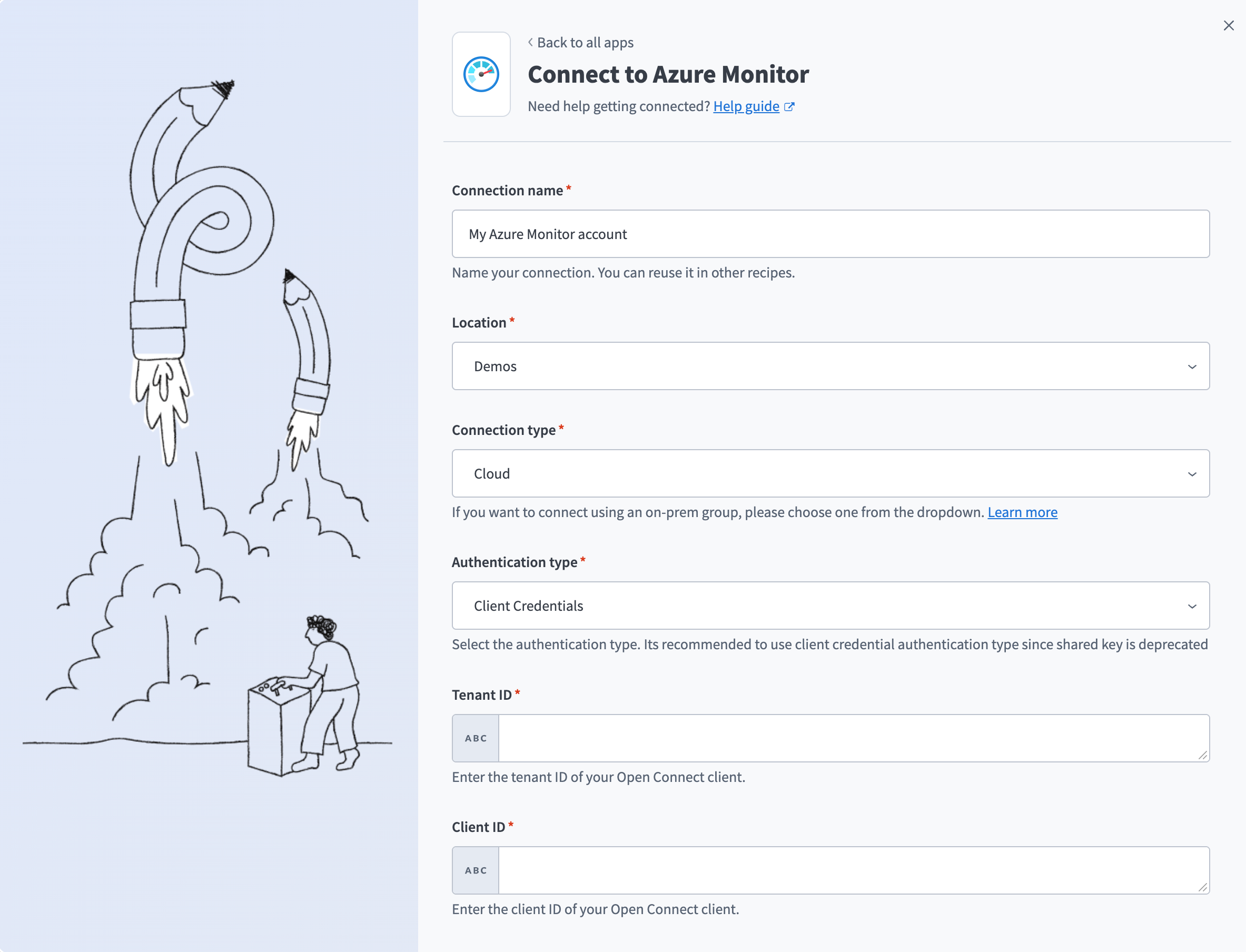 Azure Monitorに接続
ロケーションドロップダウンメニューを使用して、コネクションを保存するプロジェクトを選択します。
標準クラウドコネクションの場合は、コネクションタイプドロップダウンメニューでクラウドを選択します。または、オンプレミスグループを選択して、ネットワーク内のオンプレミスエージェント経由でコネクションをルーティングします。オンプレミスグループを選択するには、既存のオンプレミスグループが必要です。
Authentication typeドロップダウンメニューを使用して、Client Credentialsを選択します。
Azureアプリ登録のtenant IDをTenant IDフィールドに入力します。
Azureアプリ登録のclient IDをClient IDフィールドに入力します。
Azureアプリ登録のclient secretをClient secretフィールドに入力します。
data collection endpoint URLをData collection endpointフィールドに入力します。例: https://YOUR-INSTANCE-NAME.eastus-1.ingest.monitor.azure.com。 Azure portalでは、これはLogs Ingestion値として表示されます。
接続をクリックします。
Shared key
この方式には、次の値が必要です:
- Workspace ID
- Shared key
非推奨 - 移行が必要
この認証方式は、非推奨のレガシーHTTP Data Collector APIを使用しており、2026年9月に 動作を停止します。代わりにClient credentials認証へ移行してください。
Workspace IDとShared keyを取得する
Workspace IDとShared keyを取得するには、次の手順を実行します:
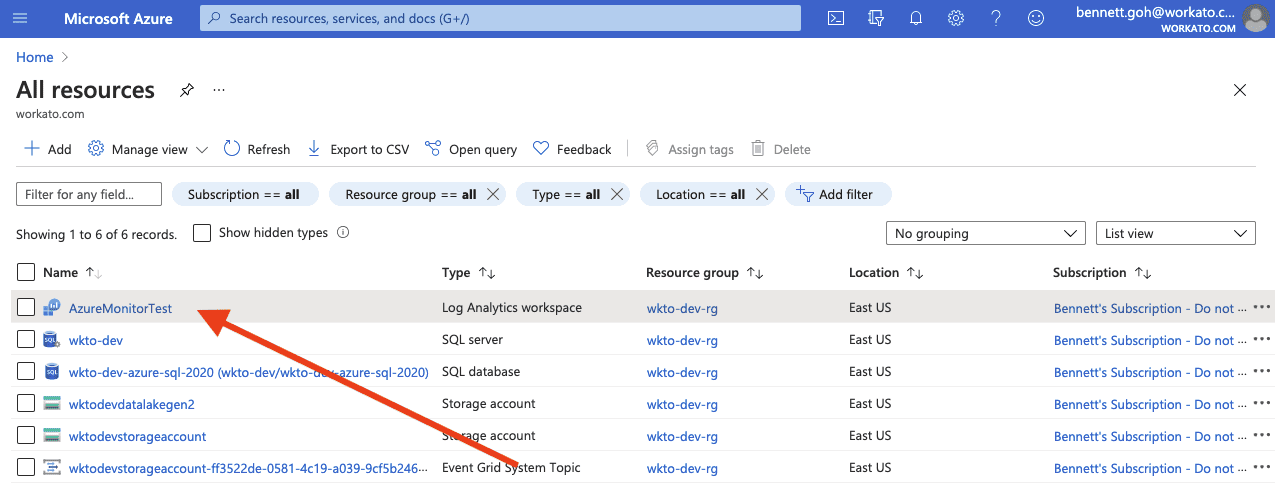
 Cloud Shellを開く
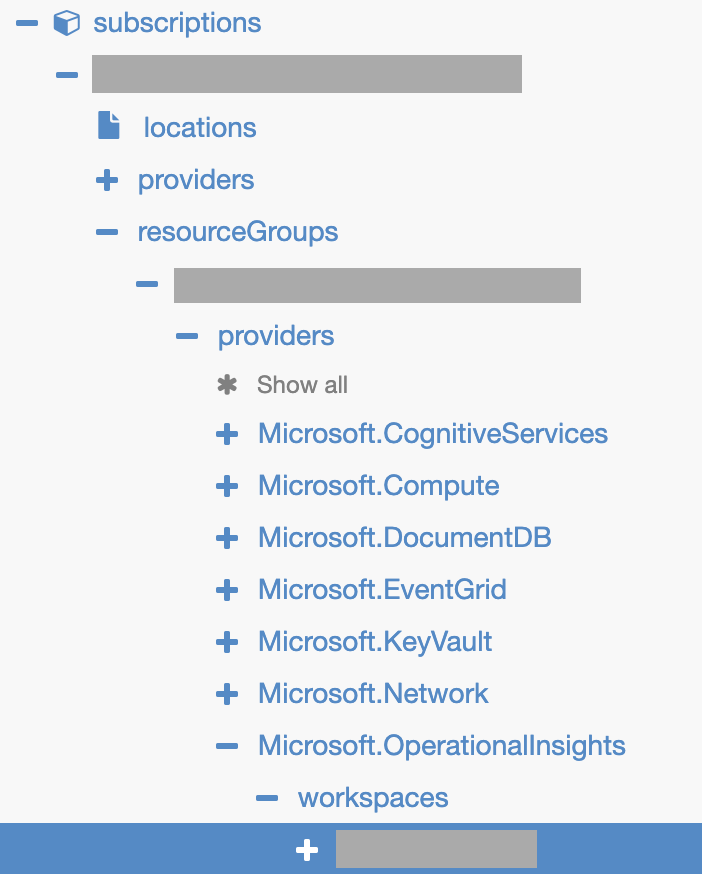 Azureリソースツリー
Workatoで設定を完了する
Shared key認証を使用してAzure Monitorコネクションを確立するには、次の手順を実行します:
作成 > コネクションをクリックするか、Cを2回押します。
New connectionページでAzure Monitorを検索して選択します。
コネクション名フィールドにコネクションの名前を入力します。
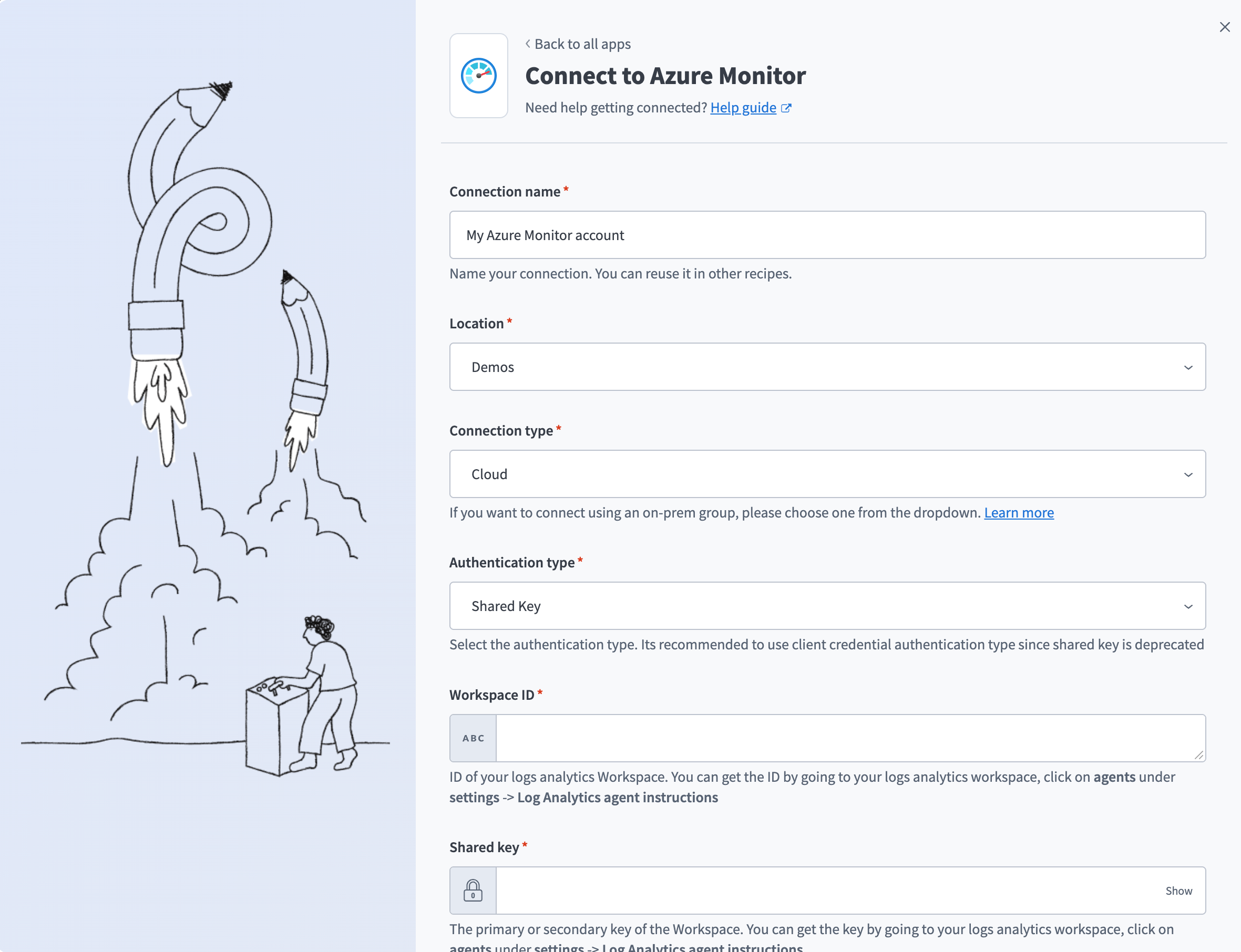 Azure Monitorに接続
ロケーションドロップダウンメニューを使用して、コネクションを保存するプロジェクトを選択します。
標準クラウドコネクションの場合は、コネクションタイプドロップダウンメニューでクラウドを選択します。または、オンプレミスグループを選択して、ネットワーク内のオンプレミスエージェント経由でコネクションをルーティングします。オンプレミスグループを選択するには、既存のオンプレミスグループが必要です。
Authentication typeドロップダウンメニューを使用して、Shared Keyを選択します。
Workspace IDを入力します。
Shared keyを入力します。
接続をクリックします。
最終更新日: