Coupa
Coupa is a business spend management platform. It supports procurement, invoicing, expense, and payment functions for enterprises. Coupa enables you to create and approve procurement processes including requisitions and invoices. It also has an integrated expense module that enables you to submit and approve expense reports directly in Coupa. This information is typically synced with ERP systems such as NetSuite, Oracle EBS, or SAP for other business functions such as accounting or making payments.
API version
The Coupa connector uses the Coupa Core REST API.
Coupa OAuth 2.0 connection setup
The Coupa connector has supported OAuth 2.0-based connectivity since January 2022. OAuth connections are more secure than API key-based connections. OAuth lets you specify the exact scopes you plan to use in the Workato connection settings. The Coupa connector supports OAuth 2.0 Client Credentials and OAuth 2.0 Authorization Code Grant connections. Refer to OpenID Connect Clients for more information.
API key authentication
API keys are keys you generate to let Coupa know this Workato connection is allowed to work with your information. Complete the following steps to generate your Coupa API key.
Sign in to your Coupa account or go to your Coupa instance. For example: https://[your-instance-name].coupacloud.com/api_keys.
Go to Setup > Integrations > API Keys.
Provide a unique name for the connection in the Connection name field.
Enter the Host and API key.
Click Link your account.
API KEY AUTHENTICATION DEPRECATED
Coupa no longer supports API key authentication for connection to Workato. Use an OAuth method to connect Coupa to Workato. Refer to OAuth 2.0 and OIDC for more information.
How to connect to Coupa with OAuth 2.0
Sign in to your Coupa instance, for example https://[your-instance-name].coupacloud.com/oauth2/clients.
Click Create to create a new OAuth client.
Use the Grant type drop-down menu to select Authorization Code or Client Credentials. You must select the same option in Workato for the Authentication type.
Provide a name in the Name field. For example: Workato Coupa OAuth connection.
Enter the redirect URIs you plan to use in the Redirect URIs field. Add the link https://www.workato.com/oauth/callback if you plan to use Authorization code.
Select the scopes you plan to provide to Workato. Include all objects and features you plan to automate with the Coupa connector. The scopes you select must match the scopes you configure in Workato. You must include the core.common.read and offline_access scopes at a minimum to establish a connection.
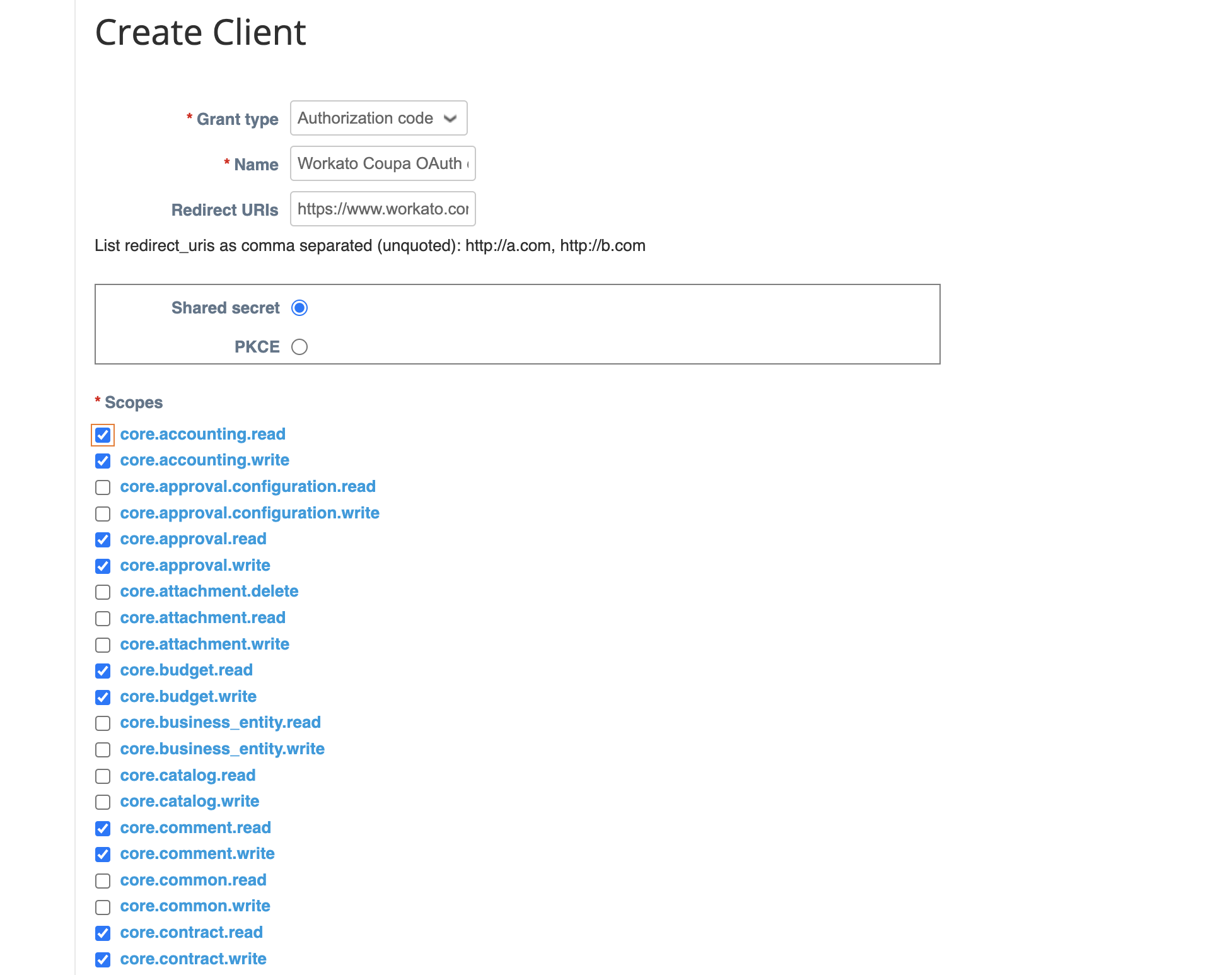 Create a new client
Click Save.
Copy and store the Identifier and the Secret for use in Workato.
Return to your Workato account and go to the project where you plan to add your connection.
Click Create > Connection or press C twice.
Search for and select Coupa as your connection on the New connection page.
Provide a unique name for the connection in the Connection name field.
Use the Location drop-down menu to select the project where you plan to store the connection.
Use the Authentication drop-down to select the Grant type provided in Coupa.
Enter the Client ID and Client secret.
Enter the Coupa URL for your instance in the Host field. For example, enter acme if your URL is http://acme.coupacloud.com.
Use the Scopes drop-down menu to select the same scopes you configured in Coupa. Include the required scopes core.common.read and offline_access to connect successfully.
Click Connect.
Coupa connector objects
Use the following objects, fields, and return types with the Coupa connector:
Objects
Coupa data is grouped into objects in Workato actions and triggers. You must specify whether you plan to create a purchase order or an invoice when you select an action such as Create Object.
The following list provides common Coupa objects. Refer to the Coupa Resources documentation to view a complete list of Coupa objects. You can use custom actions to send custom HTTP requests if you plan to use an action that isn't included in the connector. Refer to Custom actions for more information.
Workato supports the following objects in Coupa:
Account
Trigger off, query, create, or update accounts that match your financial structure.
Address
Trigger off, query, create, or update personal or supplier remit-to address information.
Approvals
Trigger off or query approvals for requisitions or purchase orders.
Contract
Trigger off, query, create, or update a contract.
Department
Trigger off, query, create, or update department information. Use departments to match your company's operating structure and to organize groups and users accordingly.
Exchange rate
Trigger off, query, create, or update exchange rates.
Expense line
Query or create expense report lines used for expense management.
Expense report
Trigger off, query, create, or update expense reports used for expense management.
Integration
Query or create integrations in Coupa.
Integration error
Query or create integrations errors in Coupa.
Integration run
Query or create integrations runs in Coupa.
Integration history record
Query or create integrations history records in Coupa.
Invoice
Trigger off, query, create, or update invoices in Coupa.
Inventory Transaction
Trigger off, query, or create inventory transactions. Receipts of goods are the same as inventory transactions in Coupa.
Item
Trigger off, query, create, or update items not provided by suppliers. Use the supplier item object if you plan to work with items provided by suppliers.
Lookup value
Trigger off, query, create, or update lookup values in Coupa.
Purchase order
Trigger off, query, or create purchase order lines in Coupa.
Purchase order line
Trigger off, query, or create purchase order lines in Coupa.
Remit to address
Trigger off, query, create, or update supplier remit-to address. This address is used to send payment to suppliers.
Requisition
Trigger off or query requisitions in Coupa.
Supplier
Trigger off, query, create, or update suppliers.
Supplier information
Trigger off, query, create, or update supplier information.
Supplier item
Trigger off, query, create, or update items provided by suppliers that users can select when creating a requisition.
Supplier site
Trigger off, query, create, or update supplier sites.
User
Trigger off, query, create, or update a user.
Custom object fields in Coupa
The Coupa connector on Workato automatically pulls all custom fields when you request an object. Use the Add/remove optional fields drop-down menu to select the custom fields you've defined.
Return types in Coupa
Records in Coupa can be large due to multiple attributes. This may result in time outs or slow performance when retrieving a batch of records. Use the Return type input field to control the amount of data retrieved per record to improve retrieval. The output datatree that describes the record changes automatically updates to match the input fields you select. The following return types are available:
- Default: This is the default option on the Coupa Connector. All fields and child attributes are returned.
- Shallow: All attributes or fields of the object are called, and the IDs and natural keys of the one-deep associations are returned.
- Limited: Only ID's are returned. This is supported for all commands.
Last updated: