Custom validation for API applications
Custom validation is a credential type for API platform applications that validates incoming JSON Web Tokens (JWT) against claim and scope rules you define, instead of requiring a Workato-issued key. Use custom validation when your consumer authenticates with their own identity provider (IdP) and you need to accept its tokens without embedding a Workato-specific claim in them.
CLIENT AUTHENTICATION METHOD REQUIRED
Custom validation is only available for applications on clients whose authentication method is JSON web token (JWT) or OpenID Connect. If the client uses another authentication method, such as OAuth 2.0, the Custom validation option is disabled.
Connecting an external OIDC identity provider to API platform typically involves embedding a custom claim that contains the application's Workato-issued API key in the JWTs the IdP issues. This binds each token to a specific application and remains fully supported. Adding the claim requires administrative access to the IdP's token claim configuration.
Custom validation is an alternative for consumers who can't or prefer not to modify their IdP's tokens. Instead of identifying the application through an embedded claim, Workato validates the token against claim rules and, optionally, scope rules that you define directly on the application. The IdP issues standard tokens with no Workato-specific configuration.
Some consumers pass the API key through an HTTP header instead of a JWT claim. This isn't a supported alternative.
UNSUPPORTED WORKAROUND
Because different applications can share the same IdP issuer, a header-based approach lets a caller claim any application's permissions, creating a privilege escalation risk.
Application credential types
You choose one of two credential types when you create an application:
| Credential type | Description |
|---|---|
| API key | Workato generates a static key. The consumer includes it as a header in each request. |
| Custom validation | Validate JWT tokens using claim and scope rules. The consumer obtains tokens from their own identity provider. No Workato-issued key is required. |
You can't change an application's credential type after you create it.
Issuer URLs
Every token an application accepts must come from a trusted issuer. The Issuer URLs field defines the issuer values Workato accepts. A token's iss claim must match one of the URLs you configure.
Workato pre-populates Issuer URLs with the issuer values configured at the client level. You can override these values for a specific application, and you can enter more than one issuer URL.
Unlike claim rules, the issuer is validated against specific values. You can't configure the issuer to check only that the iss claim exists.
Claim validation
Claim validation defines additional claim rules that an incoming token must satisfy. A token is accepted only if it satisfies every rule you define, in addition to matching an issuer URL.
Workato pre-populates the claim validation table with the claims configured at the client level. You can override these values for a specific application.
Each claim rule has three parts:
| Part | Description |
|---|---|
| Claim | The name of the JWT claim to check, for example iss, aud, or sub. |
| Rule | exists to require that the claim is present in the token, or one of to require that the claim matches one of the values you specify. |
| Values | Required when Rule is one of. A comma-separated list of accepted values for the claim. Not used when Rule is exists. |
For example, the following claim rules require that the token includes a specific client ID and a subject claim:
| Claim | Rule | Values |
|---|---|---|
client_id | one of | client-web-001 |
sub | exists | — |
CLAIM RULE LIMIT
You can add up to 10 claim rules per application.
Scope validation
Scope validation defines the scope values that an incoming token must contain, in addition to satisfying every claim rule.
Scope validation has two settings:
- Don't validate: Skip scope checks. Only claim rules apply.
- Validate: Check that the token contains all required scope values.
When you select Validate, enter one or more Scope values separated by commas. Workato checks both the scope and scp claims for a match.
SCOPE VALUE LIMIT
You can add up to 10 scope values per application.
Create an application with custom validation
Complete the following steps to create an application that validates JWTs with claim and scope rules:
PREREQUISITES
Ensure you have completed the following tasks:
- Create a client with JSON web token (JWT) or OpenID Connect as the authentication method
- Confirm the issuer URL and token claims that your consumer's identity provider issues
Go to Platform > API platform > Clients, and select the client you plan to create an application for.
Click Applications.
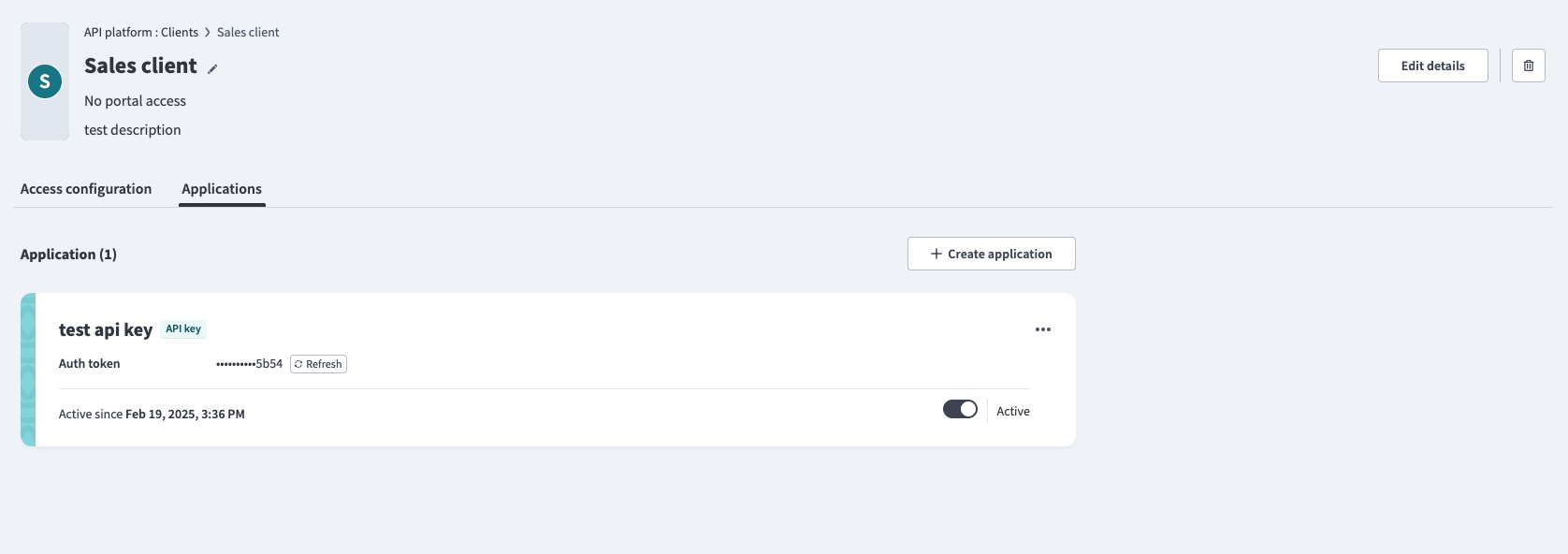 Applications tab
Click + Create application.
Enter an Application name.
Select Custom validation under Credential type.
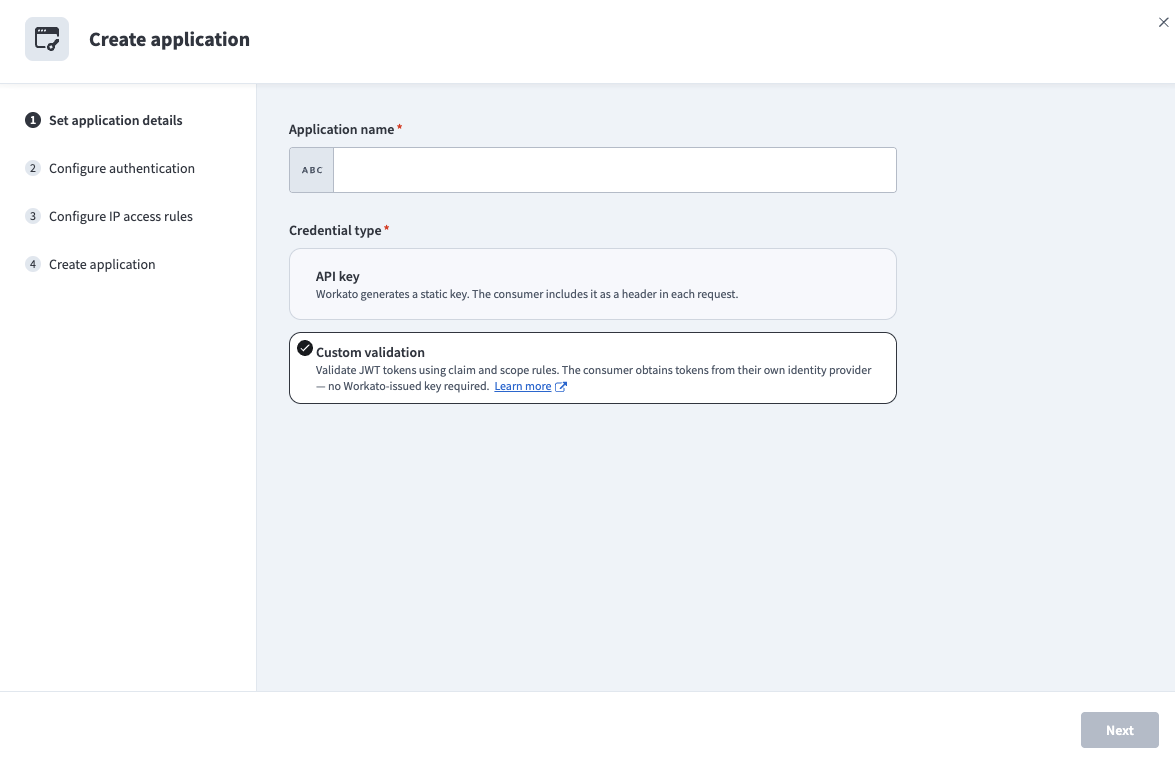 Select the Custom validation credential type
Click Next.
Enter one or more Issuer URLs. A token's iss claim must match one of the URLs you enter. Workato pre-populates this field with the issuer values configured at the client level, and you can override them for this application.
Click Add rule under Claim validation for each claim to require, then configure the Claim, Rule, and Values for the rule.
For example, to require that the token includes a specific client ID and a subject claim, add the following rules:
| Claim | Rule | Values |
|---|---|---|
client_id | one of | client-web-001 |
sub | exists | — |
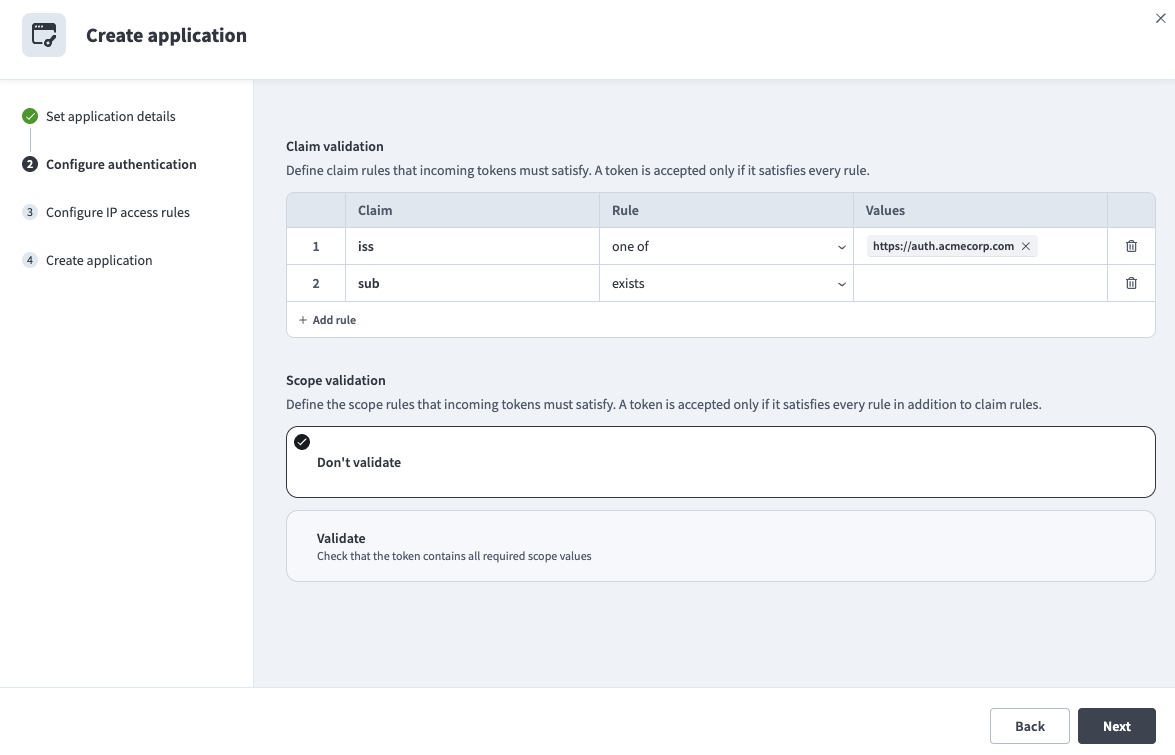 Configure claim validation rules
Select Validate under Scope validation to require specific scopes, then enter the Scope values separated by commas. Leave Don't validate selected to skip scope checks.
For example, to require the token to include the openid and email scopes, enter openid, email in Scope values.
Click Next.
Optional. Enter Allowed IPs. If defined, only API requests initiated from these IP addresses are allowed. To add multiple IP addresses, separate them using commas, or define a range, for example 106.226.100.3/20.
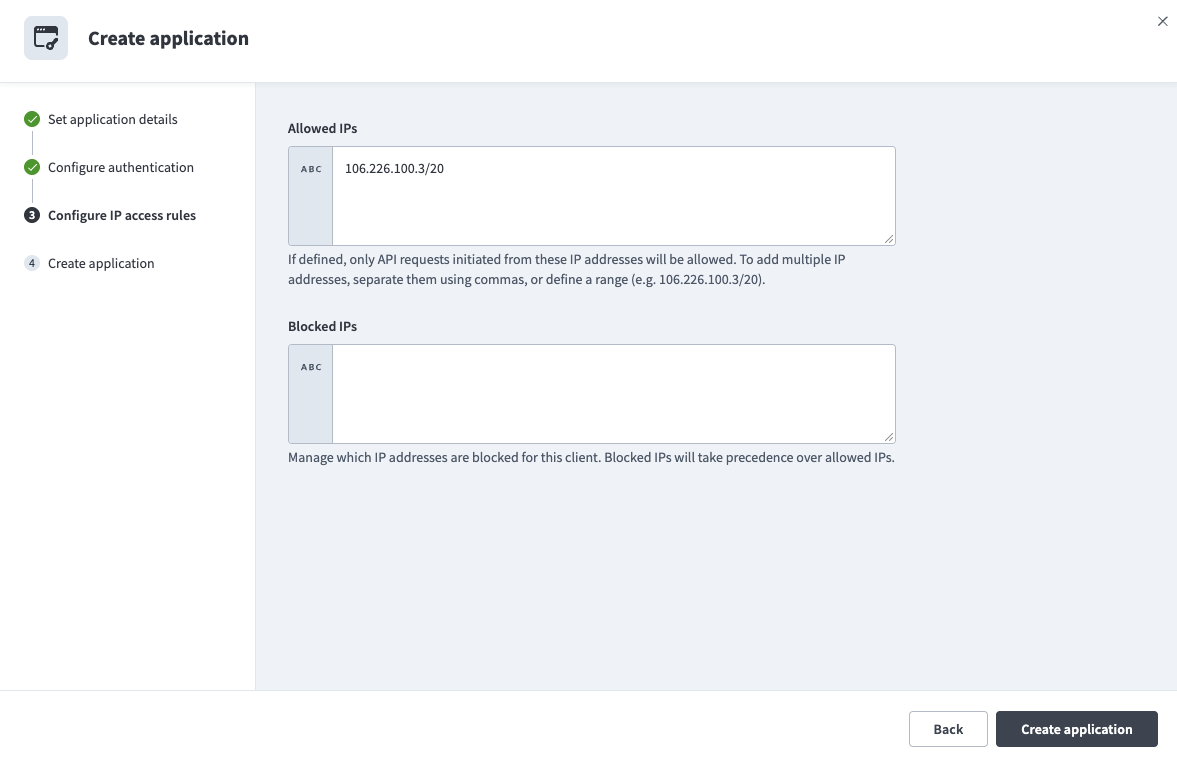 Configure IP access rules
Optional. Enter Blocked IPs. Blocked IPs take precedence over allowed IPs.
Click Create application.
Click Done. The application is active immediately and validates incoming tokens against the rules you configured.
NO KEY GENERATED
Applications with the Custom validation credential type don't receive a Workato-issued key. The consumer authenticates using tokens issued by its own identity provider.
View and manage applications
The Applications tab on a client lists every application created for that client, showing the credential type, the configured rules or key, and whether the application is active.
For an application with the Custom validation credential type, the application card displays a Custom badge next to the application name and the following:
- Claim validation: Each configured claim rule, shown as
claim: rule "value". For example,iss: one of "https://auth.acmecorp.com". - Scope validation: The configured scope values, when scope validation is enabled
- Active since: The date the application was created
- An Active toggle to enable or disable the application
Click ... (ellipsis) next to an application to rename, edit, or delete it. Custom validation applications also offer an Edit configuration option.
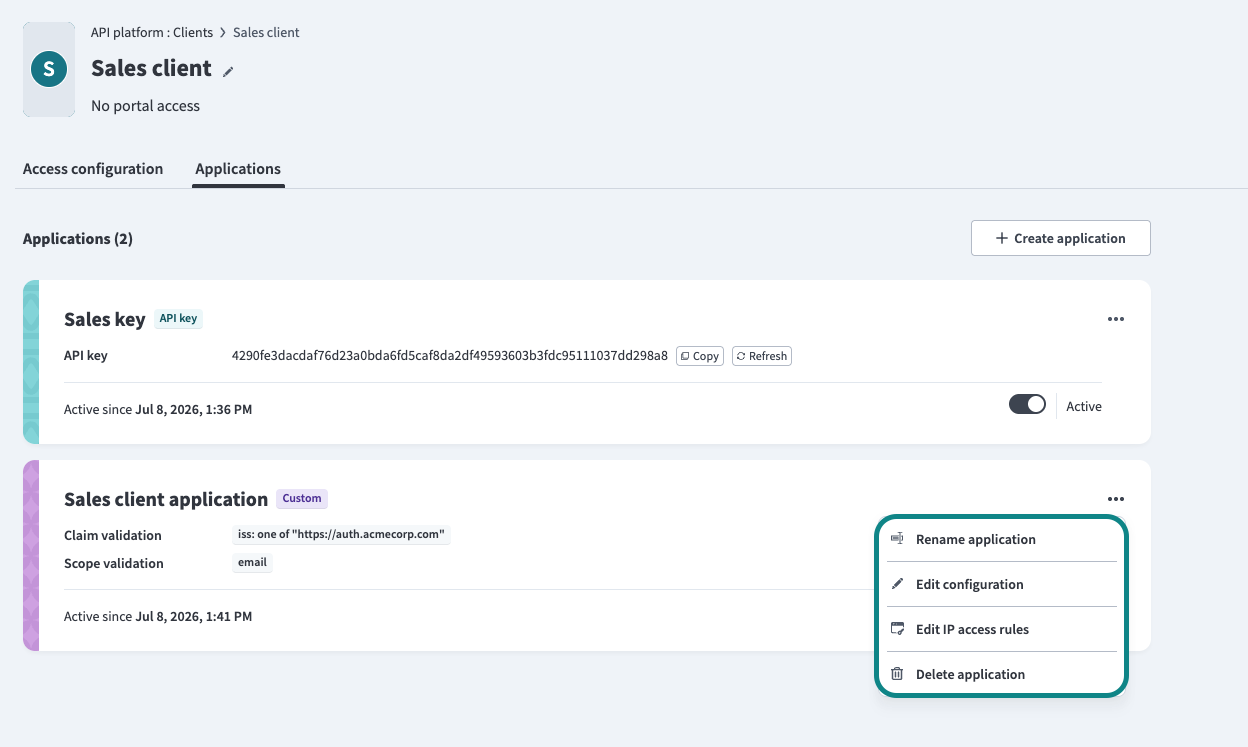 Manage application
Limitations
Custom validation has the following limitations:
- Custom validation is only available for applications on clients using the JWT or OpenID Connect authentication method. It's not available for clients using OAuth 2.0 or Auth token.
- A maximum of 10 claim rules is supported per application.
- A maximum of 10 scope values is supported per application.
Last updated: