Configure S3 Iceberg as your data pipeline destination
Set up S3 Iceberg as a destination for your data pipeline. This connection enables Workato to replicate data from source applications into Iceberg tables in Amazon S3, backed by either AWS Glue Data Catalog or an Iceberg REST catalog such as Snowflake Horizon Catalog, Apache Polaris, or Databricks Unity Catalog.
Features supported
The following features are supported when using S3 Iceberg as a pipeline destination:
- Automatic creation of destination tables based on source schema.
- Field-level data replication without explicit field mapping.
- Choice of AWS Glue Data Catalog or an Iceberg REST catalog (Snowflake Horizon Catalog, Apache Polaris, Databricks Unity Catalog, or a self-hosted iceberg-rest server).
- Static key or vended credential AWS authentication, and Bearer token or OAuth 2.0 catalog authentication for REST catalogs.
Prerequisites
You must have the following configuration and access:
- An Amazon S3 bucket to store Iceberg data files, and the AWS region it's located in
- An Iceberg catalog. Either an AWS Glue Data Catalog, or a REST catalog such as Snowflake Horizon Catalog, Apache Polaris, Databricks Unity Catalog, or a self-hosted iceberg-rest server
- AWS credentials, either as a static access key ID and secret, or through vended credentials issued by your REST catalog. Refer to Create AWS credentials for S3 Iceberg for the required permissions.
- A supported catalog authentication method if you use a REST catalog
Create AWS credentials for S3 Iceberg
Create a dedicated IAM user if you use AWS Glue as your catalog type, or Static keys as your AWS authentication method with a REST catalog. Skip this section if you use vended credentials, because S3 Iceberg requests temporary, per-table credentials from your REST catalog instead.
Create an IAM policy in AWS with the following permissions:
{
    "Version": "2012-10-17",
    "Statement": [
        {
            "Effect": "Allow",
            "Action": [
                "s3:ListBucket*",
                "s3:GetBucketLocation",
                "s3:GetObject*",
                "s3:PutObject",
                "s3:PutObjectAcl",
                "s3:DeleteObject"
            ],
            "Resource": [
                "arn:aws:s3:::<your-bucket>/*",
                "arn:aws:s3:::<your-bucket>"
            ]
        },
        {
            "Effect": "Allow",
            "Action": [
                "glue:TagResource",
                "glue:UnTagResource",
                "glue:BatchCreatePartition",
                "glue:BatchDeletePartition",
                "glue:BatchDeleteTable",
                "glue:BatchGetPartition",
                "glue:CreateDatabase",
                "glue:CreateTable",
                "glue:CreatePartition",
                "glue:DeletePartition",
                "glue:DeleteTable",
                "glue:GetDatabase",
                "glue:GetPartition",
                "glue:GetPartitions",
                "glue:GetTable",
                "glue:GetTables",
                "glue:UpdateDatabase",
                "glue:UpdatePartition",
                "glue:UpdateTable"
            ],
            "Resource": ["*"]
        },
        {
            "Effect": "Allow",
            "Action": [
                "athena:StartQueryExecution",
                "athena:GetQueryExecution",
                "athena:GetQueryResults",
                "athena:StopQueryExecution",
                "athena:GetWorkGroup",
                "athena:ListWorkGroups"
            ],
            "Resource": ["*"]
        }
    ]
}
Scope the S3 statement's Resource values to your warehouse bucket. The s3 actions apply to every catalog type. The glue and athena actions apply only if you use AWS Glue.
Create an IAM user and attach the policy from the previous step.
Generate an access key for the user. Use the resulting access key ID and secret access key when you configure the connection.
For REST catalogs, grant access through the catalog itself instead of an IAM policy. For example, Snowflake Horizon Catalog requires a role with CREATE ICEBERG TABLE privileges and usage on an external volume configured for your S3 bucket, plus a programmatic access token to use as either the Bearer token or the OAuth 2.0 credential value.
Connect to S3 Iceberg
Complete the following steps to connect to S3 Iceberg as a data pipeline destination:
Connect to S3 Iceberg
Select Create > Connection or press C twice.
Search for S3 Iceberg and select it as your app.
Enter a name in the Connection name field.
Use the Location drop-down menu to select the project where you plan to store the connection.
Enter the AWS region of your S3 bucket and Glue catalog, if applicable. Workato requires this value even if you use vended credentials.
Enter a value in the Warehouse field:
- AWS Glue: an S3 URI where Iceberg data files land, such as
s3://my-bucket/warehouse. - REST catalogs: a catalog-specific value. For Snowflake, enter the database name, such as
MY_DATABASE. For Databricks Unity Catalog or a self-hosted iceberg-rest catalog, enter an S3 URI.
Use the Catalog type drop-down menu to select the Iceberg catalog backing the destination, then complete the corresponding steps based on your selection:
Click Connect to verify and establish the connection.
Configure the destination action
Ensure the destination warehouse and catalog are newly created and empty before you start the pipeline. This prevents errors during the initial sync and allows the pipeline to create destination tables without conflicts.
Click the Load data to target table in destination app action. This action defines how the pipeline replicates data in the destination.
Select S3 Iceberg from the list of available destination apps.
Choose the S3 Iceberg connection you plan to use for this pipeline. Alternatively, click + New connection to create a new connection.
The Load data to target table in destination app action automatically replicates the object schema from the source to S3 Iceberg. Explicit field mapping isn't required.
Enter a value in the Namespace field. This sets the Iceberg namespace under which target tables are created:
- AWS Glue: the Glue database name, such as
sales_pipeline. Glue database names must be 1-255 characters. Refer to the AWS Glue Table API reference for the full naming pattern. - REST catalogs: a catalog-specific value. For Snowflake, enter the schema name inside the database given as the warehouse, such as
SALES_PIPELINE_SCHEMA. Naming limits depend on your catalog, so refer to your catalog vendor's identifier rules.
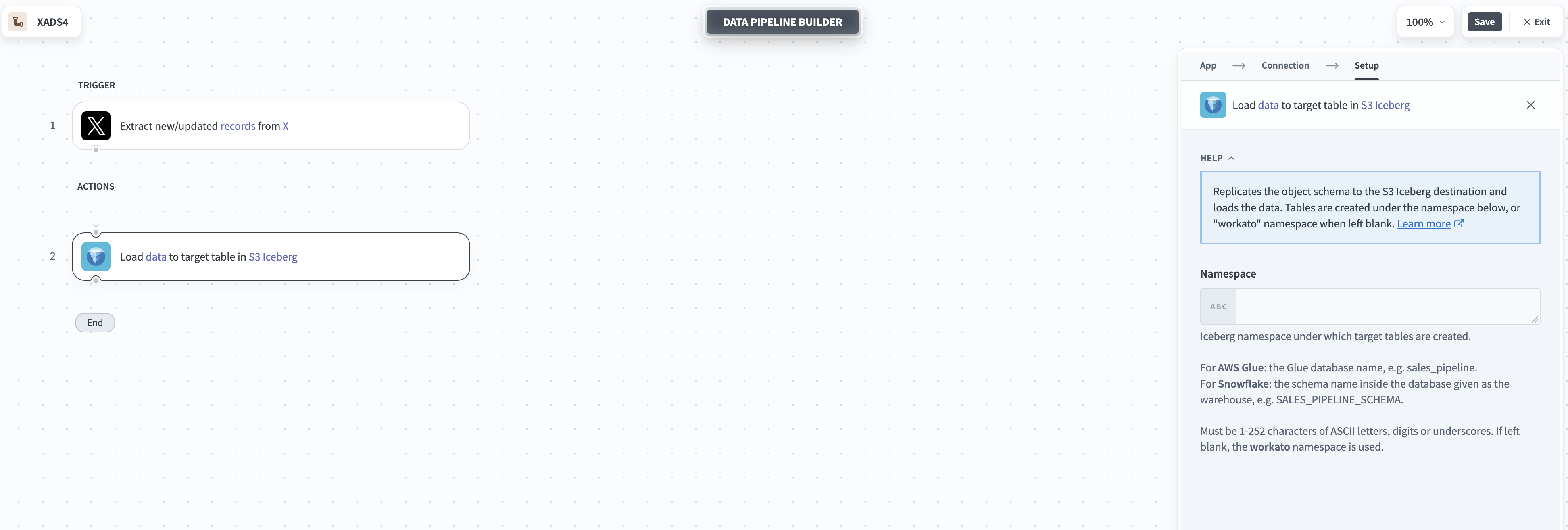 Configure S3 Iceberg destination
Workato creates tables under the workato namespace if you leave this field blank.
Select Save to save the pipeline.
Last updated: