Embedded API - Insights
Use these endpoints to query Insights data in a single customer workspace, from your Embed admin workspace.
Rate limits
Insights resources have the following rate limits:
| Type | Resource | Quota |
|---|---|---|
| All | All Insights endpoints | 60 requests per minute |
Quick reference
| Type | Resource | Description |
|---|---|---|
| GET | /api/v2/managed_users/:managed_user_id/insights/tables | List the Insights tables available in a customer workspace. |
| POST | /api/v2/managed_users/:managed_user_id/insights/schema | Return the columns of named Insights tables in a customer workspace. |
| POST | /api/v2/managed_users/:managed_user_id/insights/query | Run a read-only SQL query in a customer workspace and return the result as CSV or JSON. |
How are Insights table names constructed?
Every Insights table has a fully qualified name made of three parts: a catalog, a schema, and the table. A catalog groups related tables. Queries and the Get Insights table columns endpoint both expect the full name, such as workato_data.public.recipes. List Insights schema tables returns all three parts for every table it lists, though it doesn't list every table the customer workspace has. The Query parameters section explains which tables it leaves out.
Refer to the Insights data catalog for each table's columns, row grain, and join keys.
Run your first query
Complete the following steps to run your first query against a customer workspace:
Create an API client in your Embed admin workspace, with a client role granting both privilege groups under Customer workspace > Tools > Insights:
- Insights schema lets the client look up table and column names in a customer workspace.
- Insights query lets the client run queries against a customer workspace.
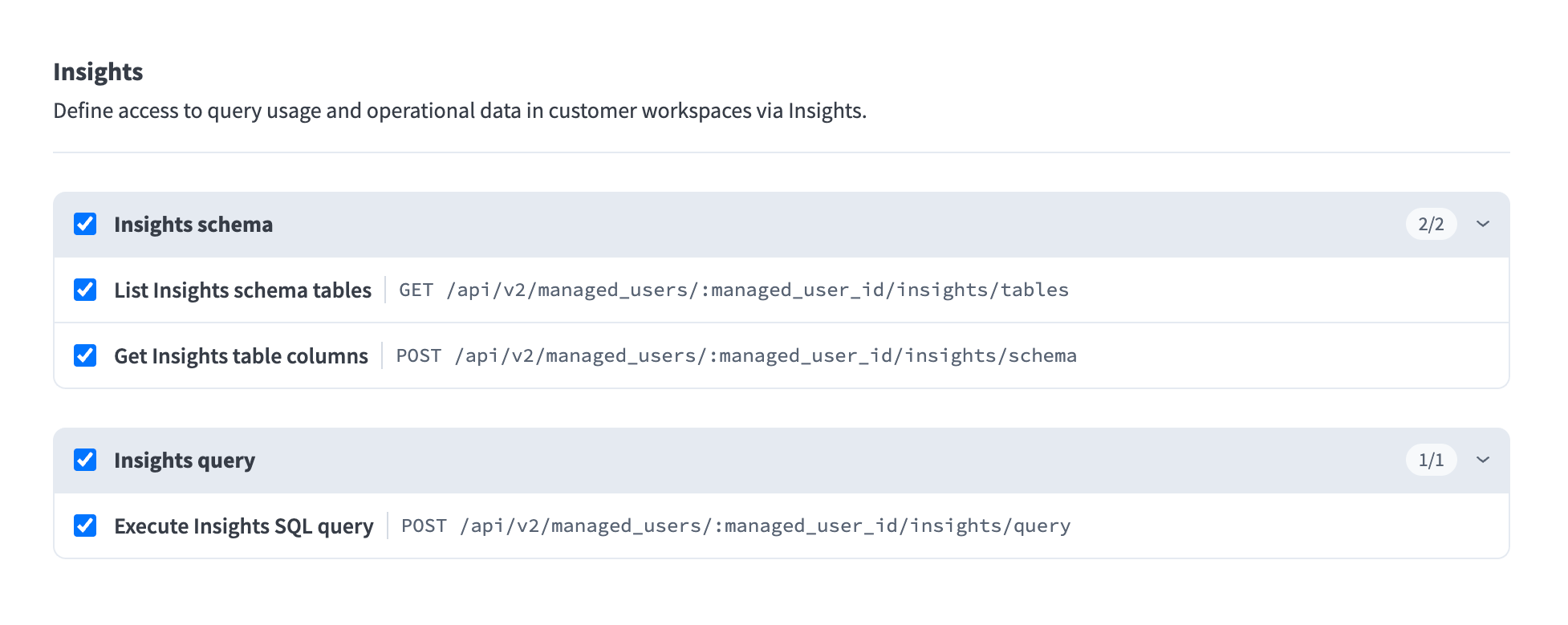 Insights privileges in an Embed admin workspace client role
Call List Insights schema tables with the customer's managed_user_id to see which tables are available in that workspace.
Call Get Insights table columns to see the columns of the tables you plan to query.
Call Execute an Insights SQL query with your SELECT statement, against the same managed_user_id.
Data scope
Each request targets exactly one customer workspace, named by managed_user_id in the path. Refer to Data scope on the Developer API page for the workspace-scoped versus project-scoped source distinction, which still applies within that one workspace.
- Which tables and catalogs are available mirrors what the customer's own Developer API token would see: it's governed by the customer workspace's own plan and feature add-ons (API Platform, Data Pipelines, and similar), not your Embed admin workspace's. A customer is never provisioned with more features than the admin workspace itself has.
- The optional usage and billing metric columns in
usage.public.usage_by_plan, such ascreditsandmcp_tool_calls, are the only exception: they follow your Embed admin workspace's own billing-contract features, not the customer's billing contract.
A query that references a table outside that scope returns a 400, same as the Developer API.
List Insights schema tables in a customer workspace
Returns the names of the Insights tables available in a customer workspace. Call this before you write a query, then call Get Insights table columns for the columns of the tables you plan to use.
GET https://YOUR_DATA_CENTER/api/v2/managed_users/:managed_user_id/insights/tablesURL parameters
| Name | Type | Description |
|---|---|---|
| managed_user_id | string required | Embedded customer Account ID or External ID. External IDs must have the prefix E and be URL-encoded. For example, EA2300. |
Query parameters
| Name | Type | Description |
|---|---|---|
| catalog | string optional | Return only the tables in this catalog. Use the catalog name as it appears in SQL. Refer to Catalogs below for the full list. |
The response leaves out data tables (workato_db) and Workflow apps tables (lcap) unless you name their catalog, for example /api/v2/managed_users/:managed_user_id/insights/tables?catalog=workato_db. Custom job report tables (job_history) aren't listed by this endpoint, as each job report is named dynamically per recipe. Refer to Custom job report tables for more information.
Catalogs
The catalog parameter accepts the following names:
| Catalog | Contains |
|---|---|
workato_data | Core workspace structure: projects, recipes, folders, connections, and environments. |
users | Workspace collaborators and embedded end users and end-user groups. |
usage | Billing periods and plan usage/consumption figures. |
audit_log | Compliance and activity events: logins, membership and role changes, recipe and connection updates. |
api_platform | API Platform collections, endpoints, clients, keys, policies, and gateway request events. |
mcp | MCP servers, tools, and gateway request events. |
data_orchestration | Data pipelines and their run history. |
job_history_all | Job history across every recipe. |
job_history | Each recipe's own custom job report, named dynamically per recipe. There's no fixed list of these tables for this endpoint to return. Refer to Custom job report tables. |
workato_db | Data tables. Each workspace's tables have their own columns, so there's no catalog-wide schema. Excluded by default unless named. |
lcap | Workflow apps tables. Each app's tables have their own columns, so there's no catalog-wide schema. Excluded by default unless named. |
Sample request
curl -X GET https://YOUR_DATA_CENTER/api/v2/managed_users/:managed_user_id/insights/tables \
     -H 'Authorization: Bearer <api_token>'
Sample response
{
  "data": {
    "tables": [
      {
        "catalog": "workato_data",
        "schema": "public",
        "table": "recipes",
        "label": "Recipes"
      },
      {
        "catalog": "job_history_all",
        "schema": "public",
        "table": "job_history_all",
        "label": "Job History"
      }
    ]
  }
}
Custom job report tables
Each recipe's custom job report has its own table, which the table-listing endpoint doesn't return. job_history_all lists recipes that have run jobs, not specifically recipes with a custom job report. Confirm a specific recipe has a custom job report by opening the job details page, selecting Customize job report, and checking whether columns are already mapped.
Complete the following steps to get the table's columns:
Find the recipe's ID. The recipe_id column of job_history_all.public.job_history_all lists recipe IDs. For example, run the following through POST /api/v2/managed_users/:managed_user_id/insights/query:
SELECT DISTINCT recipe_id FROM job_history_all.public.job_history_allBuild the table name job_history.public.RECIPE_ID, replacing RECIPE_ID with that ID.
Pass the name to the tables payload of POST /api/v2/managed_users/:managed_user_id/insights/schema, for example job_history.public.1127731. Pass the ID without quotes, as the payload is a JSON string, not SQL.
The response labels the table with the recipe's own name instead of a generic name.
To reference the table in a SQL query instead, quote the recipe ID, as it's numeric: SELECT job_handle FROM job_history.public."1127731" LIMIT 10.
Get Insights table columns in a customer workspace
Returns the columns of the tables you name, in a customer workspace. Call List Insights schema tables first to find the table names.
POST https://YOUR_DATA_CENTER/api/v2/managed_users/:managed_user_id/insights/schemaURL parameters
| Name | Type | Description |
|---|---|---|
| managed_user_id | string required | Embedded customer Account ID or External ID. External IDs must have the prefix E and be URL-encoded. For example, EA2300. |
Payload
| Name | Type | Description |
|---|---|---|
| tables | array required | Fully qualified table names, each catalog.schema.table. Accepts at most 20 names in one request. |
Sample request
curl -X POST https://YOUR_DATA_CENTER/api/v2/managed_users/:managed_user_id/insights/schema \
     -H 'Authorization: Bearer <api_token>' \
     -H 'Content-Type: application/json' \
     -d '{
           "tables": ["workato_data.public.recipes"]
         }'
Sample response
{
  "data": {
    "tables": [
      {
        "catalog": "workato_data",
        "schema": "public",
        "table": "recipes",
        "label": "Recipes",
        "columns": [
          {
            "name": "id",
            "label": "ID",
            "data_type": "BIGINT"
          },
          {
            "name": "name",
            "label": "Name",
            "data_type": "VARCHAR"
          }
        ]
      }
    ],
    "not_found": []
  }
}
A column's data_type is one of the following:
- Primitive types:
BOOLEAN,DATE,TIMESTAMP,BIGINT,DOUBLE,VARCHAR - Array types:
ARRAY<VARCHAR>,ARRAY<BIGINT> UNKNOWN
A table that doesn't exist, or that the API client can't access, is returned in not_found instead of raising an error.
Execute an Insights SQL query in a customer workspace
Runs a read-only SQL query against a customer workspace and returns the result as CSV or JSON.
POST https://YOUR_DATA_CENTER/api/v2/managed_users/:managed_user_id/insights/queryURL parameters
| Name | Type | Description |
|---|---|---|
| managed_user_id | string required | Embedded customer Account ID or External ID. External IDs must have the prefix E and be URL-encoded. For example, EA2300. |
Payload
| Name | Type | Description |
|---|---|---|
| sql | string required | The SQL query to run. Must not be blank, and must be 10,000 characters or fewer. Refer to Supported SQL for the accepted syntax. |
| output_format | string optional | The format of a successful result. Accepts csv or json. Defaults to csv if left blank. Error responses are JSON regardless of output_format. |
output_format is the only way to choose the response format. Setting an Accept header, such as Accept: text/csv, doesn't have an effect, and neither does adding a file extension to the URL, such as /api/v2/managed_users/:managed_user_id/insights/query.csv.
Sample request
curl -X POST https://YOUR_DATA_CENTER/api/v2/managed_users/:managed_user_id/insights/query \
     -H 'Authorization: Bearer <api_token>' \
     -H 'Content-Type: application/json' \
     -d '{
           "sql": "SELECT id, name FROM workato_data.public.recipes WHERE is_active = true",
           "output_format": "json"
         }'
Sample response
{
  "data": {
    "columns": [
      {
        "qualifier": "id",
        "label": "Id",
        "type": "BIGINT",
        "hints": []
      },
      {
        "qualifier": "name",
        "label": "Name",
        "type": "VARCHAR",
        "hints": []
      }
    ],
    "data": [
      [1, "Order sync"],
      [2, "Invoice reconciliation"]
    ],
    "has_more_rows": false
  }
}
CSV output
CSV is the default output_format. This example sets it explicitly and adds --include to show the response headers:
curl -X POST https://YOUR_DATA_CENTER/api/v2/managed_users/:managed_user_id/insights/query \
     -H 'Authorization: Bearer <api_token>' \
     -H 'Content-Type: application/json' \
     --include \
     -d '{
           "sql": "SELECT id, name, applications FROM workato_data.public.recipes",
           "output_format": "csv"
         }'
The response is UTF-8 CSV. The header row repeats the qualifier of each column from the JSON response, and each line after it is one row (some headers omitted below for brevity):
HTTP/1.1 200 OK
Content-Type: text/csv; charset=utf-8
X-Workato-Has-More-Rows: false

id,name,applications
1,"Order sync","[""Shopify"",""NetSuite""]"
2,"Invoice reconciliation","[""NetSuite"",""Workday""]"
CSV output differs from JSON output in the following ways:
- Array and object values are written as JSON.
- Null values are empty cells, and empty strings are written as
"". - Column types aren't included. The JSON response carries a
typefor every column, and CSV drops it, so a downstream consumer such as a warehouse loader must re-type the columns itself. Run the same query withoutput_formatset tojsonto read the types. - Truncation is reported through the
X-Workato-Has-More-Rowsresponse header rather thandata.has_more_rows.
Supported SQL
Queries run against a supported subset of ANSI SQL:2003. Joins, GROUP BY, aggregate functions, CASE expressions, common table expressions, and subqueries are supported. Catalog, schema, and table names must match the case returned by GET /api/v2/managed_users/:managed_user_id/insights/tables and POST /api/v2/managed_users/:managed_user_id/insights/schema exactly. A different case fails to resolve the object. Wrap an identifier in double quotes if it contains non-alphanumeric characters or starts with a digit, such as a custom job report table named after a recipe ID.
Statement types
Only SELECT statements are accepted, including the UNION, INTERSECT, and EXCEPT set operations. MINUS, INSERT, UPDATE, DELETE, CREATE, DROP, ALTER, EXECUTE, and CALL are rejected.
Restrictions
Every query is validated before it runs, so a query that breaks one of the following restrictions is rejected without executing:
A query must resolve to a single flat result. Common table expressions and subqueries are supported, as they still produce one flat result.
Table functions, such as
TABLE()expressions, are rejected.UNNESTisn't affected. Use it withCROSS JOINto flatten an array column, for example:sqlSELECT r.id, t.tag FROM workato_data.public.recipes r CROSS JOIN UNNEST(r.tags) AS t(tag)Queries can't read the query engine's internal metadata tables, such as
information_schema.
Allowed functions
The following functions are permitted. A rejected function is named in the error, so you know which function to remove:
AVG, CAST, CEILING, CHAR_LENGTH, COUNT, COUNT_IF, CURRENT_TIMESTAMP, DATE_TRUNC, EXTRACT, FLOOR, LOWER, MAX, MIN, MOD, NULLIF, POSITION, REPLACE, ROUND, SUBSTRING, SUM, TRIM, UPPER
This excludes window functions, such as ROW_NUMBER and RANK. Window functions are rejected the same way as any other disallowed function.
Query limits
The query service caps each result at 5,000 rows and there is no pagination. A result that hits the cap says so instead of truncating silently:
- JSON output sets
data.has_more_rowstotrue. - CSV output sets the
X-Workato-Has-More-Rowsresponse header totrue.
The API doesn't have a cursor or continuation token for paging past the cap. ORDER BY ... LIMIT ... OFFSET ... and OFFSET ... ROWS FETCH NEXT ... ROWS ONLY both run, but they only pick which rows within the 5,000-row result the query returns, not how much underlying data it scans, so they can't retrieve rows beyond the cap either. Narrow the query rather than paging to get the rest of the data. Add filters, shorten the time range, or pre-aggregate in the SELECT so the result fits under the cap.
A query that passes validation can still exceed the resource quotas that govern execution, or run longer than the query service allows, such as with an unbounded time range, an expensive join, or a slow-planning query. These return a 422 with retryable set to false. Narrow the query instead of retrying.
The sql value is capped at 10,000 characters. A longer query returns a 400 without running.
Error responses
The Insights API returns errors in the following formats:
Error format
Most errors return an errors array. Each error includes a code and a title, and can include a detail field and a retryable flag. For a query the query service rejects, detail can start with the line and column range of the problem in your SQL, followed by what's wrong and how to discover the correct tables and columns:
{
  "errors": [
    {
      "code": 400,
      "title": "Query rejected",
      "detail": "Object 'foo' not found Use GET /v2/managed_users/:managed_user_id/insights/tables to list the available tables (with catalog=workato_db or catalog=lcap for data tables and app tables) and POST /v2/managed_users/:managed_user_id/insights/schema to get their columns.",
      "retryable": false
    }
  ]
}
retryable is present on errors raised by the query service. true means sending the identical query again can succeed on its own, such as after a throttled request or a data source that temporarily didn't respond. false means don't automatically retry the identical request. The fix depends on the error code and isn't always a change to the SQL itself. Refer to Error codes for what each code means. The flag is omitted on framework errors, such as rate limits and parameter validation.
Use retryable to decide whether to retry at all. When a 429 response includes a Retry-After header, use it to decide how long to wait before that retry. A 429 response without Retry-After can still be retried.
Error responses are JSON regardless of output_format, including when it's set to csv.
Unauthorized and parameter errors
401 errors return a message field instead of an errors array. These responses can also include details and reason fields. reason is authentication_failed when the token is missing or invalid, and missing_privilege when the client role lacks the privilege for the endpoint:
{
  "message": "Unauthorized",
  "reason": "missing_privilege"
}
The sql parameter missing from the request entirely returns a message field instead:
{
  "message": "Missing parameter sql"
}
An empty sql value, or any other invalid parameter, returns an errors array instead, with a code and a title and no retryable flag:
{
  "errors": [
    {
      "code": 400,
      "title": "sql is required"
    }
  ]
}
Error codes
The Insights API returns the following error codes:
| Code | Description |
|---|---|
| 400 | Bad request, with retryable false: the query service rejected the SQL (syntax error, disallowed operation, unknown table or column). retryable is omitted instead for a framework parameter-validation error: a missing, blank, or over-10,000-character sql, a malformed JSON request body, or an invalid output_format. Narrow the query based on the error detail rather than retrying. |
| 401 | Unauthorized. The API token is missing or invalid, or the client role lacks the privilege for the endpoint. Refer to Run your first query for the privileges each endpoint needs. |
| 409 | Conflict. The data source no longer matches the schema the query was written against. Changing the SQL doesn't resolve it. retryable is false. |
| 422 | The query is valid but couldn't be executed, such as when it exceeds the resource quotas or runs longer than allowed. retryable is false. Narrow the query rather than retrying it unchanged. |
| 429 | Too many requests. The query service throttled the query, in which case retryable is true and no Retry-After header is sent, or the API rate limit is exceeded, in which case the Retry-After header indicates when you can retry. |
| 500 | Internal server error. The query service failed, or an unexpected error occurred in the API framework. The title includes an error ID. retryable is false for query service errors. |
| 502 | The query service returned a response the API framework couldn't use. retryable is false. |
| 503 | The query service is temporarily unavailable, or a data source didn't respond to a catalog-filtered GET /api/v2/managed_users/:managed_user_id/insights/tables request or to POST /api/v2/managed_users/:managed_user_id/insights/schema. retryable is true. |
| 504 | The query service didn't respond before the gateway timed out. retryable is true. Retry with backoff. |
Last updated: