# Salesforce - Scheduled records search using SOQL query trigger (batch)
This trigger searches Salesforce using a SOQL query on a schedule you specify.
SELECT CLAUSE IN SOQL
SOQL queries don't support the SELECT * operation often used in SQL queries. You must specify specific fields to retrieve in the SELECT clause.
# Input
| Input fields | Description |
|---|---|
| SOQL query | Enter a SOQL query to filter records by. You must select ID using the SELECT statement for this trigger to work. |
| Schedule | Select how often to search Salesforce. |
| Time zone | Select a time zone for the schedule. |
| Hour | Enter the hour to search Salesforce. This field uses 24-hour format, for example: 11 for 11am or 23 for 11pm. Defaults to 00 (12am). |
| Minute | Enter how many minutes past the hour to search Salesforce in double digit format. For example: 01 for 1 minute past the hour. |
| Day of month | Enter a number between 1 and 31 to specify the day of the month to search Salesforce. Shorter months round this value down to the last day of the month. Defaults to 1. |
| Sunday | Select whether to allow searches on Sundays. |
| Monday | Select whether to allow searches on Mondays. |
| Tuesday | Select whether to allow searches on Tuesdays. |
| Wednesday | Select whether to allow searches on Wednesdays. |
| Thursday | Select whether to allow searches on Thursdays. |
| Friday | Select whether to allow searches on Fridays. |
| Saturday | Select whether to allow searches on Saturdays. |
| Batch size | Enter the maximum number of records to contain in each batch. The default value for this field is 100 and the maximum is 2000. Salesforce records with many custom fields require smaller batch sizes. |
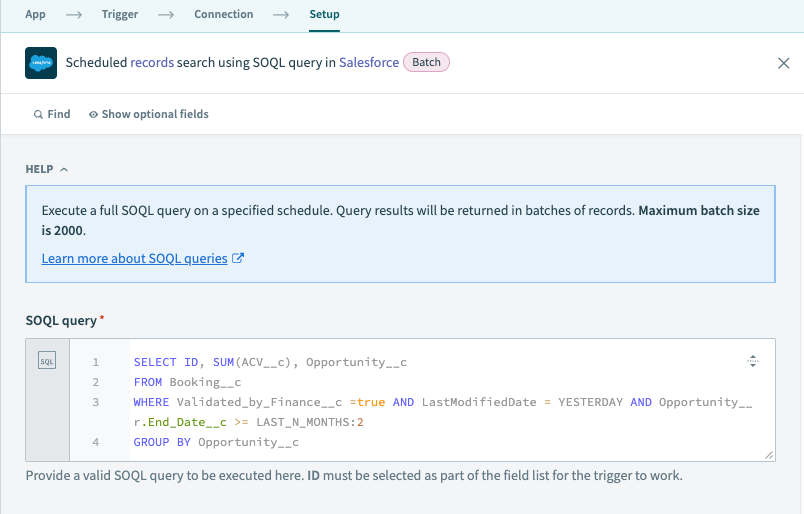 Example of valid query in scheduled records search
# Output
| Output fields | Description |
|---|---|
| Range | The range of records retrieved in the current batch. |
| Scheduled time | The date and time scheduled for the search. |
| Total number of objects | The total number of matching objects retrieved from Salesforce. |
| First batch | A boolean indicating whether the current batch contains the beginning of the results list. |
| Last batch | A boolean indicating whether the current batch contains the end of the results list. |
| Starting offset | The offset number for the first record of this batch. |
| Ending offset | The offset number for the last record of this batch. |
| First record name | The name of the first record. |
| Last record name | The name of the last record. |
| Records | An object containing information about the current record. |
Last updated: 1/15/2026, 10:10:58 PM