Agent orchestration
Agent orchestration is a key capability of large action models, enabling genies to plan and execute multi-step business processes autonomously within recipes. Recipes assign tasks to genies without user input. Genies process tasks while the recipe job pauses, then return responses and metadata to the recipe. The recipe resumes with the returned data.
Watch a quick video guide: Assign a task to a genie
You can track Agent orchestration workflows on the Conversations page. Each task assigned to a genie appears as a new conversation.
Agent orchestration uses the Assign task to genie action. Refer to the Assign task to genie action reference for a field-level description of inputs and outputs.
The Assign task to genie action lets you assign a task to your genie. You must provide a clear task description to ensure that your genie understands how to handle the task.
VERIFIED USER ACCESS and USER CONFIRMATION CONNECTIONS AREN'T SUPPORTED
The Assign task to genie action can't be used with genies that have verified user access skills or that require user confirmations with Business approvals.
Refer to App Events vs Agent orchestration for recommended uses for App events and Agent orchestration.
How it works
The Assign task to genie action is available in any recipe as a standard action step. The following fields are required to set up your action:
- Genie: The genie that processes the task.
- Task instructions: This is the prompt the genie receives to process its assign task without human assistance. Everything the genie needs to complete the task must be in the task instructions. Refer to Write effective task instructions for more information.
- Metadata: Optional structured data passed to the genie with task instructions. Metadata fields are defined in the skill trigger of any skill the genie calls during task processing. Pass values, such as an invoice ID, an opportunity ID, or a user email, as metadata fields rather than embedding the values in the task instruction text if a skill must access specific values from the recipe context. Metadata values are accessible in the skill as datapills from the Start workflow trigger.
- Conversation ID: Optional field that enables the genie to process the task using context and conversation history from the identified conversation. The genie processes the task without conversation context and history when this field is left blank. You can leave this field blank for use cases, such as classification, summarization, or evaluation. Use cases that require continuity, such as chaining multiple Assign task to genie calls that build on each other must have the Conversation ID passed from the first call's output to subsequent calls to maintain context across the chain.
- Configure genie output for use in this recipe: An optional configuration that allows you to define custom output fields. The genie returns the response in a structured format matching the defined schema rather than as free-form text. The structured output fields become datapills available in downstream recipe steps.
The following process begins when the recipe reaches the Assign task to genie action step:
- The recipe pauses and the task is sent to the genie
- The genie processes the task using its job description, available skills, and knowledge bases
- The recipe job is suspended during genie processing and doesn't consume recipe runtime while waiting. Processing time depends on the complexity of the task and whether the genie needs to call skills or search knowledge bases. Simple reasoning tasks complete in seconds. Tasks requiring multiple skill calls may take longer.
- The genie returns a response
- The recipe resumes with the genie's response available as a datapill
Assign task to genie action
The Assign task to genie action sends a task from a recipe to a genie, which processes the task autonomously and returns a response to the recipe.
You can create a dedicated recipe from the genie editor, or add the action to an existing recipe.
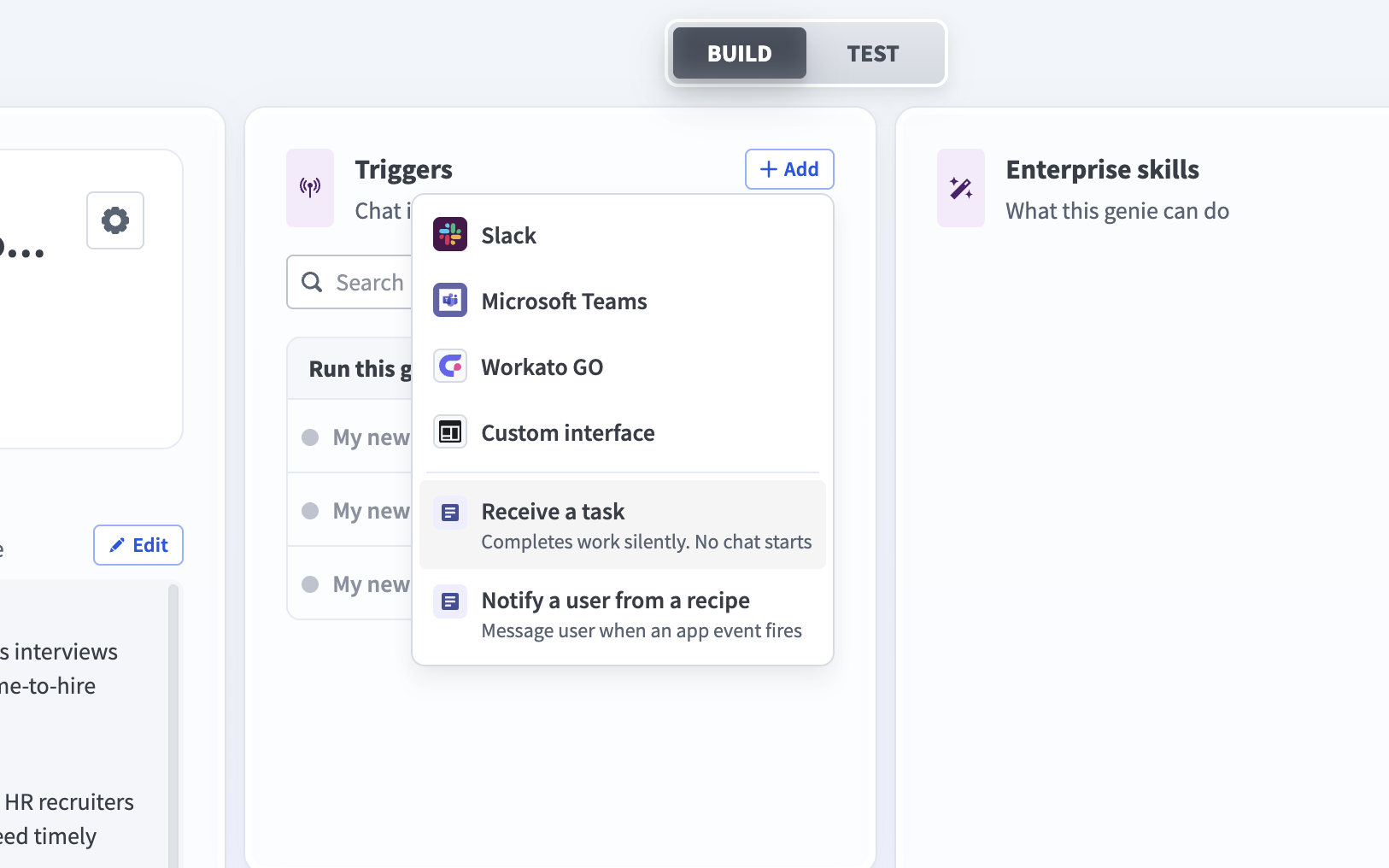 Triggers section menu
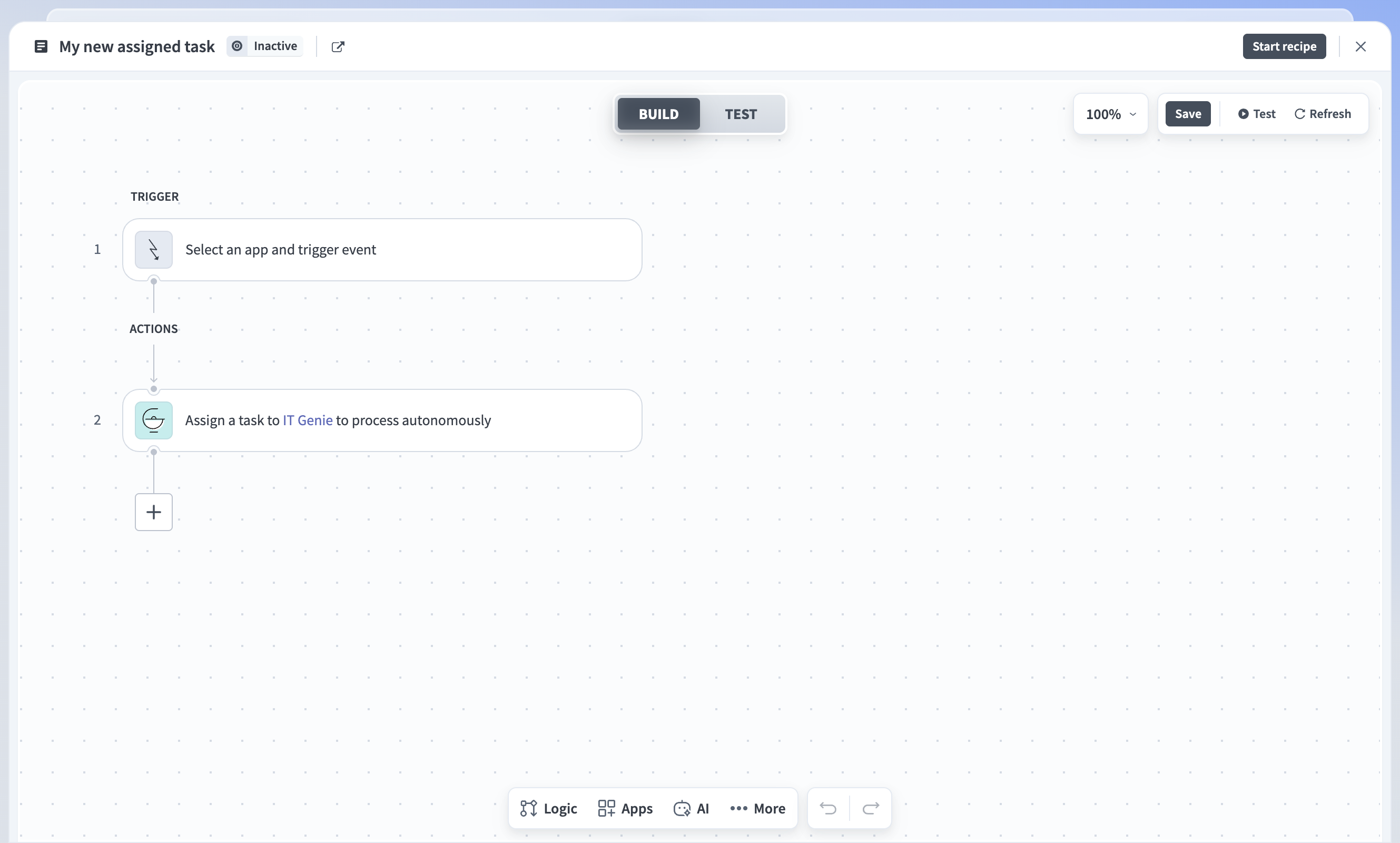 Assign task to genie action in the recipe editor
 Assign task to genie action
Configure the action
Complete the following steps to configure the Assign task to genie action:
Click the Assign task to genie action.
Use the Genie drop-down menu to select the genie you plan to use. This field is already set if you created the recipe from the genie's Triggers section.
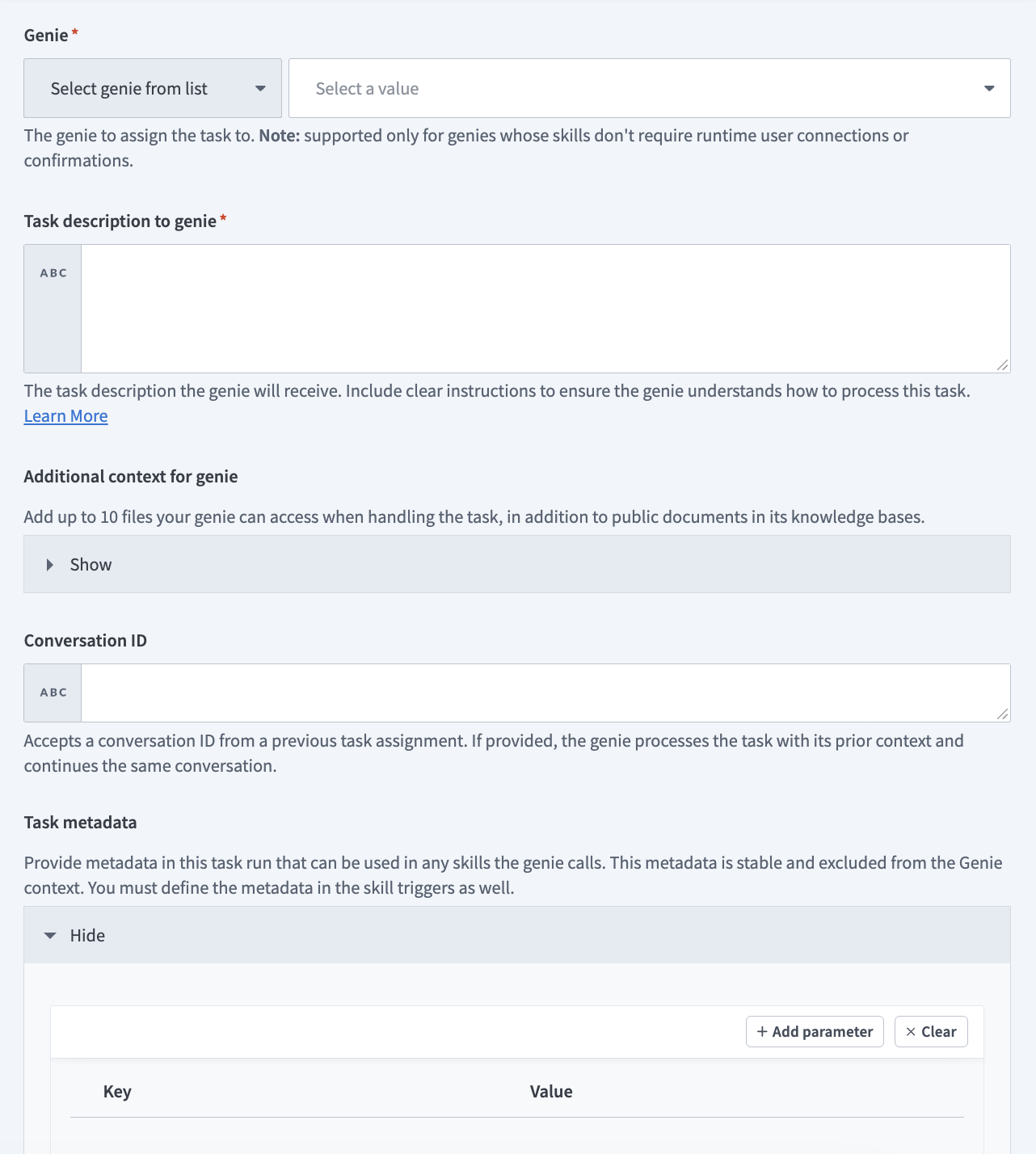 Set up the Assign task to genie action
Enter detailed instructions in the Task description to genie field. Write clear, self-contained tasks to ensure your genie handles them correctly. Include all required data.
BEST PRACTICES FOR TASK DATA
Write clear task instructions and include all required data you plan for your genie to process to design reliable and autonomous orchestration workflows.
- Keep tasks self-contained and use Conversation ID for continuity.
- Use structured output for downstream mapping with predictable fields, such as status, result, and URLs.
- Delegate across genies by splitting large or multi-domain tasks.
- Monitor and evaluate by reviewing tasks on the Conversations page.
For example:
Review the customer onboarding form and extract the following:
- Company name and size
- Industry category
- Required integrations

Also retrieve their enterprise compliance requirements from Salesforce if the company size is over 500 employees. Return all data in JSON format with fields: company_name, company_size, industry, integrations (array), enterprise_requirements (object or null).
Alternatively, you can provide a structured description format to improve outcomes. For example:
<instructions>
Perform the following steps for the following task data
- [Step 1]
- [Step 2]

If you hit errors or need clarification
- [Error handling instructions]
</instructions>

Use the following context to handle the task
<data>
[Map any datapills or provide the task data so your genie can handle it]
</data>Optional. Expand the Additional context for genie section and provide up to ten files as context for the task.
Optional. Provide the conversation ID in the Conversation ID field to pass context from a previous task. This allows a task to build on the earlier conversation.
Optional. Expand the Task metadata section and click Add parameter to provide custom key and value pairs for your metadata, such as invoice_id for an invoice processing genie or user_email for an IT reset password genie. Any skill your genie uses can access the metadata you add here.
METADATA MUST BE CONFIGURED IN SKILL TRIGGER
You must define matching metadata in your skill trigger for the skill to access the metadata.
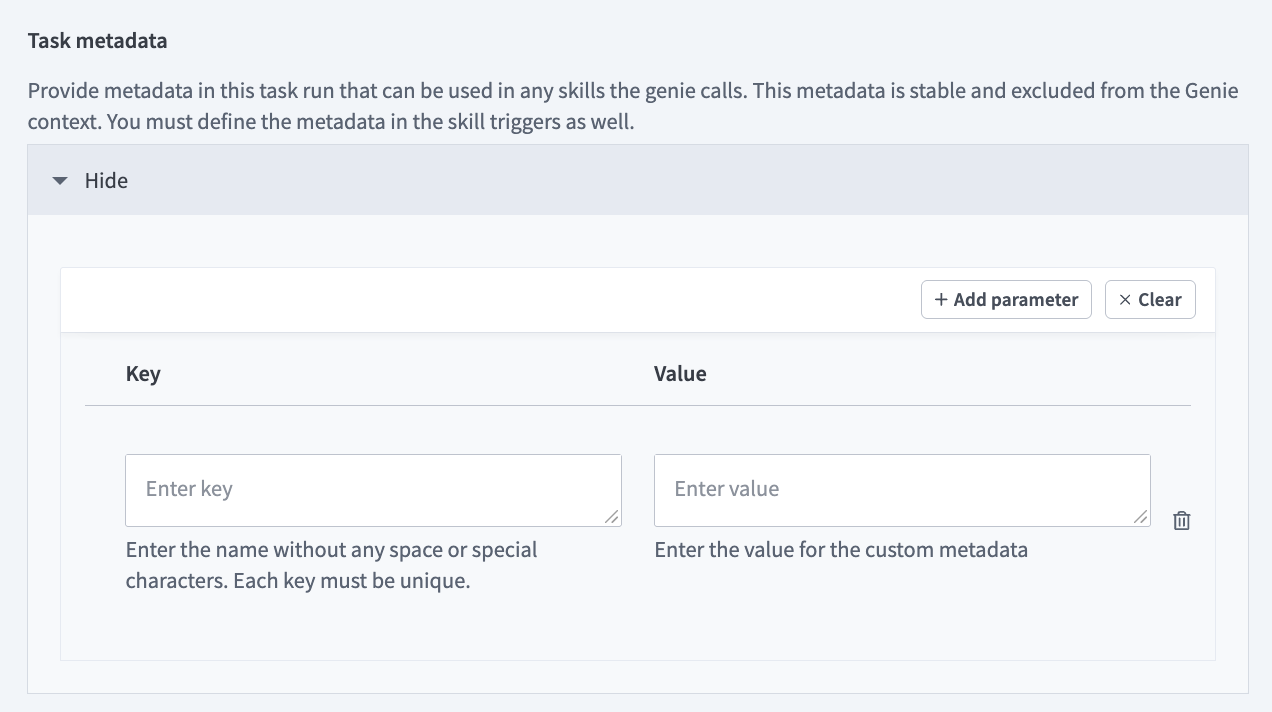 Define custom metadata
Optional. Go to the Configure genie output for usage in this recipe section and provide custom output fields to enable your genie to respond with a structured output rather than a plain text response. This allows you to use the output datapills in downstream steps in your recipe.
Click Save.
Click Start recipe to activate it.
Agent orchestration example use cases
Agent orchestration lets genies run multi-step tasks autonomously within recipes. This enables workflows that require decision-making, data gathering, or document handling to run without user input. Refer to the following example use cases to determine how Agent orchestration can be applied to your workflows:
- Autonomous task processing: Genies perform complete tasks while the recipe job is suspended. For example:
- Invoice reconciliation: Compare invoices and POs, and then return JSON summary of matches and discrepancies.
- Contract summarization: Extract key clauses, such as termination, renewal, and payment from contracts.
- Support triage: Categorize tickets and suggest priority level or assignee.
- Knowledge-based decision-making: Genies use internal knowledge bases to guide deterministic workflows. For example:
- Policy Q&A: Genies answer questions within a recipe using internal SOPs or wikis.
- Documentation lookup: A support genie retrieves relevant product documents and URLs.
- File and data processing: Genies parse, validate, or enrich structured and unstructured data. For example:
- Document classification: Identify document type and metadata.
- Data extraction: Parse spreadsheets or CSVs and enrich data through API interaction.
- Evidence upload: Collect and upload audit files to Google Drive or SharePoint.
- Testing and evaluation: Genies autonomously test workflows or other genies. For example:
- Response testing: Compare genie outputs against expected answers.
- Genies in channels: Genies process background tasks while keeping conversational context in combination with Workbot for Slack or Teams. For example:
- Persistent Conversation ID: Maintains multi-turn conversations using the same Conversation ID.
- Cross-agent collaboration: Genies delegate subtasks to each other with the Assign task to genie action to form multi-agent workflows. For example:
- Compliance audit: Audit Genie delegates evidence collection to another genie to compile results.
- Procurement: Finance genie validates a budget, and then Procurement genie proceeds to onboarding.
- Project updates: Product Manager genie summarizes Jira issues, and then Communications genie drafts updates.
Defined task metadata example use cases
The following example use cases provide an overview of how to define and use metadata in the Assign task to genie action:
Invoice processing
An invoice is automatically created in your accounting system, and the Finance Genie autonomously processes it for approval. Your scheduled trigger runs and detects new pending invoices. The trigger retrieves the invoice details from the accounting system and assigns the task to the Finance Genie with the invoice_id metadata defined. This method is stable and allows the genie to process the request without directly handling the metadata, which eliminates the chance of a hallucination.
The Finance Genie autonomously determines the appropriate action, such as approve invoice, request additional documentation, or flag for review, and executes the invoice approval in your accounting system using the verified invoice_id metadata to ensure that the request can't be spoofed.
Workflow outline
- Scheduled trigger: The recipe runs on a schedule to check for new pending invoices in your accounting system.
- Get invoice context: The recipe retrieves the invoice details and extracts the invoice ID from the accounting system. Assign task to genie: The recipe uses the Assign task to genie action to send the invoice processing task to the Finance Genie with
invoice_idmetadata, for example,INV-2026-001234, and suspends the recipe job. - Autonomous task processing: The Finance Genie references the task instructions and available skills to determine the appropriate action, such as approve invoice, request additional documentation, or flag for review.
- Execute action: The genie uses the approve invoice skill to approve the invoice in your accounting system for the invoice specified in the
invoice_idmetadata. - Complete workflow: The genie confirms the invoice approval was successful and returns the completion status to the original recipe.
The following diagram illustrates this workflow:
Password reset
A user requests a password reset in Slack, and the ITSM Genie autonomously processes the request. Your Workbot trigger detects a new message in a Slack thread and runs. It retrieves the user's email and assigns the task to the ITSM Genie with the user_email metadata. This method is stable and allows the genie to process the request without directly handling the metadata, which eliminates the chance of a hallucination.
The ITSM Genie autonomously determines the appropriate action, such as reset password, link with policy, or unlock account, and executes the password reset in Okta using the verified user_email metadata to ensure that the request can't be spoofed.
Workflow outline
- Workbot connector trigger: Workbot detects a new message in a Slack thread requesting a password reset.
- Get user context: The recipe retrieves the user's email address from Slack using their Slack ID.
- Assign task to genie: The recipe uses the Assign task to genie action to send the password reset task to the ITSM Genie with
user_emailmetadata, for example,[email protected], and suspends the recipe job. - Autonomous task processing: The ITSM Genie references the task instructions and available skills to determine the appropriate action, such as reset password, unlock account, or link with policy.
- Execute action: The genie uses the reset password skill to reset the password in Okta for the user specified in the
user_emailmetadata. - Complete workflow: The genie confirms the password reset was successful and returns the completion status to the original recipe.
Compliance audit example use case
A compliance audit triggers on a schedule and the Audit genie autonomously initiates evidence collection. The Audit genie uses an API endpoint skill to call a recipe that assigns the evidence collection task to the Evidence Collection genie.
The Evidence Collection genie autonomously collects required compliance documentation from multiple systems and uploads the files to Google Drive and returns the file URLs to the Audit genie, which then uploads the evidence to the governance, risk, and compliance tool.
Workflow outline
Trigger: Scheduled recipe triggers the Audit genie to begin compliance evidence collection.
API call: The Audit genie uses a skill to call an API endpoint recipe.
Assign task to genie: The API endpoint recipe uses the Assign task to genie action to send the evidence collection task to the Evidence Collection genie and suspends the recipe job.
Autonomous task processing: The genie references the task instructions to understand how to process the task.
Sends response: The genie sends the response and metadata back to the recipe when the task is complete.
Resume recipe: The API endpoint recipe resumes and returns the genie's response to the Audit genie.
Complete workflow: The Audit genie uses the Google Drive URLs to access and upload the files to the governance, risk, and compliance tool using another skill.
Last updated: