Manage blueprints
Rename, delete, and organize your blueprints in your workspace.
Rename a blueprint
Complete the following steps to rename a blueprint:
Select the three dots next to your blueprint and choose Rename blueprint.
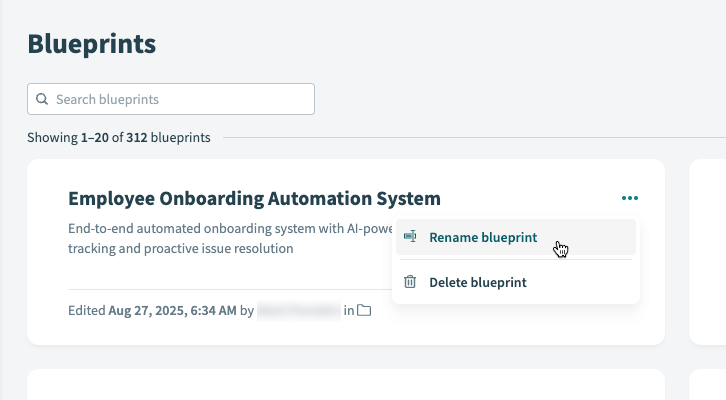 Rename blueprint
Enter the new blueprint name and click ✔ to save.
Delete a blueprint
Complete the following steps to delete a blueprint:
Select the three dots next to your blueprint and choose Delete blueprint.
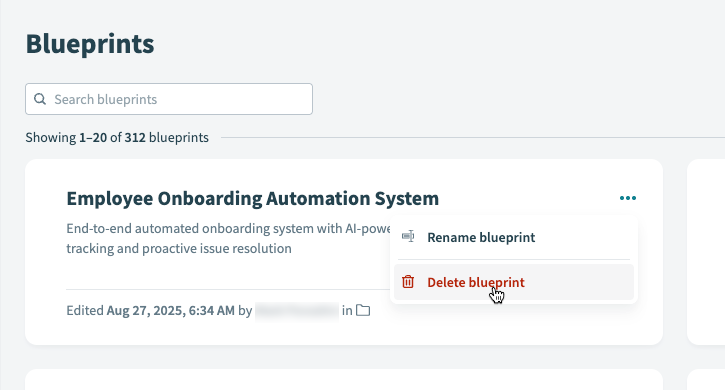 Delete blueprint
Confirm by clicking Delete blueprint again.
You can recover deleted blueprints from the trash.
DELETING BLUEPRINTS
Deleting a blueprint does not delete the recipes, connections, or other assets it references. These remain available in your workspace.
Sort and filter blueprints
You can sort blueprints by latest activity or alphabetical order. Use the search bar to filter by name or keyword.
Last updated: