OAuth 2.0 token
Workato allows API platform users to authenticate themselves using the OAuth 2.0 (Client Credentials grant) specification. Instead of a static token, the client makes API requests with access tokens obtained through the OAuth 2.0 flow. Users first obtain an access token from Workato's token request endpoint, after which they can make API calls to Workato API endpoints using the access tokens.
Set up OAuth 2.0
Create a new API client, or select an existing API client.
Select OAuth 2.0 as the authentication method.
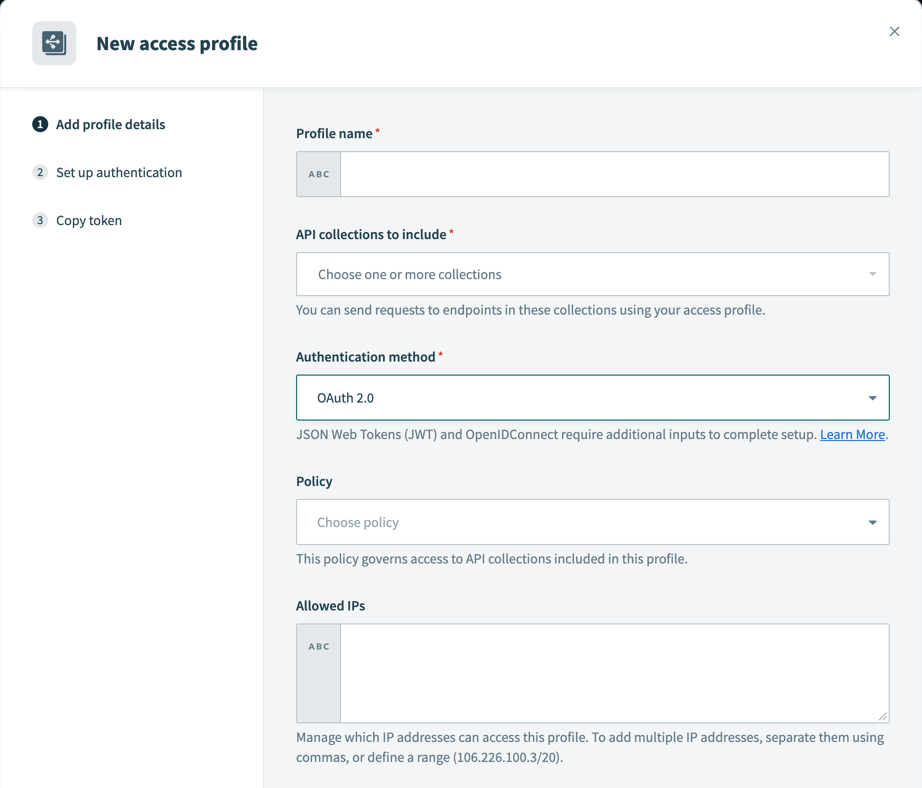 OAuth 2.0 Authentication method
Create a new API key for the client. Workato displays the Client ID and Client Secret credentials when you generate the key. Copy and save both values.
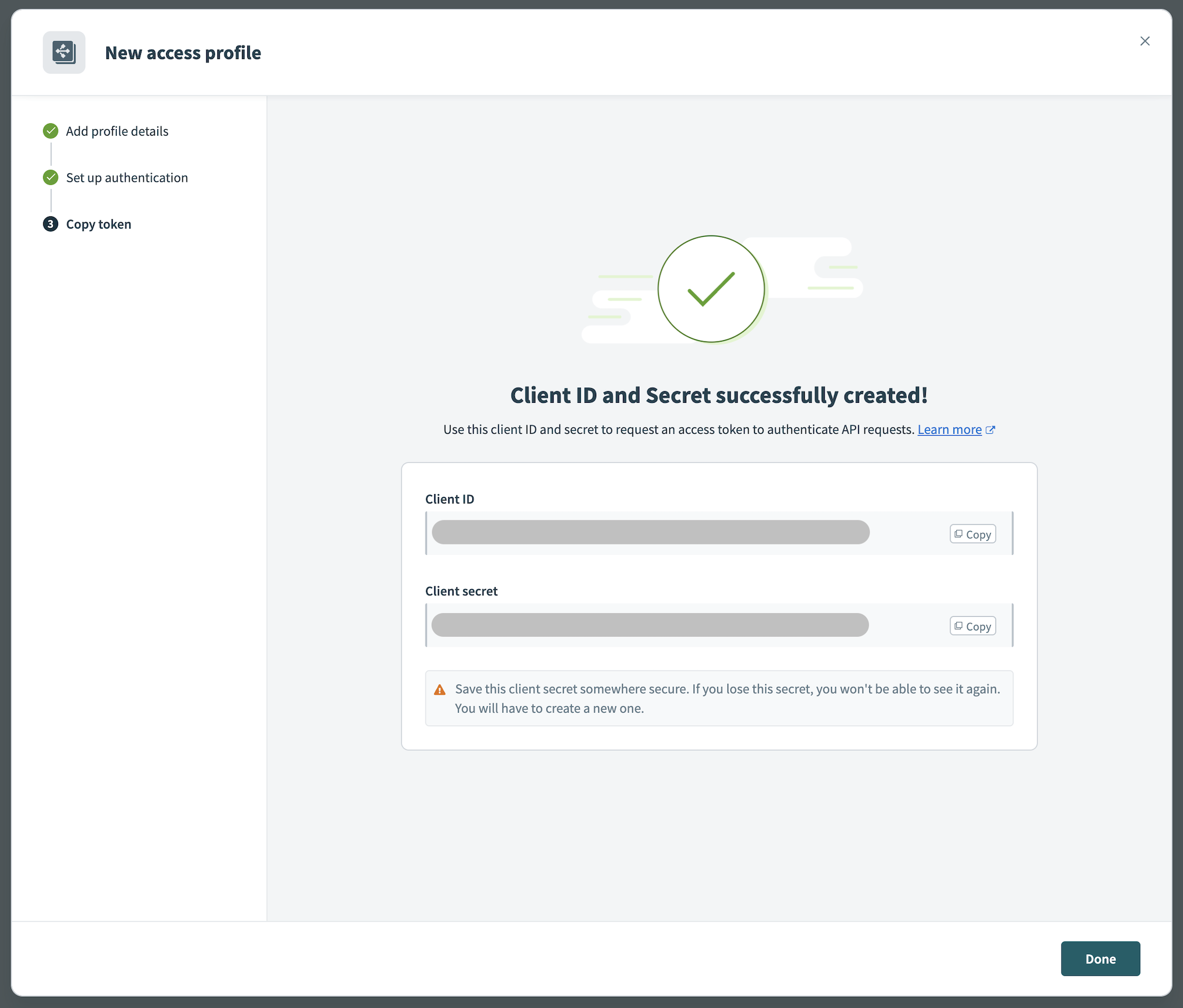 OAuth 2.0 Credentials
VIRTUAL PRIVATE WORKATO (VPW) CUSTOMERS
This feature requires configuration steps that are specific to your Virtual Private Workato (VPW) instance. If you are a VPW customer, refer to your VPW private documentation for the configuration details for your instances.
Request access token
| Parameter | Description |
|---|---|
grant_type | Required. Mechanism for authorizing the token request. Must be client_credentials. |
client_id | Required. Client ID obtained when you created the API key. |
client_secret | Required. Client secret obtained when you created the API key. |
Send a POST request to the Workato token request endpoint. The token request must contain the client credentials and grant_type parameter. The RFC recommends encoding the client credentials and sending them as Basic Auth header, using client_id and client_secret as username and password, respectively. See the following example:
POST /oauth2/token HTTP/1.1
Host: apim.workato.com
Authorization: Basic ${Base64(<CLIENT_ID>:<CLIENT_SECRET>)}
Content-Type: application/x-www-form-urlencoded

grant_type=client_credentials
Other supported formats
We recognize that some HTTP clients may not support this exact format. Workato supports the following alternatives:
CONTENT-TYPE CONSISTENCY
The Content-Type header is required and must match the payload format. Otherwise, the request will be rejected.
JSON format
POST /oauth2/token HTTP/1.1
Host: apim.workato.com
Content-Type: application/json

{
  "grant_type": "client_credentials",
  "client_id": "<CLIENT_ID>",
  "client_secret": "<CLIENT_SECRET>"
}
URL encoded body
POST /oauth2/token HTTP/1.1
Host: apim.workato.com
Content-Type: application/x-www-form-urlencoded

client_secret=<CLIENT_SECRET>&client_id=<CLIENT_ID>&grant_type=client_credentials
Multipart form
POST /oauth2/token HTTP/1.1
Host: apim.workato.com
Content-Type: multipart/form-data; boundary=----WebKitFormBoundary7MA4YWxkTrZu0gW

----WebKitFormBoundary7MA4YWxkTrZu0gW
Content-Disposition: form-data; name="grant_type"

client_credentials
----WebKitFormBoundary7MA4YWxkTrZu0gW
Content-Disposition: form-data; name="client_id"

<CLIENT_ID>
----WebKitFormBoundary7MA4YWxkTrZu0gW
Content-Disposition: form-data; name="client_secret"

<CLIENT_SECRET>
----WebKitFormBoundary7MA4YWxkTrZu0gW
You can also use tools like Postman to generate an access token.
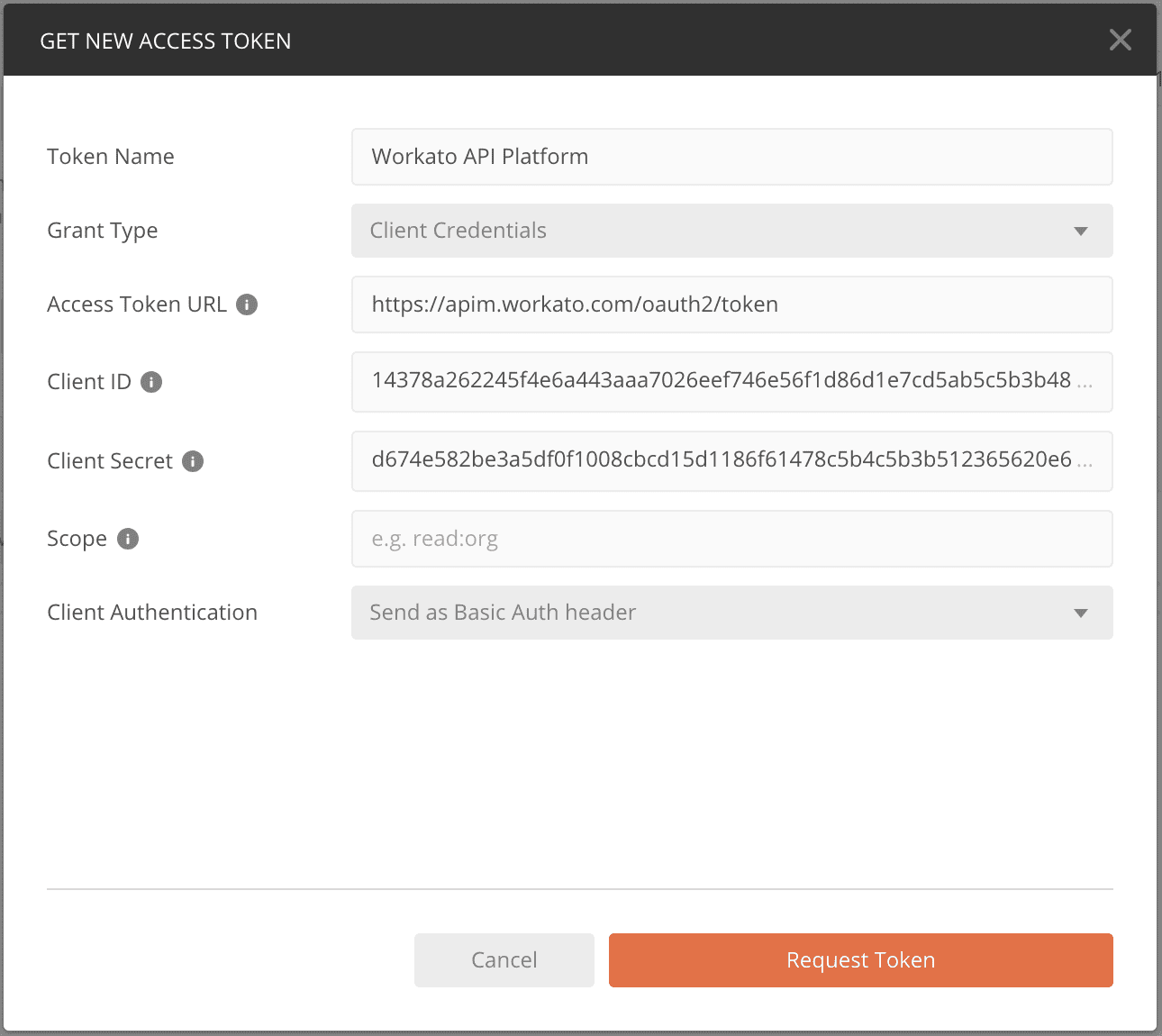 Generate access token with Postman
Token request endpoint
The following token request endpoints are available for Workato Enterprise and Self-service (Workato Free, Workato Pro, or Developer Sandbox) data centers:
Workato Enterprise customers
United States (US)
https://apim.workato.com/oauth2/token
European Union (EU)
https://apim.eu.workato.com/oauth2/token
Japan (JP)
https://apim.jp.workato.com/oauth2/token
Singapore (SG)
https://apim.sg.workato.com/oauth2/token
Australia (AU)
https://apim.au.workato.com/oauth2/token
Israel (IL)
https://apim.il.workato.com/oauth2/token
China (CN)
https://apim.workatoapp.cn/oauth2/token
South Korea (KR)
https://apim.kr.workato.com/oauth2/token
United Kingdom (UK)
https://apim.uk.workato.com/oauth2/token
Self-service (Workato Free, Workato Pro, or Developer Sandbox) users
- Self-service
https://apim.trial.workato.com/oauth2/token
For API platform owners who have enabled custom domains, the token request endpoints will follow the custom domain. For example, for the custom domain api.boltcompany.com, the token request endpoint is https://api.boltcompany.com/oauth2/token.
Obtain an OAuth 2.0 access token
Upon sending a successful access token request, Workato's authorization server will respond with a JSON object containing the following properties:
{
    "access_token": "eyJhbGciOiJIUzI1NiIsImtpZCI6ImFlZTM5NGExZTZiOGZmY2VhZGZhZmRhZDk4ZTJjZTdhNDE0YmU3NWU2ODcyNmNkOTQ3YjBjMmU3OTI1MTUzNGQiLCJ0eXAiOiJKV1QifQ.eyJzdWIiOiJhZWUzOTRhMWU2YjhmZmNlYWRmYWZkYWQ5OGUyY2U3YTQxNGJlNzVlNjg3MjZjZDk0N2IwYzJlNzkyNTE1MzRkIiwiZXhwIjoxNjQ5MzAzMDM4LCJuYmYiOjE2NDkyOTk0MzgsImlhdCI6MTY0OTI5OTQzOH0.TJySFOomyLkvyQHbvQBtm6qGj0bLDqSuUBqbkTSbXm4",
    "token_type": "bearer",
    "expires_in": 3600
}
EXPIRATION TIME
Access tokens are valid for 3600 seconds. After that, the token expires and cannot be used anymore. Clients will need to generate a new access token to continue making API requests.
Each request to /oauth2/token will generate a new access token with an independent expiration time.
Use the OAuth 2.0 access token in an API request
Use the OAuth 2.0 access token to make API calls to Workato API endpoints.
Provide the access token obtained in the authorization header, using the bearer authentication scheme. Learn more about making an API request.
curl -XGET 'https://apim.workato.com/prefix/collection/endpoint/call?email=john-doe%40acme.com'\
-H 'Authorization: Bearer <ACCESS_TOKEN>'
Refresh client credentials
The client secret can be refreshed. We recommend performing this regularly to improve your security posture. Naturally, the old client secret will no longer work after refreshing it. Additionally, previously generated access tokens will be revoked along with the client secret.
Last updated: