Coupa - Object actions
Workato provides various object actions to enable you to interact with Coupa, such as invoices, expenses, and suppliers. You can also use a wide range of Coupa objects. You can specify the object you plan to work with when using connector actions that reference objects. Refer to the Objects section for more information.
Workato offers the following object actions:
- Create object
- Update object
- Search object
- Get object by ID
- Get remit to addresses by object ID
- Add file attachment on object
Input fields for create/update actions
This step performs the selected action on the object you select. For example, select the Create object action and select Invoice as your object to create an invoice in Coupa when the step is executed in a recipe.
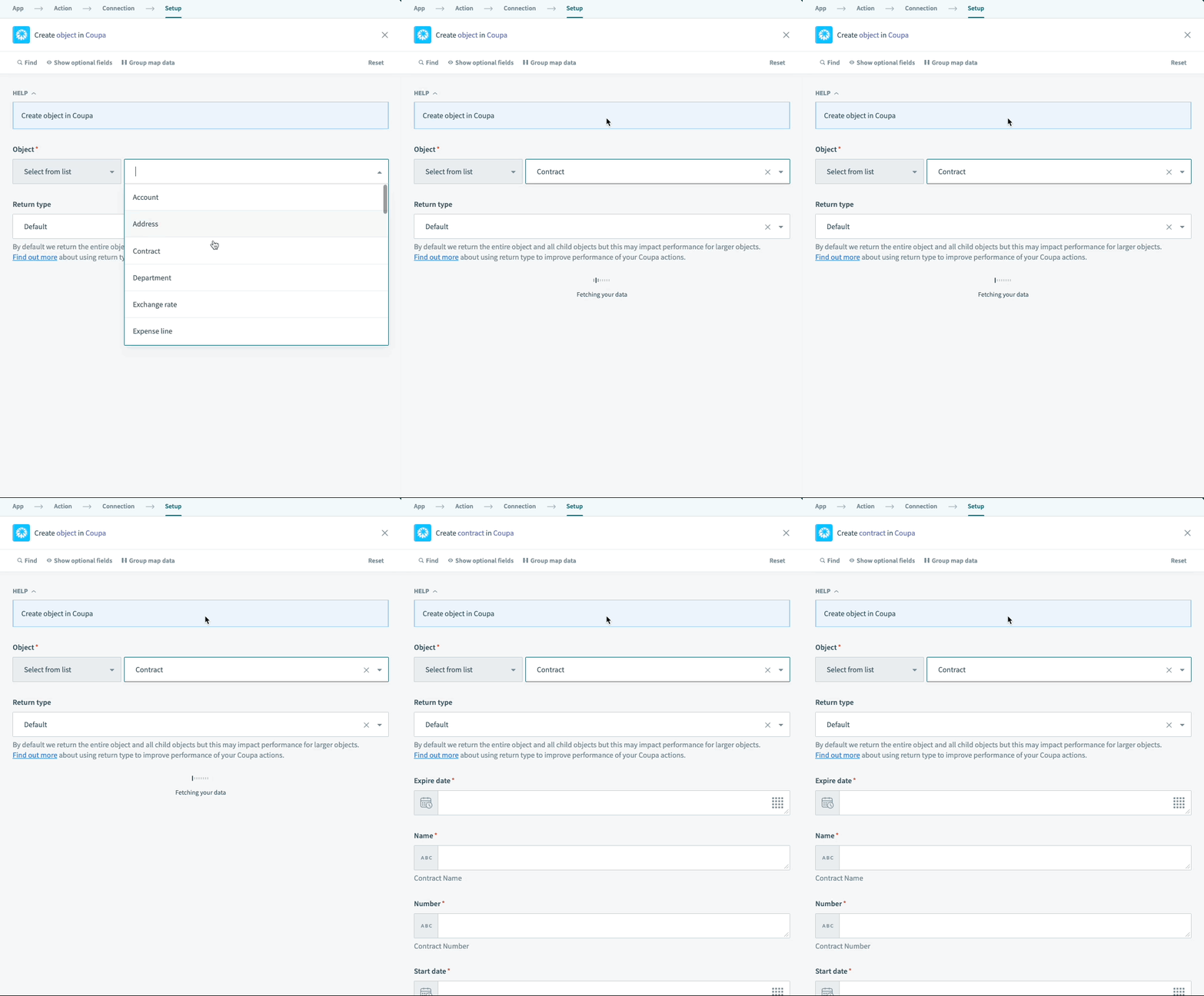 Selecting an object in the Coupa connector in the create/update object action
After you select an object, all relevant fields for that object are displayed. For example, if you choose the Create object action and select Contract as your object, the action populates with all the contract-related fields for you to complete. Use datapills from previous steps to create objects based on the data in your workflow.
AUGMENT INCOMPLETE SCHEMA WITH OVERRIDES
Workato infers the Coupa object schema based on the first response payload it receives. This response payload may not include all available fields, which results in an incomplete schema. You can use the Add/override fields feature to add the missing fields or override the inferred schema if you notice missing fields or inaccuracies in the input schema.
Required fields always appear in the recipe configuration to prevent errors. You can also find custom fields defined in your Coupa instance in the additional fields tab.
List input fields
Some Coupa object actions in Workato can accept list input lines. This is often the case in invoices and purchase orders when generating a list of invoice or purchase order lines. You can map the generated list outputs from recipe actions using the list input fields. Refer to Lists to learn more about list inputs.
Create object
This action creates an object you specify, such as a purchase order or an invoice. The dynamically generated input fields display all the required input fields to create this object successfully. Optional input fields may be hidden in the fields tab.
Workato recommends that you create custom fields in Coupa to store the record ID in the application the data is coming from. For example, any new supplier created in Coupa through an integration pulling data from NetSuite should have a custom field to store the NetSuite ID of that same supplier. You must also update the NetSuite record with the Coupa internal ID of that same action. This makes future recipes and integrations easier by explicitly defining this relationship between records in applications.
Update object
This action updates a specific object in Coupa. You must provide the Coupa object internal ID. This tells Coupa which object you plan to update. All other fields are dynamically generated.
Use the Search object action if your recipe doesn't have the internal ID of this invoice in Coupa. Refer to the Search object section for more information. The Search object action allows you to search for a specific object in Coupa based on other fields, such as Invoice number for invoices and Purchase order number for purchase orders. Use the ID datapill from the Search object output to update your object.
Output fields for create/update actions
Each create/update object action executes an action on a single object in Coupa. This action in Workato retrieves all object-related information included in custom fields. You can then use the output datapills in subsequent steps in your recipe.
Input fields for search/retrieval actions
This action performs a search in Coupa when the step is executed. It receives input and returns objects in a list of objects that match those returns.
All relevant fields for that object are displayed after you select an object. Workato supports different relevant fields for you to search using the Search object action. All other search/retrieval actions must use the internal Coupa object ID.
Search object
This action searches for objects in Coupa based on certain fields that you determine. Common fields available include the Coupa internal ID and the numbers and name associated with the object. For example, you can search invoices based on invoice numbers or suppliers based on supplier name. This is useful when you plan to update these objects but don't have their Coupa internal ID.
This action can return multiple object records. The Workato connector allows you to search in the following ways:
- Fields: Search for records using a predefined set of filters. Choose the object type and then the relevant fields are displayed.
- Query: Search for records using a free-form query. Refer to the Coupa documentation for more information.
Get object by ID
This action retrieves a specific object in Coupa. Define the type of object you're looking for and the internal ID. The object returned are similar to the results of the Search object action.
This action returns only a single unique record.
Get remit to addresses by object ID
This action allows you to select an object and an associated internal Coupa ID with that object to retrieve their remit-to addresses. This is the address you send payment to. The output for this action is in the form of a list of addresses for that specified object. This action is only supported for Suppliers.
Output fields for search/retrieval actions
Each search/retrieval action, except the Get object by ID action, returns a list of objects that match your search criteria. Use this action to search for objects in Coupa that could be related to common objects in other applications.
Input fields for Add file attachment on object action
The Add file attachment on object action allows you to create file attachments on various objects in Coupa. You must manually select the object type or map a datapill to define the object for which you plan to create an attachment in Coupa. You must also provide the internal Coupa ID of the object and the attachment contents. File attachments are supported for Contracts, Purchase Orders, Requisitions, and Invoices.
ATTACHMENT NAME
The attachment name is optional and a generic attachment name is generated by Coupa if a name isn't provided. We recommend that you give a meaningful name to your attachments.
Output fields for Add file attachment on object action
This action returns the location of the attachment created in Coupa. This location can't be used directly as a URL.
Last updated: