Configure ServiceNow as a data pipeline source
Set up ServiceNow as a data pipeline source to extract and sync records into your destination. This guide includes connection setup, pipeline configuration, supported objects, sync behavior, and known limitations.
Workato uses the ServiceNow REST Table API v2 to extract and sync data from any accessible ServiceNow table, including standard ITSM tables, CMDB tables, and custom tables.
Features supported
The following features are supported when you use ServiceNow as a data pipeline source:
| Feature | Details |
|---|---|
| Standard, CMDB, and custom table extraction | Sync any table accessible by your service account, including custom (u_*) and application-scoped (x_*) tables. Refer to Supported objects. |
| Full and incremental sync | Supports incremental sync through sys_updated_on, append-only incremental through sys_created_on, and full refresh for tables without timestamp columns. Refer to Sync modes. |
| Delete tracking | Detects deleted records through the sys_audit_delete system table and sets a soft-delete flag in the destination. Refer to Delete tracking. |
| Class Table Inheritance (CTI) | Syncs parent table columns to child tables in inherited columns mode to provide complete records without duplication. Refer to Class Table Inheritance. |
| Field-level selection | Select or deselect individual fields per table to control which data the pipeline extracts. |
| Schema drift detection and handling | Detects and applies schema changes automatically with Auto-sync new fields, or blocks changes for manual review. Refer to Schema drift. |
| Field-level data masking | Apply hash-based masking to sensitive fields during pipeline configuration. Refer to PII and sensitive data. |
Prerequisites
Complete the following requirements before you connect ServiceNow as a data pipeline source.
ServiceNow instance requirements
- A ServiceNow instance running the Istanbul release or later (required for OAuth 2.0 authentication).
- The OAuth 2.0 plugin (
com.snc.platform.security.oauth) activated on the instance if you plan to use OAuth authentication. Contact your ServiceNow administrator to verify activation. - An OAuth API endpoint for external clients registered in Application Registry if you plan to use OAuth authentication. Refer to Register an OAuth application in ServiceNow for setup steps.
Service account requirements
Create a dedicated service account for the data pipeline. The account must have REST API access enabled, and the account timezone must be set to UTC to ensure consistent timestamp handling across all synced records.
Roles and permissions
The service account must have read access to the following system tables for the connector to function:
| Table | Operation | Name | Purpose |
|---|---|---|---|
| Tables | read | sys_db_object, sys_db_object.* | Lists all tables in your instance. Used for dynamic schema discovery. Required for connection check. |
| Dictionary entry | read | sys_dictionary, sys_dictionary.* | Provides field definitions, data types, and reference targets. Used to build table schemas. Required for connection check. |
| Table rotation | read | sys_table_rotation | Optional. Identifies rotated tables that use sys_created_on as the incremental sync cursor. The connector degrades gracefully if this table is unreadable. |
| Audit delete | read | sys_audit_delete | Logs deleted records. Required for delete tracking. If unreadable, delete tracking is unavailable for all objects. |
The service account must also have read access to every table you plan to sync in the pipeline.
Some base system roles, such as admin, include access to all of these tables. Refer to the ServiceNow Base system roles page for more information. Create a custom role with the minimum required access if you don't plan to use a base system role.
Create a custom role
Create a custom role with the minimum access the data pipeline requires if your organization doesn't allow broad admin access for integration accounts.
Create a role in your ServiceNow instance and assign it a name that reflects its association with the data pipeline, such as Workato Pipeline. Refer to the ServiceNow documentation for more information on creating roles.
Assign the following access control rules to the role:
| Table | Type | Operation | Name |
|---|---|---|---|
| Tables | record | read | sys_db_object, sys_db_object.* |
| Dictionary entry | record | read | sys_dictionary, sys_dictionary.* |
| Table rotation | record | read | sys_table_rotation (optional — enables rotated table detection) |
| Audit delete | record | read | sys_audit_delete (enables delete tracking) |
SECURITY ADMIN ROLE REQUIRED
Only a user with the security_admin role can create or edit access control rules. Confirm your permissions with your ServiceNow administrator. Refer to the ServiceNow documentation on elevated privilege roles for more information.
Add read access control rules for every ServiceNow table you plan to sync in the pipeline. For example, to sync incidents, add a read rule for the incident table.
Assign the custom role to the service account you plan to use for the data pipeline connection.
CREATE INDEX
Create an index on the sys_updated_on column for any large table you plan to sync incrementally. This improves query performance during extraction. Contact your ServiceNow administrator to add the index.
Supported connection types
Workato supports the following authentication methods for ServiceNow data pipelines:
- Username/Password: Connect with your ServiceNow login credentials. No OAuth configuration required.
- OAuth 2.0 (Authorization Code Grant): Recommended for production use. Requires the OAuth 2.0 plugin on your instance. You authenticate through a browser-based flow and Workato manages token refresh automatically.
- OAuth 2.0 (Password Grant): Alternative OAuth flow for service accounts and headless integrations. You provide your Client ID, Client secret, Username, and Password directly. Suitable when interactive browser authentication is impractical.
The OAuth methods require you to register an OAuth application in ServiceNow and provide the Client ID and Client secret during connection setup. Username/Password authentication does not require OAuth configuration.
Register an OAuth application in ServiceNow
Create an OAuth API endpoint for external clients in your ServiceNow instance before you connect to Workato. Refer to the ServiceNow OAuth setup documentation for detailed instructions.
Set the Redirect URL to https://www.workato.com/oauth/callback when you register the application.
After you register the application, copy the Client ID and Client secret values from the application record. Store these securely. You must provide them during Workato connection setup.
INVALID REFRESH TOKEN ERROR
You may see an invalid_request or invalid refresh token error when your ServiceNow OAuth 2.0 connection expires. This behavior occurs because ServiceNow limits how long a refresh token remains valid. You must reauthenticate the connection when the token expires.
You can adjust the Refresh Token Lifetime in your ServiceNow OAuth client configuration. Go to your ServiceNow instance, open System OAuth > Application Registry, select your Workato OAuth client, and review the Refresh Token Lifetime value. The default duration is 100 days. Access tokens expire after 30 minutes by default. Workato handles access token refresh automatically, but you must reauthorize the connection manually when the refresh token expires.
Connection setup
Complete the following steps to connect to ServiceNow as a data pipeline source.
Connect with Username/Password
Select Create > Connection.
Search for ServiceNow and select it as your app.
Provide a name for your connection in the Connection name field.
Use the Location drop-down menu to select the project where you plan to store the connection.
Use the Authentication type drop-down menu to select Username/Password.
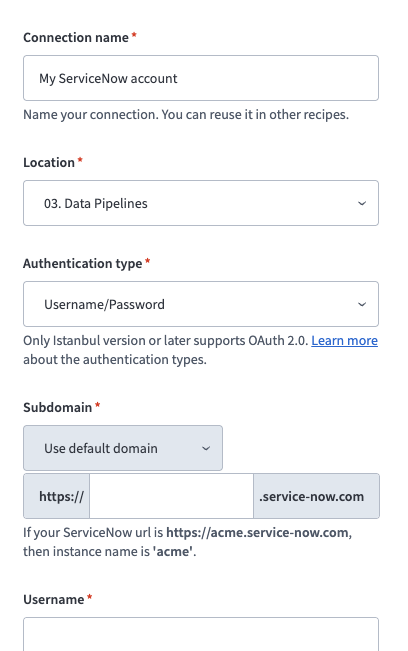 Configure your ServiceNow connection
Enter your ServiceNow instance name in the Subdomain field. For example, if your ServiceNow URL is https://acme.service-now.com, enter acme.
Use the Subdomain drop-down menu to switch from Use default domain to Use custom domain if your organization uses a custom URL (for example, https://servicenow.acme.com).
Enter the Username and Password for the ServiceNow service account.
Optional. Select a Custom OAuth profile to restrict the connection to specific scopes.
Click Connect.
Connect with OAuth 2.0
Select Create > Connection.
Search for ServiceNow and select it as your app.
Provide a name for your connection in the Connection name field.
Use the Location drop-down menu to select the project where you plan to store the connection.
Use the Authentication type drop-down menu to select OAuth 2.0.
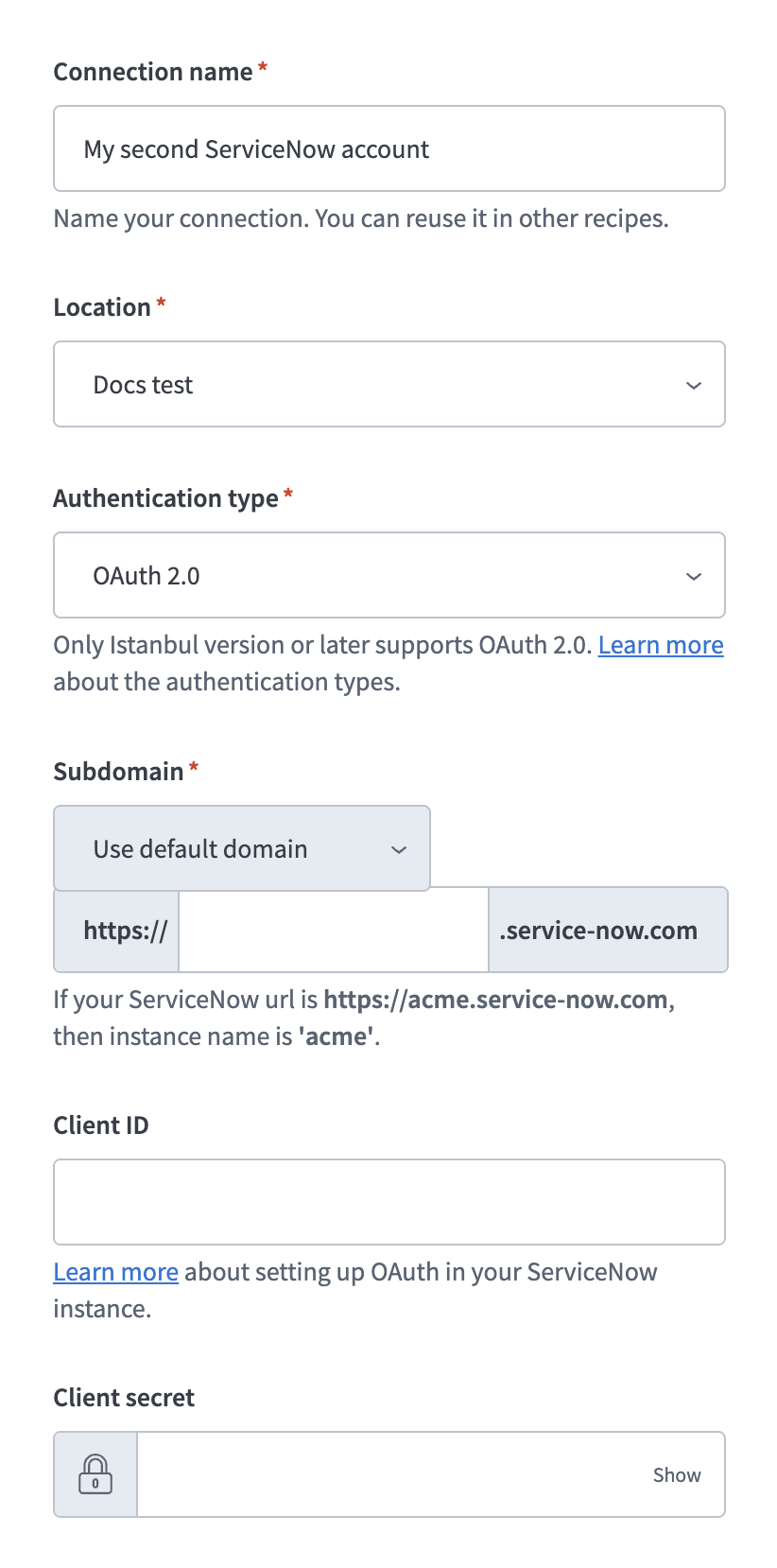 Configure your ServiceNow connection
Enter your ServiceNow instance name in the Subdomain field. For example, if your ServiceNow URL is https://acme.service-now.com, enter acme.
Use the Subdomain drop-down menu to switch from Use default domain to Use custom domain if your organization uses a custom URL (for example, https://servicenow.acme.com).
Enter the Client ID and Client secret from the OAuth application you registered in ServiceNow.
Optional. Select a Custom OAuth profile to restrict the connection to specific scopes.
Select Connect and enter your ServiceNow account credentials when prompted.
Select Allow to grant Workato access to your ServiceNow instance. Workato displays a success message when the connection is established.
Connect with Password grant
Select Create > Connection.
Search for ServiceNow and select it as your app.
Provide a name for your connection in the Connection name field.
Use the Location drop-down menu to select the project where you plan to store the connection.
Use the Authentication type drop-down menu to select Password grant.
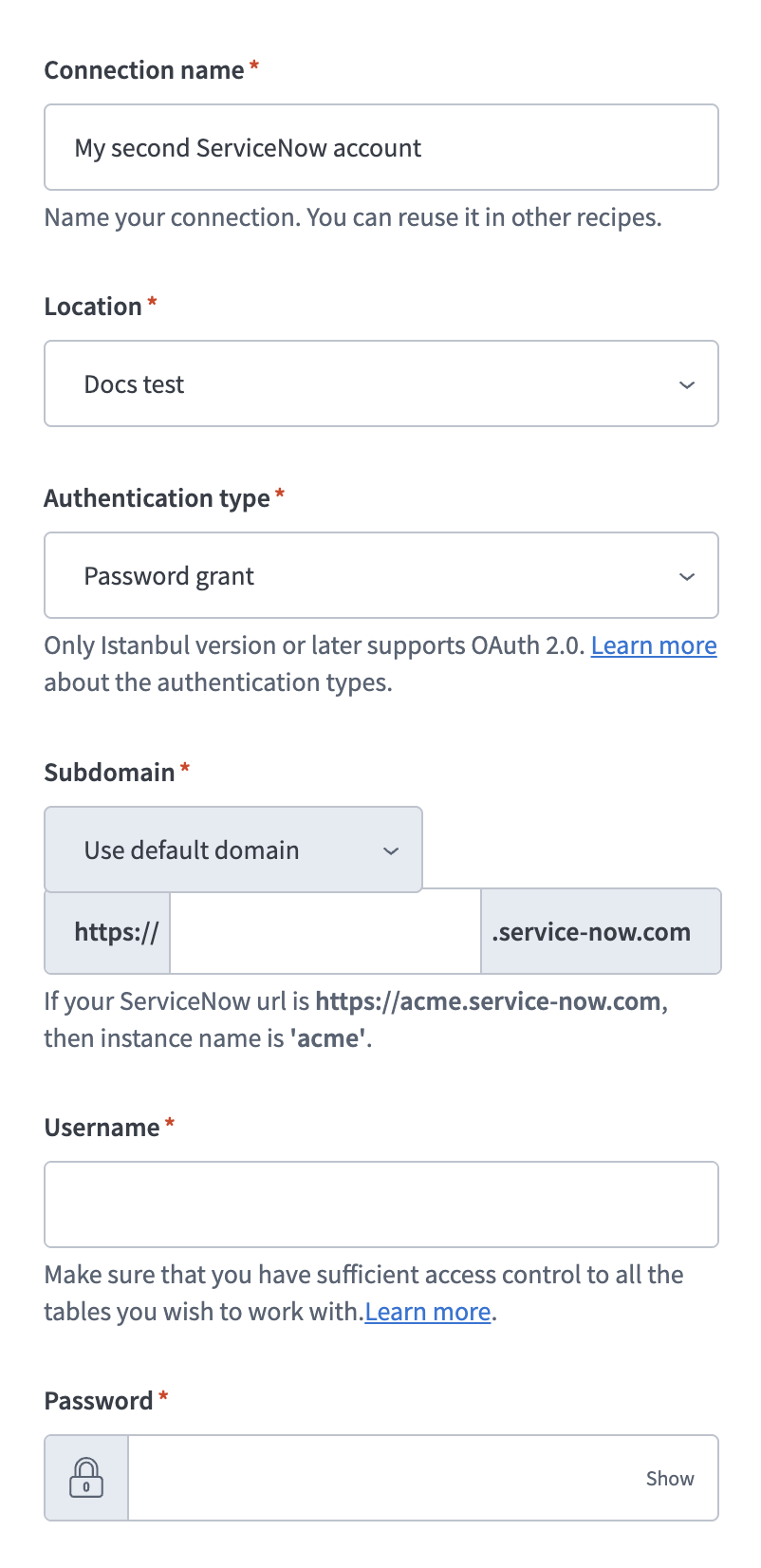 Configure your ServiceNow connection
Enter your ServiceNow instance name in the Subdomain field. For example, if your ServiceNow URL is https://acme.service-now.com, enter acme.
Use the Subdomain drop-down menu to switch from Use default domain to Use custom domain if your organization uses a custom URL (for example, https://servicenow.acme.com).
Enter the Username and Password for the ServiceNow service account.
Enter the Client ID and Client secret from the OAuth application you registered in ServiceNow.
Optional. Select a Custom OAuth profile to restrict the connection to specific scopes.
Click Connect.
Configure the pipeline
Complete the following steps to configure ServiceNow as your data pipeline source:
Select Create > Data pipeline or press C+I.
Enter a name for the data pipeline in the Data pipeline name field.
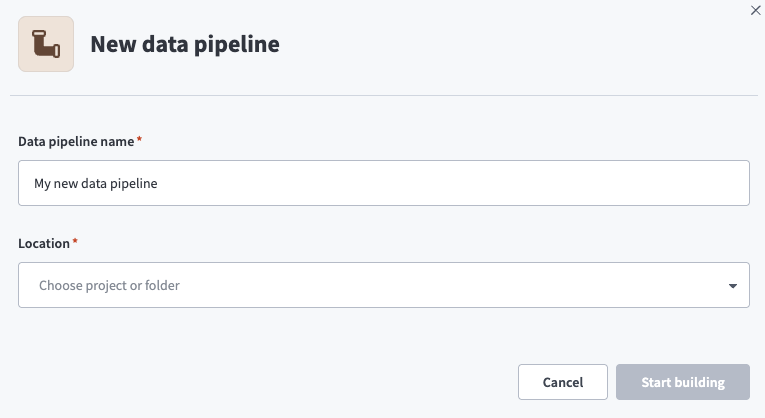 Data pipeline setup
Use the Location drop-down menu to select the project where you plan to store the data pipeline.
Click Start building.
Click the Extract new/updated records from source app trigger. This trigger defines how the pipeline retrieves data from the source application.
Use the Your Connected Source Apps drop-down menu to select ServiceNow.
Choose the ServiceNow connection you plan to use for this pipeline. Alternatively, click + New connection to create a new connection.
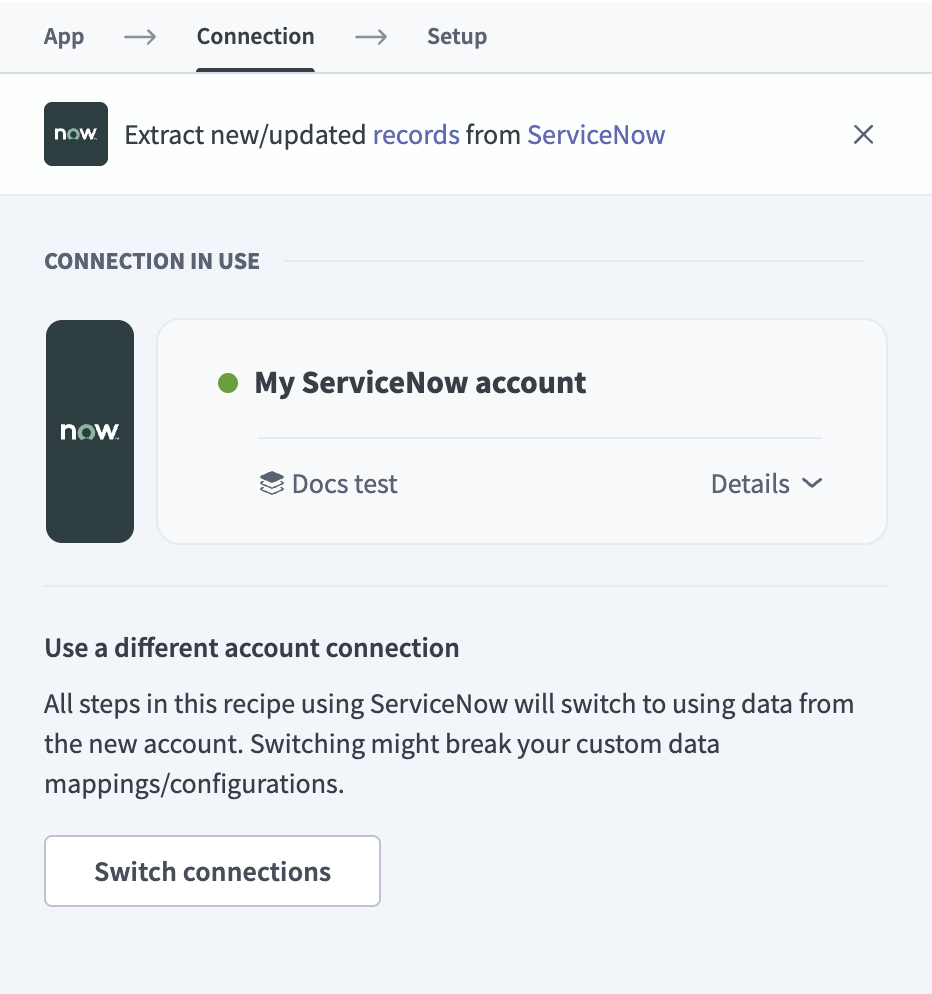 Choose a ServiceNow connection
Use the Inherited columns drop-down menu to configure how the pipeline handles Class Table Inheritance (CTI). Select Include inherited columns to merge parent table fields into child table schemas, or select Exclude inherited columns to include only fields defined directly on each table. Refer to Class Table Inheritance for more information.
Click Add object to open the Add new objects panel. Workato dynamically discovers all tables accessible by your service account and displays them as a searchable list. Each table displays its label and table name.
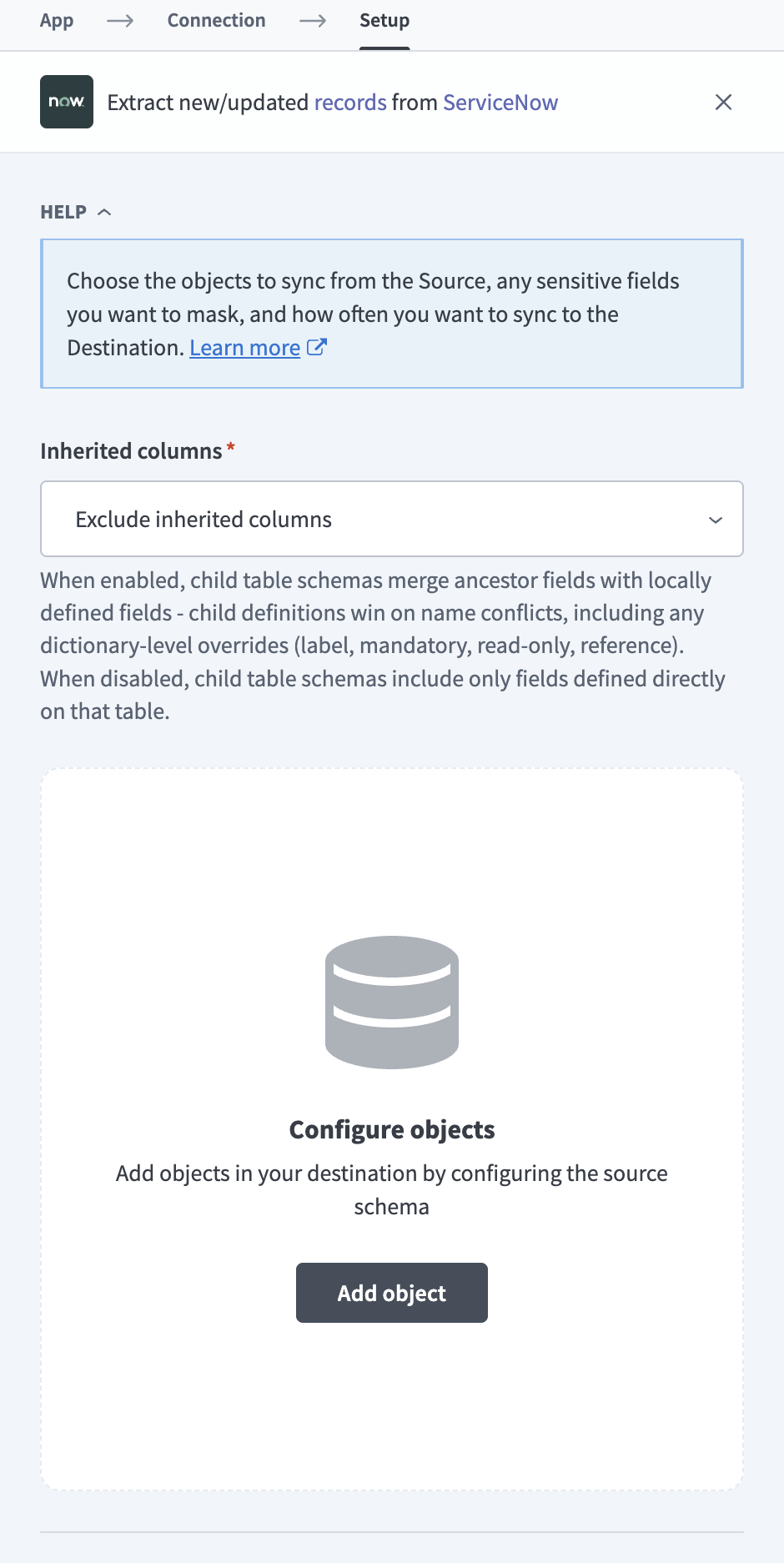 Add object
Search or browse the list of available ServiceNow tables. Select the tables you plan to sync and click Add.
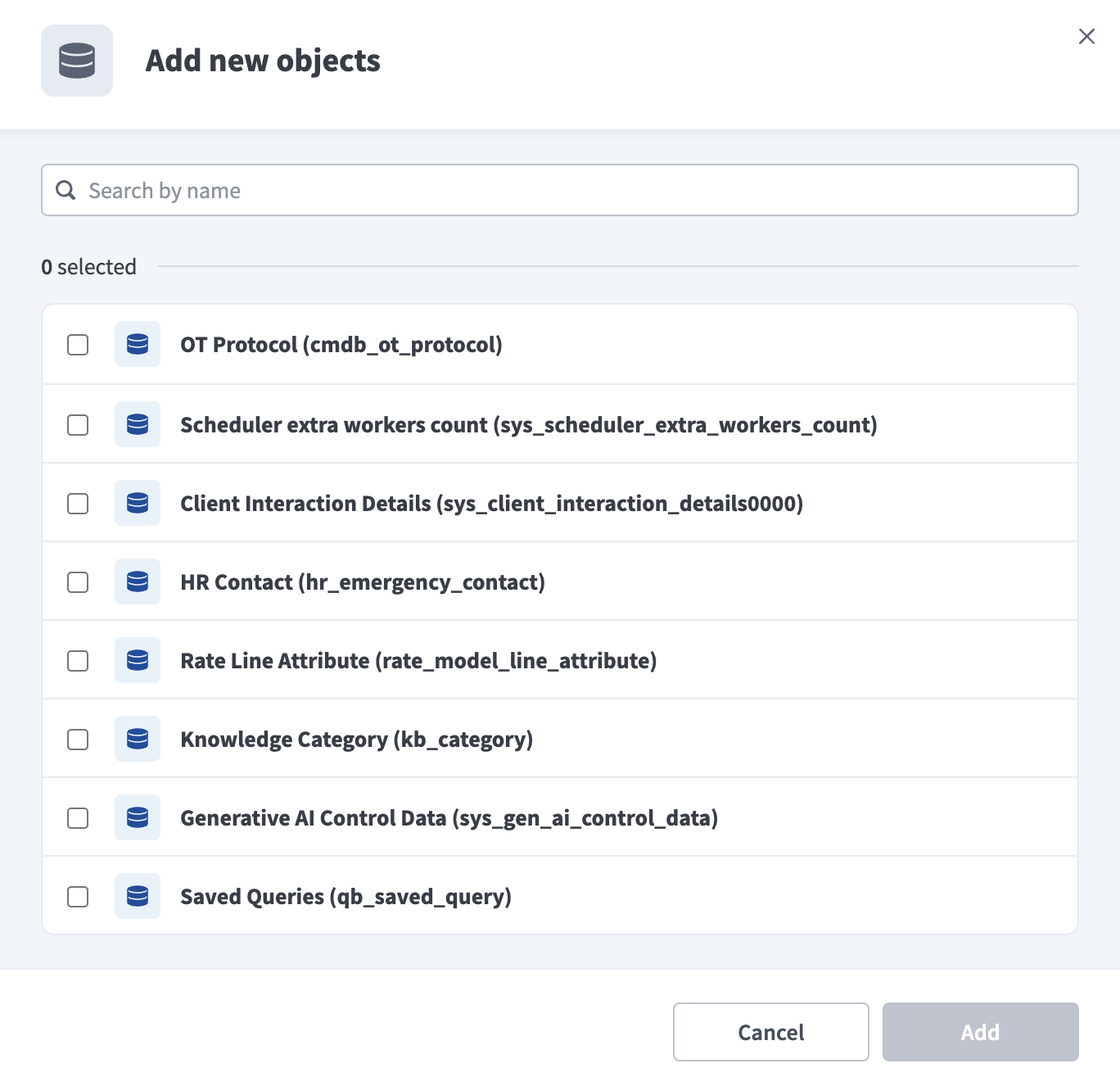 Add new objects
FULL REFRESH OBJECTS
Objects that lack a sys_updated_on or sys_created_on column require a full refresh on each sync run.
Review and customize the schema for each selected table. Expand any table to view its fields. Keep all fields selected to extract all available data, or deselect specific fields to exclude them from data extraction and schema replication. Use the masking option on individual fields to apply hash-based masking to sensitive data.
Click Add object again to add more tables. Repeat this step to include multiple ServiceNow tables in your pipeline.
Use the Choose how to handle schema changes drop-down menu to select a schema drift handling option:
- Auto-sync new fields: Automatically detects and syncs new fields added in the source.
- Block new fields: Keeps the schema fixed after the pipeline starts. You must add new fields manually. This option may cause the destination to fall out of sync if the source schema updates.
Refer to Schema replication and schema drift management for more information.
Workato recommends Auto-sync new fields because ServiceNow instances frequently add custom columns.
Choose either a standard time-based schedule or define a custom cron expression in the Frequency field. This determines how often the pipeline syncs data from ServiceNow to the destination.
Supported objects
ServiceNow stores all data in tables accessible through the REST Table API. The pipeline supports syncing any table accessible by your service account. This includes standard ITSM tables, CMDB tables, HR tables, custom tables, and application-scoped tables. A typical ServiceNow instance exposes over 1,000 tables, though the exact number varies based on the modules installed.
Workato dynamically discovers available tables at connection setup time by querying ServiceNow system dictionary tables (sys_db_object, sys_dictionary).
If you don't see a specific table in the object wizard, verify that your service account has read access to that table and that the related ServiceNow module is installed on your instance.
The following tables list commonly synced ServiceNow objects. All custom objects (u_* prefix) and application-scoped objects (x_* prefix) are also supported through dynamic schema discovery.
ITSM and task management
The following objects support IT service management workflows, including incident, problem, and change management. Objects marked "Extends task" inherit columns from the task parent table through Class Table Inheritance.
| Object | Sync mode | Incremental key | Notes |
|---|---|---|---|
incident | Incremental | sys_updated_on | Core incident management table. Extends task. |
task | Incremental | sys_updated_on | Parent table for all task-based records. In inherited columns mode, child table records are excluded. |
change_request | Incremental | sys_updated_on | Change management. Extends task. |
problem | Incremental | sys_updated_on | Problem management. Extends task. |
sc_request | Incremental | sys_updated_on | Service catalog requests. Extends task. |
sc_req_item | Incremental | sys_updated_on | Requested items within service catalog requests. Extends task. |
sc_task | Incremental | sys_updated_on | Catalog fulfillment tasks. Extends task. |
sla | Incremental | sys_updated_on | SLA definitions. |
task_sla | Incremental | sys_updated_on | SLA records attached to tasks. Critical for SLA breach reporting. |
User and organization
The following objects store user accounts, groups, organizational structure, and location data. These objects are commonly used as reference targets for JOIN operations in the destination.
| Object | Sync mode | Incremental key | Notes |
|---|---|---|---|
sys_user | Incremental | sys_updated_on | User records. Contains PII fields. |
sys_user_group | Incremental | sys_updated_on | Groups and teams. |
sys_user_grmember | Incremental | sys_updated_on | User-to-group membership (junction table). |
core_company | Incremental | sys_updated_on | Company and organization records. |
cmn_location | Incremental | sys_updated_on | Physical locations. |
cmn_department | Incremental | sys_updated_on | Departments. |
cost_center | Incremental | sys_updated_on | Cost centers. |
CMDB
The following objects store Configuration Management Database (CMDB) records. The cmdb_ci table is the root of the CI class hierarchy. All other CI objects extend it through Class Table Inheritance.
| Object | Sync mode | Incremental key | Notes |
|---|---|---|---|
cmdb_ci | Incremental | sys_updated_on | Root configuration item table. Class Table Inheritance root for all CI types. |
cmdb_ci_server | Incremental | sys_updated_on | Server CIs. Extends cmdb_ci. |
cmdb_ci_computer | Incremental | sys_updated_on | Computer CIs (desktops and laptops). Extends cmdb_ci. |
cmdb_ci_service | Incremental | sys_updated_on | Business service CIs. Extends cmdb_ci. |
cmdb_ci_app_server | Incremental | sys_updated_on | Application server CIs. Extends cmdb_ci_server. |
cmdb_ci_database | Incremental | sys_updated_on | Database CIs. Extends cmdb_ci. |
cmdb_ci_network_adapter | Incremental | sys_updated_on | Network adapter CIs. |
cmdb_rel_ci | Incremental | sys_updated_on | CI relationship table. Critical for CMDB topology mapping. |
Service catalog and knowledge
The following objects store service catalog definitions and knowledge base content.
| Object | Sync mode | Incremental key | Notes |
|---|---|---|---|
sc_cat_item | Incremental | sys_updated_on | Service catalog item definitions. |
kb_knowledge | Incremental | sys_updated_on | Knowledge base articles. |
HR and asset management
The following objects support HR case management, IT asset tracking, and contract management. HR objects require the HR Service Delivery module.
| Object | Sync mode | Incremental key | Notes |
|---|---|---|---|
sn_hr_core_case | Incremental | sys_updated_on | HR cases. Extends task. Requires the HR Service Delivery module. Contains sensitive employment data. |
alm_asset | Incremental | sys_updated_on | IT asset records. |
alm_hardware | Incremental | sys_updated_on | Hardware assets. Extends alm_asset. |
contract | Incremental | sys_updated_on | Contract records. |
Workflow
The following objects track workflow execution history within ServiceNow.
| Object | Sync mode | Incremental key | Notes |
|---|---|---|---|
wf_context | Incremental | sys_updated_on | Workflow execution contexts. |
wf_activity | Incremental | sys_updated_on | Workflow activities within a context. |
Metrics
The following object stores metric tracking data used for SLA and OLA measurements.
| Object | Sync mode | Incremental key | Notes |
|---|---|---|---|
metric_instance | Incremental | sys_updated_on | Metric tracking instances for SLA and OLA measurements. High volume. |
System and audit tables
The following table stores system-level data, including activity logs, email records, and audit trails.
HIGH-VOLUME SYSTEM OBJECTS
The objects in this group aren't excluded from the object wizard. They appear alongside all other discoverable objects. However, syncing these objects dramatically increases sync duration and API usage.
These tables tend to have very high record volumes and may significantly increase sync duration and API usage.
| Object | Sync mode | Incremental key | Notes |
|---|---|---|---|
sys_journal_field | Incremental (append-only) | sys_created_on | Work notes and comments across all tables. Very high volume. Available but not recommended for most pipelines. |
sys_email | Incremental (append-only) | sys_created_on | Email records. Contains PII. Available but not recommended for most pipelines. |
sys_audit | Incremental (append-only) | sys_created_on | Field-level audit trail. Extremely high volume. Not recommended for sync unless required for compliance. |
sys_audit_delete | Incremental (append-only) | sys_created_on | Delete audit trail. Used internally by the connector for delete tracking. Not recommended for sync to destination. |
Custom and application-scoped tables
All custom tables (tables with the u_ prefix) and application-scoped tables (tables with the x_ prefix) are discoverable. Workato determines the sync mode for each custom table automatically based on whether sys_updated_on or sys_created_on columns exist.
Sync modes
ServiceNow data pipelines support incremental sync, full refresh, and delete tracking. The connector determines the sync mode for each object automatically based on the columns available in the source table.
Incremental sync
An incremental sync extracts only new and updated records on each pipeline run. Most ServiceNow objects use the sys_updated_on column as the incremental sync key.
Objects with sys_created_on but not sys_updated_on support append-only incremental sync. The pipeline captures new records but does not detect updates to existing records. The sys_journal_field and sys_email objects use this mode because their records are immutable after creation.
Full refresh
A full refresh extracts all records from the source object on every pipeline run, ordered by sys_id. Use full refresh for objects that lack both sys_updated_on and sys_created_on columns. The connector assigns this mode automatically.
Rotated tables
ServiceNow uses table rotation for high-volume system tables. The pipeline detects rotated tables through the sys_table_rotation system table and uses sys_created_on as the incremental sync cursor instead of sys_updated_on, because rotated records are immutable after creation.
Delete tracking
Delete tracking detects records deleted from the source and emits a delete marker row in the destination. This mode is available for objects that use sys_updated_on as their incremental sync key. Rotated and append-only objects don't support delete tracking in this release.
Each delete marker row contains sys_id, _workato_is_deleted set to true, and sys_updated_on set to the deletion timestamp. All other fields are null. Delete tracking requires the service account to have read access to sys_audit_delete.
Class Table Inheritance
ServiceNow uses Class Table Inheritance (CTI) where child tables extend parent tables. For example, the incident, problem, and change_request tables all extend the task parent table. A record in incident also exists in task.
Inherited columns mode
The pipeline syncs parent table columns to child tables so each child table contains the complete record when inherited columns mode is enabled. Records that belong to child tables are excluded from the parent table to prevent data duplication. The sys_class_name field on each record identifies which child table it belongs to.
Child tables contain only their own columns when inherited columns mode is disabled. The parent table contains all records, including those from child tables, when inherited columns mode is disabled. This results in partial records in child tables and duplicate records across parent and child tables.
Key inheritance hierarchies include the following:
taskis the parent ofincident,problem,change_request,sc_request,sc_req_item,sc_task,sn_hr_core_casecmdb_ciis the parent ofcmdb_ci_server,cmdb_ci_computer,cmdb_ci_service,cmdb_ci_app_server,cmdb_ci_databasealm_assetis the parent ofalm_hardware,alm_consumable,alm_license
Limitations
Review the following limitations when you configure a ServiceNow data pipeline:
Null sys_id records
ServiceNow tables occasionally contain records where sys_id is null. This can occur when records are corrupt or when row-level ACL policies prevent the service account from reading a specific record. The pipeline skips null sys_id records during extraction and doesn't load them to the destination. If you notice missing records, verify that your service account has the appropriate ACL permissions for the affected table.
sys_updated_on isn't updated on all modifications
The sys_updated_on field isn't guaranteed to update on every record modification. XML imports, direct database operations, bulk API operations, and import sets that skip business rules may bypass this field. Records modified through these paths may not appear in incremental syncs. Run a full refresh to re-extract all data for the affected objects if you suspect missing records.
File attachments not supported
The pipeline extracts structured table data only. File attachments aren't supported in this release.
PII and sensitive data
ServiceNow tables contain personally identifiable information (PII) and sensitive data. The following table identifies key objects and fields that may require field-level data masking.
| Object | Sensitive fields |
|---|---|
sys_user | first_name, last_name, email, phone, mobile_phone, home_phone, street, city, state, zip, country, employee_number, manager |
incident | description, close_notes, comments_and_work_notes (may contain PII in free-text fields), caller_id |
sys_journal_field | value |
sn_hr_core_case | subject_person, description (HR case details containing sensitive employment data) |
sys_email | from, recipients, subject, body |
cmdb_ci | ip_address, mac_address, serial_number, asset_tag |
core_company | name, street, phone, website |
sys_audit | oldvalue, newvalue |
| Custom tables | May contain arbitrary sensitive data depending on your instance configuration. |
Use Workato's built-in field-level data masking (hash option) for any fields that contain PII or sensitive data in your pipeline configuration. Organizations operating under GDPR, HIPAA, or SOC 2 requirements should review all synced fields and apply masking as needed.
Last updated: