Configure SurveyMonkey as a data pipeline source
Set up SurveyMonkey as a data pipeline source to extract surveys, survey structure, responses, answers, and collectors into your destination.
Use this guide to set up a connection, configure your pipeline, add objects, review sync behavior, and understand known limitations.
Features supported
The following features are supported when you use SurveyMonkey as a pipeline source:
- Cloud connectivity: Connect to SurveyMonkey over HTTPS through the API host for your account's data center. On-prem agents aren't required.
- Full sync and incremental sync: Supports full sync for every object and incremental sync for
surveys,survey_responses, andcollectors. Refer to Sync modes for more information. - Object-level selection: Select from SurveyMonkey objects, including surveys, survey structure, responses, answers, and collectors, to sync as separate tables in your destination. Refer to Supported objects for the full list.
- Delete tracking: Detect deleted records on full-sync objects and deleted questions in
survey_questions. Refer to Delete tracking for more information. - Schema drift detection and handling: Detect and apply schema changes automatically with Auto-sync new fields, or keep the schema fixed with Block new fields.
- Field-level data protection: Hash or replicate sensitive fields as is before the data reaches your destination.
- Configurable sync frequency: Schedule syncs on a time-based interval or with a cron expression. The minimum supported interval is
15minutes.
Prerequisites
Connecting SurveyMonkey as a data pipeline source requires:
- A SurveyMonkey account. You need a paid plan to sync
survey_responsesandresponse_answers. Refer to Responses require a paid plan for more information. - SurveyMonkey account credentials to authorize the OAuth 2.0 connection. Workato recommends using an admin account to avoid permission issues.
- A custom OAuth profile, if your SurveyMonkey account is hosted in a data center outside the United States.
REQUIRED SCOPES
The SurveyMonkey app behind a custom OAuth profile must grant the users_read, surveys_read, collectors_read, responses_read, and responses_read_detail scopes. Add the contacts_read scope to sync your account's contact field labels as the column labels for the collector_recipients custom field columns.
Supported connection types
SurveyMonkey data pipelines support OAuth 2.0 authentication. You sign in to SurveyMonkey and authorize Workato to read your account data. Use a custom OAuth profile to authorize through your own SurveyMonkey app or to connect to a data center outside the United States.
DRAFT APPS AREN'T SUITABLE FOR DATA PIPELINES
SurveyMonkey limits apps in draft state to a low number of API requests per day. A data pipeline makes many requests on every run, so a custom OAuth profile based on a draft app is likely to reach the daily limit and fail. Refer to the SurveyMonkey Request and Response Limits guide for more information.
Connect to SurveyMonkey
Complete the following steps to connect SurveyMonkey as a data pipeline source:
Connect to SurveyMonkey
Click Create > Connection or press C twice.
Search for SurveyMonkey and select it as your app.
Provide a Connection name that identifies which SurveyMonkey account Workato is connected to.
Use the Location drop-down menu to select the project or folder where you plan to store the connection.
Use the Datacenter drop-down menu to select the data center that hosts your SurveyMonkey account. Defaults to United States. You must use a custom OAuth profile to connect to a data center outside of the United States.
Optional. Use the Custom OAuth profile drop-down menu to select a custom OAuth profile for your connection. All requests to the app use the profile you specify here.
Click Connect to open the SurveyMonkey authorization window.
Sign in to SurveyMonkey with your account credentials. We recommend you use an admin account to avoid permission roadblocks.
Read the terms of service and click Authorize to complete the connection setup.
VIEW ANSWERS REQUIREMENT
Select View answers along with responses during authorization to retrieve survey response answers. The Completed survey response trigger, the Send survey invite via email and wait for response action, and the survey_responses and response_answers data pipeline objects require this permission.
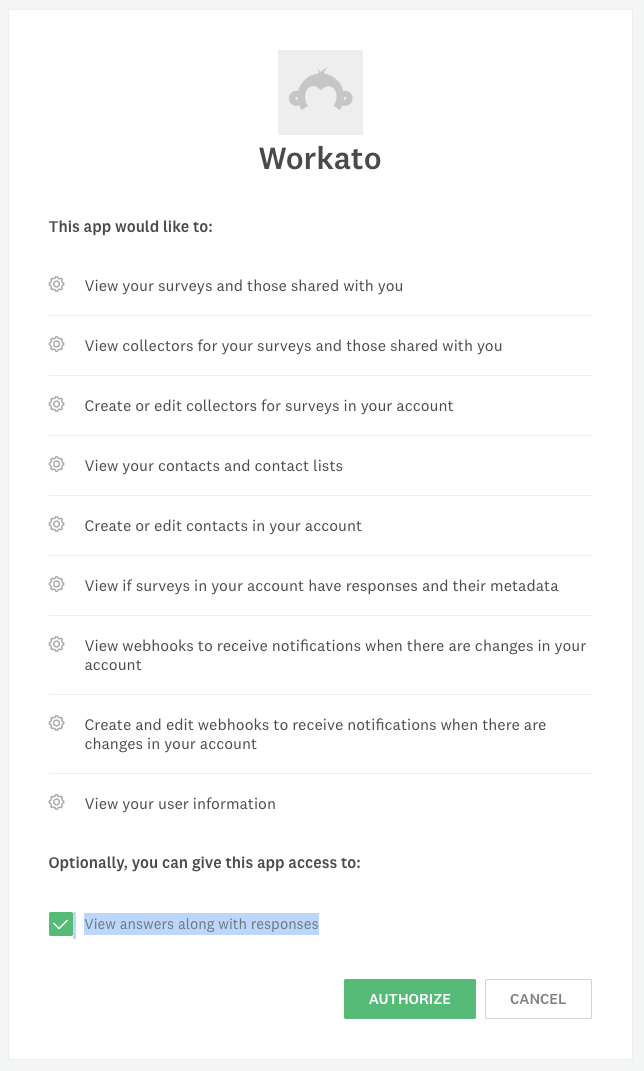 Authorize Workato to access your SurveyMonkey account.
Configure the pipeline
Complete the following steps to configure SurveyMonkey as your data pipeline source:
Select Create > Data pipeline or press C+I.
Enter a name for the data pipeline in the Data pipeline name field.
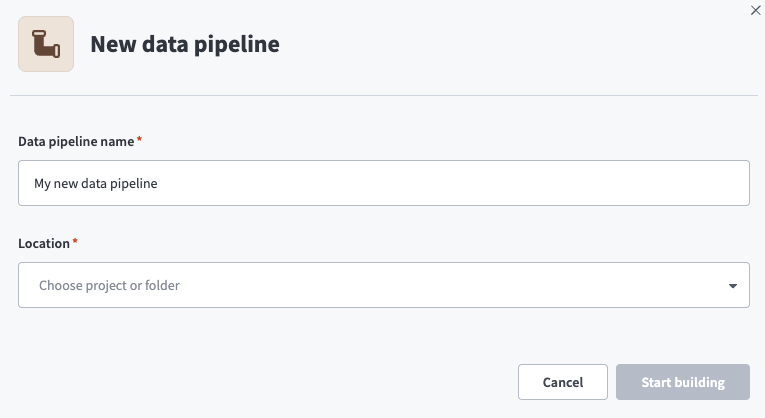 Data pipeline setup
Use the Location drop-down menu to select the project where you plan to store the data pipeline.
Click Start building.
Click the Extract new/updated records from source app trigger. This trigger defines how the pipeline retrieves data from SurveyMonkey.
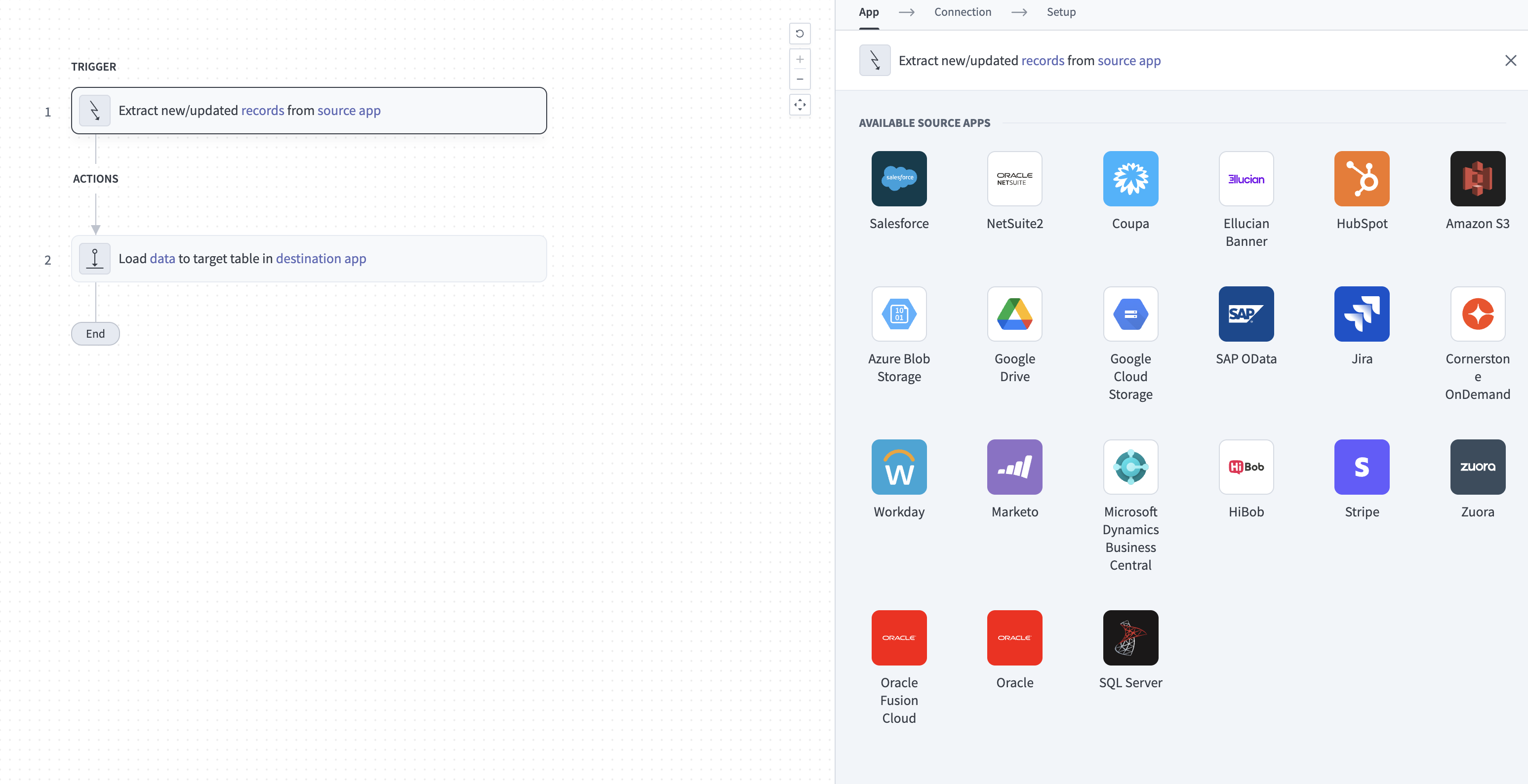 Configure the Extract new/updated records from source app trigger
Use the Your Connected Source Apps drop-down menu to select SurveyMonkey.
Choose the SurveyMonkey connection you plan to use for this pipeline. Alternatively, click + New connection to create a new connection.
Click Add object to open the Add new objects panel.
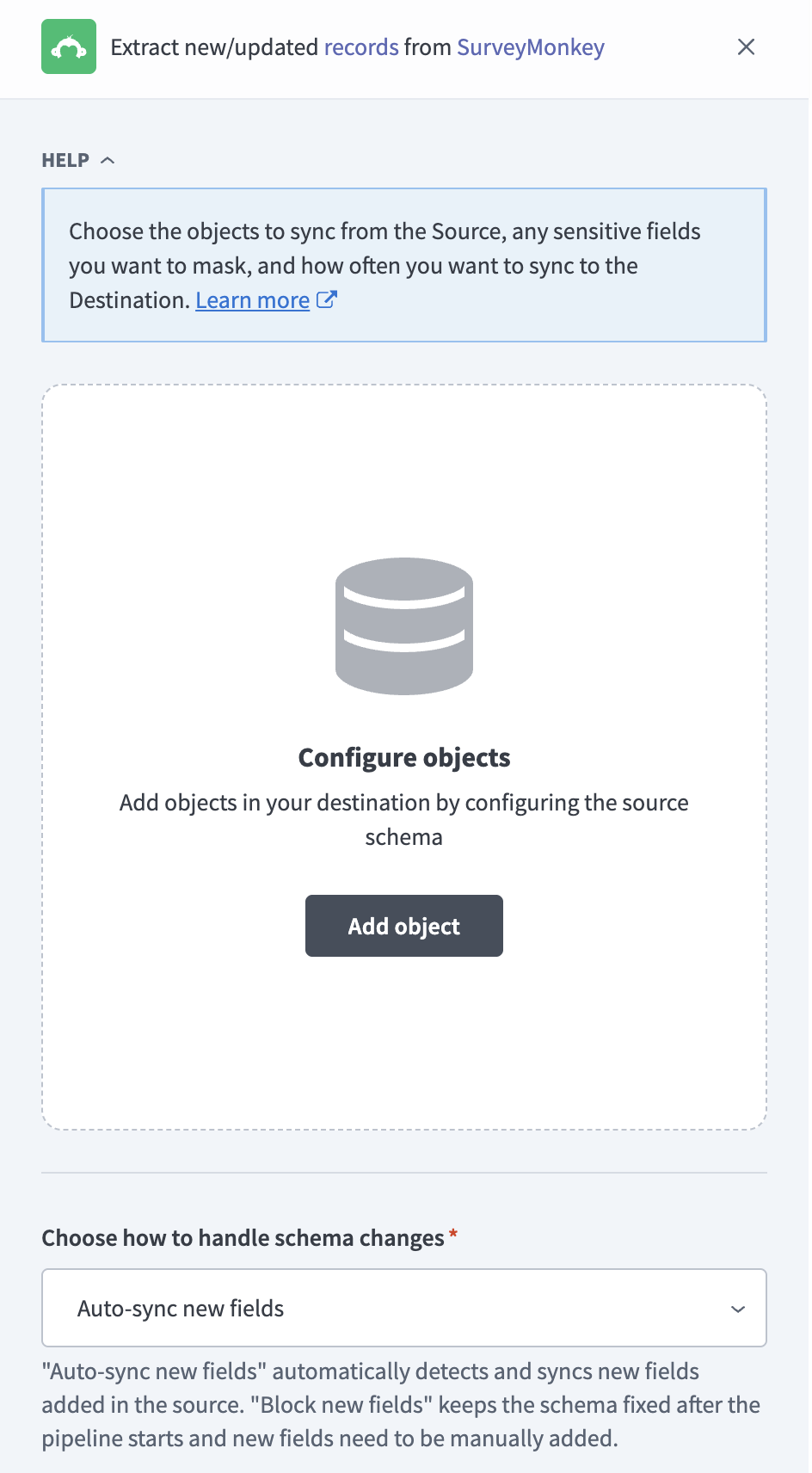 Add objects
Search or browse the list of available SurveyMonkey objects, select the objects you plan to sync, and click Add.
FULL SYNC ONLY OBJECTS
Objects without an incremental cursor, such as survey_pages and response_answers, are labeled Full sync in the object list and always sync in full. Refer to Sync modes for more information.
Optional. Click the gear icon next to an object to open its sync mode settings. Use the Sync mode drop-down menu to select Full sync or Incremental, then click Save. Only surveys, survey_responses, and collectors support incremental sync.
Review and customize the schema for each selected object. The pipeline automatically fetches an object's schema when you select it. This ensures the destination matches the source.
Expand an object to view associated fields. Keep all fields selected to extract all available data, or deselect specific fields to exclude them from data extraction and schema replication.
Optional. Configure field-level data protection by expanding an object and choosing how to handle each field:
- Replicate as is: Data values at the source replicate identically to the destination.
- Hash: Hash sensitive data values in the field before syncing to your destination.
Workato recommends hashing personally identifiable information (PII) and other sensitive fields. Refer to Sensitive data handling for a list of fields that commonly contain PII.
Click Add object again to add more objects. Repeat this step to include additional SurveyMonkey objects in your pipeline.
Use the Choose how to handle schema changes drop-down menu to select a schema drift handling option:
- Auto-sync new fields: Automatically detects and syncs new fields added in the source.
- Block new fields: Keeps the schema fixed after the pipeline starts. You must add new fields manually. This option may cause the destination to fall out of sync if the source schema updates.
Refer to Schema replication and schema drift management for more information.
Optional. Enter a value in the Concurrency limit field to cap the number of concurrent operations. Leave the field blank to use the default limit set by Workato. The maximum value is 100.
Choose either a standard time-based schedule or define a custom cron expression in the Frequency field. This determines how often the pipeline syncs data from SurveyMonkey to the destination.
SurveyMonkey objects apply the start date differently. Refer to The start date applies differently by object for more information.
Supported objects
SurveyMonkey data pipelines sync data from the SurveyMonkey REST API v3. The following tables list the supported objects, grouped by category. Each object syncs as a separate table in your destination.
Surveys and survey structure
| Object | Sync mode(s) | Delete tracking |
|---|---|---|
surveys | Full sync, incremental | No |
survey_pages | Full sync | Yes |
survey_questions | Full sync | Yes |
question_options | Full sync | Yes |
question_sub_rows | Full sync | Yes |
survey_pages, survey_questions, question_options, and question_sub_rows store each survey's structure. question_options contains the answer choices for each question, and question_sub_rows contains the rows of matrix and other multi-row questions.
Responses
survey_responses and response_answers require a paid SurveyMonkey plan. Refer to Responses require a paid plan for more information.
| Object | Sync mode(s) | Delete tracking |
|---|---|---|
survey_responses | Full sync, incremental | No |
response_answers | Full sync | Yes |
response_answers contains one row per answer in each response. Join response_answers to question_options on question_id and choice_id (matched to question_options.id) to resolve a selected answer to its choice text.
Collectors
| Object | Sync mode(s) | Delete tracking |
|---|---|---|
collectors | Full sync, incremental | No |
collector_recipients | Full sync | Yes |
collector_recipients contains recipients of email and SMS collectors only. Other collector types, such as web links and embedded surveys, have no recipient list.
Sync modes
SurveyMonkey data pipelines support full sync and incremental sync. You configure the sync mode per object when you add it to your pipeline.
Full sync
A full sync reads all available records from SurveyMonkey for the selected object. Survey structure objects, response_answers and collector_recipients, use full sync because SurveyMonkey doesn't expose a last-modified timestamp for them.
Every SurveyMonkey object has a primary key, so a full sync merges into the existing destination table, and records deleted in SurveyMonkey stay in the table.
Incremental sync
An incremental sync extracts only records that changed since the last successful run, using the date_modified field as the cursor:
surveys: Extracts surveys modified since the last run.survey_responses: Tracks a separate cursor for each survey and checks every survey on each run, so new and edited responses sync even when the parent survey hasn't changed.collectors: Extracts collectors modified since the last run.
Each incremental run rereads the last 5 minutes of the previous window to capture records modified at the window boundary. Your destination's upsert behavior deduplicates rereads by primary key.
Delete tracking
SurveyMonkey's API doesn't report deleted surveys, responses, or collectors. Workato tracks deletions in the following ways:
- Full-sync objects: Workato marks records that no longer appear in SurveyMonkey as deleted in your destination. Deletions are detected on the next full sync, not at the time of deletion.
survey_questions: SurveyMonkey keeps deleted questions in the API and sets theirvisiblefield tofalse. Workato sets_workato_is_deletedtotruefor these questions.- Incremental objects: Deletions aren't detected for
surveys,survey_responses, orcollectors. An incremental run only pulls changed records, so deleted records remain in your destination.
Schema and data type handling
The following considerations apply to schema and data types when you sync data from SurveyMonkey:
Nested fields
Nested and variable-shape fields sync as JSON objects stored in your destination's native JSON type, such as VARIANT in Snowflake. These fields include headings, answers, and validation on survey_questions, and metadata, logic_path, page_path, and custom_variables on survey_responses. Workato doesn't flatten these into individual columns. custom_variables keys vary by survey.
Timestamps
SurveyMonkey returns survey timestamps without a time zone offset and response and collector timestamps with an offset. Workato syncs date_created and date_modified on surveys as timestamps without a time zone, in UTC. The same fields on survey_responses and collectors sync as timestamps with a time zone.
Response answer keys
response_answers uses a composite primary key of response_id, question_id, row_id, col_id, choice_id, and other_id. Key columns that don't apply to a question type contain an empty string, not null. For example, row_id and col_id are empty for single-choice questions.
Collector recipient custom fields
collector_recipients includes six custom field columns, custom_field_1 through custom_field_6, that map to the first six contact custom fields in your SurveyMonkey account. Workato labels these columns with your account's custom field labels when the connection grants the contacts_read scope.
Synthetic columns
Workato adds the following synthetic column to the survey_questions destination table:
| Column | Type | Purpose |
|---|---|---|
_workato_is_deleted | Boolean | Set to true when SurveyMonkey marks the question as deleted (visible is false). |
Sensitive data handling
SurveyMonkey objects can contain personally identifiable information (PII). The following objects commonly contain sensitive fields:
| Object | Sensitive fields |
|---|---|
survey_responses | first_name, last_name, email_address, ip_address, custom_value, custom_variables, metadata |
response_answers | text |
collectors | email |
collector_recipients | email, phone_number, custom_field_1 through custom_field_6 |
response_answers.text contains free-text answers to open-ended questions, which can include names, contact details, and other personal information. custom_variables can contain any values you pass to a survey, and metadata includes the respondent's referral URL and user agent.
Use the Hash option in field-level data protection during pipeline configuration to protect PII before it reaches your destination. Refer to the Configure the pipeline steps for more information.
Limitations
The following limitations apply when you use SurveyMonkey as a data pipeline source:
Responses require a paid plan
SurveyMonkey provides response details only to accounts on a paid plan. Syncs of survey_responses and response_answers fail on a free plan account. Remove these objects from your pipeline or upgrade your SurveyMonkey plan.
The start date applies differently by object
The When first started, this pipeline should pick up records from date filters SurveyMonkey objects in the following ways:
- Survey objects:
surveys,survey_pages,survey_questions,question_options, andquestion_sub_rowsinclude only surveys modified after this date. Survey structure objects exclude older surveys even if those surveys still receive responses. - Responses and collectors:
survey_responsesandcollectorsapply this date to each record'sdate_modifiedvalue on the first incremental sync. A full sync of these objects ignores the start date and extracts all records. - Answers and recipients:
response_answersandcollector_recipientsignore the start date and extract all records on every run.
Leave this field blank to sync the structure of every survey.
Surveys with more than 1,000 questions
SurveyMonkey doesn't return the structure of surveys with more than 1,000 questions. Workato skips the survey structure objects for these surveys and continues the sync. The surveys record for the survey still syncs.
Preview responses aren't synced
survey_responses and response_answers exclude test responses submitted from a collector preview link or the survey builder's preview. All other responses sync, including manually entered and edited responses.
Collector recipient data
collector_recipients doesn't include recipient first and last names, because SurveyMonkey doesn't return them in the recipient list. Custom field values sync only for the first 6 contact custom fields in your account.
Minimum sync frequency
The minimum supported sync interval is 15 minutes.
Last updated: