Example transformation maps
The following examples show complete transformation maps for common integration patterns. Add null handling to these examples for production data that may contain missing fields.
- Reshape a list: Change the shape of items in a list.
- Aggregate with group-by: Group a list by a key and compute a count or total for each group instead of copying each row.
- Chain a transformation with filter and sort: Break a multi-stage transformation into separate nodes.
- Flatten a nested array: Produce one row for each element of an array nested inside another array.
- Join two arrays: Correlate two lists on a shared key.
Reshape a list
Use this pattern when an inbound system sends a list of items in one shape and the target system requires each item in a different shape, such as different field names and a computed value.
In this example, an e-commerce order webhook sends order lines with sku, qty, and unit_price. The ERP requires items with product_code, quantity, and a per-line amount.
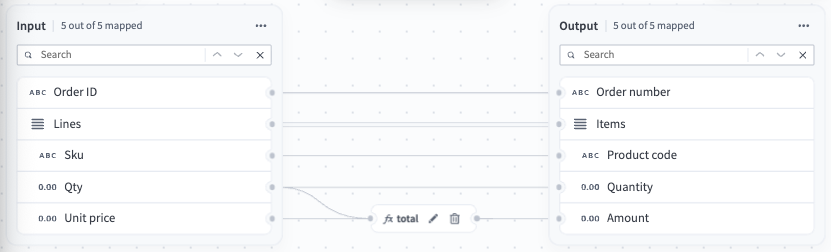 Reshape a list
This reshape doesn't require a formula for the whole list. order_id, sku, and qty pass through unchanged under new names, so only the computed amount field needs a formula.
The total node multiplies the quantity by the unit price to produce the per-line total. It returns a single scalar value, so the node doesn't require an output schema. An Integer multiplied by a Number returns a Number.
Aggregate with group-by
Use this pattern when you require a summary rather than a row-for-row copy, such as grouping a list by a key and computing a count or total for each group.
In this example, the same order lines carry a category. The target requires one row for each category with the number of lines and the summed amount.
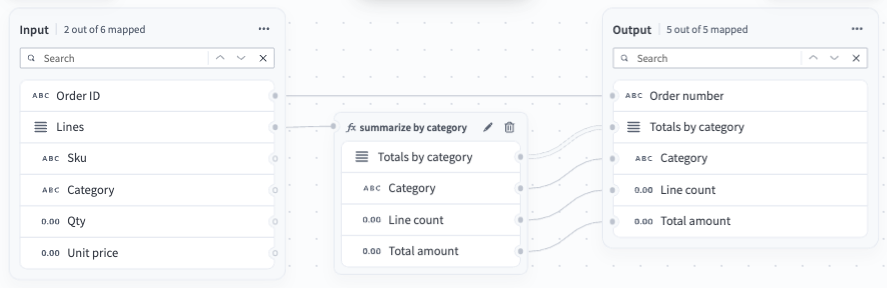 Aggregate with group-by
order_id connects directly to order_number unchanged, the same as a one-to-one rename. Only lines feeds the summarize by category node, since it's the only field the aggregation needs.
The summarize by category node does the aggregation in three stages. group_by collects the lines into one bucket for each category, which produces a map rather than a list. entries restates that map as a list of key and value pairs so you can iterate over it. map_by then returns one object for each pair, containing the category name, the number of lines in the group, and the sum of the line totals.
The node returns a list of objects, so it requires an output schema. Refer to When to define an output schema.
Chain a transformation with filter and sort
Use this pattern when a transformation runs in stages. Chaining keeps each stage in its own node, so you can read the transformation from the canvas and test each stage on its own.
In this example, order lines carry a sku, qty, and unit_price. The map computes a per-line total, filters out lines below a threshold, and sorts what remains by total, each stage in its own node.
 Chain a transformation with filter and sort
The map uses three nodes, each handling one stage:
line_totalscomputes a per-line total by multiplyingqtybyunit_price.filterkeeps only lines with a total of 20 or more.sortorders the remaining lines from highest to lowest total.
Each node references the previous node's output by the upstream formula name, such as _.line_totals_lines and _.filter_filtered. Every node in the chain returns a list, so each one requires its own output schema. Refer to When to define an output schema.
Four lines produce four totals, the filter drops A-100 at 19, and the sort puts D-410 at 120 ahead of C-050 at 45 and B-220 at 40.
You can write all three stages as a single formula in one node, which produces the same result and requires only one output schema. Chain the stages instead to test each one on its own, or when a single formula becomes difficult to read.
Flatten a nested array
Use this pattern when the values you need are in an array nested inside another array. You can't access inner arrays directly, so the transformation starts at the top-level array and flattens down to the inner elements. Refer to Arrays for more information.
In this example, lines is a list of objects, and each line carries its own units list of objects. The target requires one row for each unit, with the sku of the line it came from.
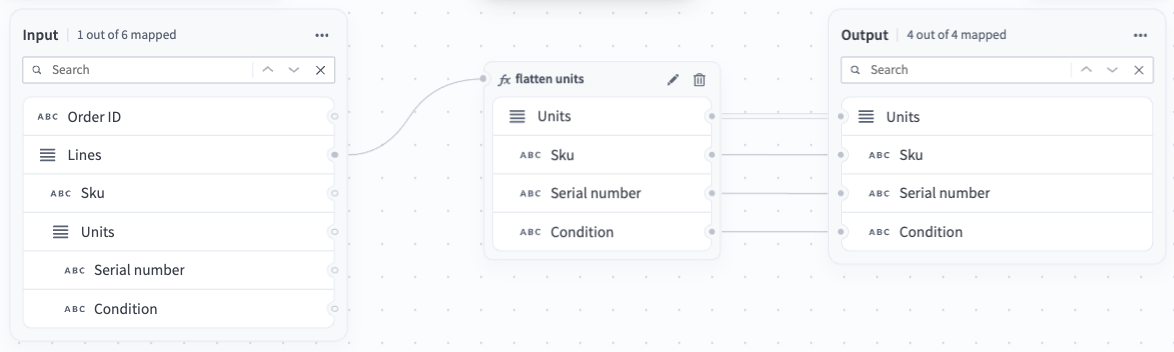 Flatten a nested array
The flatten units node walks each line, then walks that line's units list, and flattens the result into a single list. Two lines containing three units in total produce three rows.
The formula reads sku from the parent line while it processes each unit, which is how every row keeps a value from the line it came from. Without this, the node still flattens, but the result contains only the unit fields, with no indication of which line each unit came from.
The node returns a list of objects, so it requires an output schema. Refer to When to define an output schema.
Join two arrays
Use this pattern when the payload contains two lists that you must correlate on a shared key, such as order lines and a product catalog.
In this example, lines carries a sku and a quantity, and products carries the name and price for each sku. The target requires one enriched item for each line.
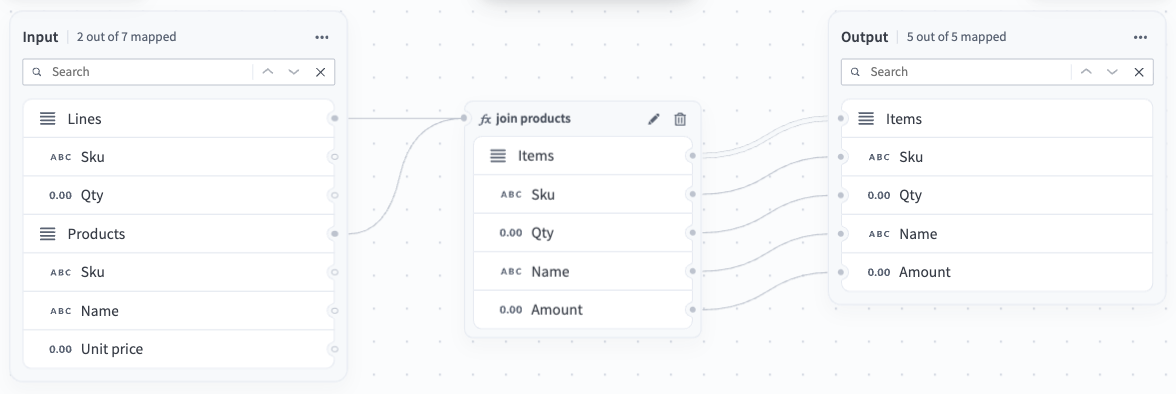 Join two arrays
The join products node builds a lookup from products once, keyed by sku, before it processes any lines. Each line then reads its product directly from that lookup, rather than searching the product list again for every line. The node returns one item for each line, combining the quantity from the line with the name of the matched product and an amount computed from its price.
The node returns a list of objects, so it requires an output schema. Refer to When to define an output schema.
Every sku in lines must exist in products. The mapping fails with a Cannot access field error when it looks up a key that doesn't exist, so add a fallback if the source data can contain unmatched keys. If products can contain the same sku more than once, the lookup keeps the last entry for that key and discards the earlier ones.
Last updated: