Accessing on-prem
Enterprises deploy applications and databases within a restricted network to exercise greater control over security and privacy. Firewalls monitor and regulate the flow of data between these private environments and the public internet. Therefore, applications and data hosted on these private IT environments are typically not accessible to cloud services like Workato.
Using Workato's on-prem agent, we can create a secure connection from within your private IT environment to connect to Workato cloud. This allows you to fully integrate your hybrid cloud or multicloud architecture while maintaining control over security.
FEATURE AVAILABILITY
On-prem connectivity is available on specific pricing plans. Refer to your pricing plan and contract to learn more.
How it works
The following is a conceptual model of Workato's on-prem agent and how it interacts with databases and applications behind the firewall.
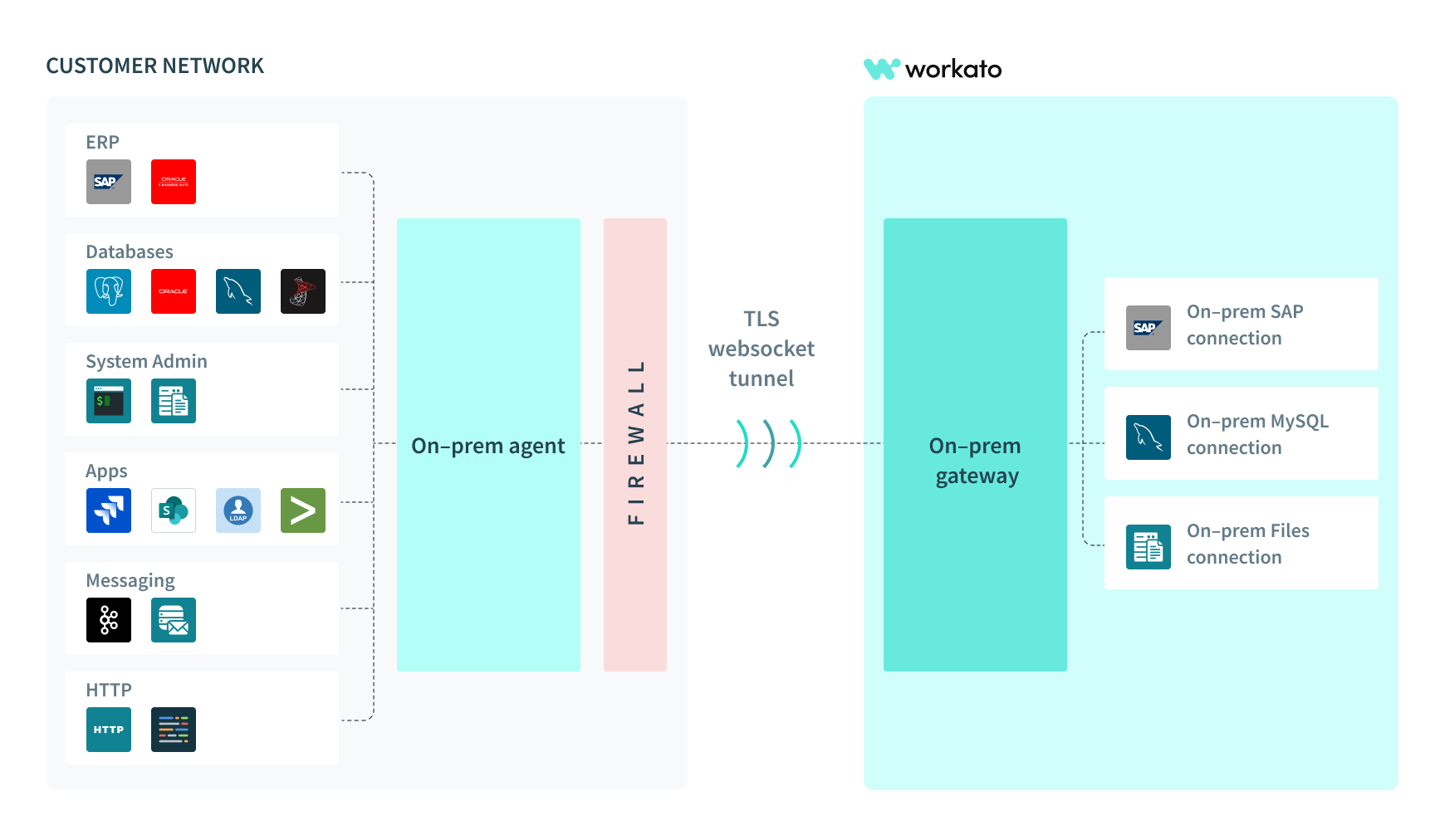 Conceptual model for on-prem agent and connector
On-prem agents can also be installed into logical groups, called on-prem groups, to achieve High Availability and Load Balancing capabilities.
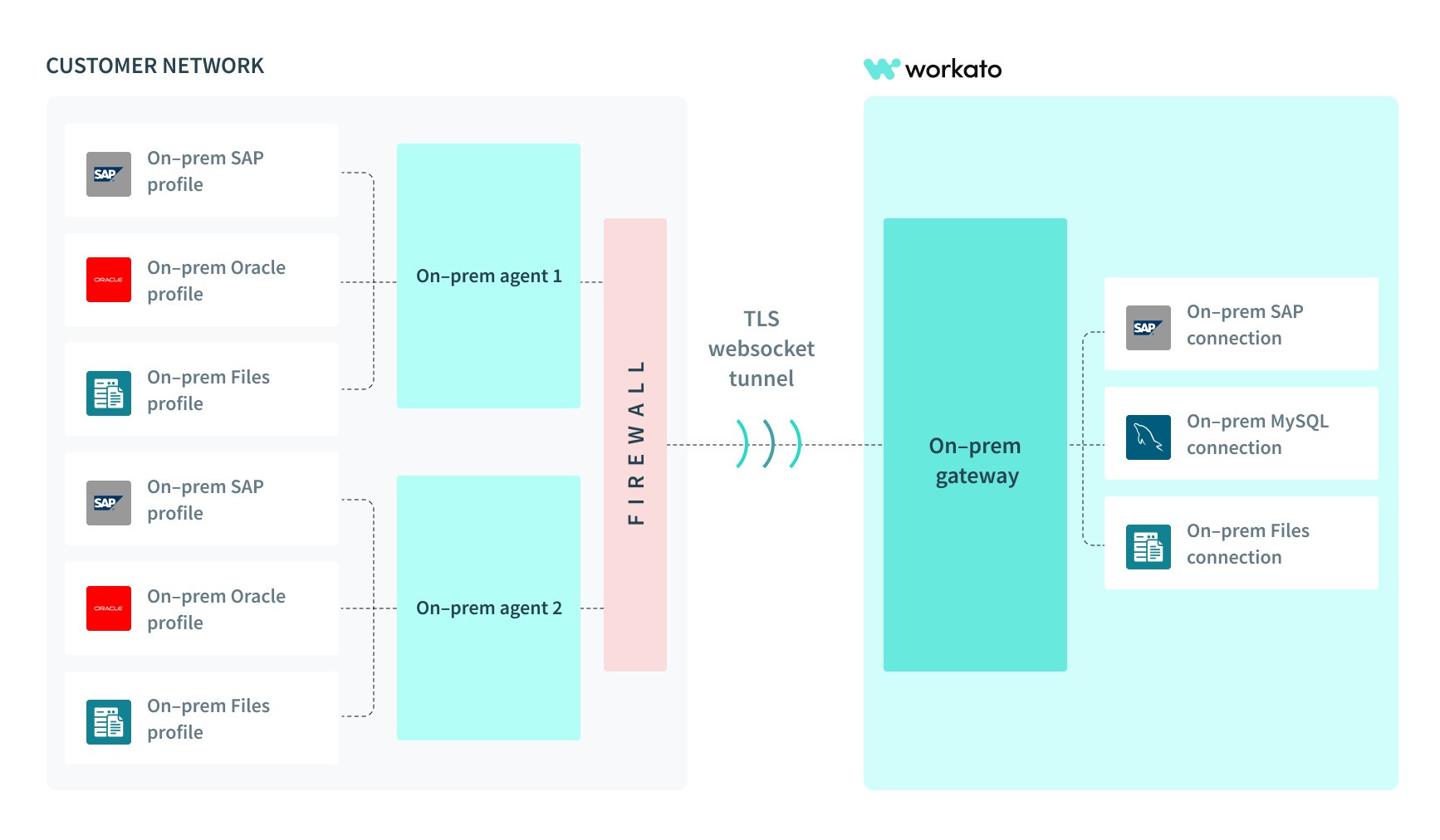 Conceptual model for on-prem agents in a group
Workato on-prem connectivity has two core components:
- Tunneling
- Database, file system, and application access.
The on-prem agent runs within the user's server, typically behind a firewall, and establishes a TLS WebSocket tunnel to connect out to Workato.
Because the on-prem agent is within the same network as systems behind the firewall, it can safely access them and act as the agent to communicate securely out to Workato.
The OPA only makes outbound connections to Workato. It doesn't require you to open any inbound ports in your firewall. The agent connects to Workato's on-premise gateways over TCP port 443.
The gateway connection uses mutual TLS (mTLS) backed by Workato's private public key infrastructure (PKI). Both the agent and the gateway verify each other's identity during the TLS handshake:
- The gateway presents a server certificate signed by Workato's private certificate authority (CA).
- Each agent presents a client certificate issued to it during activation.
- The agent validates the gateway certificate against an embedded trust store that trusts only Workato's private CA.
Workato operates this PKI privately rather than relying on publicly trusted CAs. This is a deliberate security design. Trusting only Workato's private CA helps protect against the following:
- Fraudulent certificates issued by a compromised public CA.
- TLS interception or man-in-the-middle (MITM) attacks by intermediate network devices.
- Unauthorized agents that attempt to connect to Workato's gateway infrastructure.
Network requirements
Refer to the following sections to configure your network for the Workato OPA.
Allow outbound traffic to Workato
The OPA host must be able to send outbound traffic to Workato's gateways for the agent to connect. Add the Workato gateway FQDNs and IP addresses to your network's firewall or security allowlist.
Refer to Traffic to Workato for the full list of gateway FQDNs and IP addresses by data center.
Configure SSL/TLS inspection
SSL inspection tools such as Zscaler, Cisco Umbrella, and CATO Cloud intercept HTTPS traffic and re-sign it with their own CA certificates. This breaks the mTLS trust chain between the OPA and the Workato gateway and causes the agent to reject the connection.
Importing the inspection tool's CA certificate into the agent's trust store doesn't resolve this issue. The gateway connection validates certificates only against Workato's private CA. Refer to How it works for more information about Workato's private PKI.
Configure your SSL/TLS inspection tool to bypass inspection of Workato gateway FQDNs. For example, add a Do Not Inspect rule in Zscaler for the Workato gateway FQDNs. This targeted exclusion applies only to Workato gateway traffic and doesn't affect inspection of other network traffic.
Refer to Traffic to Workato for the gateway FQDNs to exclude, or refer to On-prem setup and installation issues for related troubleshooting steps.
Supported operating systems
The on-prem agent runs on the following systems:
- Linux (64-bit)
- Windows 7, 10, 11 (64-bit)
- Mac
- Windows Server 2008 and newer (before OPA v2.8.0)
- Windows Server 2012 R2 and newer (OPA v2.8.0 onwards)
Minimum hardware requirements are:
- 8 GB of RAM
- 768 MB of disk space for one on-prem agent
- 800 MHz 64-bit CPU (Intel/AMD).
Refer to the following OS-specific guides to create an on-prem agent:
Can the OPA be used in multicloud and public clouds?
Yes, Workato's OPA can be used in any IT environment. You can run the OPA on a public cloud like Amazon Web Service, Azure cloud, or Google Cloud Platform. You can also run the OPA on a private machine.
The OPA runs on any virtual or physical machine as long as there is a compatible operating system. Learn more about supported operating systems.
On-prem permissions
You can configure access to on-prem features using Workato role-based access control.
In this section
Last updated: