Developer API - Resources
Use the following endpoints to manage resources in your workspace.
Permissions
Go to the Create client role or Edit client role page and edit the Projects > Project assets > Resources section to configure a client role's access to resource endpoints.
Refer to the Role-based access control section to configure resource access using collaborator and project roles.
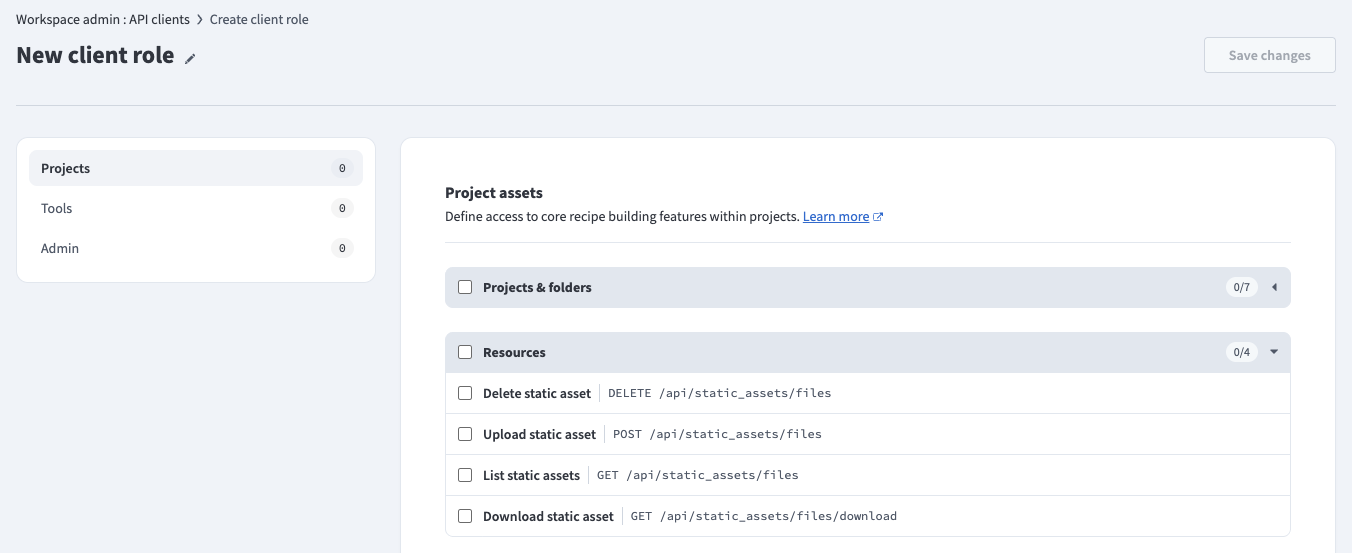 API client permissions
Rate limits
Resources have the following rate limits:
| Type | Resource | Quota |
|---|---|---|
| All | All Resources endpoints | 60 requests per minute |
Quick reference
| Type | Resource | Description |
|---|---|---|
| GET | /api/static_assets/files | List resources. |
| POST | /api/static_assets/files | Upload a resource. |
| GET | /api/static_assets/files/download | Download a resource. |
| DELETE | /api/static_assets/files | Delete a resource. |
List resources
Retrieves all resources in a folder.
GET https://YOUR_DATA_CENTER/api/static_assets/filesQuery parameters
| Name | Type | Description |
|---|---|---|
| project_name | string required | The name of the project. |
| path | string required | The path to the folder within the project. For example: /Assets |
Sample request
curl -X GET 'https://YOUR_DATA_CENTER/api/static_assets/files?project_name=:project_name_value&path=:path_value' \
  -H 'Authorization: Bearer <api_token>'
Response
{
  "items": [
    {
      "filename": "template.xslt",
      "updated_by": "[email protected]",
      "updated_at": "2026-03-20T12:00:00.000Z"
    }
  ]
}
Upload a resource
Uploads a resource to a folder. If a resource with the same filename already exists, this creates a new version. Refer to the Upload resources guide to upload a resource using the Workato UI.
POST https://YOUR_DATA_CENTER/api/static_assets/filesRequest body
Send the request as multipart/form-data.
| Name | Type | Description |
|---|---|---|
| project_name | string required | The name of the project. |
| path | string required | The path to the folder within the project. For example: /Assets |
| file | file required | The resource file to upload. The maximum file size is 50 MB. Accepted file types are .xsd, .xslt, .wsdl, .rb, .js, .py, and .wel. |
Sample request
curl -X POST 'https://YOUR_DATA_CENTER/api/static_assets/files' \
  -H 'Authorization: Bearer <api_token>' \
  -F 'project_name=:project_name_value' \
  -F 'path=:path_value' \
  -F 'file=@:file_path'
Response
{
  "success": true
}
400 BAD REQUEST
A 400 Bad Request error occurs when the file size exceeds the 50 MB quota.
{
  "errors": [
    {
      "code": "bad_request",
      "title": "File size exceeds maximum allowed (50MB)"
    }
  ]
}
Download a resource
Downloads a resource. Refer to the Download a resource guide to download a resource using the Workato UI.
GET https://YOUR_DATA_CENTER/api/static_assets/files/downloadQuery parameters
| Name | Type | Description |
|---|---|---|
| project_name | string required | The name of the project. |
| path | string required | The path to the resource within the project, including the filename. For example: /Assets/template.xslt |
Sample request
curl -X GET 'https://YOUR_DATA_CENTER/api/static_assets/files/download?project_name=:project_name_value&path=:path_value' \
  -H 'Authorization: Bearer <api_token>' \
  --output template.xslt
Response
A successful request returns the raw file content with the following headers:
Content-Type: application/octet-streamContent-Disposition: attachment; filename=template.xslt
Delete a resource
Deletes a resource. Refer to the Delete a resource guide to delete a resource using the Workato UI.
DELETE https://YOUR_DATA_CENTER/api/static_assets/filesQuery parameters
| Name | Type | Description |
|---|---|---|
| project_name | string required | The name of the project. |
| path | string required | The path to the resource within the project, including the filename. For example: /Assets/template.xslt |
Sample request
curl -X DELETE 'https://YOUR_DATA_CENTER/api/static_assets/files?project_name=:project_name_value&path=:path_value' \
  -H 'Authorization: Bearer <api_token>'
Response
{
  "success": true
}Last updated: