Resources
Use the following endpoints to manage resources in your workspace.
PRIVATE BETA
Resources are in private beta and only available to selected customers. Contact your Customer Success Manager to learn more.
Permissions
Go to the Create client role or Edit client role page and edit the Projects > Project assets > Resources section to configure a client role's access to resource endpoints.
Refer to the Role-based access control section to configure resource access using collaborator and project roles.
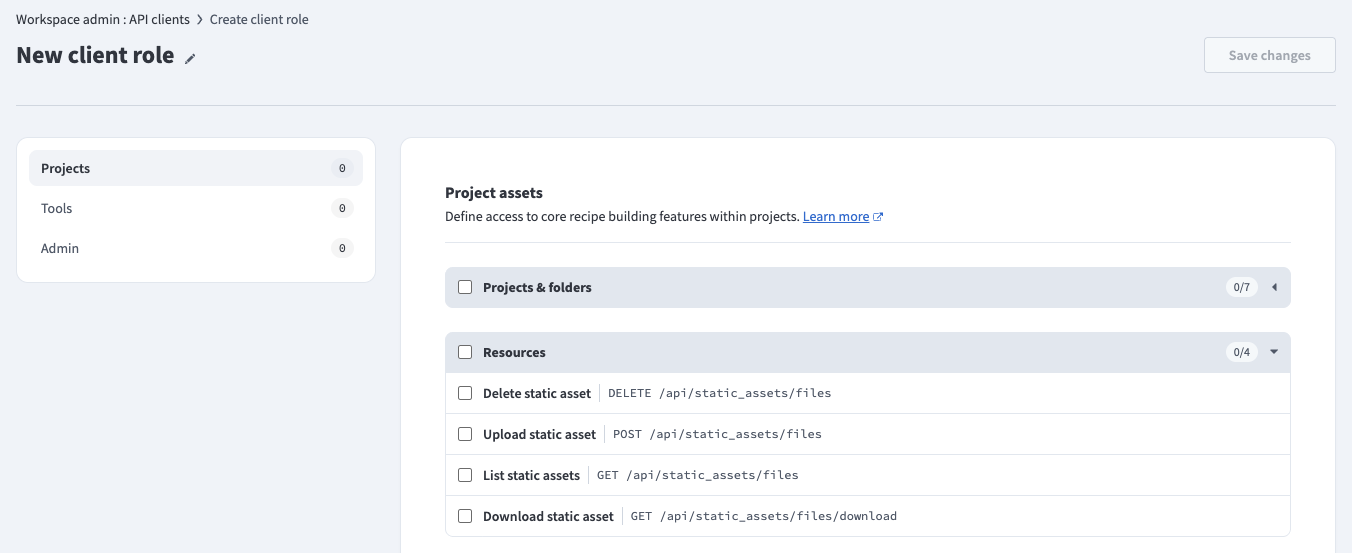 API client permissions
Rate limits
Resources have the following rate limits:
| Type | Resource | Limit |
|---|---|---|
| All | All Resources endpoints | 60 requests per minute |
Quick reference
| Type | Resource | Description |
|---|---|---|
| GET | /api/static_assets/files | List resources. |
| POST | /api/static_assets/files | Upload a resource. |
| GET | /api/static_assets/files/download | Download a resource. |
| DELETE | /api/static_assets/files | Delete a resource. |
List resources
Retrieves all resources in a folder.
GET /api/static_assets/filesQuery parameters
| Name | Type | Description |
|---|---|---|
| project_name | string required | The name of the project. |
| path | string required | The path to the folder within the project. For example: /Assets |
Sample request
curl -X GET 'https://www.workato.com/api/static_assets/files?project_name=Resources&path=/Assets' \
  -H 'Authorization: Bearer <api_token>'
Response
{
  "items": [
    {
      "filename": "template.xslt",
      "updated_by": "[email protected]",
      "updated_at": "2026-03-20T12:00:00.000Z"
    }
  ]
}
Upload a resource
Uploads a resource to a folder. If a resource with the same filename already exists, this creates a new version. Refer to the Upload resources guide to upload a resource using the Workato UI.
POST /api/static_assets/filesRequest body
Send the request as multipart/form-data.
| Name | Type | Description |
|---|---|---|
| project_name | string required | The name of the project. |
| path | string required | The path to the folder within the project. For example: /Assets |
| file | file required | The resource file to upload. The maximum file size is 50 MB. |
Sample request
curl -X POST 'https://www.workato.com/api/static_assets/files' \
  -H 'Authorization: Bearer <api_token>' \
  -F 'project_name=My project' \
  -F 'path=/Assets' \
  -F 'file=@/path/to/template.xslt'
Response
{
  "success": true
}
400 BAD REQUEST
A 400 Bad Request error occurs when the file size exceeds the 50 MB limit.
{
  "errors": [
    {
      "code": "bad_request",
      "title": "File size exceeds maximum allowed (50MB)"
    }
  ]
}
Download a resource
Downloads a resource. Refer to the Download a resource guide to download a resource using the Workato UI.
GET /api/static_assets/files/downloadQuery parameters
| Name | Type | Description |
|---|---|---|
| project_name | string required | The name of the project. |
| path | string required | The path to the resource within the project, including the filename. For example: /Assets/template.xslt |
Sample request
curl -X GET 'https://www.workato.com/api/static_assets/files/download?project_name=Resources&path=/Assets/template.xslt' \
  -H 'Authorization: Bearer <api_token>' \
  --output template.xslt
Response
A successful request returns the raw file content with the following headers:
Content-Type: application/octet-streamContent-Disposition: attachment; filename=template.xslt
Delete a resource
Deletes a resource. Refer to the Delete a resource guide to delete a resource using the Workato UI.
DELETE /api/static_assets/filesQuery parameters
| Name | Type | Description |
|---|---|---|
| project_name | string required | The name of the project. |
| path | string required | The path to the resource within the project, including the filename. For example: /Assets/template.xslt |
Sample request
curl -X DELETE 'https://www.workato.com/api/static_assets/files?project_name=Resources&path=/Assets/template.xslt' \
  -H 'Authorization: Bearer <api_token>'
Response
{
  "success": true
}Last updated: