コネクター構築 - アクションの構築
methodsでオブジェクトスキーマを定義したので、定義したばかりのスキーマメソッドを参照するCRUDSアクションの構築を開始できます。
設定フィールドの定義
オブジェクトベースのアクションを扱う場合、まず設定フィールドと呼ばれるものを定義する必要があります。設定フィールドは、回答に応じて他の入力フィールドを動的に生成できる、定義可能な特別な入力フィールドです。
config_fields: [
{
name: 'object',
optional: false,
label: 'Object type',
control_type: 'select',
pick_list: 'object_list_create',
hint: 'Select the object type from picklist.'
}
],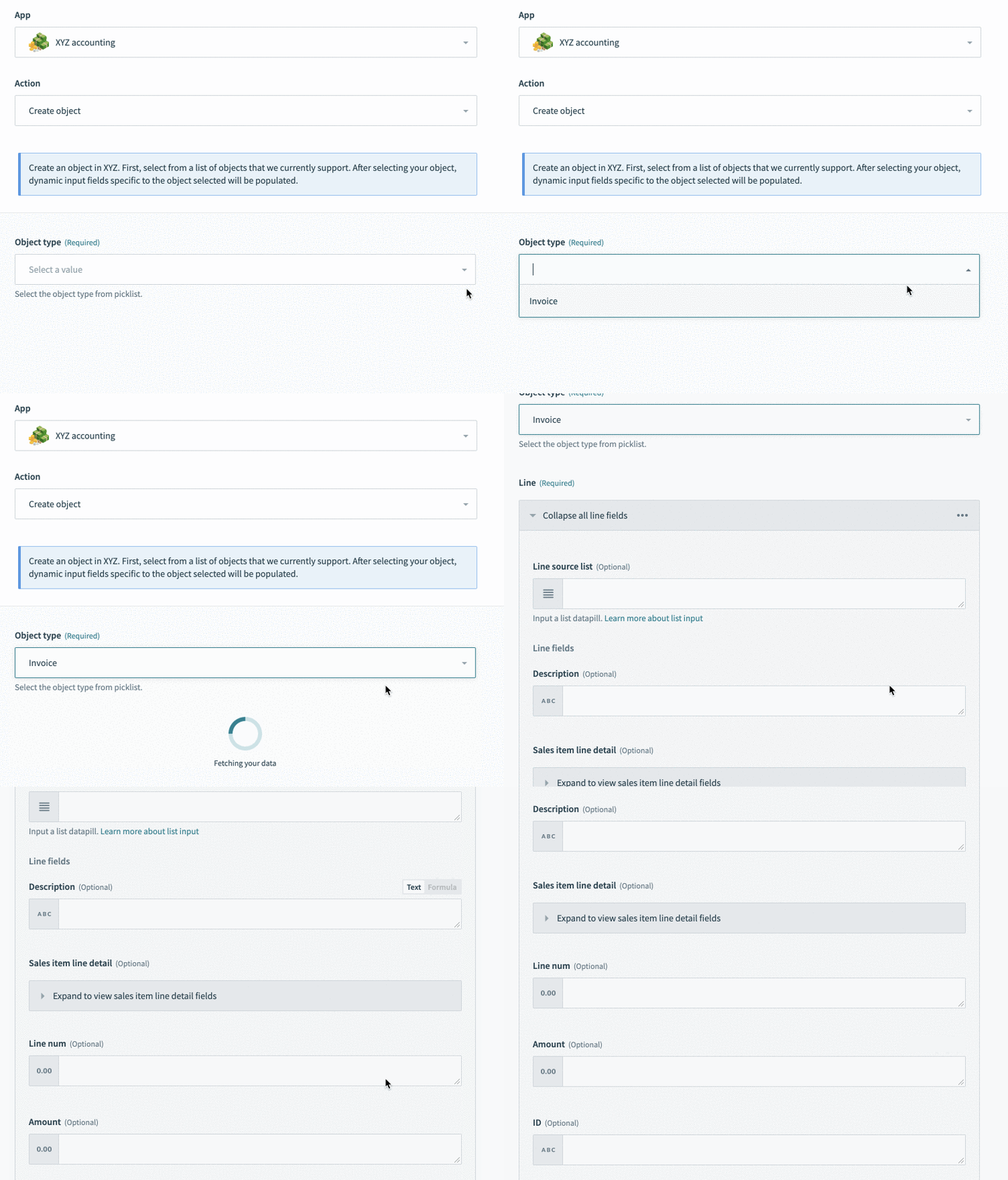 請求書を選択すると、請求書関連の入力フィールドが表示されます
ここでは、サポート対象として追加のオブジェクトを導入するときに簡単に追加できるピックリストも紹介します。
動的入力フィールド
設定フィールドを使用して、ユーザーの選択に基づいて入力フィールドを動的に生成することもできます。選択されたオブジェクトで、正確な入力フィールドを表示する前に追加情報が必要なシナリオについては、入力フィールドの定義セクションを参照してください。
タイトル、サブタイトル、説明、ヘルプテキストの定義
また、アクションに役立つタイトルと説明を定義することを強くお勧めします。これは非常に重要です。オブジェクトベースのアクションを扱う場合、これはコネクターを使用するレシピの読みやすさを高めるだけでなく、コネクターでレシピを構築するユーザーのユーザーエクスペリエンスを向上させるのに役立ちます。
actions: {
  create_object: {
    title: 'Create object',

    subtitle: 'Supports the creation of invoices, payments, and customers',

    description: lambda do |input, picklist_label|
      "Create a <span class='provider'>" \
      "#{picklist_label['object'] || 'object'}</span> in " \
      "<span class='provider'>XYZ Accounting</span>"
    end,

    help: lambda do |input, picklist_label|
      "Creates an #{picklist_label['object'] || 'object'} in XYZ. First, select from a list of " \
      'objects that we currently support. After selecting your object,' \
      ' dynamic input fields specific to the object selected ' \
      'will be populated.'
    end,

    config_fields: [
      {
        name: 'object',
        optional: false,
        label: 'Object type',
        control_type: 'select',
        pick_list: 'object_list_create',
        hint: 'Select the object type from picklist.'
      }
    ],
    # More code truncated here
  }
}
ここでは、コネクター内のさまざまなアクションの中からユーザーがそのアクションを把握できるように、タイトルとサブタイトルを定義します。タイトルは簡潔に保ちつつ、サブタイトルを使用してもう少し詳しい情報を提供することを忘れないでください。
説明では、ユーザーがconfig_fieldで選択したときにアクションの説明を動的に変更するために、lambda関数(上記の例を参照)を使用できます。上記の例に示すように、ヘルプテキストでも同じことができます。
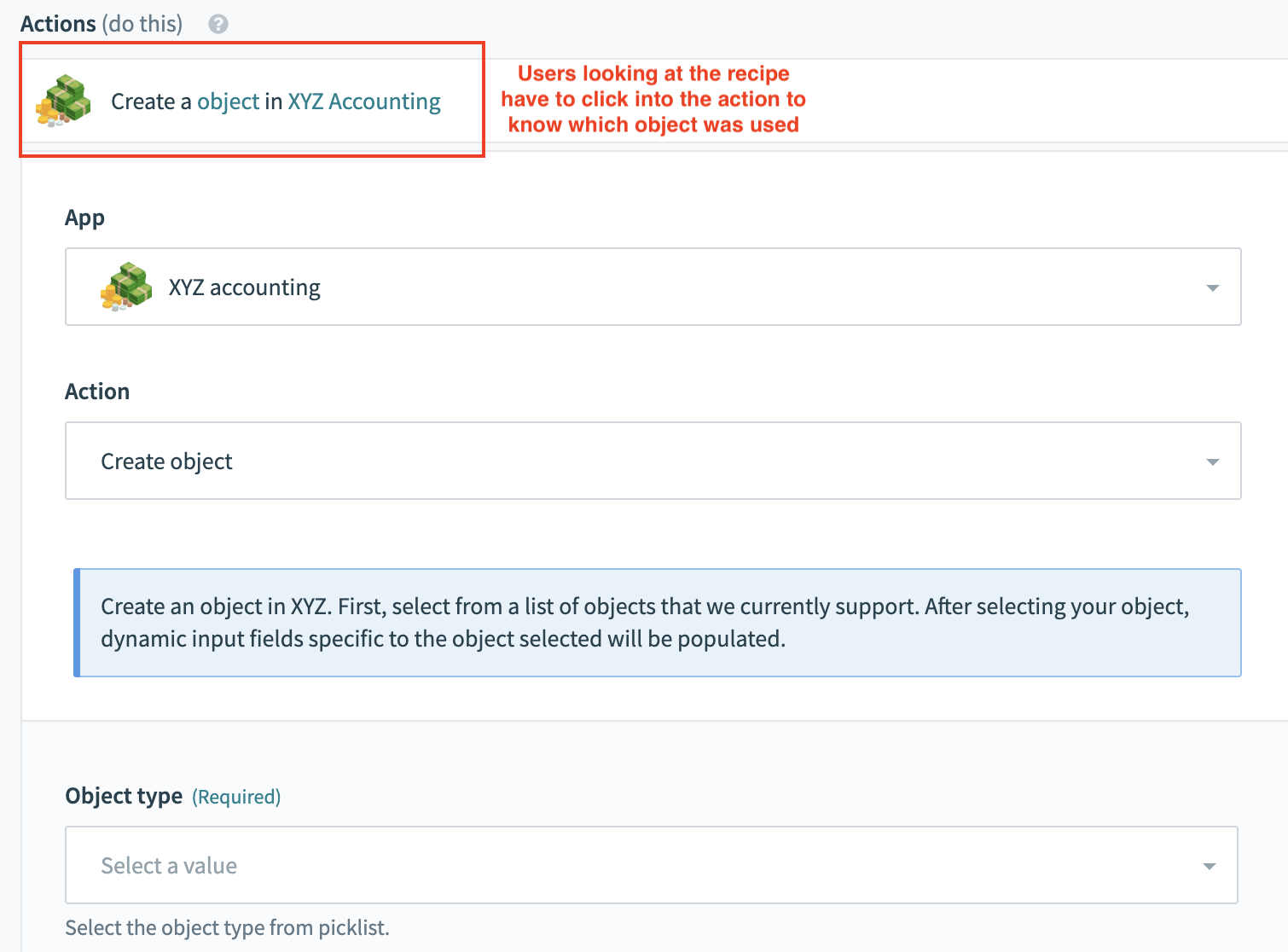 動的な説明がない悪い例
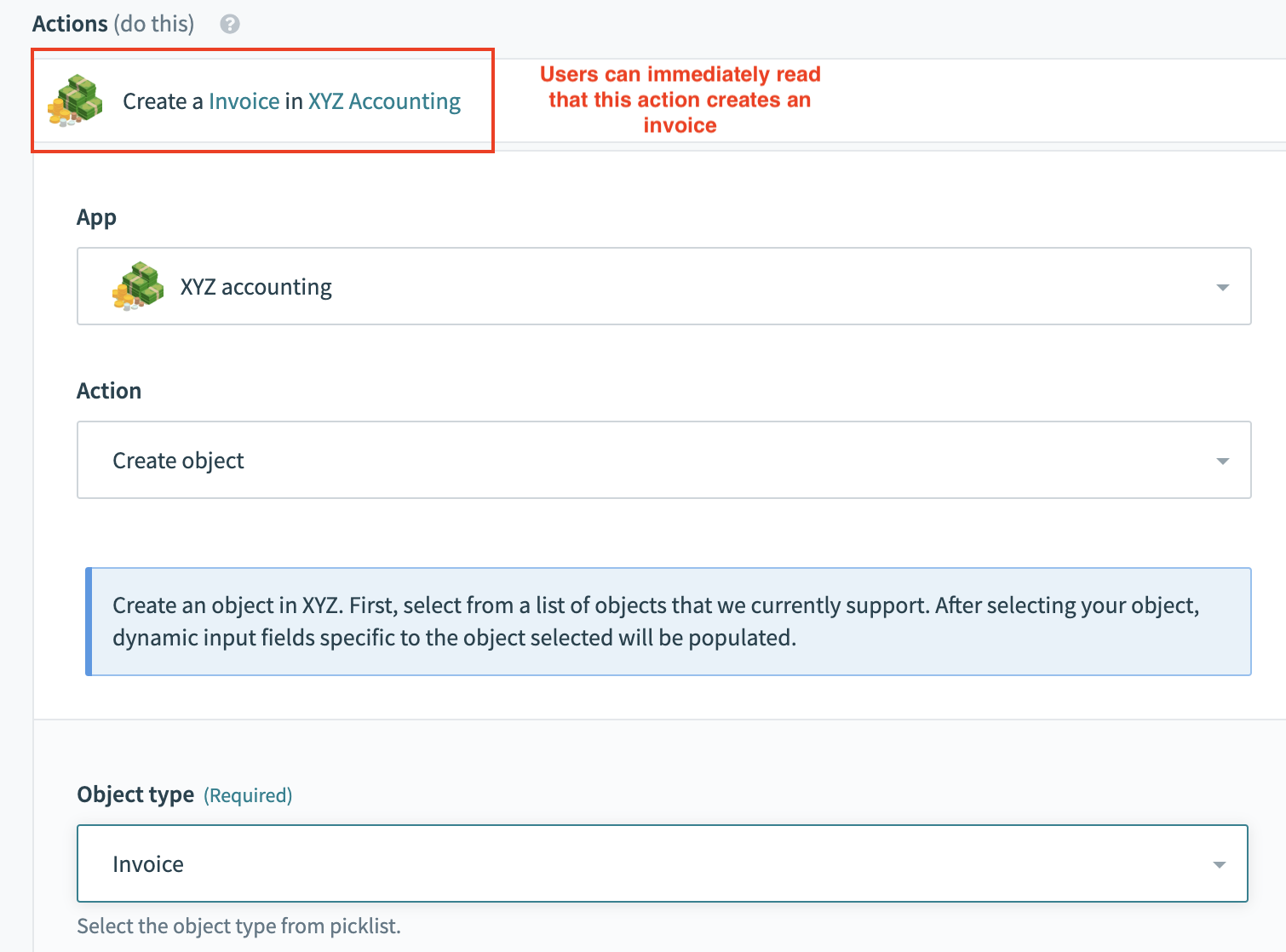 動的な説明がある良い例
入力フィールドの定義
クリーンでスケーラブルな入力フィールドを作成するもう1つの機能として、1つのアクションで単一のobject_definitions呼び出しを使用して複数のオブジェクトをサポートできます。設定フィールドの値にはobject_definitionsメソッドを介してしかアクセスできないため、後でユーザーが選択したオブジェクトに基づいて適切なスキーマを取得できる汎用的なobject_definitionsを呼び出すことをお勧めします。
入力
input_fields: lambda do |object_definitions, connection, config_fields|

  object = config_fields['object']

  input_schema = object_definitions[object] # If user select invoice, evaluates to object_definitions['invoice']

  case object
  when 'invoice'
    input_schema.where('name !=': 'Id')
  else
    input_schema
  end
end,
オブジェクト定義
  object_definitions: {
    invoice: lambda do |connection, config_fields, object_definitions|
      [
        { name: "Id" },
        { name: "TxnDate" },
        { name: "TotalAmt", type: "number" },
        {
          name: "Line",
          type: "array",
          of: "object",
          properties: [
            { name: "Description" },
            {
              name: "SalesItemLineDetail",
              type: "object",
              properties: [
                { name: "Qty", type: "number" },
                { name: "UnitPrice", type: "number" }
              ]
            },
            { name: "Line-Num", type: "number" },
            { name: "Amount", type: "number" },
            { name: "Id" }
          ]
        },
        # More schema
      ]
    end
}オブジェクト定義invoiceが呼び出されると、請求書に関連するスキーマが返されます。次に、input_fieldsでidフィールドを条件付きで除外します。これは、請求書の作成には適用されず、表示すべきでないためです。
executeブロックの定義
executeブロックを定義する際は、まずデータの前処理または後処理に使用する汎用メソッドをexecuteブロックに格納します。以下の例では、ターゲットAPIに送信する前にペイロードをフォーマットする2つの汎用メソッドを使用します。ペイロードのフォーマット後、action-objectレベルで必要な特定のデータ処理と、適切なエンドポイントへの最終的なHTTP呼び出しを保持するメソッドが呼び出されます。
エラー処理では関連するエラーメッセージが表示されるため、レシピの設計およびデバッグ時のユーザーの時間を大幅に節約できます。
アクションのタイムアウト
SDKアクションには、180秒のタイムアウト制限があります。
タイムアウト制限を超過するファイルを転送するには、ファイルストリーミングアクションでcheckpoint!メソッドを使用できます。追加情報については、マルチステップフレームワークを使用してアップロード時間を延長するセクションを参照してください。
executeブロック
execute: lambda do |connection,input|
  object_name = input.delete('object')

  response = call('create_#{object_name}_execute', payload).
              after_error_response(/.*/) do |_code, body, _header, message|
                error("#{message}: #{body}")
              end

  formatted_response
end,action-objectメソッド
create_invoice_execute: lambda do |payload|
  post('api/invoice/create', payload)
end,
出力フィールドの定義
出力フィールドは、前に使用したものと同じスキーマメソッドを使用して、入力フィールドと同じ方法で定義できます。スキーマメソッドを呼び出す際は、レスポンスで想定されるフィールドを返す必要があることをメソッドが認識できるように、パラメーターoutputを渡すことを忘れないでください。多くの場合、これにはcreated_atやupdated_atタイムスタンプなど、ユーザーが変更できないオブジェクトに関するメタデータが含まれます。
出力
output_fields: lambda do |object_definitions, connection, config_fields|
  object = config_fields['object']

  input_schema = object_definitions[object] # If user select invoice, evaluates to object_definitions['invoice']
end,object_definition['invoice']に含まれる請求書スキーマは、APIから返されるフィールドと完全に一致するため、それ以上の操作は必要ありません。
例1: XYZ Accountingの請求書更新アクション
以下では、XYZ Accountingのオブジェクト更新アクションの完全な例を1つ見ていきます。
サンプルコード
methods: {
  update_invoice_execute: lambda do |payload|
    patch('api/invoice/update', payload)
  end,

},

object_definitions: {

  invoice: {
    fields: lambda do |connection, config_fields, object_definitions|
      # same schema as above
    end
  },

},
actions: {

  update_object: {
    title: 'Update object',

    subtitle: 'Updates an object in XYZ accounting.',

    description: lambda do |input, picklist_label|
      "Update a <span class='provider'>" \
      "#{picklist_label['object'] || 'object'}</span> in " \
      "<span class='provider'>XYZ Accounting</span>"
    end,

    help: lambda do |input, picklist_label|
      {
        body:
        "Updates an #{picklist_label['object'] || 'object'} in XYZ. First, select from a list of " \
        'objects that we currently support. After selecting your object,' \
        ' dynamic input fields specific to the object selected ' \
        'will be populated.'
      }
    end,

    config_fields: [
      {
        name: 'object',
        optional: false,
        label: 'Object type',
        control_type: 'select',
        pick_list: 'object_list_update',
        hint: 'Select the object type from picklist.'
      }
    ],

    input_fields: lambda do |object_definitions, connection, config_fields|
      object = config_fields['object']

      input_schema = object_definitions[object]
    end,

    execute: lambda do |connection,input|
      object_name = input.delete('object')

      response = call('update_#{object_name}_execute', payload).
                  after_error_response(/.*/) do |_code, body, _header, message|
                    error("#{message}: #{body}")
                  end

      response
    end,

    output_fields: lambda do |object_definitions, connection, config_fields|
      object = config_fields['object']

      input_schema = object_definitions[object]
    end,

    sample_output: lambda do |connection, input|
      payload = {
        "limit" => 1,
        "status" => "closed"
      }
      call("search_#{input['object']}_execute", payload)
    end

  }
  # More actions below
},

pick_lists: {
  object_list_update: lambda do
    [
      ["Invoice","invoice"]
    ]
  end,
  # More picklists below
}以下の例は、オブジェクト更新アクションの作成に必要なさまざまなステップをすべて示しています。現在、このコードでは単一のオブジェクト、Invoicesのサポートのみを示しています。オブジェクト更新アクションの構造は、オブジェクト作成アクションの構造とほぼ同じです。設定フィールド、タイトル、サブタイトル、説明、ヘルプテキスト、入力フィールド、出力フィールド、execute、およびsample outputブロックが汎用的に定義されます。多くの重要な処理はオブジェクト定義とメソッドで行われ、特定のスキーマを取得し、そのオブジェクトに関連するエンドポイントへHTTP呼び出しを行うためのオブジェクト固有のコードが導入されます。
トリガーの構築
次に、オブジェクトベースのトリガーの構築について学びましょう。
最終更新日: