YouTube Creator MCPサーバー
YouTube Creator MCPサーバーを使用すると、LLMは自然な会話を通じてYouTubeコンテンツを調査し、チャンネルを管理できます。 YouTubeインターフェイスを直接操作することなく、構造化されたYouTubeデータの取得、動画とチャンネルの分析、コメントの管理、プレイリストの整理、動画メタデータの更新を行うためのツールを提供します。
用途
YouTube Creator MCPサーバーを使用して、次のアクションを実行します。
- キーワードとフィルターを使用したYouTube動画の検索
- 動画メタデータと公開指標の取得
- 登録者数やプレイリストを含むチャンネル情報の取得
- 特定のチャンネルで公開された動画の一覧表示
- 動画のコメントスレッドの表示と管理
- 動画のコメントへの返信
- 動画キャプショントラックと文字起こしへのアクセス
- チャンネルのプレイリストの一覧表示と管理
- 新しいプレイリストの作成と動画の追加
- 動画のタイトル、説明、タグの更新
プロンプト例
Search for videos about Python tutorials from this month.Get the details for video dQw4w9WgXcQ.Show me information about the Workato YouTube channel.List the recent videos from this channel.Show me the top comments on my latest video.Reply to that comment thanking them for the feedback.Get the captions for this video.Create a new playlist called 'Product Demos'.Add this video to my Tutorials playlist.Update the title of my latest video.
YouTube Creator MCPサーバーのツール
YouTube Creator MCPサーバーは次のツールを提供します。
| ツール | 説明 |
|---|---|
| search_videos | キーワードとオプションのフィルターを使用してYouTube動画を検索します。 |
| get_video_details | 指定したYouTube動画のメタデータと公開指標を取得します。 |
| get_channel_info | YouTubeチャンネルのメタデータと公開指標を取得します。 |
| list_channel_videos | 指定したYouTubeチャンネルで公開された動画を一覧表示します。 |
| list_video_comment_threads | YouTube動画のトップレベルのコメントスレッドを取得します。 |
| list_thread_replies | 指定したコメントスレッド内の返信を取得します。 |
| reply_to_comment | 既存のYouTubeコメントに返信を投稿します。 |
| list_video_caption_tracks | YouTube動画で利用可能なキャプショントラックを一覧表示します。 |
| download_caption_track | 指定したキャプショントラックの文字起こしコンテンツを取得します。 |
| list_playlists | YouTubeチャンネルのプレイリストを一覧表示します。 |
| get_playlist_items | 指定したプレイリストに含まれる動画を取得します。 |
| create_playlist | 認証済みクリエイターのチャンネルに新しいプレイリストを作成します。 |
| update_playlist | 既存のプレイリストのメタデータを更新します。 |
| add_to_playlist | 動画をプレイリストに追加します。 |
| remove_from_playlist | 動画をプレイリストから削除します。 |
| update_video_metadata | 認証済みクリエイターが所有するYouTube動画のメタデータを更新します。 |
YouTube Creator MCPサーバーのインストール
構築済みMCPサーバーをプロジェクトにインストールするには、次の手順を完了します:
Workatoアカウントにサインインします。
AI Hub > Enterprise MCPに移動します。
+ Create MCP serverをクリックします。
接続済みアプリを使用して構築済みMCPサーバーを開始するセクションに移動し、使用する構築済みMCPサーバーを選択します。
Use this serverをクリックします。
サーバー名フィールドにMCPサーバーの名前を入力します。
場所ドロップダウンメニューを使用して、MCPサーバーのプロジェクトを選択します。
Connectionsセクションに移動し、アプリアカウントに接続します。
MCPサーバーテンプレートで使用するコネクションタイプを選択します。
- User's connection: MCPサーバーツールは、アプリケーションに接続するユーザーのIDと権限に基づいてアクションを実行します。ユーザーは自分の認証情報で認証し、スキルを実行します。
- Your connection: このオプションでは、レシピビルダーによって確立されたコネクションを使用し、通常のアプリコネクションと同じ原則に従います。
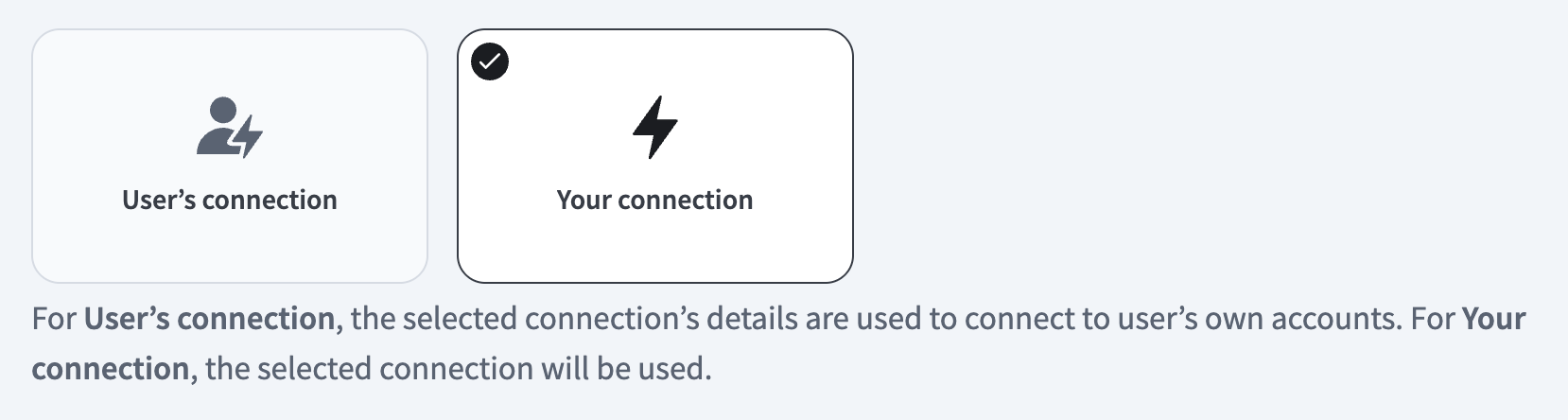 コネクションタイプを選択
検証済みユーザーアクセスの認証要件
OAuth 2.0認可コードグラントを使用するアプリコネクションのみが、ユーザーのコネクションで利用できます。詳細については、検証済みユーザーアクセスを参照してください。
次のセクションで、アプリ固有のコネクション設定手順を完了します。
YouTubeコネクションの設定
APIキーまたはOAuth 2.0認可を使用してYouTubeに接続できます。
YouTubeコネクションの設定手順を表示
APIキー
APIキーコネクションの設定手順を表示
WorkatoでへのAPI keyコネクションを設定するには、次の手順を実行します:
作成 > コネクションをクリックします。
YouTubeを検索し、アプリとして選択します。
コネクション名フィールドにコネクションの名前を入力します。
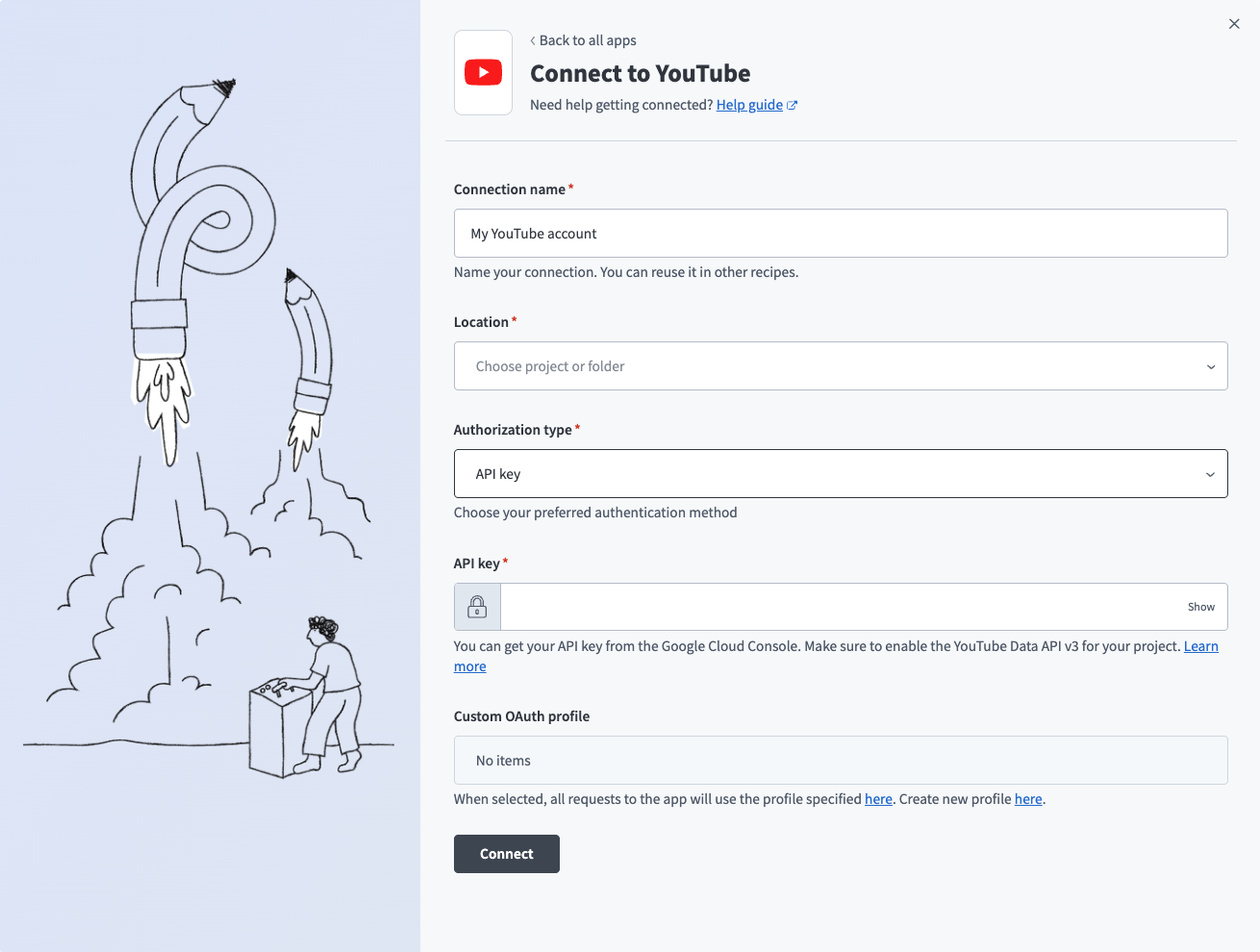 YouTube APIキーコネクション設定
ロケーションドロップダウンメニューを使用して、コネクションを保存するプロジェクトを選択します。
認証タイプドロップダウンメニューを使用して、APIキーを選択します。
API keyを入力します。詳細については、APIキー認証のYouTube設定を参照してください。
任意。 Custom OAuth profileドロップダウンメニューを使用して、コネクション用のCustom OAuth profileを選択します。
接続をクリックします。
OAuth 2.0
OAuth 2.0コネクションの設定手順を表示
WorkatoでへのOAuth 2.0コネクションを設定するには、次の手順を実行します:
作成 > コネクションをクリックします。
YouTubeを検索し、アプリとして選択します。
コネクション名フィールドにコネクションの名前を入力します。
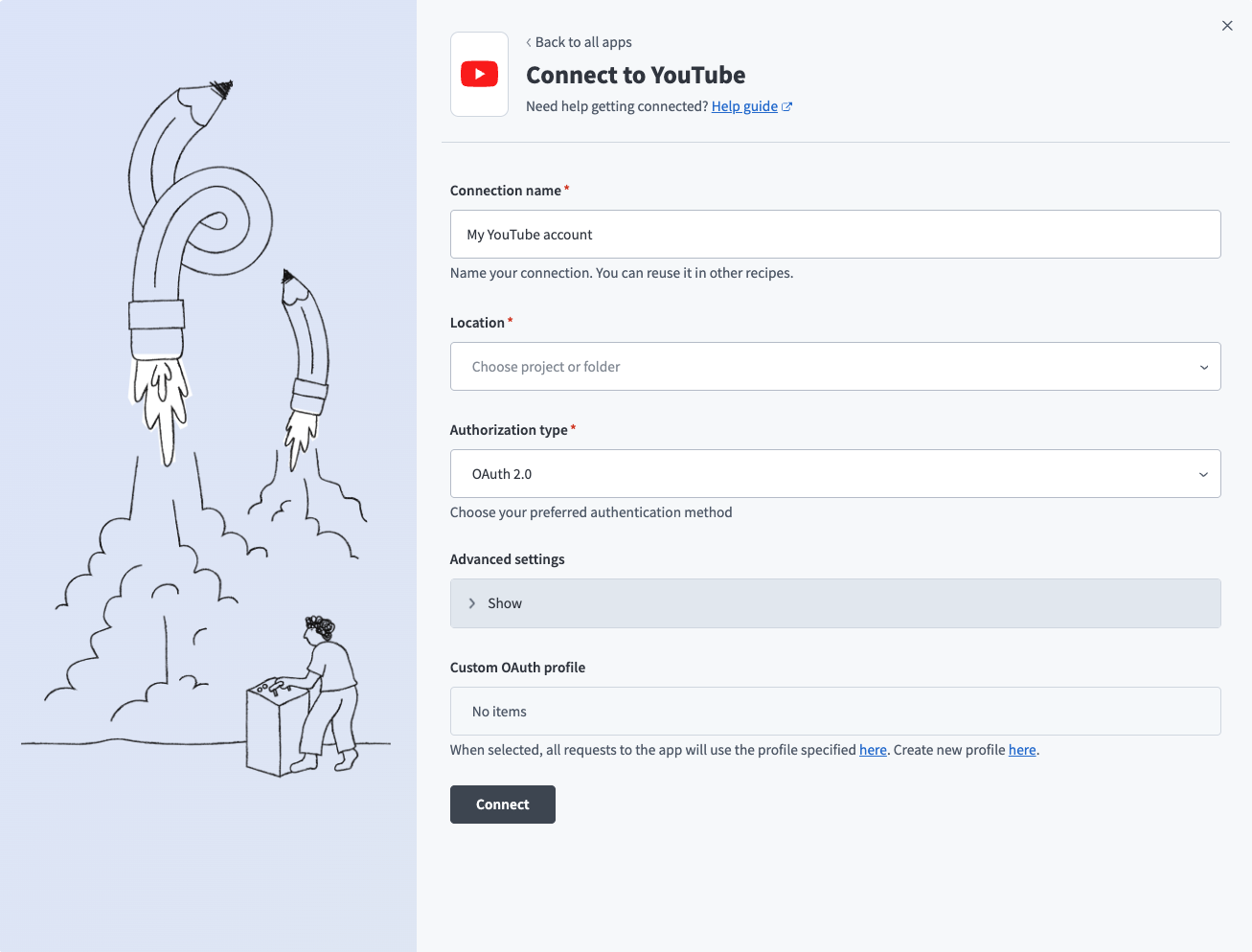 YouTube OAuth 2.0コネクション設定
ロケーションドロップダウンメニューを使用して、コネクションを保存するプロジェクトを選択します。
認可タイプドロップダウンメニューを使用してOAuth 2.0を選択します。
任意。詳細設定セクションを展開して、コネクションのスコープを設定します。空のままにすると、デフォルトでread-onlyになります。
Custom OAuth profileドロップダウンメニューを使用して、コネクション用のCustom OAuth profileを選択します。詳細については、Custom OAuth profileを作成を参照してください。
接続をクリックします。
プロンプトが表示されたら、Googleアカウントを選択します。
WorkatoがGoogleアカウントにアクセスすることを許可するには、許可をクリックします。
YouTube Creator MCPサーバーツールの使用方法
利用可能なツールの詳細については、次のセクションを参照してください:
search_videosツール
search_videosツールは、キーワードとオプションのフィルターを使用してYouTube動画を検索します。 LLMはこのツールを使用して、トピック、キーワード、またはアップロード日やチャンネルなどの特定の条件で動画を検索します。
質問例:
Search for videos about machine learning from this year.Find Python tutorial videos uploaded this month.Look for videos about web development with high view counts.Search for recipe videos from the Food Network channel.
get_video_detailsツール
get_video_detailsツールは、指定したYouTube動画のメタデータと公開指標を取得します。これにはタイトル、説明、タグ、公開日、エンゲージメント指標が含まれます。 LLMはこのツールを使用して、動画に関する詳細情報を提供します。
質問例:
Get the details for video dQw4w9WgXcQ.Show me the metadata for this YouTube video.What are the tags and description for video dK983ksdls9?Get the view count and publish date for this video.
get_channel_infoツール
get_channel_infoツールは、タイトル、説明、登録者数(表示されている場合)、アップロードを含むYouTubeチャンネルのメタデータと公開指標を取得します。 LLMはこのツールを使用して、特定のチャンネルに関する情報を提供します。
質問例:
Show me information about the Workato YouTube channel.Get the subscriber count for this channel.What's the description and metadata for this YouTube channel?Get channel details for UCxxxxxxxxxxxxxx.
list_channel_videosツール
list_channel_videosツールは、指定したYouTubeチャンネルで公開された動画を一覧表示します。 LLMはこのツールを使用して、チャンネルのアップロード済みコンテンツを参照または取得します。
質問例:
List the recent videos from the Workato channel.Show me all videos published by this channel.What videos has this creator uploaded recently?Get the video list for channel UCxxxxxxxxxxxxxx.
list_video_comment_threadsツール
list_video_comment_threadsツールは、コメントのテキスト、投稿者、タイムスタンプ、返信数を含む、YouTube動画のトップレベルのコメントスレッドを取得します。 LLMはこのツールを使用して、動画のコメントをレビューします。
質問例:
Show me the top comments on my latest video.Get the comment threads for this YouTube video.What are people saying in the comments on video mawxyl9382?List the comments on my product demo video.
list_thread_repliesツール
list_thread_repliesツールは、特定のコメントスレッド内の返信を取得します。 LLMはこのツールを使用して、コメントスレッド内の会話を表示します。
質問例:
Show me the replies to this comment.Get all responses in this comment thread.What did people reply to the top comment?List the conversation in this comment thread.
reply_to_commentツール
reply_to_commentツールは、既存のYouTubeコメントに返信を投稿します。 LLMはこのツールを使用して、動画へのコメントに返信します。
質問例:
Reply to that comment thanking them for the feedback.Respond to this comment with the link to the documentation.Post a reply to the top comment addressing their question.Thank the commenter for their suggestion.
list_video_caption_tracksツール
list_video_caption_tracksツールは、言語とトラックタイプのメタデータを含む、YouTube動画で利用可能なキャプショントラックを一覧表示します。 LLMはこのツールを使用して、動画で利用可能なキャプションを表示します。
質問例:
What caption tracks are available for this video?List the languages with captions on this YouTube video.Show me the available subtitles for video dWls9s8fgsx5.What caption options does this video have?
download_caption_trackツール
download_caption_trackツールは、指定したキャプショントラックの文字起こしコンテンツを取得します。 LLMはこのツールを使用して、動画の完全な文字起こしまたはキャプションにアクセスします。
質問例:
Get the English captions for this video.Download the transcript for this YouTube video.Show me the full caption text for this video.Retrieve the subtitles in Spanish for this video.
list_playlistsツール
list_playlistsツールは、YouTubeチャンネルのプレイリストを一覧表示します。 LLMはこのツールを使用して、チャンネル上の既存のプレイリストを表示します。
質問例:
Show me all my YouTube playlists.List the playlists on my channel.What playlists does this channel have?Get all playlists for the Workato channel.
get_playlist_itemsツール
get_playlist_itemsツールは、指定したプレイリストに含まれる動画を取得します。 LLMはこのツールを使用して、プレイリストの動画を表示します。
質問例:
Show me the videos in my Tutorials playlist.List all videos in this YouTube playlist.What's in the Product Demos playlist?Get the contents of playlist PLxxxxxxxxxxxxxx.
create_playlistツール
create_playlistツールは、チャンネルに新しいプレイリストを作成し、プレイリストIDを返します。 LLMはこのツールを使用して、コンテンツを整理するための新しいプレイリストを作成します。
質問例:
Create a new playlist called 'Product Demos'.Make a playlist for my tutorial videos.Create a playlist titled 'Customer Success Stories'.Set up a new playlist for webinar recordings.
update_playlistツール
update_playlistツールは、タイトル、説明、プライバシー設定を含む既存のプレイリストのメタデータを更新します。 LLMはこのツールを使用して、プレイリストの詳細を変更します。
質問例:
Update my Tutorials playlist title to 'Getting Started Guides'.Change the description of this playlist.Make this playlist public.Update the metadata for my Product Demos playlist.
add_to_playlistツール
add_to_playlistツールは、動画をプレイリストに追加します。 LLMはこのツールを使用して、動画をプレイリストに整理します。
質問例:
Add this video to my Tutorials playlist.Put video kjdalsfiao91 in the Product Demos playlist.Add my latest video to the Featured Content playlist.Include this video in the Getting Started playlist.
remove_from_playlistツール
remove_from_playlistツールは、動画をプレイリストから削除します。 LLMはこのツールを使用して、プレイリストを再整理したり、古くなったコンテンツを削除したりします。
質問例:
Remove this video from the Tutorials playlist.Take video dskji232sd out of the Featured Content playlist.Delete the outdated video from my Getting Started playlist.Remove this from the Product Demos playlist.
update_video_metadataツール
update_video_metadataツールは、タイトル、説明、タグを含む、所有するYouTube動画のメタデータを更新します。 LLMはこのツールを使用して、動画の詳細を変更します。
質問例:
Update the title of my latest video to include 'Tutorial'.Change the description of video aksdfjskd913.Add tags to this video: python, tutorial, beginner.Update my video metadata to improve SEO.
はじめに
MCP serverのツールは、Overviewページのツールセクションで表示および管理できます。ツール管理では、次の機能を利用できます:
ツールを開始する必要があります
LLMは、MCP server connector内のアクティブなツールにのみアクセスできます。
最終更新日: