# API Edge Gateway
Edge Gateway allows administrators to securely route API traffic from on-premise environments to Workato's API platform while maintaining centralized management, observability, and policy enforcement. Gateways run locally within customer infrastructure but remain connected to the Workato control plane for configuration and telemetry.
BETA PRICING
API Edge Gateway is currently available at no additional cost. Pricing takes effect after the beta pricing period ends.
# Key capabilities
Edge Gateways extend Workato's API gateway by processing API traffic securely on-premise with centralized control. It provides the following capabilities:
- Local traffic processing: Route and process API requests within your infrastructure to reduce latency and meet data residency requirements.
- Hybrid deployment support: Deploy API collections to cloud or edge gateways based on compliance, performance, or architectural needs.
- Centralized policy and version management: Manage configurations, monitor gateway health, and receive update notifications from the Workato cloud.
- Observability and alerts: Stream metrics and logs to the cloud, receive alerts for authentication failures, version mismatches, and connectivity loss.
# Architecture and deployment model
API Edge Gateway introduces a hybrid deployment model that separates management from traffic execution.
# Control plane and data plane
Edge Gateway separates control plane operations from data plane processing:
- Control plane runs in Workato cloud. It manages configuration, policies, versioning, and observability.
- Data plane runs in your infrastructure. It processes API requests and responses.
The gateway maintains a secure outbound connection to the Workato control plane over TLS (port 443).
# Deployment types
Workato supports two API gateway deployment types:
# Cloud gateway
API traffic is processed within Workato's cloud infrastructure. No additional infrastructure or setup is required.
# Edge gateway
API traffic is processed within your infrastructure while API management remains centralized in the Workato cloud.
Use Edge Gateway when your requirements include one or more of the following:
- Your organization has data residency obligations that prohibit API payloads from transiting external infrastructure, such as GDPR or HIPAA.
- Your backend services are hosted on-premise and routing traffic through the cloud introduces unacceptable latency.
- Your security policies require API traffic to remain within a defined network perimeter.
Use the cloud gateway if these requirements don't apply.
# API lifecycle integration
Edge Gateway doesn't change the API design and publishing workflow.
You can design, configure, and publish API collections in the Workato cloud. When you select Edge Gateway as the deployment target, the gateway synchronizes the published configuration and processes API traffic locally within your infrastructure.
# Collection-level deployment targeting
Workato supports per-collection deployment targeting. You can select either the cloud gateway or an Edge Gateway for each API collection at publish time.
This flexibility enables hybrid architectures where some APIs run in the Workato cloud and others run within customer infrastructure.
# Set up Edge Gateway
You must set up an Edge Gateway before you route traffic locally. Each Edge Gateway runs in your infrastructure and communicates with the Workato control plane over a secure gRPC channel.
PREREQUISITES
You must have the following to set up an Edge Gateway:
- A Workato workspace with the API Platform enabled
- Admin access to the workspace
- A configured local environment
Complete the following steps to set up your edge gateway:
Go to API Platform > Settings > Manage gateway.
Click Set up Edge gateway.
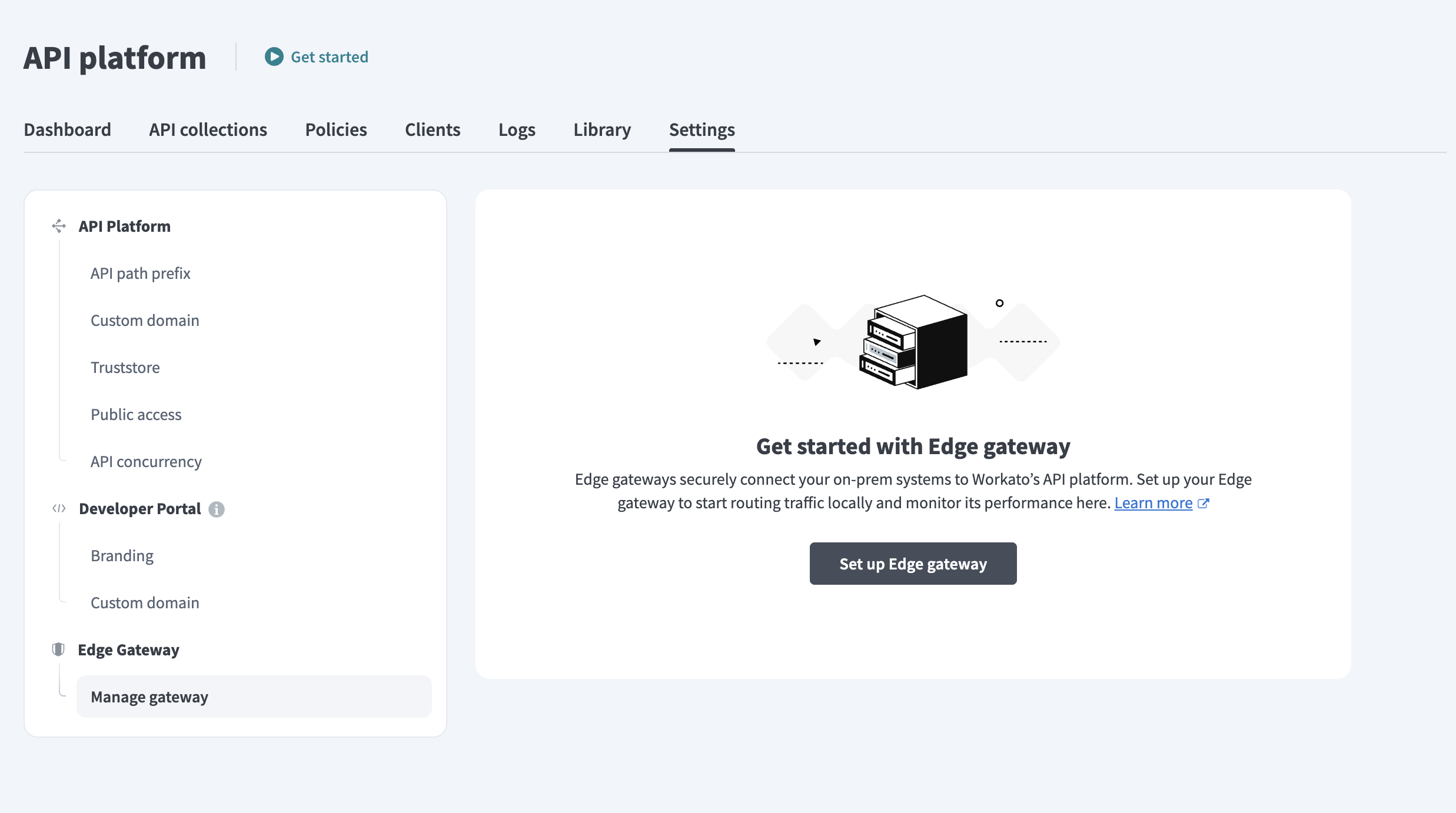 Set up Edge Gateway
Enter a Gateway name and select a Connection method. You can choose Docker or Kubernetes (Helm) based on your deployment environment.
Copy the Installation command generated in the dialog. The command includes both the bootstrap and runtime commands.
You run these commands when you deploy the gateway in your infrastructure.
TOKEN VALIDITY
Registration tokens expire after 5 minutes. Click Regenerate command if needed.
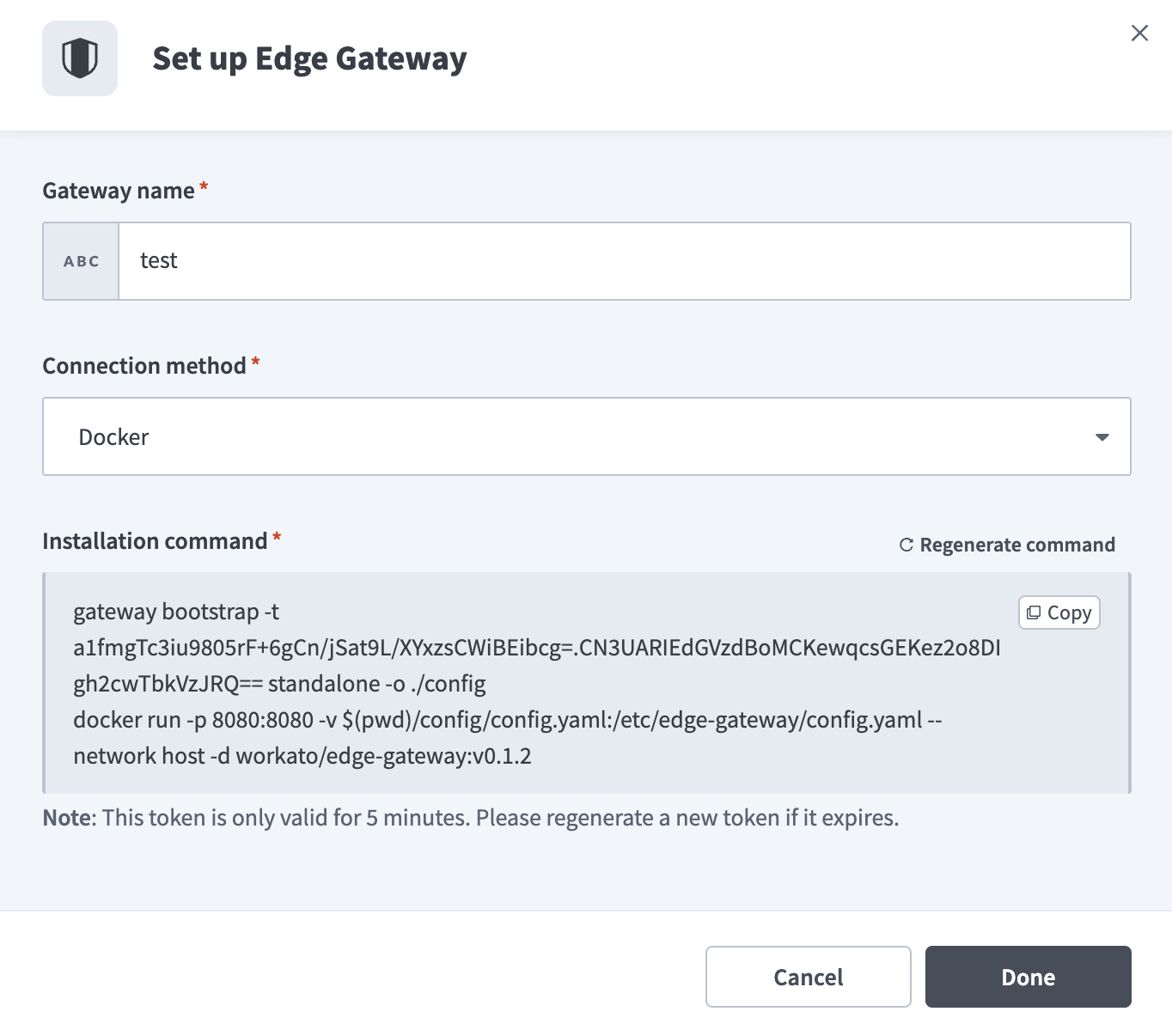 Set up Edge Gateway
Click Done.
# Supported environments
API Edge Gateway supports the following environments:
- Linux (x86-64)
- Kubernetes v1.25 or later
- Docker-compatible container runtimes, including Docker and Podman
# Network requirements
The gateway requires outbound HTTPS (port 443) access to the following Workato endpoints:
apim-edge.workato.comtelemetry.apim-edge.workato.comconfig.apim-edge.workato.com(required during bootstrap only)
Endpoints use the following format for region-specific deployments:
apim-edge.<region>.workato.comtelemetry.apim-edge.<region>.workato.comconfig.apim-edge.<region>.workato.com
The gateway establishes a secure gRPC connection over TLS (port 443) using mutual TLS (mTLS).
Workato doesn't require inbound connectivity to your environment.
# Install and deploy the gateway
Deploy the gateway in your infrastructure using the command you copied during setup.
TOKEN VALIDITY
Registration tokens expire after 5 minutes. Go to API Platform > Settings > Manage gateway and click Regenerate command if your token has expired.
# Supported installation methods
Workato supports the following deployment methods:
Use Docker for single-host deployments. Use Kubernetes for production environments that require orchestration and scaling.
# Docker deployment
Use Docker to deploy the gateway on a Linux host in a single-node or non-orchestrated environment.
Deployment consists of two phases:
# Bootstrap the gateway
Run the bootstrap command generated in the Workato UI in a terminal on the Linux host where you plan to run the gateway container:
docker run --rm \
-v $(pwd)/config:/tmp/egw/config \
registry.workato.com/edge-gateway:<tag> \
/gateway bootstrap \
-t <registration-token> \
-o /tmp/egw/config \
standalone
Replace the following placeholders:
<tag>with the image version displayed in the Workato UI.<registration-token>with the one-time registration token generated in the Workato UI. The token appears after the-tflag in the generated command and expires after 5 minutes.
The bootstrap command performs the following:
- Registers the gateway using the one-time registration token
- Establishes mutual TLS (mTLS) trust with the Workato control plane
- Generates configuration and credential files
- Writes the generated files to the
configdirectory
Keep the config directory. The gateway runtime requires these files to start.
If you delete the config directory, run the bootstrap command again using a new registration token.
# Start the gateway runtime
Start the gateway using the configuration generated during bootstrap:
docker run --rm \
-p 8080:8080 \
-v $(pwd)/config:/etc/edge-gateway/ \
registry.workato.com/edge-gateway:<tag>
The runtime performs the following:
- Reads configuration from
/etc/edge-gateway/ - Connects to the Workato control plane over TLS (port 443)
- Processes API traffic on port 8080
Run the following to verify that the container is running:
docker ps
Run the following to view logs:
docker logs <container-id>
# Kubernetes (Helm) deployment
Use Kubernetes to deploy the gateway when you require orchestration, scaling, or rolling upgrades.
Deployment consists of the following phases:
Run these commands from a machine that has Docker, Helm, and kubectl installed and configured with access to your Kubernetes cluster.
# Bootstrap the gateway
Execute the bootstrap command generated in the Workato UI:
docker run --rm \
-v $(pwd)/config:/tmp/egw/config \
registry.workato.com/edge-gateway:<tag> \
/gateway bootstrap \
-t <registration-token> \
-o /tmp/egw/config \
helm
Replace the following placeholders:
<tag>with the image version displayed in the Workato UI.<registration-token>with the one-time registration token generated in the Workato UI. The token appears after the-tflag in the generated command and expires after 5 minutes.
The bootstrap command registers the gateway with the Workato control plane and generates a Helm configuration file at config/values.yaml.
Keep the config directory. Helm uses this file to deploy the gateway. If you delete the config directory, run the bootstrap command again using a new registration token.
# Deploy using Helm
Deploy the gateway using Helm:
helm upgrade \
  -n edge-gateway \
  -f config/values.yaml \
  --create-namespace \
  edge-gateway \
  charts/gateway
Run the following to verify that the pod is running:
kubectl get pods -n edge-gateway
Run the following to view logs:
kubectl logs -n edge-gateway <pod-name>
# Verify gateway connection
After you create the gateway in Workato, it appears on the Manage gateway page. The gateway shows as active only after you deploy and start the runtime.
Complete the following steps after you start the runtime container (Docker) or deploy the Helm release (Kubernetes):
Go to API Platform > Settings > Manage gateway.
Confirm that Instances shows at least 1 online.
Confirm that Last synced displays a timestamp.
Confirm that the gateway version appears correctly.
These indicators confirm that the gateway:
- Established a secure mTLS connection to the Workato control plane.
- Synchronized configuration.
- Began processing API traffic.
Perform the following checks if the gateway doesn't appear online:
- Check container or pod logs.
- Confirm outbound HTTPS (port 443) access to required Workato endpoints.
- Verify that the registration token was valid during bootstrap.
# Publish API collections to Edge Gateway
After your gateway is online, you can publish API proxy collections to it. Select the edge gateway as the deployment target in the API gateway field when you create or edit an API proxy collection.
Edge Gateway supports API proxy collections only. API recipe collections aren't supported on Edge Gateway.
Auth policies, rate limiting, and other collection settings apply to Edge Gateway the same way they apply to the cloud gateway. Refer to API proxy collections for more information.
# Manage Edge Gateway
You can monitor and manage all edge gateways from the Manage gateway section after setup. Each gateway runs one or more instances and syncs with the Workato cloud for configuration and observability.
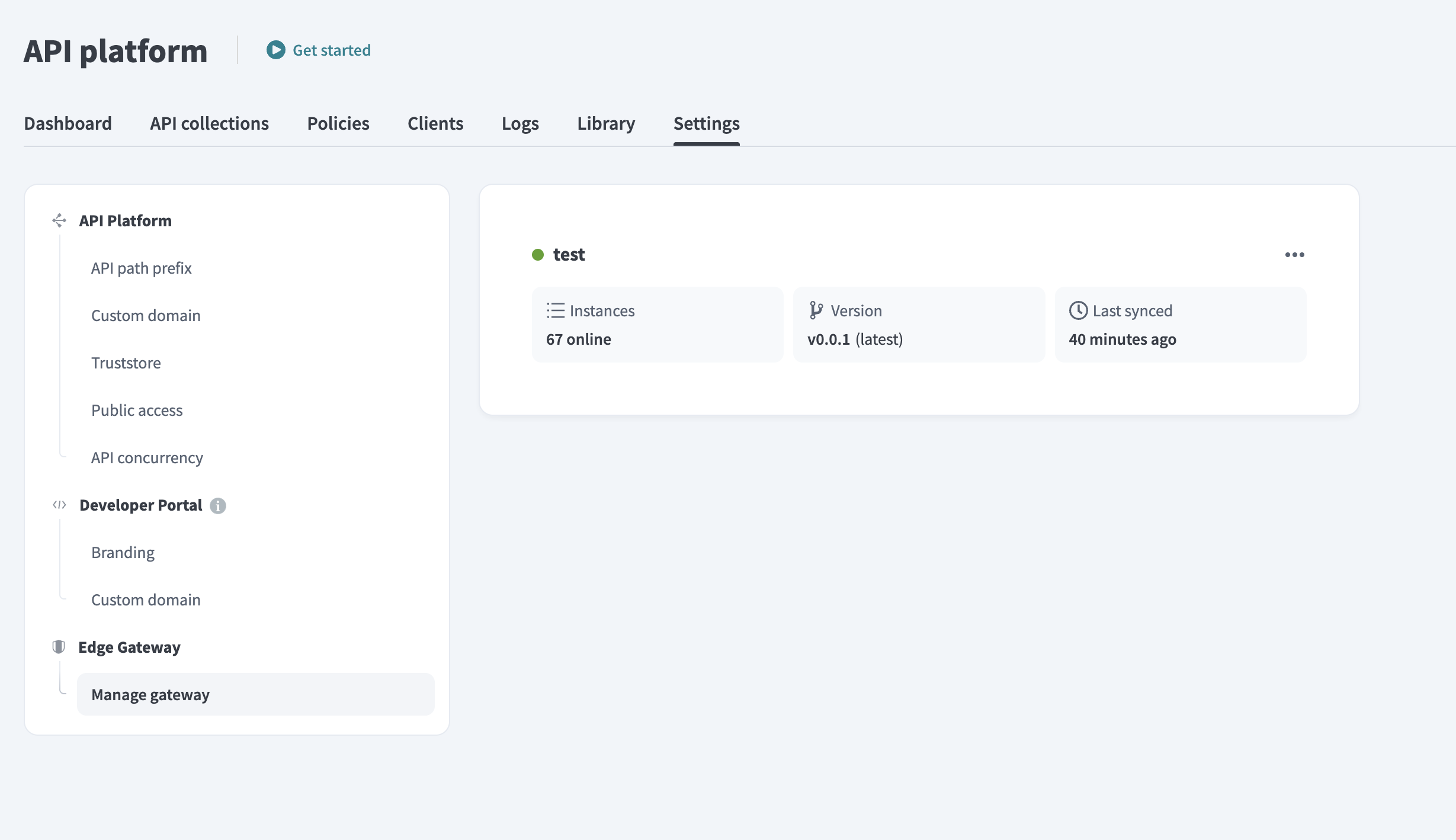 Edge Gateway interface
You can view the following for each gateway:
- Deployment name
- Number of instances
- Gateway version and update availability
- Last synced timestamp
Click the ... (ellipses) next to a gateway to rename it, generate an installation command, or delete it. Deleting an Edge Gateway removes it from your workspace and deactivates all associated endpoints.
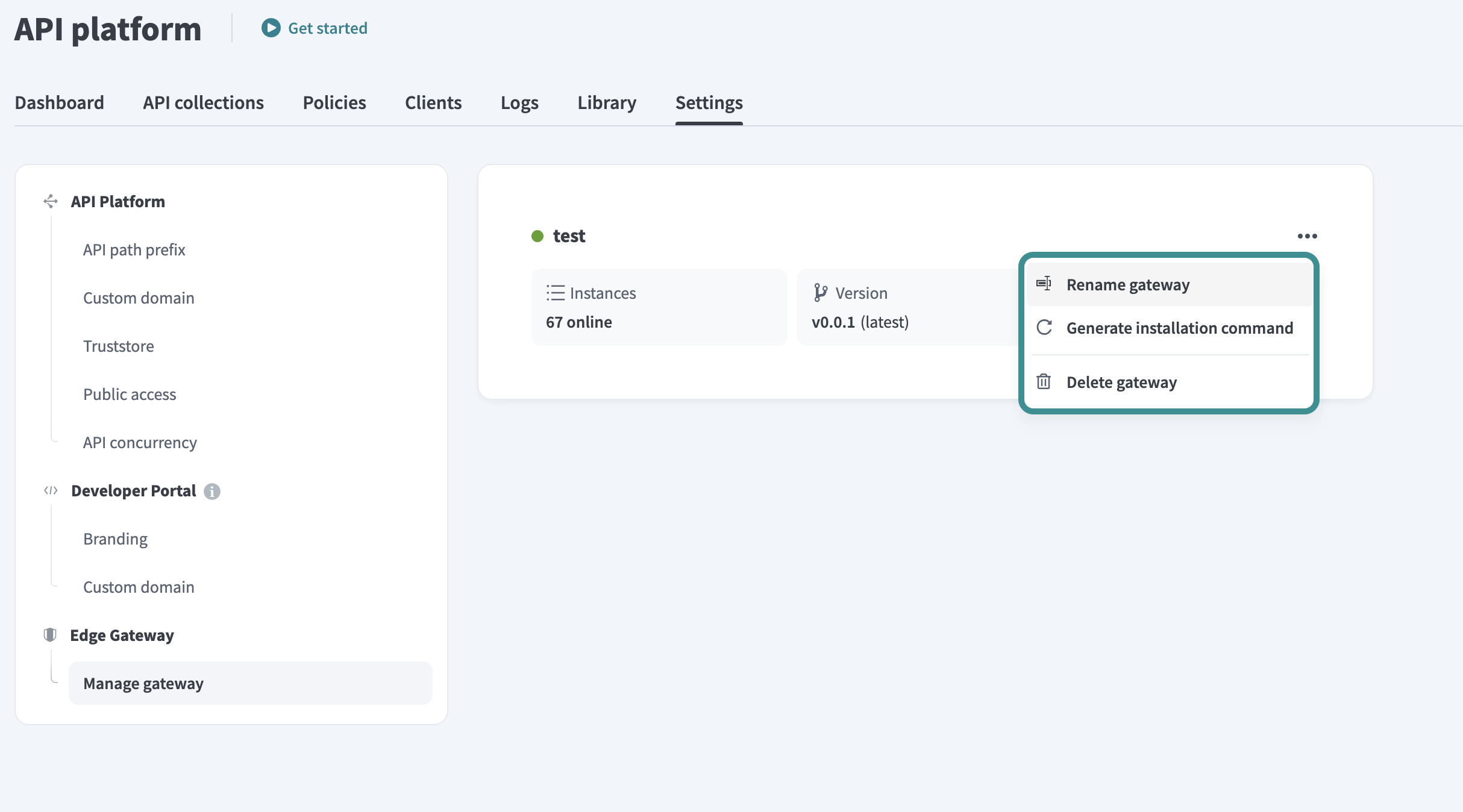 Rename, reinstall, or delete the gateway
# Update gateway version
Workato alerts you when a new version of your gateway becomes available. Complete the following steps to update your gateway using the method that matches your original installation:
Click the Update to [version] badge next to the gateway version.
Review the update command and release note in the dialog. Click Copy to copy the command for your installation method.
Run the command in your local environment to pull the latest container or apply the update.
Click Done to close the dialog. The new version appears in the status panel after the gateway reconnects.
# Control plane connectivity
Edge Gateway maintains a secure outbound connection to the Workato control plane to synchronize configuration and send telemetry.
The gateway automatically enters fallback mode if it loses connectivity to the control plane. The following occurs in fallback mode:
- The gateway continues processing API traffic using the last cached configuration.
- Configuration updates from the control plane are paused.
- Telemetry and status reporting are temporarily suspended.
Normal operation resumes automatically after the gateway reconnects to the control plane.
# Deployment constraints
The following constraints apply to API Edge Gateway deployments:
- One gateway per workspace environment.
- No enforced limit on the number of instances per gateway.
- Collection limits follow the same constraints as the standard API gateway.
API Edge Gateway is deployed as a dedicated collection type.
# Limitations
API Edge Gateway has the following limitations:
- API recipe collections aren't supported
- Request and response transformations aren't supported
- Custom request validation isn't supported
- Certificate validation formula isn't supported
- Air-gapped environments aren't supported
API Edge Gateway supports all policy types available in the standard API gateway.
# Edge Gateway and OPA
In an OPA-based hybrid deployment, API traffic routes through the Workato cloud, while the OPA evaluates policies locally within your environment. Edge Gateway keeps all API traffic within your environment and processes inbound requests locally. The gateway maintains a secure outbound connection to the Workato control plane for configuration and observability.
Edge Gateway consolidates the following capabilities into a single runtime deployment:
- Authentication and rate limiting.
- Traffic routing to internal services.
- Gateway policy enforcement.
- Metrics and telemetry collection.
This architecture simplifies hybrid API deployments and reduces reliance on separate policy engines or tunnel-based integrations.
Last updated: 4/22/2026, 3:28:51 PM