License Genie features
License Genie automates license optimization across your connected apps. This page describes the features it provides, grouped into core capabilities that make up the optimization workflow and extended capabilities that add optional functionality.
Core features
The following diagram shows how core features map to each stage of the workflow, from scheduling through approval and execution.
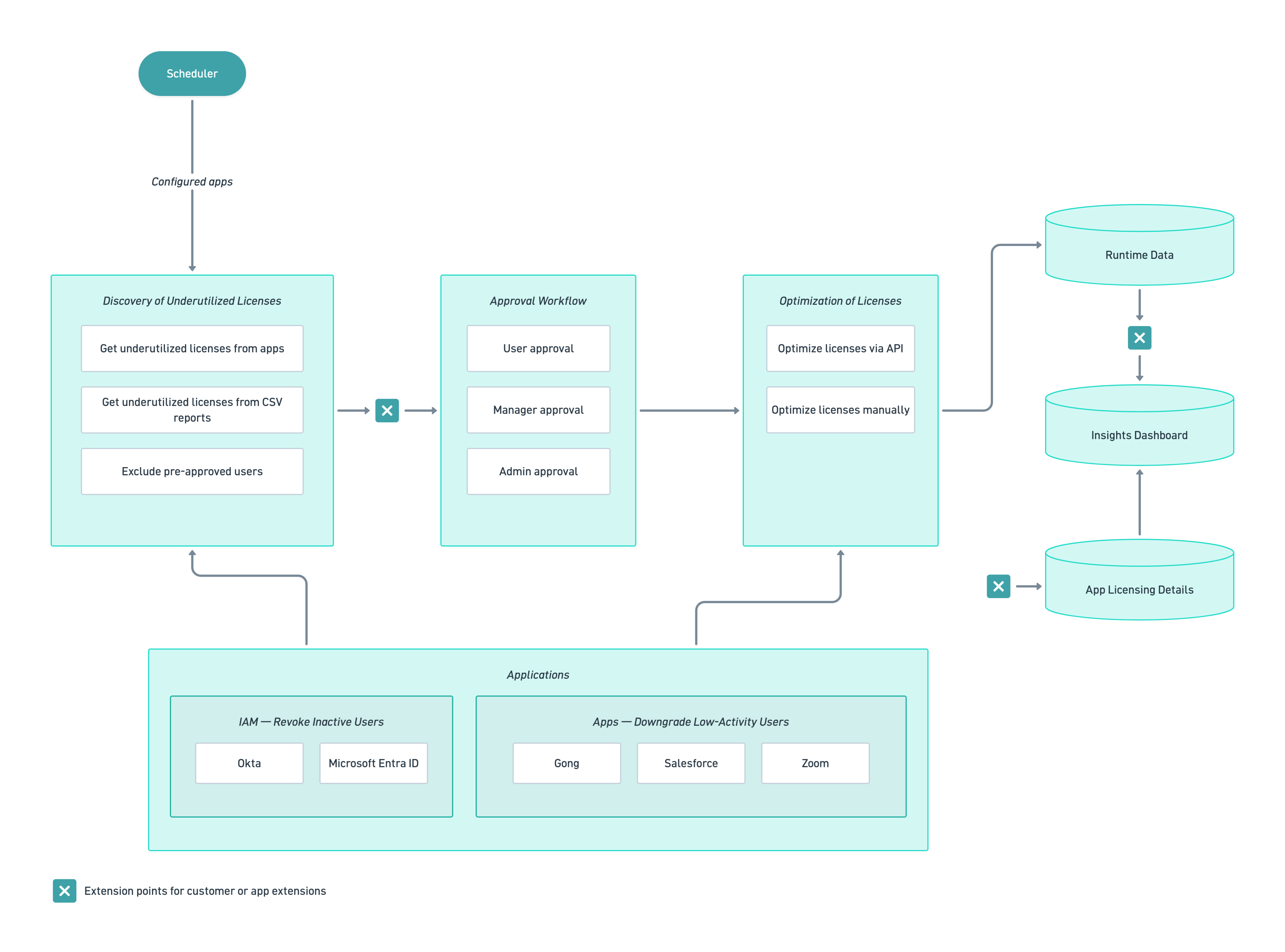 License Genie optimization workflow
Scheduler
License Genie runs on a configurable schedule that supports weekly (by weekday) or monthly (by date) cadences. You can set cadences independently per connected app. For example, you can have an Okta-managed Salesforce deployment that runs on the first of every month, while an Okta-managed Zoom deployment runs every Tuesday.
License discovery
License Genie identifies underutilized licenses using API data from connected applications. You can configure inactivity thresholds per app, and extend support to additional apps.
Downgrade detection
For Salesforce, Gong, and Zoom, License Genie analyzes usage activity to identify users on a higher license tier than they need. You can extend support to additional apps.
Multi-tier approval
License Genie routes identified users through a multi-tier approval workflow before reclaiming a license. You can enable user, manager, and admin tiers independently:
- User approval: The user receives a notification. Approving reclaims the license; rejecting escalates the request to the manager, if enabled.
- Manager approval: The manager reviews requests escalated from the user. Approving reclaims the license. Rejecting ends the workflow and retains the license. A timeout escalates the request to the admin, if enabled.
- Admin approval: The admin acts as the final reviewer, or as the default tier when user and manager approval are both disabled.
If all tiers are disabled, License Genie applies the default action set in the Approval.TimedOutDefaultAction project property.
Approvers can handle all pending escalated requests in a single interaction. License Genie maintains a full audit trail of all approval actions.
License optimization
After approval, License Genie either revokes or downgrades the license through the connected application's API or through an SSO provider such as Okta or Microsoft Entra ID. When an app requires manual processing, admins receive a notification to complete the action.
Exclusion list
You can add users to an exclusion list to prevent them from being flagged during optimization. Exclusion lists are scoped per app and are checked before any user enters the approval workflow.
Extended features
Extended features add optional capabilities to the core optimization workflow.
Contract data extraction
License Genie uses intelligent document processing to extract license counts, SKUs, pricing, and contract dates from uploaded contract PDFs. The extracted data feeds directly into cost and license analysis.
Manual upload of usage data
You can manually upload usage data as a CSV file for apps without a direct API integration. The uploaded data triggers the same discovery, approval, and optimization workflow as API-connected apps. For the upload steps, see Manual upload of usage data in the setup guide.
CORE IS READ-ONLY
Don't modify assets in the Core folder. Activate Extensions assets as-is, or clone them to Custom Extensions before customizing.
Last updated: