Configure Facebook as a data pipeline source
Set up Facebook as a data pipeline source to extract and sync ad account, campaign, and performance insights data from the Meta Marketing API to your destination.
Use this guide to review the features and prerequisites, connect Facebook as a data pipeline source, configure the pipeline, and understand the supported objects, sync modes, schema handling, sensitive data handling, and known limitations.
Features supported
The following features are supported when you use Facebook as a pipeline source:
- Cloud connectivity: Connects to the Meta Marketing API over HTTPS through
https://graph.facebook.com. - Multi-account support: Sync all ad accounts your connection can access, or select specific ad accounts by ID.
- Object-level selection: Choose from supported objects across the ad hierarchy and performance insights reports. Refer to Supported objects for the full list.
- Incremental sync:
AdSet,Ad, and all performance insights objects sync incrementally. Refer to Sync modes for more information. - Delete tracking: Detect archived, deleted, or missing records on every full-sync object, plus
AdSetandAd, and mark them with a soft-delete flag in your destination. Refer to Delete tracking for more information. - Schema drift detection and handling: Detect and apply schema changes automatically with Auto-sync new fields, or keep the schema fixed with Block new fields.
- Field-level data protection: Hash or replicate sensitive fields as is before the data reaches your destination.
- Configurable sync frequency: Schedule syncs on a time-based interval or with a cron expression. The minimum supported interval is 15 minutes.
Prerequisites
Complete the following requirements before you connect Facebook as a data pipeline source.
- A Meta Business Manager account with access to the ad accounts you plan to sync.
- A Facebook account with permission to authorize third-party applications for those ad accounts.
REQUIRED PERMISSIONS
Workato requires the ads_read permission to sync Facebook objects. If you also want to sync the AdAccount object's funding_source_details field, grant the business_management permission. Without it, Workato skips that field and logs a warning rather than failing the sync.
Supported connection types
Facebook data pipelines support OAuth 2.0 authentication:
- OAuth 2.0: Authorize Workato through Facebook Login, using the same OAuth flow as the Facebook Lead Ads workflow connector. Meta invalidates the resulting access token if you change your password, enable two-factor authentication, or remove Workato's app permissions. Reconnect the pipeline connection if that happens.
Connect to Facebook
Complete the following steps to connect Facebook as a data pipeline source.
Connect to Facebook
Select Create > Connection or press C twice.
Search for Facebook and select it as your app.
Enter a name in the Connection name field.
Use the Location drop-down menu to select the project where you plan to store the connection.
Optional. Use the Custom OAuth profile drop-down menu to select a custom OAuth profile for your connection.
Select Connect to open Facebook's login window.
Enter your credentials in the Facebook login window to authenticate your account.
Review the permissions that Workato requests, then select Continue to approve them and complete the connection. Workato displays a success message when the connection is established.
Configure the pipeline
Complete the following steps to configure Facebook as your data pipeline source:
Select Create > Data pipeline or press C+I.
Enter a name for the data pipeline in the Data pipeline name field.
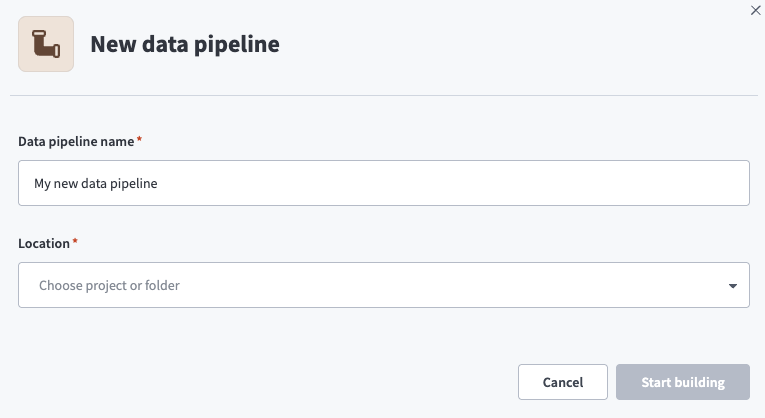 Data pipeline setup
Use the Location drop-down menu to select the project where you plan to store the data pipeline.
Click Start building.
Click the Extract new/updated records from source app trigger. This trigger defines how the pipeline retrieves data from Facebook.
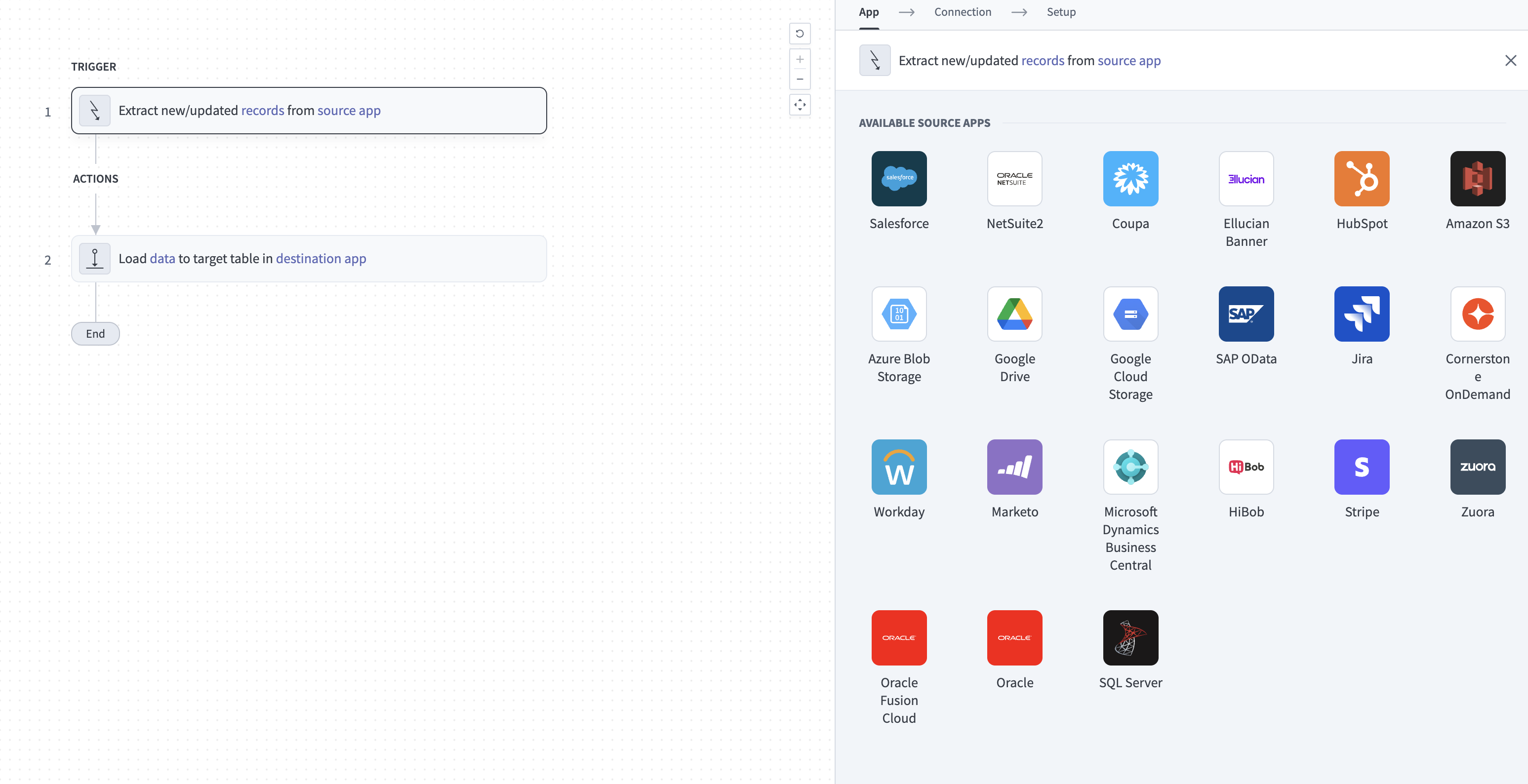 Configure the Extract new/updated records from source app trigger
Use the Your Connected Source Apps drop-down menu to select Facebook.
Choose the Facebook connection you plan to use for this pipeline. Alternatively, click + New connection to create a new connection.
Use the Sync all ad accounts drop-down menu to choose whether the pipeline discovers and syncs data from every ad account reachable by the authorized Facebook user. Select Yes to sync every accessible ad account automatically.
If you select No, use the Ad accounts to sync field to choose specific accounts to sync. Select Select from list to pick accounts from a list, or toggle the field to enter ad account IDs as a comma-separated list instead.
You can't change the Sync all ad accounts value after the pipeline's first run.
Click Add object to open the Add new objects panel.
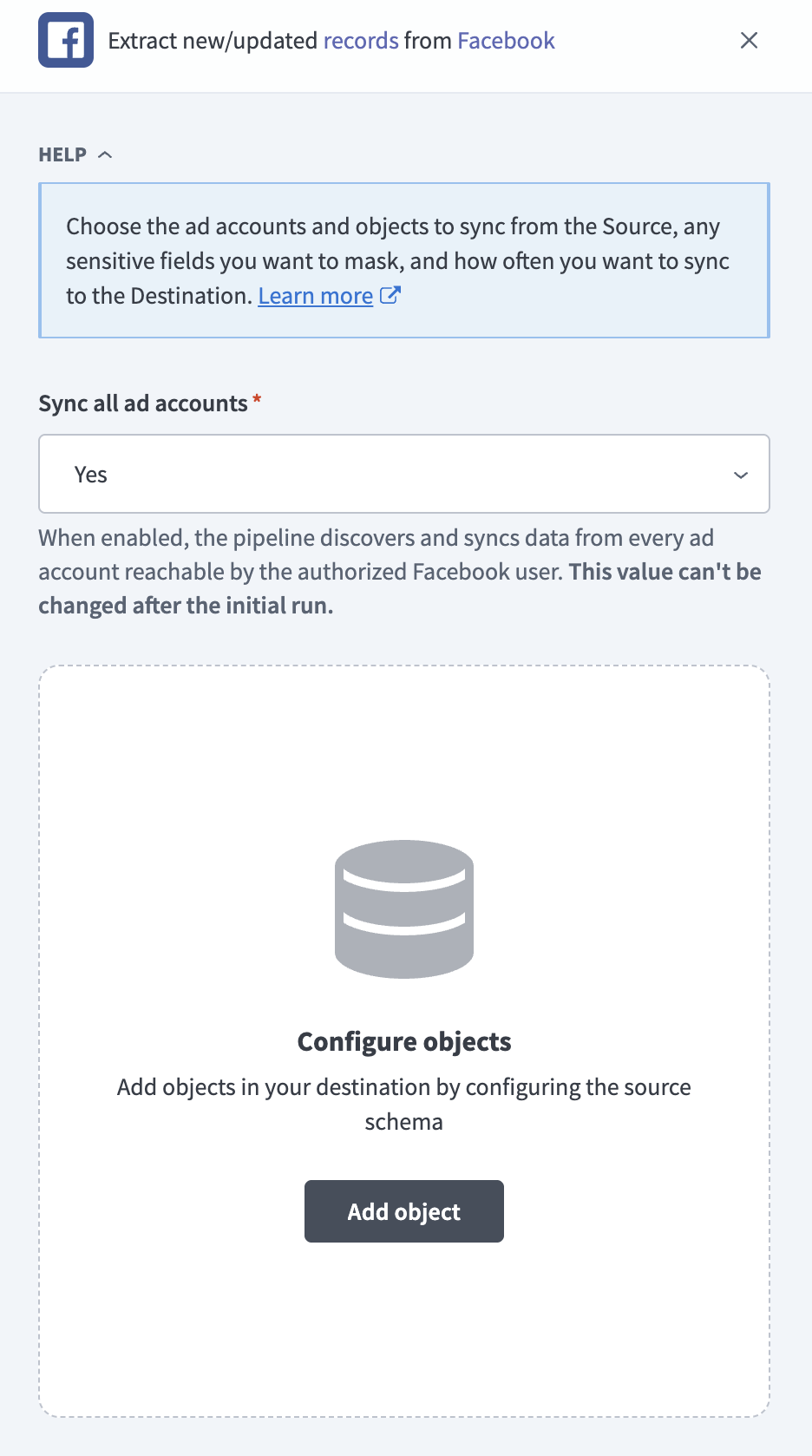 Add Facebook objects
Search or browse the list of available Facebook objects, select the objects you plan to sync, and click Add.
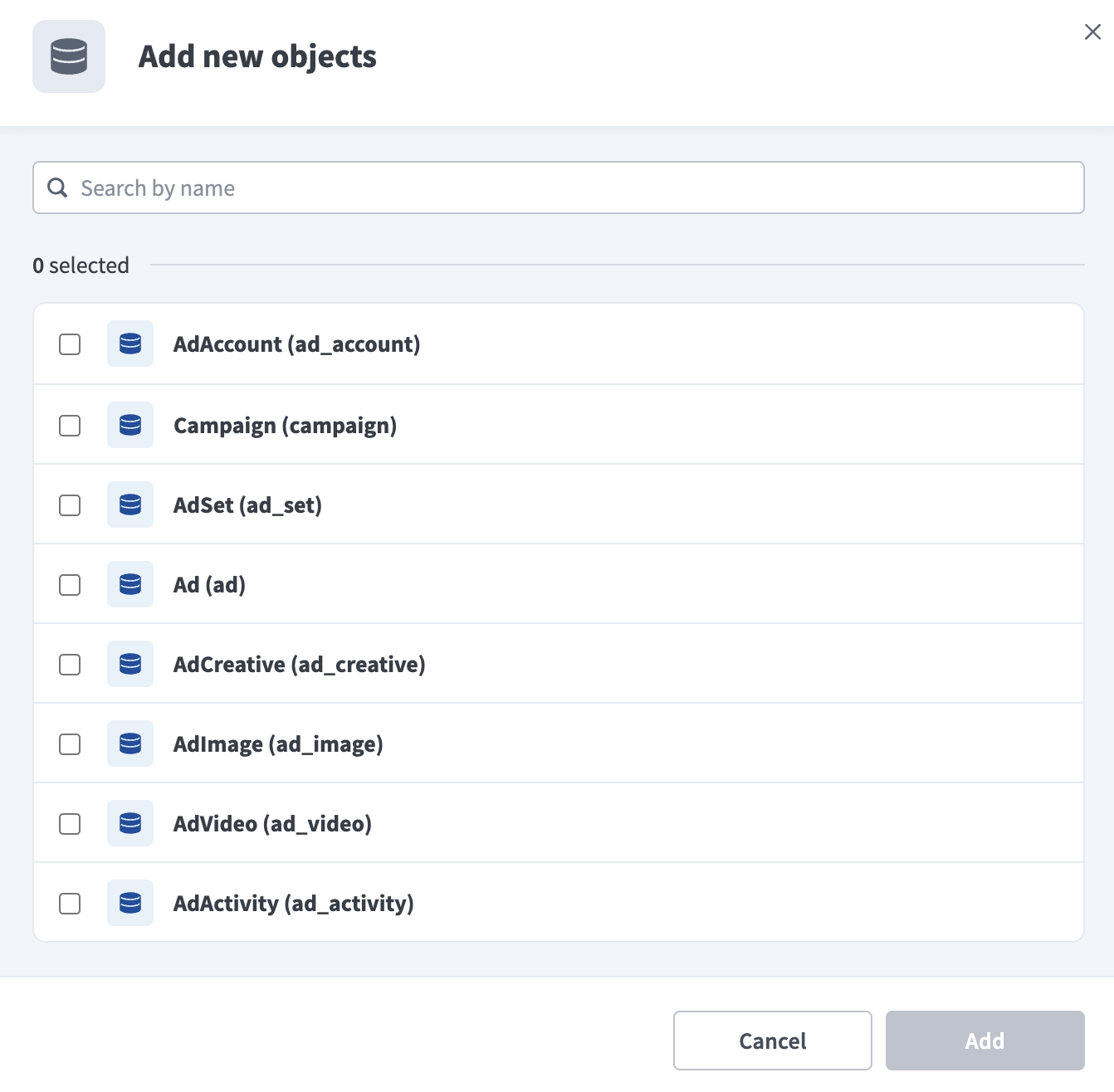 Select Facebook objects
Review and customize the schema for each selected object. The pipeline automatically fetches an object's schema when you select it. This ensures the destination matches the source.
Expand an object to view associated fields. Keep all fields selected to extract all available data, or deselect specific fields to exclude them from data extraction and schema replication.
Optional. Configure field-level data protection by expanding an object and choosing how to handle each field:
- Replicate as is: Data values at the source replicate identically to the destination.
- Hash: Hash sensitive data values in the field before syncing to your destination.
Workato recommends hashing personally identifiable information (PII) and other sensitive fields. Refer to Sensitive data handling for a list of fields that commonly contain PII.
Click Add object again to add more objects. Repeat this step to include additional Facebook objects in your pipeline.
Use the Choose how to handle schema changes drop-down menu to select a schema drift handling option:
- Auto-sync new fields: Automatically detects and syncs new fields added in the source.
- Block new fields: Keeps the schema fixed after the pipeline starts. You must add new fields manually. This option may cause the destination to fall out of sync if the source schema updates.
Refer to Schema replication and schema drift management for more information.
Choose either a standard time-based schedule or define a custom cron expression in the Frequency field. This determines how often the pipeline syncs data from Facebook to the destination.
Supported objects
Facebook data pipelines sync data from the Meta Marketing API (v25.0). The following tables list the supported objects, grouped by category. Each object syncs as a separate table in your destination, except Basic Ad Actions, which merges Meta's actions and action_values arrays into a single child table of Basic Ad.
Ad accounts and campaign hierarchy
The following objects mirror Meta's ad hierarchy: an AdAccount is the parent of Campaign objects, which are the parent of AdSet objects, which are the parent of Ad objects. Each Ad references an AdCreative.
| Object | Sync mode | Delete tracking |
|---|---|---|
AdAccount | Full sync | Yes (destination-inferred) |
Campaign | Full sync | Yes (soft) |
AdSet | Incremental | Yes (soft) |
Ad | Incremental | Yes (soft) |
AdCreative | Full sync | Yes (soft) |
Creative assets, audiences, and labels
The following objects hold supporting creative assets and audience or label definitions referenced by ads, ad sets, and campaigns.
| Object | Sync mode | Delete tracking |
|---|---|---|
AdImage | Full sync | Yes (soft) |
AdVideo | Full sync | Yes (destination-inferred) |
CustomAudience | Full sync | Yes (destination-inferred) |
AdLabel | Full sync | Yes (destination-inferred) |
Activity log
The following object is a change-history log for the other objects in the ad hierarchy.
| Object | Sync mode | Delete tracking |
|---|---|---|
AdActivity | Append-only | N/A |
Prebuilt performance reports
The following objects return daily performance metrics at a fixed level (account, campaign, ad set, or ad). Basic Ad Actions is a child table of Basic Ad that expands each ad's conversion actions into one row per action type.
| Object | Sync mode | Delete tracking |
|---|---|---|
Basic Ad | Incremental | N/A |
Basic Ad Actions | Incremental | N/A |
Basic AdSet | Incremental | N/A |
Basic Campaign | Incremental | N/A |
Basic Account | Incremental | N/A |
Demographic breakdowns and marketing mix modeling
The following objects return the same daily performance metrics broken down by an additional dimension, such as country or age and gender, or reduced to the minimal field set required for marketing mix modeling tools. Demographics Platform & Device surfaces the Facebook-versus-Instagram performance split, because Instagram ads sync through the same Marketing API objects rather than a separate connector.
| Object | Sync mode | Delete tracking |
|---|---|---|
Demographics Country | Incremental | N/A |
Demographics Region | Incremental | N/A |
Demographics Age & Gender | Incremental | N/A |
Demographics Platform & Device | Incremental | N/A |
Marketing Mix Modeling | Incremental | N/A |
Sync modes
Facebook data pipelines support full sync, incremental sync, and append-only sync. Workato detects the sync mode for each object automatically.
Full sync
A full sync re-reads the complete record set for an object on every run and overwrites the destination table. AdAccount, Campaign, AdCreative, AdImage, AdVideo, CustomAudience, and AdLabel use full sync, because Meta's API doesn't expose a reliable modified-time signal for these objects.
Incremental sync
An incremental sync extracts only the records that changed since the last run. AdSet and Ad use Meta's updated_time field as a cursor.
All performance insights objects use a rolling date window instead of a modified-time cursor. Each run advances the window forward and re-fetches the trailing 28 days of data, so recent numbers can change between runs. This window is fixed at 28 days and isn't configurable.
Refer to the Supported objects tables to see the sync mode for each object.
Append-only sync
AdActivity is a change-history log for Meta's ad objects. Each run reads the account's activity history and adds new events to the destination without modifying or removing rows written by previous runs.
Delete tracking
For Campaign, AdSet, and Ad, Workato detects soft-deleted records through Meta's effective_status field, but only for archived objects. Workato can detect an archived campaign, ad set, or ad, but not one that Meta has permanently deleted. For AdCreative and AdImage, Workato reads each record's own status field instead.
AdAccount, AdVideo, CustomAudience, and AdLabel sync in full on every run, so Workato detects deletions by comparing each run's complete snapshot against the previous one and flags records that no longer appear, even though Meta's API doesn't expose an explicit deletion signal for these objects.
Performance insights records are immutable once their date range passes, so delete tracking doesn't apply to them, and AdActivity is an append-only log that isn't deleted.
Schema and data type handling
The following considerations apply to schema and data types when you sync data from Facebook.
Timestamps
Facebook objects use different timestamp representations, and Workato handles each one differently:
AdAccount,Campaign,AdSet,Ad,AdCreative,AdImage,AdVideo, andAdActivityreturn ISO 8601 timestamps with an embedded UTC offset. Workato normalizes these values to UTC when it writes them to your destination.CustomAudience'stime_created,time_updated, andtime_content_updatedfields return Unix epoch seconds instead of ISO 8601 strings. Workato detects and parses this format automatically.- Performance insights objects return
date_startanddate_stopas calendar dates (YYYY-MM-DD) with no time component. Workato stores these as date values, not timestamps.
Nested and variable fields
Facebook doesn't support user-defined custom fields, but several objects include fields whose structure varies by campaign objective or creative type. Workato stores the following fields as JSON columns instead of flattening them:
AdSet.targetingAdCreative.object_story_specAdCreative.asset_feed_specCampaign.promoted_object
Workato syncs JSON fields to the destination's native JSON type, such as VARIANT in Snowflake. Workato serializes JSON fields as strings if the destination doesn't support a native JSON type.
Synthetic columns
Workato adds the following synthetic column to destination tables for objects with delete tracking:
| Column | Type | Purpose |
|---|---|---|
_workato_is_deleted | Boolean | Set to true for deleted or missing records on Campaign, AdSet, Ad, AdCreative, AdImage, AdAccount, AdVideo, CustomAudience, and AdLabel. Refer to Delete tracking for more information. |
Sensitive data handling
Facebook objects can contain personally identifiable information (PII) and payment details. Meta's Marketing API doesn't expose individual user-level data (all performance insights data is aggregated), but the following objects commonly contain sensitive fields:
| Object | Sensitive fields |
|---|---|
AdAccount | name (may contain a business name), owner (a Facebook user ID), funding_source_details (partial payment method information) |
AdSet | targeting (aggregated audience criteria, such as age, gender, interests, geography, and custom audiences; not individual user data) |
CustomAudience | name, description, data_source (indicates whether the audience was built from a customer list or website traffic) |
AdAccount.funding_source_details requires the business_management permission. Refer to Prerequisites for what happens if the connection's token doesn't have it.
If you operate under GDPR or a similar regulation, note that Meta doesn't expose CustomAudience membership data (the list of people in an audience) through the Marketing API. Meta retains that data exclusively, so Workato can't extract or forward it.
Use the Hash option in field-level data protection during pipeline configuration to protect PII before it reaches your destination. Refer to the Configure the pipeline steps for more information.
Workato recommends hashing AdAccount.funding_source_details in particular.
Limitations
The following limitations apply when you use Facebook as a data pipeline source.
Insights history is capped at 37 months
Meta retains Insights data for 37 months. Even if you set an earlier historical start date, Basic Ad, Basic AdSet, Basic Campaign, Basic Account, the demographic breakdown objects, and Marketing Mix Modeling can't sync data older than 37 months. AdAccount, Campaign, AdSet, Ad, AdCreative, AdImage, AdVideo, AdActivity, CustomAudience, and AdLabel don't have a historical start date at all. They only accumulate history from the date you create the connection forward.
Reach-related metrics are unavailable for older date ranges
For date ranges that start more than 13 months in the past, Meta no longer returns reach, frequency, or cpp on Basic Ad and the demographic breakdown objects. Meta also quotas accounts to 10 asynchronous reach requests per day for date ranges past that threshold.
Minimum sync frequency
The minimum supported sync interval is 15 minutes.
Last updated: