Apache Kafka
Apache Kafka is an open-source distributed event streaming platform. It is used by many industries and organizations to process payments and perform other financial transactions in real-time, to collect and immediately react to customer interactions and orders, and to serve as the foundation for data platforms, microservices, and much more.
Using Workato Apache Kafka connector you can link with your local or web Kafka cluster instance and:
- Consume messages using the New message trigger or New messages trigger (batch).
- Send messages using the Publish message action or Publish messages action (batch).
How to connect to Apache Kafka in Workato
Complete the following steps to establish a connection to Apache Kafka in Workato using a cloud profile OPA:
LOCAL PROFILE SETUP
The steps in this guide configure an Apache Kafka connection using a Cloud Profile. Refer to the Apache Kafka Profile guide to configure a connection using a config.yml file.
Enter a Connection name that identifies which Apache Kafka instance Workato is connected to.
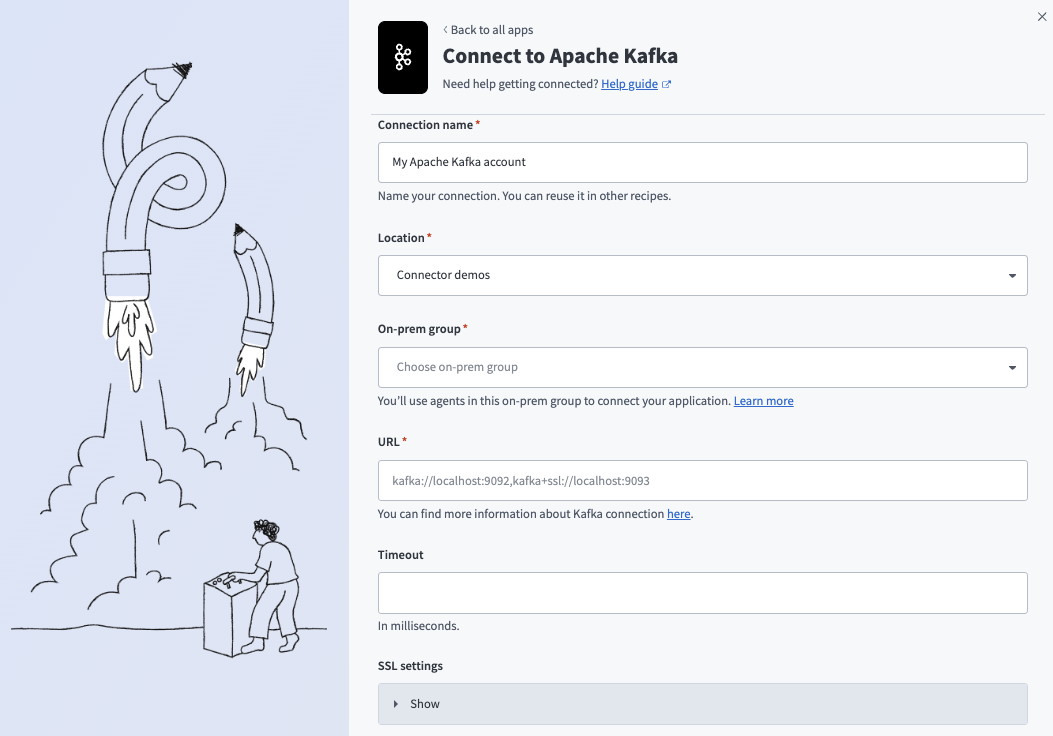 Create your connection
Use the Location drop-down menu to select the project where you plan to store the connection.
Use the On-prem group drop-down menu to select an on-prem group that uses a cloud profile.
Enter a server URL that uses the kafka or kafka+ssl protocol.
Specify a Timeout in milliseconds for general operations.
Enter the following values in .pem format to connect to Kafka using SSL/TLS:
Enter an X509 Server certificate and SSL client certificate.
Enter an RSA SSL client key.
Optional. Enter an RSA SSL client key password. Don't inline password-protected private keys.
Optional. Expand the Additional properties for Kafka connection section and click Add parameter to define additional properties.
Define additional properties
You can define any Kafka producer or consumer configuration properties. For example, bootstrap.servers or batch_size.
Some properties are unavailable because the on-prem agent overrides them. Protected properties include the following:
| Property name | Details |
|---|---|
| key.serializer | Only StringSerializer is supported by agent. |
| value.serializer | Only StringSerializer is supported by agent. |
| key.deserializer | Only StringSerializer is supported by agent. |
| value.deserializer | Only StringSerializer is supported by agent. |
| auto.offset.reset | Defined by recipes. |
| enable.auto.commit | Defined internally. |
The Kafka connector uses Apache Avro, a binary serialization format. Avro defines what fields are present and their type using JSON schemas. The connector stores data in a schema registry. The Kafka connector requires schema registry version 6.1.4 or later. For example:
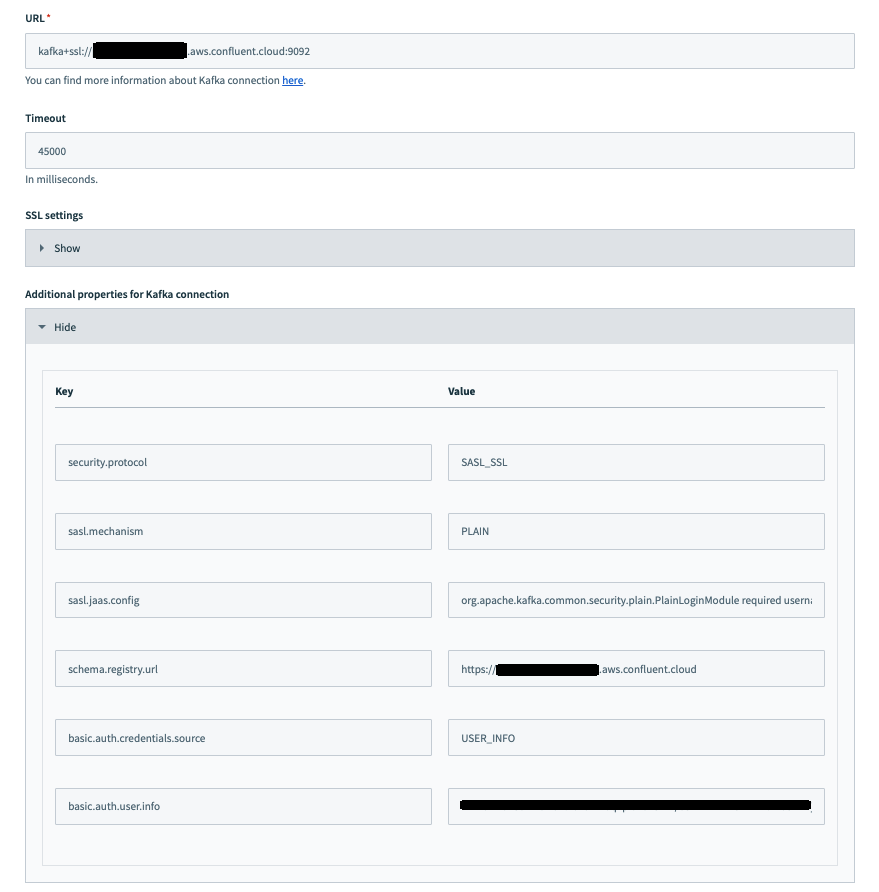 Kafka connection configuration with schema registry URL
Click Connect.
TROUBLESHOOT NO PROFILE FOUND ERRORS
Refer to the On-prem connections issues troubleshooting guide if you encounter a No profile found error.
Last updated: