# SAP Ariba
SAP Ariba (opens new window) is a leading procurement and supply chain management solution. It provides a platform for managing procurement, sourcing, supplier collaboration, and financial supply chain processes, enhancing operational efficiency and transparency. This connector enables seamless integration between SAP Ariba and other applications for automated workflows.
# Prerequisites
Before using the SAP Ariba connector in Workato, ensure you have an active SAP Ariba account with appropriate permissions to access APIs.
# Request API enablement
Complete the following steps to request API enablement as user with developer or organization admin privileges:
Sign in to the SAP Ariba Developer Portal.
Click Manage from the navigation menu.
Click Applications.
Search for the application you plan to have enabled.
Click Actions > Request API Access.
Select the API name in the API Names drop-down. This is the API that you plan to access when using this application.
Enter the realm name in the Realm Name field. This is the site for which you plan to have the application enabled.
Enter the ANID in the ANID field.
Select the radio button corresponding to the realm type. Available options include production or test.
Click Submit.
# Approve an API enablement request
Complete the following steps to approve the API enablement request. The following steps must be taken by a user with the organization admin privilege:
Click Manage in the left navigation menu.
Click Applications.
Search for the application.
Click Approve.
WAITING PERIOD FOR API ENABLEMENT
It can take 12 hours for SAP to enable the API. When ready, the application's Client ID is listed under the Account Settings > API Management section within your Ariba account.
Refer to the SAP Business Accelerator (opens new window) Hub for the API list and reference documents.
# Connection setup
Establishing a connection to SAP Ariba in Workato consists of the following steps:
Click Create > Connection or press C twice.
Search for and select SAP Ariba as your connection in the New connection page.
Provide a name for your connection in the Connection name field.
Use the Location drop-down menu to select the project where you plan to store the connection.
Select one or more Applications (API) from the drop-down menu.
You can authenticate to multiple APIs in a single connection. This allows you to access resources from different APIs within the same recipe without creating multiple connections.
Refer to the Available APIs table to understand the required APIs based on your use case.
Provide the Client ID generated from the SAP Ariba Developer Portal.
Provide the Client Secret generated from the SAP Ariba Developer Portal. This, along with the Client ID, is used to authenticate API requests securely.
Enter the API Key generated from the SAP Ariba Developer Portal. It is required to authorize API calls and link them to your account.
Enter the unique realm identifier for your SAP Ariba environment in the x-realm field. This ensures API requests are routed to the correct instance of your SAP Ariba setup.
Enter the Ariba Network ID (ANID) associated with your organization. This unique identifier is used to establish communication and link your organization within the Ariba Network.
Optional. If you are authenticating to additional APIs within the same connection, repeat Steps 6-10 with the corresponding credentials for each additional API.
Click Connect.
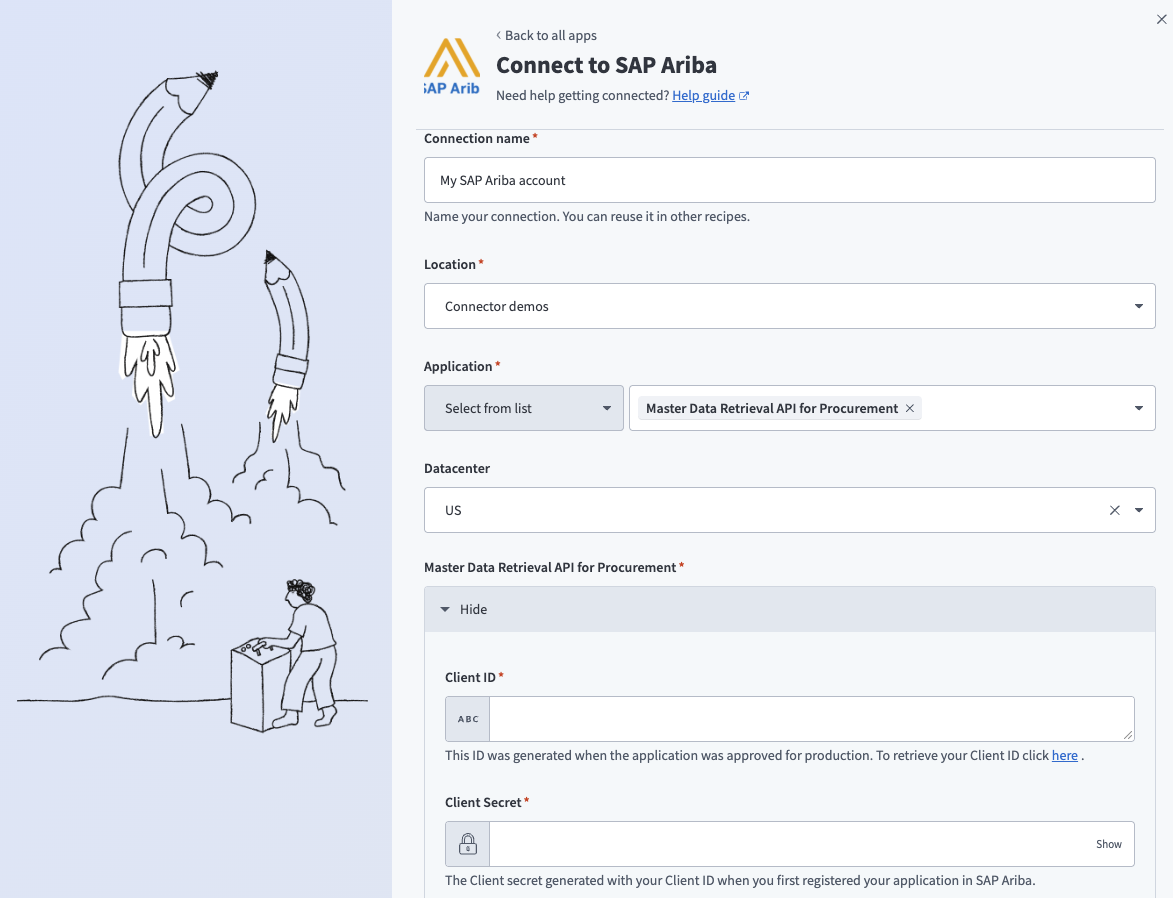 Connect to SAP Ariba in Workato
# Available APIs
The SAP Ariba connector supports multiple APIs. Each API provides access to different objects and operations. You can authenticate to multiple APIs within a single connection when you provide credentials for each one during connection setup.
The following APIs are available:
| API name | Description | Supported operations | Available objects |
|---|---|---|---|
| Master Data Retrieval API for Procurement | Retrieve and search master data from SAP Ariba Procurement | Actions:
|
|
| Master Data Retrieval API for Sourcing | Retrieve and search master data from SAP Ariba Sourcing | Actions:
|
|
| Order Change Requests API for Buyers | Retrieve and search purchase order change requests from a buyer perspective | Actions:
|
|
| Order Change Requests API for Suppliers | Retrieve and search purchase order change requests from a supplier perspective | Actions:
|
|
| Ariba Network Purchase Orders Buyer API | Retrieve and search purchase order data from a buyer perspective | Actions:
|
|
| Ariba Network Purchase Orders Supplier API | Retrieve and search purchase order data from a supplier perspective | Actions:
|
|
| Document Approval API | Search approval data | Actions:
|
|
| Contract Workspace Retrieval API | Manage, retrieve, and search contract workspace data | Triggers:
|
|
| Contract Workspace Modification API | Create, update, and modify contract workspaces | Actions:
|
|
| Contract Terms Management API | Retrieve and manage contract terms | Actions:
|
|
| Project Document Management Creation API | Create project documents | Actions:
|
|
| Event Management API | Create, manage, retrieve, and search events and related data | Triggers:
|
|
Last updated: 4/30/2026, 3:06:08 PM