MCP server tool design
An MCP server is a collection of tools that enable large language models (LLMs) to access data and perform actions in your systems. MCP server tool design is the process of planning and structuring tools for AI agents to interact with your applications.
Workato recommends the following best practices for MCP server tool design:
- Build tools that complement each other for complex workflows.
- Create preprocessing steps to summarize large datasets.
- Add new tools incrementally as use cases evolve.
- Use consistent error codes across all tools.
- Test your tools with real AI agent workflows.
- Monitor which tools are used most frequently.
- Refine tool descriptions based on usage patterns.
- Add new tools to support additional use cases.
Refer to MCP server design for comprehensive best practices on designing effective MCP servers, including MCP scope identification, MCP server description guidelines, error handling, and defining input and output structure.
MCP server tool design considerations
Design your MCP server around specific tool use cases. Start with the workflow you plan to enable, then determine what tools are needed, what data each tool returns, and how the tools interact. Each component is interconnected, and understanding these relationships helps you design MCP servers that are efficient, reliable, and composable.
These considerations can be broken down to the following points to help you design successful MCP servers that require minimal adjustments over time:
- Use case: Define the specific scenario the tools solve. What workflow does the MCP server enable?
- Tool breakdown: Identify the individual operations that compose the workflow. What actions are needed?
- Data optimization: Determine which data fields to include in tool responses. What information is essential?
- Developer experience: Plan clear descriptions and examples. Ensure the LLM can interpret and apply the tools effectively.
MCP servers typically include the following components:
- Tools: Define what actions (skills) the AI agent can perform.
- Tool architecture: Specifies how tools are structured and interact with other tools and apps.
- Data strategy: Controls what information is returned to the AI agent.
- Tool descriptions: Determines how the AI agent understands and uses each tool.
Design your first MCP server workflow use case
Every MCP server starts with a specific workflow. A workflow use case defines the task your tools support and the sequence of required operations. Workflow use cases must be specific and measurable rather than broad and abstract. Design your tools around the following principles:
- Start with a scenario: Identify a specific high-value workflow you plan to enable.
- Break into tools: Decompose the workflow into individual operations the AI agent can orchestrate.
- Avoid monolithic tools: Don't create single tools that try to handle entire workflows. For example,create separate tools like
get_zoom_meetings,get_zoom_transcript, andcreate_jira_issuethat work together instead of creating one tool calledprocess_zoom_to_jira.
| ❌ Not recommended | ✅ Recommended |
|---|---|
Overloaded Toolmanage_item(action, type, id, data)- Actions: create, read, update, delete - Types: customer, order, product | Single-Purpose Toolscreate_customer(data)get_customer(id)update_customer(id, fields)search_customers(query) |
Hidden Side Effectsupdate_order(id, status)// Also: sends email, updates inventory | Explicit Toolsupdate_order_status(id, status)send_order_email(id)update_inventory(id) |
Hidden Quotassearch(query)// Fails if query > 100 chars // Returns max 10, no signal | Explicit Quotassearch(query, limit=20)// query: max 100 chars, returns error if exceeded // Returns has_more flag |
Tool design principles
A tool should interact with your application in a specific, predictable way. MCP servers can have one or multiple tools, depending on the use case's complexity. Consider the following principles when you design your tools:
- Simple: Each tool performs exactly one specific action or retrieval.
- Composable: Tools act as building blocks that work together seamlessly.
- Predictable: Tools behave consistently and return standard errors.
Simple tools
Simple tools reduce ambiguity. Each tool should have a single, clear purpose. Avoid complex branching logic that changes the output based on inputs. For example, a tool called get_customer_by_id is clear, while a tool called get_customer_or_create_new creates confusion about what action happens.
Designing simple tools provides the following benefits:
- The AI agent knows exactly what each tool does.
- Reduces hallucination and unexpected behavior.
- Makes tool behavior easy to understand and test.
Composable tools
Composable tools enable workflows. Tools should work together as building blocks. The output of one tool must be easily consumable as the input for another tool. Use consistent and standard naming conventions across all tools. For example, always use email_address rather than switching between email and user_email.
Designing composable tools provides the following benefits:
- Allows the AI agent to chain operations naturally.
- Enables complex workflows from simple tools.
- Reduces the need to teach the agent new patterns.
Predictable tools
Predictable tools handle errors gracefully. Tools must behave consistently across all scenarios. Your tool should return a standard error if an ID is missing, not a random variation. Define HTTP status codes with detailed error messages to help the AI agent understand what went wrong. Workato recommends that your use the following standard status codes:
200for success400for bad input404for resource not found500for server errors
Designing predictable tools provides the following benefits:
- The AI agent learns how to handle error states.
- Enables graceful recovery instead of workflow termination.
- Allows the agent to ask for clarification or try alternatives.
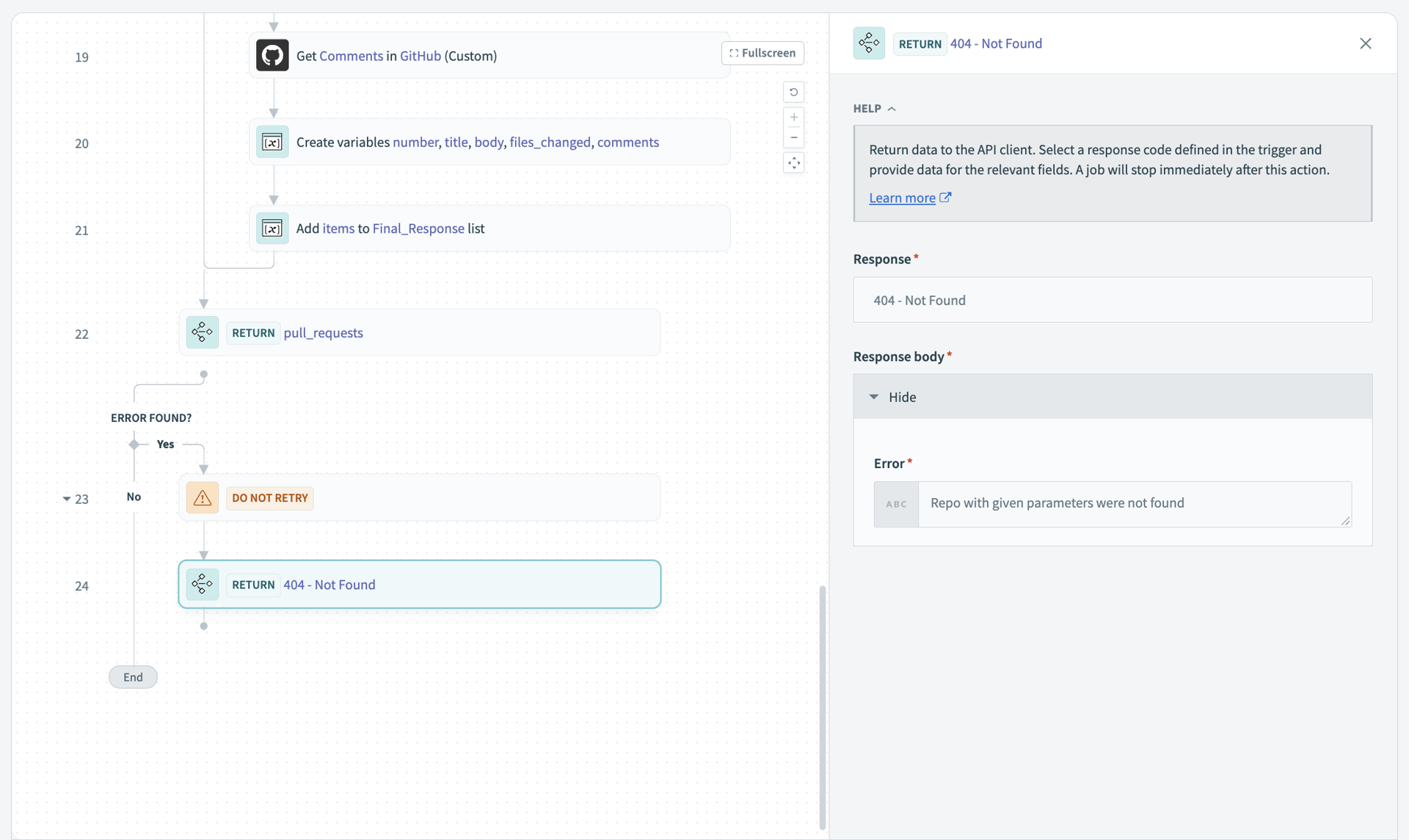 MCP tool with standard HTTP error code
Data strategy
This section provides strategies to optimize the data your tools return. Returning excessive or irrelevant data can overwhelm the AI agent and reduce performance. Focus on including only the information needed for the workflow.
Optimize data for context windows
The AI agent can only process a limited amount of information at once. Context from previous tool calls may be lost if too much information is returned. Design your data responses to be efficient and focused.
Return only necessary fields
APIs often return extensive data that is not relevant to the workflow. A call to get a Jira issue might return 200 fields including metadata, icons, links, and historical logs. This raw data wastes tokens and creates confusion.
Best practice: Define your response schema to include only essential fields. For example, create a search tool that returns only the title, URL, and a brief summary rather than the full page content.
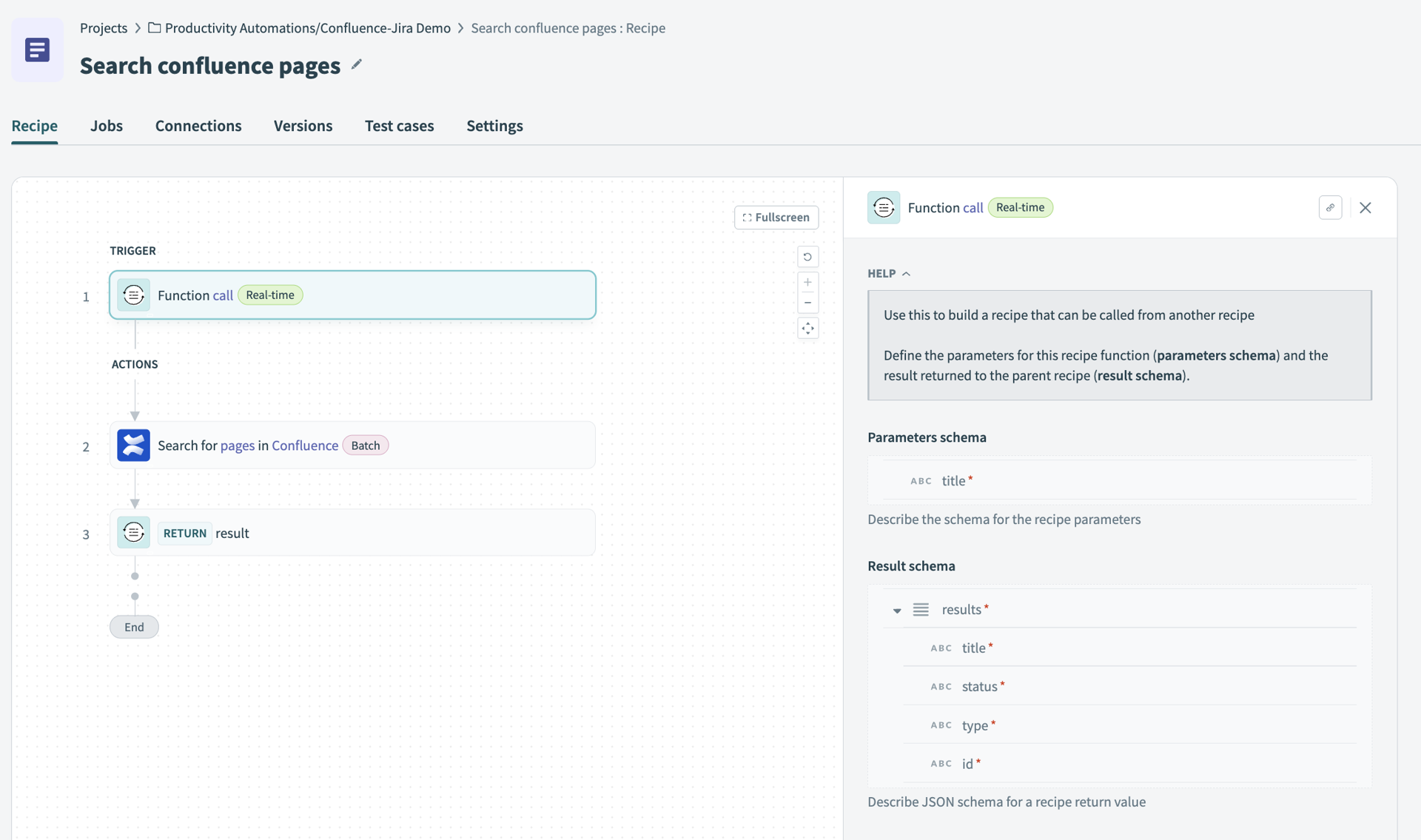 Only include essential fields in your schema
Returning only necessary fields provides the following benefits:
- Preserves context window for other operations.
- Reduces token costs.
- Helps the AI agent focus on relevant information.
Use AI preprocessing for large data
Don't send raw data from large text sources, such as transcripts or logs, directly to the AI agent. Use an intermediate AI processing step to summarize the content before returning it. For example, you can design a workflow that:
- Fetches the full transcript from the API.
- Uses an AI model to summarize the transcript.
- Returns only the summary to the AI agent.
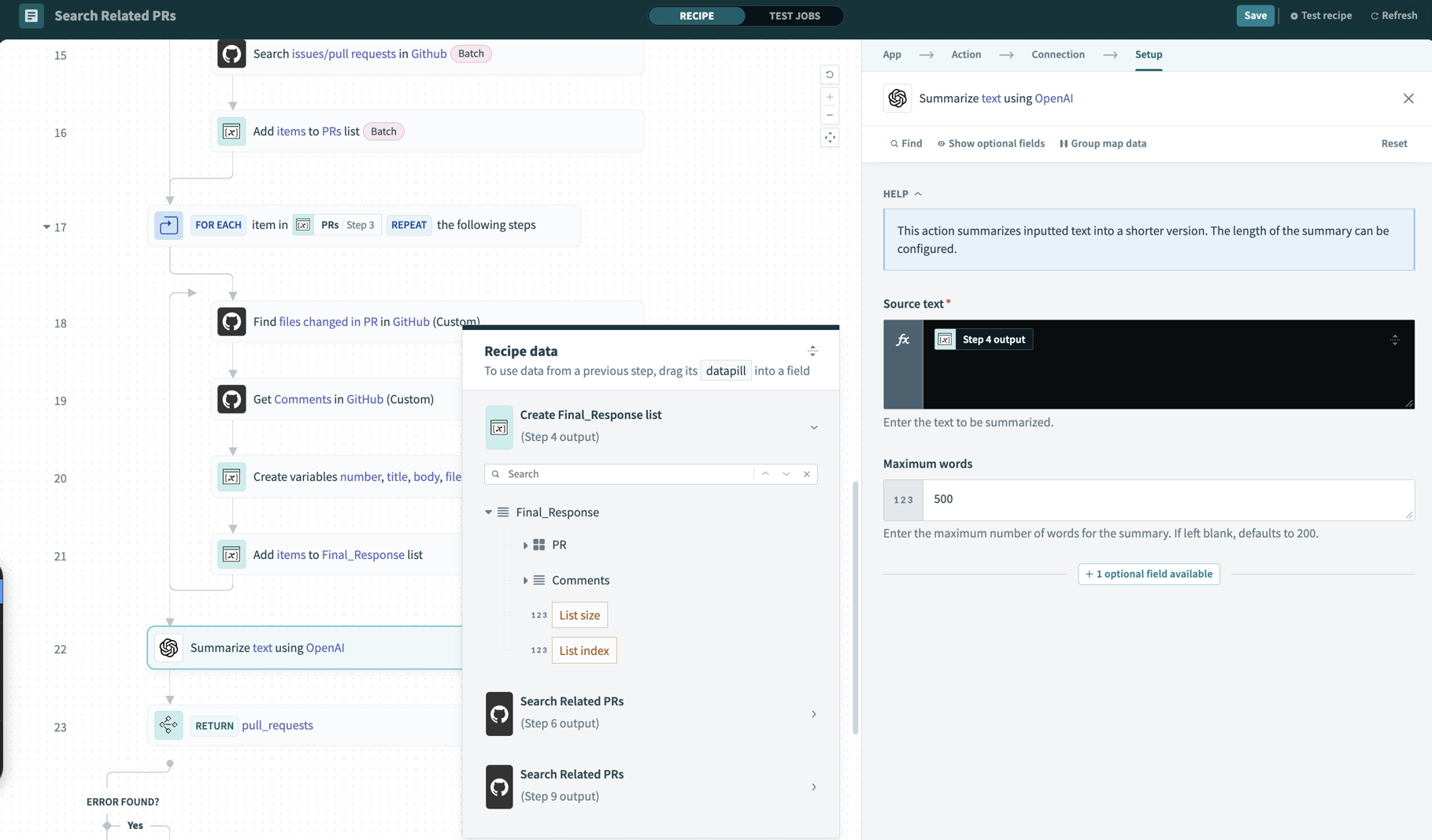 Use an AI model to summarize the transcript
Using AI preprocessing for large data provides the following benefits:
- Keeps the context window manageable.
- Provides the AI agent with actionable information.
- Reduces processing overhead for the main workflow.
Developer experience
Your AI agent uses tools documentation to understand and use tools effectively. The AI agent uses tool names, descriptions, and schemas to understand what each tool does. Clear documentation reduces errors, improves tool adoption, and enables the agent to orchestrate complex workflows successfully. Refer to the following sections to design effective tool documentation:
Write detailed tool descriptions
How you describe your tool determines how well the AI agent uses it. The AI agent doesn't see your code implementation. The agent only sees the tool name, description, and schema. Tool names must clearly indicate what the tool does. Avoid technical jargon, version numbers, or abbreviations that obscure meaning. For example:
| Recommended | Not recommended |
|---|---|
✅ search_products | ❌ prod_lookup_v2 |
✅ create_jira_issue | ❌ jira_create |
✅ get_zoom_transcript | ❌ fetch_zm_txt |
Descriptions should explain the tool's purpose, what it returns, and when to use it. Include specific details about the data structure and use cases. For example:
Searches the product catalog by keyword. Returns a list of matching items including SKU, price, and stock level. Use this tool when checking product availability or looking up pricing information.| ❌ Not recommended | ✅ Recommended |
|---|---|
Use for searches | Use when user asks to find customers by name, email, or company |
Standard limits apply | Max 100 results per call, returns cursor if more available |
Ensure data is valid | account_id must come from search_accounts or create_account |
When to use this tool - Be specific
✅ Recommended - Specific triggers Use this tool when:
- User asks to find opportunities by name, account, owner, or stage
- User wants deals matching specific criteria
- User requests opportunities assigned to a person or team Ask for search criteria if none are provided.
❌ Not recommended - Too vague
- Use this tool for opportunity-related searches.
When NOT to use this tool - Prevent confusion
✅ Include negative guidance to tell the LLM not to use this tool to:
- Create a new opportunity (use create_opportunity)
- Perform aggregate analysis (use opportunity_analytics)
- Filter by date range only (use list_opportunities_by_date)
Define quotas explicitly
✅ Clear quotas
- Maximum 100 results per call
- Query string: max 200 characters
- Date range: max 90 days
- Rate limit: 10 calls per minute
❌ Vague quotas
- Standard quotas apply. Use caution with large requests.
State prerequisites clearly
Explicit prerequisites and dependencies improve your MCP server performance. For example:
1. Call validate_account before creating opportunities
2. Use get_opportunity before update_opportunity to confirm current state

Dependencies:

- account_id must come from search_accounts or create_account
- stage values must be selected from list_opportunity_stages
Include sample requests and responses
Add example JSON requests and responses to your tool descriptions. This provides examples that help the AI agent understand the expected data format.
Example sample request
{
  "keyword": "laptop",
  "limit": 5
}
Sample response
{
  "products": [
    {
      "sku": "LAP-001",
      "name": "Business Laptop Pro",
      "price": 899.99,
      "in_stock": true
    }
  ]
}
Including sample requests and responses provides the following benefits:
- Helps the agent validate inputs before calling the tool.
- Shows the agent what data structure to expect in responses.
- Reduces errors from incorrect tool usage.
Last updated: