# Datadog
Datadog (opens new window) is a cloud-based security and analytics platform that monitors metrics, traces, and logs in real-time across your infrastructure.
The Datadog connector integrates Datadog insights into your Workato recipes.
# Prerequisites
Ensure you meet the following requirements before you begin:
- A Datadog API key (opens new window)
- A Datadog application key (opens new window) if you plan to perform read actions.
# Connection setup
Complete the following steps to connect your Datadog account in Workato:
Click Create > Connection or press C twice.
Provide a name for your connection in the Connection name field.
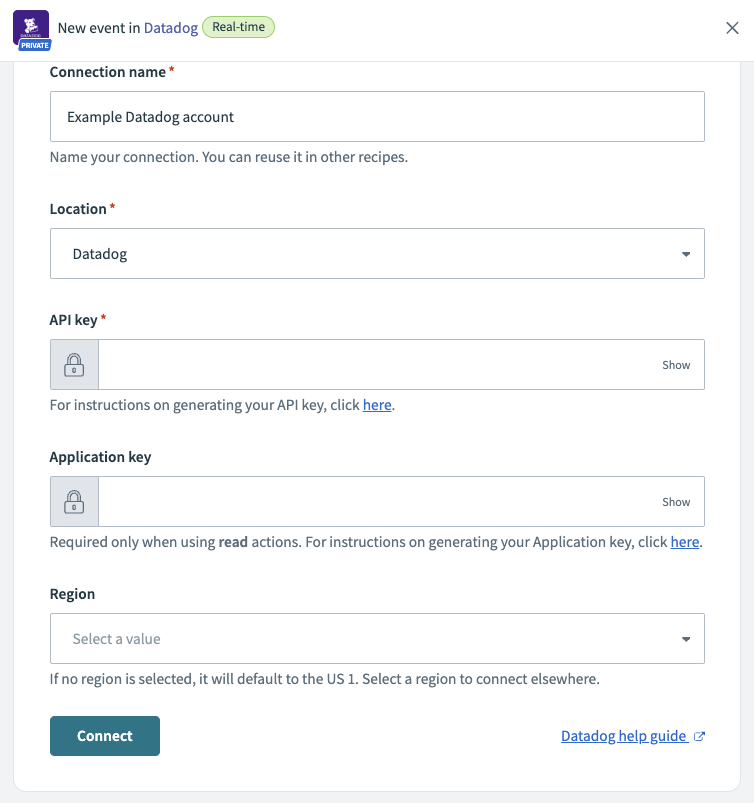 Datadog connection fields
Use the Location drop-down menu to select the project where you plan to store the connection.
Search for and select Datadog as your connection on the New connection page.
Enter your Datadog API key. Refer to the Datadog Add an API key (opens new window) guide to generate this value.
Optional. Enter your Datadog Application key if you plan to perform read actions. Refer to the Datadog Add application keys (opens new window) guide to generate this value.
Use the Region drop-down menu to select the location for your Datadog account. This field defaults to US 1 if left blank.
Click Connect.
Last updated: 4/30/2026, 3:06:08 PM