# Datadog - New event trigger (real-time)
The New event trigger uses webhooks to monitor Datadog for events in real-time.
# Set up the New event trigger in Datadog
Complete the following steps to configure the New event trigger in Datadog:
1
Copy the static webhook URI from the trigger's HELP section.
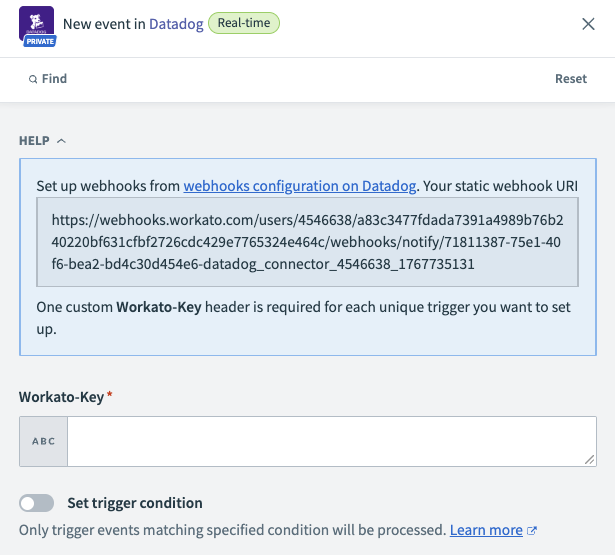 Static webhook URI
2
Open Datadog (opens new window) and go to Integration > Webhooks > Configure.
3
Click + New.
4
Enter a Name for the trigger webhook.
5
Enter the webhook URI in the URL field.
6
Click the Custom headers checkbox and enter a key-value pair Workato-Key header. For example:
{
  "Workato-Key": "a1b2c3d4-e5f6-7890-abcd-ef1234567890"
}
Save this value for later use in Workato.
7
Click Save.
# Input
| Input field | Description |
|---|---|
| Workato-Key | Enter the Workato-Key value configured in Datadog. |
# Output
| Output field | Description |
|---|---|
| ID | The unique Datadog identifier for the event. |
| Title | The title of the event. |
| Date | The date and time the event occurred. |
| Last updated | The date and time the event was last updated. |
| Event type | The type of event. |
| Body | The body content of the event. |
| Org | Contains information about the organization, such as ID and Name. |
Last updated: 1/7/2026, 9:38:34 PM