Salesforce batch operations
In addition to supporting Salesforce bulk operations, Workato supports Salesforce batch operations using the Salesforce sObject Collections API.
These operations enable you to process up to 2,000 records at a time. Use these operations when processing smaller batches of Salesforce records or when performing multiple operations without using the Bulk API.
Advanced configuration
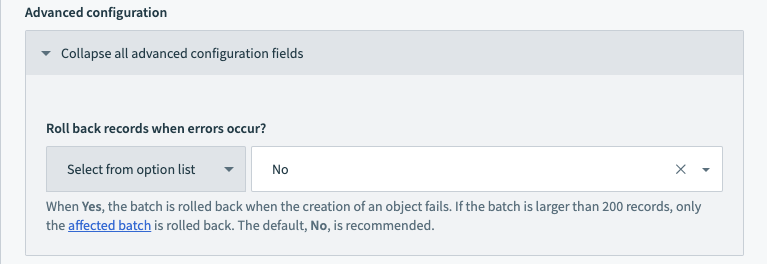 Advanced configuration
The Advanced configuration settings configure whether batch operations roll back when a record fails.
Workato processes records in batches of up to 200 records each. If a single record in a batch fails, the entire batch rolls back, while other batches remain unaffected.
For example, when processing 1,000 records, they are divided into 5 batches of 200 records each. If any record in the first batch fails, the entire first batch of 200 records rolls back. The remaining four batches proceed as normal.
The default and recommended setting is No. This allows successful records to remain processed. You can use additional logic in subsequent recipe steps to handle the failed records.
Actions
Workato supports the following Salesforce batch actions:
Create records in batches (batch)
The Create records in batches action creates Salesforce records in batches. Each job can create up to 2,000 records in 10 batches of 200.
Get related list by parent record ID (batch)
The Get related list by parent record ID action retrieves a related list of a Salesforce record in batches using a parent record's ID. In Salesforce, a related list is usually a child object that has a lookup or master-detail relationship to a parent record.
List data category groups (batch)
The List data category groups action retrieves all data category groups from Salesforce in batches.
Get report by ID (batch)
The Get report by ID action retrieves columns and rows from a Salesforce report in batches.
List data category groups (batch)
The List data category groups action retrieves all data category groups from Salesforce in batches.
Retrieve data category group hierarchy (batch)
The Retrieve data category group hierarchy action retrieves a data category group hierarchy from Salesforce using a source list.
Search records (batch)
The Search records action retrieves a list of Salesforce records that match the search criteria you provide. Each job can retrieve up to 2,000 records.
Search records using SOQL query (batch)
The Search records using SOQL query action retrieves a list of Salesforce records that match the SOQL query you provide. Each job can retrieve up to 2,000 records.
Search records using SOQL query WHERE clause (batch)
The Search records using SOQL query WHERE clause action retrieves a CSV stream of Salesforce records that match the SOQL WHERE clause you provide. Each job can retrieve up to 2,000 records.
Update records in batches (batch)
The Update records in batches action updates Salesforce records in batches. Each batch can update up to 2,000 records in 10 batches of 200.
Upsert records in batches (batch)
The Upsert records in batches action upserts Salesforce records in batches. Each batch can upsert up to 2,000 records in 10 batches of 200. If matching records are found, they are updated. If matching records aren't found, they are created.
Triggers
Workato supports the following Salesforce batch triggers:
New records (batch)
The New records trigger monitors Salesforce for newly created records and retrieves them in batches.
New/updated records (batch)
The New/updated records trigger monitors Salesforce for newly created or updated objects and retrieves them in batches.
Scheduled record search using SOQL query WHERE clause (batch)
The Scheduled record search using SOQL query WHERE clause trigger searches Salesforce using a SOQL query WHERE clause on a schedule you specify and returns the results in batches.
Scheduled records search using SOQL query (batch)
The Scheduled records search using SOQL query trigger searches Salesforce using a SOQL query on a schedule you specify.
Threshold met for new records created (batch)
The Threshold met for new records created trigger monitors Salesforce for when the number of newly created objects reaches a threshold you specify. When Salesforce reaches the new object threshold, Workato triggers a job, retrieves the newly created objects in batches, and waits for the number of new jobs to reach the threshold again.
Last updated: