Embedded API - コネクションパラメーターリファレンス
このリファレンスには、WorkatoのAPIを使用してコネクターを設定するために必要なコネクションパラメータが含まれています。
プロバイダー値
すべてのコネクターには、コネクターのタイプを一意に識別するprovider値があります。たとえば、Salesforceコネクターにはprovider: salesforce値があります。
プロバイダー値は次の場合に指定する必要があります:
- プラットフォームAPIを使用したコネクションの作成:
curl  -X POST https://YOUR_DATA_CENTER/api/managed_users/:managed_user_id/connections \
      -H 'Authorization: Bearer <api_token>' \
      -H 'Content-Type: application/json' \
      -d  '{
             "name": ":name",
             "provider": "salesforce"
}'顧客向けのApp Accessの定義。コネクターの
provider値をwhitelisted_appsパラメータに含めて、顧客がアクセスできるコネクターのリストを定義できます。たとえば、次のリクエストではSalesforceとNetSuiteのみにアクセスできるアカウントを作成します:
curl  -X POST https://YOUR_DATA_CENTER/api/managed_users \
      -H 'Authorization: Bearer <api_token>' \
      -H 'Content-Type: application/json' \
      -d '{
            "name": ":name",
            "notification_email": ":notification_email",
            "external_id": ":external_id",
            "whitelisted_apps": ["salesforce", "netsuite"],
            "time_zone": ":time_zone"
          }'
コネクションパラメータ
次のパラメータは、特定のコネクターの設定を説明します:
| フィールド | タイプ | 説明 |
|---|---|---|
| oauth | boolean | trueの場合、コネクターにはOAuthが必要です。 |
| personalization | boolean | trueの場合、コネクションはWorkbotのユースケースでパーソナライズされたコネクションとして使用できます。 |
| secure_tunnel | boolean | trueの場合、コネクションはオンプレミスシステムへの接続に使用できます。 |
| input | 配列 | コネクターのコネクションパラメータを説明するオブジェクトの配列。空の場合、設定は不要です。 |
例: 設定不要
設定を必要としないコネクターの例を次に示します:
      {
          "oauth": true,
          "personalization": true,
          "input":
          []
      }
例: 設定が必要
コネクションパラメータ設定が必要なAirtableコネクターの設定例を次に示します:
{
    "oauth": true,
    "personalization": false,
    "input": [
        {
            "name": "authentication_type",
            "type": "select",
            "options": [
                "OAuth 2.0",
                "個人アクセストークン",
                "APIキー(非推奨)"
            ],
            "optional": false,
            "label": "認証タイプ",
            "hint": "現在の方法には'OAuth 2.0'または'Personal access token'を選択します。'API key'はサポートされていません。"
        },
        {
            "name": "personal_access_token",
            "type": "string",
            "optional": true,
            "label": "個人アクセストークン",
            "hint": "選択した認証タイプが'Personal access token'の場合は、ここに個人アクセストークンを入力します。",
            "conditional": {
                "field": "authentication_type",
                "value": "Personal access token"
            }
        }
    ]
}
OAuth認証
Workato APIでは、OAuth 2.0コネクションを作成できます。ただし、oauthやoauth2_auth_code_grantなど、通常はサインイン画面にリダイレクトされるコネクションタイプには、アクセストークンとリフレッシュトークンを含むoauth_token_pairオブジェクトが必要です。クライアント資格情報グラントコネクションには、oauth_token_pairオブジェクトは必要ありません。
oauth_token_pairオブジェクトの構造は次のとおりです:
"oauth_token_pair": {
    "label": "OAuthトークンペア",
    "optional": true,
    "type": "object",
    "hint": "認可コードグラントコネクションを作成できます。アクセストークンとリフレッシュトークンがない場合は、シェルコネクションを作成できます。",
    "properties": [
      {
        "label": "アクセストークン",
        "name": "access_token",
        "type": "string",
        "optional": false
      },
      {
        "label": "リフレッシュトークン",
        "name": "refresh_token",
        "type": "string",
        "optional": false
      }
    ]
}マネージドユーザーのコネクションを作成する場合など、アクセストークンとリフレッシュトークンがない場合は、シェルコネクションを作成できます。これにより、コネクションをDisconnected状態で初期化し、後でWorkato UIで認証を完了できます。シェルコネクションを作成するには、リクエスト本文に"shell_connection": trueを含めるか、認証フィールドを省略します。
シェルコネクションを作成して認証する
シェルコネクションを作成して認証するには、次の手順を実行します:
Create a connectionエンドポイントを使用して、シェルコネクションを作成します。例:
curl  -X POST https://YOUR_DATA_CENTER/api/managed_users/:managed_user_id/connections \
      -H 'Authorization: Bearer <api_token>' \
      -H 'Content-Type: application/json' \
      -d  '{
            "name": ":name",
            "provider": "snowflake",
            "folder_id": :folder_id,
            "shell_connection": :true_or_false,
            "input": {
                "authentication_type": ["OAuth 2.0", "oauth"],
                "warehouse": ":warehouse",
                "host": ":host",
                "database": ":database",
                "role": ":role",
                "user": ":user",
                "schema_name": ":schema_name",
                "db_timezone": ["American Samoa", "American Samoa"]
                }
}'Workatoにサインインします。
シェルコネクションを保存したプロジェクトを開きます。
シェルコネクションを選択します。 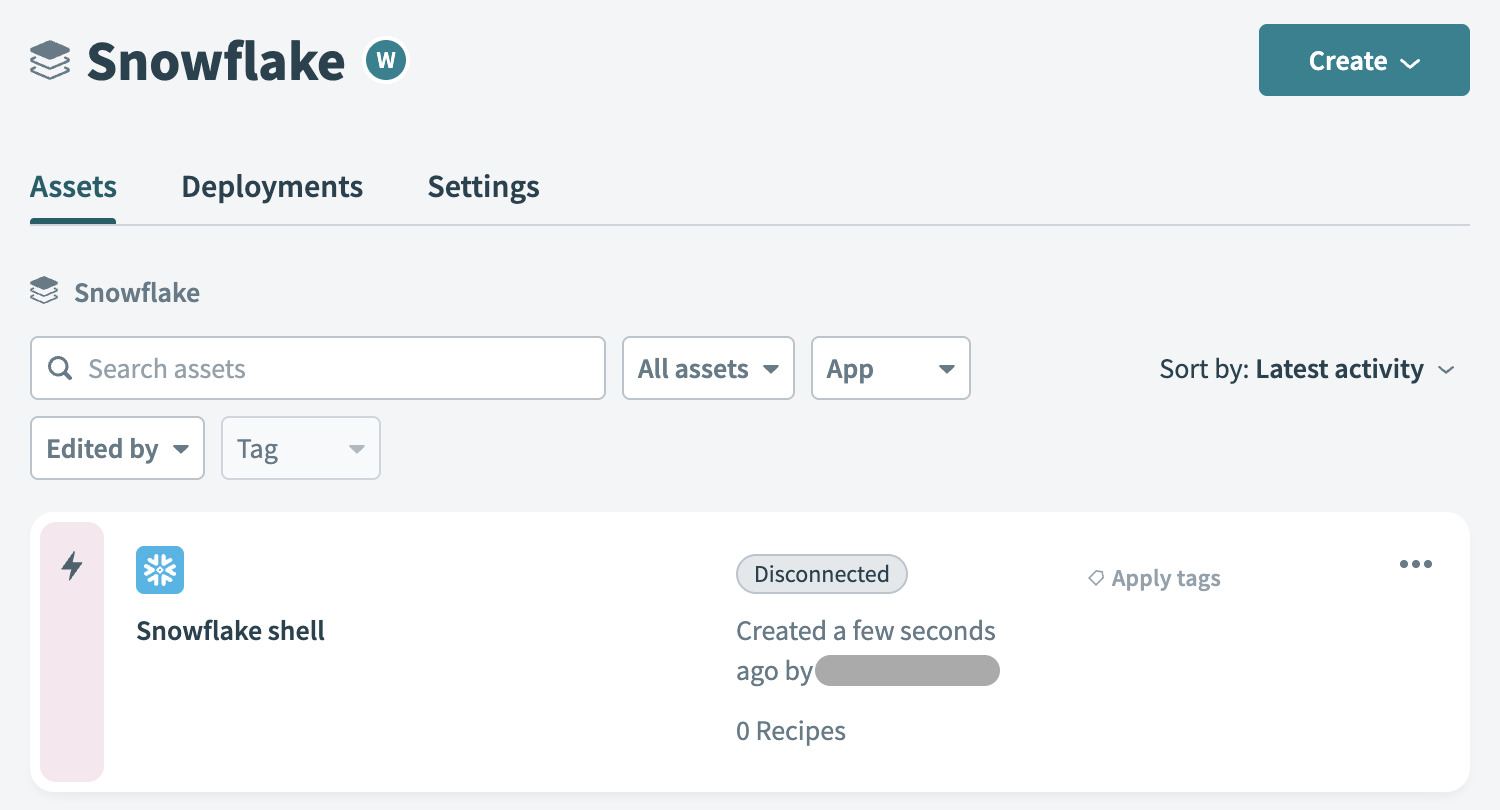 シェルコネクションを選択します。
残りのフィールドを入力します。コネクター固有の認証手順については、Workatoドキュメントのコネクターセクションを参照してください。 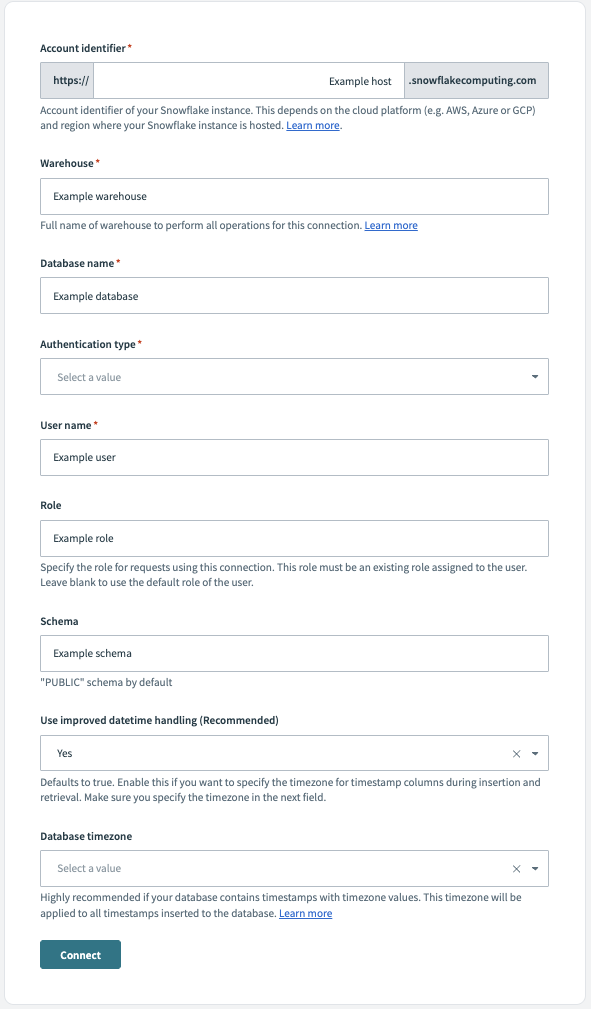 残りのフィールドを入力します。
コネクター別の設定パラメータとプロバイダー値
次のリストには、各コネクターの設定パラメータとプロバイダー値が含まれています。
注: コネクションを必要とするコネクターのみが一覧表示されています。
2Checkout
プロバイダー値:
"provider": "two_checkout"コネクションパラメーターJSONを表示
{
    "personalization": true,
    "input": [
        {
            "label": "ベンダーコード",
            "name": "vendor_code",
            "optional": false,
            "hint": "2Checkout cpanel > Integrations > Webhooks & APIに移動します。'API'セクションでベンダー/マーチャントコードを取得します。",
            "type": "string"
        },
        {
            "label": "シークレットキー",
            "name": "secret_key",
            "optional": false,
            "hint": "2Checkout cpanel > Integrations > Webhooks & APIに移動します。シークレットキーは'API'セクションで確認できます。",
            "type": "string"
        }
    ]
}
Active Directory
プロバイダー値:
"provider": "active_directory"コネクションパラメーターJSONを表示
{
    "personalization": true,
    "input": [
        {
            "label": "オンプレミスコネクションプロファイル",
            "name": "profile",
            "hint": "コネクションプロファイルを使用するには、オンプレミスグループのconfig.ymlファイルのLDAPセクションにあるプロファイル名を入力します。詳細については、次のドキュメントを参照してください: https://docs.workato.com/on-prem/agents/connection/profile.html#active-directory-profile",
            "type": "string"
        },
        {
            "label": "URL",
            "name": "url",
            "hint": "URLは、SSLの場合、ldap://myserver.example.com:389またはldaps://myserver.example.com:636の形式にする必要があります。LDAPコネクションの詳細については、こちらを参照してください。これは、クラウドプロファイルを使用する場合にのみ適用されます。例: 'ldap://acme1.ldap.com:389'。詳細については、次のドキュメントを参照してください: https://docs.workato.com/on-prem/agents/connection/cloud.html#active-directory-profile",
            "type": "string"
        },
        {
            "label": "ユーザー名",
            "name": "username",
            "hint": "LDAPサーバーで認証する際に使用するユーザー名(プリンシパル)。通常、これは管理者ユーザーの識別名(distinguished name)です。これは、クラウドプロファイルを使用する場合にのみ適用されます。例: cn=Administrator",
            "type": "string"
        },
        {
            "label": "パスワード",
            "name": "password",
            "hint": "LDAPサーバーで認証する際に使用するパスワード(認証情報)。これは、クラウドプロファイルを使用する場合にのみ適用されます。",
            "type": "string"
        },
        {
            "label": "ベース",
            "name": "base",
            "optional": true,
            "hint": "すべてのリクエストのベースDN。この属性が設定されている場合、LDAP操作に渡される、およびLDAP操作から受信するすべての識別名(Distinguished name)は、このLDAPパスを基準とした相対パスになります。これは、クラウドプロファイルを使用する場合にのみ適用されます。例: dc=acme,dc=com",
            "type": "string"
        },
        {
            "label": "SSL設定",
            "name": "ssl",
            "optional": true,
            "hint": "これは、クラウドプロファイルを使用する場合にのみ適用されます。",
            "type": "object",
            "properties": [
                {
                    "label": "証明書",
                    "name": "cert",
                    "optional": true,
                    "hint": "PEMエンコードされた証明書または信頼済みCAへのパス。",
                    "type": "string"
                },
                {
                    "label": "SSL証明書",
                    "name": "pem",
                    "optional": true,
                    "hint": "PEMエンコードされたクライアント証明書の完全な内容。",
                    "type": "string"
                },
                {
                    "label": "SSL証明書キー",
                    "name": "key",
                    "optional": true,
                    "hint": "相互SSL設定用の秘密キー。SSL証明書を指定する場合は必須です。",
                    "type": "string"
                },
                {
                    "label": "すべて信頼",
                    "name": "trustAll",
                    "optional": true,
                    "hint": "自己署名証明書を有効にするにはtrueに設定します。",
                    "type": "boolean"
                }
            ]
        }
    ]
}
Adobe Experience Manager
プロバイダー値:
"provider": "adobe_experience_manager"コネクションパラメーターJSONを表示
{
    "personalization": true,
    "input": [
        {
            "label": "認証タイプ",
            "name": "authentication_type",
            "optional": false,
            "hint": "コネクションに使用する認証タイプを選択します。デフォルトは`service_credentials`です。",
            "type": "string",
            "pick_list": [
                [
                    "Basic",
                    "basic"
                ],
                [
                    "サービス認証情報",
                    "service_credentials"
                ]
            ]
        },
        {
            "label": "AEMインスタンスアドレス",
            "name": "host_name",
            "optional": false,
            "hint": "AEMインスタンスのアドレス。プライベートネットワークでローカルにホストされている場合は、OPAをデプロイし、後のステップでエージェントを選択する必要があります。AEMインスタンスアドレスがhttps://wkto.aem.com:8080の場合、アドレスはhttps://wkto.aem.comです。",
            "type": "string"
        },
        {
            "label": "ポート",
            "name": "port",
            "optional": true,
            "hint": "AEMインスタンスに関連付けられたポート。設定によっては、これは不要な場合があります。AEMインスタンスアドレスがhttps://wkto.aem.com:8080の場合、ポート番号は8080です。",
            "type": "integer"
        },
        {
            "label": "サービス認証情報JSON",
            "name": "service_auth_json",
            "optional": false,
            "hint": "AEM Developer Consoleから取得したサービス認証情報JSONの内容を貼り付けます。サービス認証情報を生成する手順については、次のドキュメントを参照してください:https://experienceleague.adobe.com/docs/experience-manager-learn/getting-started-with-aem-headless/authentication/service-credentials.html?lang=en。サービス認証情報の証明書は365日ごとに期限切れになります。必要に応じてこれらの証明書を再生成してください。これは`Authentication type`が'サービス認証情報'の場合にのみ適用されます。",
            "type": "string"
        },
        {
            "label": "ユーザー名",
            "name": "username",
            "optional": false,
            "hint": "Workato用にプロビジョニングされたユーザーのユーザー名。これは`Authentication type`が'Basic'の場合にのみ適用されます。",
            "type": "string"
        },
        {
            "label": "パスワード",
            "name": "password",
            "optional": false,
            "hint": "Workato用にプロビジョニングされたユーザーのパスワード。これは`Authentication type`が'Basic'の場合にのみ適用されます。",
            "type": "string"
        }
    ]
}
ADP Workforce Now
プロバイダー値:
"provider": "adp7"コネクションパラメーターJSONを表示
{
    "personalization": true,
    "input": [
        {
            "label": "サンドボックス",
            "name": "sandbox",
            "optional": true,
            "hint": "デフォルトは`false`です。",
            "type": "boolean"
        },
        {
            "label": "クライアントID",
            "name": "client_id",
            "type": "string"
        },
        {
            "label": "クライアントシークレット",
            "name": "client_secret",
            "type": "string"
        },
        {
            "label": "SSLクライアント証明書",
            "name": "ssl_client_cert",
            "type": "string"
        },
        {
            "label": "SSLクライアントキー",
            "name": "ssl_client_key",
            "type": "string"
        },
        {
            "label": "カスタムCA証明書",
            "name": "ssl_key_passphrase",
            "optional": true,
            "type": "string"
        },
        {
            "label": "機密情報のマスクを解除しますか?",
            "name": "unmask",
            "optional": true,
            "hint": "「はい」の場合、機密情報はレスポンスで返されます。「いいえ」の場合、返されません。デフォルトは`false`です。",
            "type": "boolean"
        }
    ]
}
Airbrake
プロバイダー値:
"provider": "airbrake"コネクションパラメーターJSONを表示
{
    "personalization": true,
    "input": [
        {
            "label": "APIキー",
            "name": "api_key",
            "optional": true,
            "type": "string"
        }
    ]
}
AirREGI
プロバイダー値:
"provider": "air_regi"コネクションパラメーターJSONを表示
{
    "oauth": true,
    "personalization": true,
    "oauth_token_pair": {
        "label": "OAuthトークンペア",
        "optional": true,
        "type": "object",
        "hint": "認可コードグラントコネクションを作成できます。アクセストークンおよびリフレッシュトークンがない場合は、シェルコネクションを作成できます。",
        "properties": [
            {
                "label": "アクセストークン",
                "name": "access_token",
                "type": "string",
                "optional": false
            },
            {
                "label": "リフレッシュトークン",
                "name": "refresh_token",
                "type": "string",
                "optional": false
            }
        ]
    },
    "input": []
}
Airtable
プロバイダー値:
"provider": "airtable"コネクションパラメーターJSONを表示
{
    "oauth": true,
    "personalization": true,
    "oauth_token_pair": {
        "label": "OAuthトークンペア",
        "optional": true,
        "type": "object",
        "hint": "認可コードグラントコネクションを作成できます。アクセストークンとリフレッシュトークンがない場合は、シェルコネクションを作成できます。",
        "properties": [
            {
                "label": "アクセストークン",
                "name": "access_token",
                "type": "string",
                "optional": false
            },
            {
                "label": "リフレッシュトークン",
                "name": "refresh_token",
                "type": "string",
                "optional": false
            }
        ]
    },
    "input": [
        {
            "label": "認証タイプ",
            "name": "authentication_type",
            "optional": false,
            "hint": "認証タイプを選択します。デフォルトはAPIキー(非推奨)です。",
            "type": "string",
            "pick_list": [
                [
                    "OAuth 2.0",
                    "oauth2_auth_code_grant"
                ],
                [
                    "個人用アクセストークン",
                    "personal_token_authentication"
                ],
                [
                    "APIキー(非推奨)",
                    "api_key"
                ]
            ]
        },
        {
            "label": "個人用アクセストークン",
            "name": "access_token",
            "optional": false,
            "hint": "個人用アクセストークンを指定します。Airtableで個人用アクセストークンを作成するには、次のページに移動します:https://airtable.com/create/tokens。これは、認証タイプが'personal_token_authentication'の場合にのみ適用されます。",
            "type": "string"
        },
        {
            "label": "詳細設定",
            "name": "advanced_settings",
            "optional": true,
            "hint": "これは、認証タイプが'OAuth 2.0'の場合にのみ適用されます。",
            "type": "object",
            "properties": [
                {
                    "label": "リクエストする権限(Oauthスコープ)",
                    "name": "scopes",
                    "optional": true,
                    "hint": "このコネクションでリクエストするスコープを選択します。'data.records:read'と'schema.bases:read'は常にリクエストされます。空白のままにした場合、デフォルトは'data.records:read'、'schema.bases:read'、'data.records:write'、'schema.bases:write'です。複数の値はスペースで区切ります。詳細については、次のAirtableドキュメントを参照してください:https://airtable.com/developers/web/api/scopes",
                    "type": "string",
                    "pick_list": [
                        [
                            "ベース内のレコードを表示",
                            "records_read"
                        ],
                        [
                            "テーブルおよびベーススキーマを表示",
                            "bases_read"
                        ],
                        [
                            "レコードを作成、編集、および削除",
                            "records_write"
                        ],
                        [
                            "テーブルおよびベースを作成、編集",
                            "bases_write"
                        ],
                        [
                            "レコード内のコメントを表示",
                            "read_comment"
                        ],
                        [
                            "レコードコメントを作成、編集、および削除",
                            "read_write_comment"
                        ],
                        [
                            "ベースのWebhookを表示、作成、削除し、Webhookペイロードを取得します。",
                            "read_write_webhook"
                        ],
                        [
                            "エンタープライズ配下のユーザーグループ、そのアクセス権、およびメンバーに関する情報を表示",
                            "read_group"
                        ],
                        [
                            "コラボレーターを含むワークスペース、ベース、およびビューに関するメタデータを表示",
                            "read_base"
                        ],
                        [
                            "コラボレーター、招待、ビュー、および拡張機能を含むワークスペースとベースのメタデータを編集",
                            "read_write_base"
                        ],
                        [
                            "ベースの共有リンクを表示、有効化、無効化、および削除します。注:共有リンクを使用して、ベース内のデータを表示できます。",
                            "share_base"
                        ],
                        [
                            "SCIM APIを使用して、プロビジョニングとプロビジョニング解除を含む組織のユーザーとグループを管理します。",
                            "read_write_scim"
                        ],
                        [
                            "組織の監査ログを表示",
                            "read_audit"
                        ],
                        [
                            "ワークスペースID、ユーザー、グループ、およびメールドメインを含むエンタープライズアカウントに関するデータを表示",
                            "read_account"
                        ],
                        [
                            "ユーザーID、名前、メール、およびユーザーがアクセスできるベースを含む、エンタープライズ配下のユーザーのアカウント情報を表示",
                            "read_user"
                        ],
                        [
                            "プロビジョニング、無効化、および削除を含む、エンタープライズアカウント配下のユーザーを管理",
                            "write_user"
                        ],
                        [
                            "エンタープライズ配下のワークスペース間でベースを移動",
                            "manage_bases"
                        ]
                    ]
                }
            ]
        },
        {
            "label": "APIキー",
            "name": "api_key",
            "optional": false,
            "hint": "APIキーはアカウントページで確認できます:https://airtable.com/create/tokens。これは、認証タイプが'OAuth 2.0'ではなく、'Personal access token'でもない場合にのみ適用されます。",
            "type": "string"
        }
    ]
}
Amazon Cognito
プロバイダー値:
"provider": "aws_cognito"コネクションパラメーターJSONを表示
{
    "personalization": true,
    "input": [
        {
            "label": "アクセスキーID",
            "name": "api_key",
            "optional": false,
            "hint": "AWSアカウント名>Security Credentials(セキュリティ認証情報)>Users(ユーザー)をクリックします。既存のユーザーからAPIキーを取得するか、ユーザーを作成します",
            "type": "string"
        },
        {
            "label": "シークレットアクセスキー",
            "name": "secret_key",
            "optional": false,
            "hint": "AWSアカウント名>Security Credentials(セキュリティ認証情報)>Users(ユーザー)をクリックします。既存のユーザーからシークレットキーを取得するか、ユーザーを作成します",
            "type": "string"
        },
        {
            "label": "AWSリージョン",
            "name": "aws_region",
            "optional": false,
            "hint": "アカウントURLがhttps://eu-west-1.console.aws.amazon.comの場合は、リージョンとしてeu-west-1を使用します",
            "type": "string"
        },
        {
            "label": "Cognitoユーザープール",
            "name": "cognito_user_pool",
            "optional": false,
            "type": "object",
            "properties": [
                {
                    "label": "ユーザープールID",
                    "name": "user_pool_id",
                    "optional": false,
                    "hint": "CognitoユーザープールのID",
                    "type": "string"
                },
                {
                    "label": "アプリクライアントID",
                    "name": "app_client_id",
                    "optional": false,
                    "hint": "Cognitoユーザープールに関連付けられているアプリのアプリクライアントID",
                    "type": "string"
                },
                {
                    "label": "アプリクライアントシークレット",
                    "name": "app_client_secret",
                    "optional": true,
                    "hint": "Cognitoユーザープールに関連付けられているアプリのアプリクライアントシークレット。アプリクライアントにクライアントシークレットが設定されている場合は必須です。",
                    "type": "string"
                }
            ]
        },
        {
            "label": "Cognito IDプール",
            "name": "cognito_identity_pool",
            "optional": false,
            "type": "object",
            "properties": [
                {
                    "label": "アカウントID",
                    "name": "account_id",
                    "hint": "AWSアカウントID(9桁以上)",
                    "type": "string"
                },
                {
                    "label": "IDプールID",
                    "name": "identity_pool_id",
                    "optional": false,
                    "hint": "Cognito IDプールのID",
                    "type": "string"
                }
            ]
        }
    ]
}
Amazon Lex
プロバイダー値:
"provider": "amazon_lex_nlu"コネクションパラメーターJSONを表示
{
    "personalization": true,
    "input": [
        {
            "label": "ボット名",
            "name": "bot_name",
            "hint": "Amazon Lexボット名",
            "type": "string"
        },
        {
            "label": "ボットエイリアス",
            "name": "bot_alias",
            "hint": "Amazon Lexボットエイリアス",
            "type": "string"
        },
        {
            "label": "リージョン",
            "name": "region",
            "hint": "リージョン",
            "type": "string"
        },
        {
            "label": "アクセスキーID",
            "name": "access_key_id",
            "hint": "IAMユーザー: アクセスキーID(AWS管理ポリシー\"AmazonLexRunBotsOnly\"をユーザーにアタッチする必要があります)",
            "type": "string"
        },
        {
            "label": "シークレットアクセスキー",
            "name": "secret_access_key",
            "hint": "IAMユーザー: シークレットアクセスキー",
            "type": "string"
        }
    ]
}
Amazon S3
プロバイダー値:
"provider": "amazon_s3"コネクションパラメーターJSONを表示
{
    "personalization": true,
    "input": [
        {
            "label": "認可タイプ",
            "name": "auth_type",
            "optional": false,
            "hint": "デフォルトはアクセスキー(非推奨)です。認可の詳細については、Amazonドキュメントを参照してください: https://docs.workato.com/connectors/s3/connection-setup.html#how-to-connect-to-amazon-s3-on-workato",
            "type": "string",
            "pick_list": [
                [
                    "アクセスキー(非推奨)",
                    "key_secret"
                ],
                [
                    "IAMロール",
                    "role_based"
                ]
            ]
        },
        {
            "label": "IAMロールARN",
            "name": "assume_role",
            "optional": false,
            "hint": "IAMロールARNを入力します。詳細については、Amazonの'IAMユーザーにアクセス許可を付与するロールを作成する'ドキュメントを参照してください: 'https://docs.aws.amazon.com/IAM/latest/UserGuide/id_roles_create_for-user.html'. これは、認可タイプが'IAMロール'の場合にのみ適用されます。",
            "type": "string"
        },
        {
            "label": "アクセスキーID",
            "name": "api_key",
            "optional": false,
            "hint": "AWSアカウント名>マイセキュリティ認証情報>ユーザーに移動します。既存のユーザーからAPIキーを取得するか、新しいユーザーを作成します。これは、認可タイプが'アクセスキー(非推奨)'の場合にのみ適用されます。",
            "type": "string"
        },
        {
            "label": "シークレットアクセスキー",
            "name": "secret_key",
            "optional": false,
            "hint": "AWSアカウント名>マイセキュリティ認証情報>ユーザーに移動します。既存のユーザーからシークレットキーを取得するか、新しいユーザーを作成します。これは、認可タイプが'アクセスキー(非推奨)'の場合にのみ適用されます。",
            "type": "string"
        },
        {
            "label": "外部ID",
            "name": "external_id",
            "optional": true,
            "hint": "これは、認可タイプが'IAMロール'で、カスタム外部IDが設定されている場合にのみ適用されます。詳細については、Amazonの'IAMユーザーにアクセス許可を付与するロールを作成する'ドキュメントを参照してください: https://docs.aws.amazon.com/IAM/latest/UserGuide/id_roles_create_for-user.html",
            "type": "string"
        },
        {
            "label": "バケットに制限",
            "name": "restrict_to_bucket",
            "optional": true,
            "hint": "指定したバケットにコネクションを制限するために使用します。このユーザーのs3:ListBucketアクセスが制限されている場合に必要です。詳細については、次のAmazonドキュメントを参照してください: https://docs.aws.amazon.com/AmazonS3/latest/dev/using-with-s3-actions.html#using-with-s3-actions-related-to-buckets",
            "type": "string"
        },
        {
            "label": "パスに制限",
            "name": "restrict_to_path",
            "optional": true,
            "hint": "指定したバケットおよびオブジェクトまたはパスにコネクションを制限するために使用します。このユーザーのs3:ListBucketアクセスが制限されている場合に必要です。これは、`Restrict to bucket`を有効にした場合にのみ適用されます。詳細については、次のAmazonドキュメントを参照してください: https://docs.aws.amazon.com/AmazonS3/latest/dev/using-with-s3-actions.html#using-with-s3-actions-related-to-buckets",
            "type": "string"
        },
        {
            "label": "リージョン",
            "name": "region",
            "optional": false,
            "hint": "リージョンは通常、S3アカウントURLで指定されます。アカウントURLがhttps://eu-west-1.console.s3.amazon.comの場合、リージョンにはeu-west-1を使用します。",
            "type": "string"
        },
        {
            "label": "ダウンロードスレッド",
            "name": "download_threads",
            "optional": true,
            "hint": "ダウンロード速度を向上させるために使用します。デフォルトは1、最大は20です。",
            "type": "string"
        }
    ]
}
Amazon S3(セカンダリ)
プロバイダー値:
"provider": "amazon_s3_secondary"コネクションパラメーターJSONを表示
{
    "personalization": true,
    "input": [
        {
            "label": "認可タイプ",
            "name": "auth_type",
            "optional": false,
            "hint": "デフォルトはアクセスキー(非推奨)です。認可の詳細については、Amazonドキュメントを参照してください: https://docs.workato.com/connectors/s3/connection-setup.html#how-to-connect-to-amazon-s3-on-workato",
            "type": "string",
            "pick_list": [
                [
                    "アクセスキー(非推奨)",
                    "key_secret"
                ],
                [
                    "IAMロール",
                    "role_based"
                ]
            ]
        },
        {
            "label": "IAMロールARN",
            "name": "assume_role",
            "optional": false,
            "hint": "IAMロールARNを入力します。詳細については、Amazonの'IAMユーザーにアクセス許可を付与するロールを作成する'ドキュメントを参照してください: 'https://docs.aws.amazon.com/IAM/latest/UserGuide/id_roles_create_for-user.html'. これは、認可タイプが'IAMロール'の場合にのみ適用されます。",
            "type": "string"
        },
        {
            "label": "アクセスキーID",
            "name": "api_key",
            "optional": false,
            "hint": "AWSアカウント名>マイセキュリティ認証情報>ユーザーに移動します。既存のユーザーからAPIキーを取得するか、新しいユーザーを作成します。これは、認可タイプが'アクセスキー(非推奨)'の場合にのみ適用されます。",
            "type": "string"
        },
        {
            "label": "シークレットアクセスキー",
            "name": "secret_key",
            "optional": false,
            "hint": "AWSアカウント名>マイセキュリティ認証情報>ユーザーに移動します。既存のユーザーからシークレットキーを取得するか、新しいユーザーを作成します。これは、認可タイプが'アクセスキー(非推奨)'の場合にのみ適用されます。",
            "type": "string"
        },
        {
            "label": "外部ID",
            "name": "external_id",
            "optional": true,
            "hint": "これは、認可タイプが'IAMロール'で、カスタム外部IDが設定されている場合にのみ適用されます。詳細については、Amazonの'IAMユーザーにアクセス許可を付与するロールを作成する'ドキュメントを参照してください: https://docs.aws.amazon.com/IAM/latest/UserGuide/id_roles_create_for-user.html",
            "type": "string"
        },
        {
            "label": "バケットに制限",
            "name": "restrict_to_bucket",
            "optional": true,
            "hint": "指定したバケットにコネクションを制限するために使用します。このユーザーのs3:ListBucketアクセスが制限されている場合に必要です。詳細については、次のAmazonドキュメントを参照してください: https://docs.aws.amazon.com/AmazonS3/latest/dev/using-with-s3-actions.html#using-with-s3-actions-related-to-buckets",
            "type": "string"
        },
        {
            "label": "パスに制限",
            "name": "restrict_to_path",
            "optional": true,
            "hint": "指定したバケットおよびオブジェクトまたはパスにコネクションを制限するために使用します。このユーザーのs3:ListBucketアクセスが制限されている場合に必要です。これは、`Restrict to bucket`を有効にした場合にのみ適用されます。詳細については、次のAmazonドキュメントを参照してください: https://docs.aws.amazon.com/AmazonS3/latest/dev/using-with-s3-actions.html#using-with-s3-actions-related-to-buckets",
            "type": "string"
        },
        {
            "label": "リージョン",
            "name": "region",
            "optional": false,
            "hint": "リージョンは通常、S3アカウントURLで指定されます。アカウントURLがhttps://eu-west-1.console.s3.amazon.comの場合、リージョンにはeu-west-1を使用します。",
            "type": "string"
        },
        {
            "label": "ダウンロードスレッド",
            "name": "download_threads",
            "optional": true,
            "hint": "ダウンロード速度を向上させるために使用します。デフォルトは1、最大は20です。",
            "type": "string"
        }
    ]
}
Amazon SES
プロバイダー値:
"provider": "amazon_ses"コネクションパラメーターJSONを表示
{
    "personalization": true,
    "input": [
        {
            "label": "認可タイプ",
            "name": "auth_type",
            "optional": false,
            "hint": "必要な認可タイプを選択します。デフォルトはアクセスキー(非推奨)です。",
            "type": "string",
            "pick_list": [
                [
                    "アクセスキー(非推奨)",
                    "key_secret"
                ],
                [
                    "IAMロール",
                    "role_based"
                ]
            ]
        },
        {
            "label": "IAMロールARN",
            "name": "assume_role",
            "optional": false,
            "hint": "IAMロールARNを入力します。詳細については、Amazonの「Create a role to give permissions to an IAM user」ドキュメントを参照してください: 'https://docs.aws.amazon.com/IAM/latest/UserGuide/id_roles_create_for-user.html'。これは、認可タイプが「IAMロール」の場合にのみ適用されます。",
            "type": "string"
        },
        {
            "label": "アクセスキーID",
            "name": "api_key",
            "optional": false,
            "hint": "AWSアカウント名>My Security Credentials>Usersに移動します。既存のユーザーからAPIキーを取得するか、新しいユーザーを作成します。これは、認可タイプが「アクセスキー(非推奨)」の場合にのみ適用されます。",
            "type": "string"
        },
        {
            "label": "シークレットアクセスキー",
            "name": "secret_key",
            "optional": false,
            "hint": "AWSアカウント名>My Security Credentials>Usersに移動します。既存のユーザーからシークレットキーを取得するか、新しいユーザーを作成します。これは、認可タイプが「アクセスキー(非推奨)」の場合にのみ適用されます。",
            "type": "string"
        },
        {
            "label": "リージョン",
            "name": "region",
            "optional": false,
            "hint": "リージョンは通常、SESアカウントURLに含まれています。アカウントURLがhttps://console.aws.amazon.com/ses/home?region=us-east-1の場合、リージョンとしてus-east-1を使用します。",
            "type": "string"
        }
    ]
}
Amazon SNS
プロバイダー値:
"provider": "aws_sns"コネクションパラメーターJSONを表示
{
    "personalization": true,
    "input": [
        {
            "label": "認証タイプ",
            "name": "auth_type",
            "hint": "認証方法を選択します。デフォルトはアクセスキー認証です。",
            "type": "string",
            "pick_list": [
                [
                    "アクセスキー認証",
                    "aws_key_secret"
                ],
                [
                    "IAMロール認証",
                    "aws_role_based"
                ]
            ]
        },
        {
            "label": "IAMロールARN",
            "name": "assume_role",
            "optional": false,
            "hint": "IAMロールARNを入力します。詳細については、Amazonの'IAMユーザーにアクセス許可を付与するロールを作成する'ドキュメントを参照してください:'https://docs.aws.amazon.com/IAM/latest/UserGuide/id_roles_create_for-user.html'。これは、認証タイプが'IAMロール認証'の場合にのみ適用されます。",
            "type": "string"
        },
        {
            "label": "外部ID",
            "name": "external_id",
            "optional": true,
            "hint": "これは、認証タイプが'IAMロール認証'で、カスタム外部IDが設定されている場合にのみ適用されます。詳細については、Amazonの'IAMユーザーにアクセス許可を付与するロールを作成する'ドキュメントを参照してください:https://docs.aws.amazon.com/IAM/latest/UserGuide/id_roles_create_for-user.html",
            "type": "string"
        },
        {
            "label": "アクセスキーID",
            "name": "access_key_id",
            "optional": false,
            "hint": "AWSアカウント名>セキュリティ認証情報>ユーザーをクリックします。既存のユーザーからAPIキーを取得するか、ユーザーを作成します。これは、認証タイプが'IAMロール認証'ではない場合にのみ適用されます。",
            "type": "string"
        },
        {
            "label": "シークレットアクセスキー",
            "name": "secret_access_key",
            "optional": false,
            "hint": "AWSアカウント名>セキュリティ認証情報>ユーザーをクリックします。既存のユーザーからシークレットキーを取得するか、ユーザーを作成します。これは、認証タイプが'IAMロール認証'ではない場合にのみ適用されます。",
            "type": "string"
        },
        {
            "label": "リージョン",
            "name": "region",
            "optional": false,
            "hint": "アカウントURLがhttps://eu-west-1.console.aws.amazon.comの場合は、リージョンとしてeu-west-1を使用します。これは、認証タイプが'IAMロール認証'または'アクセスキー認証'の場合にのみ適用されます。",
            "type": "string"
        }
    ]
}
Amazon SQS
プロバイダー値:
"provider": "aws_sqs"コネクションパラメーターJSONを表示
{
    "personalization": true,
    "input": [
        {
            "label": "認証タイプ",
            "name": "auth_type",
            "optional": false,
            "hint": "デフォルトはアクセスキーです。Amazon SQS/S3認証の詳細については、次のドキュメントを参照してください:https://docs.workato.com/connectors/s3/connection-setup.html#how-to-connect-to-amazon-s3-on-workato",
            "type": "string",
            "pick_list": [
                [
                    "アクセスキー",
                    "key_secret"
                ],
                [
                    "IAMロール",
                    "role_based"
                ]
            ]
        },
        {
            "label": "IAMロールARN",
            "name": "assume_role",
            "optional": false,
            "hint": "IAMロールARNを入力します。詳細については、Amazonの'IAMユーザーに権限を付与するロールを作成する'ドキュメントを参照してください:'https://docs.aws.amazon.com/IAM/latest/UserGuide/id_roles_create_for-user.html'。これは認証タイプが'IAMロール'の場合にのみ適用されます。",
            "type": "string"
        },
        {
            "label": "アクセスキーID",
            "name": "api_key",
            "optional": false,
            "hint": "AWSアカウント名>マイセキュリティ認証情報>ユーザーに移動します。既存のユーザーからAPIキーを取得するか、新しいユーザーを作成します。これは認証タイプが'アクセスキー'の場合にのみ適用されます。",
            "type": "string"
        },
        {
            "label": "シークレットアクセスキー",
            "name": "secret_key",
            "optional": false,
            "hint": "AWSアカウント名>マイセキュリティ認証情報>ユーザーに移動します。既存のユーザーからシークレットキーを取得するか、新しいユーザーを作成します。これは認証タイプが'アクセスキー'の場合にのみ適用されます。",
            "type": "string"
        },
        {
            "label": "リージョン",
            "name": "region",
            "optional": false,
            "hint": "SQSキューのリージョンです。キューARNで定義されています。キューARNがarn:aws:sqs:us-east-1:641923904298:gabriel_standard_qの場合は、リージョンとしてus-east-1を使用します。",
            "type": "string"
        },
        {
            "label": "バージョン",
            "name": "version",
            "optional": false,
            "hint": "SQS APIバージョンを選択します。デフォルトは`2012-11-05`です。",
            "type": "string",
            "pick_list": [
                [
                    "2012-11-05",
                    "2012-11-05"
                ]
            ]
        },
        {
            "label": "サービス",
            "name": "service",
            "optional": false,
            "hint": "SQSキューのサービスです。キューARNで定義されています。キューARNがarn:aws:sqs-fips:us-east-1:123456789:bennett_standard_qの場合は、サービスとしてsqs-fipsを使用します。",
            "type": "string",
            "pick_list": [
                [
                    "SQS",
                    "sqs"
                ],
                [
                    "SQS-FIPS",
                    "sqs-fips"
                ]
            ]
        }
    ]
}
AMcards
プロバイダー値:
"provider": "amcards"コネクションパラメーターJSONを表示
{
    "personalization": true,
    "input": [
        {
            "label": "アクセストークン",
            "name": "access_token",
            "optional": false,
            "hint": "アクセストークンを取得するには、次のページに移動してください: https://amcards.com/profile/generate-access-token",
            "type": "string"
        }
    ]
}
Anaplan
プロバイダー値:
"provider": "anaplan"コネクションパラメーターJSONを表示
{
    "oauth": true,
    "personalization": true,
    "oauth_token_pair": {
        "label": "OAuthトークンペア",
        "optional": true,
        "type": "object",
        "hint": "認可コードグラントのコネクションを作成できます。アクセストークンとリフレッシュトークンがない場合に、シェルコネクションを作成できます。",
        "properties": [
            {
                "label": "アクセストークン",
                "name": "access_token",
                "type": "string",
                "optional": false
            },
            {
                "label": "リフレッシュトークン",
                "name": "refresh_token",
                "type": "string",
                "optional": false
            }
        ]
    },
    "input": [
        {
            "label": "認証タイプ",
            "name": "authentication_type",
            "hint": "コネクションの認証タイプを選択します。デフォルトはユーザー名/パスワードです。",
            "type": "string",
            "pick_list": [
                [
                    "OAuth 2.0",
                    "oauth2_auth_code_grant"
                ],
                [
                    "証明書認証",
                    "certicate_auth"
                ],
                [
                    "ユーザー名/パスワード",
                    "basic_auth"
                ]
            ]
        },
        {
            "label": "ユーザー名",
            "name": "username",
            "optional": false,
            "hint": "これは認証タイプが'ユーザー名/パスワード'の場合にのみ適用されます。",
            "type": "string"
        },
        {
            "label": "証明書",
            "name": "certificate",
            "optional": false,
            "hint": "PEM形式の証明書文字列を入力します。CA証明書を取得し、PEM文字列に変換する方法についてはこちらをご覧ください。これは認証タイプが'証明書認証'の場合にのみ適用されます。詳細については、次のAnaplanドキュメントを参照してください: https://help.anaplan.com/anapedia/Content/Administration_and_Security/Tenant_Administration/Security/ProcuringCACertificates.htm",
            "type": "string"
        },
        {
            "label": "秘密鍵",
            "name": "private_key",
            "optional": false,
            "hint": "PEM形式の秘密鍵文字列を入力します。これは認証タイプが'証明書認証'の場合にのみ適用されます。",
            "type": "string"
        },
        {
            "label": "パスワード",
            "name": "password",
            "optional": false,
            "hint": "これは認証タイプが'ユーザー名/パスワード'の場合にのみ適用されます。",
            "type": "string"
        },
        {
            "label": "データセンター",
            "name": "data_centre",
            "optional": true,
            "hint": "必要なデータセンターを選択します。デフォルトはAnaplanデータセンターです。",
            "type": "string",
            "pick_list": [
                [
                    "Anaplanデータセンター",
                    "anaplan"
                ],
                [
                    "AWSオーストラリア",
                    "au1a.app2.anaplan"
                ],
                [
                    "GCPカナダ",
                    "ca1a.app.anaplan"
                ],
                [
                    "AWSインドネシア",
                    "id1.app.anaplan"
                ]
            ]
        },
        {
            "label": "クライアントID",
            "name": "client_id",
            "optional": false,
            "hint": "アプリケーションのクライアントID。詳細については、OAuth 2.0クライアントの作成方法を参照してください。これは認証タイプが'OAuth 2.0'の場合にのみ適用されます。詳細については、次のAnaplanドキュメントを参照してください: https://help.anaplan.com/create-an-oauth-20-client-0984a799-a667-4e70-8759-a134be32f48c",
            "type": "string"
        },
        {
            "label": "クライアントシークレット",
            "name": "client_secret",
            "optional": false,
            "hint": "アプリケーションのクライアントシークレット。この値はAdministration > Security > OAuth Clientsから取得できます。これは認証タイプが'OAuth 2.0'の場合にのみ適用されます。",
            "type": "string"
        }
    ]
}
Apache Kafka
プロバイダー値:
"provider": "kafka"コネクションパラメーターJSONを表示
{
    "personalization": true,
    "input": [
        {
            "label": "オンプレミスコネクションプロファイル",
            "name": "profile",
            "hint": "コネクションプロファイルを使用するには、オンプレミスグループのconfig.ymlファイルのkafkaセクションからプロファイル名を入力します。詳細については、次のドキュメントを参照してください: https://docs.workato.com/on-prem/agents/connection/profile.html#apache-kafka-profile",
            "type": "string"
        },
        {
            "label": "URL",
            "name": "url",
            "hint": "Kafkaコネクションの詳細については、こちらを参照してください。これはクラウドプロファイルを使用する場合にのみ適用されます。例: `kafka://localhost:9092,kafka+ssl://localhost:9093`。詳細については、次のドキュメントを参照してください: https://docs.workato.com/on-prem/agents/connection/cloud.html#apache-kafka-profile",
            "type": "string"
        },
        {
            "label": "タイムアウト",
            "name": "timeout",
            "optional": true,
            "hint": "秒単位。これはクラウドプロファイルを使用する場合にのみ適用されます",
            "type": "integer"
        },
        {
            "label": "SSL設定",
            "name": "ssl",
            "optional": true,
            "hint": "これはクラウドプロファイルを使用する場合にのみ適用されます",
            "type": "object",
            "properties": [
                {
                    "label": "サーバー証明書",
                    "name": "cert",
                    "optional": true,
                    "hint": ".pem形式のX509サーバー証明書の内容またはパス。Kafka SSL設定の詳細については、次のドキュメントを参照してください: https://docs.workato.com/connectors/kafka.html",
                    "type": "string"
                },
                {
                    "label": "SSLクライアント証明書",
                    "name": "pem",
                    "optional": true,
                    "hint": ".pem形式のX509クライアント証明書の内容またはパス。",
                    "type": "string"
                },
                {
                    "label": "SSLクライアントキー",
                    "name": "key",
                    "optional": true,
                    "hint": ".pem形式のRSAクライアントキーの内容またはパス。",
                    "type": "string"
                },
                {
                    "label": "SSLクライアントキーのパスワード",
                    "name": "keyPassword",
                    "optional": true,
                    "hint": "SSLクライアントキーの任意のパスワード。",
                    "type": "string"
                }
            ]
        },
        {
            "label": "Kafkaコネクションの追加プロパティ",
            "name": "additional_properties",
            "optional": true,
            "hint": "これはクラウドプロファイルを使用する場合にのみ適用されます",
            "type": "array",
            "of": "object",
            "properties": [
                {
                    "label": "キー",
                    "name": "key",
                    "type": "string"
                },
                {
                    "label": "値",
                    "name": "value",
                    "type": "string"
                }
            ]
        }
    ]
}
Apollo.io
プロバイダー値:
"provider": "apollo"コネクションパラメーターJSONを表示
{
    "personalization": true,
    "input": [
        {
            "label": "APIキー",
            "name": "api_key",
            "optional": false,
            "hint": "Developerポータル(https://developer.apollo.io/)から取得したAPIキーを入力してください。マスターキーを使用すると、すべてのソースオブジェクトにアクセスできます。スコープ付きキーでは、連絡先とアカウントにのみアクセスできます。",
            "type": "string"
        }
    ]
}
Apttus
プロバイダー値:
"provider": "apttus"コネクションパラメーターJSONを表示
{
    "oauth": true,
    "personalization": true,
    "oauth_token_pair": {
        "label": "OAuthトークンペア",
        "optional": true,
        "type": "object",
        "hint": "認可コードグラントコネクションを作成できます。アクセストークンとリフレッシュトークンがない場合は、シェルコネクションを作成できます。",
        "properties": [
            {
                "label": "アクセストークン",
                "name": "access_token",
                "type": "string",
                "optional": false
            },
            {
                "label": "リフレッシュトークン",
                "name": "refresh_token",
                "type": "string",
                "optional": false
            }
        ]
    },
    "input": [
        {
            "label": "サンドボックス",
            "name": "sandbox",
            "optional": true,
            "hint": "これはサンドボックスアカウントへの接続ですか。デフォルトは`false`です。",
            "type": "boolean"
        }
    ]
}
Apttus Intelligent Cloud
プロバイダー値:
"provider": "apttus_intelligent_cloud"コネクションパラメーターJSONを表示
{
    "personalization": true,
    "input": [
        {
            "label": "サブドメイン",
            "name": "subdomain",
            "optional": false,
            "hint": "apttus AIC URLで確認できるAICクラウド名",
            "type": "string",
            "url": ".apttuscloud.com"
        },
        {
            "label": "クライアントID",
            "name": "client_id",
            "optional": false,
            "type": "string"
        },
        {
            "label": "クライアントシークレット",
            "name": "client_secret",
            "optional": false,
            "type": "string"
        },
        {
            "label": "ディレクトリID",
            "name": "directory_id",
            "optional": false,
            "hint": "ディレクトリIDについては、次のページを参照してください: https://portal.azure.com/#blade/Microsoft_AAD_IAM/ActiveDirectoryMenuBlade/Properties.",
            "type": "string"
        }
    ]
}
Asana
プロバイダー値:
"provider": "asana"コネクションパラメーターJSONを表示
{
    "oauth": true,
    "personalization": true,
    "oauth_token_pair": {
        "label": "OAuthトークンペア",
        "optional": true,
        "type": "object",
        "hint": "認可コードグラントコネクションを作成できます。アクセストークンおよびリフレッシュトークンがない場合は、シェルコネクションを作成できます。",
        "properties": [
            {
                "label": "アクセストークン",
                "name": "access_token",
                "type": "string",
                "optional": false
            },
            {
                "label": "リフレッシュトークン",
                "name": "refresh_token",
                "type": "string",
                "optional": false
            }
        ]
    },
    "input": []
}
AscentERP
プロバイダー値:
"provider": "ascent_erp"コネクションパラメーターJSONを表示
{
    "oauth": true,
    "personalization": true,
    "oauth_token_pair": {
        "label": "OAuthトークンペア",
        "optional": true,
        "type": "object",
        "hint": "認可コードグラントコネクションを作成できます。アクセストークンとリフレッシュトークンがない場合は、シェルコネクションを作成できます。",
        "properties": [
            {
                "label": "アクセストークン",
                "name": "access_token",
                "type": "string",
                "optional": false
            },
            {
                "label": "リフレッシュトークン",
                "name": "refresh_token",
                "type": "string",
                "optional": false
            }
        ]
    },
    "input": [
        {
            "label": "サンドボックス",
            "name": "sandbox",
            "optional": true,
            "hint": "これはサンドボックスアカウントへの接続ですか。デフォルトは`false`です。",
            "type": "boolean"
        }
    ]
}
AWS Cognito
プロバイダー値:
"provider": "aws_cognito"コネクションパラメーターJSONを表示
{
    "personalization": true,
    "input": [
        {
            "label": "アクセスキーID",
            "name": "api_key",
            "optional": false,
            "hint": "AWSアカウント名>Security Credentials(セキュリティ認証情報)>Users(ユーザー)をクリックします。既存のユーザーからAPIキーを取得するか、ユーザーを作成します",
            "type": "string"
        },
        {
            "label": "シークレットアクセスキー",
            "name": "secret_key",
            "optional": false,
            "hint": "AWSアカウント名>Security Credentials(セキュリティ認証情報)>Users(ユーザー)をクリックします。既存のユーザーからシークレットキーを取得するか、ユーザーを作成します",
            "type": "string"
        },
        {
            "label": "AWSリージョン",
            "name": "aws_region",
            "optional": false,
            "hint": "アカウントURLがhttps://eu-west-1.console.aws.amazon.comの場合は、リージョンとしてeu-west-1を使用します",
            "type": "string"
        },
        {
            "label": "Cognitoユーザープール",
            "name": "cognito_user_pool",
            "optional": false,
            "type": "object",
            "properties": [
                {
                    "label": "ユーザープールID",
                    "name": "user_pool_id",
                    "optional": false,
                    "hint": "CognitoユーザープールのID",
                    "type": "string"
                },
                {
                    "label": "アプリクライアントID",
                    "name": "app_client_id",
                    "optional": false,
                    "hint": "Cognitoユーザープールに関連付けられているアプリのアプリクライアントID",
                    "type": "string"
                },
                {
                    "label": "アプリクライアントシークレット",
                    "name": "app_client_secret",
                    "optional": true,
                    "hint": "Cognitoユーザープールに関連付けられているアプリのアプリクライアントシークレット。アプリクライアントにクライアントシークレットが設定されている場合は必須です。",
                    "type": "string"
                }
            ]
        },
        {
            "label": "Cognito IDプール",
            "name": "cognito_identity_pool",
            "optional": false,
            "type": "object",
            "properties": [
                {
                    "label": "アカウントID",
                    "name": "account_id",
                    "hint": "AWSアカウントID(9桁以上)",
                    "type": "string"
                },
                {
                    "label": "IDプールID",
                    "name": "identity_pool_id",
                    "optional": false,
                    "hint": "Cognito IDプールのID",
                    "type": "string"
                }
            ]
        }
    ]
}
AWS Lambda
プロバイダー値:
"provider": "aws_lambda"コネクションパラメーターJSONを表示
{
    "personalization": true,
    "input": [
        {
            "label": "認証タイプ",
            "name": "auth_type",
            "optional": false,
            "hint": "デフォルトはアクセスキー(非推奨)です。AWS Lambda認証の詳細については、次のドキュメントを参照してください: https://docs.workato.com/connectors/s3/connection-setup.html#how-to-connect-to-amazon-s3-on-workato",
            "type": "string",
            "pick_list": [
                [
                    "アクセスキー(非推奨)",
                    "key_secret"
                ],
                [
                    "IAMロール",
                    "role_based"
                ]
            ]
        },
        {
            "label": "IAMロールARN",
            "name": "assume_role",
            "optional": false,
            "hint": "IAMロールARNを入力します。詳細については、Amazonの'IAMユーザーにアクセス許可を付与するロールを作成する'ドキュメントを参照してください: 'https://docs.aws.amazon.com/IAM/latest/UserGuide/id_roles_create_for-user.html'。これは、認証タイプが'IAMロール'の場合にのみ適用されます。次のページで参照されているすべてのポリシーを含めてください: https://docs.aws.amazon.com/lambda/latest/dg/lambda-intro-execution-role.html#permissions-executionrole-features",
            "type": "string"
        },
        {
            "label": "アクセスキーID",
            "name": "api_key",
            "optional": false,
            "hint": "AWSアカウント名>セキュリティ認証情報>ユーザーをクリックします。既存のユーザーからAPIキーを取得するか、ユーザーを作成します(AWSLambdaFullAccess権限付き)。これは、認証タイプが'アクセスキー(非推奨)'の場合にのみ適用されます。",
            "type": "string"
        },
        {
            "label": "シークレットアクセスキー",
            "name": "secret_key",
            "optional": false,
            "hint": "AWSアカウント名>セキュリティ認証情報>ユーザーをクリックします。既存のユーザーからシークレットキーを取得するか、ユーザーを作成します(AWSLambdaFullAccess権限付き)。これは、認証タイプが'アクセスキー(非推奨)'の場合にのみ適用されます。",
            "type": "string"
        },
        {
            "label": "リージョン",
            "name": "region",
            "optional": false,
            "hint": "アカウントURLがhttps://eu-west-1.console.aws.amazon.comの場合、リージョンとしてeu-west-1を使用します",
            "type": "string"
        },
        {
            "label": "外部ID",
            "name": "external_id",
            "optional": true,
            "hint": "これは、認証タイプが'IAMロール'で、カスタム外部IDが設定されている場合にのみ適用されます。詳細については、Amazonの'IAMユーザーにアクセス許可を付与するロールを作成する'ドキュメントを参照してください: https://docs.aws.amazon.com/IAM/latest/UserGuide/id_roles_create_for-user.html",
            "type": "string"
        }
    ]
}
AWS SNS
プロバイダー値:
"provider": "aws_sns"コネクションパラメーターJSONを表示
{
    "personalization": true,
    "input": [
        {
            "label": "認証タイプ",
            "name": "auth_type",
            "hint": "認証方法を選択します。デフォルトはアクセスキー認証です。",
            "type": "string",
            "pick_list": [
                [
                    "アクセスキー認証",
                    "aws_key_secret"
                ],
                [
                    "IAMロール認証",
                    "aws_role_based"
                ]
            ]
        },
        {
            "label": "IAMロールARN",
            "name": "assume_role",
            "optional": false,
            "hint": "IAMロールARNを入力します。詳細については、Amazonの'IAMユーザーにアクセス許可を付与するロールを作成する'ドキュメントを参照してください:'https://docs.aws.amazon.com/IAM/latest/UserGuide/id_roles_create_for-user.html'。これは、認証タイプが'IAMロール認証'の場合にのみ適用されます。",
            "type": "string"
        },
        {
            "label": "外部ID",
            "name": "external_id",
            "optional": true,
            "hint": "これは、認証タイプが'IAMロール認証'で、カスタム外部IDが設定されている場合にのみ適用されます。詳細については、Amazonの'IAMユーザーにアクセス許可を付与するロールを作成する'ドキュメントを参照してください:https://docs.aws.amazon.com/IAM/latest/UserGuide/id_roles_create_for-user.html",
            "type": "string"
        },
        {
            "label": "アクセスキーID",
            "name": "access_key_id",
            "optional": false,
            "hint": "AWSアカウント名>セキュリティ認証情報>ユーザーをクリックします。既存のユーザーからAPIキーを取得するか、ユーザーを作成します。これは、認証タイプが'IAMロール認証'ではない場合にのみ適用されます。",
            "type": "string"
        },
        {
            "label": "シークレットアクセスキー",
            "name": "secret_access_key",
            "optional": false,
            "hint": "AWSアカウント名>セキュリティ認証情報>ユーザーをクリックします。既存のユーザーからシークレットキーを取得するか、ユーザーを作成します。これは、認証タイプが'IAMロール認証'ではない場合にのみ適用されます。",
            "type": "string"
        },
        {
            "label": "リージョン",
            "name": "region",
            "optional": false,
            "hint": "アカウントURLがhttps://eu-west-1.console.aws.amazon.comの場合は、リージョンとしてeu-west-1を使用します。これは、認証タイプが'IAMロール認証'または'アクセスキー認証'の場合にのみ適用されます。",
            "type": "string"
        }
    ]
}
Azure Blob Storage
プロバイダー値:
"provider": "azure_blob_storage"コネクションパラメーターJSONを表示
{
    "oauth": true,
    "personalization": true,
    "oauth_token_pair": {
        "label": "OAuthトークンペア",
        "optional": true,
        "type": "object",
        "hint": "認可コードグラントコネクションを作成できます。アクセストークンとリフレッシュトークンがない場合は、シェルコネクションを作成できます。",
        "properties": [
            {
                "label": "アクセストークン",
                "name": "access_token",
                "type": "string",
                "optional": false
            },
            {
                "label": "リフレッシュトークン",
                "name": "refresh_token",
                "type": "string",
                "optional": false
            }
        ]
    },
    "input": [
        {
            "label": "ストレージアカウント",
            "name": "storage_account",
            "optional": false,
            "hint": "ストレージアカウントの名前。Azure Portalに移動し、ストレージアカウントを選択します。",
            "type": "string"
        },
        {
            "label": "コネクションアカウントタイプ",
            "name": "account_type",
            "optional": true,
            "hint": "Common、Organization、またはテナント固有のコネクションアカウントタイプのどれでサインインするかを選択します。Commonは、テナント固有ではない個人、エンタープライズ、およびマルチテナントアカウントに対応しています。Organizationは、マルチテナントのエンタープライズアカウントに対応しています。テナント固有オプションでは、テナントID/ドメインを指定する必要があります。デフォルトはCommonタイプに設定されています。Microsoftアカウントタイプの詳細を確認してください。詳細については、次のドキュメントを参照してください: https://learn.microsoft.com/en-us/entra/identity-platform/msal-client-application-configuration#authority",
            "type": "string",
            "pick_list": [
                [
                    "Common",
                    "common"
                ],
                [
                    "Organization",
                    "organization"
                ],
                [
                    "テナント固有",
                    "tenant"
                ]
            ]
        },
        {
            "label": "認証タイプ",
            "name": "authentication_type",
            "optional": false,
            "hint": "認証タイプを選択します。デフォルトは認可コードグラントに設定されています。クライアント認証情報グラントの場合は、詳細設定でクライアントIDとクライアントシークレットを指定し、コネクションで指定されたストレージアカウントにアクセスするための十分な権限がアプリにあることを確認します。これは、`Connection account type`が'Tenant specific'の場合にのみ適用されます。デフォルトは認可コードグラントです。",
            "type": "string",
            "pick_list": [
                [
                    "認可コードグラント",
                    "oauth2_auth_code_grant"
                ],
                [
                    "クライアント認証情報",
                    "oauth2_client_credentials_grant"
                ]
            ]
        },
        {
            "label": "テナントID/ドメイン",
            "name": "tenant_id",
            "optional": false,
            "hint": "Azure Active Directory(Azure AD)テナントのテナントID(GUID)、またはそのテナントドメインを指定します。これは、`Connection account type`が'Tenant specific'の場合にのみ適用されます。",
            "type": "string"
        },
        {
            "label": "詳細設定",
            "name": "advanced_settings",
            "optional": true,
            "hint": "コネクションの詳細設定。",
            "type": "object",
            "properties": [
                {
                    "label": "OAuth 2.0認可コードスコープ",
                    "name": "auth_code_scopes",
                    "optional": true,
                    "hint": "このコネクションで要求する追加のOAuth 2.0認可コードグラントスコープを選択します。Azure Blob Storageで動的Webhookトリガーを設定するには、`Management`スコープが必要です。選択したスコープは、Azure Blob Storageとのコネクションを確立するために必要な最小スコープに追加されます。空白のままにすると、デフォルトのスコープが設定されます。これは、`Authentication type`が'Client credentials'ではない場合にのみ適用されます。",
                    "type": "string",
                    "delimiter": " "
                },
                {
                    "label": "OAuth 2.0クライアント認証情報スコープ",
                    "name": "client_credential_scopes",
                    "optional": true,
                    "hint": "このコネクションで要求する追加のOAuth 2.0クライアント認証情報グラントスコープを選択します。指定したスコープがAzureアプリ登録にも定義されていることを確認してください。Azure Blob Storageで動的Webhookトリガーを設定するには、`Management`スコープが必要です。選択したスコープは、Azure Blob Storageとのコネクションを確立するために必要な最小スコープに追加されます。空白のままにすると、デフォルトのスコープが設定されます。これは、`Authentication type`が'Client credentials'の場合にのみ適用されます。",
                    "type": "string",
                    "delimiter": " "
                },
                {
                    "label": "クライアントID",
                    "name": "client_id",
                    "optional": true,
                    "hint": "クライアントIDを取得するには、**Azure Portal > アプリの登録を選択 > アプリケーションを選択**に移動します。詳細については、Azureの`Authorize access to blobs by using Microsoft Entra ID`ドキュメントを参照してください: https://docs.microsoft.com/en-us/azure/storage/common/storage-auth-aad-app。認証タイプが`Client credentials`に設定されている場合は必須です。",
                    "type": "string"
                },
                {
                    "label": "クライアントシークレット",
                    "name": "client_secret",
                    "optional": true,
                    "hint": "クライアントシークレットを取得するには、**Azure Portal > アプリの登録を選択 > アプリケーションを選択 > 証明書とシークレットを選択**に移動します。詳細については、Azureの`Authorize access to blobs by using Microsoft Entra ID`ドキュメントを参照してください: https://docs.microsoft.com/en-us/azure/storage/common/storage-auth-aad-app。認証タイプが`Client credentials`に設定されている場合は必須です。",
                    "type": "string"
                },
                {
                    "label": "アクセスキー",
                    "name": "access_key",
                    "optional": true,
                    "hint": "任意。**事前署名済みURLの生成**アクションのアクセスキーを入力します。アカウントのAzure Portalに移動し、このコネクションに使用するストレージアカウントを選択して、アクセスキーを取得します。",
                    "type": "string"
                }
            ]
        }
    ]
}
Azure Key Vault
プロバイダー値:
"provider": "azure_key_vault"コネクションパラメーターJSONを表示
{
    "personalization": true,
    "input": [
        {
            "label": "コンテナーURL",
            "name": "vault_url",
            "type": "string"
        },
        {
            "label": "テナントID",
            "name": "tenant_id",
            "type": "string"
        },
        {
            "label": "クライアントID",
            "name": "client_id",
            "type": "string"
        },
        {
            "label": "クライアントシークレット",
            "name": "client_secret",
            "type": "string"
        }
    ]
}
Azure Monitor
プロバイダー値:
"provider": "azure_monitor"コネクションパラメーターJSONを表示
{
    "oauth": true,
    "personalization": true,
    "oauth_token_pair": {
        "label": "OAuthトークンペア",
        "optional": true,
        "type": "object",
        "hint": "認可コードグラントコネクションを作成できます。アクセストークンとリフレッシュトークンがない場合は、シェルコネクションを作成できます。",
        "properties": [
            {
                "label": "アクセストークン",
                "name": "access_token",
                "type": "string",
                "optional": false
            },
            {
                "label": "リフレッシュトークン",
                "name": "refresh_token",
                "type": "string",
                "optional": false
            }
        ]
    },
    "input": [
        {
            "label": "認証タイプ",
            "name": "authentication_type",
            "optional": false,
            "hint": "認証タイプを選択します。共有キーは非推奨のため、クライアント資格情報認証タイプの使用を推奨します。デフォルトはクライアント資格情報です。",
            "type": "string",
            "pick_list": [
                [
                    "クライアント資格情報",
                    "client_credentials"
                ],
                [
                    "共有キー",
                    "api_key"
                ]
            ]
        },
        {
            "label": "テナントID",
            "name": "tenant_id",
            "optional": false,
            "hint": "Open ConnectクライアントのテナントIDを入力します。これは、`Authentication type`が'クライアント資格情報'の場合にのみ適用されます。",
            "type": "string"
        },
        {
            "label": "クライアントID",
            "name": "client_id",
            "optional": false,
            "hint": "Open ConnectクライアントのクライアントIDを入力します。これは、`Authentication type`が'クライアント資格情報'の場合にのみ適用されます。",
            "type": "string"
        },
        {
            "label": "クライアントシークレット",
            "name": "client_secret",
            "optional": false,
            "hint": "Open Connectクライアントのクライアントシークレットを入力します。これは、`Authentication type`が'クライアント資格情報'の場合にのみ適用されます。",
            "type": "string"
        },
        {
            "label": "データ収集エンドポイント",
            "name": "host",
            "optional": false,
            "hint": "データ収集エンドポイントURLを入力します。例:https://your-instance-name.useast-1.ingest.monitor.azure.com。これは、`Authentication type`が'クライアント資格情報'の場合にのみ適用されます。",
            "type": "string"
        },
        {
            "label": "ワークスペースID",
            "name": "workspace_id",
            "optional": false,
            "hint": "Log AnalyticsワークスペースのIDを入力します。Log Analyticsワークスペースで**設定>Log Analytics**に移動し、**エージェント**をクリックしてこの値を取得します。これは、`Authentication type`が'共有キー'の場合にのみ適用されます。",
            "type": "string"
        },
        {
            "label": "共有キー",
            "name": "shared_key",
            "optional": false,
            "hint": "ワークスペースのプライマリキーまたはセカンダリキーを入力します。Log Analyticsワークスペースで**設定>Log Analytics**に移動し、**エージェント**をクリックしてこの値を取得します。これは、`Authentication type`が'共有キー'の場合にのみ適用されます。",
            "type": "string"
        }
    ]
}
Azure OpenAI
プロバイダー値:
"provider": "azure_open_ai"コネクションパラメーターJSONを表示
{
    "oauth": true,
    "personalization": true,
    "oauth_token_pair": {
        "label": "OAuthトークンペア",
        "optional": true,
        "type": "object",
        "hint": "認可コードグラントコネクションを作成できます。アクセストークンとリフレッシュトークンがない場合は、シェルコネクションを作成できます。",
        "properties": [
            {
                "label": "アクセストークン",
                "name": "access_token",
                "type": "string",
                "optional": false
            },
            {
                "label": "リフレッシュトークン",
                "name": "refresh_token",
                "type": "string",
                "optional": false
            }
        ]
    },
    "input": [
        {
            "label": "認証タイプ",
            "name": "authentication_type",
            "optional": false,
            "hint": "認証タイプを選択します。デフォルトはAPIキーに設定されています。",
            "type": "string",
            "pick_list": [
                [
                    "APIキー",
                    "api_key"
                ],
                [
                    "OAuth 2.0",
                    "oauth2_auth_code_grant"
                ]
            ]
        },
        {
            "label": "APIキー",
            "name": "api_key",
            "optional": false,
            "hint": "APIキーを指定します。これは認証タイプが'APIキー'の場合にのみ適用されます。詳細については、次のドキュメントを参照してください: https://learn.microsoft.com/en-us/azure/ai-services/openai/reference#authentication",
            "type": "string"
        },
        {
            "label": "クライアントID",
            "name": "client_id",
            "optional": false,
            "hint": "AzureアプリケーションのOAuth 2.0クライアントIDを指定します。これは認証タイプが'OAuth 2.0'の場合にのみ適用されます。",
            "type": "string"
        },
        {
            "label": "クライアントシークレット",
            "name": "client_secret",
            "optional": false,
            "hint": "AzureアプリケーションのOAuth 2.0クライアントシークレットを指定します。これは認証タイプが'OAuth 2.0'の場合にのみ適用されます。",
            "type": "string"
        },
        {
            "label": "サブドメイン",
            "name": "sub_domain",
            "optional": false,
            "hint": "組織のサブドメインを入力します。",
            "type": "string",
            "url": ".openai.azure.com"
        }
    ]
}
BambooHR
プロバイダー値:
"provider": "bamboohr"コネクションパラメーターJSONを表示
{
"oauth": true,
"personalization": true,
"oauth_token_pair": {
"label": "OAuth Token Pair",
"optional": true,
"type": "object",
"hint": "Allows you to create authorization code grant connections. You can create a shell connection in cases where you don't have an access token and refresh token.",
"properties": [
{
"label": "Access Token",
"name": "access_token",
"type": "string",
"optional": false
},
{
"label": "Refresh Token",
"name": "refresh_token",
"type": "string",
"optional": false
}
]
},
"input": [
{
"label": "Authentication type",
"name": "authentication_type",
"optional": false,
"hint": "Choose how you want to authenticate. Defaults to 'api_token'.",
"type": "string",
"pick_list": [
[
"API Token",
"api_token"
],
[
"OAuth2.0",
"oauth2.0"
]
]
},
{
"label": "API token",
"name": "api_token",
"optional": false,
"hint": "Enter your sub-domain in the following URL to retrieve an API token: 'https://[sub-domain].bamboohr.com/settings/permissions/api.php'. This only applies when authentication type is 'api_token'.",
"type": "string"
},
{
"label": "Sub-domain",
"name": "subdomain",
"optional": false,
"hint": "Your BambooHR subdomain is most often your company name.",
"type": "string"
},
{
"label": "Advanced settings",
"name": "advanced_settings",
"optional": true,
"hint": "This only applies when authentication type is 'oauth2.0'.",
"type": "object",
"properties": [
{
"label": "OAuth scopes",
"name": "scope",
"optional": true,
"hint": "Select scopes (https://documentation.bamboohr.com/reference/scopes) to request for this connection. Defaults to the following scopes: 'openid', 'offline_access', 'email', 'public.user', 'employee_directory', 'employee', 'employee.write', 'employee:custom_fields', 'employee:custom_fields.write', 'employee:job', 'employee:job.write', 'employee:contact', 'employee:contact.write', 'employee:education', 'employee:education.write', 'employee:emergency_contacts', 'employee:emergency_contacts.write', 'employee:dependent', 'employee:dependent.write', 'employee:assets', 'employee:assets.write', 'employee:compensation', 'employee:compensation.write', 'employee:identification', 'employee:identification.write', 'employee:vaccination', 'employee:vaccination.write', 'employee:name', 'employee:name.write', 'employee:demographic', 'employee:demographic.write', 'employee:payroll', 'employee:payroll.write', 'employee:photo', 'employee:tabs', 'employee:tabs.write', 'employee:management', 'employee:management.write', 'sensitive_employee:address', 'sensitive_employee:address.write', 'sensitive_employee:creditcards', 'sensitive_employee:creditcards.write', 'benefit', 'benefit.write', 'time_off', 'time_off.write', 'report', 'field', 'user', 'webhooks'. The following are included in addition to any custom selected scopes: 'public.user', 'employee', 'offline_access', 'openid', 'email'. When 'public.integration' is selected, only 'offline_access' is included as a minimum scope instead; 'public.user', 'employee', 'openid' and 'email' are incompatible with 'public.integration' and aren't appended. Separate multiple values with spaces.",
"type": "string",
"delimiter": " ",
"options": [
[
"Employee - Write",
"employee.write"
],
[
"Employee - Assets",
"employee:assets"
],
[
"Employee - Assets Write",
"employee:assets.write"
],
[
"Employee - Compensation",
"employee:compensation"
],
[
"Employee - Compensation Write",
"employee:compensation.write"
],
[
"Employee - Contact",
"employee:contact"
],
[
"Employee - Contact Write",
"employee:contact.write"
],
[
"Employee - Custom Fields",
"employee:custom_fields"
],
[
"Employee - Custom Fields Write",
"employee:custom_fields.write"
],
[
"Employee - Custom Fields Encrypted",
"employee:custom_fields_encrypted"
],
[
"Employee - Custom Fields Encrypted Write",
"employee:custom_fields_encrypted.write"
],
[
"Employee - Demographic",
"employee:demographic"
],
[
"Employee - Demographic Write",
"employee:demographic.write"
],
[
"Employee - Dependent",
"employee:dependent"
],
[
"Employee - Dependent Write",
"employee:dependent.write"
],
[
"Employee - Dependent SSN",
"employee:dependent:ssn"
],
[
"Employee - Dependent SSN Write",
"employee:dependent:ssn.write"
],
[
"Employee - Education",
"employee:education"
],
[
"Employee - Education Write",
"employee:education.write"
],
[
"Employee - Emergency Contacts",
"employee:emergency_contacts"
],
[
"Employee - Emergency Contacts Write",
"employee:emergency_contacts.write"
],
[
"Employee - File",
"employee:file"
],
[
"Employee - File Write",
"employee:file.write"
],
[
"Employee - Identification",
"employee:identification"
],
[
"Employee - Identification Write",
"employee:identification.write"
],
[
"Employee - Job",
"employee:job"
],
[
"Employee - Job Write",
"employee:job.write"
],
[
"Employee - Management",
"employee:management"
],
[
"Employee - Management Write",
"employee:management.write"
],
[
"Employee - Name",
"employee:name"
],
[
"Employee - Name Write",
"employee:name.write"
],
[
"Employee - Payroll",
"employee:payroll"
],
[
"Employee - Payroll Write",
"employee:payroll.write"
],
[
"Employee - Photo",
"employee:photo"
],
[
"Employee - Photo Write",
"employee:photo.write"
],
[
"Employee - Providers",
"employee:providers"
],
[
"Employee - Providers Write",
"employee:providers.write"
],
[
"Employee - Providers Payroll",
"employee:providers:payroll"
],
[
"Employee - Providers Payroll Write",
"employee:providers:payroll.write"
],
[
"Employee - Tabs",
"employee:tabs"
],
[
"Employee - Tabs Write",
"employee:tabs.write"
],
[
"Employee - Vaccination",
"employee:vaccination"
],
[
"Employee - Vaccination Write",
"employee:vaccination.write"
],
[
"Employee Directory",
"employee_directory"
],
[
"Company - Administration",
"company:administration"
],
[
"Company - Administration Write",
"company:administration.write"
],
[
"Company - Info",
"company:info"
],
[
"Company - Details",
"company:details"
],
[
"Company - Details Write",
"company:details.write"
],
[
"Company - File",
"company_file"
],
[
"Company - File Write",
"company_file.write"
],
[
"Sensitive Employee - Address",
"sensitive_employee:address"
],
[
"Sensitive Employee - Address Write",
"sensitive_employee:address.write"
],
[
"Sensitive Employee - Credit Cards",
"sensitive_employee:creditcards"
],
[
"Sensitive Employee - Credit Cards Write",
"sensitive_employee:creditcards.write"
],
[
"Sensitive Employee - Protected Info",
"sensitive_employee:protected_info"
],
[
"Sensitive Employee - Protected Info Write",
"sensitive_employee:protected_info.write"
],
[
"Hiring - Applications",
"hiring:applications"
],
[
"Hiring - Applications Write",
"hiring:applications.write"
],
[
"Hiring - Job Openings",
"hiring:job_openings"
],
[
"Hiring - Job Openings Write",
"hiring:job_openings.write"
],
[
"Hiring - Checkr",
"hiring:checkr"
],
[
"Hiring - Checkr Write",
"hiring:checkr.write"
],
[
"Hiring - Offers",
"hiring:offers"
],
[
"Hiring - Offers Write",
"hiring:offers.write"
],
[
"Hiring - Settings",
"hiring:settings"
],
[
"Hiring - Settings Write",
"hiring:settings.write"
],
[
"Hiring - Talent Pools",
"hiring:talent_pools"
],
[
"Hiring - Talent Pools Write",
"hiring:talent_pools.write"
],
[
"Benefit",
"benefit"
],
[
"Benefit Write",
"benefit.write"
],
[
"Data Cleaner",
"data_cleaner"
],
[
"Data Cleaner Write",
"data_cleaner.write"
],
[
"Error Management",
"error_management"
],
[
"Error Management Write",
"error_management.write"
],
[
"Goal",
"goal"
],
[
"Goal Write",
"goal.write"
],
[
"Tasks",
"tasks"
],
[
"Tasks Write",
"tasks.write"
],
[
"Access Level",
"access_level"
],
[
"Benchmarking Compensation",
"benchmarking:compensation"
],
[
"Compensation Benchmarks",
"compensation_benchmarks"
],
[
"Compensation Benchmarks Write",
"compensation_benchmarks.write"
],
[
"Field",
"field"
],
[
"Field Write",
"field.write"
],
[
"Gridlets",
"gridlets"
],
[
"Meta",
"meta"
],
[
"Training",
"training"
],
[
"Training Write",
"training.write"
],
[
"User",
"user"
],
[
"User Management",
"user:management"
],
[
"User Management Write",
"user:management.write"
],
[
"Webhooks",
"webhooks"
],
[
"Webhooks Write",
"webhooks.write"
],
[
"Payroll",
"payroll"
],
[
"Payroll Write",
"payroll.write"
],
[
"Payroll - ACH Returns",
"payroll:ach_returns"
],
[
"Payroll - ACH Returns Write",
"payroll:ach_returns.write"
],
[
"Payroll - Beneficial Owners",
"payroll:beneficial_owners"
],
[
"Payroll - Beneficial Owners Write",
"payroll:beneficial_owners.write"
],
[
"Payroll - Earnings",
"payroll:earnings"
],
[
"Payroll - Legal Entities",
"payroll:legal_entities"
],
[
"Payroll - Pay Cycles",
"payroll:pay_cycles"
],
[
"Payroll - Pay Periods",
"payroll:pay_periods"
],
[
"Payroll - Pay Schedules",
"payroll:pay_schedules"
],
[
"Payroll - Pay Stubs",
"payroll:pay_stubs"
],
[
"Payroll - Payrolls",
"payroll:payrolls"
],
[
"Payroll - Retirements",
"payroll:retirements"
],
[
"Report",
"report"
],
[
"Time Off",
"time_off"
],
[
"Time Off Write",
"time_off.write"
],
[
"Time Tracking",
"time_tracking"
],
[
"Time Tracking Write",
"time_tracking.write"
],
[
"Public Integration",
"public.integration"
],
[
"Public User",
"public.user"
]
]
}
]
}
]
}Basecamp 2
プロバイダー値:
"provider": "basecamp"コネクションパラメーターJSONを表示
{
    "oauth": true,
    "personalization": true,
    "oauth_token_pair": {
        "label": "OAuthトークンペア",
        "optional": true,
        "type": "object",
        "hint": "認可コードグラントのコネクションを作成できます。アクセストークンとリフレッシュトークンがない場合は、シェルコネクションを作成できます。",
        "properties": [
            {
                "label": "アクセストークン",
                "name": "access_token",
                "type": "string",
                "optional": false
            },
            {
                "label": "リフレッシュトークン",
                "name": "refresh_token",
                "type": "string",
                "optional": false
            }
        ]
    },
    "input": [
        {
            "label": "アカウントID",
            "name": "account_id",
            "hint": "アカウントIDは、ログイン時にブラウザーに表示されるURLの数字部分です。たとえば、次のURLでは'2551808'がアカウントIDです:'https://basecamp.com/2551808/'。",
            "type": "integer"
        }
    ]
}
Bigtincan
プロバイダー値:
"provider": "bigtincan"コネクションパラメーターJSONを表示
{
    "oauth": true,
    "personalization": true,
    "oauth_token_pair": {
        "label": "OAuthトークンペア",
        "optional": true,
        "type": "object",
        "hint": "認可コードグラントコネクションを作成できます。アクセストークンおよびリフレッシュトークンがない場合は、シェルコネクションを作成できます。",
        "properties": [
            {
                "label": "アクセストークン",
                "name": "access_token",
                "type": "string",
                "optional": false
            },
            {
                "label": "リフレッシュトークン",
                "name": "refresh_token",
                "type": "string",
                "optional": false
            }
        ]
    },
    "input": []
}
Bill.com
プロバイダー値:
"provider": "bill"コネクションパラメーターJSONを表示
{
    "personalization": true,
    "input": [
        {
            "label": "ユーザー名",
            "name": "userName",
            "hint": "ユーザーのメールアドレスを入力してください。",
            "type": "string"
        },
        {
            "label": "パスワード",
            "name": "password",
            "hint": "ユーザーのパスワードを入力してください。",
            "type": "string"
        },
        {
            "label": "組織ID",
            "name": "orgId",
            "hint": "このIDの取得方法については、次のドキュメントを参照してください:'https://developer.bill.com/v2/docs/sign-up-process#retrieve-organization-id-with-the-api'。",
            "type": "string"
        },
        {
            "label": "Environment",
            "name": "environment",
            "optional": false,
            "hint": "詳細については、サンドボックス環境の詳細(https://developer.bill.com/hc/en-us/articles/360035430211-Sandbox-Environment)またはプロダクション環境の詳細(https://developer.bill.com/hc/en-us/articles/360035431311-Production-Environment)を参照してください。デフォルトは'api'です。",
            "type": "string",
            "pick_list": [
                [
                    "プロダクション",
                    "api"
                ],
                [
                    "サンドボックス",
                    "api-stage"
                ]
            ]
        },
        {
            "label": "開発者キー",
            "name": "devKey",
            "optional": true,
            "hint": "任意。開発者キーを入力してください。指定しない場合は、デフォルトのキーが使用されます。開発者キーを取得するには、次のドキュメントを参照してください:https://developer.bill.com/docs/api-sandbox-sign-up#generate-developer-key",
            "type": "string"
        }
    ]
}
BIM 360
プロバイダー値:
"provider": "bim360"コネクションパラメーターJSONを表示
{
    "oauth": true,
    "personalization": true,
    "oauth_token_pair": {
        "label": "OAuthトークンペア",
        "optional": true,
        "type": "object",
        "hint": "認可コードグラントのコネクションを作成できます。アクセストークンとリフレッシュトークンがない場合は、シェルコネクションを作成できます。",
        "properties": [
            {
                "label": "アクセストークン",
                "name": "access_token",
                "type": "string",
                "optional": false
            },
            {
                "label": "リフレッシュトークン",
                "name": "refresh_token",
                "type": "string",
                "optional": false
            }
        ]
    },
    "input": [
        {
            "label": "詳細設定",
            "name": "custom_oauth",
            "optional": true,
            "hint": "カスタムAutodesk Platform Services (APS) OAuthアプリのクライアントIDとシークレットを入力します。BIM 360インスタンスが米国外にある場合は必須です。カスタムAPS OAuthアプリの作成方法については、次のドキュメントを参照してください:'https://aps.autodesk.com/en/docs/oauth/v2/tutorials/create-app/'。",
            "type": "object",
            "properties": [
                {
                    "label": "クライアントID",
                    "name": "client_id",
                    "optional": true,
                    "hint": "カスタムOAuthコネクションを設定するためのクライアントIDを入力します。クライアントIDの生成方法については、次のドキュメントを参照してください:'https://docs.workato.com/connectors/bim360.html#how-to-connect-to-bim-360-on-workato'。",
                    "type": "string"
                },
                {
                    "label": "クライアントシークレット",
                    "name": "client_secret",
                    "optional": true,
                    "hint": "カスタムOAuthコネクションを設定するためのクライアントシークレットを入力します。クライアントシークレットの生成方法については、次のドキュメントを参照してください:'https://docs.workato.com/connectors/bim360.html#how-to-connect-to-bim-360-on-workato'。",
                    "type": "string"
                },
                {
                    "label": "要求する権限(OAuthスコープ)",
                    "name": "scopes",
                    "optional": true,
                    "hint": "このコネクションで要求する権限を選択します。空欄の場合、デフォルトは'user:read'、'account:read'、'data:write'、'data:read'、'data:create'、'account:write'です。選択リストから権限を選択すると、デフォルトの権限が上書きされます。最低限必要な権限は'user-profile:read'で、選択した権限に加えて常に要求されます。複数の値はスペースで区切ります。スコープの詳細については、次のドキュメントを参照してください:'https://aps.autodesk.com/en/docs/oauth/v2/developers_guide/scopes'。",
                    "type": "string",
                    "options": [
                        [
                            "user:read",
                            "user:read"
                        ],
                        [
                            "account:read",
                            "account:read"
                        ],
                        [
                            "data:write",
                            "data:write"
                        ],
                        [
                            "data:read",
                            "data:read"
                        ],
                        [
                            "data:create",
                            "data:create"
                        ],
                        [
                            "account:write",
                            "account:write"
                        ]
                    ]
                }
            ]
        }
    ]
}
Bitbucket
プロバイダー値:
"provider": "bitbucket"コネクションパラメーターJSONを表示
{
    "oauth": true,
    "personalization": true,
    "oauth_token_pair": {
        "label": "OAuth Token Pair",
        "optional": true,
        "type": "object",
        "hint": "承認コードグラントコネクションを作成できます。アクセスコネクションとリフレッシュトークンがまだない場合にシェルコネクションを作成できます。",
        "properties": [
            {
                "label": "Access Token",
                "name": "access_token",
                "type": "string",
                "optional": false
            },
            {
                "label": "Refresh Token",
                "name": "refresh_token",
                "type": "string",
                "optional": false
            }
        ]
    },
    "input": [
        {
            "label": "Bitbucket hostname",
            "name": "hostname",
            "optional": true,
            "hint": "サーバーのホスト(および任意のポート)。例えば 'http://localhost:7990/rest/api'。これはオンプレミスエージェントを使用する場合にのみ適用されます。",
            "type": "string"
        }
    ]
}
Box
プロバイダー値:
"provider": "box"コネクションパラメーターJSONを表示
{
    "oauth": true,
    "personalization": true,
    "oauth_token_pair": {
        "label": "OAuthトークンペア",
        "optional": true,
        "type": "object",
        "hint": "認可コードグラントのコネクションを作成できます。アクセストークンとリフレッシュトークンがない場合は、シェルコネクションを作成できます。",
        "properties": [
            {
                "label": "アクセストークン",
                "name": "access_token",
                "type": "string",
                "optional": false
            },
            {
                "label": "リフレッシュトークン",
                "name": "refresh_token",
                "type": "string",
                "optional": false
            }
        ]
    },
    "input": [
        {
            "label": "認証タイプ",
            "name": "authentication_type",
            "optional": false,
            "hint": "コネクションの認証タイプを選択します。デフォルトは'oauth2_auth_code_grant'です。",
            "type": "string",
            "pick_list": [
                [
                    "認可コードグラント",
                    "oauth2_auth_code_grant"
                ],
                [
                    "クライアント資格情報",
                    "client_credentials"
                ],
                [
                    "JWT",
                    "jwt"
                ]
            ]
        },
        {
            "label": "詳細設定",
            "name": "advanced_settings",
            "optional": true,
            "hint": "認証タイプが'oauth2_auth_code_grant'の場合にのみ適用されます。",
            "type": "object",
            "properties": [
                {
                    "label": "要求する権限(OAuthスコープ)",
                    "name": "api_scope",
                    "optional": true,
                    "hint": "このコネクションで要求する権限(https://developer.box.com/docs/scopes)を選択します。デフォルトのスコープは、'root_readonly'、'root_readwrite'、'manage_app_users'、'manage_managed_users'、'manage_groups'、'manage_webhook'です。選択リストから権限を選択すると、デフォルトの権限が上書きされます。必要な最小限の権限は'root_readonly'であり、選択した権限に加えて常に要求されます。複数の値はカンマで区切ります。",
                    "type": "string",
                    "delimiter": ",",
                    "options": [
                        [
                            "ファイルとフォルダーの読み取り",
                            "root_readonly"
                        ],
                        [
                            "ファイルとフォルダーの読み取りと書き込み",
                            "root_readwrite"
                        ],
                        [
                            "アプリユーザーの管理",
                            "manage_app_users"
                        ],
                        [
                            "管理対象ユーザーの管理",
                            "manage_managed_users"
                        ],
                        [
                            "グループの管理",
                            "manage_groups"
                        ],
                        [
                            "Webhookの管理",
                            "manage_webhook"
                        ],
                        [
                            "企業プロパティの管理",
                            "manage_enterprise_properties"
                        ],
                        [
                            "保持ポリシーの管理",
                            "manage_data_retention"
                        ],
                        [
                            "グローバルコンテンツマネージャー",
                            "gcm"
                        ],
                        [
                            "管理者によるユーザーに代わっての呼び出し",
                            "admin_on_behalf_of"
                        ],
                        [
                            "署名リクエストの管理",
                            "sign_requests.readwrite"
                        ],
                        [
                            "Box AI APIの管理",
                            "ai.readwrite"
                        ],
                        [
                            "Box Relayの管理",
                            "manage_triggers"
                        ]
                    ]
                }
            ]
        },
        {
            "label": "クライアントID",
            "name": "client_id",
            "hint": "クライアントIDを入力します。認証タイプが'client_credentials'または'jwt'の場合にのみ適用されます。",
            "type": "string"
        },
        {
            "label": "クライアントシークレット",
            "name": "client_secret",
            "hint": "クライアントシークレットを入力します。認証タイプが'client_credentials'または'jwt'の場合にのみ適用されます。",
            "type": "string"
        },
        {
            "label": "サブジェクトタイプ",
            "name": "subject_type",
            "hint": "認証のサブジェクトタイプを選択します。認証タイプが'client_credentials'または'jwt'の場合にのみ適用されます。デフォルトは'user'です。",
            "type": "string",
            "pick_list": [
                [
                    "サービスアカウント",
                    "enterprise"
                ],
                [
                    "管理対象ユーザー",
                    "user"
                ]
            ]
        },
        {
            "label": "企業ID",
            "name": "enterprise_id",
            "hint": "企業IDを入力します。認証タイプが'client_credentials'または'jwt'で、サブジェクトタイプが'enterprise'の場合にのみ適用されます。",
            "type": "string"
        },
        {
            "label": "ユーザーID",
            "name": "user_id",
            "hint": "ユーザーIDを入力します。認証タイプが'client_credentials'または'jwt'で、サブジェクトタイプが'user'の場合にのみ適用されます。",
            "type": "string"
        },
        {
            "label": "秘密鍵",
            "name": "private_key",
            "hint": "JWT署名用のRSA秘密鍵を入力します。これは、Boxアプリで設定された公開鍵に対応する秘密鍵です。認証タイプが'jwt'の場合にのみ適用されます。",
            "type": "string"
        },
        {
            "label": "秘密鍵のパスフレーズ",
            "name": "private_key_passphrase",
            "optional": true,
            "hint": "任意です。秘密鍵が暗号化されている場合は、そのパスフレーズを入力します。認証タイプが'jwt'の場合にのみ適用されます。",
            "type": "string"
        },
        {
            "label": "公開鍵ID",
            "name": "public_key_id",
            "optional": true,
            "hint": "JWTの署名に使用する公開鍵のIDを入力します。アプリケーションで複数の鍵ペアが定義されている場合に使用します。認証タイプが'jwt'の場合にのみ適用されます。",
            "type": "string"
        }
    ]
}
Braintree
プロバイダー値:
"provider": "braintree"コネクションパラメーターJSONを表示
{
    "personalization": true,
    "input": [
        {
            "label": "マーチャントID",
            "name": "merchant_id",
            "optional": false,
            "hint": "BraintreeコントロールパネルのSettings(設定)>APIからマーチャントIDを入力してください。",
            "type": "string"
        },
        {
            "label": "公開キー",
            "name": "public_key",
            "optional": false,
            "hint": "BraintreeコントロールパネルのSettings(設定)>APIから公開キーを入力してください。",
            "type": "string"
        },
        {
            "label": "秘密キー",
            "name": "private_key",
            "optional": false,
            "hint": "BraintreeコントロールパネルのSettings(設定)>APIから秘密キーを入力してください。",
            "type": "string"
        },
        {
            "label": "Environment",
            "name": "environment",
            "optional": false,
            "hint": "デフォルトは'PRODUCTION'です。",
            "type": "string",
            "pick_list": [
                [
                    "プロダクション",
                    "PRODUCTION"
                ],
                [
                    "サンドボックス",
                    "SANDBOX"
                ]
            ]
        }
    ]
} ご
BrickFTP
プロバイダー値:
"provider": "brick_ftp"コネクションパラメーターJSONを表示
{
    "personalization": true,
    "input": [
        {
            "label": "API Key",
            "name": "api_key",
            "hint": "RESTを有効にしてAPIキーを取得するには 'https://yoursite.brickftp.com/sites/edit?group=api' に移動します。",
            "type": "string"
        }
    ]
}
Bynder
プロバイダー値:
"provider": "bynder"コネクションパラメーターJSONを表示
{
    "oauth": true,
    "personalization": true,
    "oauth_token_pair": {
        "label": "OAuthトークンペア",
        "optional": true,
        "type": "object",
        "hint": "認可コードグラントのコネクションを作成できます。アクセストークンとリフレッシュトークンがまだない場合に、シェルコネクションを作成できます。",
        "properties": [
            {
                "label": "アクセストークン",
                "name": "access_token",
                "type": "string",
                "optional": false
            },
            {
                "label": "リフレッシュトークン",
                "name": "refresh_token",
                "type": "string",
                "optional": false
            }
        ]
    },
    "input": [
        {
            "label": "ドメイン",
            "name": "base_url",
            "optional": false,
            "hint": "Bynder URLに含まれるBynderドメインを入力します。たとえば、次のURLでは 'https://acme.getbynder.com' 、ドメインは 'acme.getbynder.com' です。",
            "type": "string"
        },
        {
            "label": "詳細設定",
            "name": "advanced_settings",
            "optional": true,
            "type": "object",
            "properties": [
                {
                    "label": "スコープ",
                    "name": "scopes",
                    "optional": true,
                    "hint": "このコネクションでリクエストするスコープを指定します。デフォルトでリクエストするスコープについては、次のドキュメントを参照してください: https://docs.workato.com/connectors/bynder.html。複数の値を指定する場合は、空白で区切ります。",
                    "type": "string",
                    "delimiter": " ",
                    "options": [
                        [
                            "アセット利用状況の読み取り",
                            "asset.usage:read"
                        ],
                        [
                            "アセットの読み取り",
                            "asset:read"
                        ],
                        [
                            "アセットの書き込み",
                            "asset:write"
                        ],
                        [
                            "アセット利用状況の作成および削除",
                            "asset.usage:write"
                        ],
                        [
                            "コレクションの読み取り",
                            "collection:read"
                        ],
                        [
                            "コレクションの書き込み",
                            "collection:write"
                        ],
                        [
                            "メタプロパティおよび依存関係の作成および削除",
                            "meta.assetbank:write"
                        ],
                        [
                            "ワークフローキャンペーンの読み取り",
                            "workflow.campaign:read"
                        ],
                        [
                            "ワークフローキャンペーンの書き込み",
                            "workflow.campaign:write"
                        ],
                        [
                            "ワークフローグループの読み取り",
                            "workflow.group:read"
                        ],
                        [
                            "ワークフローグループの書き込み",
                            "workflow.group:write"
                        ],
                        [
                            "ワークフロージョブの読み取り",
                            "workflow.job:read"
                        ],
                        [
                            "ワークフロージョブの書き込み",
                            "workflow.job:write"
                        ],
                        [
                            "ワークフロープリセットの読み取り",
                            "workflow.preset:read"
                        ],
                        [
                            "Brandstore注文の読み取り",
                            "brandstore.order:read"
                        ],
                        [
                            "Brandstore注文の書き込み",
                            "brandstore.order:write"
                        ],
                        [
                            "メタワークフローの読み取り",
                            "meta.workflow:read"
                        ],
                        [
                            "現在のプロファイルの読み取り",
                            "current.profile:read"
                        ],
                        [
                            "現在のユーザーの読み取り",
                            "current.user:read"
                        ],
                        [
                            "管理者プロファイルの読み取り",
                            "admin.profile:read"
                        ],
                        [
                            "管理者ユーザーの読み取り",
                            "admin.user:read"
                        ],
                        [
                            "管理者ユーザーの書き込み",
                            "admin.user:write"
                        ]
                    ]
                }
            ]
        }
    ]
}
Callable recipes by Workato
プロバイダー値:
"provider": "workato_service"このコネクターでは、コネクションパラメータ設定は不要です。
CandidateZip
プロバイダー値:
"provider": "candidate_zip"Celonis
プロバイダー値:
"provider": "celonis"このコネクターでは、コネクションパラメータ設定は不要です。
Chargebee
プロバイダー値:
"provider": "chargebee"コネクションパラメーターJSONを表示
{
    "personalization": true,
    "input": [
        {
            "label": "APIキー",
            "name": "api_key",
            "optional": false,
            "hint": "API v1およびv2にアクセスできるChargebee APIキーを入力してください。",
            "type": "string"
        },
        {
            "label": "サブドメイン",
            "name": "subdomain",
            "optional": false,
            "hint": "Chargebeeのサブドメインを入力してください。",
            "type": "string"
        },
        {
            "label": "製品カタログ",
            "name": "product_catalog",
            "optional": false,
            "hint": "このコネクションで使用するChargebeeの製品カタログを選択してください。デフォルトは'PC 2.0'です。",
            "type": "string",
            "pick_list": [
                [
                    "PC 1.0",
                    "PC 1.0"
                ],
                [
                    "PC 2.0",
                    "PC 2.0"
                ]
            ]
        }
    ]
}
Chatter
プロバイダー値:
"provider": "chatter"コネクションパラメーターJSONを表示
{
    "oauth": true,
    "personalization": true,
    "oauth_token_pair": {
        "label": "OAuthトークンペア",
        "optional": true,
        "type": "object",
        "hint": "認可コードグラントコネクションを作成できます。アクセストークンおよびリフレッシュトークンがない場合は、シェルコネクションを作成できます。",
        "properties": [
            {
                "label": "アクセストークン",
                "name": "access_token",
                "type": "string",
                "optional": false
            },
            {
                "label": "リフレッシュトークン",
                "name": "refresh_token",
                "type": "string",
                "optional": false
            }
        ]
    },
    "input": []
}
Cisco Webex Teams
プロバイダー値:
"provider": "cisco_spark"コネクションパラメーターJSONを表示
{
    "oauth": true,
    "personalization": true,
    "oauth_token_pair": {
        "label": "OAuthトークンペア",
        "optional": true,
        "type": "object",
        "hint": "認可コードグラントのコネクションを作成できます。アクセストークンとリフレッシュトークンがない場合は、空のコネクションを作成できます。",
        "properties": [
            {
                "label": "アクセストークン",
                "name": "access_token",
                "type": "string",
                "optional": false
            },
            {
                "label": "リフレッシュトークン",
                "name": "refresh_token",
                "type": "string",
                "optional": false
            }
        ]
    },
    "input": [
        {
            "label": "認証タイプ",
            "name": "authentication_type",
            "optional": false,
            "hint": "認証タイプを選択します。デフォルトは'oauth2_auth_code_grant'です。",
            "type": "string",
            "pick_list": [
                [
                    "OAuth 2.0",
                    "oauth2_auth_code_grant"
                ],
                [
                    "ボットアクセストークン",
                    "bot_token"
                ]
            ]
        },
        {
            "label": "ボットアクセストークン",
            "name": "access_token",
            "optional": false,
            "hint": "ボットアクセストークンを入力します。開発者ポータルでボットを作成し、アクセストークンを取得するには、次のURLを参照してください:'https://developer.webex.com/docs/bots'。これは、認証タイプが'bot_token'の場合にのみ適用されます。",
            "type": "string"
        }
    ]
}
Clearbit
プロバイダー値:
"provider": "clearbit"コネクションパラメーターJSONを表示
{
    "personalization": true,
    "input": [
        {
            "label": "APIキー",
            "name": "api_key",
            "optional": true,
            "hint": "Clearbit APIキーを入力してください。この値を取得するには、次のページを参照してください: 'https://dashboard.clearbit.com/keys'",
            "type": "string"
        }
    ]
}
Cloud Watch
プロバイダー値:
"provider": "cloud_watch"コネクションパラメーターJSONを表示
{
    "personalization": true,
    "input": [
        {
            "label": "認証タイプ",
            "name": "auth_type",
            "optional": false,
            "hint": "このコネクションに使用する認証タイプを指定します。デフォルトは'key_secret'です。詳細については、AWS Cloud Watchの認可ガイドを参照してください:'https://docs.workato.com/connectors/s3/connection-setup.html#how-to-connect-to-amazon-s3-on-workato'。",
            "type": "string",
            "pick_list": [
                [
                    "アクセスキー",
                    "key_secret"
                ],
                [
                    "IAMロール",
                    "role_based"
                ]
            ]
        },
        {
            "label": "IAMロールARN",
            "name": "assume_role",
            "optional": false,
            "hint": "IAMロールARNを入力します。Workatoは、Workatoユーザーごとに'workato-user-84762'などの一意の外部IDを生成します。Amazon S3でIAMロールを作成する際は、この外部IDを指定し、次のAWSガイドに記載されているすべてのポリシーを含める必要があります:(https://docs.aws.amazon.com/lambda/latest/dg/lambda-intro-execution-role.html#permissions-executionrole-features)。詳細については、次のドキュメントを参照してください:https://docs.aws.amazon.com/IAM/latest/UserGuide/id_roles_create_for-user.html。これは、認証タイプが'role_based'の場合にのみ適用されます。",
            "type": "string"
        },
        {
            "label": "アクセスキーID",
            "name": "api_key",
            "optional": false,
            "hint": "APIキーを入力します。AWSアカウントにサインインし、'マイセキュリティ認証情報>ユーザー'に移動して、この値を取得します。これは、認証タイプが'key_secret'の場合にのみ適用されます。",
            "type": "string"
        },
        {
            "label": "シークレットアクセスキー",
            "name": "secret_key",
            "optional": false,
            "hint": "シークレットキーを入力します。AWSアカウントにサインインし、'マイセキュリティ認証情報>ユーザー'に移動して、この値を取得します。これは、認証タイプが'key_secret'の場合にのみ適用されます。",
            "type": "string"
        },
        {
            "label": "リージョン",
            "name": "region",
            "optional": false,
            "hint": "AWSリージョンを入力します。たとえば、次のアカウントURLでは、'eu-west-1'がリージョンです:'https://eu-west-1.console.aws.amazon.com'",
            "type": "string"
        },
        {
            "label": "外部ID",
            "name": "external_id",
            "optional": true,
            "hint": "新しいIAMロールに移行する場合は、このフィールドの現在の値を新しいロール定義の外部IDとして使用します。詳細については、次のドキュメントを参照してください:'https://docs.aws.amazon.com/IAM/latest/UserGuide/id_roles_create_for-user.html'。これは、認証タイプが'role_based'で、外部IDが設定されている場合にのみ適用されます。",
            "type": "string"
        }
    ]
}
Codeship
プロバイダー値:
"provider": "codeship"コネクションパラメーターJSONを表示
{
    "personalization": true,
    "input": [
        {
            "label": "API key",
            "name": "api_key",
            "optional": false,
            "hint": "CodeshipのAPIキーを入力します。この値を取得するには、Codeshipにサインインし、「My Account > Account settings」に移動します。",
            "type": "string"
        }
    ]
}
コレクション by Workato
プロバイダー値:
"provider": "workato_smart_list"Confluence
プロバイダー値:
"provider": "confluence"コネクションパラメーターJSONを表示
{
"oauth": true,
"personalization": true,
"oauth_token_pair": {
"label": "OAuthトークンペア",
"optional": true,
"type": "object",
"hint": "認可コード付与方式のコネクションを作成できます。アクセストークンとリフレッシュトークンがない場合は、シェルコネクションを作成できます。",
"properties": [
{
"label": "アクセストークン",
"name": "access_token",
"type": "string",
"optional": false
},
{
"label": "リフレッシュトークン",
"name": "refresh_token",
"type": "string",
"optional": false
}
]
},
"input": [
{
"label": "認証タイプ",
"name": "auth_type",
"type": "string",
"pick_list": [
[
"基本認証",
"basic"
],
[
"APIトークン",
"api_token"
],
[
"OAuth 2.0",
"oauth"
]
]
},
{
"label": "Confluenceサブドメイン",
"name": "subdomain",
"optional": false,
"hint": "URLに含まれるConfluenceサブドメインを入力してください。オンプレミスエージェントを使用する場合は適用されません。",
"type": "string"
},
{
"label": "ConfluenceルートURI",
"name": "root_uri",
"optional": false,
"hint": "ConfluenceホストのルートURI(プロトコル、任意のポート、ホスト名)を入力してください。例:'https://confluence.intranet.acme.com:7654'。ほとんどの組み込みアクションはConfluence Cloudのみをサポートしています。Data Centerにはカスタムアクションを使用してください。このフィールドは、オンプレミスエージェントを使用する場合にのみ適用されます。",
"type": "string"
},
{
"label": "メールアドレス",
"name": "email",
"hint": "認証タイプが'api_token'の場合にのみ適用されます。",
"type": "string"
},
{
"label": "APIトークン",
"name": "apitoken",
"hint": "Confluence APIトークンを入力してください。この値を取得するには、次のページを参照してください:'https://id.atlassian.com/manage/api-tokens'。認証タイプが'api_token'の場合にのみ適用されます。",
"type": "string"
},
{
"label": "ユーザー名",
"name": "username",
"hint": "ユーザー名(メールアドレスではありません)を入力してください。認証タイプが'basic'の場合にのみ適用されます。",
"type": "string"
},
{
"label": "パスワード",
"name": "password",
"hint": "パスワードを入力してください。認証タイプが'basic'の場合にのみ適用されます。",
"type": "string"
},
{
"label": "クライアントID",
"name": "client_id",
"optional": false,
"hint": "クライアントIDを入力してください。認証タイプが'oauth'の場合にのみ適用されます。",
"type": "string"
},
{
"label": "クライアントシークレット",
"name": "client_secret",
"optional": false,
"hint": "クライアントシークレットを入力してください。認証タイプが'oauth'の場合にのみ適用されます。",
"type": "string"
},
{
"label": "詳細設定",
"name": "advanced_settings",
"optional": true,
"hint": "認証タイプが'oauth'の場合にのみ適用されます。",
"type": "object",
"properties": [
{
"label": "クラシックスコープ",
"name": "scopes",
"optional": true,
"hint": "このコネクションで要求するクラシックスコープ(https://developer.atlassian.com/cloud/confluence/scopes-for-oauth-2-3LO-and-forge-apps/)を選択してください。クライアントに使用が許可されているスコープのみを指定してください。選択したスコープはデフォルトのスコープを上書きします。空欄の場合、デフォルトで'read:confluence-groups'、'read:confluence-content.summary'、'write:confluence-content'、'search:confluence'が使用されます。ConfluenceルートURIが設定されていない場合にのみ適用されます。複数の値はスペースで区切ってください。",
"type": "string",
"options": [
[
"Confluenceコンテンツの書き込み",
"write:confluence-content"
],
[
"Confluenceスペースの概要の読み取り",
"read:confluence-space.summary"
],
[
"Confluenceスペースの詳細の管理",
"write:confluence-space"
],
[
"Confluence添付ファイルのアップロード",
"write:confluence-file"
],
[
"Confluenceコンテンツプロパティの読み取り",
"read:confluence-props"
],
[
"Confluenceコンテンツプロパティの書き込み",
"write:confluence-props"
],
[
"Confluenceグローバル設定の管理",
"manage:confluence-configuration"
],
[
"Confluenceの詳細なコンテンツの読み取り",
"read:confluence-content.all"
],
[
"Confluenceコンテンツの概要の読み取り",
"read:confluence-content.summary"
],
[
"Confluenceコンテンツおよびスペースの概要の検索",
"search:confluence"
],
[
"Confluenceのコンテンツ権限の読み取り",
"read:confluence-content.permission"
],
[
"ユーザーの読み取り",
"read:confluence-user"
],
[
"ユーザーグループの読み取り",
"read:confluence-groups"
],
[
"ユーザーグループの作成、削除、更新",
"write:confluence-groups"
],
[
"コンテンツ添付ファイルのダウンロード",
"readonly:content.attachment:confluence"
]
]
},
{
"label": "詳細スコープ",
"name": "granular_scopes",
"optional": true,
"hint": "このコネクションで要求する詳細スコープ(https://developer.atlassian.com/cloud/confluence/scopes-for-oauth-2-3LO-and-forge-apps/#granular-scopes)を選択してください。クライアントに使用が許可されているスコープのみを指定してください。ConfluenceルートURIが設定されていない場合にのみ適用されます。複数の値はスペースで区切ってください。",
"type": "string",
"options": [
[
"コンテンツの表示",
"read:content:confluence"
],
[
"コンテンツの詳細の表示",
"read:content-details:confluence"
],
[
"コンテンツの作成と更新",
"write:content:confluence"
],
[
"コンテンツの削除",
"delete:content:confluence"
],
[
"スペースの詳細の表示",
"read:space-details:confluence"
],
[
"コンテンツの分析情報の表示",
"read:analytics.content:confluence"
],
[
"監査レコードの表示",
"read:audit-log:confluence"
],
[
"監査レコードの作成",
"write:audit-log:confluence"
],
[
"Confluence設定の表示",
"read:configuration:confluence"
],
[
"Confluence設定の更新",
"write:configuration:confluence"
],
[
"ページの表示",
"read:page:confluence"
],
[
"ページの作成と更新",
"write:page:confluence"
],
[
"ページの削除",
"delete:page:confluence"
],
[
"ブログ投稿の表示",
"read:blogpost:confluence"
],
[
"ブログ投稿の作成と更新",
"write:blogpost:confluence"
],
[
"ブログ投稿の削除",
"delete:blogpost:confluence"
],
[
"ホワイトボードの表示",
"read:whiteboard:confluence"
],
[
"ホワイトボードの作成と更新",
"write:whiteboard:confluence"
],
[
"ホワイトボードの削除",
"delete:whiteboard:confluence"
],
[
"データベースの表示",
"read:database:confluence"
],
[
"データベースの作成と更新",
"write:database:confluence"
],
[
"データベースの削除",
"delete:database:confluence"
],
[
"コンテンツツリー内のSmart Linksの表示",
"read:embed:confluence"
],
[
"コンテンツツリー内のSmart Linksの作成と更新",
"write:embed:confluence"
],
[
"コンテンツツリー内のSmart Linksの削除",
"delete:embed:confluence"
],
[
"フォルダの表示",
"read:folder:confluence"
],
[
"フォルダの作成と更新",
"write:folder:confluence"
],
[
"フォルダの削除",
"delete:folder:confluence"
],
[
"カスタムコンテンツの表示",
"read:custom-content:confluence"
],
[
"カスタムコンテンツの作成と更新",
"write:custom-content:confluence"
],
[
"カスタムコンテンツの削除",
"delete:custom-content:confluence"
],
[
"コンテンツ添付ファイルの表示とダウンロード",
"read:attachment:confluence"
],
[
"コンテンツ添付ファイルの作成と更新",
"write:attachment:confluence"
],
[
"コンテンツ添付ファイルの削除",
"delete:attachment:confluence"
],
[
"コメントの表示",
"read:comment:confluence"
],
[
"コメントの作成と更新",
"write:comment:confluence"
],
[
"コメントの削除",
"delete:comment:confluence"
],
[
"コンテンツテンプレートの表示",
"read:template:confluence"
],
[
"コンテンツテンプレートの作成、更新、削除",
"write:template:confluence"
],
[
"ラベルの表示",
"read:label:confluence"
],
[
"ラベルの追加と削除",
"write:label:confluence"
],
[
"コンテンツ権限の確認",
"read:content.permission:confluence"
],
[
"コンテンツプロパティの表示",
"read:content.property:confluence"
],
[
"コンテンツプロパティの作成、更新、削除",
"write:content.property:confluence"
],
[
"コンテンツ制限の表示",
"read:content.restriction:confluence"
],
[
"コンテンツ制限の更新",
"write:content.restriction:confluence"
],
[
"コンテンツの概要の表示",
"read:content.metadata:confluence"
],
[
"階層コンテンツの読み取り",
"read:hierarchical-content:confluence"
],
[
"コンテンツ、スペース、またはラベルのウォッチャーの表示",
"read:watcher:confluence"
],
[
"コンテンツ、スペース、またはラベルのウォッチャーの追加と削除",
"write:watcher:confluence"
],
[
"グループの表示",
"read:group:confluence"
],
[
"グループの作成、更新、削除",
"write:group:confluence"
],
[
"インラインタスクの表示",
"read:inlinetask:confluence"
],
[
"インラインタスクのステータスの設定",
"write:inlinetask:confluence"
],
[
"エンティティ間の関係の表示",
"read:relation:confluence"
],
[
"エンティティ間の関係の作成と更新",
"write:relation:confluence"
],
[
"スペースの表示",
"read:space:confluence"
],
[
"スペースの作成と更新",
"write:space:confluence"
],
[
"スペースの削除",
"delete:space:confluence"
],
[
"スペース権限の表示",
"read:space.permission:confluence"
],
[
"スペース権限の更新",
"write:space.permission:confluence"
],
[
"スペースプロパティの表示",
"read:space.property:confluence"
],
[
"スペースプロパティの作成、更新、削除",
"write:space.property:confluence"
],
[
"ユーザープロパティの表示",
"read:user.property:confluence"
],
[
"ユーザープロパティの作成、更新、削除",
"write:user.property:confluence"
],
[
"スペース設定の表示",
"read:space.setting:confluence"
],
[
"スペース設定の更新",
"write:space.setting:confluence"
],
[
"ユーザーの詳細の表示",
"read:user:confluence"
],
[
"タスクの表示",
"read:task:confluence"
],
[
"タスクの更新",
"write:task:confluence"
],
[
"メールアドレスの読み取り",
"read:email-address:confluence"
]
]
},
{
"label": "セルフホストスコープ",
"name": "self_hosted_scopes",
"optional": true,
"hint": "このコネクションで要求するスコープ(https://confluence.atlassian.com/doc/oauth-2-0-scopes-for-incoming-links-1115674734.html)を選択してください。クライアントに使用が許可されているスコープのみを指定してください。選択したスコープはデフォルトのスコープを上書きします。空欄の場合、デフォルトで'READ'、'WRITE'、'ADMIN'が使用されます。ConfluenceルートURIが設定されている場合にのみ適用されます。複数の値はスペースで区切ってください。",
"type": "string",
"options": [
[
"コンテンツの表示",
"READ"
],
[
"コンテンツの作成、更新、削除",
"WRITE"
],
[
"Confluenceの管理",
"ADMIN"
],
[
"Confluenceシステムの管理",
"SYSTEM_ADMIN"
],
[
"すべてのコンテンツの読み取り",
"READ_ALL"
],
[
"サブスクリプションの管理",
"MANAGE_SUBSCRIPTIONS"
]
]
}
]
}
]
}Confluence(セカンダリ)
プロバイダー値:
"provider": "confluence_secondary"コネクションパラメーターJSONを表示
{
"oauth": true,
"personalization": true,
"oauth_token_pair": {
"label": "OAuthトークンペア",
"optional": true,
"type": "object",
"hint": "認可コード付与方式のコネクションを作成できます。アクセストークンとリフレッシュトークンがない場合は、シェルコネクションを作成できます。",
"properties": [
{
"label": "アクセストークン",
"name": "access_token",
"type": "string",
"optional": false
},
{
"label": "リフレッシュトークン",
"name": "refresh_token",
"type": "string",
"optional": false
}
]
},
"input": [
{
"label": "認証タイプ",
"name": "auth_type",
"type": "string",
"pick_list": [
[
"基本認証",
"basic"
],
[
"APIトークン",
"api_token"
],
[
"OAuth 2.0",
"oauth"
]
]
},
{
"label": "Confluenceサブドメイン",
"name": "subdomain",
"optional": false,
"hint": "URLに含まれるConfluenceサブドメインを入力してください。オンプレミスエージェントを使用する場合は適用されません。",
"type": "string"
},
{
"label": "ConfluenceルートURI",
"name": "root_uri",
"optional": false,
"hint": "ConfluenceホストのルートURI(プロトコル、任意のポート、ホスト名)を入力してください。例:'https://confluence.intranet.acme.com:7654'。ほとんどの組み込みアクションはConfluence Cloudのみをサポートしています。Data Centerにはカスタムアクションを使用してください。このフィールドは、オンプレミスエージェントを使用する場合にのみ適用されます。",
"type": "string"
},
{
"label": "メールアドレス",
"name": "email",
"hint": "認証タイプが'api_token'の場合にのみ適用されます。",
"type": "string"
},
{
"label": "APIトークン",
"name": "apitoken",
"hint": "Confluence APIトークンを入力してください。この値を取得するには、次のページを参照してください:'https://id.atlassian.com/manage/api-tokens'。認証タイプが'api_token'の場合にのみ適用されます。",
"type": "string"
},
{
"label": "ユーザー名",
"name": "username",
"hint": "ユーザー名(メールアドレスではありません)を入力してください。認証タイプが'basic'の場合にのみ適用されます。",
"type": "string"
},
{
"label": "パスワード",
"name": "password",
"hint": "パスワードを入力してください。認証タイプが'basic'の場合にのみ適用されます。",
"type": "string"
},
{
"label": "クライアントID",
"name": "client_id",
"optional": false,
"hint": "クライアントIDを入力してください。認証タイプが'oauth'の場合にのみ適用されます。",
"type": "string"
},
{
"label": "クライアントシークレット",
"name": "client_secret",
"optional": false,
"hint": "クライアントシークレットを入力してください。認証タイプが'oauth'の場合にのみ適用されます。",
"type": "string"
},
{
"label": "詳細設定",
"name": "advanced_settings",
"optional": true,
"hint": "認証タイプが'oauth'の場合にのみ適用されます。",
"type": "object",
"properties": [
{
"label": "クラシックスコープ",
"name": "scopes",
"optional": true,
"hint": "このコネクションで要求するクラシックスコープ(https://developer.atlassian.com/cloud/confluence/scopes-for-oauth-2-3LO-and-forge-apps/)を選択してください。クライアントに使用が許可されているスコープのみを指定してください。選択したスコープはデフォルトのスコープを上書きします。空欄の場合、デフォルトで'read:confluence-groups'、'read:confluence-content.summary'、'write:confluence-content'、'search:confluence'が使用されます。ConfluenceルートURIが設定されていない場合にのみ適用されます。複数の値はスペースで区切ってください。",
"type": "string",
"options": [
[
"Confluenceコンテンツの書き込み",
"write:confluence-content"
],
[
"Confluenceスペースの概要の読み取り",
"read:confluence-space.summary"
],
[
"Confluenceスペースの詳細の管理",
"write:confluence-space"
],
[
"Confluence添付ファイルのアップロード",
"write:confluence-file"
],
[
"Confluenceコンテンツプロパティの読み取り",
"read:confluence-props"
],
[
"Confluenceコンテンツプロパティの書き込み",
"write:confluence-props"
],
[
"Confluenceグローバル設定の管理",
"manage:confluence-configuration"
],
[
"Confluenceの詳細なコンテンツの読み取り",
"read:confluence-content.all"
],
[
"Confluenceコンテンツの概要の読み取り",
"read:confluence-content.summary"
],
[
"Confluenceコンテンツおよびスペースの概要の検索",
"search:confluence"
],
[
"Confluenceのコンテンツ権限の読み取り",
"read:confluence-content.permission"
],
[
"ユーザーの読み取り",
"read:confluence-user"
],
[
"ユーザーグループの読み取り",
"read:confluence-groups"
],
[
"ユーザーグループの作成、削除、更新",
"write:confluence-groups"
],
[
"コンテンツ添付ファイルのダウンロード",
"readonly:content.attachment:confluence"
]
]
},
{
"label": "詳細スコープ",
"name": "granular_scopes",
"optional": true,
"hint": "このコネクションで要求する詳細スコープ(https://developer.atlassian.com/cloud/confluence/scopes-for-oauth-2-3LO-and-forge-apps/#granular-scopes)を選択してください。クライアントに使用が許可されているスコープのみを指定してください。ConfluenceルートURIが設定されていない場合にのみ適用されます。複数の値はスペースで区切ってください。",
"type": "string",
"options": [
[
"コンテンツの表示",
"read:content:confluence"
],
[
"コンテンツの詳細の表示",
"read:content-details:confluence"
],
[
"コンテンツの作成と更新",
"write:content:confluence"
],
[
"コンテンツの削除",
"delete:content:confluence"
],
[
"スペースの詳細の表示",
"read:space-details:confluence"
],
[
"コンテンツの分析情報の表示",
"read:analytics.content:confluence"
],
[
"監査レコードの表示",
"read:audit-log:confluence"
],
[
"監査レコードの作成",
"write:audit-log:confluence"
],
[
"Confluence設定の表示",
"read:configuration:confluence"
],
[
"Confluence設定の更新",
"write:configuration:confluence"
],
[
"ページの表示",
"read:page:confluence"
],
[
"ページの作成と更新",
"write:page:confluence"
],
[
"ページの削除",
"delete:page:confluence"
],
[
"ブログ投稿の表示",
"read:blogpost:confluence"
],
[
"ブログ投稿の作成と更新",
"write:blogpost:confluence"
],
[
"ブログ投稿の削除",
"delete:blogpost:confluence"
],
[
"ホワイトボードの表示",
"read:whiteboard:confluence"
],
[
"ホワイトボードの作成と更新",
"write:whiteboard:confluence"
],
[
"ホワイトボードの削除",
"delete:whiteboard:confluence"
],
[
"データベースの表示",
"read:database:confluence"
],
[
"データベースの作成と更新",
"write:database:confluence"
],
[
"データベースの削除",
"delete:database:confluence"
],
[
"コンテンツツリー内のSmart Linksの表示",
"read:embed:confluence"
],
[
"コンテンツツリー内のSmart Linksの作成と更新",
"write:embed:confluence"
],
[
"コンテンツツリー内のSmart Linksの削除",
"delete:embed:confluence"
],
[
"フォルダの表示",
"read:folder:confluence"
],
[
"フォルダの作成と更新",
"write:folder:confluence"
],
[
"フォルダの削除",
"delete:folder:confluence"
],
[
"カスタムコンテンツの表示",
"read:custom-content:confluence"
],
[
"カスタムコンテンツの作成と更新",
"write:custom-content:confluence"
],
[
"カスタムコンテンツの削除",
"delete:custom-content:confluence"
],
[
"コンテンツ添付ファイルの表示とダウンロード",
"read:attachment:confluence"
],
[
"コンテンツ添付ファイルの作成と更新",
"write:attachment:confluence"
],
[
"コンテンツ添付ファイルの削除",
"delete:attachment:confluence"
],
[
"コメントの表示",
"read:comment:confluence"
],
[
"コメントの作成と更新",
"write:comment:confluence"
],
[
"コメントの削除",
"delete:comment:confluence"
],
[
"コンテンツテンプレートの表示",
"read:template:confluence"
],
[
"コンテンツテンプレートの作成、更新、削除",
"write:template:confluence"
],
[
"ラベルの表示",
"read:label:confluence"
],
[
"ラベルの追加と削除",
"write:label:confluence"
],
[
"コンテンツ権限の確認",
"read:content.permission:confluence"
],
[
"コンテンツプロパティの表示",
"read:content.property:confluence"
],
[
"コンテンツプロパティの作成、更新、削除",
"write:content.property:confluence"
],
[
"コンテンツ制限の表示",
"read:content.restriction:confluence"
],
[
"コンテンツ制限の更新",
"write:content.restriction:confluence"
],
[
"コンテンツの概要の表示",
"read:content.metadata:confluence"
],
[
"階層コンテンツの読み取り",
"read:hierarchical-content:confluence"
],
[
"コンテンツ、スペース、またはラベルのウォッチャーの表示",
"read:watcher:confluence"
],
[
"コンテンツ、スペース、またはラベルのウォッチャーの追加と削除",
"write:watcher:confluence"
],
[
"グループの表示",
"read:group:confluence"
],
[
"グループの作成、更新、削除",
"write:group:confluence"
],
[
"インラインタスクの表示",
"read:inlinetask:confluence"
],
[
"インラインタスクのステータスの設定",
"write:inlinetask:confluence"
],
[
"エンティティ間の関係の表示",
"read:relation:confluence"
],
[
"エンティティ間の関係の作成と更新",
"write:relation:confluence"
],
[
"スペースの表示",
"read:space:confluence"
],
[
"スペースの作成と更新",
"write:space:confluence"
],
[
"スペースの削除",
"delete:space:confluence"
],
[
"スペース権限の表示",
"read:space.permission:confluence"
],
[
"スペース権限の更新",
"write:space.permission:confluence"
],
[
"スペースプロパティの表示",
"read:space.property:confluence"
],
[
"スペースプロパティの作成、更新、削除",
"write:space.property:confluence"
],
[
"ユーザープロパティの表示",
"read:user.property:confluence"
],
[
"ユーザープロパティの作成、更新、削除",
"write:user.property:confluence"
],
[
"スペース設定の表示",
"read:space.setting:confluence"
],
[
"スペース設定の更新",
"write:space.setting:confluence"
],
[
"ユーザーの詳細の表示",
"read:user:confluence"
],
[
"タスクの表示",
"read:task:confluence"
],
[
"タスクの更新",
"write:task:confluence"
],
[
"メールアドレスの読み取り",
"read:email-address:confluence"
]
]
},
{
"label": "セルフホストスコープ",
"name": "self_hosted_scopes",
"optional": true,
"hint": "このコネクションで要求するスコープ(https://confluence.atlassian.com/doc/oauth-2-0-scopes-for-incoming-links-1115674734.html)を選択してください。クライアントに使用が許可されているスコープのみを指定してください。選択したスコープはデフォルトのスコープを上書きします。空欄の場合、デフォルトで'READ'、'WRITE'、'ADMIN'が使用されます。ConfluenceルートURIが設定されている場合にのみ適用されます。複数の値はスペースで区切ってください。",
"type": "string",
"options": [
[
"コンテンツの表示",
"READ"
],
[
"コンテンツの作成、更新、削除",
"WRITE"
],
[
"Confluenceの管理",
"ADMIN"
],
[
"Confluenceシステムの管理",
"SYSTEM_ADMIN"
],
[
"すべてのコンテンツの読み取り",
"READ_ALL"
],
[
"サブスクリプションの管理",
"MANAGE_SUBSCRIPTIONS"
]
]
}
]
}
]
}Confluent Cloud
プロバイダー値:
"provider": "confluent_cloud"コネクションパラメーターJSONを表示
{
    "personalization": true,
    "input": [
        {
            "label": "シードブローカー",
            "name": "seed_brokers",
            "hint": "シードブローカーを'host:port'形式でカンマ区切りのリストとして入力してください。",
            "type": "string"
        },
        {
            "label": "ユーザー名",
            "name": "username",
            "hint": "SASL/PLAIN認証用のユーザー名を入力してください。詳細については、次のページを参照してください:'https://docs.confluent.io/current/kafka/authentication_sasl/authentication_sasl_plain.html#sasl-plain-overview'。",
            "type": "string"
        },
        {
            "label": "パスワード",
            "name": "password",
            "hint": "パスワードを入力してください。",
            "type": "string"
        },
        {
            "label": "Stream governance",
            "name": "stream_governance",
            "optional": true,
            "type": "object",
            "properties": [
                {
                    "label": "Stream Governance API URL",
                    "name": "api_url",
                    "optional": false,
                    "hint": "Stream Governance API(Schema RegistryおよびStream Catalog API)のURLを指定してください。",
                    "type": "string"
                },
                {
                    "label": "Stream Governanceユーザー名",
                    "name": "api_username",
                    "optional": false,
                    "hint": "Schema Registryのユーザー名を指定してください。",
                    "type": "string"
                },
                {
                    "label": "Stream Governanceパスワード",
                    "name": "api_password",
                    "optional": false,
                    "hint": "Schema Registryのパスワードを指定してください。",
                    "type": "string"
                }
            ]
        }
    ]
}
Cornerstone OnDemand
プロバイダー値:
"provider": "cornerstone_ondemand"コネクションパラメーターJSONを表示
{
"oauth": true,
"personalization": true,
"oauth_token_pair": {
"label": "OAuthトークンペア",
"optional": true,
"type": "object",
"hint": "認可コードグラントのコネクションを作成できます。アクセストークンとリフレッシュトークンがない場合は、空のコネクションを作成できます。",
"properties": [
{
"label": "アクセストークン",
"name": "access_token",
"type": "string",
"optional": false
},
{
"label": "リフレッシュトークン",
"name": "refresh_token",
"type": "string",
"optional": false
}
]
},
"input": [
{
"label": "ポータル",
"name": "portal",
"optional": false,
"hint": "Cornerstone OnDemandドメインのポータルプレフィックスを入力します。たとえば、'https://acme.csod.com'のポータルプレフィックスは'acme'です。",
"type": "string"
},
{
"label": "リージョン",
"name": "region",
"optional": false,
"hint": "Cornerstone OnDemandアプリケーションがホストされているリージョンを選択します。デフォルトは'com'です。",
"type": "string",
"pick_list": [
[
"米国",
"com"
],
[
"カナダ",
"ca"
],
[
"ヨーロッパ",
"eu"
],
[
"英国",
"co.uk"
],
[
"日本",
"jp"
],
[
"シンガポール",
"sg"
],
[
"オーストラリア",
"au"
]
]
},
{
"label": "クライアントID",
"name": "client_id",
"optional": false,
"hint": "Cornerstone OnDemandのOAuthアプリケーションのクライアントIDを入力します。",
"type": "string"
},
{
"label": "クライアントシークレット",
"name": "client_secret",
"optional": false,
"hint": "Cornerstone OnDemandのOAuthアプリケーションのクライアントシークレットを入力します。",
"type": "string"
},
{
"label": "スコープ",
"name": "scope",
"optional": false,
"hint": "コネクションに必要なOAuthスコープを選択します。デフォルトでは、'reportingmetadata:view'および'obj_metadata:read'スコープが要求されます。CSOD APIの制限により、18を超えるスコープを選択した場合、Workatoはすべてのスコープを要求します。詳細については、次のドキュメントを参照してください:'https://csod.dev/guides/getting-started/authentication.html#acquire-a-token-and-make-an-api-call'。複数の値はカンマで区切ります。",
"type": "string",
"options": [
[
"住所の基本データの読み取り",
"obj_address_core:read"
],
[
"タイムゾーンの基本データの読み取り",
"obj_timezone_core:read"
],
[
"タイムゾーンのローカライズデータの読み取り",
"obj_timezone_local_core:read"
],
[
"アセスメント評価の基本データの読み取り",
"obj_assessment_evaluation_core:read"
],
[
"アセスメント回答の基本データの読み取り",
"obj_assessment_response_core:read"
],
[
"アセスメント結果の基本データの読み取り",
"obj_assessment_result_core:read"
],
[
"アセスメントテストの基本データの読み取り",
"obj_assessment_test_core:read"
],
[
"アセスメントタイプの基本データの読み取り",
"obj_assessment_type_core:read"
],
[
"応募のカスタムフィールドの列挙値のローカライズデータの読み取り",
"obj_application_cf_enum_local2_core:read"
],
[
"利用可否タイプの読み取り",
"obj_AvailabilityType:read"
],
[
"能力の読み取り",
"obj_Capability:read"
],
[
"能力のローカライズデータの読み取り",
"obj_Capability_local:read"
],
[
"能力カテゴリーの読み取り",
"obj_CapabilityCategory:read"
],
[
"能力カテゴリーのローカライズデータの読み取り",
"obj_CapabilityCategory_local:read"
],
[
"能力カテゴリーのマッピングの読み取り",
"obj_CapabilityCategoryMap:read"
],
[
"能力モデルの読み取り",
"obj_CapabilityModel:read"
],
[
"能力モデルのローカライズデータの読み取り",
"obj_CapabilityModel_local:read"
],
[
"能力モデルの利用可否の読み取り",
"obj_CapabilityModelAvailability:read"
],
[
"能力モデルと能力のマッピングの読み取り",
"obj_CapabilityModelCapabilityMap:read"
],
[
"能力モデルと対象のマッピングの読み取り",
"obj_CapabilityModelTargetMap:read"
],
[
"能力ソースの読み取り",
"obj_CapabilitySource:read"
],
[
"能力ステータスの読み取り",
"obj_CapabilityStatus:read"
],
[
"能力タイプの読み取り",
"obj_CapabilityType:read"
],
[
"カテゴリーステータスの読み取り",
"obj_CategoryStatus:read"
],
[
"認定カテゴリーのローカライズデータの読み取り",
"obj_certification_category_local_core:read"
],
[
"認定の基本データの読み取り",
"obj_certification_core:read"
],
[
"認定ファミリーのローカライズデータの読み取り",
"obj_certification_family_local_core:read"
],
[
"認定のローカライズデータの読み取り",
"obj_certification_local_core:read"
],
[
"チェックインの読み取り",
"obj_CheckIn:read"
],
[
"チェックインコメントの読み取り",
"obj_CheckInComment:read"
],
[
"チェックインフォローアップの読み取り",
"obj_CheckInFollowUp:read"
],
[
"チェックインミーティングの読み取り",
"obj_CheckInMeeting:read"
],
[
"チェックインメモの読み取り",
"obj_CheckInNote2:read"
],
[
"チェックイン参加者の読み取り",
"obj_CheckInParticipant:read"
],
[
"チェックインテンプレートの読み取り",
"obj_CheckInTemplate:read"
],
[
"チェックインテンプレートのローカライズデータの読み取り",
"obj_CheckInTemplate_local:read"
],
[
"チェックイントピックの読み取り",
"obj_CheckInTopic:read"
],
[
"報酬タイプのローカライズデータの読み取り",
"obj_compensation_type_local_core:read"
],
[
"コース評価の基本データの読み取り",
"obj_course_rating_core:read"
],
[
"カルチャーの基本データの読み取り",
"obj_culture_core:read"
],
[
"言語の基本データの読み取り",
"obj_language_core:read"
],
[
"通貨の基本データの読み取り",
"obj_currency_core:read"
],
[
"カリキュラム期限タイプのローカライズデータの読み取り",
"obj_curriculum_due_date_type_local_core:read"
],
[
"カリキュラム構造の基本データの読み取り",
"obj_curriculum_structure_core:read"
],
[
"Development計画のアクションステップの基本データの読み取り",
"obj_devplan_action_step_core:read"
],
[
"Development計画のアクティビティタイプの基本データの読み取り",
"obj_devplan_activity_type_core:read"
],
[
"Development計画のアクティビティタイプのローカライズデータの読み取り",
"obj_devplan_activity_type_local_core:read"
],
[
"Development計画のカテゴリーの基本データの読み取り",
"obj_devplan_category_core:read"
],
[
"Development計画のカテゴリーのローカライズデータの読み取り",
"obj_devplan_category_local_core:read"
],
[
"Development計画のカスタムフィールドの読み取り",
"obj_devplan_cf_core:read"
],
[
"Development計画のカスタムフィールドの列挙値のローカライズデータの読み取り",
"obj_devplan_cf_enum_local2_core:read"
],
[
"Development計画の基本データの読み取り",
"obj_devplan_core:read"
],
[
"Development計画の目標カテゴリーの基本データの読み取り",
"obj_devplan_objective_category_core:read"
],
[
"Development計画の目標カテゴリーのローカライズデータの読み取り",
"obj_devplan_objective_category_local_core:read"
],
[
"Development計画の目標の基本データの読み取り",
"obj_devplan_objective_core:read"
],
[
"Development計画のステータスの基本データの読み取り",
"obj_devplan_status_core:read"
],
[
"Development計画のステータスのローカライズデータの読み取り",
"obj_devplan_status_local_core:read"
],
[
"Development計画のトレーニングの基本データの読み取り",
"obj_devplan_training_core:read"
],
[
"専門家による検証の読み取り",
"obj_ExpertValidation:read"
],
[
"フィードバックバッジのローカライズデータの読み取り",
"obj_feedback_badge_local_core:read"
],
[
"目標の関連付けの基本データの読み取り",
"obj_goal_association_core:read"
],
[
"目標カテゴリーの関連付けの基本データの読み取り",
"obj_goal_category_association_core:read"
],
[
"目標カテゴリーの基本データの読み取り",
"obj_goal_category_core:read"
],
[
"目標カテゴリーのローカライズデータの読み取り",
"obj_goal_category_local_core:read"
],
[
"目標の基本データの読み取り",
"obj_goal_core:read"
],
[
"目標の観点の基本データの読み取り",
"obj_goal_perspective_core:read"
],
[
"目標の観点のローカライズデータの読み取り",
"obj_goal_perspective_local_core:read"
],
[
"目標のターゲットの基本データの読み取り",
"obj_goal_target_core:read"
],
[
"目標タスクの基本データの読み取り",
"obj_goal_task_core:read"
],
[
"講師の基本データの読み取り",
"obj_instructor_core:read"
],
[
"求人応募者の基本データの読み取り",
"obj_job_applicant_core:read"
],
[
"求人応募の基本データの読み取り",
"obj_job_application_core:read"
],
[
"求人応募の処置のローカライズデータの読み取り",
"obj_job_application_disposition_local_core:read"
],
[
"求人応募ステータスのローカライズデータの読み取り",
"obj_job_application_status_local_core:read"
],
[
"求人応募の提出元の基本データの読み取り",
"obj_job_application_submission_source_core:read"
],
[
"求人応募ワークフローの基本データの読み取り",
"obj_job_application_workflow_core:read"
],
[
"採用申請のカスタムフィールドの読み取り",
"obj_job_requisition_cf_core:read"
],
[
"採用申請の基本データの読み取り",
"obj_job_requisition_core:read"
],
[
"採用申請のEEOカテゴリーの基本データの読み取り",
"obj_job_requisition_eeo_category_core:read"
],
[
"採用申請の雇用タイプのローカライズデータの読み取り",
"obj_job_requisition_employment_type_local_core:read"
],
[
"採用申請の対象OUの基本データの読み取り",
"obj_job_requisition_target_ou_core:read"
],
[
"採用申請テンプレートの基本データの読み取り",
"obj_job_requisition_template_core:read"
],
[
"採用申請テンプレートのローカライズデータの読み取り",
"obj_job_requisition_template_local_core:read"
],
[
"内定通知書のカスタムフィールドの列挙値のローカライズデータの読み取り",
"obj_offer_letter_cf_enum_local2_core:read"
],
[
"OUのカスタムフィールドの読み取り",
"obj_ou_cf_core:read"
],
[
"OUのカスタムフィールドの列挙値のローカライズデータの読み取り",
"obj_ou_cf_enum_local2_core:read"
],
[
"OUのカスタムフィールドのテキストのローカライズデータの読み取り",
"obj_ou_cf_text_local_core:read"
],
[
"OUの基本データの読み取り",
"obj_ou_core:read"
],
[
"OU階層の基本データの読み取り",
"obj_ou_hierarchy_core:read"
],
[
"OUのローカライズデータの読み取り",
"obj_ou_local_core:read"
],
[
"OUタイプの基本データの読み取り",
"obj_ou_type_core:read"
],
[
"OUタイプのローカライズデータの読み取り",
"obj_ou_type_local_core:read"
],
[
"業績評価のカスタムフィールドの列挙値のローカライズデータの読み取り",
"obj_performance_review_cf_enum_local2_core:read"
],
[
"QnA回答バンクの基本データの読み取り",
"obj_qna_answer_bank_core:read"
],
[
"QnAコンテナーの基本データの読み取り",
"obj_qna_container_core:read"
],
[
"QnA正解の基本データの読み取り",
"obj_qna_correct_answer_core:read"
],
[
"QnA項目監査の基本データの読み取り",
"obj_qna_item_audit_core:read"
],
[
"QnA質問カテゴリーの基本データの読み取り",
"obj_qna_question_category_core:read"
],
[
"QnA質問カテゴリーのローカライズデータの読み取り",
"obj_qna_question_category_local_core:read"
],
[
"QnA質問の基本データの読み取り",
"obj_qna_question_core:read"
],
[
"QnA質問タイプのローカライズデータの読み取り",
"obj_qna_question_type_local_core:read"
],
[
"QnAセクションの基本データの読み取り",
"obj_qna_section_core:read"
],
[
"QnA構造の基本データの読み取り",
"obj_qna_structure_core:read"
],
[
"QnA対象者の基本データの読み取り",
"obj_qna_target_person_core:read"
],
[
"QnAテキストのローカライズデータの読み取り",
"obj_qna_text_local_core:read"
],
[
"SCORMセッションの読み取り",
"obj_scorm_session:read"
],
[
"SCORMサブセッションの読み取り",
"obj_scorm_subsession:read"
],
[
"SCORMサブセッションのインタラクションの読み取り",
"obj_scorm_subsession_interaction:read"
],
[
"SCORMサブセッションのインタラクションの正解の読み取り",
"obj_scorm_subsession_interaction_correct_response:read"
],
[
"SCORM 2004アクティビティセッション履歴の読み取り",
"obj_scorm2004_activity_session_history:read"
],
[
"SCORM 2004インタラクション履歴の読み取り",
"obj_scorm2004_interaction_history:read"
],
[
"スキルの読み取り",
"obj_Skill:read"
],
[
"スキルグラフリンクの読み取り",
"obj_SkillsGraphLink:read"
],
[
"スキルグラフリンク方式の読み取り",
"obj_SkillsGraphLinkMethod:read"
],
[
"スキルグラフリンクタイプの読み取り",
"obj_SkillsGraphLinkType:read"
],
[
"SMPタスクレビューのローカライズデータの読み取り",
"obj_smp_task_review_local_core:read"
],
[
"後継者計画のカスタムフィールドの列挙値2のローカライズデータの読み取り",
"obj_succession_cf_enum_local2_core:read"
],
[
"科目の基本データの読み取り",
"obj_subject_core:read"
],
[
"同等科目の基本データの読み取り",
"obj_subject_equivalent_core:read"
],
[
"科目のローカライズデータの読み取り",
"obj_subject_local_core:read"
],
[
"科目トレーニングの基本データの読み取り",
"obj_subject_training_core:read"
],
[
"対象タイプの読み取り",
"obj_TargetType:read"
],
[
"タスクのローカライズデータの読み取り",
"obj_task_local_core:read"
],
[
"タスクレビュー評価のローカライズデータの読み取り",
"obj_task_review_rating_local_core:read"
],
[
"タスクレビューステップのローカライズデータの読み取り",
"obj_task_review_step_local_core:read"
],
[
"タスクステータスのローカライズデータの読み取り",
"obj_task_status_local_core:read"
],
[
"トレーニング割り当ての基本データの読み取り",
"obj_training_assignment_core:read"
],
[
"トレーニング割り当て詳細の基本データの読み取り",
"obj_training_assignment_detail_core:read"
],
[
"トレーニング割り当てLATの基本データの読み取り",
"obj_training_assignment_lat_core:read"
],
[
"トレーニング割り当てユーザーの基本データの読み取り",
"obj_training_assignment_user_core:read"
],
[
"OU別のトレーニング利用可否の基本データの読み取り",
"obj_training_availability_by_ou_core:read"
],
[
"ユーザー別のトレーニング利用可否の基本データの読み取り",
"obj_training_availability_by_user_core:read"
],
[
"トレーニングで利用可能なカルチャーの基本データの読み取り",
"obj_training_available_culture_core:read"
],
[
"トレーニングバンドルの基本データの読み取り",
"obj_training_bundle_core:read"
],
[
"トレーニングバンドルマニフェストの基本データの読み取り",
"obj_training_bundle_manifest_core:read"
],
[
"トレーニングのカスタムフィールドの読み取り",
"obj_training_cf_core:read"
],
[
"トレーニングのカスタムフィールドの列挙値のローカライズデータの読み取り",
"obj_training_cf_enum_local2_core:read"
],
[
"トレーニングのカスタムフィールドのテキストのローカライズデータの読み取り",
"obj_training_cf_text_local_core:read"
],
[
"トレーニング連絡先の基本データの読み取り",
"obj_training_contact_core:read"
],
[
"トレーニングの基本データの読み取り",
"obj_training_core:read"
],
[
"トレーニングの同等性の基本データの読み取り",
"obj_training_equivalency_core:read"
],
[
"トレーニング免除理由のローカライズデータの読み取り",
"obj_training_exemption_reason_local_core:read"
],
[
"トレーニング予測のカスタムフィールドの列挙値のローカライズデータの読み取り",
"obj_training_forecast_cf_enum_local2_core:read"
],
[
"トレーニングILT施設の基本データの読み取り",
"obj_training_ilt_facility_core:read"
],
[
"トレーニングILT施設タイプのローカライズデータの読み取り",
"obj_training_ilt_facility_type_local_core:read"
],
[
"トレーニングILTセッションの基本データの読み取り",
"obj_training_ilt_session_core:read"
],
[
"トレーニングライセンスの基本データの読み取り",
"obj_training_license_core:read"
],
[
"トレーニングのローカライズデータの読み取り",
"obj_training_local_core:read"
],
[
"トレーニング教材タイプの基本データの読み取り",
"obj_training_material_type_core:read"
],
[
"トレーニング教材タイプのローカライズデータの読み取り",
"obj_training_material_type_local_core:read"
],
[
"トレーニングモデルの基本データの読み取り",
"obj_training_model_core:read"
],
[
"トレーニングモデルのローカライズデータの読み取り",
"obj_training_model_local_core:read"
],
[
"トレーニングモデルのトレーニングオブジェクトの基本データの読み取り",
"obj_training_model_training_object_core:read"
],
[
"トレーニングパートの出席の基本データの読み取り",
"obj_training_part_attendance_core:read"
],
[
"トレーニングパートの講師の基本データの読み取り",
"obj_training_part_instructor_core:read"
],
[
"トレーニングパートのローカライズデータの読み取り",
"obj_training_part_local_core:read"
],
[
"トレーニングパート2の基本データの読み取り",
"obj_training_part2_core:read"
],
[
"トレーニングプロバイダーの基本データの読み取り",
"obj_training_provider_core:read"
],
[
"トレーニングプロバイダーの講師所属の基本データの読み取り",
"obj_training_provider_instructor_membership_core:read"
],
[
"トレーニングの関係の基本データの読み取り",
"obj_training_relationship_core:read"
],
[
"トレーニングの関係タイプの基本データの読み取り",
"obj_training_relationship_type_core:read"
],
[
"トレーニング削除理由のローカライズデータの読み取り",
"obj_training_removal_reason_local_core:read"
],
[
"トレーニング要件タグカテゴリーの基本データの読み取り",
"obj_training_requirement_tag_category_core:read"
],
[
"トレーニング要件タグカテゴリーのローカライズデータの読み取り",
"obj_training_requirement_tag_category_local_core:read"
],
[
"トレーニング要件タグの基本データの読み取り",
"obj_training_requirement_tag_core:read"
],
[
"トレーニング要件タグのローカライズデータの読み取り",
"obj_training_requirement_tag_local_core:read"
],
[
"トレーニングSCORMの基本データの読み取り",
"obj_training_scorm_core:read"
],
[
"トレーニングステータスタイプのローカライズデータの読み取り",
"obj_training_status_type_local_core:read"
],
[
"トレーニングタイプの基本データの読み取り",
"obj_training_type_core:read"
],
[
"トレーニングタイプのローカライズデータの読み取り",
"obj_training_type_local_core:read"
],
[
"トレーニング購入の基本データの読み取り",
"obj_training_purchase_core:read"
],
[
"トレーニング購入明細項目の基本データの読み取り",
"obj_training_purchase_line_item_core:read"
],
[
"トレーニング購入支払者の基本データの読み取り",
"obj_training_purchase_payer_core:read"
],
[
"トレーニング購入支払いタイプの基本データの読み取り",
"obj_training_purchase_payment_type_core:read"
],
[
"トレーニング購入者のオーバーライドの基本データの読み取り",
"obj_training_purchaser_overrides_core:read"
],
[
"受講記録アクションの基本データの読み取り",
"obj_transcript_action_core:read"
],
[
"受講記録アクションのローカライズデータの読み取り",
"obj_transcript_action_local_core:read"
],
[
"受講記録アクション理由の基本データの読み取り",
"obj_transcript_action_reason_core:read"
],
[
"受講記録アクション理由のローカライズデータの読み取り",
"obj_transcript_action_reason_local_core:read"
],
[
"受講記録の割り当ての基本データの読み取り",
"obj_transcript_assignment_core:read"
],
[
"受講記録のカスタムフィールドの読み取り",
"obj_transcript_cf_core:read"
],
[
"受講記録の基本データの読み取り",
"obj_transcript_core:read"
],
[
"受講記録の提供方法のローカライズデータの読み取り",
"obj_transcript_delivery_method_local_core:read"
],
[
"受講記録の起源タイプのローカライズデータの読み取り",
"obj_transcript_origin_type_local_core:read"
],
[
"受講記録のソース割り当ての基本データの読み取り",
"obj_transcript_src_assignment_core:read"
],
[
"受講記録ステータスグループの基本データの読み取り",
"obj_transcript_status_group_core:read"
],
[
"受講記録ステータスグループの所属の基本データの読み取り",
"obj_transcript_status_group_membership_core:read"
],
[
"受講記録ステータスのローカライズデータの読み取り",
"obj_transcript_status_local_core:read"
],
[
"ユーザーカテゴリーのローカライズデータの読み取り",
"obj_user_category_local_core:read"
],
[
"ユーザーのカスタムフィールドの列挙値のローカライズデータの読み取り",
"obj_user_cf_enum_local2_core:read"
],
[
"ユーザーの動的関係の基本データの読み取り",
"obj_user_dynamic_relation_core:read"
],
[
"ユーザーの雇用ステータスのローカライズデータの読み取り",
"obj_user_employment_status_local_core:read"
],
[
"ユーザーの休職理由のローカライズデータの読み取り",
"obj_user_leave_reason_local_core:read"
],
[
"ユーザーログインの基本データの読み取り",
"obj_user_login_core:read"
],
[
"ユーザーOUの基本データの読み取り",
"obj_user_ou_core:read"
],
[
"ユーザーの複数OUの基本データの読み取り",
"obj_user_ou_multi_core:read"
],
[
"ユーザーのピボット済みOUの基本データの読み取り",
"obj_user_ou_pivoted_core:read"
],
[
"ユーザーOUステータスのローカライズデータの読み取り",
"obj_user_ou_status_local_core:read"
],
[
"ユーザーの再雇用資格のローカライズデータの読み取り",
"obj_user_rehire_eligibility_local_core:read"
],
[
"ユーザーステータスの基本データの読み取り",
"obj_user_status_core:read"
],
[
"ユーザーステータスのローカライズデータの読み取り",
"obj_user_status_local_core:read"
],
[
"ユーザーサブカテゴリーの基本データの読み取り",
"obj_user_sub_category_core:read"
],
[
"ユーザーサブカテゴリーのローカライズデータの読み取り",
"obj_user_sub_category_local_core:read"
],
[
"ユーザーの雇用終了理由カテゴリーの基本データの読み取り",
"obj_user_termination_reason_category_core:read"
],
[
"ユーザーの雇用終了理由カテゴリーのローカライズデータの読み取り",
"obj_user_termination_reason_category_local_core:read"
],
[
"ユーザーの雇用終了理由の基本データの読み取り",
"obj_user_termination_reason_core:read"
],
[
"ユーザーの雇用終了理由のローカライズデータの読み取り",
"obj_user_termination_reason_local_core:read"
],
[
"ユーザータイプのローカライズデータの読み取り",
"obj_user_type_local_core:read"
],
[
"ユーザー能力ステータスの読み取り",
"obj_UserCapabilityStatus:read"
],
[
"ユーザー評価の表示範囲のローカライズデータの読み取り",
"obj_UserRatingVisibility_local:read"
],
[
"ユーザーのカスタムフィールドの読み取り",
"obj_users_cf_core:read"
],
[
"ユーザーの基本データの読み取り",
"obj_users_core:read"
],
[
"ユーザースキルのマッピングの読み取り",
"obj_UserSkillMap:read"
],
[
"ユーザースキルの読み取り",
"obj_UserSkills:read"
],
[
"トレーニングユニットキーコードの読み取り",
"vw_rpt_training_unit_key_code:read"
],
[
"トレーニングで利用可能な言語の読み取り",
"vw_rpt_training_available_language:read"
],
[
"トレーニングILTセッション講師の読み取り",
"vw_rpt_training_ilt_session_instructor:read"
],
[
"トランザクションのカスタムフィールドの読み取り",
"vw_rpt_transaction_cf:read"
],
[
"トランザクションの請求アカウントの読み取り",
"vw_rpt_transaction_billing_account:read"
],
[
"トランザクションのクレジットカードタイプの読み取り",
"vw_rpt_transaction_credit_card_type:read"
],
[
"トランザクションのカスタムフィールドの選択肢のローカライズデータの読み取り",
"vw_rpt_transaction_custom_field_option_local:read"
],
[
"受講記録のパート出席の読み取り",
"vw_rpt_transcript_part_attendance:read"
],
[
"トレーニングスケジュールの読み取り",
"vw_rpt_training_schedule:read"
]
]
}
]
}Coupa
プロバイダー値:
"provider": "coupa"コネクションパラメーターJSONを表示
{
    "oauth": true,
    "personalization": true,
    "oauth_token_pair": {
        "label": "OAuthトークンペア",
        "optional": true,
        "type": "object",
        "hint": "認可コード付与のコネクションを作成できます。アクセストークンとリフレッシュトークンがない場合は、シェルコネクションを作成できます。",
        "properties": [
            {
                "label": "アクセストークン",
                "name": "access_token",
                "type": "string",
                "optional": false
            },
            {
                "label": "リフレッシュトークン",
                "name": "refresh_token",
                "type": "string",
                "optional": false
            }
        ]
    },
    "input": [
        {
            "label": "認証タイプ",
            "name": "authentication_type",
            "optional": false,
            "hint": "認証タイプを選択します。デフォルトは'api_key'です。",
            "type": "string",
            "pick_list": [
                [
                    "認可コード付与",
                    "oauth2_auth_code_grant"
                ],
                [
                    "クライアント認証情報",
                    "oauth2_client_credentials_grant"
                ],
                [
                    "APIキー",
                    "api_key"
                ]
            ]
        },
        {
            "label": "クライアントID",
            "name": "client_id",
            "hint": "Open ConnectクライアントのクライアントIDを入力します。認証タイプが'oauth2_auth_code_grant'または'oauth2_client_credentials_grant'の場合にのみ適用されます。",
            "type": "string"
        },
        {
            "label": "クライアントシークレット",
            "name": "client_secret",
            "hint": "Open Connectクライアントのクライアントシークレットを入力します。認証タイプが'oauth2_auth_code_grant'または'oauth2_client_credentials_grant'の場合にのみ適用されます。",
            "type": "string"
        },
        {
            "label": "スコープ",
            "name": "scopes",
            "optional": false,
            "hint": "このコネクションがアクセスできるCoupaのスコープを選択します。OpenIDConnectアカウントがアクセスできないスコープを選択すると、エラーが発生します。認証タイプが'oauth2_auth_code_grant'の場合、デフォルトで'core.common.read'と'offline_access'のスコープが選択されます。認証タイプが'oauth2_client_credentials_grant'の場合、デフォルトで'core.common.read'のスコープが選択されます。Coupaでアカウントを作成する際に追加するスコープに、デフォルトのスコープが含まれていることを確認してください。スコープの形式は'service.object.right'です。例:'core.accounting.read'または'core.accounting.write'。利用可能なスコープの全一覧は、Coupaインスタンスの'Scope management(スコープ管理)'ページで確認できます。詳細については、次のドキュメントを参照してください:'https://docs.coupa.com/en/developer-documentation/the-coupa-core-api/oauth-2.0-and-oidc/openid-connect-clients#scopes-0'。認証タイプが'oauth2_auth_code_grant'または'oauth2_client_credentials_grant'の場合にのみ適用されます。複数の値はスペースで区切ります。",
            "type": "string"
        },
        {
            "label": "ホスト",
            "name": "host",
            "optional": false,
            "hint": "CoupaのURLを入力します。例:'https://your-instance-name.coupacloud.com'",
            "type": "string"
        },
        {
            "label": "APIキー",
            "name": "api_key",
            "hint": "APIキーを入力します。https://your-instance-name.coupacloud.com/api_keysにアクセスして、この値を取得します。認証タイプが'api_key'の場合にのみ適用されます。",
            "type": "string"
        }
    ]
}
CSVツール by Workato
プロバイダー値:
"provider": "csv_parser"このコネクターでは、コネクションパラメータ設定は不要です。
Workato Genie用カスタムLLM
プロバイダー値:
"provider": "byollm"コネクションパラメーターJSONを表示
{
    "personalization": true,
    "input": [
        {
            "label": "LLMプロバイダー",
            "name": "provider",
            "optional": false,
            "hint": "このコネクションで使用するLLMプロバイダーを選択します。",
            "type": "string",
            "pick_list": [
                [
                    "Anthropic",
                    "anthropic"
                ],
                [
                    "OpenAI Compatible",
                    "openai"
                ],
                [
                    "Azure OpenAI",
                    "azure"
                ],
                [
                    "AWS Bedrock",
                    "bedrock"
                ]
            ]
        },
        {
            "label": "APIキー",
            "name": "api_key",
            "optional": false,
            "hint": "LLMプロバイダーのAPIキーを入力します。この値を取得するには、次のいずれかのページを参照します: OpenAI Compatibleの場合はhttps://platform.openai.com/api-keys、Anthropicの場合はhttps://console.anthropic.com/settings/keys、Azure OpenAIの場合はhttps://portal.azure.com/#view/Microsoft_Azure_ProjectOxford/CognitiveServicesHub/~/CognitiveServices。この設定は、LLMプロバイダーが 'openai'、'anthropic'、または 'azure' の場合にのみ適用されます。",
            "type": "string"
        },
        {
            "label": "API URL",
            "name": "api_url",
            "optional": true,
            "hint": "APIベースURLを入力します。プロバイダーのデフォルトを使用する場合は空欄のままにします。OpenAI Compatibleの場合のデフォルトはhttps://api.openai.com/v1、Anthropicの場合のデフォルトはhttps://api.anthropic.com/v1です。カスタムのOpenAI互換APIを使用するには、値を手動で入力します。オンプレミスグループが選択されている場合、URLはオンプレミスエージェントのネットワークから到達可能である必要があります。プライベートDNS名およびIPアドレスは使用可能です。この設定は、LLMプロバイダーが 'openai' または 'anthropic' の場合にのみ適用されます。",
            "type": "string"
        },
        {
            "label": "組織ID",
            "name": "organization_id",
            "optional": true,
            "hint": "任意。複数の組織を持つOpenAIアカウント用の組織IDを入力します。この設定は、LLMプロバイダーが 'openai' の場合にのみ適用されます。",
            "type": "string"
        },
        {
            "label": "プロジェクトID",
            "name": "project_id",
            "optional": true,
            "hint": "任意。複数のプロジェクトを持つOpenAIアカウント用のプロジェクトIDを入力します。この設定は、LLMプロバイダーが 'openai' の場合にのみ適用されます。",
            "type": "string"
        },
        {
            "label": "モデル",
            "name": "model",
            "optional": false,
            "hint": "一覧から選択するか、カスタムモデル名を入力します。利用可能なオプションは、選択したLLMプロバイダーによって異なります。この設定は、LLMプロバイダーが 'openai'、'anthropic'、または 'azure' の場合にのみ適用されます。",
            "type": "string",
            "pick_list": [
                [
                    "Claude Sonnet 4.5",
                    "claude-sonnet-4-5-20250929"
                ],
                [
                    "Claude Haiku 4.5",
                    "claude-haiku-4-5-20251001"
                ],
                [
                    "Claude Opus 4.1",
                    "claude-opus-4-1-20250805"
                ],
                [
                    "Claude Sonnet 3.7 (legacy)",
                    "claude-3-7-sonnet-20250219"
                ],
                [
                    "Claude Sonnet 4 (legacy)",
                    "claude-sonnet-4-20250514"
                ],
                [
                    "GPT-5.1",
                    "gpt-5.1"
                ],
                [
                    "GPT-5",
                    "gpt-5"
                ],
                [
                    "GPT-5 mini",
                    "gpt-5-mini"
                ],
                [
                    "GPT-4.1",
                    "gpt-4.1"
                ],
                [
                    "GPT-4.1 mini",
                    "gpt-4.1-mini"
                ],
                [
                    "GPT-4o",
                    "gpt-4o"
                ],
                [
                    "GPT-4o mini",
                    "gpt-4o-mini"
                ]
            ]
        },
        {
            "label": "エンドポイントURL",
            "name": "endpoint_url",
            "optional": false,
            "hint": "AzureサービスのエンドポイントURLを入力します。例: 'https://your-resource.openai.azure.com'。オンプレミスグループが選択されている場合、URLはオンプレミスエージェントのネットワークから到達可能である必要があります (プライベートDNS名およびIPアドレスは使用可能です)。この設定は、LLMプロバイダーが 'azure' の場合にのみ適用されます。",
            "type": "string"
        },
        {
            "label": "APIバージョン",
            "name": "api_version",
            "optional": true,
            "hint": "Azure APIバージョンを入力します。デフォルトは '2024-08-01-preview' です。この設定は、LLMプロバイダーが 'azure' の場合にのみ適用されます。",
            "type": "string"
        },
        {
            "label": "AWSアクセスキーID",
            "name": "access_key_id",
            "optional": false,
            "hint": "認証に使用するAWSアクセスキーIDを入力します。この設定は、LLMプロバイダーが 'bedrock' の場合にのみ適用されます。",
            "type": "string"
        },
        {
            "label": "AWSシークレットアクセスキー",
            "name": "secret_access_key",
            "optional": false,
            "hint": "認証に使用するAWSシークレットアクセスキーを入力します。この設定は、LLMプロバイダーが 'bedrock' の場合にのみ適用されます。",
            "type": "string"
        },
        {
            "label": "AWSセッショントークン",
            "name": "session_token",
            "optional": true,
            "hint": "一時的な認証情報用のAWSセッショントークンを入力します。この設定は、LLMプロバイダーが 'bedrock' の場合にのみ適用されます。",
            "type": "string"
        },
        {
            "label": "AWSリージョン",
            "name": "region",
            "optional": true,
            "hint": "Bedrockモデルをホストしているリージョンを入力します。デフォルトは 'us-east-1' です。この設定は、LLMプロバイダーが 'bedrock' の場合にのみ適用されます。",
            "type": "string",
            "pick_list": [
                [
                    "US East (N. Virginia)",
                    "us-east-1"
                ],
                [
                    "US West (Oregon)",
                    "us-west-2"
                ],
                [
                    "Asia Pacific (Singapore)",
                    "ap-southeast-1"
                ],
                [
                    "Asia Pacific (Sydney)",
                    "ap-southeast-2"
                ],
                [
                    "Europe (Frankfurt)",
                    "eu-central-1"
                ],
                [
                    "Europe (Ireland)",
                    "eu-west-1"
                ],
                [
                    "Canada (Central)",
                    "ca-central-1"
                ],
                [
                    "Asia Pacific (Tokyo)",
                    "ap-northeast-1"
                ]
            ]
        },
        {
            "label": "モデルID",
            "name": "model_id",
            "optional": false,
            "hint": "BedrockモデルIDまたは推論プロファイルARNを入力します。例: 'anthropic.claude-3-sonnet-20240229-v1:0'。この設定は、LLMプロバイダーが 'bedrock' の場合にのみ適用されます。",
            "type": "string"
        }
    ]
}
cXML
プロバイダー値:
"provider": "cxml"コネクションパラメーターJSONを表示
{
    "personalization": true,
    "input": [
        {
            "label": "ネットワークユーザーID",
            "name": "network_user_id",
            "type": "string"
        },
        {
            "label": "共有シークレット",
            "name": "shared_secret",
            "type": "string"
        },
        {
            "label": "購入者のネットワークユーザーID",
            "name": "buyer_network_user_id",
            "type": "string"
        },
        {
            "label": "発注書URL",
            "name": "purchase_order_url",
            "hint": "発注書のcXMLを送信するURLを入力してください。デフォルトは'http://www.workato.com/ariba/purchase_order/1/78'です。",
            "type": "string"
        }
    ]
}
CyberArk Conjur
プロバイダー値:
"provider": "cyberark_conjur"コネクションパラメーターJSONを表示
{
    "personalization": true,
    "input": [
        {
            "label": "サーバーURL",
            "name": "server_url",
            "hint": "Conjur Cloud へのコネクション用サーバーURLを入力します。例: 'https://{subdomain}.secretsmgr.cyberark.cloud/api/'。詳細については、次のドキュメントを参照してください: 'https://docs.workato.com/security/data-protection/secrets-management/setting-up-workspace-level-cyberark-conjur.html'",
            "type": "string"
        },
        {
            "label": "組織アカウント名",
            "name": "account_name",
            "hint": "組織のアカウント名を入力します。Conjur Cloud に接続するには 'conjur' を入力します。詳細については、次のガイドを参照してください: 'https://docs.workato.com/security/data-protection/secrets-management/setting-up-workspace-level-cyberark-conjur.html'。",
            "type": "string"
        },
        {
            "label": "ログインID",
            "name": "login",
            "hint": "ホスト認証用のログインIDを 'host/' を先頭に付けて入力します。例: 'host/workato-app/workato-user-1'",
            "type": "string"
        },
        {
            "label": "APIキー",
            "name": "api_key",
            "type": "string"
        }
    ]
}
Deputy
プロバイダー値:
"provider": "deputy"このコネクターでは、コネクションパラメータ設定は不要です。
docparser
プロバイダー値:
"provider": "docparser"コネクションパラメーターJSONを表示
      {
          "oauth": false,
          "personalization": false,
          "input":
          [
              {
                  "name": "api_key",
                  "type": "string",
                  "optional": false,
                  "label": "APIキー",
                  "hint": "APIキーを取得するには、Account -> API Accessに移動します"
              }
          ]
      }
DocuSign
プロバイダー値:
"provider": "docusign"コネクションパラメーターJSONを表示
{
    "oauth": true,
    "personalization": true,
    "oauth_token_pair": {
        "label": "OAuthトークンペア",
        "optional": true,
        "type": "object",
        "hint": "認可コードグラントコネクションを作成できます。アクセストークンとリフレッシュトークンがない場合に、シェルコネクションを作成できます。",
        "properties": [
            {
                "label": "アクセストークン",
                "name": "access_token",
                "type": "string",
                "optional": false
            },
            {
                "label": "リフレッシュトークン",
                "name": "refresh_token",
                "type": "string",
                "optional": false
            }
        ]
    },
    "input": [
        {
            "label": "デモ",
            "default": "false",
            "optional": true,
            "hint": "これがデモアカウントかどうかを指定します。",
            "type": "boolean",
            "name": "demo"
        },
        {
            "label": "アカウントID",
            "optional": true,
            "hint": "複数のDocusignアカウントがある場合、このフィールドを使用して単一のDocusignアカウントを指定します。特定のアカウントのIDは、**設定>アプリとキー>APIアカウントID**で確認できます。デフォルトでは、このコネクションはユーザーにタグ付けされた最初のDocuSignアカウントを選択します。",
            "type": "string",
            "name": "account_id"
        },
        {
            "label": "Connectキー",
            "optional": true,
            "hint": "Webhookリクエストを検証するためにDocuSignアカウントで設定されている有効なConnectキーを指定します。DocuSignでConnectキーを設定する方法の詳細については、docusignの'アプリのHMACキーを追加する'ドキュメントを参照してください: https://developers.docusign.com/platform/webhooks/connect/setting-up-hmac/ ",
            "type": "string",
            "name": "connect_key"
        }
    ]
}
DocuSign(セカンダリ)
プロバイダー値:
"provider": "docusign_secondary"コネクションパラメーターJSONを表示
{
    "oauth": true,
    "personalization": true,
    "oauth_token_pair": {
        "label": "OAuthトークンペア",
        "optional": true,
        "type": "object",
        "hint": "認可コードグラントコネクションを作成できます。アクセストークンとリフレッシュトークンがない場合に、シェルコネクションを作成できます。",
        "properties": [
            {
                "label": "アクセストークン",
                "name": "access_token",
                "type": "string",
                "optional": false
            },
            {
                "label": "リフレッシュトークン",
                "name": "refresh_token",
                "type": "string",
                "optional": false
            }
        ]
    },
    "input": [
        {
            "label": "デモ",
            "default": "false",
            "optional": true,
            "hint": "これがデモアカウントかどうかを指定します。",
            "type": "boolean",
            "name": "demo"
        },
        {
            "label": "アカウントID",
            "optional": true,
            "hint": "複数のDocusignアカウントがある場合、このフィールドを使用して単一のDocusignアカウントを指定します。特定のアカウントのIDは、**設定>アプリとキー>APIアカウントID**で確認できます。デフォルトでは、このコネクションはユーザーにタグ付けされた最初のDocuSignアカウントを選択します。",
            "type": "string",
            "name": "account_id"
        },
        {
            "label": "Connectキー",
            "optional": true,
            "hint": "Webhookリクエストを検証するためにDocuSignアカウントで設定されている有効なConnectキーを指定します。DocuSignでConnectキーを設定する方法の詳細については、docusignの'アプリのHMACキーを追加する'ドキュメントを参照してください: https://developers.docusign.com/platform/webhooks/connect/setting-up-hmac/ ",
            "type": "string",
            "name": "connect_key"
        }
    ]
}
Dropbox
プロバイダー値:
"provider": "dropbox"このコネクターでは、コネクションパラメータ設定は不要です。
Egnyte
プロバイダー値:
"provider": "egnyte"Eloqua
プロバイダー値:
"provider": "eloqua"メール by Workato
プロバイダー値:
"provider": "email"eTapestry
プロバイダー値:
"provider": "etapestry"コネクションパラメーターJSONを表示
      {
          "oauth": false,
          "personalization": false,
          "input":
          [
              {
                  "name": "loginId",
                  "type": "string",
                  "label": "ログインID"
              },
              {
                  "name": "password",
                  "type": "string",
                  "label": "パスワード",
                  "hint": "ログイン用パスワード"
              }
          ]
      }
Eventbrite
プロバイダー値:
"provider": "event_brite"このコネクターでは、コネクションパラメータ設定は不要です。
Evernote
プロバイダー値:
"provider": "evernote"このコネクターでは、コネクションパラメータ設定は不要です。
everydayhero
プロバイダー値:
"provider": "everydayhero"このコネクターでは、コネクションパラメータ設定は不要です。
Expensify
プロバイダー値:
"provider": "expensify"コネクションパラメーターJSONを表示
      {
          "oauth": false,
          "personalization": false,
          "input":
          [
              {
                  "name": "partner_user_id",
                  "type": "string",
                  "label": "パートナーユーザーID",
                  "hint": "Expensifyの<a href=\"https://www.expensify.com/tools/integrations/\">連携設定</a>でユーザーIDとシークレットを生成します"
              },
              {
                  "name": "partner_user_secret",
                  "type": "string",
                  "label": "パートナーユーザーシークレット"
              }
          ]
      }
Facebook
プロバイダー値:
"provider": "facebook"このコネクターでは、コネクションパラメータ設定は不要です。
Fairsail
プロバイダー値:
"provider": "fairsail"コネクションパラメーターJSONを表示
      {
          "oauth": true,
          "personalization": true,
          "input":
          [
              {
                  "name": "sandbox",
                  "type": "boolean",
                  "optional": true,
                  "label": "Sandbox",
                  "hint": "これはサンドボックスアカウントに接続していますか?",
                  "default": "false"
              }
          ]
      }
Feedly
プロバイダー値:
"provider": "feedly"このコネクターでは、コネクションパラメータ設定は不要です。
ファイルツール by Workato
プロバイダー値:
"provider": "file_connector"FinancialForce
プロバイダー値:
"provider": "financialforce"コネクションパラメーターJSONを表示
      {
          "oauth": true,
          "personalization": true,
          "input":
          [
              {
                  "name": "sandbox",
                  "type": "boolean",
                  "optional": true,
                  "label": "Sandbox",
                  "hint": "これはサンドボックスアカウントに接続していますか?",
                  "default": "false"
              }
          ]
      }
Force.com
プロバイダー値:
"provider": "forcecom"コネクションパラメーターJSONを表示
      {
          "oauth": true,
          "personalization": true,
          "input":
          [
              {
                  "name": "sandbox",
                  "type": "boolean",
                  "optional": true,
                  "label": "Sandbox",
                  "hint": "これはサンドボックスアカウントに接続していますか?",
                  "default": "false"
              }
          ]
      }
FreshBooks
プロバイダー値:
"provider": "fresh_books"コネクションパラメーターJSONを表示
      {
          "oauth": false,
          "personalization": false,
          "input":
          [
              {
                  "name": "auth_token",
                  "type": "string",
                  "label": "認証トークン",
                  "hint": "FreshBooksページのMy Account - FreshBooks APIから"
              },
              {
                  "name": "subdomain",
                  "type": "string",
                  "label": "サブドメイン",
                  "hint": "FreshBooksのWebアドレスに表示されるアカウント名。通常は会社名です"
              }
          ]
      }
Freshdesk
プロバイダー値:
"provider": "fresh_desk"コネクションパラメーターJSONを表示
      {
          "oauth": false,
          "personalization": false,
          "input":
          [
              {
                  "name": "api_key",
                  "type": "string",
                  "label": "APIキー",
                  "hint": "APIキーは、ヘルプデスクの右上隅にある\"User Profile\"ドロップダウン>Profile Settings>Your API Keyで確認できます"
              },
              {
                  "name": "help_desk_name",
                  "type": "string",
                  "label": "ヘルプデスク名",
                  "hint": "yourcompany.freshdesk.com"
              }
          ]
      }
FTP/FTPS
プロバイダー値:
"provider": "ftps"コネクションパラメーターJSONを表示
{
    "oauth": false,
    "personalization": true,
    "input": [
        {
            "label": "On-prem connection profile",
            "hint": "You can find profile names in the ftp section of an on-prem group's config.yml file. Refer to the Workato SFTP documentation for more information: https://docs.workato.com/on-prem/agents/connection/profile.html#on-prem-sftp-profile",
            "type": "string",
            "name": "profile"
        },
        {
            "label": "Server type",
            "hint": "Select whether your FTP server is secure or non-secure. Ensure you have Workato IP addresses whitelisted. Refer to the Workato security documentation for more information: https://docs.workato.com/security.html",
            "default": "ftp-s",
            "type": "string",
            "name": "servertype",
            "pick_list": [
                [
                    "FTP-S",
                    "FTP-S"
                ],
                [
                    "FTP",
                    "FTP"
                ]
            ]
        },
        {
            "label": "Verify cert",
            "optional": true,
            "hint": "Select whether to verify FTPS server certificates",
            "type": "boolean",
            "name": "verify_cert"
        },
        {
            "label": "FTPS connection type",
            "optional": true,
            "type": "string",
            "name": "ftps_conn",
            "pick_list": [
                [
                    "Explicit",
                    "Explicit"
                ],
                [
                    "Implicit",
                    "Implicit"
                ]
            ]
        },
        {
            "label": "Host name",
            "hint": "Enter the server's host name. For example: companyname.sampleftp.com",
            "type": "string",
            "name": "hostname"
        },
        {
            "label": "Port",
            "optional": true,
            "type": "string",
            "name": "port"
        },
        {
            "label": "Username",
            "type": "string",
            "name": "username"
        },
        {
            "label": "Password",
            "options": true,
            "type": "string",
            "name": "password"
        },
        {
            "label": "Advanced settings",
            "optional": true,
            "type": "object",
            "name": "advanced_settings",
            "properties": [
                {
                    "label": "Port",
                    "optional": true,
                    "hint": "Specify the port number if your FTPS server uses a port other than the default (`21`).",
                    "type": "string",
                    "name": "port"
                },
                {
                    "label": "Login before send buffer size",
                    "optional": true,
                    "hint": "Select whether to send `PASS` before any other FTP command.",
                    "type": "boolean",
                    "name": "login_before_send_buffer_size"
                }
            ]
        },
        {
            "label": "SSL settings",
            "optional": true,
            "type": "object",
            "name": "ssl",
            "properties": [
                {
                    "label": "FTPS connection type",
                    "optional": true,
                    "type": "string",
                    "name": "implicit",
                    "pick_list": [
                        [
                            "Explicit",
                            "false"
                        ],
                        [
                            "Implicit",
                            "true"
                        ]
                    ]
                },
                {
                    "label": "Server certificate",
                    "hint": "X509 server certification in .pem format",
                    "optional": true,
                    "type": "string",
                    "name": "cert"
                },
                {
                    "label": "Trust all",
                    "optional": true,
                    "hint": "This forces the client to trust any certificate chain. Workato supports self-signed server certificates.",
                    "type": "boolean",
                    "name": "trustAll"
                }
            ]
        }
    ]
}
FTP/FTPS(セカンダリ)
プロバイダー値:
"provider": "ftps_secondary"コネクションパラメーターJSONを表示
{
    "oauth": false,
    "personalization": true,
    "input": [
        {
            "label": "On-prem connection profile",
            "hint": "You can find profile names in the ftp section of an on-prem group's config.yml file. Refer to the Workato SFTP documentation for more information: https://docs.workato.com/on-prem/agents/connection/profile.html#on-prem-sftp-profile",
            "type": "string",
            "name": "profile"
        },
        {
            "label": "Server type",
            "hint": "Select whether your FTP server is secure or non-secure. Ensure you have Workato IP addresses whitelisted. Refer to the Workato security documentation for more information: https://docs.workato.com/security.html",
            "default": "ftp-s",
            "type": "string",
            "name": "servertype",
            "pick_list": [
                [
                    "FTP-S",
                    "FTP-S"
                ],
                [
                    "FTP",
                    "FTP"
                ]
            ]
        },
        {
            "label": "Verify cert",
            "optional": true,
            "hint": "Select whether to verify FTPS server certificates",
            "type": "boolean",
            "name": "verify_cert"
        },
        {
            "label": "FTPS connection type",
            "optional": true,
            "type": "string",
            "name": "ftps_conn",
            "pick_list": [
                [
                    "Explicit",
                    "Explicit"
                ],
                [
                    "Implicit",
                    "Implicit"
                ]
            ]
        },
        {
            "label": "Host name",
            "hint": "Enter the server's host name. For example: companyname.sampleftp.com",
            "type": "string",
            "name": "hostname"
        },
        {
            "label": "Port",
            "optional": true,
            "type": "string",
            "name": "port"
        },
        {
            "label": "Username",
            "type": "string",
            "name": "username"
        },
        {
            "label": "Password",
            "options": true,
            "type": "string",
            "name": "password"
        },
        {
            "label": "Advanced settings",
            "optional": true,
            "type": "object",
            "name": "advanced_settings",
            "properties": [
                {
                    "label": "Port",
                    "optional": true,
                    "hint": "Specify the port number if your FTPS server uses a port other than the default (`21`).",
                    "type": "string",
                    "name": "port"
                },
                {
                    "label": "Login before send buffer size",
                    "optional": true,
                    "hint": "Select whether to send `PASS` before any other FTP command.",
                    "type": "boolean",
                    "name": "login_before_send_buffer_size"
                }
            ]
        },
        {
            "label": "SSL settings",
            "optional": true,
            "type": "object",
            "name": "ssl",
            "properties": [
                {
                    "label": "FTPS connection type",
                    "optional": true,
                    "type": "string",
                    "name": "implicit",
                    "pick_list": [
                        [
                            "Explicit",
                            "false"
                        ],
                        [
                            "Implicit",
                            "true"
                        ]
                    ]
                },
                {
                    "label": "Server certificate",
                    "hint": "X509 server certification in .pem format",
                    "optional": true,
                    "type": "string",
                    "name": "cert"
                },
                {
                    "label": "Trust all",
                    "optional": true,
                    "hint": "This forces the client to trust any certificate chain. Workato supports self-signed server certificates.",
                    "type": "boolean",
                    "name": "trustAll"
                }
            ]
        }
    ]
}
FullContact
プロバイダー値:
"provider": "fullcontact"コネクションパラメーターJSONを表示
      {
          "oauth": false,
          "personalization": false,
          "input":
          [
              {
                  "name": "apiKey",
                  "type": "string",
                  "label": "APIキー",
                  "hint": "<a href=\"https://portal.fullcontact.com/admin\" target=\"_blank\" rel=\"noopener\">Fullcontact APIキーを確認する方法</a>"
              }
          ]
      }
Funraise
プロバイダー値:
"provider": "funraise"GitHub
プロバイダー値:
"provider": "github"このコネクターでは、コネクションパラメータ設定は不要です。
Gmail
プロバイダー値:
"provider": "gmail"コネクションパラメーターJSONを表示
      {
          "oauth": true,
          "personalization": true,
          "input":
          [
              {
                  "name": "read_email_permission",
                  "type": "boolean",
                  "optional": true,
                  "label": "メール読み取り権限",
                  "hint": "Googleの更新されたセキュリティポリシーに基づき、Gmailトリガーまたは添付ファイルのダウンロード\nアクションは、有料のGoogleワークスペースアカウントでのみ使用できます。これらを使用するには、この設定を有効にし、\nここでGMailアカウントをリンクする前に、Googleワークスペース管理者にWorkato Gmail Connectorアプリを許可リストに追加し、\nメール読み取り権限を付与するよう依頼してください。\n<a href=\"https://docs.workato.com/connectors/gmail.html\" target=\"_blank\">詳細はこちら</a>\n"
              }
          ]
      }
Gong.io
プロバイダー値:
"provider": "gong"Google BigQuery
プロバイダー値:
"provider": "google_big_query"コネクションパラメーターJSONを表示
{
  "oauth": true,
  "personalization": true,
  "oauth_token_pair": {
      "label": "OAuthトークンペア",
      "optional": true,
      "type": "object",
      "hint": "認可コードグラントのコネクションを作成できます。アクセストークンとリフレッシュトークンがない場合は、シェルコネクションを作成できます。",
      "properties": [
        {
          "label": "アクセストークン",
          "name": "access_token",
          "type": "string",
          "optional": false
        },
        {
          "label": "リフレッシュトークン",
          "name": "refresh_token",
          "type": "string",
          "optional": false
        }
      ]
    },
      "input": [
        {
          "label": "認証タイプ",
          "default": "oauth",
          "hint": "さまざまな認証タイプの設定の詳細については、BigQueryドキュメントを参照してください: https://docs.workato.com/connectors/bigquery.html#how-to-connect-to-bigquery-on-workato",
          "type": "string",
          "name": "authentication_type",
          "pick_list": [
            [
              "OAuth 2.0",
              "oauth"
            ],
            [
            "サービスアカウント",
            "service_auth"
            ]
          ],
          },
          {
          "label": "GCPプロジェクトサービスアカウントのメールアドレス",
          "hint": "サービスアカウントのメールアドレス。このフィールドは、**認証タイプ**が**サービスアカウント**に設定されている場合にのみ使用できます。Googleサービスアカウントの詳細については、Googleドキュメントを参照してください: https://developers.google.com/identity/protocols/oauth2/service-account/.",
          "type": "string",
          "name": "service_email"
        },
        {
          "label": "秘密鍵",
          "hint": "ダウンロードしたJSONに含まれる秘密鍵をコピーして貼り付けます。このフィールドは、**認証タイプ**が**サービスアカウント**に設定されている場合にのみ使用できます。Googleサービスアカウントの詳細については、Googleドキュメントを参照してください: https://developers.google.com/identity/protocols/oauth2/service-account/.",
          "type": "string",
          "name": "private_key"
        },
        {
          "label": "詳細設定",
          "optional": true,
          "type": "object",
          "name": "advanced_settings",
          "properties": [
            {
              "label": "リクエストする権限(サービス認証スコープ)",
              "optional": true,
              "hint": "このコネクションにリクエストする権限を選択します。このフィールドは、**認証タイプ**が**サービスアカウント**に設定されている場合にのみ使用できます。Googleサービスアカウントの詳細については、Googleドキュメントを参照してください: https://developers.google.com/identity/protocols/oauth2/service-account/. 空白のままにすると、デフォルトで`https://www.googleapis.com/auth/bigquery`および`https://www.googleapis.com/auth/bigquery.insertdata`が使用されます。ピックリストから権限を選択すると、デフォルトの権限が上書きされます。詳細については、Googleスコープのドキュメントを参照してください: https://developers.google.com/identity/protocols/oauth2/scopes#bigquery",
              "type": "string",
              "name": "scope",
              "options": [
                [
                  "Google BigQuery内のデータの表示と管理",
                  "https://www.googleapis.com/auth/bigquery"
                ],
                [
                  "Google BigQueryへのデータの挿入",
                  "https://www.googleapis.com/auth/bigquery.insertdata"
                ],
                [
                  "Google Cloudプラットフォームサービス全体でのデータの表示と管理",
                  "https://www.googleapis.com/auth/cloud-platform"
                ],
                [
                  "Google Cloudプラットフォームサービス全体でのデータの表示",
                  "https://www.googleapis.com/auth/cloud-platform.read-only"
                ],
                [
                  "Google Cloud Storage内のデータと権限の管理",
                  "https://www.googleapis.com/auth/devstorage.full_control"
                ],
                [
                  "Google Cloud Storage内のデータの表示",
                  "https://www.googleapis.com/auth/devstorage.read_only"
                ],
                [
                  "Google Cloud Storage内のデータの管理",
                  "https://www.googleapis.com/auth/devstorage.read_write"
                ]
              ]
            }
          ]
        }
      ]
    }
Google Calendar
プロバイダー値:
"provider": "google_calendar"このコネクターでは、コネクションパラメータ設定は不要です。
Google Contacts
プロバイダー値:
"provider": "google_contacts"このコネクターでは、コネクションパラメータ設定は不要です。
Google Dialogflow
プロバイダー値:
"provider": "api_ai_nlu"コネクションパラメーターJSONを表示
{
    "personalization": true,
    "input": [
        {
            "label": "サービスアカウントJSON",
            "name": "service_account_data",
            "hint": "Dialogflowエージェントに関連付けられたサービスアカウントからダウンロードしたJSON秘密鍵。詳細については、Dialogflowコネクターのドキュメントを参照してください:https://docs.workato.com/en/connectors/dialogflow#google-dialogflow",
            "type": "string"
        }
    ]
}
Google Drive
プロバイダー値:
"provider": "google_drive"このコネクターでは、コネクションパラメータ設定は不要です。
Google People
プロバイダー値:
"provider": "google_people"Google Sheets
プロバイダー値:
"provider": "google_sheets"このコネクターでは、コネクションパラメータ設定は不要です。
Google Speech to テキスト
プロバイダー値:
"provider": "google_speech_to_text"このコネクターでは、コネクションパラメータ設定は不要です。
Google テキスト to Speech
プロバイダー値:
"provider": "google_text_to_speech"このコネクターでは、コネクションパラメータ設定は不要です。
Google Translate
プロバイダー値:
"provider": "google_translate"このコネクターでは、コネクションパラメータ設定は不要です。
Google Vision
プロバイダー値:
"provider": "google_vision"このコネクターでは、コネクションパラメータ設定は不要です。
Googleワークスペース
プロバイダー値:
"provider": "google_workspace"Goombal
プロバイダー値:
"provider": "goombal"コネクションパラメーターJSONを表示
      {
          "oauth": false,
          "personalization": false,
          "input":
          [
              {
                  "name": "Email",
                  "type": "string",
                  "label": "メール"
              },
              {
                  "name": "Password",
                  "type": "string",
                  "label": "パスワード"
              },
              {
                  "name": "instance",
                  "type": "string",
                  "optional": true,
                  "label": "インスタンス",
                  "hint": "空のままにするとデフォルトで<b>app</b>になります"
              }
          ]
      }
GotoWebinar
プロバイダー値:
"provider": "goto_webinar"このコネクターでは、コネクションパラメータ設定は不要です。
Greenhouse
プロバイダー値:
"provider": "greenhouse"HipChat
プロバイダー値:
"provider": "hipchat"コネクションパラメーターJSONを表示
      {
          "oauth": false,
          "personalization": false,
          "input":
          [
              {
                  "name": "subdomain",
                  "type": "string",
                  "optional": false,
                  "label": "サブドメイン",
                  "hint": "HipChat URLがhttps://abc.hipchat.comの場合、サブドメインは'abc'です"
              },
              {
                  "name": "auth_token",
                  "type": "string",
                  "optional": false,
                  "label": "アクセストークン",
                  "hint": "yourdomain.hipchat.com/account/apiに移動して新しいトークンを作成します。スコープの1つとして\"View Group\"または\"View Room\"を選択します"
              }
          ]
      }
HTTP(OAuth2)
プロバイダー値:
"provider": "rest_oauth"コネクションパラメーターJSONを表示
      {
          "oauth": true,
          "personalization": true,
          "input":
          [
              {
                  "name": "oauth2_auth_url",
                  "type": "string",
                  "label": "OAuth2認証URL",
                  "hint": "コールバックURLとして<b>https://www.workato.com/oauth/callback</b>を使用します。<a href='https://docs.workato.com/developing-connectors/http/connection-setup.html#authentication-type-oauth2-authorization-code-grant'\n                                    target='_blank'>認証方法を確認する</a>"
              },
              {
                  "name": "oauth2_token_url",
                  "type": "string",
                  "label": "OAuth2トークンURL"
              },
              {
                  "name": "oauth2_client_id",
                  "type": "string",
                  "label": "OAuth2クライアントID"
              },
              {
                  "name": "oauth2_client_secret",
                  "type": "string",
                  "label": "OAuth2クライアントシークレット"
              }
          ]
      }
HTTP
プロバイダー値:
"provider": "rest"コネクションパラメーターJSONを表示
{
"oauth": true,
"personalization": true,
"oauth_token_pair": {
"label": "OAuthトークンペア",
"optional": true,
"type": "object",
"hint": "認可コードグラントコネクションを作成できます。アクセストークンとリフレッシュトークンがない場合は、シェルコネクションを作成できます。",
"properties": [
{
"label": "アクセストークン",
"name": "access_token",
"type": "string",
"optional": false
},
{
"label": "リフレッシュトークン",
"name": "refresh_token",
"type": "string",
"optional": false
}
]
},
"input": [
{
"label": "認証タイプ",
"hint": "認証方法を選択します。詳細はWorkato HTTPドキュメントを参照してください: https://docs.workato.com/developing-connectors/http/connection-setup.html",
"type": "string",
"name": "auth_type",
"pick_list": [
[
"なし",
"no_auth"
],
[
"Basic",
"basic"
],
[
"ヘッダー認証",
"headers"
],
[
"クエリパラメーター",
"query"
],
[
"オンプレミスNTLM",
"ntlm"
],
[
"OAuth 2(認可コードグラント)",
"oauth2_auth_code_grant"
],
[
"OAuth 2(クライアント認証情報グラント)",
"oauth2_client_credentials_grant"
],
[
"AWSアクセスキー認証",
"aws_key_secret"
],
[
"AWS IAMロール認証",
"aws_role_based"
],
[
"Azure OAuth 2(認可コードグラント)",
"azure_oauth2_auth_code_grant"
],
[
"Azure OAuth 2(クライアント認証情報グラント)",
"azure_oauth2_client_credentials_grant"
],
[
"カスタム",
"custom"
]
]
},
{
"label": "AWS名",
"optional": false,
"hint": "AWSサービスを選択します。",
"type": "string",
"name": "aws_service",
"pick_list": [
[
"Amazon S3",
"s3"
],
[
"Amazon Lambda",
"lambda"
],
[
"Amazon SNS",
"sns"
],
[
"Amazon Redshift",
"redshift"
],
[
"Amazon SES",
"email"
],
[
"Amazon SQS",
"sqs"
],
[
"Amazon Cloud Watch",
"monitoring"
],
[
"Amazon Lex(Models)",
"models.lex"
],
[
"Amazon Lex(Run-time)",
"runtime.lex"
],
[
"Amazon Glacier",
"glacier"
],
[
"Amazon Cloud front",
"cloudfront"
],
[
"Amazon Kinesis Data Analytics",
"kinesisanalytics"
],
[
"Amazon Kinesis Data Firehose",
"firehose"
],
[
"Amazon Kinesis Data Streams",
"kinesis"
],
[
"Amazon Kinesis Video Streams ",
"kinesisvideo"
],
[
"Dynamo DB",
"dynamodb"
]
]
},
{
"label": "リージョン",
"optional": false,
"hint": "リージョンはアカウントURLで確認できます。たとえば、アカウントURLが'https://eu-west-1.console.s3.amazon.com'の場合、リージョンとして'eu-west-1'を使用します。",
"type": "string",
"name": "aws_region"
},
{
"label": "IAMロールARN",
"optional": false,
"type": "string",
"name": "aws_assume_role",
"help": {
"title": "IAMロール認可の使用",
"text": "IAMロールARNフィールドにIAMロールARNを入力します。詳細は'How to retrieve IAM role ARN'ドキュメントを参照してください: https://docs.workato.com/en/developing-connectors/http/connection-setup.html#authentication-type-aws-iam-role-auth"
}
},
{
"label": "AWSアクセスキーID",
"optional": false,
"hint": "AWSアクセスキーIDを入力します。アクセスキーIDを確認するには、AWSアカウントに移動し、**セキュリティ認証情報 > ユーザー**をクリックします。",
"type": "string",
"name": "aws_api_key"
},
{
"label": "シークレットアクセスキー",
"optional": false,
"hint": "シークレットアクセスキーを入力します。シークレットアクセスキーを確認するには、AWSアカウントに移動し、**セキュリティ認証情報 > ユーザー**をクリックします。",
"type": "string",
"name": "aws_secret_key"
},
{
"label": "AzureテナントID",
"optional": false,
"hint": "AzureテナントIDフィールドにテナントIDを入力します。Azureサブスクリプションがある場合は、テナントIDを入力します。それ以外の場合は、commonを使用します。",
"type": "string",
"name": "azure_tenant_id"
},
{
"label": "オンプレミスNTLMプロファイル",
"hint": "オンプレミスエージェントのconfig.ymlファイルで指定されたNTLMプロファイル名を入力します。",
"type": "string",
"name": "profile"
},
{
"label": "Basic認証ユーザー",
"optional": true,
"type": "string",
"name": "basic_user"
},
{
"label": "Basic認証パスワード",
"optional": true,
"type": "string",
"name": "basic_password"
},
{
"label": "ユーザー名",
"optional": true,
"type": "string",
"name": "username"
},
{
"label": "パスワード",
"optional": true,
"type": "string",
"name": "password"
},
{
"label": "ヘッダー認可",
"optional": true,
"hint": "カスタム認証ヘッダーを追加します",
"type": "array",
"name": "header_pair",
"properties": [
{
"label": "キー",
"type": "string",
"name": "param"
},
{
"label": "値",
"type": "string",
"name": "value"
}
]
},
{
"label": "エンドポイントのヘッダーでは大文字と小文字が区別されますか。",
"default": "false",
"optional": true,
"hint": "ヘッダー名をセンテンスケースに変換するには'いいえ'に設定します。例: `x-api-key`を`X-api-key`に変換します。エンドポイントヘッダーで大文字と小文字が区別される場合は、これを'はい'に設定します。デフォルトは'いいえ'です。このフィールドは、**応答を待機**フィールドが'はい'に設定されている場合、またはコネクションがオンプレミスエージェントを使用している場合は効果がありません。",
"type": "boolean",
"name": "case_sensitive_headers"
},
{
"label": "URLパラメーター",
"optional": true,
"type": "array",
"name": "url_param",
"properties": [
{
"label": "キー",
"type": "string",
"name": "param"
},
{
"label": "値",
"type": "string",
"name": "value"
}
]
},
{
"label": "OAuth2認可URL",
"type": "string",
"name": "oauth2_auth_url",
"hint": "この値を取得するには、Workato HTTP OAuthドキュメントを参照してください: https://docs.workato.com/developing-connectors/http.html#set-up-your-oauth-2-0-connection'"
},
{
"label": "OAuth2トークンURL",
"type": "string",
"name": "oauth2_token_url"
},
{
"label": "OAuth2クライアントID",
"type": "string",
"name": "oauth2_client_id"
},
{
"label": "OAuth2クライアントシークレット",
"type": "string",
"name": "oauth2_client_secret"
},
{
"label": "Azureエンドポイントバージョン",
"optional": true,
"default": "2.0",
"hint": "使用するAzureエンドポイントのバージョンを選択します。デフォルトは2.0です",
"type": "string",
"name": "azure_endpoint_version",
"pick_list": [
[
"1.0",
"1.0"
],
[
"2.0",
"2.0"
]
]
},
{
"label": "APIではトークンをリクエストするために認証情報をどのように送信する必要がありますか。",
"optional": true,
"hint": "クライアントIDとシークレットをトークンリクエスト本文で送信するか、ヘッダー内のbase64エンコード文字列として送信するかを選択します。",
"type": "string",
"name": "param_type",
"pick_list": [
[
"ヘッダー",
"basic"
],
[
"本文",
"payload"
]
]
},
{
"label": "ベースURL",
"hint": "すべてのリクエストに使用するベースURLを設定します。レシピではこの値を上書きできません。",
"optional": true,
"type": "string",
"name": "base_url"
},
{
"label": "カスタムTLS/SSL証明書設定を使用",
"default": "false",
"optional": true,
"hint": "カスタム証明書/キー設定を使用する場合は、PEM形式を使用します。",
"type": "boolean",
"name": "ssl_params"
},
{
"label": "TLSサーバーのカスタムCA証明書",
"optional": true,
"type": "string",
"name": "ssl_ca_cert",
"help": {
"title": "自己署名証明書またはカスタムルートCAを使用するサーバー向け",
"text": "APIサーバーの自己署名証明書、または非標準のルート証明機関によって署名された証明書を入力します。チェーンを完了するために複数の中間証明書が必要な場合は、証明書を空行で区切ります。"
}
},
{
"label": "TLSクライアント証明書",
"optional": true,
"type": "string",
"name": "ssl_client_cert"
},
{
"label": "TLSクライアントキー",
"optional": true,
"type": "string",
"name": "ssl_client_key"
},
{
"label": "TLSクライアント中間証明書",
"type": "string",
"name": "ssl_client_intermediate_chain",
"optional": true,
"help": {
"title": "クライアント中間証明書チェーン",
"text": "クライアント証明書をAPIサーバーが信頼するルート証明機関にリンクするために、1つ以上の中間証明書に依存している場合は、証明書を入力します。チェーンを完了するために複数の中間証明書が必要な場合は、証明書を空行で区切ります。"
}
},
{
"label": "詳細設定",
"optional": true,
"type": "object",
"name": "advanced_settings",
"properties": [
{
"label": "OAuth2スコープ",
"optional": true,
"hint": "アクセスリクエストのスコープです。各値をスペースで区切ります。",
"type": "string",
"name": "oauth2_scope"
},
{
"label": "AzureリソースURI",
"hint": "アクセスをリクエストするAzureサービスのリソースURIを入力します。コネクションごとにリクエストできるリソースは1つだけです。**Azure Portal > アプリの登録 > 登録済みアプリ > APIのアクセス許可 > 管理**に移動します。リソースURIを取得するには、権限名をクリックします。詳細はMicrosoft Azureドキュメントを参照してください: https://learn.microsoft.com/en-us/rest/api/azure",
"type": "string",
"name": "azure_resource_uri"
},
{
"label": "バケットに制限",
"optional": true,
"hint": "コネクションを特定のバケットに制限するには、このフィールドを使用します。これは、ユーザーのs3:ListBucketアクセスが制限されている場合に必要です。詳細: https://docs.aws.amazon.com/AmazonS3/latest/dev/using-with-s3-actions.html#using-with-s3-actions-related-to-buckets",
"type": "string",
"name": "aws_restrict_to_bucket"
},
{
"label": "パスに制限",
"optional": true,
"hint": "コネクションを特定のバケットおよびオブジェクトまたはパスに制限するには、このフィールドを使用します。これは、ユーザーのs3:ListBucketアクセスが制限されている場合に必要です。詳細: https://docs.aws.amazon.com/AmazonS3/latest/dev/using-with-s3-actions.html#using-with-s3-actions-related-to-buckets",
"type": "string",
"name": "aws_restrict_to_path"
},
{
"label": "トークン設定",
"optional": true,
"hint": "デフォルトはアクセストークンです",
"type": "string",
"name": "token_settings",
"options": [
[
"アクセストークンを使用",
"access_token"
],
[
"IDトークンを使用",
"id_token"
]
]
}
]
},
{
"label": "NTLM認証",
"hint": "NTLM認証ドメインとワークステーションを入力します。",
"type": "string",
"name": "auth"
},
{
"label": "ユーザー名",
"hint": "NTLM認証ユーザー名を入力します。",
"type": "string",
"name": "username"
},
{
"label": "パスワード",
"hint": "NTLM認証パスワードを入力します。",
"type": "string",
"name": "password"
},
{
"label": "ベースURL",
"hint": "NTLMリソースのベースURLを入力します。",
"type": "string",
"name": "base_url"
},
{
"label": "任意のプロパティ",
"optional": true,
"type": "object",
"name": "optional_properties",
"properties": [
{
"label": "ルートあたりのコネクション数",
"optional": true,
"hint": "ルート/ホストあたりのコネクション数を設定します。",
"type": "integer",
"name": "cm_default_max_per_route"
},
{
"label": "最大コネクション数",
"hint": "最大コネクション数を設定します。",
"optional": true,
"type": "integer",
"name": "cm_max_total"
},
{
"label": "タイムアウト",
"optional": true,
"hint": "コネクションのリクエスト時に使用されるタイムアウト(ミリ秒)です。",
"type": "integer",
"name": "http_connect_timeout"
},
{
"label": "コネクションリクエストタイムアウト",
"optional": true,
"hint": "コネクションが確立されるまでのタイムアウト(ミリ秒)です。",
"type": "integer",
"name": "http_connection_request_timeout"
},
{
"label": "ソケットタイムアウト",
"optional": true,
"hint": "ソケットタイムアウト(ミリ秒)で、データの待機に使用されるタイムアウトです。これは、連続する2つのデータパケット間の最大非アクティブ期間です。",
"type": "integer",
"name": "http_socket_timeout"
},
{
"label": "ホストを検証",
"optional": true,
"default": "true",
"hint": "SSL/TLSコネクションでホスト名の検証を有効にするかどうかを指定します。",
"type": "boolean",
"name": "verifyHost"
},
{
"label": "すべて信頼",
"optional": true,
"default": "false",
"hint": "SSL/TLSコネクションですべての証明書を信頼するかどうかを指定します。",
"type": "boolean",
"name": "trustAll"
}
]
}
]
}HTTP(セカンダリ)
プロバイダー値:
"provider": "rest_secondary"コネクションパラメーターJSONを表示
{
"oauth": true,
"personalization": true,
"oauth_token_pair": {
"label": "OAuthトークンペア",
"optional": true,
"type": "object",
"hint": "認可コードグラントコネクションを作成できます。アクセストークンとリフレッシュトークンがない場合は、シェルコネクションを作成できます。",
"properties": [
{
"label": "アクセストークン",
"name": "access_token",
"type": "string",
"optional": false
},
{
"label": "リフレッシュトークン",
"name": "refresh_token",
"type": "string",
"optional": false
}
]
},
"input": [
{
"label": "認証タイプ",
"hint": "認証方法を選択します。詳細はWorkato HTTPドキュメントを参照してください: https://docs.workato.com/developing-connectors/http/connection-setup.html",
"type": "string",
"name": "auth_type",
"pick_list": [
[
"なし",
"no_auth"
],
[
"Basic",
"basic"
],
[
"ヘッダー認証",
"headers"
],
[
"クエリパラメーター",
"query"
],
[
"オンプレミスNTLM",
"ntlm"
],
[
"OAuth 2(認可コードグラント)",
"oauth2_auth_code_grant"
],
[
"OAuth 2(クライアント認証情報グラント)",
"oauth2_client_credentials_grant"
],
[
"AWSアクセスキー認証",
"aws_key_secret"
],
[
"AWS IAMロール認証",
"aws_role_based"
],
[
"Azure OAuth 2(認可コードグラント)",
"azure_oauth2_auth_code_grant"
],
[
"Azure OAuth 2(クライアント認証情報グラント)",
"azure_oauth2_client_credentials_grant"
],
[
"カスタム",
"custom"
]
]
},
{
"label": "AWS名",
"optional": false,
"hint": "AWSサービスを選択します。",
"type": "string",
"name": "aws_service",
"pick_list": [
[
"Amazon S3",
"s3"
],
[
"Amazon Lambda",
"lambda"
],
[
"Amazon SNS",
"sns"
],
[
"Amazon Redshift",
"redshift"
],
[
"Amazon SES",
"email"
],
[
"Amazon SQS",
"sqs"
],
[
"Amazon Cloud Watch",
"monitoring"
],
[
"Amazon Lex(Models)",
"models.lex"
],
[
"Amazon Lex(Run-time)",
"runtime.lex"
],
[
"Amazon Glacier",
"glacier"
],
[
"Amazon Cloud front",
"cloudfront"
],
[
"Amazon Kinesis Data Analytics",
"kinesisanalytics"
],
[
"Amazon Kinesis Data Firehose",
"firehose"
],
[
"Amazon Kinesis Data Streams",
"kinesis"
],
[
"Amazon Kinesis Video Streams ",
"kinesisvideo"
],
[
"Dynamo DB",
"dynamodb"
]
]
},
{
"label": "リージョン",
"optional": false,
"hint": "リージョンはアカウントURLで確認できます。たとえば、アカウントURLが'https://eu-west-1.console.s3.amazon.com'の場合、リージョンとして'eu-west-1'を使用します。",
"type": "string",
"name": "aws_region"
},
{
"label": "IAMロールARN",
"optional": false,
"type": "string",
"name": "aws_assume_role",
"help": {
"title": "IAMロール認可の使用",
"text": "IAMロールARNフィールドにIAMロールARNを入力します。詳細は'How to retrieve IAM role ARN'ドキュメントを参照してください: https://docs.workato.com/en/developing-connectors/http/connection-setup.html#authentication-type-aws-iam-role-auth"
}
},
{
"label": "AWSアクセスキーID",
"optional": false,
"hint": "AWSアクセスキーIDを入力します。アクセスキーIDを確認するには、AWSアカウントに移動し、**セキュリティ認証情報 > ユーザー**をクリックします。",
"type": "string",
"name": "aws_api_key"
},
{
"label": "シークレットアクセスキー",
"optional": false,
"hint": "シークレットアクセスキーを入力します。シークレットアクセスキーを確認するには、AWSアカウントに移動し、**セキュリティ認証情報 > ユーザー**をクリックします。",
"type": "string",
"name": "aws_secret_key"
},
{
"label": "AzureテナントID",
"optional": false,
"hint": "AzureテナントIDフィールドにテナントIDを入力します。Azureサブスクリプションがある場合は、テナントIDを入力します。それ以外の場合は、commonを使用します。",
"type": "string",
"name": "azure_tenant_id"
},
{
"label": "オンプレミスNTLMプロファイル",
"hint": "オンプレミスエージェントのconfig.ymlファイルで指定されたNTLMプロファイル名を入力します。",
"type": "string",
"name": "profile"
},
{
"label": "Basic認証ユーザー",
"optional": true,
"type": "string",
"name": "basic_user"
},
{
"label": "Basic認証パスワード",
"optional": true,
"type": "string",
"name": "basic_password"
},
{
"label": "ユーザー名",
"optional": true,
"type": "string",
"name": "username"
},
{
"label": "パスワード",
"optional": true,
"type": "string",
"name": "password"
},
{
"label": "ヘッダー認可",
"optional": true,
"hint": "カスタム認証ヘッダーを追加します",
"type": "array",
"name": "header_pair",
"properties": [
{
"label": "キー",
"type": "string",
"name": "param"
},
{
"label": "値",
"type": "string",
"name": "value"
}
]
},
{
"label": "エンドポイントのヘッダーでは大文字と小文字が区別されますか。",
"default": "false",
"optional": true,
"hint": "ヘッダー名をセンテンスケースに変換するには'いいえ'に設定します。例: `x-api-key`を`X-api-key`に変換します。エンドポイントヘッダーで大文字と小文字が区別される場合は、これを'はい'に設定します。デフォルトは'いいえ'です。このフィールドは、**応答を待機**フィールドが'はい'に設定されている場合、またはコネクションがオンプレミスエージェントを使用している場合は効果がありません。",
"type": "boolean",
"name": "case_sensitive_headers"
},
{
"label": "URLパラメーター",
"optional": true,
"type": "array",
"name": "url_param",
"properties": [
{
"label": "キー",
"type": "string",
"name": "param"
},
{
"label": "値",
"type": "string",
"name": "value"
}
]
},
{
"label": "OAuth2認可URL",
"type": "string",
"name": "oauth2_auth_url",
"hint": "この値を取得するには、Workato HTTP OAuthドキュメントを参照してください: https://docs.workato.com/developing-connectors/http.html#set-up-your-oauth-2-0-connection'"
},
{
"label": "OAuth2トークンURL",
"type": "string",
"name": "oauth2_token_url"
},
{
"label": "OAuth2クライアントID",
"type": "string",
"name": "oauth2_client_id"
},
{
"label": "OAuth2クライアントシークレット",
"type": "string",
"name": "oauth2_client_secret"
},
{
"label": "Azureエンドポイントバージョン",
"optional": true,
"default": "2.0",
"hint": "使用するAzureエンドポイントのバージョンを選択します。デフォルトは2.0です",
"type": "string",
"name": "azure_endpoint_version",
"pick_list": [
[
"1.0",
"1.0"
],
[
"2.0",
"2.0"
]
]
},
{
"label": "APIではトークンをリクエストするために認証情報をどのように送信する必要がありますか。",
"optional": true,
"hint": "クライアントIDとシークレットをトークンリクエスト本文で送信するか、ヘッダー内のbase64エンコード文字列として送信するかを選択します。",
"type": "string",
"name": "param_type",
"pick_list": [
[
"ヘッダー",
"basic"
],
[
"本文",
"payload"
]
]
},
{
"label": "ベースURL",
"hint": "すべてのリクエストに使用するベースURLを設定します。レシピではこの値を上書きできません。",
"optional": true,
"type": "string",
"name": "base_url"
},
{
"label": "カスタムTLS/SSL証明書設定を使用",
"default": "false",
"optional": true,
"hint": "カスタム証明書/キー設定を使用する場合は、PEM形式を使用します。",
"type": "boolean",
"name": "ssl_params"
},
{
"label": "TLSサーバーのカスタムCA証明書",
"optional": true,
"type": "string",
"name": "ssl_ca_cert",
"help": {
"title": "自己署名証明書またはカスタムルートCAを使用するサーバー向け",
"text": "APIサーバーの自己署名証明書、または非標準のルート証明機関によって署名された証明書を入力します。チェーンを完了するために複数の中間証明書が必要な場合は、証明書を空行で区切ります。"
}
},
{
"label": "TLSクライアント証明書",
"optional": true,
"type": "string",
"name": "ssl_client_cert"
},
{
"label": "TLSクライアントキー",
"optional": true,
"type": "string",
"name": "ssl_client_key"
},
{
"label": "TLSクライアント中間証明書",
"type": "string",
"name": "ssl_client_intermediate_chain",
"optional": true,
"help": {
"title": "クライアント中間証明書チェーン",
"text": "クライアント証明書をAPIサーバーが信頼するルート証明機関にリンクするために、1つ以上の中間証明書に依存している場合は、証明書を入力します。チェーンを完了するために複数の中間証明書が必要な場合は、証明書を空行で区切ります。"
}
},
{
"label": "詳細設定",
"optional": true,
"type": "object",
"name": "advanced_settings",
"properties": [
{
"label": "OAuth2スコープ",
"optional": true,
"hint": "アクセスリクエストのスコープです。各値をスペースで区切ります。",
"type": "string",
"name": "oauth2_scope"
},
{
"label": "AzureリソースURI",
"hint": "アクセスをリクエストするAzureサービスのリソースURIを入力します。コネクションごとにリクエストできるリソースは1つだけです。**Azure Portal > アプリの登録 > 登録済みアプリ > APIのアクセス許可 > 管理**に移動します。リソースURIを取得するには、権限名をクリックします。詳細はMicrosoft Azureドキュメントを参照してください: https://learn.microsoft.com/en-us/rest/api/azure",
"type": "string",
"name": "azure_resource_uri"
},
{
"label": "バケットに制限",
"optional": true,
"hint": "コネクションを特定のバケットに制限するには、このフィールドを使用します。これは、ユーザーのs3:ListBucketアクセスが制限されている場合に必要です。詳細: https://docs.aws.amazon.com/AmazonS3/latest/dev/using-with-s3-actions.html#using-with-s3-actions-related-to-buckets",
"type": "string",
"name": "aws_restrict_to_bucket"
},
{
"label": "パスに制限",
"optional": true,
"hint": "コネクションを特定のバケットおよびオブジェクトまたはパスに制限するには、このフィールドを使用します。これは、ユーザーのs3:ListBucketアクセスが制限されている場合に必要です。詳細: https://docs.aws.amazon.com/AmazonS3/latest/dev/using-with-s3-actions.html#using-with-s3-actions-related-to-buckets",
"type": "string",
"name": "aws_restrict_to_path"
},
{
"label": "トークン設定",
"optional": true,
"hint": "デフォルトはアクセストークンです",
"type": "string",
"name": "token_settings",
"options": [
[
"アクセストークンを使用",
"access_token"
],
[
"IDトークンを使用",
"id_token"
]
]
}
]
},
{
"label": "NTLM認証",
"hint": "NTLM認証ドメインとワークステーションを入力します。",
"type": "string",
"name": "auth"
},
{
"label": "ユーザー名",
"hint": "NTLM認証ユーザー名を入力します。",
"type": "string",
"name": "username"
},
{
"label": "パスワード",
"hint": "NTLM認証パスワードを入力します。",
"type": "string",
"name": "password"
},
{
"label": "ベースURL",
"hint": "NTLMリソースのベースURLを入力します。",
"type": "string",
"name": "base_url"
},
{
"label": "任意のプロパティ",
"optional": true,
"type": "object",
"name": "optional_properties",
"properties": [
{
"label": "ルートあたりのコネクション数",
"optional": true,
"hint": "ルート/ホストあたりのコネクション数を設定します。",
"type": "integer",
"name": "cm_default_max_per_route"
},
{
"label": "最大コネクション数",
"hint": "最大コネクション数を設定します。",
"optional": true,
"type": "integer",
"name": "cm_max_total"
},
{
"label": "タイムアウト",
"optional": true,
"hint": "コネクションのリクエスト時に使用されるタイムアウト(ミリ秒)です。",
"type": "integer",
"name": "http_connect_timeout"
},
{
"label": "コネクションリクエストタイムアウト",
"optional": true,
"hint": "コネクションが確立されるまでのタイムアウト(ミリ秒)です。",
"type": "integer",
"name": "http_connection_request_timeout"
},
{
"label": "ソケットタイムアウト",
"optional": true,
"hint": "ソケットタイムアウト(ミリ秒)で、データの待機に使用されるタイムアウトです。これは、連続する2つのデータパケット間の最大非アクティブ期間です。",
"type": "integer",
"name": "http_socket_timeout"
},
{
"label": "ホストを検証",
"optional": true,
"default": "true",
"hint": "SSL/TLSコネクションでホスト名の検証を有効にするかどうかを指定します。",
"type": "boolean",
"name": "verifyHost"
},
{
"label": "すべて信頼",
"optional": true,
"default": "false",
"hint": "SSL/TLSコネクションですべての証明書を信頼するかどうかを指定します。",
"type": "boolean",
"name": "trustAll"
}
]
}
]
}HubSpot
プロバイダー値:
"provider": "hubspot"コネクションパラメーターJSONを表示
      {
          "oauth": true,
          "personalization": true,
          "input":
          [
              {
                  "name": "advanced_settings",
                  "type": "object",
                  "optional": true,
                  "label": "詳細設定",
                  "properties":
                  [
                      {
                          "name": "scopes",
                          "type": "string",
                          "optional": true,
                          "label": "スコープ",
                          "hint": "               このコネクションがアクセスするHubSpotの領域を選択します。HubSpotアカウントがアクセス権を持たないスコープを選択すると、エラーになります。連絡先、会社、取引を扱う場合は、デフォルトの選択で十分です。\n",
                          "default": "contacts"
                      }
                  ]
              }
          ]
      }
IBM Watsonワークスペース
プロバイダー値:
"provider": "ibm_workspace"このコネクターでは、コネクションパラメータ設定は不要です。
Infusionsoft
プロバイダー値:
"provider": "infusionsoft"このコネクターでは、コネクションパラメータ設定は不要です。
Insightly
プロバイダー値:
"provider": "insightly"コネクションパラメーターJSONを表示
      {
          "oauth": false,
          "personalization": false,
          "input":
          [
              {
                  "name": "api_key",
                  "type": "string",
                  "label": "APIキー",
                  "hint": "ホームページの右上隅にあるドロップダウンをクリックします。API KEYは'User settings'の下にあります"
              }
          ]
      }
Instagram
プロバイダー値:
"provider": "instagram"このコネクターでは、コネクションパラメータ設定は不要です。
Intercom
プロバイダー値:
"provider": "intercom"コネクションパラメーターJSONを表示
      {
          "oauth": true,
          "personalization": true,
          "input":
          [
              {
                  "name": "user_ids",
                  "type": "string",
                  "optional": true,
                  "label": "サンプルユーザーID",
                  "hint": "                   Workatoがこれらのユーザー用に設定されたカスタムフィールドを取得できるように、カンマ区切りのIntercomユーザーID(例: <b>54253</b>)を指定します。\n                   指定できるユーザーIDは最大<b>3</b>件です。\n"
              }
          ]
      }
JavaScript
プロバイダー値:
"provider": "js_eval"JDBC
プロバイダー値:
"provider": "jdbc"コネクションパラメーターJSONを表示
{
    "oauth": false,
    "personalization": true,
    "input": [
        {
            "label": "オンプレミスコネクションプロファイル",
            "type": "string",
            "name": "profile"
        },
        {
            "label": "JDBCコネクションURL",
            "hint": "JDBC URLを入力します。詳細は、データベースコネクションのドキュメントを参照してください: https://docs.workato.com/on-prem/agents/connection/cloud.html#database-profile",
            "type": "string",
            "name": "url"
        },
        {
            "label": "JDBCドライバークラス名",
            "hint": "指定したデータベースのJDBCドライバークラスの完全修飾名を入力します。",
            "optional": true,
            "type": "string",
            "name": "driver"
        },
        {
            "label": "ユーザー名",
            "optional": true,
            "type": "string",
            "name": "username"
        },
        {
            "label": "パスワード",
            "optional": true,
            "type": "string",
            "name": "password"
        },
        {
            "label": "プーリング設定",
            "optional": true,
            "type": "object",
            "name": "pooling",
            "properties": [
                {
                    "label": "最小プールサイズ",
                    "optional": true,
                    "hint": "OPAがプール内で維持するコネクションの最小数を入力します。これには、アイドル状態と使用中の両方のコネクションが含まれます。デフォルトは1です。",
                    "type": "integer",
                    "name": "minSize"
                },
                {
                    "label": "最大プールサイズ",
                    "optional": true,
                    "hint": "OPAがプール内で維持するコネクションの最大数を入力します。プールがこのサイズに達し、アイドル状態のコネクションが利用できない場合、Workatoは'タイムアウト'期間が終了するまで新しいコネクション試行をブロックします。デフォルトは10です。",
                    "type": "integer",
                    "name": "maxSize"
                },
                {
                    "label": "アイドルタイムアウト",
                    "optional": true,
                    "hint": "コネクションが削除される前にプール内でアイドル状態のままでいることが許可される最大時間(秒)。値が0の場合、コネクションはプールから削除されません。デフォルトは30分です。",
                    "type": "integer",
                    "name": "idleTimeout"
                },
                {
                    "label": "最大有効期間",
                    "optional": true,
                    "hint": "プール内のコネクションの最大有効期間(秒)。コネクションがアイドル状態でこのタイムアウトに達すると、最近使用された場合でも、Workatoはそのコネクションをプールから削除します。デフォルトは30分です。",
                    "type": "integer",
                    "name": "maxLifetime"
                },
                {
                    "label": "タイムアウト",
                    "optional": true,
                    "hint": "プール内のコネクションの最大有効期間(秒)。コネクションがアイドル状態でこのタイムアウトに達すると、最近使用された場合でも、Workatoはそのコネクションをプールから削除します。デフォルトは30分です。",
                    "type": "integer",
                    "name": "timeout"
                }
            ]
        },
        {
            "label": "スキーマ",
            "optional": true,
            "type": "string",
            "name": "schema_name"
        },
        {
            "type": "array",
            "name": "additional_properties",
            "label": "JDBCコネクションの追加プロパティ",
            "optional": true,
            "properties": [
                {
                    "label": "キー",
                    "type": "string",
                    "name": "key"
                },
                {
                    "label": "値",
                    "type": "string",
                    "name": "value"
                }
            ]
        }
    ]
}
JDBC(セカンダリ)
プロバイダー値:
"provider": "jdbc_secondary"コネクションパラメーターJSONを表示
{
    "oauth": false,
    "personalization": true,
    "input": [
        {
            "label": "オンプレミスコネクションプロファイル",
            "type": "string",
            "name": "profile"
        },
        {
            "label": "JDBCコネクションURL",
            "hint": "JDBC URLを入力します。詳細は、データベースコネクションのドキュメントを参照してください: https://docs.workato.com/on-prem/agents/connection/cloud.html#database-profile",
            "type": "string",
            "name": "url"
        },
        {
            "label": "JDBCドライバークラス名",
            "hint": "指定したデータベースのJDBCドライバークラスの完全修飾名を入力します。",
            "optional": true,
            "type": "string",
            "name": "driver"
        },
        {
            "label": "ユーザー名",
            "optional": true,
            "type": "string",
            "name": "username"
        },
        {
            "label": "パスワード",
            "optional": true,
            "type": "string",
            "name": "password"
        },
        {
            "label": "プーリング設定",
            "optional": true,
            "type": "object",
            "name": "pooling",
            "properties": [
                {
                    "label": "最小プールサイズ",
                    "optional": true,
                    "hint": "OPAがプール内で維持するコネクションの最小数を入力します。これには、アイドル状態と使用中の両方のコネクションが含まれます。デフォルトは1です。",
                    "type": "integer",
                    "name": "minSize"
                },
                {
                    "label": "最大プールサイズ",
                    "optional": true,
                    "hint": "OPAがプール内で維持するコネクションの最大数を入力します。プールがこのサイズに達し、アイドル状態のコネクションが利用できない場合、Workatoは'タイムアウト'期間が終了するまで新しいコネクション試行をブロックします。デフォルトは10です。",
                    "type": "integer",
                    "name": "maxSize"
                },
                {
                    "label": "アイドルタイムアウト",
                    "optional": true,
                    "hint": "コネクションが削除される前にプール内でアイドル状態のままでいることが許可される最大時間(秒)。値が0の場合、コネクションはプールから削除されません。デフォルトは30分です。",
                    "type": "integer",
                    "name": "idleTimeout"
                },
                {
                    "label": "最大有効期間",
                    "optional": true,
                    "hint": "プール内のコネクションの最大有効期間(秒)。コネクションがアイドル状態でこのタイムアウトに達すると、最近使用された場合でも、Workatoはそのコネクションをプールから削除します。デフォルトは30分です。",
                    "type": "integer",
                    "name": "maxLifetime"
                },
                {
                    "label": "タイムアウト",
                    "optional": true,
                    "hint": "プール内のコネクションの最大有効期間(秒)。コネクションがアイドル状態でこのタイムアウトに達すると、最近使用された場合でも、Workatoはそのコネクションをプールから削除します。デフォルトは30分です。",
                    "type": "integer",
                    "name": "timeout"
                }
            ]
        },
        {
            "label": "スキーマ",
            "optional": true,
            "type": "string",
            "name": "schema_name"
        },
        {
            "type": "array",
            "name": "additional_properties",
            "label": "JDBCコネクションの追加プロパティ",
            "optional": true,
            "properties": [
                {
                    "label": "キー",
                    "type": "string",
                    "name": "key"
                },
                {
                    "label": "値",
                    "type": "string",
                    "name": "value"
                }
            ]
        }
    ]
}
Jenkins
プロバイダー値:
"provider": "jenkins"コネクションパラメーターJSONを表示
      {
          "oauth": false,
          "personalization": false,
          "input":
          [
              {
                  "name": "root_uri",
                  "type": "string",
                  "optional": false,
                  "label": "JenkinsルートURI",
                  "hint": "                  Jenkinsサーバーのホスト(および任意のポート)。例: http://workato-jenkins.<br>\n                  Manage Jenkins-> Configure Global Securityに移動します。<b>Prevent Cross Site Request Forgery exploits</b>の選択を解除します。\n"
              },
              {
                  "name": "username",
                  "type": "string",
                  "optional": false,
                  "label": "ユーザー名"
              },
              {
                  "name": "password",
                  "type": "string",
                  "optional": false,
                  "label": "パスワード"
              }
          ]
      }
Jira
プロバイダー値:
"provider": "jira"コネクションパラメーターJSONを表示
{
    "oauth": true,
    "personalization": true,
    "oauth_token_pair": {
        "label": "OAuthトークンペア",
        "optional": true,
        "type": "object",
        "hint": "認証コードグラントコネクションを作成できます。アクセストークンとリフレッシュトークンがない場合は、シェルコネクションを作成できます。",
        "properties": [
            {
                "label": "アクセストークン",
                "name": "access_token",
                "type": "string",
                "optional": false
            },
            {
                "label": "リフレッシュトークン",
                "name": "refresh_token",
                "type": "string",
                "optional": false
            }
        ]
    },
    "input": [
        {
            "label": "認証タイプ",
            "hint": "Jiraアカウントの認証タイプを選択します。Jira ServerおよびJira Data CenterはOAuth 2.0をサポートしていません。",
            "type": "string",
            "name": "auth_type",
            "pick_list": [
                [
                    "Basic認証",
                    "basic"
                ],
                [
                    "APIトークン",
                    "api_token"
                ],
                [
                    "OAuth 2.0",
                    "oauth"
                ],
                [
                    "個人アクセストークン",
                    "access_token"
                ]
            ]
        },
        {
            "label": "ホスト名",
            "hint": "Jiraへのサインインに使用するJiraインスタンスURLを入力します。例: 'workato.atlassian.net'。",
            "type": "string",
            "name": "host_name",
            "toggle_hint": "HTTPSサブドメインを入力",
            "toggle_field": {
                "type": "string",
                "name": "host_url"
            }
        },
        {
            "label": "個人アクセストークン",
            "optional": false,
            "hint": "個人アクセストークンを生成するには、次のガイドを参照してください: 'https://docs.workato.com/en/connectors/jira.html#personal-access-tokens'",
            "type": "string",
            "name": "token"
        },
        {
            "label": "メール",
            "type": "string",
            "name": "email"
        },
        {
            "label": "APIトークン",
            "hint": "APIトークンを作成するには、次のドキュメントを参照してください: 'https://id.atlassian.com'",
            "type": "string",
            "name": "apitoken"
        },
        {
            "label": "ユーザー名",
            "hint": "メールのユーザー名を入力するか、Jiraインスタンスの作成者としてサインインするには'admin'を入力します。たとえば、メールが'[email protected]'の場合、ユーザー名は'johndoe'です。",
            "type": "string",
            "name": "username"
        },
        {
            "label": "パスワード",
            "hint": "2018年12月1日以降、AtlassianはJira(クラウドのみ)のパスワードを使用したBasic認証を廃止しています。代わりにAPIトークンを使用するようにコネクションを更新してください。詳細については、Jiraコネクタのドキュメントを参照してください: 'https://https://docs.workato.com/connectors/jira.html#how-to-connect-to-jira-on-workato'。",
            "type": "string",
            "name": "password"
        },
        {
            "label": "詳細設定",
            "optional": true,
            "type": "object",
            "name": "advanced_settings",
            "properties": [
                {
                    "label": "スコープ",
                    "optional": true,
                    "hint": "このコネクションでリクエストするスコープを選択します。クライアントに使用が許可されているスコープのみを選択してください。デフォルトのスコープは、選択したスコープに加えて常に提供されます。空白のままにすると、デフォルトで次の権限になります: 'read:jira-user', 'write:jira-work', 'manage:jira-project', 'read:jira-work', 'manage:jira-webhook'。詳細については、Jiraスコープのドキュメントを参照してください: 'https://developer.atlassian.com/cloud/jira/platform/scopes-for-connect-and-oauth-2-3LO-apps/'",
                    "type": "string",
                    "name": "scopes",
                    "options": [
                        [
                            "ユーザープロファイルの表示",
                            "read:jira-user"
                        ],
                        [
                            "Jira課題データの表示",
                            "read:jira-work"
                        ],
                        [
                            "課題の作成と管理",
                            "write:jira-work"
                        ],
                        [
                            "プロジェクト設定の管理",
                            "manage:jira-project"
                        ],
                        [
                            "Jira Webhookの管理",
                            "manage:jira-webhook"
                        ],
                        [
                            "Jiraグローバル設定の管理",
                            "manage:jira-configuration"
                        ]
                    ]
                }
            ]
        }
    ]
}
Jira(セカンダリ)
プロバイダー値:
"provider": "jira_secondary"コネクションパラメーターJSONを表示
{
    "oauth": true,
    "personalization": true,
    "oauth_token_pair": {
        "label": "OAuthトークンペア",
        "optional": true,
        "type": "object",
        "hint": "認証コードグラントコネクションを作成できます。アクセストークンとリフレッシュトークンがない場合は、シェルコネクションを作成できます。",
        "properties": [
            {
                "label": "アクセストークン",
                "name": "access_token",
                "type": "string",
                "optional": false
            },
            {
                "label": "リフレッシュトークン",
                "name": "refresh_token",
                "type": "string",
                "optional": false
            }
        ]
    },
    "input": [
        {
            "label": "認証タイプ",
            "hint": "Jiraアカウントの認証タイプを選択します。Jira ServerおよびJira Data CenterはOAuth 2.0をサポートしていません。",
            "type": "string",
            "name": "auth_type",
            "pick_list": [
                [
                    "Basic認証",
                    "basic"
                ],
                [
                    "APIトークン",
                    "api_token"
                ],
                [
                    "OAuth 2.0",
                    "oauth"
                ],
                [
                    "個人アクセストークン",
                    "access_token"
                ]
            ]
        },
        {
            "label": "ホスト名",
            "hint": "Jiraへのサインインに使用するJiraインスタンスURLを入力します。例: 'workato.atlassian.net'。",
            "type": "string",
            "name": "host_name",
            "toggle_hint": "HTTPSサブドメインを入力",
            "toggle_field": {
                "type": "string",
                "name": "host_url"
            }
        },
        {
            "label": "個人アクセストークン",
            "optional": false,
            "hint": "個人アクセストークンを生成するには、次のガイドを参照してください: 'https://docs.workato.com/en/connectors/jira.html#personal-access-tokens'",
            "type": "string",
            "name": "token"
        },
        {
            "label": "メール",
            "type": "string",
            "name": "email"
        },
        {
            "label": "APIトークン",
            "hint": "APIトークンを作成するには、次のドキュメントを参照してください: 'https://id.atlassian.com'",
            "type": "string",
            "name": "apitoken"
        },
        {
            "label": "ユーザー名",
            "hint": "メールのユーザー名を入力するか、Jiraインスタンスの作成者としてサインインするには'admin'を入力します。たとえば、メールが'[email protected]'の場合、ユーザー名は'johndoe'です。",
            "type": "string",
            "name": "username"
        },
        {
            "label": "パスワード",
            "hint": "2018年12月1日以降、AtlassianはJira(クラウドのみ)のパスワードを使用したBasic認証を廃止しています。代わりにAPIトークンを使用するようにコネクションを更新してください。詳細については、Jiraコネクタのドキュメントを参照してください: 'https://https://docs.workato.com/connectors/jira.html#how-to-connect-to-jira-on-workato'。",
            "type": "string",
            "name": "password"
        },
        {
            "label": "詳細設定",
            "optional": true,
            "type": "object",
            "name": "advanced_settings",
            "properties": [
                {
                    "label": "スコープ",
                    "optional": true,
                    "hint": "このコネクションでリクエストするスコープを選択します。クライアントに使用が許可されているスコープのみを選択してください。デフォルトのスコープは、選択したスコープに加えて常に提供されます。空白のままにすると、デフォルトで次の権限になります: 'read:jira-user', 'write:jira-work', 'manage:jira-project', 'read:jira-work', 'manage:jira-webhook'。詳細については、Jiraスコープのドキュメントを参照してください: 'https://developer.atlassian.com/cloud/jira/platform/scopes-for-connect-and-oauth-2-3LO-apps/'",
                    "type": "string",
                    "name": "scopes",
                    "options": [
                        [
                            "ユーザープロファイルの表示",
                            "read:jira-user"
                        ],
                        [
                            "Jira課題データの表示",
                            "read:jira-work"
                        ],
                        [
                            "課題の作成と管理",
                            "write:jira-work"
                        ],
                        [
                            "プロジェクト設定の管理",
                            "manage:jira-project"
                        ],
                        [
                            "Jira Webhookの管理",
                            "manage:jira-webhook"
                        ],
                        [
                            "Jiraグローバル設定の管理",
                            "manage:jira-configuration"
                        ]
                    ]
                }
            ]
        }
    ]
}
JIRA Service Desk
プロバイダー値:
"provider": "jira_service_desk"コネクションパラメーターJSONを表示
      {
          "oauth": false,
          "personalization": false,
          "input":
          [
              {
                  "name": "host_name",
                  "type": "string",
                  "label": "ホスト名",
                  "hint": "JiraアカウントのURLを参照し、上記のURLを完成させます。たとえば、<b>workato.atlassian.net</b>"
              },
              {
                  "name": "host_url",
                  "type": "string",
                  "label": "プロトコル付きホスト名",
                  "hint": "JiraアカウントのURLを参照し、上記のURLを指定します。<br>例: <b>http://workato.atlassian.net</b>"
              },
              {
                  "name": "api_token_auth",
                  "type": "boolean",
                  "label": "APIトークン認証?",
                  "hint": "認証はAPIトークンに基づきますか? Yesの場合は、<b>Email</b>と<b>API token</b>を指定します。Noの場合は、<b>Username</b>と<b>Password</b>を指定します。",
                  "default": "false"
              },
              {
                  "name": "email",
                  "type": "string",
                  "optional": true,
                  "label": "メール"
              },
              {
                  "name": "apitoken",
                  "type": "string",
                  "optional": true,
                  "label": "APIトークン",
                  "hint": "             APIトークンを取得/作成するには、<a href='https://id.atlassian.com' target='_blank' ><b>id.atlassian.com</b></a> > <b>API tokens</b> > <b>Create API token</b>に移動します。\n"
              }
          ]
      }
JMS
プロバイダー値:
"provider": "jms"コネクションパラメーターJSONを表示
      {
          "oauth": false,
          "personalization": false,
          "input":
          [
              {
                  "name": "profile",
                  "type": "string",
                  "label": "オンプレミスJMSコネクションプロファイル"
              }
          ]
      }
JobScience
プロバイダー値:
"provider": "jobscience"コネクションパラメーターJSONを表示
      {
          "oauth": true,
          "personalization": true,
          "input":
          [
              {
                  "name": "sandbox",
                  "type": "boolean",
                  "optional": true,
                  "label": "Sandbox",
                  "hint": "これはサンドボックスアカウントに接続していますか?",
                  "default": "false"
              }
          ]
      }
Jobvite
プロバイダー値:
"provider": "jobvite"コネクションパラメーターJSONを表示
      {
          "oauth": false,
          "personalization": false,
          "input":
          [
              {
                  "name": "api_key",
                  "type": "string",
                  "label": "APIキー",
                  "hint": "jobviteの<b>Api Key</b>を入力します。"
              },
              {
                  "name": "secret",
                  "type": "string",
                  "label": "シークレット",
                  "hint": "jobviteの<b>Secret</b>を入力します。"
              },
              {
                  "name": "use_staging",
                  "type": "boolean",
                  "label": "Stagingを使用",
                  "hint": "選択した場合、staging jobviteインスタンスが使用されます",
                  "default": "false"
              },
              {
                  "name": "use_v2",
                  "type": "boolean",
                  "optional": true,
                  "label": "V2 APIを使用",
                  "hint": "選択した場合、V2バージョンが使用されます",
                  "default": "false"
              }
          ]
      }
JSONパーサー by Workato
プロバイダー値:
"provider": "json_parser"JSON Web Token(JWT)
プロバイダー値:
"provider": "jwt"コネクションパラメーターJSONを表示
      {
          "oauth": false,
          "personalization": false,
          "input":
          [
              {
                  "name": "alg",
                  "type": "string",
                  "label": "署名アルゴリズム",
                  "hint": "JWT署名アルゴリズムを選択します",
                  "pick_list":
                  [
                      [
                          "SHA-256を使用するHMAC",
                          "HS256"
                      ],
                      [
                          "SHA-384を使用するHMAC",
                          "HS384"
                      ],
                      [
                          "SHA-512を使用するHMAC",
                          "HS512"
                      ],
                      [
                          "SHA-256を使用するRSA",
                          "RS256"
                      ],
                      [
                          "SHA-384を使用するRSA",
                          "RS384"
                      ],
                      [
                          "SHA-512を使用するRSA",
                          "RS512"
                      ]
                  ],
                  "default": "HS256"
              },
              {
                  "name": "hmac_secret",
                  "type": "string",
                  "optional": true,
                  "label": "HMAC共有シークレット",
                  "hint": "共有HMACシークレットを入力します(最小32文字)"
              },
              {
                  "name": "public_key",
                  "type": "string",
                  "optional": true,
                  "label": "公開鍵",
                  "hint": "                                公開鍵と秘密鍵のペアを生成する方法については、\n                                <a href=\"https://docs.workato.com/features/pgp-encryption.html\" target=\"_blank\">こちら</a>をご覧ください。\n"
              },
              {
                  "name": "private_key",
                  "type": "string",
                  "optional": true,
                  "label": "秘密鍵",
                  "hint": "                                 公開鍵と秘密鍵のペアを生成する方法については、\n                                 <a href=\"https://docs.workato.com/features/pgp-encryption.html\" target=\"_blank\">こちら</a>をご覧ください。\n"
              },
              {
                  "name": "passphrase",
                  "type": "string",
                  "optional": true,
                  "label": "パスフレーズ",
                  "hint": "暗号化された秘密鍵のパスフレーズ"
              }
          ]
      }
JumpCloud
プロバイダー値:
"provider": "jump_cloud"コネクションパラメーターJSONを表示
      {
          "oauth": false,
          "personalization": false,
          "input":
          [
              {
                  "name": "api_key",
                  "type": "string",
                  "optional": false,
                  "label": "APIキー",
                  "hint": "APIキーを取得するには<a href='https://docs.jumpcloud.com/2.0/authentication-and-authorization/authentication-and-authorization-overview#access-your-api-key' target='_blank'>こちら</a>をクリックします。"
              },
              {
                  "name": "org_id",
                  "type": "string",
                  "optional": true,
                  "label": "組織ID",
                  "hint": "<span class='provider'>組織ID </span>は、すべてのマルチテナント管理者に必要です。組織IDを取得するには<a href='https://docs.jumpcloud.com/2.0/authentication-and-authorization/multi-tenant-organization-api-headers#to-obtain-an-individual-organization-id-via-the-ui' target='_blank'>こちら</a>をクリックします。"
              }
          ]
      }
Kenandy
プロバイダー値:
"provider": "kenandy"コネクションパラメーターJSONを表示
      {
          "oauth": true,
          "personalization": true,
          "input":
          [
              {
                  "name": "sandbox",
                  "type": "boolean",
                  "optional": true,
                  "label": "Sandbox",
                  "hint": "これはサンドボックスアカウントに接続していますか?",
                  "default": "false"
              }
          ]
      }
Kizen
プロバイダー値:
"provider": "kizen"Knack
プロバイダー値:
"provider": "knack"コネクションパラメーターJSONを表示
      {
          "oauth": false,
          "personalization": false,
          "input":
          [
              {
                  "name": "app_id",
                  "type": "string",
                  "optional": false,
                  "label": "アプリケーションID",
                  "hint": "歯車アイコンにカーソルを合わせ、API & Code -> get Application IDを選択します"
              },
              {
                  "name": "api_key",
                  "type": "string",
                  "optional": false,
                  "label": "APIキー",
                  "hint": "歯車アイコンにカーソルを合わせ、API & Code -> get API Keyを選択します"
              }
          ]
      }
Librato
プロバイダー値:
"provider": "librato"コネクションパラメーターJSONを表示
      {
          "oauth": false,
          "personalization": false,
          "input":
          [
              {
                  "name": "username",
                  "type": "string",
                  "optional": false,
                  "label": "ユーザー名",
                  "hint": "Account Settings->API Tokenに移動します。GET token。例: [email protected]"
              },
              {
                  "name": "password",
                  "type": "string",
                  "optional": false,
                  "label": "パスワードまたは個人APIキー",
                  "hint": "APIキーの場合は、Account Settings->API Tokenに移動します。GET API Key"
              }
          ]
      }
LinkedIn
プロバイダー値:
"provider": "linkedin"このコネクターでは、コネクションパラメータ設定は不要です。
ロガー by Workato
プロバイダー値:
"provider": "logger"ルックアップ テーブル by Workato
プロバイダー値:
"provider": "lookup_table"Magento 2
プロバイダー値:
"provider": "magento"コネクションパラメーターJSONを表示
      {
          "oauth": false,
          "personalization": false,
          "input":
          [
              {
                  "name": "server",
                  "type": "string",
                  "optional": false,
                  "label": "サーバードメイン",
                  "hint": "完全なURLを入力します。例: <b>http://mymagentostore.com</b>"
              },
              {
                  "name": "username",
                  "type": "string",
                  "optional": false,
                  "label": "ユーザー名",
                  "hint": "アカウントタイプがadminの場合は、ユーザー名を入力します。それ以外の場合は、メールアドレスを入力します"
              },
              {
                  "name": "account_type",
                  "type": "string",
                  "optional": false,
                  "label": "アカウントタイプ",
                  "hint": "接続アカウントが管理者アカウントか非管理者アカウントかを選択します",
                  "pick_list":
                  [
                      [
                          "admin",
                          "admin"
                      ],
                      [
                          "customer",
                          "customer"
                      ]
                  ]
              },
              {
                  "name": "password",
                  "type": "string",
                  "optional": false,
                  "label": "パスワード"
              }
          ]
      }
MailChimp
プロバイダー値:
"provider": "mailchimp"このコネクターでは、コネクションパラメータ設定は不要です。
Mapper by Workato
プロバイダー値:
"provider": "workato_mapper"Marketo
プロバイダー値:
"provider": "marketo"コネクションパラメーターJSONを表示
{
    "oauth": false,
    "personalization": true,
    "input": [
        {
            "label": "RESTエンドポイント",
            "hint": "MarketoインスタンスのベースURLを指定します。詳細は、Marketo開発者向けドキュメントを参照してください: 'https://developers.marketo.com/documentation/rest/endpoint-url/'",
            "type": "string",
            "name": "endpoint"
        },
        {
            "label": "カスタムサービスクライアントID",
            "hint": "MarketoクライアントIDを入力します。詳細は、Marketo開発者向けドキュメントを参照してください: 'https://developers.marketo.com/documentation/rest/custom-service/'",
            "type": "string",
            "name": "client_id"
        },
        {
            "label": "カスタムサービスクライアントシークレット",
            "hint": "Marketoクライアントシークレットを入力します。詳細は、Marketoコネクターのドキュメントを参照してください: 'https://docs.workato.com/en/connectors/marketo.html'",
            "type": "string",
            "name": "client_secret"
        }
    ]
}
Marketo(セカンダリ)
プロバイダー値:
"provider": "marketo_secondary"コネクションパラメーターJSONを表示
{
    "oauth": false,
    "personalization": true,
    "input": [
        {
            "label": "RESTエンドポイント",
            "hint": "MarketoインスタンスのベースURLを指定します。詳細は、Marketo開発者向けドキュメントを参照してください: 'https://developers.marketo.com/documentation/rest/endpoint-url/'",
            "type": "string",
            "name": "endpoint"
        },
        {
            "label": "カスタムサービスクライアントID",
            "hint": "MarketoクライアントIDを入力します。詳細は、Marketo開発者向けドキュメントを参照してください: 'https://developers.marketo.com/documentation/rest/custom-service/'",
            "type": "string",
            "name": "client_id"
        },
        {
            "label": "カスタムサービスクライアントシークレット",
            "hint": "Marketoクライアントシークレットを入力します。詳細は、Marketoコネクターのドキュメントを参照してください: 'https://docs.workato.com/en/connectors/marketo.html'",
            "type": "string",
            "name": "client_secret"
        }
    ]
}
Maxio
プロバイダー値:
"provider": "chargify"コネクションパラメーターJSONを表示
{
    "personalization": true,
    "input": [
        {
            "label": "API Key",
            "name": "api_key",
            "hint": "APIキーを入力します。sellerダッシュボードの“API Access”タブからこの値を取得します。",
            "type": "string"
        },
        {
            "label": "Sub-domain",
            "name": "subdomain",
            "hint": "Maxioのサブドメインを入力します。多くの場合、自社名となります。",
            "type": "string"
        }
    ]
}
メッセージテンプレート by Workato
プロバイダー値:
"provider": "workato_template"Microsoft Dynamics 365
プロバイダー値:
"provider": "microsoft_dynamics_crm"コネクションパラメーターJSONを表示
      {
          "oauth": true,
          "personalization": true,
          "input":
          [
              {
                  "name": "subdomain",
                  "type": "string",
                  "label": "サブドメイン",
                  "hint": "             Microsoft Dynamics 365 URLが<b>https://abc.crm.dynamics.com</b>の場合、\n             サブドメインは<b>abc.crm.dynamics.com</b>です\n"
              },
              {
                  "name": "account_type",
                  "type": "string",
                  "label": "アカウントタイプ",
                  "pick_list":
                  [
                      [
                          "オンプレミス",
                          "onpremises"
                      ],
                      [
                          "クラウド",
                          "online"
                      ]
                  ]
              },
              {
                  "name": "adfs_name",
                  "type": "string",
                  "optional": true,
                  "label": "ADドメイン名",
                  "hint": "             アカウントタイプが'On premise'の場合に必要です。\n             ADサーバーが<b>https://abc.adfs.dynamics.com/adfs</b>の場合、ADドメイン名は<b>abc.adfs.dynamics.com</b>です\n"
              },
              {
                  "name": "client_id",
                  "type": "string",
                  "label": "クライアントID",
                  "hint": "クライアントIDの取得方法を確認するには<a target='_blank' href=http://docs.workato.com/connectors/dynamics-crm.html>こちら</a>をクリックします"
              },
              {
                  "name": "client_secret",
                  "type": "string",
                  "optional": true,
                  "label": "クライアントシークレット"
              }
          ]
      }
Microsoft Dynamics Business Central
プロバイダー値:
"provider": "business_central"コネクションパラメーターJSONを表示
{
    "oauth": true,
    "personalization": true,
    "oauth_token_pair": {
        "label": "OAuthトークンペア",
        "optional": true,
        "type": "object",
        "hint": "認可コードグラントのコネクションを作成できます。アクセストークンとリフレッシュトークンがない場合は、シェルコネクションを作成できます。",
        "properties": [
            {
                "label": "アクセストークン",
                "name": "access_token",
                "type": "string",
                "optional": false
            },
            {
                "label": "リフレッシュトークン",
                "name": "refresh_token",
                "type": "string",
                "optional": false
            }
        ]
    },
    "input": [
        {
            "label": "テナントID",
            "name": "tenant_id",
            "optional": false,
            "hint": "テナントIDを入力してください。この値を取得するには、Microsoft Azureポータル(http://portal.azure.com/)にサインインし、Azure Active Directoryの概要ページに移動してください。",
            "type": "string"
        },
        {
            "label": "Environment名",
            "name": "environment",
            "optional": false,
            "hint": "デフォルトは'プロダクション'です。",
            "type": "string",
            "pick_list": [
                [
                    "Production",
                    "Production"
                ],
                [
                    "Sandbox",
                    "Sandbox"
                ]
            ]
        },
        {
            "label": "会社ID",
            "name": "company_id",
            "optional": true,
            "hint": "アクションでデフォルトとして使用する会社IDを入力してください。アクションごとに会社を指定するには、このフィールドを空白のままにしてください。会社IDを取得するには、Business Centralを開いて'会社'に移動してください。",
            "type": "string"
        }
    ]
}
Microsoft Sharepoint
プロバイダー値:
"provider": "microsoft_sharepoint"コネクションパラメーターJSONを表示
      {
          "oauth": true,
          "personalization": true,
          "input":
          [
              {
                  "name": "subdomain",
                  "type": "string",
                  "optional": false,
                  "label": "サブドメイン",
                  "hint": "SharePoint URLにあるSharePointサブドメインを入力します。SharePoint URLが<b>https://abc.sharepoint.com</b>の場合、サブドメインは<b>abc</b>です"
              },
              {
                  "name": "domain",
                  "type": "string",
                  "label": "ドメイン",
                  "hint": "SharePointドメインの完全なURLを入力します。<b>例: https://company-name.sharepoint.com</b>。"
              },
              {
                  "name": "client_id",
                  "type": "string",
                  "optional": true,
                  "label": "クライアントID",
                  "hint": "クライアントIDとクライアントシークレットを生成する方法については、<a href='https://docs.workato.com/connectors/sharepoint.html' target='_blank'>こちらをクリック</a>してください。"
              },
              {
                  "name": "client_secret",
                  "type": "string",
                  "optional": true,
                  "label": "クライアントシークレット",
                  "hint": "クライアントIDとクライアントシークレットを生成する方法については、<a href='https://docs.workato.com/connectors/sharepoint.html' target='_blank'>こちらをクリック</a>してください。"
              },
              {
                  "name": "connection_siteurl",
                  "type": "string",
                  "optional": true,
                  "label": "サイト名",
                  "hint": "                  接続先のSharePointサイト名。このフィールドは、その特定のサイトにのみアクセスでき、ホームサイトにアクセスできない場合に使用します。\n                  空白のままにすると、Workatoはデフォルトのホームサイトに接続します。\n                  サイトページのURLにあるサイト名を使用します。例: URLが<b>https://company-name.sharepoint.com/sites/product</b>の場合は、<b>product</b>を使用します。\n"
              }
          ]
      }
Miro
プロバイダー値:
"provider": "miro_board"コネクションパラメーターJSONを表示
      {
          "oauth": true,
          "personalization": true,
          "input":
          [
              {
                  "name": "client_id",
                  "type": "string",
                  "optional": false,
                  "label": "クライアントID"
              },
              {
                  "name": "client_secret",
                  "type": "string",
                  "optional": false,
                  "label": "クライアントシークレット"
              }
          ]
      }
Mixpanel
プロバイダー値:
"provider": "mixpanel"コネクションパラメーターJSONを表示
      {
          "oauth": false,
          "personalization": false,
          "input":
          [
              {
                  "name": "api_key",
                  "type": "string",
                  "label": "APIキー",
                  "hint": "アカウントメニュー内のプロジェクトタブで確認できます"
              },
              {
                  "name": "api_secret",
                  "type": "string",
                  "label": "APIシークレット",
                  "hint": "アカウントメニュー内のプロジェクトタブで確認できます"
              }
          ]
      }
MySQL
プロバイダー値:
"provider": "mysql"コネクションパラメーターJSONを表示
      {
          "oauth": false,
          "personalization": false,
          "input":
          [
              {
                  "name": "profile",
                  "type": "string",
                  "label": "オンプレミスコネクションプロファイル"
              },
              {
                  "name": "username",
                  "type": "string",
                  "label": "ユーザー名"
              },
              {
                  "name": "password",
                  "type": "string",
                  "label": "パスワード"
              },
              {
                  "name": "host",
                  "type": "string",
                  "label": "ホスト"
              },
              {
                  "name": "port",
                  "type": "string",
                  "label": "ポート"
              },
              {
                  "name": "database",
                  "type": "string",
                  "label": "データベース"
              }
          ]
      }
MySQL(セカンダリ)
プロバイダー値:
"provider": "mysql_secondary"コネクションパラメーターJSONを表示
      {
          "oauth": false,
          "personalization": false,
          "input":
          [
              {
                  "name": "profile",
                  "type": "string",
                  "label": "オンプレミスコネクションプロファイル"
              },
              {
                  "name": "username",
                  "type": "string",
                  "label": "ユーザー名"
              },
              {
                  "name": "password",
                  "type": "string",
                  "label": "パスワード"
              },
              {
                  "name": "host",
                  "type": "string",
                  "label": "ホスト"
              },
              {
                  "name": "port",
                  "type": "string",
                  "label": "ポート"
              },
              {
                  "name": "database",
                  "type": "string",
                  "label": "データベース"
              }
          ]
      }
Namely
プロバイダー値:
"provider": "namely"コネクションパラメーターJSONを表示
      {
          "oauth": true,
          "personalization": true,
          "input":
          [
              {
                  "name": "company",
                  "type": "string",
                  "label": "会社",
                  "hint": "Namely URLがhttps://acme.namely.comの場合、値として<b>acme</b>を使用します。"
              }
          ]
      }
NationBuilder
プロバイダー値:
"provider": "nationbuilder"コネクションパラメーターJSONを表示
      {
          "oauth": true,
          "personalization": true,
          "input":
          [
              {
                  "name": "slug",
                  "type": "string",
                  "label": "Nation",
                  "hint": "NationBuilderの\"nation\"。例: <b>voteforpedro</b>.nationbuilder.com"
              }
          ]
      }
NetSuite
プロバイダー値:
"provider": "netsuite"コネクションパラメーターJSONを表示
{
"oauth": false,
"personalization": false,
"input":
[
{
"name": "account",
"type": "string",
"label": "アカウントID",
"hint": "Administratorとしてログインし、<b>Setup Menu</b>で<b>Integration</b> > <b>Web Services Preferences</b>を探します"
},
{
"name": "tokenId",
"type": "string",
"label": "トークンID"
},
{
"name": "tokenSecret",
"type": "string",
"label": "トークンシークレット"
},
{
"name": "timezone",
"type": "string",
"optional": true,
"label": "アカウントタイムゾーン",
"hint": "NetSuiteとの一貫性を保つために必要です。NetSuiteプロファイルと同じものを選択してください",
"pick_list":
[
[
"American Samoa (-11:00)",
"American Samoa"
],
[
"International Date Line West (-11:00)",
"International Date Line West"
],
[
"Midway Island (-11:00)",
"Midway Island"
],
[
"Hawaii (-10:00)",
"Hawaii"
],
[
"Alaska (-9:00)",
"Alaska"
],
[
"Pacific Time (US & Canada) (-8:00)",
"Pacific Time (US & Canada)"
],
[
"Tijuana (-8:00)",
"Tijuana"
],
[
"Arizona (-7:00)",
"Arizona"
],
[
"Chihuahua (-7:00)",
"Chihuahua"
],
[
"Mazatlan (-7:00)",
"Mazatlan"
],
[
"Mountain Time (US & Canada) (-7:00)",
"Mountain Time (US & Canada)"
],
[
"Central America (-6:00)",
"Central America"
],
[
"Central Time (US & Canada) (-6:00)",
"Central Time (US & Canada)"
],
[
"Guadalajara (-6:00)",
"Guadalajara"
],
[
"Mexico City (-6:00)",
"Mexico City"
],
[
"Monterrey (-6:00)",
"Monterrey"
],
[
"Saskatchewan (-6:00)",
"Saskatchewan"
],
[
"Bogota (-5:00)",
"Bogota"
],
[
"Eastern Time (US & Canada) (-5:00)",
"Eastern Time (US & Canada)"
],
[
"Indiana (East) (-5:00)",
"Indiana (East)"
],
[
"Lima (-5:00)",
"Lima"
],
[
"Quito (-5:00)",
"Quito"
],
[
"Atlantic Time (Canada) (-4:00)",
"Atlantic Time (Canada)"
],
[
"Caracas (-4:00)",
"Caracas"
],
[
"Georgetown (-4:00)",
"Georgetown"
],
[
"La Paz (-4:00)",
"La Paz"
],
[
"Santiago (-4:00)",
"Santiago"
],
[
"Newfoundland (-4:30)",
"Newfoundland"
],
[
"Brasilia (-3:00)",
"Brasilia"
],
[
"Buenos Aires (-3:00)",
"Buenos Aires"
],
[
"Greenland (-3:00)",
"Greenland"
],
[
"Montevideo (-3:00)",
"Montevideo"
],
[
"Mid-Atlantic (-2:00)",
"Mid-Atlantic"
],
[
"Azores (-1:00)",
"Azores"
],
[
"Cape Verde Is. (-1:00)",
"Cape Verde Is."
],
[
"Casablanca (+0:00)",
"Casablanca"
],
[
"Dublin (+0:00)",
"Dublin"
],
[
"Edinburgh (+0:00)",
"Edinburgh"
],
[
"Lisbon (+0:00)",
"Lisbon"
],
[
"London (+0:00)",
"London"
],
[
"Monrovia (+0:00)",
"Monrovia"
],
[
"UTC (+0:00)",
"UTC"
],
[
"Amsterdam (+1:00)",
"Amsterdam"
],
[
"Belgrade (+1:00)",
"Belgrade"
],
[
"Berlin (+1:00)",
"Berlin"
],
[
"Bern (+1:00)",
"Bern"
],
[
"Bratislava (+1:00)",
"Bratislava"
],
[
"Brussels (+1:00)",
"Brussels"
],
[
"Budapest (+1:00)",
"Budapest"
],
[
"Copenhagen (+1:00)",
"Copenhagen"
],
[
"Ljubljana (+1:00)",
"Ljubljana"
],
[
"Madrid (+1:00)",
"Madrid"
],
[
"Paris (+1:00)",
"Paris"
],
[
"Prague (+1:00)",
"Prague"
],
[
"Rome (+1:00)",
"Rome"
],
[
"Sarajevo (+1:00)",
"Sarajevo"
],
[
"Skopje (+1:00)",
"Skopje"
],
[
"Stockholm (+1:00)",
"Stockholm"
],
[
"Vienna (+1:00)",
"Vienna"
],
[
"Warsaw (+1:00)",
"Warsaw"
],
[
"West Central Africa (+1:00)",
"West Central Africa"
],
[
"Zagreb (+1:00)",
"Zagreb"
],
[
"Athens (+2:00)",
"Athens"
],
[
"Bucharest (+2:00)",
"Bucharest"
],
[
"Cairo (+2:00)",
"Cairo"
],
[
"Harare (+2:00)",
"Harare"
],
[
"Helsinki (+2:00)",
"Helsinki"
],
[
"Jerusalem (+2:00)",
"Jerusalem"
],
[
"Kaliningrad (+2:00)",
"Kaliningrad"
],
[
"Kyiv (+2:00)",
"Kyiv"
],
[
"Pretoria (+2:00)",
"Pretoria"
],
[
"Riga (+2:00)",
"Riga"
],
[
"Sofia (+2:00)",
"Sofia"
],
[
"Tallinn (+2:00)",
"Tallinn"
],
[
"Vilnius (+2:00)",
"Vilnius"
],
[
"Baghdad (+3:00)",
"Baghdad"
],
[
"Istanbul (+3:00)",
"Istanbul"
],
[
"Kuwait (+3:00)",
"Kuwait"
],
[
"Minsk (+3:00)",
"Minsk"
],
[
"Moscow (+3:00)",
"Moscow"
],
[
"Nairobi (+3:00)",
"Nairobi"
],
[
"Riyadh (+3:00)",
"Riyadh"
],
[
"St. Petersburg (+3:00)",
"St. Petersburg"
],
[
"Tehran (+3:30)",
"Tehran"
],
[
"Abu Dhabi (+4:00)",
"Abu Dhabi"
],
[
"Baku (+4:00)",
"Baku"
],
[
"Muscat (+4:00)",
"Muscat"
],
[
"Samara (+4:00)",
"Samara"
],
[
"Tbilisi (+4:00)",
"Tbilisi"
],
[
"Volgograd (+4:00)",
"Volgograd"
],
[
"Yerevan (+4:00)",
"Yerevan"
],
[
"Kabul (+4:30)",
"Kabul"
],
[
"Ekaterinburg (+5:00)",
"Ekaterinburg"
],
[
"Islamabad (+5:00)",
"Islamabad"
],
[
"Karachi (+5:00)",
"Karachi"
],
[
"Tashkent (+5:00)",
"Tashkent"
],
[
"Chennai (+5:30)",
"Chennai"
],
[
"Kolkata (+5:30)",
"Kolkata"
],
[
"Mumbai (+5:30)",
"Mumbai"
],
[
"New Delhi (+5:30)",
"New Delhi"
],
[
"Sri Jayawardenepura (+5:30)",
"Sri Jayawardenepura"
],
[
"Kathmandu (+5:45)",
"Kathmandu"
],
[
"Almaty (+6:00)",
"Almaty"
],
[
"Astana (+6:00)",
"Astana"
],
[
"Dhaka (+6:00)",
"Dhaka"
],
[
"Urumqi (+6:00)",
"Urumqi"
],
[
"Rangoon (+6:30)",
"Rangoon"
],
[
"Bangkok (+7:00)",
"Bangkok"
],
[
"Hanoi (+7:00)",
"Hanoi"
],
[
"Jakarta (+7:00)",
"Jakarta"
],
[
"Krasnoyarsk (+7:00)",
"Krasnoyarsk"
],
[
"Novosibirsk (+7:00)",
"Novosibirsk"
],
[
"Beijing (+8:00)",
"Beijing"
],
[
"Chongqing (+8:00)",
"Chongqing"
],
[
"Hong Kong (+8:00)",
"Hong Kong"
],
[
"Irkutsk (+8:00)",
"Irkutsk"
],
[
"Kuala Lumpur (+8:00)",
"Kuala Lumpur"
],
[
"Perth (+8:00)",
"Perth"
],
[
"Singapore (+8:00)",
"Singapore"
],
[
"Taipei (+8:00)",
"Taipei"
],
[
"Ulaanbaatar (+8:00)",
"Ulaanbaatar"
],
[
"Osaka (+9:00)",
"Osaka"
],
[
"Sapporo (+9:00)",
"Sapporo"
],
[
"Seoul (+9:00)",
"Seoul"
],
[
"Tokyo (+9:00)",
"Tokyo"
],
[
"Yakutsk (+9:00)",
"Yakutsk"
],
[
"Adelaide (+9:30)",
"Adelaide"
],
[
"Darwin (+9:30)",
"Darwin"
],
[
"Brisbane (+10:00)",
"Brisbane"
],
[
"Canberra (+10:00)",
"Canberra"
],
[
"Guam (+10:00)",
"Guam"
],
[
"Hobart (+10:00)",
"Hobart"
],
[
"Melbourne (+10:00)",
"Melbourne"
],
[
"Port Moresby (+10:00)",
"Port Moresby"
],
[
"Sydney (+10:00)",
"Sydney"
],
[
"Vladivostok (+10:00)",
"Vladivostok"
],
[
"Magadan (+11:00)",
"Magadan"
],
[
"New Caledonia (+11:00)",
"New Caledonia"
],
[
"Solomon Is. (+11:00)",
"Solomon Is."
],
[
"Srednekolymsk (+11:00)",
"Srednekolymsk"
],
[
"Auckland (+12:00)",
"Auckland"
],
[
"Fiji (+12:00)",
"Fiji"
],
[
"Kamchatka (+12:00)",
"Kamchatka"
],
[
"Marshall Is. (+12:00)",
"Marshall Is."
],
[
"Wellington (+12:00)",
"Wellington"
],
[
"Chatham Is. (+12:45)",
"Chatham Is."
],
[
"Nuku'alofa (+13:00)",
"Nuku'alofa"
],
[
"Samoa (+13:00)",
"Samoa"
],
[
"Tokelau Is. (+13:00)",
"Tokelau Is."
]
]
},
{
"name": "ignoreReadOnlyFields",
"type": "boolean",
"optional": true,
"label": "読み取り専用フィールドを無視",
"hint": "追加および更新操作で読み取り専用フィールドを無視しますか? <b>No</b>に設定すると、読み取り専用フィールドへの書き込みを試行したときにアクションでエラーが発生します。",
"default": "false"
},
{
"name": "advanced_settings",
"type": "object",
"properties": [
{
"name": "consumerKey",
"type": "string",
"label": "コンシューマーキー"
},
{
"name": "consumerSecret",
"type": "string",
"label": "コンシューマーシークレット"
},
]
}
]
}NetSuite(セカンダリ)
プロバイダー値:
"provider": "netsuite_secondary"コネクションパラメーターJSONを表示
{
"oauth": false,
"personalization": false,
"input":
[
{
"name": "account",
"type": "string",
"label": "アカウントID",
"hint": "Administratorとしてログインし、<b>Setup Menu</b>で<b>Integration</b> > <b>Web Services Preferences</b>を探します"
},
{
"name": "tokenId",
"type": "string",
"label": "トークンID"
},
{
"name": "tokenSecret",
"type": "string",
"label": "トークンシークレット"
},
{
"name": "timezone",
"type": "string",
"optional": true,
"label": "アカウントタイムゾーン",
"hint": "NetSuiteとの一貫性を保つために必要です。NetSuiteプロファイルと同じものを選択してください",
"pick_list":
[
[
"American Samoa (-11:00)",
"American Samoa"
],
[
"International Date Line West (-11:00)",
"International Date Line West"
],
[
"Midway Island (-11:00)",
"Midway Island"
],
[
"Hawaii (-10:00)",
"Hawaii"
],
[
"Alaska (-9:00)",
"Alaska"
],
[
"Pacific Time (US & Canada) (-8:00)",
"Pacific Time (US & Canada)"
],
[
"Tijuana (-8:00)",
"Tijuana"
],
[
"Arizona (-7:00)",
"Arizona"
],
[
"Chihuahua (-7:00)",
"Chihuahua"
],
[
"Mazatlan (-7:00)",
"Mazatlan"
],
[
"Mountain Time (US & Canada) (-7:00)",
"Mountain Time (US & Canada)"
],
[
"Central America (-6:00)",
"Central America"
],
[
"Central Time (US & Canada) (-6:00)",
"Central Time (US & Canada)"
],
[
"Guadalajara (-6:00)",
"Guadalajara"
],
[
"Mexico City (-6:00)",
"Mexico City"
],
[
"Monterrey (-6:00)",
"Monterrey"
],
[
"Saskatchewan (-6:00)",
"Saskatchewan"
],
[
"Bogota (-5:00)",
"Bogota"
],
[
"Eastern Time (US & Canada) (-5:00)",
"Eastern Time (US & Canada)"
],
[
"Indiana (East) (-5:00)",
"Indiana (East)"
],
[
"Lima (-5:00)",
"Lima"
],
[
"Quito (-5:00)",
"Quito"
],
[
"Atlantic Time (Canada) (-4:00)",
"Atlantic Time (Canada)"
],
[
"Caracas (-4:00)",
"Caracas"
],
[
"Georgetown (-4:00)",
"Georgetown"
],
[
"La Paz (-4:00)",
"La Paz"
],
[
"Santiago (-4:00)",
"Santiago"
],
[
"Newfoundland (-4:30)",
"Newfoundland"
],
[
"Brasilia (-3:00)",
"Brasilia"
],
[
"Buenos Aires (-3:00)",
"Buenos Aires"
],
[
"Greenland (-3:00)",
"Greenland"
],
[
"Montevideo (-3:00)",
"Montevideo"
],
[
"Mid-Atlantic (-2:00)",
"Mid-Atlantic"
],
[
"Azores (-1:00)",
"Azores"
],
[
"Cape Verde Is. (-1:00)",
"Cape Verde Is."
],
[
"Casablanca (+0:00)",
"Casablanca"
],
[
"Dublin (+0:00)",
"Dublin"
],
[
"Edinburgh (+0:00)",
"Edinburgh"
],
[
"Lisbon (+0:00)",
"Lisbon"
],
[
"London (+0:00)",
"London"
],
[
"Monrovia (+0:00)",
"Monrovia"
],
[
"UTC (+0:00)",
"UTC"
],
[
"Amsterdam (+1:00)",
"Amsterdam"
],
[
"Belgrade (+1:00)",
"Belgrade"
],
[
"Berlin (+1:00)",
"Berlin"
],
[
"Bern (+1:00)",
"Bern"
],
[
"Bratislava (+1:00)",
"Bratislava"
],
[
"Brussels (+1:00)",
"Brussels"
],
[
"Budapest (+1:00)",
"Budapest"
],
[
"Copenhagen (+1:00)",
"Copenhagen"
],
[
"Ljubljana (+1:00)",
"Ljubljana"
],
[
"Madrid (+1:00)",
"Madrid"
],
[
"Paris (+1:00)",
"Paris"
],
[
"Prague (+1:00)",
"Prague"
],
[
"Rome (+1:00)",
"Rome"
],
[
"Sarajevo (+1:00)",
"Sarajevo"
],
[
"Skopje (+1:00)",
"Skopje"
],
[
"Stockholm (+1:00)",
"Stockholm"
],
[
"Vienna (+1:00)",
"Vienna"
],
[
"Warsaw (+1:00)",
"Warsaw"
],
[
"West Central Africa (+1:00)",
"West Central Africa"
],
[
"Zagreb (+1:00)",
"Zagreb"
],
[
"Athens (+2:00)",
"Athens"
],
[
"Bucharest (+2:00)",
"Bucharest"
],
[
"Cairo (+2:00)",
"Cairo"
],
[
"Harare (+2:00)",
"Harare"
],
[
"Helsinki (+2:00)",
"Helsinki"
],
[
"Jerusalem (+2:00)",
"Jerusalem"
],
[
"Kaliningrad (+2:00)",
"Kaliningrad"
],
[
"Kyiv (+2:00)",
"Kyiv"
],
[
"Pretoria (+2:00)",
"Pretoria"
],
[
"Riga (+2:00)",
"Riga"
],
[
"Sofia (+2:00)",
"Sofia"
],
[
"Tallinn (+2:00)",
"Tallinn"
],
[
"Vilnius (+2:00)",
"Vilnius"
],
[
"Baghdad (+3:00)",
"Baghdad"
],
[
"Istanbul (+3:00)",
"Istanbul"
],
[
"Kuwait (+3:00)",
"Kuwait"
],
[
"Minsk (+3:00)",
"Minsk"
],
[
"Moscow (+3:00)",
"Moscow"
],
[
"Nairobi (+3:00)",
"Nairobi"
],
[
"Riyadh (+3:00)",
"Riyadh"
],
[
"St. Petersburg (+3:00)",
"St. Petersburg"
],
[
"Tehran (+3:30)",
"Tehran"
],
[
"Abu Dhabi (+4:00)",
"Abu Dhabi"
],
[
"Baku (+4:00)",
"Baku"
],
[
"Muscat (+4:00)",
"Muscat"
],
[
"Samara (+4:00)",
"Samara"
],
[
"Tbilisi (+4:00)",
"Tbilisi"
],
[
"Volgograd (+4:00)",
"Volgograd"
],
[
"Yerevan (+4:00)",
"Yerevan"
],
[
"Kabul (+4:30)",
"Kabul"
],
[
"Ekaterinburg (+5:00)",
"Ekaterinburg"
],
[
"Islamabad (+5:00)",
"Islamabad"
],
[
"Karachi (+5:00)",
"Karachi"
],
[
"Tashkent (+5:00)",
"Tashkent"
],
[
"Chennai (+5:30)",
"Chennai"
],
[
"Kolkata (+5:30)",
"Kolkata"
],
[
"Mumbai (+5:30)",
"Mumbai"
],
[
"New Delhi (+5:30)",
"New Delhi"
],
[
"Sri Jayawardenepura (+5:30)",
"Sri Jayawardenepura"
],
[
"Kathmandu (+5:45)",
"Kathmandu"
],
[
"Almaty (+6:00)",
"Almaty"
],
[
"Astana (+6:00)",
"Astana"
],
[
"Dhaka (+6:00)",
"Dhaka"
],
[
"Urumqi (+6:00)",
"Urumqi"
],
[
"Rangoon (+6:30)",
"Rangoon"
],
[
"Bangkok (+7:00)",
"Bangkok"
],
[
"Hanoi (+7:00)",
"Hanoi"
],
[
"Jakarta (+7:00)",
"Jakarta"
],
[
"Krasnoyarsk (+7:00)",
"Krasnoyarsk"
],
[
"Novosibirsk (+7:00)",
"Novosibirsk"
],
[
"Beijing (+8:00)",
"Beijing"
],
[
"Chongqing (+8:00)",
"Chongqing"
],
[
"Hong Kong (+8:00)",
"Hong Kong"
],
[
"Irkutsk (+8:00)",
"Irkutsk"
],
[
"Kuala Lumpur (+8:00)",
"Kuala Lumpur"
],
[
"Perth (+8:00)",
"Perth"
],
[
"Singapore (+8:00)",
"Singapore"
],
[
"Taipei (+8:00)",
"Taipei"
],
[
"Ulaanbaatar (+8:00)",
"Ulaanbaatar"
],
[
"Osaka (+9:00)",
"Osaka"
],
[
"Sapporo (+9:00)",
"Sapporo"
],
[
"Seoul (+9:00)",
"Seoul"
],
[
"Tokyo (+9:00)",
"Tokyo"
],
[
"Yakutsk (+9:00)",
"Yakutsk"
],
[
"Adelaide (+9:30)",
"Adelaide"
],
[
"Darwin (+9:30)",
"Darwin"
],
[
"Brisbane (+10:00)",
"Brisbane"
],
[
"Canberra (+10:00)",
"Canberra"
],
[
"Guam (+10:00)",
"Guam"
],
[
"Hobart (+10:00)",
"Hobart"
],
[
"Melbourne (+10:00)",
"Melbourne"
],
[
"Port Moresby (+10:00)",
"Port Moresby"
],
[
"Sydney (+10:00)",
"Sydney"
],
[
"Vladivostok (+10:00)",
"Vladivostok"
],
[
"Magadan (+11:00)",
"Magadan"
],
[
"New Caledonia (+11:00)",
"New Caledonia"
],
[
"Solomon Is. (+11:00)",
"Solomon Is."
],
[
"Srednekolymsk (+11:00)",
"Srednekolymsk"
],
[
"Auckland (+12:00)",
"Auckland"
],
[
"Fiji (+12:00)",
"Fiji"
],
[
"Kamchatka (+12:00)",
"Kamchatka"
],
[
"Marshall Is. (+12:00)",
"Marshall Is."
],
[
"Wellington (+12:00)",
"Wellington"
],
[
"Chatham Is. (+12:45)",
"Chatham Is."
],
[
"Nuku'alofa (+13:00)",
"Nuku'alofa"
],
[
"Samoa (+13:00)",
"Samoa"
],
[
"Tokelau Is. (+13:00)",
"Tokelau Is."
]
]
},
{
"name": "ignoreReadOnlyFields",
"type": "boolean",
"optional": true,
"label": "読み取り専用フィールドを無視",
"hint": "追加および更新操作で読み取り専用フィールドを無視しますか? <b>No</b>に設定すると、読み取り専用フィールドへの書き込みを試行したときにアクションでエラーが発生します。",
"default": "false"
},
{
"name": "advanced_settings",
"type": "object",
"properties": [
{
"name": "consumerKey",
"type": "string",
"label": "コンシューマーキー"
},
{
"name": "consumerSecret",
"type": "string",
"label": "コンシューマーシークレット"
},
]
}
]
}New Relic
プロバイダー値:
"provider": "new_relic"コネクションパラメーターJSONを表示
      {
          "oauth": false,
          "personalization": false,
          "input":
          [
              {
                  "name": "api_key",
                  "type": "string",
                  "optional": false,
                  "label": "APIキー",
                  "hint": "Account settings->API Keysに移動してAPIキーを取得します"
              }
          ]
      }
Nimble CRM
プロバイダー値:
"provider": "nimblecrm"このコネクターでは、コネクションパラメータ設定は不要です。
Okta
プロバイダー値:
"provider": "okta"コネクションパラメーターJSONを表示
{
"oauth": true,
"personalization": true,
"oauth_token_pair": {
"label": "OAuthトークンペア",
"optional": true,
"type": "object",
"hint": "認可コードグラントのコネクションを作成できます。アクセストークンとリフレッシュトークンがない場合は、シェルコネクションを作成できます。",
"properties": [
{
"label": "アクセストークン",
"name": "access_token",
"type": "string",
"optional": false
},
{
"label": "リフレッシュトークン",
"name": "refresh_token",
"type": "string",
"optional": false
}
]
},
"input": [
{
"label": "認証タイプ",
"optional": false,
"hint": "Oktaに接続するための認証タイプを選択します。",
"type": "string",
"name": "authentication_type",
"default": "api_key",
"pick_list": [
[
"認可コードグラント",
"oauth2_auth_code_grant"
],
[
"クライアント認証情報",
"oauth2_client_credentials_grant"
],
[
"APIキー",
"api_key"
]
]
},
{
"label": "Oktaドメイン",
"hint": "Okta URLで確認できるOktaドメイン名。例: mycompany.okta.com, mytest.oktapreview.com。",
"optional": false,
"type": "string",
"name": "subdomain"
},
{
"label": "クライアントID",
"optional": false,
"hint": "クライアントIDとクライアントシークレットを取得するには、次のOktaドキュメントを参照してください: https://developer.okta.com/docs/guides/implement-oauth-for-okta/main/#create-an-oauth-2-0-app-in-okta。",
"type": "string",
"name": "client_id"
},
{
"label": "クライアントシークレット",
"optional": false,
"hint": "クライアントIDとクライアントシークレットを取得するには、次のOktaドキュメントを参照してください: https://developer.okta.com/docs/guides/implement-oauth-for-okta/main/#create-an-oauth-2-0-app-in-okta。",
"type": "string",
"name": "client_secret"
},
{
"label": "秘密鍵",
"optional": false,
"hint": "PEM形式で秘密鍵を入力します。この値を生成するには、Oktaの秘密鍵情報を参照してください: https://developer.okta.com/docs/guides/implement-oauth-for-okta-serviceapp/main/#generate-the-jwk-using-the-admin-console",
"type": "string",
"name": "private_key"
},
{
"label": "APIキー",
"optional": false,
"hint": "管理者としてOkta管理コンソールにサインインし、Security > API > Create Tokenに移動してAPIキーを作成します。",
"type": "string",
"name": "api_key"
},
{
"label": "詳細設定",
"optional": true,
"type": "object",
"name": "advanced_settings",
"properties": [
{
"label": "OAuth 2.0スコープ",
"optional": true,
"hint": "このコネクションで要求するOAuth 2.0スコープを選択します。Okta > Applications > Applications > Okta API Scopesで定義されているスコープに基づいて、必要なスコープを必ず指定してください。選択したスコープには、Oktaとのコネクションを確立するために必要な最小スコープであるokta.logs.read, okta.schemas.read, offline_access, openidが追加されます。カスタムロールを使用して接続するには、okta.users.readが選択されていることを確認してください。空白のままにすると、次のデフォルトスコープが設定されます: okta.logs.read, okta.schemas.read, offline_access, openid, okta.eventHooks.manage, okta.users.manage, okta.groups.manage, okta.apps.read。詳細については、Okta OAuth 2.0ドキュメントを参照してください: https://developer.okta.com/docs/api/oauth2/#oauth-20-scopes",
"type": "string",
"name": "scopes",
"options": [
[
"okta.users.manage",
"OKTA_USERS_MANAGE"
],
[
"okta.users.read",
"OKTA_USERS_READ"
],
[
"okta.linkedObjects.manage",
"OKTA_LINKEDOBJECTS_MANAGE"
],
[
"okta.linkedObjects.read",
"OKTA_LINKEDOBJECTS_READ"
],
[
"okta.profileMappings.manage",
"OKTA_PROFILEMAPPINGS_MANAGE"
],
[
"okta.profileMappings.read",
"OKTA_PROFILEMAPPINGS_READ"
],
[
"okta.userTypes.manage",
"OKTA_USERTYPES_MANAGE"
],
[
"okta.userTypes.read",
"OKTA_USERTYPES_READ"
],
[
"okta.clients.manage",
"OKTA_CLIENTS_MANAGE"
],
[
"okta.clients.register",
"OKTA_CLIENTS_REGISTER"
],
[
"okta.clients.read",
"OKTA_CLIENTS_READ"
],
[
"okta.appGrants.manage",
"OKTA_APPGRANTS_MANAGE"
],
[
"okta.appGrants.read",
"OKTA_APPGRANTS_READ"
],
[
"okta.policies.manage",
"OKTA_POLICIES_MANAGE"
],
[
"okta.policies.read",
"OKTA_POLICIES_READ"
],
[
"okta.groups.manage",
"OKTA_GROUPS_MANAGE"
],
[
"okta.groups.read",
"OKTA_GROUPS_READ"
],
[
"okta.inlineHooks.manage",
"OKTA_INLINEHOOKS_MANAGE"
],
[
"okta.inlineHooks.read",
"OKTA_INLINEHOOKS_READ"
],
[
"okta.eventHooks.manage",
"OKTA_EVENTHOOKS_MANAGE"
],
[
"okta.eventHooks.read",
"OKTA_EVENTHOOKS_READ"
],
[
"okta.events.read",
"OKTA_EVENTS_READ"
],
[
"okta.apps.manage",
"OKTA_APPS_MANAGE"
],
[
"okta.apps.read",
"OKTA_APPS_READ"
],
[
"okta.schemas.manage",
"OKTA_SCHEMAS_MANAGE"
],
[
"okta.idps.manage",
"OKTA_IDPS_MANAGE"
],
[
"okta.idps.read",
"OKTA_IDPS_READ"
],
[
"okta.factors.manage",
"OKTA_FACTORS_MANAGE"
],
[
"okta.factors.read",
"OKTA_FACTORS_READ"
],
[
"okta.riskProviders.manage",
"OKTA_RISKPROVIDERS_MANAGE"
],
[
"okta.riskProviders.read",
"OKTA_RISKPROVIDERS_READ"
],
[
"okta.roles.manage",
"OKTA_ROLES_MANAGE"
],
[
"okta.roles.read",
"OKTA_ROLES_READ"
],
[
"okta.domains.manage",
"OKTA_DOMAINS_MANAGE"
],
[
"okta.domains.read",
"OKTA_DOMAINS_READ"
],
[
"okta.brands.manage",
"OKTA_BRANDS_MANAGE"
],
[
"okta.brands.read",
"OKTA_BRANDS_READ"
],
[
"okta.sessions.manage",
"OKTA_SESSIONS_MANAGE"
],
[
"okta.sessions.read",
"OKTA_SESSIONS_READ"
],
[
"okta.templates.manage",
"OKTA_TEMPLATES_MANAGE"
],
[
"okta.templates.read",
"OKTA_TEMPLATES_READ"
],
[
"okta.trustedOrigins.manage",
"OKTA_TRUSTEDORIGINS_MANAGE"
],
[
"okta.trustedOrigins.read",
"OKTA_TRUSTEDORIGINS_READ"
],
[
"okta.threatInsights.manage",
"OKTA_THREATINSIGHTS_MANAGE"
],
[
"okta.threatInsights.read",
"OKTA_THREATINSIGHTS_READ"
],
[
"okta.behaviors.manage",
"OKTA_BEHAVIORS_MANAGE"
],
[
"okta.behaviors.read",
"OKTA_BEHAVIORS_READ"
],
[
"okta.networkZones.manage",
"OKTA_NETWORKZONES_MANAGE"
],
[
"okta.networkZones.read",
"OKTA_NETWORKZONES_READ"
],
[
"okta.agentPools.manage",
"OKTA_AGENTPOOLS_MANAGE"
],
[
"okta.agentPools.read",
"OKTA_AGENTPOOLS_READ"
],
[
"okta.reports.read",
"OKTA_REPORTS_READ"
],
[
"okta.features.manage",
"OKTA_FEATURES_MANAGE"
],
[
"okta.features.read",
"OKTA_FEATURES_READ"
],
[
"okta.certificateAuthorities.manage",
"OKTA_CERTIFICATEAUTHORITIES_MANAGE"
],
[
"okta.certificateAuthorities.read",
"OKTA_CERTIFICATEAUTHORITIES_READ"
],
[
"okta.principalRateLimits.manage",
"OKTA_PRINCIPALRATELIMITS_MANAGE"
],
[
"okta.principalRateLimits.read",
"OKTA_PRINCIPALRATELIMITS_READ"
],
[
"okta.rateLimits.manage",
"OKTA_RATELIMITS_MANAGE"
],
[
"okta.rateLimits.read",
"OKTA_RATELIMITS_READ"
],
[
"okta.apiTokens.manage",
"OKTA_APITOKENS_MANAGE"
],
[
"okta.apiTokens.read",
"OKTA_APITOKENS_READ"
],
[
"okta.users.manage.self",
"OKTA_USERS_MANAGE_SELF"
],
[
"okta.users.read.self",
"OKTA_USERS_READ_SELF"
],
[
"email",
"EMAIL"
],
[
"profile",
"PROFILE"
],
[
"address",
"ADDRESS"
],
[
"phone",
"PHONE"
],
[
"groups",
"GROUPS"
]
]
},
{
"label": "クライアント認証情報スコープ",
"optional": true,
"hint": "このコネクションで要求するクライアント認証情報スコープを選択します。Okta > Applications > Applications > Okta API Scopesで定義されているスコープに基づいて、必要なスコープを必ず指定してください。選択したスコープには、Oktaとのコネクションを確立するために必要な最小スコープであるokta.logs.read, okta.schemas.readが追加されます。カスタムロールを使用して接続するには、okta.users.readが選択されていることを確認してください。空白のままにすると、次のデフォルトスコープが設定されます: okta.logs.read, okta.schemas.read, okta.eventHooks.manage, okta.users.manage, okta.groups.manage, okta.apps.read。詳細については、Okta OAuth 2.0ドキュメントを参照してください: https://developer.okta.com/docs/api/oauth2/#oauth-20-scopes",
"type": "string",
"name": "client_credential_scopes",
"options": [
[
"okta.users.manage",
"OKTA_USERS_MANAGE"
],
[
"okta.users.read",
"OKTA_USERS_READ"
],
[
"okta.linkedObjects.manage",
"OKTA_LINKEDOBJECTS_MANAGE"
],
[
"okta.linkedObjects.read",
"OKTA_LINKEDOBJECTS_READ"
],
[
"okta.profileMappings.manage",
"OKTA_PROFILEMAPPINGS_MANAGE"
],
[
"okta.profileMappings.read",
"OKTA_PROFILEMAPPINGS_READ"
],
[
"okta.userTypes.manage",
"OKTA_USERTYPES_MANAGE"
],
[
"okta.userTypes.read",
"OKTA_USERTYPES_READ"
],
[
"okta.clients.manage",
"OKTA_CLIENTS_MANAGE"
],
[
"okta.clients.register",
"OKTA_CLIENTS_REGISTER"
],
[
"okta.clients.read",
"OKTA_CLIENTS_READ"
],
[
"okta.appGrants.manage",
"OKTA_APPGRANTS_MANAGE"
],
[
"okta.appGrants.read",
"OKTA_APPGRANTS_READ"
],
[
"okta.policies.manage",
"OKTA_POLICIES_MANAGE"
],
[
"okta.policies.read",
"OKTA_POLICIES_READ"
],
[
"okta.groups.manage",
"OKTA_GROUPS_MANAGE"
],
[
"okta.groups.read",
"OKTA_GROUPS_READ"
],
[
"okta.inlineHooks.manage",
"OKTA_INLINEHOOKS_MANAGE"
],
[
"okta.inlineHooks.read",
"OKTA_INLINEHOOKS_READ"
],
[
"okta.eventHooks.manage",
"OKTA_EVENTHOOKS_MANAGE"
],
[
"okta.eventHooks.read",
"OKTA_EVENTHOOKS_READ"
],
[
"okta.events.read",
"OKTA_EVENTS_READ"
],
[
"okta.apps.manage",
"OKTA_APPS_MANAGE"
],
[
"okta.apps.read",
"OKTA_APPS_READ"
],
[
"okta.schemas.manage",
"OKTA_SCHEMAS_MANAGE"
],
[
"okta.idps.manage",
"OKTA_IDPS_MANAGE"
],
[
"okta.idps.read",
"OKTA_IDPS_READ"
],
[
"okta.factors.manage",
"OKTA_FACTORS_MANAGE"
],
[
"okta.factors.read",
"OKTA_FACTORS_READ"
],
[
"okta.riskProviders.manage",
"OKTA_RISKPROVIDERS_MANAGE"
],
[
"okta.riskProviders.read",
"OKTA_RISKPROVIDERS_READ"
],
[
"okta.roles.manage",
"OKTA_ROLES_MANAGE"
],
[
"okta.roles.read",
"OKTA_ROLES_READ"
],
[
"okta.domains.manage",
"OKTA_DOMAINS_MANAGE"
],
[
"okta.domains.read",
"OKTA_DOMAINS_READ"
],
[
"okta.brands.manage",
"OKTA_BRANDS_MANAGE"
],
[
"okta.brands.read",
"OKTA_BRANDS_READ"
],
[
"okta.sessions.manage",
"OKTA_SESSIONS_MANAGE"
],
[
"okta.sessions.read",
"OKTA_SESSIONS_READ"
],
[
"okta.templates.manage",
"OKTA_TEMPLATES_MANAGE"
],
[
"okta.templates.read",
"OKTA_TEMPLATES_READ"
],
[
"okta.trustedOrigins.manage",
"OKTA_TRUSTEDORIGINS_MANAGE"
],
[
"okta.trustedOrigins.read",
"OKTA_TRUSTEDORIGINS_READ"
],
[
"okta.threatInsights.manage",
"OKTA_THREATINSIGHTS_MANAGE"
],
[
"okta.threatInsights.read",
"OKTA_THREATINSIGHTS_READ"
],
[
"okta.behaviors.manage",
"OKTA_BEHAVIORS_MANAGE"
],
[
"okta.behaviors.read",
"OKTA_BEHAVIORS_READ"
],
[
"okta.networkZones.manage",
"OKTA_NETWORKZONES_MANAGE"
],
[
"okta.networkZones.read",
"OKTA_NETWORKZONES_READ"
],
[
"okta.agentPools.manage",
"OKTA_AGENTPOOLS_MANAGE"
],
[
"okta.agentPools.read",
"OKTA_AGENTPOOLS_READ"
],
[
"okta.reports.read",
"OKTA_REPORTS_READ"
],
[
"okta.features.manage",
"OKTA_FEATURES_MANAGE"
],
[
"okta.features.read",
"OKTA_FEATURES_READ"
],
[
"okta.certificateAuthorities.manage",
"OKTA_CERTIFICATEAUTHORITIES_MANAGE"
],
[
"okta.certificateAuthorities.read",
"OKTA_CERTIFICATEAUTHORITIES_READ"
],
[
"okta.principalRateLimits.manage",
"OKTA_PRINCIPALRATELIMITS_MANAGE"
],
[
"okta.principalRateLimits.read",
"OKTA_PRINCIPALRATELIMITS_READ"
],
[
"okta.rateLimits.manage",
"OKTA_RATELIMITS_MANAGE"
],
[
"okta.rateLimits.read",
"OKTA_RATELIMITS_READ"
],
[
"okta.apiTokens.manage",
"OKTA_APITOKENS_MANAGE"
],
[
"okta.apiTokens.read",
"OKTA_APITOKENS_READ"
]
]
}
]
}
]
}Okta(セカンダリ)
プロバイダー値:
"provider": "okta_secondary"コネクションパラメーターJSONを表示
{
"oauth": true,
"personalization": true,
"oauth_token_pair": {
"label": "OAuthトークンペア",
"optional": true,
"type": "object",
"hint": "認可コードグラントのコネクションを作成できます。アクセストークンとリフレッシュトークンがない場合は、シェルコネクションを作成できます。",
"properties": [
{
"label": "アクセストークン",
"name": "access_token",
"type": "string",
"optional": false
},
{
"label": "リフレッシュトークン",
"name": "refresh_token",
"type": "string",
"optional": false
}
]
},
"input": [
{
"label": "認証タイプ",
"optional": false,
"hint": "Oktaに接続するための認証タイプを選択します。",
"type": "string",
"name": "authentication_type",
"default": "api_key",
"pick_list": [
[
"認可コードグラント",
"oauth2_auth_code_grant"
],
[
"クライアント認証情報",
"oauth2_client_credentials_grant"
],
[
"APIキー",
"api_key"
]
]
},
{
"label": "Oktaドメイン",
"hint": "Okta URLで確認できるOktaドメイン名。例: mycompany.okta.com, mytest.oktapreview.com。",
"optional": false,
"type": "string",
"name": "subdomain"
},
{
"label": "クライアントID",
"optional": false,
"hint": "クライアントIDとクライアントシークレットを取得するには、次のOktaドキュメントを参照してください: https://developer.okta.com/docs/guides/implement-oauth-for-okta/main/#create-an-oauth-2-0-app-in-okta。",
"type": "string",
"name": "client_id"
},
{
"label": "クライアントシークレット",
"optional": false,
"hint": "クライアントIDとクライアントシークレットを取得するには、次のOktaドキュメントを参照してください: https://developer.okta.com/docs/guides/implement-oauth-for-okta/main/#create-an-oauth-2-0-app-in-okta。",
"type": "string",
"name": "client_secret"
},
{
"label": "秘密鍵",
"optional": false,
"hint": "PEM形式で秘密鍵を入力します。この値を生成するには、Oktaの秘密鍵情報を参照してください: https://developer.okta.com/docs/guides/implement-oauth-for-okta-serviceapp/main/#generate-the-jwk-using-the-admin-console",
"type": "string",
"name": "private_key"
},
{
"label": "APIキー",
"optional": false,
"hint": "管理者としてOkta管理コンソールにサインインし、Security > API > Create Tokenに移動してAPIキーを作成します。",
"type": "string",
"name": "api_key"
},
{
"label": "詳細設定",
"optional": true,
"type": "object",
"name": "advanced_settings",
"properties": [
{
"label": "OAuth 2.0スコープ",
"optional": true,
"hint": "このコネクションで要求するOAuth 2.0スコープを選択します。Okta > Applications > Applications > Okta API Scopesで定義されているスコープに基づいて、必要なスコープを必ず指定してください。選択したスコープには、Oktaとのコネクションを確立するために必要な最小スコープであるokta.logs.read, okta.schemas.read, offline_access, openidが追加されます。カスタムロールを使用して接続するには、okta.users.readが選択されていることを確認してください。空白のままにすると、次のデフォルトスコープが設定されます: okta.logs.read, okta.schemas.read, offline_access, openid, okta.eventHooks.manage, okta.users.manage, okta.groups.manage, okta.apps.read。詳細については、Okta OAuth 2.0ドキュメントを参照してください: https://developer.okta.com/docs/api/oauth2/#oauth-20-scopes",
"type": "string",
"name": "scopes",
"options": [
[
"okta.users.manage",
"OKTA_USERS_MANAGE"
],
[
"okta.users.read",
"OKTA_USERS_READ"
],
[
"okta.linkedObjects.manage",
"OKTA_LINKEDOBJECTS_MANAGE"
],
[
"okta.linkedObjects.read",
"OKTA_LINKEDOBJECTS_READ"
],
[
"okta.profileMappings.manage",
"OKTA_PROFILEMAPPINGS_MANAGE"
],
[
"okta.profileMappings.read",
"OKTA_PROFILEMAPPINGS_READ"
],
[
"okta.userTypes.manage",
"OKTA_USERTYPES_MANAGE"
],
[
"okta.userTypes.read",
"OKTA_USERTYPES_READ"
],
[
"okta.clients.manage",
"OKTA_CLIENTS_MANAGE"
],
[
"okta.clients.register",
"OKTA_CLIENTS_REGISTER"
],
[
"okta.clients.read",
"OKTA_CLIENTS_READ"
],
[
"okta.appGrants.manage",
"OKTA_APPGRANTS_MANAGE"
],
[
"okta.appGrants.read",
"OKTA_APPGRANTS_READ"
],
[
"okta.policies.manage",
"OKTA_POLICIES_MANAGE"
],
[
"okta.policies.read",
"OKTA_POLICIES_READ"
],
[
"okta.groups.manage",
"OKTA_GROUPS_MANAGE"
],
[
"okta.groups.read",
"OKTA_GROUPS_READ"
],
[
"okta.inlineHooks.manage",
"OKTA_INLINEHOOKS_MANAGE"
],
[
"okta.inlineHooks.read",
"OKTA_INLINEHOOKS_READ"
],
[
"okta.eventHooks.manage",
"OKTA_EVENTHOOKS_MANAGE"
],
[
"okta.eventHooks.read",
"OKTA_EVENTHOOKS_READ"
],
[
"okta.events.read",
"OKTA_EVENTS_READ"
],
[
"okta.apps.manage",
"OKTA_APPS_MANAGE"
],
[
"okta.apps.read",
"OKTA_APPS_READ"
],
[
"okta.schemas.manage",
"OKTA_SCHEMAS_MANAGE"
],
[
"okta.idps.manage",
"OKTA_IDPS_MANAGE"
],
[
"okta.idps.read",
"OKTA_IDPS_READ"
],
[
"okta.factors.manage",
"OKTA_FACTORS_MANAGE"
],
[
"okta.factors.read",
"OKTA_FACTORS_READ"
],
[
"okta.riskProviders.manage",
"OKTA_RISKPROVIDERS_MANAGE"
],
[
"okta.riskProviders.read",
"OKTA_RISKPROVIDERS_READ"
],
[
"okta.roles.manage",
"OKTA_ROLES_MANAGE"
],
[
"okta.roles.read",
"OKTA_ROLES_READ"
],
[
"okta.domains.manage",
"OKTA_DOMAINS_MANAGE"
],
[
"okta.domains.read",
"OKTA_DOMAINS_READ"
],
[
"okta.brands.manage",
"OKTA_BRANDS_MANAGE"
],
[
"okta.brands.read",
"OKTA_BRANDS_READ"
],
[
"okta.sessions.manage",
"OKTA_SESSIONS_MANAGE"
],
[
"okta.sessions.read",
"OKTA_SESSIONS_READ"
],
[
"okta.templates.manage",
"OKTA_TEMPLATES_MANAGE"
],
[
"okta.templates.read",
"OKTA_TEMPLATES_READ"
],
[
"okta.trustedOrigins.manage",
"OKTA_TRUSTEDORIGINS_MANAGE"
],
[
"okta.trustedOrigins.read",
"OKTA_TRUSTEDORIGINS_READ"
],
[
"okta.threatInsights.manage",
"OKTA_THREATINSIGHTS_MANAGE"
],
[
"okta.threatInsights.read",
"OKTA_THREATINSIGHTS_READ"
],
[
"okta.behaviors.manage",
"OKTA_BEHAVIORS_MANAGE"
],
[
"okta.behaviors.read",
"OKTA_BEHAVIORS_READ"
],
[
"okta.networkZones.manage",
"OKTA_NETWORKZONES_MANAGE"
],
[
"okta.networkZones.read",
"OKTA_NETWORKZONES_READ"
],
[
"okta.agentPools.manage",
"OKTA_AGENTPOOLS_MANAGE"
],
[
"okta.agentPools.read",
"OKTA_AGENTPOOLS_READ"
],
[
"okta.reports.read",
"OKTA_REPORTS_READ"
],
[
"okta.features.manage",
"OKTA_FEATURES_MANAGE"
],
[
"okta.features.read",
"OKTA_FEATURES_READ"
],
[
"okta.certificateAuthorities.manage",
"OKTA_CERTIFICATEAUTHORITIES_MANAGE"
],
[
"okta.certificateAuthorities.read",
"OKTA_CERTIFICATEAUTHORITIES_READ"
],
[
"okta.principalRateLimits.manage",
"OKTA_PRINCIPALRATELIMITS_MANAGE"
],
[
"okta.principalRateLimits.read",
"OKTA_PRINCIPALRATELIMITS_READ"
],
[
"okta.rateLimits.manage",
"OKTA_RATELIMITS_MANAGE"
],
[
"okta.rateLimits.read",
"OKTA_RATELIMITS_READ"
],
[
"okta.apiTokens.manage",
"OKTA_APITOKENS_MANAGE"
],
[
"okta.apiTokens.read",
"OKTA_APITOKENS_READ"
],
[
"okta.users.manage.self",
"OKTA_USERS_MANAGE_SELF"
],
[
"okta.users.read.self",
"OKTA_USERS_READ_SELF"
],
[
"email",
"EMAIL"
],
[
"profile",
"PROFILE"
],
[
"address",
"ADDRESS"
],
[
"phone",
"PHONE"
],
[
"groups",
"GROUPS"
]
]
},
{
"label": "クライアント認証情報スコープ",
"optional": true,
"hint": "このコネクションで要求するクライアント認証情報スコープを選択します。Okta > Applications > Applications > Okta API Scopesで定義されているスコープに基づいて、必要なスコープを必ず指定してください。選択したスコープには、Oktaとのコネクションを確立するために必要な最小スコープであるokta.logs.read, okta.schemas.readが追加されます。カスタムロールを使用して接続するには、okta.users.readが選択されていることを確認してください。空白のままにすると、次のデフォルトスコープが設定されます: okta.logs.read, okta.schemas.read, okta.eventHooks.manage, okta.users.manage, okta.groups.manage, okta.apps.read。詳細については、Okta OAuth 2.0ドキュメントを参照してください: https://developer.okta.com/docs/api/oauth2/#oauth-20-scopes",
"type": "string",
"name": "client_credential_scopes",
"options": [
[
"okta.users.manage",
"OKTA_USERS_MANAGE"
],
[
"okta.users.read",
"OKTA_USERS_READ"
],
[
"okta.linkedObjects.manage",
"OKTA_LINKEDOBJECTS_MANAGE"
],
[
"okta.linkedObjects.read",
"OKTA_LINKEDOBJECTS_READ"
],
[
"okta.profileMappings.manage",
"OKTA_PROFILEMAPPINGS_MANAGE"
],
[
"okta.profileMappings.read",
"OKTA_PROFILEMAPPINGS_READ"
],
[
"okta.userTypes.manage",
"OKTA_USERTYPES_MANAGE"
],
[
"okta.userTypes.read",
"OKTA_USERTYPES_READ"
],
[
"okta.clients.manage",
"OKTA_CLIENTS_MANAGE"
],
[
"okta.clients.register",
"OKTA_CLIENTS_REGISTER"
],
[
"okta.clients.read",
"OKTA_CLIENTS_READ"
],
[
"okta.appGrants.manage",
"OKTA_APPGRANTS_MANAGE"
],
[
"okta.appGrants.read",
"OKTA_APPGRANTS_READ"
],
[
"okta.policies.manage",
"OKTA_POLICIES_MANAGE"
],
[
"okta.policies.read",
"OKTA_POLICIES_READ"
],
[
"okta.groups.manage",
"OKTA_GROUPS_MANAGE"
],
[
"okta.groups.read",
"OKTA_GROUPS_READ"
],
[
"okta.inlineHooks.manage",
"OKTA_INLINEHOOKS_MANAGE"
],
[
"okta.inlineHooks.read",
"OKTA_INLINEHOOKS_READ"
],
[
"okta.eventHooks.manage",
"OKTA_EVENTHOOKS_MANAGE"
],
[
"okta.eventHooks.read",
"OKTA_EVENTHOOKS_READ"
],
[
"okta.events.read",
"OKTA_EVENTS_READ"
],
[
"okta.apps.manage",
"OKTA_APPS_MANAGE"
],
[
"okta.apps.read",
"OKTA_APPS_READ"
],
[
"okta.schemas.manage",
"OKTA_SCHEMAS_MANAGE"
],
[
"okta.idps.manage",
"OKTA_IDPS_MANAGE"
],
[
"okta.idps.read",
"OKTA_IDPS_READ"
],
[
"okta.factors.manage",
"OKTA_FACTORS_MANAGE"
],
[
"okta.factors.read",
"OKTA_FACTORS_READ"
],
[
"okta.riskProviders.manage",
"OKTA_RISKPROVIDERS_MANAGE"
],
[
"okta.riskProviders.read",
"OKTA_RISKPROVIDERS_READ"
],
[
"okta.roles.manage",
"OKTA_ROLES_MANAGE"
],
[
"okta.roles.read",
"OKTA_ROLES_READ"
],
[
"okta.domains.manage",
"OKTA_DOMAINS_MANAGE"
],
[
"okta.domains.read",
"OKTA_DOMAINS_READ"
],
[
"okta.brands.manage",
"OKTA_BRANDS_MANAGE"
],
[
"okta.brands.read",
"OKTA_BRANDS_READ"
],
[
"okta.sessions.manage",
"OKTA_SESSIONS_MANAGE"
],
[
"okta.sessions.read",
"OKTA_SESSIONS_READ"
],
[
"okta.templates.manage",
"OKTA_TEMPLATES_MANAGE"
],
[
"okta.templates.read",
"OKTA_TEMPLATES_READ"
],
[
"okta.trustedOrigins.manage",
"OKTA_TRUSTEDORIGINS_MANAGE"
],
[
"okta.trustedOrigins.read",
"OKTA_TRUSTEDORIGINS_READ"
],
[
"okta.threatInsights.manage",
"OKTA_THREATINSIGHTS_MANAGE"
],
[
"okta.threatInsights.read",
"OKTA_THREATINSIGHTS_READ"
],
[
"okta.behaviors.manage",
"OKTA_BEHAVIORS_MANAGE"
],
[
"okta.behaviors.read",
"OKTA_BEHAVIORS_READ"
],
[
"okta.networkZones.manage",
"OKTA_NETWORKZONES_MANAGE"
],
[
"okta.networkZones.read",
"OKTA_NETWORKZONES_READ"
],
[
"okta.agentPools.manage",
"OKTA_AGENTPOOLS_MANAGE"
],
[
"okta.agentPools.read",
"OKTA_AGENTPOOLS_READ"
],
[
"okta.reports.read",
"OKTA_REPORTS_READ"
],
[
"okta.features.manage",
"OKTA_FEATURES_MANAGE"
],
[
"okta.features.read",
"OKTA_FEATURES_READ"
],
[
"okta.certificateAuthorities.manage",
"OKTA_CERTIFICATEAUTHORITIES_MANAGE"
],
[
"okta.certificateAuthorities.read",
"OKTA_CERTIFICATEAUTHORITIES_READ"
],
[
"okta.principalRateLimits.manage",
"OKTA_PRINCIPALRATELIMITS_MANAGE"
],
[
"okta.principalRateLimits.read",
"OKTA_PRINCIPALRATELIMITS_READ"
],
[
"okta.rateLimits.manage",
"OKTA_RATELIMITS_MANAGE"
],
[
"okta.rateLimits.read",
"OKTA_RATELIMITS_READ"
],
[
"okta.apiTokens.manage",
"OKTA_APITOKENS_MANAGE"
],
[
"okta.apiTokens.read",
"OKTA_APITOKENS_READ"
]
]
}
]
}
]
}オンプレミスコマンドラインスクリプト
プロバイダー値:
"provider": "onprem_command_line_scripts"コネクションパラメーターJSONを表示
      {
          "oauth": false,
          "personalization": false,
          "input":
          [
              {
                  "name": "profile",
                  "type": "string",
                  "label": "オンプレミスコマンドラインスクリプトプロファイル",
                  "hint": "<b>config.yml</b>ファイルで指定されたプロファイル名"
              }
          ]
      }
オンプレミスファイル
プロバイダー値:
"provider": "onprem_files"コネクションパラメーターJSONを表示
      {
          "oauth": false,
          "personalization": false,
          "input":
          [
              {
                  "name": "profile",
                  "type": "string",
                  "label": "オンプレミスコネクションプロファイル",
                  "hint": "<b>config.yml</b>ファイルで指定されたプロファイル名"
              }
          ]
      }
オンプレミスファイル(セカンダリ)
プロバイダー値:
"provider": "onprem_files_secondary"コネクションパラメーターJSONを表示
      {
          "oauth": false,
          "personalization": false,
          "input":
          [
              {
                  "name": "profile",
                  "type": "string",
                  "label": "オンプレミスコネクションプロファイル",
                  "hint": "<b>config.yml</b>ファイルで指定されたプロファイル名"
              }
          ]
      }
OneDrive
プロバイダー値:
"provider": "onedrive"コネクションパラメーターリファレンスを表示
      {
          "oauth": true,
          "personalization": true,
          "input":
          [
              {
                  "name": "account_type",
                  "type": "string",
                  "optional": false,
                  "label": "アカウントタイプ",
                  "hint": "Onedriveアカウントタイプを選択します",
                  "pick_list":
                  [
                      [
                          "個人",
                          "personal"
                      ],
                      [
                          "ビジネス",
                          "business"
                      ]
                  ],
                  "default": "personal"
              }
          ]
      }
Oracle
プロバイダー値:
"provider": "oracle"コネクションパラメーターJSONを表示
      {
          "oauth": false,
          "personalization": false,
          "input":
          [
              {
                  "name": "profile",
                  "type": "string",
                  "label": "オンプレミスコネクションプロファイル"
              },
              {
                  "name": "host",
                  "type": "string",
                  "label": "データベースホスト"
              },
              {
                  "name": "port",
                  "type": "string",
                  "optional": true,
                  "label": "データベースポート",
                  "hint": "ポート番号。デフォルトは1521です",
                  "default": 1521
              },
              {
                  "name": "user",
                  "type": "string",
                  "label": "ユーザー名"
              },
              {
                  "name": "password",
                  "type": "string",
                  "optional": true,
                  "label": "パスワード"
              },
              {
                  "name": "dbname",
                  "type": "string",
                  "label": "データベース名"
              }
          ]
      }
Oracle(セカンダリ)
プロバイダー値:
"provider": "oracle_secondary"コネクションパラメーターJSONを表示
      {
          "oauth": false,
          "personalization": false,
          "input":
          [
              {
                  "name": "profile",
                  "type": "string",
                  "label": "オンプレミスコネクションプロファイル"
              },
              {
                  "name": "host",
                  "type": "string",
                  "label": "データベースホスト"
              },
              {
                  "name": "port",
                  "type": "string",
                  "optional": true,
                  "label": "データベースポート",
                  "hint": "ポート番号。デフォルトは1521です",
                  "default": 1521
              },
              {
                  "name": "user",
                  "type": "string",
                  "label": "ユーザー名"
              },
              {
                  "name": "password",
                  "type": "string",
                  "optional": true,
                  "label": "パスワード"
              },
              {
                  "name": "dbname",
                  "type": "string",
                  "label": "データベース名"
              }
          ]
      }
Oracle E-Business Suite
プロバイダー値:
"provider": "oracle_ebs"コネクションパラメーターJSONを表示
      {
          "oauth": false,
          "personalization": false,
          "input":
          [
              {
                  "name": "instance_url",
                  "type": "string",
                  "label": "インスタンスURL",
                  "hint": "インスタンスのURL。例: 'https://oracleebs.mycompany.com:8000/'。<br>\n'user'というサービス名でUser PL/SQLサービス(内部名: FND_USER_PKG)をデプロイします\n"
              },
              {
                  "name": "username",
                  "type": "string",
                  "label": "ユーザー名"
              },
              {
                  "name": "password",
                  "type": "string",
                  "label": "パスワード"
              },
              {
                  "name": "user_service_name",
                  "type": "string",
                  "label": "ユーザーサービス名",
                  "hint": "デプロイ中に使用されるPL/SQL RESTサービス名"
              }
          ]
      }
Oracle Fusion
プロバイダー値:
"provider": "oracle_fusion"コネクションパラメーターJSONを表示
      {
          "oauth": false,
          "personalization": false,
          "input":
          [
              {
                  "name": "user",
                  "type": "string",
                  "label": "ユーザー"
              },
              {
                  "name": "password",
                  "type": "string",
                  "label": "パスワード"
              }
          ]
      }
Outlook
プロバイダー値:
"provider": "outlook"コネクションパラメーターJSONを表示
      {
          "oauth": true,
          "personalization": true,
          "input":
          [
              {
                  "name": "advanced_settings",
                  "type": "object",
                  "optional": true,
                  "label": "詳細設定",
                  "properties":
                  [
                      {
                          "name": "api_scope",
                          "type": "string",
                          "optional": true,
                          "label": "リクエストされた権限(OAuthスコープ)",
                          "hint": "                     このコネクションにリクエストする<a href=\"https://docs.microsoft.com/en-us/graph/permissions-reference#mail-permissions\" target=\"_blank\">権限</a>を選択します。空白のままにすると、デフォルトで最小権限になります。\n                     必要な最小権限は<b>mail.read</b>、<b>mail.send</b>、<b>calendars.readwrite</b>、<b>offline_access</b>、<b>mail.Read.Shared</b>です。\n                     これらは、選択した権限に加えて常にリクエストされます。\n"
                      }
                  ]
              }
          ]
      }
Outreach
プロバイダー値:
"provider": "outreach"OutSystems
プロバイダー値:
"provider": "out_systems"コネクションパラメーターJSONを表示
      {
          "oauth": false,
          "personalization": false,
          "input":
          [
              {
                  "name": "API_key",
                  "type": "string",
                  "optional": false,
                  "label": "APIキー",
                  "hint": "<b>OutSystems Workato Connector</b>のセキュリティ設定ページを使用して生成されたAPIキーを入力します。サーバーに<b>OutSystems Workato Connector</b>がインストールされていない場合は、<a href='https://www.outsystems.com/forge/' target='_blank'>OutSystems Forge</a>から取得してください。"
              },
              {
                  "name": "EnvironmentURL",
                  "type": "string",
                  "optional": false,
                  "label": "Environment URL",
                  "hint": "OutSystems Environment URL(例: YOUR_PERSONAL.outsystemscloud.com)。"
              }
          ]
      }
Pagerduty
プロバイダー値:
"provider": "pagerduty"コネクションパラメーターJSONを表示
      {
          "oauth": false,
          "personalization": false,
          "input":
          [
              {
                  "name": "api_key",
                  "type": "string",
                  "optional": false,
                  "label": "APIキー",
                  "hint": "Configuration -> API Accessに移動してAPIキーを取得します"
              }
          ]
      }
ParseHub
プロバイダー値:
"provider": "parsehub"コネクションパラメーターJSONを表示
      {
          "oauth": false,
          "personalization": false,
          "input":
          [
              {
                  "name": "api_key",
                  "type": "string",
                  "optional": false,
                  "label": "APIキー",
                  "hint": "ParseHubアカウント名-> Select Account-> Get your api keyを選択します"
              }
          ]
      }
Percolate
プロバイダー値:
"provider": "percolate"コネクションパラメーターJSONを表示
      {
          "oauth": false,
          "personalization": false,
          "input":
          [
              {
                  "name": "client_id",
                  "type": "string",
                  "optional": false,
                  "label": "クライアントID",
                  "hint": "クライアントIDを作成するには、システム管理者またはマネージャーが<a href='https://percolate.com/app/settings/developer/apps/new' target='_blank'>こちら</a>をクリックして、新しいクライアントアプリケーションを登録できます。"
              },
              {
                  "name": "client_secret",
                  "type": "string",
                  "optional": false,
                  "label": "クライアントシークレット",
                  "hint": "クライアントシークレットを作成するには、システム管理者またはマネージャーが<a href='https://percolate.com/app/settings/developer/apps/new' target='_blank'>こちら</a>をクリックして、新しいクライアントアプリケーションを登録できます。"
              },
              {
                  "name": "environment",
                  "type": "string",
                  "optional": false,
                  "label": "Environment",
                  "pick_list":
                  [
                      [
                          "プロダクション",
                          "production"
                      ],
                      [
                          "Sandbox",
                          "sandbox"
                      ],
                      [
                          "Internal",
                          "internal"
                      ]
                  ]
              }
          ]
      }
PGP
プロバイダー値:
"provider": "pgp"コネクションパラメーターJSONを表示
      {
          "oauth": false,
          "personalization": false,
          "input":
          [
              {
                  "name": "public_key",
                  "type": "string",
                  "optional": true,
                  "label": "公開鍵(非推奨)",
                  "hint": "Encrypt and Verifyアクション入力で公開鍵を指定します。"
              },
              {
                  "name": "private_key",
                  "type": "string",
                  "optional": true,
                  "label": "秘密鍵",
                  "hint": "復号化および署名アクションには秘密鍵が必要です。公開鍵と秘密鍵のペアを生成する方法については、\n<a href=\"https://docs.workato.com/features/pgp-encryption.html\" target=\"_blank\">こちら</a>をご覧ください。\n"
              },
              {
                  "name": "passphrase",
                  "type": "string",
                  "optional": true,
                  "label": "パスフレーズ",
                  "hint": "生成した鍵のパスフレーズ。"
              }
          ]
      }
Pingdom
プロバイダー値:
"provider": "pingdom"コネクションパラメーターJSONを表示
      {
          "oauth": false,
          "personalization": false,
          "input":
          [
              {
                  "name": "app_key",
                  "type": "string",
                  "optional": false,
                  "label": "アプリケーションキー"
              },
              {
                  "name": "username",
                  "type": "string",
                  "optional": false,
                  "label": "ユーザー名",
                  "hint": "ユーザー名"
              },
              {
                  "name": "password",
                  "type": "string",
                  "optional": false,
                  "label": "パスワード"
              }
          ]
      }
Pipedrive
プロバイダー値:
"provider": "pipedrive"コネクションパラメーターJSONを表示
      {
          "oauth": false,
          "personalization": false,
          "input":
          [
              {
                  "name": "api_token",
                  "type": "string",
                  "label": "APIトークン",
                  "hint": "APIトークンは、Personal settings(Settings > Personal > API)の下にあるAPIタブで確認できます"
              }
          ]
      }
Pivotal Tracker
プロバイダー値:
"provider": "pivotal_tracker"コネクションパラメーターJSONを表示
      {
          "oauth": false,
          "personalization": false,
          "input":
          [
              {
                  "name": "api_key",
                  "type": "string",
                  "optional": true,
                  "label": "APIキー",
                  "hint": "アカウント名-> Profileを選択します。ページの末尾までスクロールしてAPIトークンを取得します"
              }
          ]
      }
PlanGrid
プロバイダー値:
"provider": "plan_grid"このコネクターでは、コネクションパラメータ設定は不要です。
Podio
プロバイダー値:
"provider": "podio"このコネクターでは、コネクションパラメータ設定は不要です。
PostgreSQL
プロバイダー値:
"provider": "postgresql"コネクションパラメーターJSONを表示
      {
          "oauth": false,
          "personalization": false,
          "input":
          [
              {
                  "name": "profile",
                  "type": "string",
                  "label": "オンプレミスコネクションプロファイル"
              },
              {
                  "name": "host",
                  "type": "string",
                  "label": "データベースホスト"
              },
              {
                  "name": "port",
                  "type": "string",
                  "label": "データベースポート"
              },
              {
                  "name": "user",
                  "type": "string",
                  "label": "ユーザー名"
              },
              {
                  "name": "password",
                  "type": "string",
                  "optional": true,
                  "label": "パスワード"
              },
              {
                  "name": "dbname",
                  "type": "string",
                  "label": "データベース名"
              },
              {
                  "name": "schema_name",
                  "type": "string",
                  "optional": true,
                  "label": "スキーマ",
                  "hint": "デフォルトでは\"public\"スキーマ"
              }
          ]
      }
PostgreSQL(セカンダリ)
プロバイダー値:
"provider": "postgresql_secondary"コネクションパラメーターJSONを表示
      {
          "oauth": false,
          "personalization": false,
          "input":
          [
              {
                  "name": "profile",
                  "type": "string",
                  "label": "オンプレミスコネクションプロファイル"
              },
              {
                  "name": "host",
                  "type": "string",
                  "label": "データベースホスト"
              },
              {
                  "name": "port",
                  "type": "string",
                  "label": "データベースポート"
              },
              {
                  "name": "user",
                  "type": "string",
                  "label": "ユーザー名"
              },
              {
                  "name": "password",
                  "type": "string",
                  "optional": true,
                  "label": "パスワード"
              },
              {
                  "name": "dbname",
                  "type": "string",
                  "label": "データベース名"
              },
              {
                  "name": "schema_name",
                  "type": "string",
                  "optional": true,
                  "label": "スキーマ",
                  "hint": "デフォルトでは\"public\"スキーマ"
              }
          ]
      }
Product Hunt
プロバイダー値:
"provider": "product_hunt"コネクションパラメーターJSONを表示
      {
          "oauth": true,
          "personalization": true,
          "input":
          [
              {
                  "name": "username",
                  "type": "string",
                  "optional": false,
                  "label": "ユーザー名",
                  "hint": "Product Huntユーザー名。\"@\"プレフィックスを削除します。"
              }
          ]
      }
Prontoforms
プロバイダー値:
"provider": "prontoforms"コネクションパラメーターJSONを表示
      {
          "oauth": false,
          "personalization": false,
          "input":
          [
              {
                  "name": "api_key",
                  "type": "string",
                  "label": "APIキー"
              },
              {
                  "name": "api_secret",
                  "type": "string",
                  "label": "APIシークレット"
              }
          ]
      }
Propel
プロバイダー値:
"provider": "propel"コネクションパラメーターJSONを表示
      {
          "oauth": true,
          "personalization": true,
          "input":
          [
              {
                  "name": "sandbox",
                  "type": "boolean",
                  "optional": true,
                  "label": "Sandbox",
                  "hint": "これはサンドボックスアカウントに接続していますか?",
                  "default": "false"
              }
          ]
      }
PubSub by Workato
プロバイダー値:
"provider": "workato_pub_sub"Quick Base
プロバイダー値:
"provider": "quickbase"コネクションパラメーターJSONを表示
      {
          "oauth": false,
          "personalization": false,
          "input":
          [
              {
                  "name": "subdomain",
                  "type": "string",
                  "label": "サブドメイン",
                  "hint": "Quick Baseのサブドメインは、多くの場合会社名です"
              },
              {
                  "name": "user_token_auth",
                  "type": "boolean",
                  "label": "ユーザートークン認証ですか?",
                  "hint": "認証はユーザートークンに基づいていますか? はいの場合は<b>ユーザートークン</b>を指定します。いいえの場合は<b>ユーザー名</b>と<b>パスワード</b>を指定します。",
                  "default": "false"
              },
              {
                  "name": "usertoken",
                  "type": "string",
                  "optional": true,
                  "label": "ユーザートークン",
                  "hint": "<b>Your profile > My preferences > Manage User Tokens</b>をクリックしてユーザートークンを取得または作成します。<a href='https://help.quickbase.com/api-guide/manage_user_tokens.html' target='_blank' >詳細</a>"
              },
              {
                  "name": "username",
                  "type": "string",
                  "optional": true,
                  "label": "ユーザー名"
              },
              {
                  "name": "password",
                  "type": "string",
                  "optional": true,
                  "label": "パスワード"
              }
          ]
      }
Quick Base(セカンダリ)
プロバイダー値:
"provider": "quickbase_secondary"コネクションパラメーターJSONを表示
      {
          "oauth": false,
          "personalization": false,
          "input":
          [
              {
                  "name": "subdomain",
                  "type": "string",
                  "label": "サブドメイン",
                  "hint": "Quick Baseのサブドメインは、多くの場合会社名です"
              },
              {
                  "name": "user_token_auth",
                  "type": "boolean",
                  "label": "ユーザートークン認証ですか?",
                  "hint": "認証はユーザートークンに基づいていますか? はいの場合は<b>ユーザートークン</b>を指定します。いいえの場合は<b>ユーザー名</b>と<b>パスワード</b>を指定します。",
                  "default": "false"
              },
              {
                  "name": "usertoken",
                  "type": "string",
                  "optional": true,
                  "label": "ユーザートークン",
                  "hint": "<b>Your profile > My preferences > Manage User Tokens</b>をクリックしてユーザートークンを取得または作成します。<a href='https://help.quickbase.com/api-guide/manage_user_tokens.html' target='_blank' >詳細</a>"
              },
              {
                  "name": "username",
                  "type": "string",
                  "optional": true,
                  "label": "ユーザー名"
              },
              {
                  "name": "password",
                  "type": "string",
                  "optional": true,
                  "label": "パスワード"
              }
          ]
      }
QuickBooks Online
プロバイダー値:
"provider": "quickbooks"このコネクターでは、コネクションパラメータ設定は不要です。
Quip
プロバイダー値:
"provider": "quip"コネクションパラメーターJSONを表示
      {
          "oauth": false,
          "personalization": false,
          "input":
          [
              {
                  "name": "api_key",
                  "type": "string",
                  "label": "個人APIトークン",
                  "hint": "個人APIトークン。APIトークンを生成するには<a href=\"https://quip.com/api/personal-token\">ここ</a>をクリックします"
              }
          ]
      }
Raiser's Edge NXT
プロバイダー値:
"provider": "raisers_edge"このコネクターでは、コネクションパラメータ設定は不要です。
レシピOps by Workato
プロバイダー値:
"provider": "workato_app"コネクションパラメーターJSONを表示
      {
          "oauth": false,
          "personalization": false,
          "input":
          [
              {
                  "name": "connecting_to_account",
                  "type": "boolean",
                  "label": "誰のアカウントを管理していますか?",
                  "pick_list":
                  [
                      [
                          "自分のアカウント",
                          "current"
                      ],
                      [
                          "他のユーザーのアカウント",
                          "other"
                      ]
                  ],
                  "default": "nil"
              },
              {
                  "name": "email",
                  "type": "string",
                  "label": "メール",
                  "hint": "管理対象アカウントのメール"
              },
              {
                  "name": "api_key",
                  "type": "string",
                  "label": "APIキー",
                  "hint": "アカウント所有者に、ここにあるAPIキーの提供を依頼します: <a href=\"http://localhost:3000/users/current/edit#api_key\" target=\"_blank\">http://localhost:3000/users/current/edit#api_key</a>"
              }
          ]
      }
Redshift
プロバイダー値:
"provider": "redshift"コネクションパラメーターJSONを表示
      {
          "oauth": false,
          "personalization": false,
          "input":
          [
              {
                  "name": "url",
                  "type": "string",
                  "label": "URL",
                  "hint": "Redshift JDBC URL。"
              },
              {
                  "name": "username",
                  "type": "string",
                  "label": "ユーザー名"
              },
              {
                  "name": "password",
                  "type": "string",
                  "label": "パスワード"
              },
              {
                  "name": "schema_name",
                  "type": "string",
                  "optional": true,
                  "label": "スキーマ",
                  "hint": "デフォルトでは\"public\"スキーマ"
              }
          ]
      }
Redshift(セカンダリ)
プロバイダー値:
"provider": "redshift_secondary"コネクションパラメーターJSONを表示
      {
          "oauth": false,
          "personalization": false,
          "input":
          [
              {
                  "name": "url",
                  "type": "string",
                  "label": "URL",
                  "hint": "Redshift JDBC URL。"
              },
              {
                  "name": "username",
                  "type": "string",
                  "label": "ユーザー名"
              },
              {
                  "name": "password",
                  "type": "string",
                  "label": "パスワード"
              },
              {
                  "name": "schema_name",
                  "type": "string",
                  "optional": true,
                  "label": "スキーマ",
                  "hint": "デフォルトでは\"public\"スキーマ"
              }
          ]
      }
RegOnline® by Lanyon
プロバイダー値:
"provider": "active_reg_online"コネクションパラメーターJSONを表示
{
    "personalization": true,
    "input": [
        {
            "label": "APIトークン",
            "name": "api_token",
            "hint": "APIトークンは、RegOnlineの'Edit User(ユーザーを編集)'画面の下部にあります。",
            "type": "string"
        }
    ]
}
Replicon
プロバイダー値:
"provider": "replicon"コネクションパラメーターJSONを表示
      {
          "oauth": false,
          "personalization": false,
          "input":
          [
              {
                  "name": "company",
                  "type": "string",
                  "label": "会社",
                  "hint": "ログインに関連付けられた会社名"
              },
              {
                  "name": "user_token_auth",
                  "type": "boolean",
                  "label": "ユーザートークン認証ですか?",
                  "hint": "認証はユーザートークンに基づいていますか? <b>はい</b>の場合は<b>ユーザートークン</b>を指定します。<b>いいえ</b>の場合は<b>ユーザー名</b>と<b>パスワード</b>を指定します。",
                  "default": "false"
              },
              {
                  "name": "usertoken",
                  "type": "string",
                  "optional": true,
                  "label": "ユーザートークン",
                  "hint": "ユーザートークンを取得するには、このAPI https://<b>region</b>.replicon.com/<b>Company name</b>/services/AuthenticationService1.svc/help/test/CreateAccessToken を使用します"
              },
              {
                  "name": "username",
                  "type": "string",
                  "label": "ログイン名"
              },
              {
                  "name": "password",
                  "type": "string",
                  "optional": true,
                  "label": "パスワード"
              },
              {
                  "name": "subdomain",
                  "type": "string",
                  "optional": true,
                  "label": "サブドメイン",
                  "hint": "プロダクションインスタンスではデフォルト(global)のままにします",
                  "default": "global"
              }
          ]
      }
Revel Systems
プロバイダー値:
"provider": "revel_systems"コネクションパラメーターJSONを表示
      {
          "oauth": false,
          "personalization": false,
          "input":
          [
              {
                  "name": "subdomain",
                  "type": "string",
                  "label": "サブドメイン",
                  "hint": "revel systemsのサブドメイン。通常は会社名です。たとえば、https://api-playground.revelup.comの<b>api-playground</b>部分です"
              },
              {
                  "name": "api_key",
                  "type": "string",
                  "label": "APIキー"
              },
              {
                  "name": "api_secret",
                  "type": "string",
                  "label": "APIシークレット"
              }
          ]
      }
RingCentral
プロバイダー値:
"provider": "ringcentral"コネクションパラメーターJSONを表示
      {
          "oauth": true,
          "personalization": true,
          "input":
          [
              {
                  "name": "development",
                  "type": "number",
                  "optional": true,
                  "label": "Development",
                  "hint": "プロダクションアカウントに接続するには空のままにします。Developmentアカウントの場合は<b>true</b>、プロダクションアカウントの場合は<b>false</b>を指定します。"
              }
          ]
      }
Rollbar
プロバイダー値:
"provider": "rollbar"Ruby
プロバイダー値:
"provider": "workato_custom_code"Sage Intacct
プロバイダー値:
"provider": "intacct"コネクションパラメーターJSONを表示
      {
          "oauth": false,
          "personalization": false,
          "input":
          [
              {
                  "name": "login_username",
                  "type": "string",
                  "label": "ログインユーザー名"
              },
              {
                  "name": "login_password",
                  "type": "string",
                  "label": "ログインパスワード"
              },
              {
                  "name": "company_id",
                  "type": "string",
                  "label": "会社ID"
              },
              {
                  "name": "location_id",
                  "type": "string",
                  "optional": true,
                  "label": "ロケーションID",
                  "hint": "指定しない場合、最上位(すべてのエンティティ)が使用されます"
              }
          ]
      }
Sage Live
プロバイダー値:
"provider": "sagelive"コネクションパラメーターJSONを表示
      {
          "oauth": true,
          "personalization": true,
          "input":
          [
              {
                  "name": "sandbox",
                  "type": "boolean",
                  "optional": true,
                  "label": "Sandbox",
                  "hint": "これはサンドボックスアカウントに接続していますか?",
                  "default": "false"
              }
          ]
      }
Salesforce
プロバイダー値:
"provider": "salesforce"コネクションパラメーターJSONを表示
      {
          "oauth": true,
          "personalization": true,
          "input":
          [
              {
                  "name": "sandbox",
                  "type": "boolean",
                  "optional": true,
                  "label": "サンドボックス",
                  "hint": "これはサンドボックスアカウントへの接続ですか?",
                  "default": "false"
              },
              {
                  "name": "advanced_settings",
                  "type": "object",
                  "optional": true,
                  "label": "詳細設定",
                  "properties":
                  [
                      {
                          "name": "custom_login_url",
                          "type": "string",
                          "optional": true,
                          "label": "SalesforceコミュニティのカスタムドメインURL",
                          "hint": "                   SalesforceコミュニティのカスタムドメインURLを入力します。例: <b>acme-domain.force.com</b>。\n                   <a target='_blank' href='https://docs.workato.com/connectors/salesforce.html#connecting-to-custom-domains'>詳細</a>\n"
                      },
                      {
                          "name": "api_scope",
                          "type": "string",
                          "optional": true,
                          "label": "要求する権限(OAuthスコープ)",
                          "hint": "                     このコネクションで要求する<a href=\"https://help.salesforce.com/articleView?id=remoteaccess_oauth_scopes.htm&type=5\" target=\"_blank\">権限</a>を選択します。空白のままにすると、デフォルトで<b>full</b>(すべての権限)になります。\n                     <br/>最低限必要な権限は<b>basic info</b>、<b>manage data</b>、および<b>make\n                      requests at any time</b>です。\n                     これらは選択した権限に加えて常に要求されます。\n"
                      }
                  ]
              }
          ]
      }
Salesforce(セカンダリ)
プロバイダー値:
"provider": "salesforce_secondary"コネクションパラメーターJSONを表示
      {
          "oauth": true,
          "personalization": true,
          "input":
          [
              {
                  "name": "sandbox",
                  "type": "boolean",
                  "optional": true,
                  "label": "サンドボックス",
                  "hint": "これはサンドボックスアカウントへの接続ですか?",
                  "default": "false"
              },
              {
                  "name": "advanced_settings",
                  "type": "object",
                  "optional": true,
                  "label": "詳細設定",
                  "properties":
                  [
                      {
                          "name": "custom_login_url",
                          "type": "string",
                          "optional": true,
                          "label": "SalesforceコミュニティのカスタムドメインURL",
                          "hint": "                   SalesforceコミュニティのカスタムドメインURLを入力します。例: <b>acme-domain.force.com</b>。\n                   <a target='_blank' href='https://docs.workato.com/connectors/salesforce.html#connecting-to-custom-domains'>詳細</a>\n"
                      },
                      {
                          "name": "api_scope",
                          "type": "string",
                          "optional": true,
                          "label": "要求する権限(OAuthスコープ)",
                          "hint": "                     このコネクションで要求する<a href=\"https://help.salesforce.com/articleView?id=remoteaccess_oauth_scopes.htm&type=5\" target=\"_blank\">権限</a>を選択します。空白のままにすると、デフォルトで<b>full</b>(すべての権限)になります。\n                     <br/>最低限必要な権限は<b>basic info</b>、<b>manage data</b>、および<b>make\n                      requests at any time</b>です。\n                     これらは選択した権限に加えて常に要求されます。\n"
                      }
                  ]
              }
          ]
      }
Salesforce CPQ
プロバイダー値:
"provider": "steelbrick"コネクションパラメーターJSONを表示
      {
          "oauth": true,
          "personalization": true,
          "input":
          [
              {
                  "name": "sandbox",
                  "type": "boolean",
                  "optional": true,
                  "label": "Sandbox",
                  "hint": "これはサンドボックスアカウントに接続していますか?",
                  "default": "false"
              }
          ]
      }
SalesforceIQ
プロバイダー値:
"provider": "relateiq"コネクションパラメーターJSONを表示
      {
          "oauth": false,
          "personalization": false,
          "input":
          [
              {
                  "name": "api_key",
                  "type": "string",
                  "label": "APIキー",
                  "hint": "SalesforceIQアカウントで作成します: Organization > settings > integrations"
              },
              {
                  "name": "api_secret",
                  "type": "string",
                  "label": "APIシークレット"
              }
          ]
      }
Salesforce Marketing Cloud
プロバイダー値:
"provider": "salesforce_marketing_cloud"コネクションパラメーターJSONを表示
      {
          "oauth": false,
          "personalization": false,
          "input":
          [
              {
                  "name": "flag",
                  "type": "boolean",
                  "label": "新しくインストールされたパッケージを使用していますか?",
                  "hint": "レガシーパッケージ(2019年8月1日より前に作成)は、接続に別のフィールドセットを使用します。",
                  "default": "false"
              },
              {
                  "name": "instance",
                  "type": "string",
                  "label": "インスタンス",
                  "hint": "アカウントのインスタンスを選択します。例: インスタンスURLが<b>https://mc.s7.exacttarget.com</b>の場合は、<b>s7</b>を選択します。",
                  "pick_list":
                  [
                      [
                          "s1",
                          "s1"
                      ],
                      [
                          "s4",
                          "s4"
                      ],
                      [
                          "s6",
                          "s6"
                      ],
                      [
                          "s7",
                          "s7"
                      ],
                      [
                          "s10",
                          "s10"
                      ],
                      [
                          "test",
                          "test"
                      ]
                  ]
              },
              {
                  "name": "instance_name",
                  "type": "string",
                  "label": "インスタンス名",
                  "hint": "アカウントのインスタンスを入力します。例: インスタンスURLが<b>https://mc.s7.exacttarget.com</b>の場合は、<b>s7</b>を入力します。"
              },
              {
                  "name": "subdomain",
                  "type": "string",
                  "label": "サブドメイン",
                  "hint": "アカウントのサブドメインを入力します。"
              },
              {
                  "name": "client_id",
                  "type": "string",
                  "label": "クライアントID",
                  "hint": "                   <b>channels</b>、<b>アセット</b>、<b>contacts</b>、<b>data</b>への読み取りおよび書き込みアクセス権を持つクライアント認証情報を作成します。共有コンテンツにアクセスするには、\n                   コンテンツが属するビジネスユニットの認証情報を使用します。\n                   クライアント認証情報を作成するには、\n                   <a href=\"https://developer.salesforce.com/docs/atlas.en-us.mc-getting-started.meta/mc-getting-started/app-center-types.htm\" target=\"_blank\">こちら</a>を参照してください。\n"
              },
              {
                  "name": "client_secret",
                  "type": "string",
                  "label": "クライアントシークレット"
              }
          ]
      }
SAP Concur
プロバイダー値:
"provider": "concur"コネクションパラメーターJSONを表示
{
"oauth": true,
"personalization": true,
"oauth_token_pair": {
"label": "OAuthトークンペア",
"optional": true,
"type": "object",
"hint": "認可コードグラントのコネクションを作成できます。アクセストークンとリフレッシュトークンがない場合は、空のコネクションを作成できます。",
"properties": [
{
"label": "アクセストークン",
"name": "access_token",
"type": "string",
"optional": false
},
{
"label": "リフレッシュトークン",
"name": "refresh_token",
"type": "string",
"optional": false
}
]
},
"input": [
{
"label": "実装インスタンス",
"name": "sandbox",
"optional": true,
"hint": "このコネクションが実装インスタンスに接続するかどうかを指定します。詳細については、次のページを参照してください:'https://docs.workato.com/connectors/concur.html'。デフォルトは'false'です。",
"type": "boolean"
},
{
"label": "認証タイプ",
"name": "authentication_type",
"optional": true,
"hint": "認証タイプを選択します。実装インスタンスが'false'の場合にのみ適用されます。",
"type": "string",
"pick_list": [
[
"パスワードグラント",
"password_grant"
],
[
"リフレッシュトークングラント",
"refresh_token"
],
[
"認可コードグラント",
"authorization_grant"
]
]
},
{
"label": "ユーザー名",
"name": "user_name",
"hint": "ユーザー名またはユーザーIDを指定します。実装インスタンスが'true'、または認証タイプが'password_grant'の場合にのみ適用されます。",
"type": "string"
},
{
"label": "パスワード",
"name": "password",
"hint": "パスワードを入力します。実装インスタンスが'true'、または認証タイプが'password_grant'の場合にのみ適用されます。",
"type": "string"
},
{
"label": "ロケーション",
"name": "location",
"hint": "実装サーバーのロケーションを選択します。",
"type": "string",
"pick_list": [
[
"米国プロダクション",
"us"
],
[
"EUプロダクション",
"emea"
],
[
"中国プロダクション",
"cn"
],
[
"PSCCプロダクション",
"usg"
],
[
"米国実装環境",
"us-impl"
],
[
"EU実装環境",
"emea-impl"
]
]
},
{
"label": "クライアントID",
"name": "client_id",
"hint": "アプリケーションのクライアントIDを指定します。実装インスタンスが'true'、または認証タイプが'authorization_grant'以外の場合にのみ適用されます。",
"type": "string"
},
{
"label": "クライアントシークレット",
"name": "client_secret",
"hint": "アプリケーションのクライアントシークレットを指定します。実装インスタンスが'true'、または認証タイプが'authorization_grant'以外の場合にのみ適用されます。",
"type": "string"
},
{
"label": "リフレッシュトークン",
"name": "refresh_token",
"hint": "アプリケーションのリフレッシュトークンを指定します。認証タイプが'refresh_token'の場合にのみ適用されます。",
"type": "string"
},
{
"label": "詳細設定",
"name": "advanced_settings",
"optional": true,
"hint": "認証タイプが'authorization_grant'、かつ実装インスタンスが'false'の場合にのみ適用されます。",
"type": "object",
"properties": [
{
"label": "スコープ",
"name": "scope",
"optional": true,
"hint": "このコネクションで要求する追加のOAuth 2.0スコープを選択します。選択したスコープに加えて、最小限のスコープである'openid'、'user.read'、'EXPRPT'が常に要求されます。デフォルトでは、次のスコープが要求されます:'openid', 'user.read', 'user.write', 'EXPRPT', 'expense.report.read', 'expense.report.readwrite', 'LIST', 'spend.list.read', 'spend.list.write', 'spend.listitem.read', 'spend.listitem.write', 'spend.listitem.delete', 'IMAGE', 'ATTEND', 'CONFIG', 'INVPMT', 'INVVEN', 'identity.user.core.read', 'identity.user.coresensitive.read', 'identity.user.enterprise.read', 'identity.user.coreenterprise.writeonly', 'identity.user.externalID.writeonly', 'identity.user.ids.read', 'user.provision.read', 'user.provision.write', 'spend.user.general.read', 'spend.user.general.writeonly', 'travel.user.general.read', 'expense.config.groups.restricted.read', 'expense.config.policies.restricted.read', 'expense.config.expensetypes.restricted.read', 'expense.config.paymenttypes.restricted.read', 'expense.config.attendeetypes.restricted.read'。複数の値はスペースで区切ります。",
"type": "string",
"options": [
[
"同席者",
"ATTEND"
],
[
"同席者の管理情報の読み取り",
"attendee.admin.read"
],
[
"同席者の読み取り",
"attendee.read"
],
[
"同席者の書き込み",
"attendee.write"
],
[
"同席者の書き込みのみ",
"attendee.writeonly"
],
[
"銀行",
"BANK"
],
[
"予算項目の読み取り",
"budgetitem.read"
],
[
"予算項目の書き込み",
"budgetitem.write"
],
[
"カードアカウントの書き込みのみ",
"cards.account.writeonly"
],
[
"カード一括リクエストの読み取り",
"cards.bulkrequest.read"
],
[
"カード取引の読み取り",
"cards.transaction.read"
],
[
"カード取引の書き込みのみ",
"cards.transaction.writeonly"
],
[
"CCard",
"CCARD"
],
[
"CompD",
"COMPD"
],
[
"会社の読み取り",
"company.read"
],
[
"会社の書き込み",
"company.write"
],
[
"設定",
"CONFIG"
],
[
"ConReq",
"CONREQ"
],
[
"クレジットカードアカウントの読み取り",
"creditcardaccount.read"
],
[
"Emerg",
"EMERG"
],
[
"イベントトピックの読み取り",
"events.topic.read"
],
[
"経費設定の同席者タイプの制限付き読み取り",
"expense.config.attendeetypes.restricted.read"
],
[
"経費設定のグループの制限付き読み取り",
"expense.config.groups.restricted.read"
],
[
"経費設定のポリシーの制限付き読み取り",
"expense.config.policies.restricted.read"
],
[
"経費設定の経費タイプの制限付き読み取り",
"expense.config.expensetypes.restricted.read"
],
[
"経費設定の支払いタイプの制限付き読み取り",
"expense.config.paymenttypes.restricted.read"
],
[
"経費の為替レートの書き込みのみ",
"expense.exchangerate.writeonly"
],
[
"経費レポートの読み取り",
"expense.report.read"
],
[
"経費レポートの読み取りと書き込み",
"expense.report.readwrite"
],
[
"経費レポートの税情報の読み取りと書き込み",
"expense.report.tax.readwrite"
],
[
"経費レポートのワークフローステータスの書き込み",
"expense.report.workflowstatus.write"
],
[
"Extrct",
"EXTRCT"
],
[
"会計カレンダーの読み取り",
"fiscalcalendar.read"
],
[
"会計カレンダーの書き込み",
"fiscalcalendar.write"
],
[
"FISvc",
"FISVC"
],
[
"ユーザーIDの基本情報の読み取り",
"identity.user.core.read"
],
[
"ユーザーIDの基本機密情報の読み取り",
"identity.user.coresensitive.read"
],
[
"ユーザーIDの検証済みメールアドレスの書き込みのみ",
"identity.user.emails.verified.writeonly"
],
[
"ユーザーIDの企業情報の読み取り",
"identity.user.enterprise.read"
],
[
"ユーザーIDの基本情報と企業情報の書き込みのみ",
"identity.user.coreenterprise.writeonly"
],
[
"ユーザーIDの外部IDの書き込みのみ",
"identity.user.externalID.writeonly"
],
[
"ユーザーIDの各種IDの読み取り",
"identity.user.ids.read"
],
[
"ユーザーIDのSAP情報の読み取り",
"identity.user.sap.read"
],
[
"ユーザーIDのSAP情報の書き込みのみ",
"identity.user.sap.writeonly"
],
[
"画像",
"IMAGE"
],
[
"Insght",
"INSGHT"
],
[
"請求書の支払い確認の読み取り",
"invoice.paymentconfirmation.read"
],
[
"請求書の支払い確認の書き込み",
"invoice.paymentconfirmation.write"
],
[
"請求書のプロバイダー支払いの書き込み",
"invoice.providerpayment.write"
],
[
"InvPmt",
"INVPMT"
],
[
"InvPO",
"INVPO"
],
[
"InvTV",
"INVTV"
],
[
"InvVen",
"INVVEN"
],
[
"Itiner",
"ITINER"
],
[
"リスト",
"LIST"
],
[
"地域の読み取り",
"locality.read"
],
[
"位置検索のロケーションの読み取り",
"locate.location.read"
],
[
"位置検索のロケーションの書き込み",
"locate.location.write"
],
[
"Medic",
"MEDIC"
],
[
"Notif",
"NOTIF"
],
[
"PassV",
"PASSV"
],
[
"PayBat",
"PAYBAT"
],
[
"購入申請の読み取り",
"purchaserequest.read"
],
[
"購入申請の書き込み",
"purchaserequest.write"
],
[
"簡易経費の書き込みのみ",
"quickexpense.writeonly"
],
[
"RctImg",
"RCTIMG"
],
[
"領収書の読み取り",
"receipts.read"
],
[
"領収書の書き込み",
"receipts.write"
],
[
"領収書の書き込みのみ",
"receipts.writeonly"
],
[
"支出文書の領収書のコンプライアンス情報の読み取り",
"spenddocs.receipts.compliance.read"
],
[
"支出文書の領収書のコンプライアンス情報の書き込み",
"spenddocs.receipts.compliance.write"
],
[
"支出文書の領収書のコンプライアンス情報の書き込みのみ",
"spenddocs.receipts.compliance.writeonly"
],
[
"支出文書の領収書の読み取り",
"spenddocs.receipts.read"
],
[
"支出文書の領収書の書き込み",
"spenddocs.receipts.write"
],
[
"支出文書の領収書の書き込みのみ",
"spenddocs.receipts.writeonly"
],
[
"支出リストの削除",
"spend.list.delete"
],
[
"支出リストの読み取り",
"spend.list.read"
],
[
"支出リストの書き込み",
"spend.list.write"
],
[
"支出リスト項目の削除",
"spend.listitem.delete"
],
[
"支出リスト項目の読み取り",
"spend.listitem.read"
],
[
"支出リスト項目の書き込み",
"spend.listitem.write"
],
[
"支出ユーザーの一般情報の読み取り",
"spend.user.general.read"
],
[
"支出ユーザーの一般情報の書き込みのみ",
"spend.user.general.writeonly"
],
[
"TaxInv",
"TAXINV"
],
[
"TMCSP",
"TMCSP"
],
[
"出張手当の日数の読み取り",
"travelallowance.allowancedays.read"
],
[
"出張手当の設定の読み取り",
"travelallowance.configuration.read"
],
[
"出張手当の旅程の読み取り",
"travelallowance.itinerary.read"
],
[
"出張手当の旅程の書き込みのみ",
"travelallowance.itinerary.writeonly"
],
[
"出張手当の旅程結果の読み取り",
"travelallowance.itineraryresult.read"
],
[
"出張ホテルの書き込み",
"travel.hotel.write"
],
[
"出張旅程の読み取り",
"travel.itinerary.read"
],
[
"出張領収書の読み取り",
"travel.receipts.read"
],
[
"出張領収書の書き込み",
"travel.receipts.write"
],
[
"出張申請の書き込み",
"travelrequest.write"
],
[
"出張ユーザーの一般情報の読み取り",
"travel.user.general.read"
],
[
"出張ユーザーの非公開情報の読み取り",
"travel.user.private.read"
],
[
"TSAI",
"TSAI"
],
[
"TrvPrf",
"TRVPRF"
],
[
"TrvPts",
"TRVPTS"
],
[
"TrvReq",
"TRVREQ"
],
[
"TWS",
"TWS"
],
[
"UnUtx",
"UNUTX"
],
[
"ユーザーの書き込み",
"user.write"
],
[
"ユーザープロビジョニングの読み取り",
"user.provision.read"
],
[
"ユーザープロビジョニングの書き込み",
"user.provision.write"
]
]
}
]
}
]
} fixSAP D4C
プロバイダー値:
"provider": "sap_d4c"コネクションパラメーターJSONを表示
      {
          "oauth": false,
          "personalization": false,
          "input":
          [
              {
                  "name": "username",
                  "type": "string",
                  "label": "ユーザー名"
              },
              {
                  "name": "password",
                  "type": "string",
                  "label": "パスワード"
              },
              {
                  "name": "endpoint",
                  "type": "string",
                  "label": "エンドポイント",
                  "hint": "例: 'my123456.vlab.sapbydesign.com'"
              }
          ]
      }
SAP OData
プロバイダー値:
"provider": "sap_s4_hana_cloud"コネクションパラメーターJSONを表示
      {
          "oauth": false,
          "personalization": false,
          "input":
          [
              {
                  "name": "domain",
                  "type": "string",
                  "label": "サービスURL",
                  "hint": "認証を検証するSAPサービスURL。例: <b>http://sap.intranet.acme.com:7654/sap/opu/odata/sap/ZEMPLOYEE_SRV</b>。"
              },
              {
                  "name": "username",
                  "type": "string",
                  "label": "ユーザー名"
              },
              {
                  "name": "password",
                  "type": "string",
                  "label": "パスワード"
              },
              {
                  "name": "client",
                  "type": "string",
                  "optional": true,
                  "label": "クライアント",
                  "hint": "SAPクライアントID。デフォルトのログオンクライアントを使用するには空白のままにします。"
              }
          ]
      }
SAP RFC
プロバイダー値:
"provider": "sap"コネクションパラメーターJSONを表示
      {
          "oauth": false,
          "personalization": false,
          "input":
          [
              {
                  "name": "profile",
                  "type": "string",
                  "label": "オンプレミスエージェントコネクションプロファイル",
                  "hint": "SAPコネクションの設定方法については、<a href='https://docs.workato.com/connectors/sap.html' target='_blank'>こちらをクリック</a>してください。"
              }
          ]
      }
スケジューラー by Workato
プロバイダー値:
"provider": "clock"このコネクターでは、コネクションパラメータ設定は不要です。
SendGrid
プロバイダー値:
"provider": "sendgrid"コネクションパラメーターJSONを表示
      {
          "oauth": false,
          "personalization": false,
          "input":
          [
              {
                  "name": "api_key",
                  "type": "string",
                  "optional": false,
                  "label": "APIキー",
                  "hint": "settings -> API keys -> create API keyに移動します"
              }
          ]
      }
ServiceM8
プロバイダー値:
"provider": "servicem8"コネクションパラメーターJSONを表示
      {
          "oauth": false,
          "personalization": false,
          "input":
          [
              {
                  "name": "user",
                  "type": "string",
                  "label": "ユーザー"
              },
              {
                  "name": "password",
                  "type": "string",
                  "label": "パスワード"
              }
          ]
      }
ServiceMax
プロバイダー値:
"provider": "service_max"コネクションパラメーターJSONを表示
      {
          "oauth": true,
          "personalization": true,
          "input":
          [
              {
                  "name": "sandbox",
                  "type": "boolean",
                  "optional": true,
                  "label": "Sandbox",
                  "hint": "これはサンドボックスアカウントに接続していますか?",
                  "default": "false"
              }
          ]
      }
ServiceNow
プロバイダー値:
"provider": "service_now"コネクションパラメーターJSONを表示
      {
          "oauth": true,
          "personalization": true,
          "input":
          [
              {
                  "name": "authentication_type",
                  "type": "string",
                  "label": "認証タイプ",
                  "hint": "Istanbulバージョン以降のみOAuth 2.0をサポートしています。認証タイプについて<a href=\"http://docs.workato.com/connectors/servicenow.html\" target=\"_blank\">詳しくはこちら</a>。",
                  "pick_list":
                  [
                      [
                          "ユーザー名/パスワード",
                          "basic"
                      ],
                      [
                          "OAuth 2.0",
                          "oauth"
                      ]
                  ],
                  "default": "basic"
              },
              {
                  "name": "subdomain",
                  "type": "string",
                  "label": "インスタンス名",
                  "hint": "ServiceNowのURLが<b>https://acme.service-now.com</b>の場合、インスタンス名は<b>'acme'</b>です。"
              },
              {
                  "name": "username",
                  "type": "string",
                  "label": "ユーザー名",
                  "hint": "操作するすべてのテーブルに対して十分なアクセス制御があることを確認してください。<a href=\"http://docs.workato.com/connectors/servicenow.html#roles-and-permissions-required-to-connect\" target=\"_blank\">詳細</a>。"
              },
              {
                  "name": "password",
                  "type": "string",
                  "label": "パスワード"
              },
              {
                  "name": "client_id",
                  "type": "string",
                  "label": "クライアントID",
                  "hint": "ServiceNowインスタンスでのOAuth設定について<a href=\"http://docs.workato.com/connectors/servicenow.html#oauth-20\" target=\"_blank\">詳しくはこちら</a>。"
              },
              {
                  "name": "client_secret",
                  "type": "string",
                  "label": "クライアントシークレット"
              }
          ]
      }
ServiceNow(セカンダリ)
プロバイダー値:
"provider": "service_now_secondary"コネクションパラメーターJSONを表示
      {
          "oauth": true,
          "personalization": true,
          "input":
          [
              {
                  "name": "authentication_type",
                  "type": "string",
                  "label": "認証タイプ",
                  "hint": "Istanbulバージョン以降のみOAuth 2.0をサポートしています。認証タイプについて<a href=\"http://docs.workato.com/connectors/servicenow.html\" target=\"_blank\">詳しくはこちら</a>。",
                  "pick_list":
                  [
                      [
                          "ユーザー名/パスワード",
                          "basic"
                      ],
                      [
                          "OAuth 2.0",
                          "oauth"
                      ]
                  ],
                  "default": "basic"
              },
              {
                  "name": "subdomain",
                  "type": "string",
                  "label": "インスタンス名",
                  "hint": "ServiceNowのURLが<b>https://acme.service-now.com</b>の場合、インスタンス名は<b>'acme'</b>です。"
              },
              {
                  "name": "username",
                  "type": "string",
                  "label": "ユーザー名",
                  "hint": "操作するすべてのテーブルに対して十分なアクセス制御があることを確認してください。<a href=\"http://docs.workato.com/connectors/servicenow.html#roles-and-permissions-required-to-connect\" target=\"_blank\">詳細</a>。"
              },
              {
                  "name": "password",
                  "type": "string",
                  "label": "パスワード"
              },
              {
                  "name": "client_id",
                  "type": "string",
                  "label": "クライアントID",
                  "hint": "ServiceNowインスタンスでのOAuth設定について<a href=\"http://docs.workato.com/connectors/servicenow.html#oauth-20\" target=\"_blank\">詳しくはこちら</a>。"
              },
              {
                  "name": "client_secret",
                  "type": "string",
                  "label": "クライアントシークレット"
              }
          ]
      }
SFTP
プロバイダー値:
"provider": "sftp"コネクションパラメーターJSONを表示
      {
          "oauth": false,
          "personalization": false,
          "input":
          [
              {
                  "name": "auth_type",
                  "type": "string",
                  "label": "認証タイプ",
                  "pick_list":
                  [
                      [
                          "ユーザー名/パスワード",
                          "username_password"
                      ],
                      [
                          "公開鍵/秘密鍵ペア",
                          "pubkey"
                      ]
                  ],
                  "default": "username_password"
              },
              {
                  "name": "username",
                  "type": "string",
                  "label": "ユーザー名"
              },
              {
                  "name": "password",
                  "type": "string",
                  "label": "パスワード"
              },
              {
                  "name": "private_key",
                  "type": "string",
                  "label": "秘密鍵",
                  "hint": "パスワード保護のないOpenSSH秘密鍵を使用してください。<a href=\"https://www.ssh.com/ssh/keygen/\" target=\"_blank\">詳細</a>"
              },
              {
                  "name": "hostname",
                  "type": "string",
                  "label": "ホスト名",
                  "hint": "WorkatoのIPアドレスを許可リストに登録するには、SFTPサーバー管理者に問い合わせてください。<a href=\"http://docs.workato.com/security.html\" target=\"_blank\">詳細</a>"
              },
              {
                  "name": "port",
                  "type": "integer",
                  "label": "ポート",
                  "hint": "標準ポートは22です。正しいポートについてはSFTPサーバー管理者に問い合わせてください。",
              },
              {
                  "name": "host_key_fingerprint",
                  "type": "string",
                  "optional": true,
                  "label": "ホストキーフィンガープリント",
                  "hint": "これがなくてもコネクションは暗号化されますが、<a href=\"https://en.wikipedia.org/wiki/Man-in-the-middle_attack\">MITM</a>に対する保護はありません<br/>キーフィンガープリントについてはSFTPサーバー管理者に問い合わせてください。"
              },
              {
                  "name": "transfer_buffer_size",
                  "type": "integer",
                  "label": "転送バッファサイズ",
                  "hint": "ファイル転送に使用するバッファのサイズ。最小値は32768です。\nSFTPサーバーでサポートされている場合、サイズを大きくすると通常は転送が速くなります。\n最大値は327680です。\n",
              },
              {
                  "name": "force_close",
                  "type": "boolean",
                  "optional": true,
                  "label": "強制終了",
                  "hint": "トランザクションの終了時に、基盤となるSSHコネクションをシャットダウンします。\nコネクション試行がハングするように見えるサーバーでのみ必要です。それ以外の場合は、\nクリーンなコネクションクローズを可能にするため未設定のままにしてください。\n"
              }
          ]
      }
SFTP(セカンダリ)
プロバイダー値:
"provider": "sftp_secondaryコネクションパラメーターJSONを表示
      {
          "oauth": false,
          "personalization": false,
          "input":
          [
              {
                  "name": "auth_type",
                  "type": "string",
                  "label": "認証タイプ",
                  "pick_list":
                  [
                      [
                          "ユーザー名/パスワード",
                          "username_password"
                      ],
                      [
                          "公開鍵/秘密鍵ペア",
                          "pubkey"
                      ]
                  ],
                  "default": "username_password"
              },
              {
                  "name": "username",
                  "type": "string",
                  "label": "ユーザー名"
              },
              {
                  "name": "password",
                  "type": "string",
                  "label": "パスワード"
              },
              {
                  "name": "private_key",
                  "type": "string",
                  "label": "秘密鍵",
                  "hint": "パスワード保護のないOpenSSH秘密鍵を使用してください。<a href=\"https://www.ssh.com/ssh/keygen/\" target=\"_blank\">詳細</a>"
              },
              {
                  "name": "hostname",
                  "type": "string",
                  "label": "ホスト名",
                  "hint": "WorkatoのIPアドレスを許可リストに登録するには、SFTPサーバー管理者に問い合わせてください。<a href=\"http://docs.workato.com/security.html\" target=\"_blank\">詳細</a>"
              },
              {
                  "name": "port",
                  "type": "integer",
                  "label": "ポート",
                  "hint": "標準ポートは22です。正しいポートについてはSFTPサーバー管理者に問い合わせてください。",
              },
              {
                  "name": "host_key_fingerprint",
                  "type": "string",
                  "optional": true,
                  "label": "ホストキーフィンガープリント",
                  "hint": "これがなくてもコネクションは暗号化されますが、<a href=\"https://en.wikipedia.org/wiki/Man-in-the-middle_attack\">MITM</a>に対する保護はありません<br/>キーフィンガープリントについてはSFTPサーバー管理者に問い合わせてください。"
              },
              {
                  "name": "transfer_buffer_size",
                  "type": "integer",
                  "label": "転送バッファサイズ",
                  "hint": "ファイル転送に使用するバッファのサイズ。最小値は32768です。\nSFTPサーバーでサポートされている場合、サイズを大きくすると通常は転送が速くなります。\n最大値は327680です。\n",
              },
              {
                  "name": "force_close",
                  "type": "boolean",
                  "optional": true,
                  "label": "強制終了",
                  "hint": "トランザクションの終了時に、基盤となるSSHコネクションをシャットダウンします。\nコネクション試行がハングするように見えるサーバーでのみ必要です。それ以外の場合は、\nクリーンなコネクションクローズを可能にするため未設定のままにしてください。\n"
              }
          ]
      }
Shopify
プロバイダー値:
"provider": "shopify"コネクションパラメーターJSONを表示
      {
          "oauth": true,
          "personalization": true,
          "input":
          [
              {
                  "name": "shop_name",
                  "type": "string",
                  "label": "ショップ名",
                  "hint": "ショップ名。例: <b>shopname</b>.myshopify.com/admin"
              }
          ]
      }
Showpad
プロバイダー値:
"provider": "showpad"コネクションパラメーターJSONを表示
      {
          "oauth": true,
          "personalization": true,
          "input":
          [
              {
                  "name": "subdomain",
                  "type": "string",
                  "label": "サブドメイン",
                  "hint": "Showpadのサブドメイン。通常は会社名です。たとえば、https://acme.showpad.bizの<b>acme</b>部分です"
              }
          ]
      }
Slack
プロバイダー値:
"provider": "slack"このコネクターでは、コネクションパラメータ設定は不要です。
Slack(セカンダリ)
プロバイダー値:
"provider": "slack_secondary"このコネクターでは、コネクションパラメータ設定は不要です。
Smartsheet
プロバイダー値:
"provider": "smartsheet"コネクションパラメーターJSONを表示
      {
          "oauth": true,
          "personalization": true,
          "input":
          [
              {
                  "name": "advanced_settings",
                  "type": "object",
                  "optional": true,
                  "label": "詳細設定",
                  "properties":
                  [
                      {
                          "name": "api_scope",
                          "type": "string",
                          "optional": true,
                          "label": "要求する権限(OAuthスコープ)",
                          "hint": "                      このコネクションで要求する<a href=\"https://smartsheet-platform.github.io/api-docs/#access-scopes\" target=\"_blank\">権限</a>を選択します。空白のままにすると、デフォルトで最小権限になります。\n                      <br/>最低限必要な権限は<b>READ_SHEETS</b>、<b>WRITE_SHEETS</b>、<b>ADMIN_WEBHOOKS</b>、および<b>CREATE_SHEETS</b>です。\n                      これらは選択した権限に加えて常に要求されます。\n"
                      }
                  ]
              }
          ]
      }
SMS by Workato
プロバイダー値:
"provider": "sms"Snowflake
プロバイダー値:
"provider": "snowflake"コネクションパラメーターJSONを表示
{
"oauth": true,
"personalization": true,
"input": [
{
"label": "アカウント識別子",
"optional": false,
"hint": "Snowflakeインスタンスのアカウント識別子。これは、AWS、Azure、GCPなどのクラウドプラットフォーム、およびSnowflakeインスタンスがホストされているリージョンによって異なります。詳細については、Snowflakeコネクターのドキュメントを参照してください:https://docs.workato.com/connectors/snowflake.html#how-to-connect-to-snowflake-on-workato",
"type": "string",
"name": "host"
},
{
"label": "ウェアハウス",
"hint": "このコネクションのすべての操作を実行するウェアハウスの完全名。詳細については、Snowflakeコネクターのドキュメントを参照してください:https://docs.workato.com/connectors/snowflake.html#warehouse-considerations",
"type": "string",
"name": "warehouse"
},
{
"label": "データベース名",
"type": "string",
"name": "database"
},
{
"label": "認証タイプ",
"default": "key_pair",
"type": "string",
"name": "authentication_type",
"pick_list": [
[
"OAuth 2.0",
"oauth"
],
[
"キーペア認証",
"key_pair"
],
[
"ユーザー名/パスワード(廃止予定)",
"basic"
]
]
},
{
"label": "ユーザー名",
"type": "string",
"name": "user"
},
{
"label": "パスワード",
"hint": "Snowflakeは、ユーザーの単一要素パスワード認証を2025年11月までに廃止する予定です。詳細については、Snowflakeコネクターのドキュメントを参照してください:https://docs.workato.com/connectors/snowflake.html#configure-username-password-authentication",
"optional": true,
"type": "string",
"name": "password"
},
{
"label": "秘密キー",
"optional": true,
"hint": "秘密キーをPKCS 8形式で貼り付けます。'\n'文字シーケンスを使用して、すべてのPEM行を1つのJSON文字列に結合します。Passwordフィールドが指定されている場合、Private keyフィールドはコネクションによって無視されます。詳細については、Snowflake Key Pair Authenticationのドキュメントを参照してください:https://docs.snowflake.com/en/user-guide/key-pair-auth",
"type": "string",
"name": "private_key"
},
{
"label": "秘密キーのパスフレーズ",
"optional": true,
"hint": "秘密キーが暗号化されている場合は、パスフレーズを入力する必要があります。",
"type": "string",
"name": "private_key_passphrase"
},
{
"label": "クライアントID",
"hint": "Client IDとClient secretを取得するには、Snowflakeコネクターのドキュメントを参照してください:https://docs.workato.com/connectors/snowflake.html#configuring-oauth-2-0",
"type": "string",
"name": "client_id"
},
{
"label": "クライアントシークレット",
"hint": "Client IDとClient secretを取得するには、Snowflakeコネクターのドキュメントを参照してください:https://docs.workato.com/connectors/snowflake.html#configuring-oauth-2-0",
"type": "string",
"name": "client_secret"
},
{
"label": "ロール",
"optional": true,
"hint": "このコネクションを使用するリクエストのロールを指定します。このロールは、ユーザーに割り当てられている既存のロールである必要があります。ユーザーのデフォルトロールを使用するには、空白のままにします。",
"type": "string",
"name": "role"
},
{
"label": "スキーマ",
"optional": true,
"hint": "デフォルトではPUBLICスキーマ",
"type": "string",
"name": "schema_name"
},
{
"label": "改善された日時処理を使用(推奨)",
"optional": true,
"hint": "デフォルトはtrueです。挿入および取得時にタイムスタンプ列のタイムゾーンを指定する予定がある場合は、これを有効にします。次のフィールドでタイムゾーンを指定してください。",
"type": "boolean",
"name": "improved_datetime_handling"
},
{
"label": "データベースのタイムゾーン",
"optional": true,
"hint": "データベースにタイムゾーン値を含むタイムスタンプが含まれている場合は、強く推奨されます。このタイムゾーンは、データベースに挿入されるすべてのタイムスタンプに適用されます。詳細については、Snowflakeコネクターのドキュメントを参照してください:https://docs.workato.com/connectors/snowflake.html#database-timezone",
"type": "string",
"name": "db_timezone",
"pick_list": [
[
"米領サモア",
"American Samoa"
],
[
"国際日付変更線西側",
"International Date Line West"
],
[
"ミッドウェー島",
"Midway Island"
],
[
"ハワイ",
"Hawaii"
],
[
"アラスカ",
"Alaska"
],
[
"太平洋時間(米国およびカナダ)",
"Pacific Time (US & Canada)"
],
[
"ティフアナ",
"Tijuana"
],
[
"アリゾナ",
"Arizona"
],
[
"チワワ",
"Chihuahua"
],
[
"マサトラン",
"Mazatlan"
],
[
"山岳部時間(米国およびカナダ)",
"Mountain Time (US & Canada)"
],
[
"中央アメリカ",
"Central America"
],
[
"中部時間(米国およびカナダ)",
"Central Time (US & Canada)"
],
[
"グアダラハラ",
"Guadalajara"
],
[
"メキシコシティ",
"Mexico City"
],
[
"モンテレイ",
"Monterrey"
],
[
"サスカチュワン",
"Saskatchewan"
],
[
"ボゴタ",
"Bogota"
],
[
"東部時間(米国およびカナダ)",
"Eastern Time (US & Canada)"
],
[
"インディアナ(東部)",
"Indiana (East)"
],
[
"リマ",
"Lima"
],
[
"キト",
"Quito"
],
[
"大西洋時間(カナダ)",
"Atlantic Time (Canada)"
],
[
"カラカス",
"Caracas"
],
[
"ジョージタウン",
"Georgetown"
],
[
"ラパス",
"La Paz"
],
[
"サンティアゴ",
"Santiago"
],
[
"ニューファンドランド",
"Newfoundland"
],
[
"ブラジリア",
"Brasilia"
],
[
"ブエノスアイレス",
"Buenos Aires"
],
[
"グリーンランド",
"Greenland"
],
[
"モンテビデオ",
"Montevideo"
],
[
"中部大西洋",
"Mid-Atlantic"
],
[
"アゾレス諸島",
"Azores"
],
[
"カーボベルデ諸島",
"Cape Verde Is."
],
[
"カサブランカ",
"Casablanca"
],
[
"ダブリン",
"Dublin"
],
[
"エディンバラ",
"Edinburgh"
],
[
"リスボン",
"Lisbon"
],
[
"ロンドン",
"London"
],
[
"モンロビア",
"Monrovia"
],
[
"UTC",
"UTC"
],
[
"アムステルダム",
"Amsterdam"
],
[
"ベオグラード",
"Belgrade"
],
[
"ベルリン",
"Berlin"
],
[
"ベルン",
"Bern"
],
[
"ブラチスラバ",
"Bratislava"
],
[
"ブリュッセル",
"Brussels"
],
[
"ブダペスト",
"Budapest"
],
[
"コペンハーゲン",
"Copenhagen"
],
[
"リュブリャナ",
"Ljubljana"
],
[
"マドリード",
"Madrid"
],
[
"パリ",
"Paris"
],
[
"プラハ",
"Prague"
],
[
"ローマ",
"Rome"
],
[
"サラエボ",
"Sarajevo"
],
[
"スコピエ",
"Skopje"
],
[
"ストックホルム",
"Stockholm"
],
[
"ウィーン",
"Vienna"
],
[
"ワルシャワ",
"Warsaw"
],
[
"西中央アフリカ",
"West Central Africa"
],
[
"ザグレブ",
"Zagreb"
],
[
"アテネ",
"Athens"
],
[
"ブカレスト",
"Bucharest"
],
[
"カイロ",
"Cairo"
],
[
"ハラレ",
"Harare"
],
[
"ヘルシンキ",
"Helsinki"
],
[
"エルサレム",
"Jerusalem"
],
[
"カリーニングラード",
"Kaliningrad"
],
[
"キーウ",
"Kyiv"
],
[
"プレトリア",
"Pretoria"
],
[
"リガ",
"Riga"
],
[
"ソフィア",
"Sofia"
],
[
"タリン",
"Tallinn"
],
[
"ビリニュス",
"Vilnius"
],
[
"バグダッド",
"Baghdad"
],
[
"イスタンブール",
"Istanbul"
],
[
"クウェート",
"Kuwait"
],
[
"ミンスク",
"Minsk"
],
[
"モスクワ",
"Moscow"
],
[
"ナイロビ",
"Nairobi"
],
[
"リヤド",
"Riyadh"
],
[
"サンクトペテルブルク",
"St. Petersburg"
],
[
"テヘラン",
"Tehran"
],
[
"アブダビ",
"Abu Dhabi"
],
[
"バクー",
"Baku"
],
[
"マスカット",
"Muscat"
],
[
"サマラ",
"Samara"
],
[
"トビリシ",
"Tbilisi"
],
[
"ボルゴグラード",
"Volgograd"
],
[
"エレバン",
"Yerevan"
],
[
"カブール",
"Kabul"
],
[
"エカテリンブルク",
"Ekaterinburg"
],
[
"イスラマバード",
"Islamabad"
],
[
"カラチ",
"Karachi"
],
[
"タシケント",
"Tashkent"
],
[
"チェンナイ",
"Chennai"
],
[
"コルカタ",
"Kolkata"
],
[
"ムンバイ",
"Mumbai"
],
[
"ニューデリー",
"New Delhi"
],
[
"スリジャヤワルダナプラ",
"Sri Jayawardenepura"
],
[
"カトマンズ",
"Kathmandu"
],
[
"アルマトイ",
"Almaty"
],
[
"アスタナ",
"Astana"
],
[
"ダッカ",
"Dhaka"
],
[
"ウルムチ",
"Urumqi"
],
[
"ラングーン",
"Rangoon"
],
[
"バンコク",
"Bangkok"
],
[
"ハノイ",
"Hanoi"
],
[
"ジャカルタ",
"Jakarta"
],
[
"クラスノヤルスク",
"Krasnoyarsk"
],
[
"ノヴォシビルスク",
"Novosibirsk"
],
[
"北京",
"Beijing"
],
[
"重慶",
"Chongqing"
],
[
"香港",
"Hong Kong"
],
[
"イルクーツク",
"Irkutsk"
],
[
"クアラルンプール",
"Kuala Lumpur"
],
[
"パース",
"Perth"
],
[
"シンガポール",
"Singapore"
],
[
"台北",
"Taipei"
],
[
"ウランバートル",
"Ulaanbaatar"
],
[
"大阪",
"Osaka"
],
[
"札幌",
"Sapporo"
],
[
"ソウル",
"Seoul"
],
[
"東京",
"Tokyo"
],
[
"ヤクーツク",
"Yakutsk"
],
[
"アデレード",
"Adelaide"
],
[
"ダーウィン",
"Darwin"
],
[
"ブリスベン",
"Brisbane"
],
[
"キャンベラ",
"Canberra"
],
[
"グアム",
"Guam"
],
[
"ホバート",
"Hobart"
],
[
"メルボルン",
"Melbourne"
],
[
"ポートモレスビー",
"Port Moresby"
],
[
"シドニー",
"Sydney"
],
[
"ウラジオストク",
"Vladivostok"
],
[
"マガダン",
"Magadan"
],
[
"ニューカレドニア",
"New Caledonia"
],
[
"ソロモン諸島",
"Solomon Is."
],
[
"スレドネコリムスク",
"Srednekolymsk"
],
[
"オークランド",
"Auckland"
],
[
"フィジー",
"Fiji"
],
[
"カムチャツカ",
"Kamchatka"
],
[
"マーシャル諸島",
"Marshall Is."
],
[
"ウェリントン",
"Wellington"
],
[
"チャタム諸島",
"Chatham Is."
],
[
"ヌクアロファ",
"Nuku'alofa"
],
[
"サモア",
"Samoa"
],
[
"トケラウ諸島",
"Tokelau Is."
]
]
}
]
}Snowflake(セカンダリ)
プロバイダー値:
"provider": "snowflake_secondary"コネクションパラメーターJSONを表示
{
"oauth": true,
"personalization": true,
"input": [
{
"label": "アカウント識別子",
"optional": false,
"hint": "Snowflakeインスタンスのアカウント識別子。これは、AWS、Azure、GCPなどのクラウドプラットフォーム、およびSnowflakeインスタンスがホストされているリージョンによって異なります。詳細については、Snowflakeコネクターのドキュメントを参照してください:https://docs.workato.com/connectors/snowflake.html#how-to-connect-to-snowflake-on-workato",
"type": "string",
"name": "host"
},
{
"label": "ウェアハウス",
"hint": "このコネクションのすべての操作を実行するウェアハウスの完全名。詳細については、Snowflakeコネクターのドキュメントを参照してください:https://docs.workato.com/connectors/snowflake.html#warehouse-considerations",
"type": "string",
"name": "warehouse"
},
{
"label": "データベース名",
"type": "string",
"name": "database"
},
{
"label": "認証タイプ",
"default": "key_pair",
"type": "string",
"name": "authentication_type",
"pick_list": [
[
"OAuth 2.0",
"oauth"
],
[
"キーペア認証",
"key_pair"
],
[
"ユーザー名/パスワード(廃止予定)",
"basic"
]
]
},
{
"label": "ユーザー名",
"type": "string",
"name": "user"
},
{
"label": "パスワード",
"hint": "Snowflakeは、ユーザーの単一要素パスワード認証を2025年11月までに廃止する予定です。詳細については、Snowflakeコネクターのドキュメントを参照してください:https://docs.workato.com/connectors/snowflake.html#configure-username-password-authentication",
"optional": true,
"type": "string",
"name": "password"
},
{
"label": "秘密キー",
"optional": true,
"hint": "秘密キーをPKCS 8形式で貼り付けます。'\n'文字シーケンスを使用して、すべてのPEM行を1つのJSON文字列に結合します。Passwordフィールドが指定されている場合、Private keyフィールドはコネクションによって無視されます。詳細については、Snowflake Key Pair Authenticationのドキュメントを参照してください:https://docs.snowflake.com/en/user-guide/key-pair-auth",
"type": "string",
"name": "private_key"
},
{
"label": "秘密キーのパスフレーズ",
"optional": true,
"hint": "秘密キーが暗号化されている場合は、パスフレーズを入力する必要があります。",
"type": "string",
"name": "private_key_passphrase"
},
{
"label": "クライアントID",
"hint": "Client IDとClient secretを取得するには、Snowflakeコネクターのドキュメントを参照してください:https://docs.workato.com/connectors/snowflake.html#configuring-oauth-2-0",
"type": "string",
"name": "client_id"
},
{
"label": "クライアントシークレット",
"hint": "Client IDとClient secretを取得するには、Snowflakeコネクターのドキュメントを参照してください:https://docs.workato.com/connectors/snowflake.html#configuring-oauth-2-0",
"type": "string",
"name": "client_secret"
},
{
"label": "ロール",
"optional": true,
"hint": "このコネクションを使用するリクエストのロールを指定します。このロールは、ユーザーに割り当てられている既存のロールである必要があります。ユーザーのデフォルトロールを使用するには、空白のままにします。",
"type": "string",
"name": "role"
},
{
"label": "スキーマ",
"optional": true,
"hint": "デフォルトではPUBLICスキーマ",
"type": "string",
"name": "schema_name"
},
{
"label": "改善された日時処理を使用(推奨)",
"optional": true,
"hint": "デフォルトはtrueです。挿入および取得時にタイムスタンプ列のタイムゾーンを指定する予定がある場合は、これを有効にします。次のフィールドでタイムゾーンを指定してください。",
"type": "boolean",
"name": "improved_datetime_handling"
},
{
"label": "データベースのタイムゾーン",
"optional": true,
"hint": "データベースにタイムゾーン値を含むタイムスタンプが含まれている場合は、強く推奨されます。このタイムゾーンは、データベースに挿入されるすべてのタイムスタンプに適用されます。詳細については、Snowflakeコネクターのドキュメントを参照してください:https://docs.workato.com/connectors/snowflake.html#database-timezone",
"type": "string",
"name": "db_timezone",
"pick_list": [
[
"米領サモア",
"American Samoa"
],
[
"国際日付変更線西側",
"International Date Line West"
],
[
"ミッドウェー島",
"Midway Island"
],
[
"ハワイ",
"Hawaii"
],
[
"アラスカ",
"Alaska"
],
[
"太平洋時間(米国およびカナダ)",
"Pacific Time (US & Canada)"
],
[
"ティフアナ",
"Tijuana"
],
[
"アリゾナ",
"Arizona"
],
[
"チワワ",
"Chihuahua"
],
[
"マサトラン",
"Mazatlan"
],
[
"山岳部時間(米国およびカナダ)",
"Mountain Time (US & Canada)"
],
[
"中央アメリカ",
"Central America"
],
[
"中部時間(米国およびカナダ)",
"Central Time (US & Canada)"
],
[
"グアダラハラ",
"Guadalajara"
],
[
"メキシコシティ",
"Mexico City"
],
[
"モンテレイ",
"Monterrey"
],
[
"サスカチュワン",
"Saskatchewan"
],
[
"ボゴタ",
"Bogota"
],
[
"東部時間(米国およびカナダ)",
"Eastern Time (US & Canada)"
],
[
"インディアナ(東部)",
"Indiana (East)"
],
[
"リマ",
"Lima"
],
[
"キト",
"Quito"
],
[
"大西洋時間(カナダ)",
"Atlantic Time (Canada)"
],
[
"カラカス",
"Caracas"
],
[
"ジョージタウン",
"Georgetown"
],
[
"ラパス",
"La Paz"
],
[
"サンティアゴ",
"Santiago"
],
[
"ニューファンドランド",
"Newfoundland"
],
[
"ブラジリア",
"Brasilia"
],
[
"ブエノスアイレス",
"Buenos Aires"
],
[
"グリーンランド",
"Greenland"
],
[
"モンテビデオ",
"Montevideo"
],
[
"中部大西洋",
"Mid-Atlantic"
],
[
"アゾレス諸島",
"Azores"
],
[
"カーボベルデ諸島",
"Cape Verde Is."
],
[
"カサブランカ",
"Casablanca"
],
[
"ダブリン",
"Dublin"
],
[
"エディンバラ",
"Edinburgh"
],
[
"リスボン",
"Lisbon"
],
[
"ロンドン",
"London"
],
[
"モンロビア",
"Monrovia"
],
[
"UTC",
"UTC"
],
[
"アムステルダム",
"Amsterdam"
],
[
"ベオグラード",
"Belgrade"
],
[
"ベルリン",
"Berlin"
],
[
"ベルン",
"Bern"
],
[
"ブラチスラバ",
"Bratislava"
],
[
"ブリュッセル",
"Brussels"
],
[
"ブダペスト",
"Budapest"
],
[
"コペンハーゲン",
"Copenhagen"
],
[
"リュブリャナ",
"Ljubljana"
],
[
"マドリード",
"Madrid"
],
[
"パリ",
"Paris"
],
[
"プラハ",
"Prague"
],
[
"ローマ",
"Rome"
],
[
"サラエボ",
"Sarajevo"
],
[
"スコピエ",
"Skopje"
],
[
"ストックホルム",
"Stockholm"
],
[
"ウィーン",
"Vienna"
],
[
"ワルシャワ",
"Warsaw"
],
[
"西中央アフリカ",
"West Central Africa"
],
[
"ザグレブ",
"Zagreb"
],
[
"アテネ",
"Athens"
],
[
"ブカレスト",
"Bucharest"
],
[
"カイロ",
"Cairo"
],
[
"ハラレ",
"Harare"
],
[
"ヘルシンキ",
"Helsinki"
],
[
"エルサレム",
"Jerusalem"
],
[
"カリーニングラード",
"Kaliningrad"
],
[
"キーウ",
"Kyiv"
],
[
"プレトリア",
"Pretoria"
],
[
"リガ",
"Riga"
],
[
"ソフィア",
"Sofia"
],
[
"タリン",
"Tallinn"
],
[
"ビリニュス",
"Vilnius"
],
[
"バグダッド",
"Baghdad"
],
[
"イスタンブール",
"Istanbul"
],
[
"クウェート",
"Kuwait"
],
[
"ミンスク",
"Minsk"
],
[
"モスクワ",
"Moscow"
],
[
"ナイロビ",
"Nairobi"
],
[
"リヤド",
"Riyadh"
],
[
"サンクトペテルブルク",
"St. Petersburg"
],
[
"テヘラン",
"Tehran"
],
[
"アブダビ",
"Abu Dhabi"
],
[
"バクー",
"Baku"
],
[
"マスカット",
"Muscat"
],
[
"サマラ",
"Samara"
],
[
"トビリシ",
"Tbilisi"
],
[
"ボルゴグラード",
"Volgograd"
],
[
"エレバン",
"Yerevan"
],
[
"カブール",
"Kabul"
],
[
"エカテリンブルク",
"Ekaterinburg"
],
[
"イスラマバード",
"Islamabad"
],
[
"カラチ",
"Karachi"
],
[
"タシケント",
"Tashkent"
],
[
"チェンナイ",
"Chennai"
],
[
"コルカタ",
"Kolkata"
],
[
"ムンバイ",
"Mumbai"
],
[
"ニューデリー",
"New Delhi"
],
[
"スリジャヤワルダナプラ",
"Sri Jayawardenepura"
],
[
"カトマンズ",
"Kathmandu"
],
[
"アルマトイ",
"Almaty"
],
[
"アスタナ",
"Astana"
],
[
"ダッカ",
"Dhaka"
],
[
"ウルムチ",
"Urumqi"
],
[
"ラングーン",
"Rangoon"
],
[
"バンコク",
"Bangkok"
],
[
"ハノイ",
"Hanoi"
],
[
"ジャカルタ",
"Jakarta"
],
[
"クラスノヤルスク",
"Krasnoyarsk"
],
[
"ノヴォシビルスク",
"Novosibirsk"
],
[
"北京",
"Beijing"
],
[
"重慶",
"Chongqing"
],
[
"香港",
"Hong Kong"
],
[
"イルクーツク",
"Irkutsk"
],
[
"クアラルンプール",
"Kuala Lumpur"
],
[
"パース",
"Perth"
],
[
"シンガポール",
"Singapore"
],
[
"台北",
"Taipei"
],
[
"ウランバートル",
"Ulaanbaatar"
],
[
"大阪",
"Osaka"
],
[
"札幌",
"Sapporo"
],
[
"ソウル",
"Seoul"
],
[
"東京",
"Tokyo"
],
[
"ヤクーツク",
"Yakutsk"
],
[
"アデレード",
"Adelaide"
],
[
"ダーウィン",
"Darwin"
],
[
"ブリスベン",
"Brisbane"
],
[
"キャンベラ",
"Canberra"
],
[
"グアム",
"Guam"
],
[
"ホバート",
"Hobart"
],
[
"メルボルン",
"Melbourne"
],
[
"ポートモレスビー",
"Port Moresby"
],
[
"シドニー",
"Sydney"
],
[
"ウラジオストク",
"Vladivostok"
],
[
"マガダン",
"Magadan"
],
[
"ニューカレドニア",
"New Caledonia"
],
[
"ソロモン諸島",
"Solomon Is."
],
[
"スレドネコリムスク",
"Srednekolymsk"
],
[
"オークランド",
"Auckland"
],
[
"フィジー",
"Fiji"
],
[
"カムチャツカ",
"Kamchatka"
],
[
"マーシャル諸島",
"Marshall Is."
],
[
"ウェリントン",
"Wellington"
],
[
"チャタム諸島",
"Chatham Is."
],
[
"ヌクアロファ",
"Nuku'alofa"
],
[
"サモア",
"Samoa"
],
[
"トケラウ諸島",
"Tokelau Is."
]
]
}
]
}Splunk
プロバイダー値:
"provider": "splunk"コネクションパラメーターJSONを表示
      {
          "oauth": false,
          "personalization": false,
          "input":
          [
              {
                  "name": "server_url",
                  "type": "string",
                  "label": "サーバーURL",
                  "hint": "                   Splunk管理ポートのURL(例: https://yourdomain:8089)。\n                   最初に<a href='https://splunkbase.splunk.com/apps/#/search/workato'>Workato Add-on for Splunk</a>をインストールする必要があります。\n"
              },
              {
                  "name": "username",
                  "type": "string",
                  "label": "ユーザー名",
                  "hint": "Splunkユーザー名(例: admin)"
              },
              {
                  "name": "password",
                  "type": "string",
                  "label": "パスワード",
                  "hint": "Splunkユーザー名のパスワード"
              }
          ]
      }
SQL Server
プロバイダー値:
"provider": "mssql"コネクションパラメーターJSONを表示
      {
          "oauth": false,
          "personalization": false,
          "input":
          [
              {
                  "name": "profile",
                  "type": "string",
                  "label": "オンプレミスコネクションプロファイル"
              },
              {
                  "name": "username",
                  "type": "string",
                  "label": "ユーザー名",
                  "hint": "Azure SQLではusername@serverを使用します"
              },
              {
                  "name": "password",
                  "type": "string",
                  "label": "パスワード"
              },
              {
                  "name": "host",
                  "type": "string",
                  "label": "ホスト"
              },
              {
                  "name": "port",
                  "type": "string",
                  "optional": true,
                  "label": "ポート",
                  "hint": "ポート番号。デフォルトは1433です",
                  "default": 1433
              },
              {
                  "name": "database",
                  "type": "string",
                  "label": "データベース"
              },
              {
                  "name": "azure",
                  "type": "boolean",
                  "optional": true,
                  "label": "Azure SQL",
                  "hint": "Azure SQLに接続する場合は'yes'を選択します",
                  "default": "false"
              }
          ]
      }
SQL Server(セカンダリ)
プロバイダー値:
"provider": "mssql_secondary"コネクションパラメーターJSONを表示
      {
          "oauth": false,
          "personalization": false,
          "input":
          [
              {
                  "name": "profile",
                  "type": "string",
                  "label": "オンプレミスコネクションプロファイル"
              },
              {
                  "name": "username",
                  "type": "string",
                  "label": "ユーザー名",
                  "hint": "Azure SQLではusername@serverを使用します"
              },
              {
                  "name": "password",
                  "type": "string",
                  "label": "パスワード"
              },
              {
                  "name": "host",
                  "type": "string",
                  "label": "ホスト"
              },
              {
                  "name": "port",
                  "type": "string",
                  "optional": true,
                  "label": "ポート",
                  "hint": "ポート番号。デフォルトは1433です",
                  "default": 1433
              },
              {
                  "name": "database",
                  "type": "string",
                  "label": "データベース"
              },
              {
                  "name": "azure",
                  "type": "boolean",
                  "optional": true,
                  "label": "Azure SQL",
                  "hint": "Azure SQLに接続する場合は'yes'を選択します",
                  "default": "false"
              }
          ]
      }
Stripe
プロバイダー値:
"provider": "stripe"コネクションパラメーターJSONを表示
{
  "oauth": true,
  "personalization": true,
  "oauth_token_pair": {
    "label": "OAuthトークンペア",
    "optional": true,
    "type": "object",
    "hint": "認可コードグラントコネクションを作成できます。アクセストークンとリフレッシュトークンがない場合は、シェルコネクションを作成できます。",
    "properties": [
      {
        "label": "アクセストークン",
        "name": "access_token",
        "type": "string",
        "optional": false
      },
      {
        "label": "リフレッシュトークン",
        "name": "refresh_token",
        "type": "string",
        "optional": false
      }
    ]
  },
  "input": [
    {
      "label": "認証タイプ",
      "default": "oauth2_auth_code_grant",
      "hint": "認証タイプを選択します。",
      "optional": false,
      "type": "string",
      "name": "authentication_type",
      "pick_list": [
        [
          "認可コードグラント",
          "oauth2_auth_code_grant"
        ],
        [
          "APIキー",
          "api_key"
        ]
      ]
    },
    {
      "label": "デモ",
      "default": "false",
      "optional": true,
      "hint": "このコネクションがデモアカウント用かどうかを指定します。",
      "type": "boolean",
      "name": "demo"
    },
    {
      "label": "APIキー",
      "optional": false,
      "hint": "Stripe APIシークレットキーを指定します。APIキーを管理するには、'開発者ダッシュボード > APIキー'に移動します。テストモードのデータにアクセスするには、テストモードのシークレットキーを指定します。それ以外の場合は、実際のアカウントデータにアクセスするために本番モードのシークレットキーを指定します。詳細については、Stripeドキュメントを参照してください: https://docs.stripe.com/keys",
      "type": "string",
      "name": "api_key"
    }
  ]
}
SuccessFactors
プロバイダー値:
"provider": "success_factors"コネクションパラメーターJSONを表示
{
  "oauth": false,
  "personalization": true,
  "input": [
    {
      "type": "string",
      "name": "authentication",
      "label": "認証タイプ",
      "optional": false,
      "pick_list": [
        [
          "Basic",
          "basic"
        ],
        [
          "OAuth 2.0",
          "oauth2"
        ]
      ]
    },
    {
      "name": "odata_version",
      "label": "ODataバージョン",
      "hint": "SAPシステムのODataバージョンを選択します。OData V4はOAuth 2.0認証でのみサポートされています。空白のままにすると、デフォルトでOData V2になります。",
      "optional": true,
      "type": "string",
      "default": "v2",
      "pick_list": [
        [
          "OData V2",
          "v2"
        ],
        [
          "OData V4",
          "v4"
        ]
      ]
    },
    {
      "label": "会社ID",
      "optional": false,
      "hint": "会社IDを入力します。Company IDを確認するには、SuccessFactorsのプロファイルドロップダウンメニューから'Show Version Information'を選択するか、URLの'company='以降からIDを取得します。詳細については、SuccessFactorsコネクターのドキュメントを参照してください: https://docs.workato.com/connectors/successfactors/successfactors.html#connection-setup",
      "type": "string",
      "name": "company"
    },
    {
      "label": "ユーザーID",
      "optional": false,
      "hint": "SAP SuccessFactorsユーザーIDを入力します。",
      "type": "string",
      "name": "user_id"
    },
    {
      "label": "パスワード",
      "optional": false,
      "type": "string",
      "name": "password"
    },
    {
      "label": "クライアントID",
      "optional": false,
      "hint": "OAuthクライアントIDを入力します。このAPI KeyはSAP SuccessFactors API Centerで生成できます。",
      "type": "string",
      "name": "client_id"
    },
    {
      "label": "秘密鍵",
      "optional": false,
      "hint": "SAMLアサーションに署名するX.509秘密鍵を入力します。自己署名X.509証明書の秘密鍵、またはSAP SuccessFactorsによって生成されたX.509証明書の秘密鍵を使用できます。秘密鍵は、-----BEGIN ENCRYPTED PRIVATE KEY-----と----- END ENCRYPTED PRIVATE KEY-----の間に囲まれたbase64エンコード文字列です。エラーを回避するため、開始行と終了行を含めず、囲まれた文字列のみを入力してください。",
      "type": "string",
      "name": "private_key"
    },
    {
      "label": "Environment",
      "optional": false,
      "hint": "対応するSuccessFactors Environmentを選択します。APIエンドポイントとSuccessFactors Environmentのマッピングを確認するには、次のナレッジベースを参照してください: https://help.sap.com/docs/SAP_SUCCESSFACTORS_PLATFORM/d599f15995d348a1b45ba5603e2aba9b/af2b8d5437494b12be88fe374eba75b6.html",
      "type": "string",
      "name": "environment",
      "pick_list": [
        [
          "DC2 (DC57) プロダクション",
          "https://api2.successfactors.eu"
        ],
        [
          "DC2 (DC57) SalesDemo",
          "https://apisalesdemo2.successfactors.eu"
        ],
        [
          "DC2 (DC57) プレビュー",
          "https://api2preview.sapsf.eu"
        ],
        [
          "DC4 (DC68) プロダクション",
          "https://api4.successfactors.com"
        ],
        [
          "DC4 (DC68) SalesDemo",
          "https://api68sales.successfactors.com"
        ],
        [
          "DC4 (DC68) プレビュー",
          "https://api4preview.sapsf.com"
        ],
        [
          "DC8 (DC70) プロダクション",
          "https://api8.successfactors.com"
        ],
        [
          "DC8 (DC70) SalesDemo",
          "https://apisalesdemo8.successfactors.com"
        ],
        [
          "DC8 (DC70) プレビュー",
          "https://api8preview.sapsf.com"
        ],
        [
          "DC10 (DC66) プロダクション",
          "https://api10.successfactors.com"
        ],
        [
          "DC10 (DC66) プレビュー",
          "https://api10preview.sapsf.com"
        ],
        [
          "DC12 (DC33) プロダクション",
          "https://api012.successfactors.eu"
        ],
        [
          "DC12 Rot",
          "https://apirot.successfactors.eu"
        ],
        [
          "DC12 (DC33) プレビュー",
          "https://api12preview.sapsf.eu"
        ],
        [
          "DC15 (DC30) プロダクション",
          "https://api15.sapsf.cn"
        ],
        [
          "DC15 (DC30) プレビュー",
          "https://api15preview.sapsf.cn"
        ],
        [
          "DC16 プロダクション",
          "https://api16.sapsf.eu"
        ],
        [
          "DC17 (DC60) プレビュー",
          "https://api17preview.sapsf.com"
        ],
        [
          "DC17 (DC60) プロダクション",
          "https://api17.sapsf.com"
        ],
        [
          "DC18 プレビュー",
          "https://api18preview.sapsf.com"
        ],
        [
          "DC18 プロダクション",
          "https://api18.sapsf.com"
        ],
        [
          "DC19 (DC62) プレビュー",
          "https://api19preview.sapsf.com"
        ],
        [
          "DC19 (DC62) プロダクション",
          "https://api19.sapsf.com"
        ],
        [
          "DC22 プレビュー",
          "https://api22preview.sapsf.com"
        ],
        [
          "DC22 プロダクション",
          "https://api22.sapsf.com"
        ],
        [
          "DC23 プレビュー",
          "https://api23preview.sapsf.com"
        ],
        [
          "DC23 プロダクション",
          "https://api23.sapsf.com"
        ],
        [
          "DC40 SalesDemo",
          "https://api40sales.sapsf.com"
        ],
        [
          "DC41 プレビュー",
          "https://api41preview.sapsf.com"
        ],
        [
          "DC41 プロダクション",
          "https://api41.sapsf.com"
        ],
        [
          "DC42 プレビュー",
          "https://api42preview.sapsf.com"
        ],
        [
          "DC42 プロダクション",
          "https://api42.sapsf.com"
        ],
        [
          "DC44 (DC52) プレビュー",
          "https://api44preview.sapsf.com"
        ],
        [
          "DC44 (DC52) プロダクション",
          "https://api44.sapsf.com"
        ],
        [
          "DC47 プレビュー",
          "https://api47preview.sapsf.com"
        ],
        [
          "DC47 プロダクション",
          "https://api47.sapsf.com"
        ],
        [
          "DC50 プレビュー",
          "https://api50preview.sapsf.com"
        ],
        [
          "DC50 プロダクション",
          "https://api50.sapsf.com"
        ],
        [
          "DC55 プレビュー",
          "https://api55preview.sapsf.eu"
        ],
        [
          "DC55 プロダクション",
          "https://api55.sapsf.eu"
        ],
        [
          "DC74 プレビュー",
          "https://api74preview.sapsf.eu"
        ],
        [
          "DC74 プロダクション",
          "https://api74.sapsf.eu"
        ]
      ]
    },
    {
      "label": "アプリケーションインターフェイスキー",
      "optional": true,
      "hint": "空白のままにすると、デフォルトでWorkatoのアプリケーションインターフェイスキーになります。",
      "type": "string",
      "name": "application_interface_key"
    },
    {
      "label": "APIサーバーのタイムゾーン",
      "optional": true,
      "hint": "APIサーバーの標準UTCタイムゾーンを選択します。たとえば、DC8プロダクションEnvironmentの場合は-0500です。テナントおよびサーバーのタイムゾーンの詳細については、SAPドキュメントを参照してください: https://help.sap.com/docs/SAP_SUCCESSFACTORS_RELEASE_INFORMATION/8e0d540f96474717bbf18df51e54e522/d5e86fa8bb564058820592217d3a21d4.html",
      "type": "string",
      "name": "timezone",
      "pick_list": [
        [
          "UTC",
          "UTC"
        ],
        [
          "UTC +1",
          "+0100"
        ],
        [
          "UTC +8",
          "+0800"
        ],
        [
          "UTC +10",
          "+1000"
        ],
        [
          "UTC -5",
          "-0500"
        ]
      ]
    }
  ]
}
SurveyMonkey
プロバイダー値:
"provider": "surveymonkey"このコネクターでは、コネクションパラメータ設定は不要です。
Tango Card
プロバイダー値:
"provider": "tango_card"TaskRay
プロバイダー値:
"provider": "taskray"コネクションパラメーターJSONを表示
      {
          "oauth": true,
          "personalization": true,
          "input":
          [
              {
                  "name": "sandbox",
                  "type": "boolean",
                  "optional": true,
                  "label": "Sandbox",
                  "hint": "これはサンドボックスアカウントに接続していますか?",
                  "default": "false"
              }
          ]
      }
TrackVia
プロバイダー値:
"provider": "trackvia"コネクションパラメーターJSONを表示
      {
          "oauth": true,
          "personalization": true,
          "input":
          [
              {
                  "name": "custom_domain",
                  "type": "string",
                  "optional": "true",
                  "label": "TrackViaサブドメイン",
                  "hint": "TrackViaサブドメインを入力します。例: customdomain.trackvia.com。デフォルトでは<b>go.trackvia.com</b>が使用されます。"
              }
          ]
      }
Tradeshift
プロバイダー値:
"provider": "tradeshift"コネクションパラメーターJSONを表示
      {
          "oauth": true,
          "personalization": true,
          "input":
          [
              {
                  "name": "sandbox",
                  "type": "boolean",
                  "optional": true,
                  "label": "サンドボックス",
                  "hint": "              <b>yes</b>の場合は<a target='_blank' href=https://sandbox.tradeshift.com/#/apps/Tradeshift.AppStore/apps/Workato.tradeshiftAdapterProduction>ここ</a>をクリックしてサンドボックスアカウントを有効化します。それ以外の場合は<a target='_blank' href=https://go.tradeshift.com/#/apps/Tradeshift.AppStore/apps/Workato.tradeshiftAdapterProduction>ここ</a>をクリックしてプロダクションアカウントを有効化します。\n",
                  "default": "false"
              }
          ]
      }
Trello
プロバイダー値:
"provider": "trello"このコネクターでは、コネクションパラメータ設定は不要です。
TSheets
プロバイダー値:
"provider": "tsheets"このコネクターでは、コネクションパラメータ設定は不要です。
Twilio
プロバイダー値:
"provider": "twilio"コネクションパラメーターJSONを表示
      {
          "oauth": false,
          "personalization": false,
          "input":
          [
              {
                  "name": "sid",
                  "type": "string",
                  "label": "アカウントSID",
                  "hint": "Twilioの<a href=\"https://www.twilio.com/user/account\">アカウントページ</a>を参照してください"
              },
              {
                  "name": "token",
                  "type": "string",
                  "label": "認証トークン",
                  "hint": "Twilioの<a href=\"https://www.twilio.com/user/account\">アカウントページ</a>を参照してください"
              }
          ]
      }
Twitter
プロバイダー値:
"provider": "twitter"このコネクターでは、コネクションパラメータ設定は不要です。
Twitter Ads
プロバイダー値:
"provider": "twitter_ads"このコネクターでは、コネクションパラメータ設定は不要です。
Unbounce
プロバイダー値:
"provider": "unbounce"コネクションパラメーターJSONを表示
      {
          "oauth": false,
          "personalization": false,
          "input":
          [
              {
                  "name": "api_key",
                  "type": "string",
                  "optional": false,
                  "label": "APIキー",
                  "hint": "Profile (top right) > Manage Account > API Access"
              }
          ]
      }
変数 by Workato
プロバイダー値:
"provider": "workato_variable"Veeva CRM
プロバイダー値:
"provider": "veeva"コネクションパラメーターJSONを表示
      {
          "oauth": true,
          "personalization": true,
          "input":
          [
              {
                  "name": "sandbox",
                  "type": "boolean",
                  "optional": true,
                  "label": "Sandbox",
                  "hint": "これはサンドボックスアカウントに接続していますか?",
                  "default": "false"
              }
          ]
      }
Vend
プロバイダー値:
"provider": "vend"このコネクターでは、コネクションパラメータ設定は不要です。
Vlocity
プロバイダー値:
"provider": "vlocity"コネクションパラメーターJSONを表示
      {
          "oauth": true,
          "personalization": true,
          "input":
          [
              {
                  "name": "sandbox",
                  "type": "boolean",
                  "optional": true,
                  "label": "Sandbox",
                  "hint": "これはサンドボックスアカウントに接続していますか?",
                  "default": "false"
              }
          ]
      }
Watson Tone Analyzer
プロバイダー値:
"provider": "watson_tone_analyzer"コネクションパラメーターJSONを表示
      {
          "oauth": false,
          "personalization": false,
          "input":
          [
              {
                  "name": "username",
                  "type": "string",
                  "optional": false,
                  "label": "ユーザー名",
                  "hint": "Cloud Foundryサービス認証情報が必要です。<a href='https://cloud.ibm.com/docs/services/watson?topic=watson-creating-credentials#creating-credentials' target='_blank'>詳細</a>"
              },
              {
                  "name": "password",
                  "type": "string",
                  "optional": false,
                  "label": "パスワード",
                  "hint": "Cloud Foundryサービス認証情報が必要です。<a href='https://cloud.ibm.com/docs/services/watson?topic=watson-creating-credentials#creating-credentials' target='_blank'>詳細</a>"
              }
          ]
      }
Webhooks
プロバイダー値:
"provider": "workato_webhooks"WebMerge
プロバイダー値:
"provider": "webmerge"コネクションパラメーターJSONを表示
      {
          "oauth": false,
          "personalization": false,
          "input":
          [
              {
                  "name": "api_key",
                  "type": "string",
                  "optional": false,
                  "label": "APIキー",
                  "hint": "APIキーを取得するには、プロフィールアイコン->Api Accessを選択します"
              },
              {
                  "name": "api_secret",
                  "type": "string",
                  "optional": false,
                  "label": "APIシークレット",
                  "hint": "APIシークレットを取得するには、プロフィールアイコン->Api Accessを選択します"
              }
          ]
      }
WooCommerce
プロバイダー値:
"provider": "woocommerce"コネクションパラメーターJSONを表示
      {
          "oauth": false,
          "personalization": false,
          "input":
          [
              {
                  "name": "consumer_key",
                  "type": "string",
                  "label": "コンシューマーキー",
                  "hint": "コンシューマーキーはWooCommerce設定のAPIタブにあります"
              },
              {
                  "name": "consumer_secret",
                  "type": "string",
                  "label": "コンシューマーシークレット",
                  "hint": "コンシューマーシークレットはWooCommerce設定のAPIタブにあります"
              },
              {
                  "name": "host",
                  "type": "string",
                  "label": "ホスト",
                  "hint": "WooCommerceのホームページURLがhttps://app.Woocommerce.comの場合は、app.Woocommerce.comを使用します"
              },
              {
                  "name": "order_ids",
                  "type": "string",
                  "optional": true,
                  "label": "注文IDの例",
                  "hint": "カスタムフィールドのサンプル取得に使用する、カンマ区切りの注文ID。最大3つの値を使用できます"
              }
          ]
      }
WordPress.com
プロバイダー値:
"provider": "word_press"このコネクターでは、コネクションパラメータ設定は不要です。
Microsoft Teams向けWorkbot
プロバイダー値:
"provider": "teams_bot"このコネクターでは、コネクションパラメータ設定は不要です。
Microsoft Teams向けWorkbot(旧)
プロバイダー値:
"provider": "skype_bot"このコネクターでは、コネクションパラメータ設定は不要です。
Workbot for Slack
プロバイダー値:
"provider": "slack_bot"コネクションパラメーターJSONを表示
      {
          "oauth": true,
          "personalization": true,
          "input":
          [
              {
                  "name": "nlu_provider_shared_account_id",
                  "type": "string",
                  "optional": true,
                  "label": "NLUプロバイダー",
                  "hint": "会話型インターフェイス用のコネクションを選択します。GoogleのDialogFlowとAmazon Lexをサポートしています。"
              },
              {
                  "name": "advanced",
                  "type": "object",
                  "optional": true,
                  "label": "詳細",
                  "hint": "ほとんどのユーザーには不要な追加フィールド",
                  "properties":
                  [
                      {
                          "name": "extra_tokens",
                          "type": "string",
                          "optional": true,
                          "label": "スラッシュコマンド検証トークン",
                          "hint": "Custom Integrationのスラッシュコマンドの呼び出しに使用されます。各スラッシュコマンドにはトークンがあります。複数のスラッシュコマンドをサポートするには、トークンをカンマで区切ります。<a href='https://docs.workato.com/workbot/legacy-slash-commands.html#configuring-the-workbot-connection' target='_blank'>詳細。</a>"
                      },
                      {
                          "name": "custom_help",
                          "type": "string",
                          "optional": true,
                          "label": "カスタムヘルプ",
                          "hint": "シンプルなテキストヘルプ、またはSlackメッセージに対応するJSONドキュメントを使用したリッチヘルプを指定します。<a href='https://api.slack.com/docs/messages/builder' target='_blank'>Slack message builder</a>を使用して、リッチヘルプメッセージを作成できます。"
                      }
                  ]
              }
          ]
      }
Workday
プロバイダー値:
"provider": "workday"コネクションパラメーターJSONを表示
{
"oauth": true,
"personalization": false,
"oauth_token_pair": {
"label": "OAuthトークンペア",
"optional": true,
"type": "object",
"hint": "認可コードグラントコネクションを作成できます。アクセストークンとリフレッシュトークンがない場合は、シェルコネクションを作成できます。",
"properties": [
{
"label": "アクセストークン",
"name": "access_token",
"type": "string",
"optional": false
},
{
"label": "リフレッシュトークン",
"name": "refresh_token",
"type": "string",
"optional": false
}
]
},
"input": [
{
"label": "認証タイプ",
"optional": false,
"default": "oauth2_auth_code_grant",
"hint": "認証タイプを選択します。カスタムオブジェクトとWQLを操作するにはOAuth 2.0が必要です。",
"type": "string",
"name": "authentication_type",
"pick_list": [
[
"OAuth 2.0",
"oauth2_auth_code_grant"
],
[
"ベーシック",
"basic"
],
[
"ハイブリッド(非推奨)",
"hybrid"
]
]
},
{
"label": "テナントID",
"hint": "ログイン中にWorkday URLでテナントIDを確認できます。たとえば、次のURLではテナントIDはsample_companyです: https://impl.workday.com/sample_company/d/home.html",
"type": "string",
"name": "tenant_id"
},
{
"label": "WSDL URL",
"hint": "WSDL URLが必要です。詳細についてはWorkdayを参照してください: https://community.workday.com/articles/6120#endpoint",
"default": "https://wd2-impl-services1.workday.com/ccx/service/",
"type": "string",
"name": "base_uri"
},
{
"label": "ログイン名",
"type": "string",
"name": "login"
},
{
"label": "パスワード",
"type": "string",
"name": "password"
},
{
"label": "クライアントID",
"hint": "APIクライアント設定で確認できます",
"optional": false,
"type": "string",
"name": "client_id"
},
{
"label": "クライアントシークレット",
"hint": "APIクライアント設定で確認できます",
"optional": false,
"type": "string",
"name": "client_secret"
},
{
"label": "リフレッシュトークン",
"hint": "Integrations用のAPIクライアントを使用するには、リフレッシュトークンを入力します。",
"optional": true,
"type": "string",
"name": "refresh_token"
},
{
"label": "認可エンドポイント",
"hint": "認可エンドポイントはWorkday APIクライアント設定で確認できます。",
"optional": false,
"type": "string",
"name": "authorization_endpoint"
},
{
"label": "トークンエンドポイント",
"hint": "トークンエンドポイントはWorkday APIクライアント設定で確認できます。",
"optional": false,
"type": "string",
"name": "token_endpoint"
},
{
"label": "Workdayテナントのタイムゾーン",
"optional": true,
"hint": "Workdayテナントのタイムゾーンを入力します。テナントのタイムゾーンはWorkdayテナント設定で確認できます。Workdayはデフォルトで、PST時刻の当日から有効なデータを返します。これはWorkdayテナントのタイムゾーンとは異なる場合があります。タイムゾーンを選択すると、取得されるデータがWorkdayテナントと一貫します。",
"type": "string",
"name": "time_zone",
"pick_list": [
[
"アメリカ領サモア",
"American Samoa"
],
[
"国際日付変更線西側",
"International Date Line West"
],
[
"ミッドウェー島",
"Midway Island"
],
[
"ハワイ",
"Hawaii"
],
[
"アラスカ",
"Alaska"
],
[
"太平洋時間(米国およびカナダ)",
"Pacific Time (US & Canada)"
],
[
"ティフアナ",
"Tijuana"
],
[
"アリゾナ",
"Arizona"
],
[
"チワワ",
"Chihuahua"
],
[
"マサトラン",
"Mazatlan"
],
[
"山地時間(米国およびカナダ)",
"Mountain Time (US & Canada)"
],
[
"中央アメリカ",
"Central America"
],
[
"中部時間(米国およびカナダ)",
"Central Time (US & Canada)"
],
[
"グアダラハラ",
"Guadalajara"
],
[
"メキシコシティ",
"Mexico City"
],
[
"モンテレイ",
"Monterrey"
],
[
"サスカチュワン",
"Saskatchewan"
],
[
"ボゴタ",
"Bogota"
],
[
"東部時間(米国およびカナダ)",
"Eastern Time (US & Canada)"
],
[
"インディアナ(東部)",
"Indiana (East)"
],
[
"リマ",
"Lima"
],
[
"キト",
"Quito"
],
[
"大西洋時間(カナダ)",
"Atlantic Time (Canada)"
],
[
"カラカス",
"Caracas"
],
[
"ジョージタウン",
"Georgetown"
],
[
"ラパス",
"La Paz"
],
[
"サンティアゴ",
"Santiago"
],
[
"ニューファンドランド",
"Newfoundland"
],
[
"ブラジリア",
"Brasilia"
],
[
"ブエノスアイレス",
"Buenos Aires"
],
[
"グリーンランド",
"Greenland"
],
[
"モンテビデオ",
"Montevideo"
],
[
"中部大西洋",
"Mid-Atlantic"
],
[
"アゾレス",
"Azores"
],
[
"カーボベルデ諸島",
"Cape Verde Is."
],
[
"カサブランカ",
"Casablanca"
],
[
"ダブリン",
"Dublin"
],
[
"エディンバラ",
"Edinburgh"
],
[
"リスボン",
"Lisbon"
],
[
"ロンドン",
"London"
],
[
"モンロビア",
"Monrovia"
],
[
"UTC",
"UTC"
],
[
"アムステルダム",
"Amsterdam"
],
[
"ベオグラード",
"Belgrade"
],
[
"ベルリン",
"Berlin"
],
[
"ベルン",
"Bern"
],
[
"ブラチスラバ",
"Bratislava"
],
[
"ブリュッセル",
"Brussels"
],
[
"ブダペスト",
"Budapest"
],
[
"コペンハーゲン",
"Copenhagen"
],
[
"リュブリャナ",
"Ljubljana"
],
[
"マドリード",
"Madrid"
],
[
"パリ",
"Paris"
],
[
"プラハ",
"Prague"
],
[
"ローマ",
"Rome"
],
[
"サラエボ",
"Sarajevo"
],
[
"スコピエ",
"Skopje"
],
[
"ストックホルム",
"Stockholm"
],
[
"ウィーン",
"Vienna"
],
[
"ワルシャワ",
"Warsaw"
],
[
"西中央アフリカ",
"West Central Africa"
],
[
"ザグレブ",
"Zagreb"
],
[
"アテネ",
"Athens"
],
[
"ブカレスト",
"Bucharest"
],
[
"カイロ",
"Cairo"
],
[
"ハラレ",
"Harare"
],
[
"ヘルシンキ",
"Helsinki"
],
[
"エルサレム",
"Jerusalem"
],
[
"カリーニングラード",
"Kaliningrad"
],
[
"キーウ",
"Kyiv"
],
[
"プレトリア",
"Pretoria"
],
[
"リガ",
"Riga"
],
[
"ソフィア",
"Sofia"
],
[
"タリン",
"Tallinn"
],
[
"ビリニュス",
"Vilnius"
],
[
"バグダッド",
"Baghdad"
],
[
"イスタンブール",
"Istanbul"
],
[
"クウェート",
"Kuwait"
],
[
"ミンスク",
"Minsk"
],
[
"モスクワ",
"Moscow"
],
[
"ナイロビ",
"Nairobi"
],
[
"リヤド",
"Riyadh"
],
[
"サンクトペテルブルク",
"St. Petersburg"
],
[
"テヘラン",
"Tehran"
],
[
"アブダビ",
"Abu Dhabi"
],
[
"バクー",
"Baku"
],
[
"マスカット",
"Muscat"
],
[
"サマラ",
"Samara"
],
[
"トビリシ",
"Tbilisi"
],
[
"ボルゴグラード",
"Volgograd"
],
[
"エレバン",
"Yerevan"
],
[
"カブール",
"Kabul"
],
[
"エカテリンブルク",
"Ekaterinburg"
],
[
"イスラマバード",
"Islamabad"
],
[
"カラチ",
"Karachi"
],
[
"タシケント",
"Tashkent"
],
[
"チェンナイ",
"Chennai"
],
[
"コルカタ",
"Kolkata"
],
[
"ムンバイ",
"Mumbai"
],
[
"ニューデリー",
"New Delhi"
],
[
"スリジャヤワルダナプラ",
"Sri Jayawardenepura"
],
[
"カトマンズ",
"Kathmandu"
],
[
"アルマトイ",
"Almaty"
],
[
"アスタナ",
"Astana"
],
[
"ダッカ",
"Dhaka"
],
[
"ウルムチ",
"Urumqi"
],
[
"ラングーン",
"Rangoon"
],
[
"バンコク",
"Bangkok"
],
[
"ハノイ",
"Hanoi"
],
[
"ジャカルタ",
"Jakarta"
],
[
"クラスノヤルスク",
"Krasnoyarsk"
],
[
"ノボシビルスク",
"Novosibirsk"
],
[
"北京",
"Beijing"
],
[
"重慶",
"Chongqing"
],
[
"香港",
"Hong Kong"
],
[
"イルクーツク",
"Irkutsk"
],
[
"クアラルンプール",
"Kuala Lumpur"
],
[
"パース",
"Perth"
],
[
"シンガポール",
"Singapore"
],
[
"台北",
"Taipei"
],
[
"ウランバートル",
"Ulaanbaatar"
],
[
"大阪",
"Osaka"
],
[
"札幌",
"Sapporo"
],
[
"ソウル",
"Seoul"
],
[
"東京",
"Tokyo"
],
[
"ヤクーツク",
"Yakutsk"
],
[
"アデレード",
"Adelaide"
],
[
"ダーウィン",
"Darwin"
],
[
"ブリスベン",
"Brisbane"
],
[
"キャンベラ",
"Canberra"
],
[
"グアム",
"Guam"
],
[
"ホバート",
"Hobart"
],
[
"メルボルン",
"Melbourne"
],
[
"ポートモレスビー",
"Port Moresby"
],
[
"シドニー",
"Sydney"
],
[
"ウラジオストク",
"Vladivostok"
],
[
"マガダン",
"Magadan"
],
[
"ニューカレドニア",
"New Caledonia"
],
[
"ソロモン諸島",
"Solomon Is."
],
[
"スレドネコリムスク",
"Srednekolymsk"
],
[
"オークランド",
"Auckland"
],
[
"フィジー",
"Fiji"
],
[
"カムチャツカ",
"Kamchatka"
],
[
"マーシャル諸島",
"Marshall Is."
],
[
"ウェリントン",
"Wellington"
],
[
"チャタム諸島",
"Chatham Is."
],
[
"ヌクアロファ",
"Nuku'alofa"
],
[
"サモア",
"Samoa"
],
[
"トケラウ諸島",
"Tokelau Is."
]
]
},
{
"label": "詳細設定",
"optional": true,
"type": "object",
"name": "advanced_settings",
"properties": [
{
"label": "複数のID値に対する高度なXMLペイロード",
"default": "false",
"optional": true,
"hint": "複数の値を持つフィールドは、デフォルトでそれぞれコンテナ内にラップされます。値を'yes'に設定すると、値のラップが解除されます。詳細については、Workdayコネクタのドキュメントを参照してください: https://docs.workato.com/connectors/workday.html#workday-connector",
"type": "boolean",
"name": "unwrap_arrays"
}
]
}
]
}Workday REST
プロバイダー値:
"provider": "workday_rest"コネクションパラメーターJSONを表示
      {
          "oauth": true,
          "personalization": true,
          "input":
          [
              {
                  "name": "rest_api_endpoint",
                  "type": "string",
                  "label": "REST APIエンドポイント",
                  "hint": "                 APIクライアント詳細ページにあります。APIクライアントの登録方法は\n                 <a href='https://docs.workato.com/connectors/workday/connection_setup.html#register-api-client' target=_blank>こちら</a>を参照してください。\n",
                  "default": "https://wd2-impl-services1.workday.com/ccx/service/acme"
              },
              {
                  "name": "authorization_endpoint",
                  "type": "string",
                  "label": "認可エンドポイント",
                  "hint": "APIクライアント詳細ページにあります。"
              },
              {
                  "name": "token_endpoint",
                  "type": "string",
                  "label": "トークンエンドポイント",
                  "hint": "APIクライアント詳細ページにあります。"
              },
              {
                  "name": "client_id",
                  "type": "string",
                  "label": "クライアントID",
                  "hint": "APIクライアント詳細ページにあります。"
              },
              {
                  "name": "client_secret",
                  "type": "string",
                  "label": "クライアントシークレット",
                  "hint": "APIクライアント詳細ページにあります。"
              },
              {
                  "name": "refresh_token",
                  "type": "string",
                  "optional": true,
                  "label": "リフレッシュトークン",
                  "hint": "                 このコネクションをユーザーアカウントではなく統合ユーザーによって認可する必要がある場合は、リフレッシュトークンを指定します。\n                 認可ステップはスキップされます。\n"
              }
          ]
      }
Workday Web Services
プロバイダー値:
"provider": "workday_oauth"Workfront
プロバイダー値:
"provider": "workfront"コネクションパラメーターJSONを表示
{
"oauth": true,
"personalization": true,
"oauth_token_pair": {
"label": "OAuthトークンペア",
"optional": true,
"type": "object",
"hint": "認可コードグラントコネクションを作成できます。アクセストークンとリフレッシュトークンがない場合は、シェルコネクションを作成できます。",
"properties": [
{
"label": "アクセストークン",
"name": "access_token",
"type": "string",
"optional": false
},
{
"label": "リフレッシュトークン",
"name": "refresh_token",
"type": "string",
"optional": false
}
]
},
"input": [
{
"label": "認証タイプ",
"hint": "認証タイプを選択します",
"optional": false,
"default": "api_key",
"type": "string",
"name": "authentication_type",
"pick_list": [
[
"OAuth 2.0",
"oauth2_auth_code_grant"
],
[
"APIキー",
"api_key"
]
]
},
{
"label": "APIキー",
"optional": false,
"hint": "WorkfrontのAPIキー",
"type": "string",
"name": "api_key"
},
{
"label": "クライアントID",
"optional": false,
"hint": "クライアントIDとシークレットを作成するには、'Setup > System > OAuth2 Applications > Client ID'に移動します。",
"type": "string",
"name": "client_id"
},
{
"label": "クライアントシークレット",
"optional": false,
"hint": "クライアントIDとシークレットを作成するには、'Setup > System > OAuth2 Applications > Client secret'に移動します。",
"type": "string",
"name": "client_secret"
},
{
"label": "サブドメイン",
"optional": false,
"hint": "Workfront URLに表示されているWorkfrontサブドメイン名を入力します。",
"type": "string",
"name": "subdomain"
},
{
"label": "APIバージョン",
"default": "14.0",
"hint": "コネクションで使用するAPIバージョンを入力します。デフォルトバージョンは14.0です",
"optional": true,
"type": "string",
"name": "api_version"
},
{
"label": "アカウントタイムゾーン",
"optional": true,
"hint": "Workfrontとの整合性を保つため、アカウントタイムゾーンを入力します。すべての日付と時刻フィールドはこのタイムゾーンに変換されます。",
"type": "string",
"name": "timezone",
"pick_list": [
[
"アメリカ領サモア",
"American Samoa"
],
[
"国際日付変更線西側",
"International Date Line West"
],
[
"ミッドウェー島",
"Midway Island"
],
[
"ハワイ",
"Hawaii"
],
[
"アラスカ",
"Alaska"
],
[
"太平洋時間(米国およびカナダ)",
"Pacific Time (US & Canada)"
],
[
"ティフアナ",
"Tijuana"
],
[
"アリゾナ",
"Arizona"
],
[
"チワワ",
"Chihuahua"
],
[
"マサトラン",
"Mazatlan"
],
[
"山岳部時間(米国およびカナダ)",
"Mountain Time (US & Canada)"
],
[
"中央アメリカ",
"Central America"
],
[
"中部時間(米国およびカナダ)",
"Central Time (US & Canada)"
],
[
"グアダラハラ",
"Guadalajara"
],
[
"メキシコシティ",
"Mexico City"
],
[
"モンテレイ",
"Monterrey"
],
[
"サスカチュワン",
"Saskatchewan"
],
[
"ボゴタ",
"Bogota"
],
[
"東部時間(米国およびカナダ)",
"Eastern Time (US & Canada)"
],
[
"インディアナ(東部)",
"Indiana (East)"
],
[
"リマ",
"Lima"
],
[
"キト",
"Quito"
],
[
"大西洋時間(カナダ)",
"Atlantic Time (Canada)"
],
[
"カラカス",
"Caracas"
],
[
"ジョージタウン",
"Georgetown"
],
[
"ラパス",
"La Paz"
],
[
"サンティアゴ",
"Santiago"
],
[
"ニューファンドランド",
"Newfoundland"
],
[
"ブラジリア",
"Brasilia"
],
[
"ブエノスアイレス",
"Buenos Aires"
],
[
"グリーンランド",
"Greenland"
],
[
"モンテビデオ",
"Montevideo"
],
[
"中部大西洋",
"Mid-Atlantic"
],
[
"アゾレス諸島",
"Azores"
],
[
"カーボベルデ諸島",
"Cape Verde Is."
],
[
"カサブランカ",
"Casablanca"
],
[
"ダブリン",
"Dublin"
],
[
"エディンバラ",
"Edinburgh"
],
[
"リスボン",
"Lisbon"
],
[
"ロンドン",
"London"
],
[
"モンロビア",
"Monrovia"
],
[
"UTC",
"UTC"
],
[
"アムステルダム",
"Amsterdam"
],
[
"ベオグラード",
"Belgrade"
],
[
"ベルリン",
"Berlin"
],
[
"ベルン",
"Bern"
],
[
"ブラチスラバ",
"Bratislava"
],
[
"ブリュッセル",
"Brussels"
],
[
"ブダペスト",
"Budapest"
],
[
"コペンハーゲン",
"Copenhagen"
],
[
"リュブリャナ",
"Ljubljana"
],
[
"マドリード",
"Madrid"
],
[
"パリ",
"Paris"
],
[
"プラハ",
"Prague"
],
[
"ローマ",
"Rome"
],
[
"サラエボ",
"Sarajevo"
],
[
"スコピエ",
"Skopje"
],
[
"ストックホルム",
"Stockholm"
],
[
"ウィーン",
"Vienna"
],
[
"ワルシャワ",
"Warsaw"
],
[
"西中央アフリカ",
"West Central Africa"
],
[
"ザグレブ",
"Zagreb"
],
[
"アテネ",
"Athens"
],
[
"ブカレスト",
"Bucharest"
],
[
"カイロ",
"Cairo"
],
[
"ハラレ",
"Harare"
],
[
"ヘルシンキ",
"Helsinki"
],
[
"エルサレム",
"Jerusalem"
],
[
"カリーニングラード",
"Kaliningrad"
],
[
"キーウ",
"Kyiv"
],
[
"プレトリア",
"Pretoria"
],
[
"リガ",
"Riga"
],
[
"ソフィア",
"Sofia"
],
[
"タリン",
"Tallinn"
],
[
"ビリニュス",
"Vilnius"
],
[
"バグダッド",
"Baghdad"
],
[
"イスタンブール",
"Istanbul"
],
[
"クウェート",
"Kuwait"
],
[
"ミンスク",
"Minsk"
],
[
"モスクワ",
"Moscow"
],
[
"ナイロビ",
"Nairobi"
],
[
"リヤド",
"Riyadh"
],
[
"サンクトペテルブルク",
"St. Petersburg"
],
[
"テヘラン",
"Tehran"
],
[
"アブダビ",
"Abu Dhabi"
],
[
"バクー",
"Baku"
],
[
"マスカット",
"Muscat"
],
[
"サマーラ",
"Samara"
],
[
"トビリシ",
"Tbilisi"
],
[
"ボルゴグラード",
"Volgograd"
],
[
"エレバン",
"Yerevan"
],
[
"カブール",
"Kabul"
],
[
"エカテリンブルク",
"Ekaterinburg"
],
[
"イスラマバード",
"Islamabad"
],
[
"カラチ",
"Karachi"
],
[
"タシケント",
"Tashkent"
],
[
"チェンナイ",
"Chennai"
],
[
"コルカタ",
"Kolkata"
],
[
"ムンバイ",
"Mumbai"
],
[
"ニューデリー",
"New Delhi"
],
[
"スリジャヤワルダナプラ",
"Sri Jayawardenepura"
],
[
"カトマンズ",
"Kathmandu"
],
[
"アルマトイ",
"Almaty"
],
[
"アスタナ",
"Astana"
],
[
"ダッカ",
"Dhaka"
],
[
"ウルムチ",
"Urumqi"
],
[
"ラングーン",
"Rangoon"
],
[
"バンコク",
"Bangkok"
],
[
"ハノイ",
"Hanoi"
],
[
"ジャカルタ",
"Jakarta"
],
[
"クラスノヤルスク",
"Krasnoyarsk"
],
[
"ノボシビルスク",
"Novosibirsk"
],
[
"北京",
"Beijing"
],
[
"重慶",
"Chongqing"
],
[
"香港",
"Hong Kong"
],
[
"イルクーツク",
"Irkutsk"
],
[
"クアラルンプール",
"Kuala Lumpur"
],
[
"パース",
"Perth"
],
[
"シンガポール",
"Singapore"
],
[
"台北",
"Taipei"
],
[
"ウランバートル",
"Ulaanbaatar"
],
[
"大阪",
"Osaka"
],
[
"札幌",
"Sapporo"
],
[
"ソウル",
"Seoul"
],
[
"東京",
"Tokyo"
],
[
"ヤクーツク",
"Yakutsk"
],
[
"アデレード",
"Adelaide"
],
[
"ダーウィン",
"Darwin"
],
[
"ブリスベン",
"Brisbane"
],
[
"キャンベラ",
"Canberra"
],
[
"グアム",
"Guam"
],
[
"ホバート",
"Hobart"
],
[
"メルボルン",
"Melbourne"
],
[
"ポートモレスビー",
"Port Moresby"
],
[
"シドニー",
"Sydney"
],
[
"ウラジオストク",
"Vladivostok"
],
[
"マガダン",
"Magadan"
],
[
"ニューカレドニア",
"New Caledonia"
],
[
"ソロモン諸島",
"Solomon Is."
],
[
"スレドネコリムスク",
"Srednekolymsk"
],
[
"オークランド",
"Auckland"
],
[
"フィジー",
"Fiji"
],
[
"カムチャツカ",
"Kamchatka"
],
[
"マーシャル諸島",
"Marshall Is."
],
[
"ウェリントン",
"Wellington"
],
[
"チャタム諸島",
"Chatham Is."
],
[
"ヌクアロファ",
"Nuku'alofa"
],
[
"サモア",
"Samoa"
],
[
"トケラウ諸島",
"Tokelau Is."
]
]
}
]
}Workfront(セカンダリ)
プロバイダー値:
"provider": "workfront_secondary"コネクションパラメーターJSONを表示
{
"oauth": true,
"personalization": true,
"oauth_token_pair": {
"label": "OAuthトークンペア",
"optional": true,
"type": "object",
"hint": "認可コードグラントコネクションを作成できます。アクセストークンとリフレッシュトークンがない場合は、シェルコネクションを作成できます。",
"properties": [
{
"label": "アクセストークン",
"name": "access_token",
"type": "string",
"optional": false
},
{
"label": "リフレッシュトークン",
"name": "refresh_token",
"type": "string",
"optional": false
}
]
},
"input": [
{
"label": "認証タイプ",
"hint": "認証タイプを選択します",
"optional": false,
"default": "api_key",
"type": "string",
"name": "authentication_type",
"pick_list": [
[
"OAuth 2.0",
"oauth2_auth_code_grant"
],
[
"APIキー",
"api_key"
]
]
},
{
"label": "APIキー",
"optional": false,
"hint": "WorkfrontのAPIキー",
"type": "string",
"name": "api_key"
},
{
"label": "クライアントID",
"optional": false,
"hint": "クライアントIDとシークレットを作成するには、'Setup > System > OAuth2 Applications > Client ID'に移動します。",
"type": "string",
"name": "client_id"
},
{
"label": "クライアントシークレット",
"optional": false,
"hint": "クライアントIDとシークレットを作成するには、'Setup > System > OAuth2 Applications > Client secret'に移動します。",
"type": "string",
"name": "client_secret"
},
{
"label": "サブドメイン",
"optional": false,
"hint": "Workfront URLに表示されているWorkfrontサブドメイン名を入力します。",
"type": "string",
"name": "subdomain"
},
{
"label": "APIバージョン",
"default": "14.0",
"hint": "コネクションで使用するAPIバージョンを入力します。デフォルトバージョンは14.0です",
"optional": true,
"type": "string",
"name": "api_version"
},
{
"label": "アカウントタイムゾーン",
"optional": true,
"hint": "Workfrontとの整合性を保つため、アカウントタイムゾーンを入力します。すべての日付と時刻フィールドはこのタイムゾーンに変換されます。",
"type": "string",
"name": "timezone",
"pick_list": [
[
"アメリカ領サモア",
"American Samoa"
],
[
"国際日付変更線西側",
"International Date Line West"
],
[
"ミッドウェー島",
"Midway Island"
],
[
"ハワイ",
"Hawaii"
],
[
"アラスカ",
"Alaska"
],
[
"太平洋時間(米国およびカナダ)",
"Pacific Time (US & Canada)"
],
[
"ティフアナ",
"Tijuana"
],
[
"アリゾナ",
"Arizona"
],
[
"チワワ",
"Chihuahua"
],
[
"マサトラン",
"Mazatlan"
],
[
"山岳部時間(米国およびカナダ)",
"Mountain Time (US & Canada)"
],
[
"中央アメリカ",
"Central America"
],
[
"中部時間(米国およびカナダ)",
"Central Time (US & Canada)"
],
[
"グアダラハラ",
"Guadalajara"
],
[
"メキシコシティ",
"Mexico City"
],
[
"モンテレイ",
"Monterrey"
],
[
"サスカチュワン",
"Saskatchewan"
],
[
"ボゴタ",
"Bogota"
],
[
"東部時間(米国およびカナダ)",
"Eastern Time (US & Canada)"
],
[
"インディアナ(東部)",
"Indiana (East)"
],
[
"リマ",
"Lima"
],
[
"キト",
"Quito"
],
[
"大西洋時間(カナダ)",
"Atlantic Time (Canada)"
],
[
"カラカス",
"Caracas"
],
[
"ジョージタウン",
"Georgetown"
],
[
"ラパス",
"La Paz"
],
[
"サンティアゴ",
"Santiago"
],
[
"ニューファンドランド",
"Newfoundland"
],
[
"ブラジリア",
"Brasilia"
],
[
"ブエノスアイレス",
"Buenos Aires"
],
[
"グリーンランド",
"Greenland"
],
[
"モンテビデオ",
"Montevideo"
],
[
"中部大西洋",
"Mid-Atlantic"
],
[
"アゾレス諸島",
"Azores"
],
[
"カーボベルデ諸島",
"Cape Verde Is."
],
[
"カサブランカ",
"Casablanca"
],
[
"ダブリン",
"Dublin"
],
[
"エディンバラ",
"Edinburgh"
],
[
"リスボン",
"Lisbon"
],
[
"ロンドン",
"London"
],
[
"モンロビア",
"Monrovia"
],
[
"UTC",
"UTC"
],
[
"アムステルダム",
"Amsterdam"
],
[
"ベオグラード",
"Belgrade"
],
[
"ベルリン",
"Berlin"
],
[
"ベルン",
"Bern"
],
[
"ブラチスラバ",
"Bratislava"
],
[
"ブリュッセル",
"Brussels"
],
[
"ブダペスト",
"Budapest"
],
[
"コペンハーゲン",
"Copenhagen"
],
[
"リュブリャナ",
"Ljubljana"
],
[
"マドリード",
"Madrid"
],
[
"パリ",
"Paris"
],
[
"プラハ",
"Prague"
],
[
"ローマ",
"Rome"
],
[
"サラエボ",
"Sarajevo"
],
[
"スコピエ",
"Skopje"
],
[
"ストックホルム",
"Stockholm"
],
[
"ウィーン",
"Vienna"
],
[
"ワルシャワ",
"Warsaw"
],
[
"西中央アフリカ",
"West Central Africa"
],
[
"ザグレブ",
"Zagreb"
],
[
"アテネ",
"Athens"
],
[
"ブカレスト",
"Bucharest"
],
[
"カイロ",
"Cairo"
],
[
"ハラレ",
"Harare"
],
[
"ヘルシンキ",
"Helsinki"
],
[
"エルサレム",
"Jerusalem"
],
[
"カリーニングラード",
"Kaliningrad"
],
[
"キーウ",
"Kyiv"
],
[
"プレトリア",
"Pretoria"
],
[
"リガ",
"Riga"
],
[
"ソフィア",
"Sofia"
],
[
"タリン",
"Tallinn"
],
[
"ビリニュス",
"Vilnius"
],
[
"バグダッド",
"Baghdad"
],
[
"イスタンブール",
"Istanbul"
],
[
"クウェート",
"Kuwait"
],
[
"ミンスク",
"Minsk"
],
[
"モスクワ",
"Moscow"
],
[
"ナイロビ",
"Nairobi"
],
[
"リヤド",
"Riyadh"
],
[
"サンクトペテルブルク",
"St. Petersburg"
],
[
"テヘラン",
"Tehran"
],
[
"アブダビ",
"Abu Dhabi"
],
[
"バクー",
"Baku"
],
[
"マスカット",
"Muscat"
],
[
"サマーラ",
"Samara"
],
[
"トビリシ",
"Tbilisi"
],
[
"ボルゴグラード",
"Volgograd"
],
[
"エレバン",
"Yerevan"
],
[
"カブール",
"Kabul"
],
[
"エカテリンブルク",
"Ekaterinburg"
],
[
"イスラマバード",
"Islamabad"
],
[
"カラチ",
"Karachi"
],
[
"タシケント",
"Tashkent"
],
[
"チェンナイ",
"Chennai"
],
[
"コルカタ",
"Kolkata"
],
[
"ムンバイ",
"Mumbai"
],
[
"ニューデリー",
"New Delhi"
],
[
"スリジャヤワルダナプラ",
"Sri Jayawardenepura"
],
[
"カトマンズ",
"Kathmandu"
],
[
"アルマトイ",
"Almaty"
],
[
"アスタナ",
"Astana"
],
[
"ダッカ",
"Dhaka"
],
[
"ウルムチ",
"Urumqi"
],
[
"ラングーン",
"Rangoon"
],
[
"バンコク",
"Bangkok"
],
[
"ハノイ",
"Hanoi"
],
[
"ジャカルタ",
"Jakarta"
],
[
"クラスノヤルスク",
"Krasnoyarsk"
],
[
"ノボシビルスク",
"Novosibirsk"
],
[
"北京",
"Beijing"
],
[
"重慶",
"Chongqing"
],
[
"香港",
"Hong Kong"
],
[
"イルクーツク",
"Irkutsk"
],
[
"クアラルンプール",
"Kuala Lumpur"
],
[
"パース",
"Perth"
],
[
"シンガポール",
"Singapore"
],
[
"台北",
"Taipei"
],
[
"ウランバートル",
"Ulaanbaatar"
],
[
"大阪",
"Osaka"
],
[
"札幌",
"Sapporo"
],
[
"ソウル",
"Seoul"
],
[
"東京",
"Tokyo"
],
[
"ヤクーツク",
"Yakutsk"
],
[
"アデレード",
"Adelaide"
],
[
"ダーウィン",
"Darwin"
],
[
"ブリスベン",
"Brisbane"
],
[
"キャンベラ",
"Canberra"
],
[
"グアム",
"Guam"
],
[
"ホバート",
"Hobart"
],
[
"メルボルン",
"Melbourne"
],
[
"ポートモレスビー",
"Port Moresby"
],
[
"シドニー",
"Sydney"
],
[
"ウラジオストク",
"Vladivostok"
],
[
"マガダン",
"Magadan"
],
[
"ニューカレドニア",
"New Caledonia"
],
[
"ソロモン諸島",
"Solomon Is."
],
[
"スレドネコリムスク",
"Srednekolymsk"
],
[
"オークランド",
"Auckland"
],
[
"フィジー",
"Fiji"
],
[
"カムチャツカ",
"Kamchatka"
],
[
"マーシャル諸島",
"Marshall Is."
],
[
"ウェリントン",
"Wellington"
],
[
"チャタム諸島",
"Chatham Is."
],
[
"ヌクアロファ",
"Nuku'alofa"
],
[
"サモア",
"Samoa"
],
[
"トケラウ諸島",
"Tokelau Is."
]
]
}
]
}Wrike
プロバイダー値:
"provider": "wrike"コネクションパラメーターJSONを表示
      {
          "oauth": true,
          "personalization": true,
          "input":
          [
              {
                  "name": "advanced_settings",
                  "type": "object",
                  "optional": true,
                  "label": "詳細設定",
                  "properties":
                  [
                      {
                          "name": "api_scope",
                          "type": "string",
                          "optional": true,
                          "label": "APIスコープ",
                          "hint": "               このコネクションで要求する<a href=\"https://developers.wrike.com/documentation/api/overview\" target=\"_blank\">権限</a>を選択します。空白のままにすると、デフォルトで<b>Default</b>になります。\n               <br/>最低限必要な権限は<b>Default</b>で、選択した権限に加えて常に要求されます。\n"
                      }
                  ]
              }
          ]
      }
Wrike(セカンダリ)
プロバイダー値:
"provider": "wrike_secondary"コネクションパラメーターJSONを表示
      {
          "oauth": true,
          "personalization": true,
          "input":
          [
              {
                  "name": "advanced_settings",
                  "type": "object",
                  "optional": true,
                  "label": "詳細設定",
                  "properties":
                  [
                      {
                          "name": "api_scope",
                          "type": "string",
                          "optional": true,
                          "label": "APIスコープ",
                          "hint": "               このコネクションで要求する<a href=\"https://developers.wrike.com/documentation/api/overview\" target=\"_blank\">権限</a>を選択します。空白のままにすると、デフォルトで<b>Default</b>になります。\n               <br/>最低限必要な権限は<b>Default</b>で、選択した権限に加えて常に要求されます。\n"
                      }
                  ]
              }
          ]
      }
Wufoo
プロバイダー値:
"provider": "wufoo"コネクションパラメーターJSONを表示
      {
          "oauth": false,
          "personalization": false,
          "input":
          [
              {
                  "name": "api_key",
                  "type": "string",
                  "label": "APIキー",
                  "hint": "<a href=\"http://www.wufoo.com/docs/api/v3/#key\" target=\"_blank\">Wufoo APIキーを見つけるには?</a>"
              },
              {
                  "name": "subdomain",
                  "type": "string",
                  "label": "サブドメイン",
                  "hint": "サブドメインのみを入力します(.wufoo.comの前にあります)"
              }
          ]
      }
Xactly
プロバイダー値:
"provider": "xactly"コネクションパラメーターJSONを表示
      {
         "oauth":false,
         "personalization":false,
         "input":[
            {
               "name":"subdomain",
               "type":"string",
               "optional":false,
               "label":"サブドメイン"
            },
            {
               "name":"client_id",
               "type":"string",
               "optional":false,
               "label":"クライアントID"
            },
            {
               "name":"consumer",
               "type":"string",
               "optional":false,
               "label":"コンシューマー"
            },
            {
               "name":"username",
               "type":"string",
               "optional":false,
               "label":"ユーザー名"
            },
            {
               "name":"password",
               "type":"string",
               "optional":false,
               "label":"パスワード"
            }
         ]
      }
Xero
プロバイダー値:
"provider": "xero"コネクションパラメーターJSONを表示
      {
         "oauth":true,
         "personalization":true,
         "input":[
            {
               "name":"payroll",
               "type":"boolean",
               "optional":true,
               "label":"給与計算",
               "hint":"Xeroアカウントで給与計算が有効になっている場合は'Yes'を選択します。給与計算の接続はAU版とUS版でのみ利用可能です",
               "default":"false"
            }
         ]
      }
Xero Practice Manager
プロバイダー値:
"provider": "xero_practice_manager"XMLツール by Workato
プロバイダー値:
"provider": "xml_tools"YAMLパーサー by Workato
プロバイダー値:
"provider": "yaml_parser"Zendesk
プロバイダー値:
"provider": "zendesk"コネクションパラメーターJSONを表示
      {
         "oauth":true,
         "personalization":true,
         "input":[
            {
               "name":"subdomain",
               "type":"string",
               "label":"サブドメイン",
               "hint":"Zendesk URLがhttps://acme.zendesk.comの場合、サブドメインは<b>acme</b>です"
            },
            {
               "name":"authentication_type",
               "type":"string",
               "label":"認証タイプ",
               "pick_list":[
                  [
                     "Basic",
                     "basic"
                  ],
                  [
                     "OAuth 2.0",
                     "oauth"
                  ]
               ],
               "default":"oauth"
            },
            {
               "name":"username",
               "type":"string",
               "label":"ユーザー名",
               "hint":"トークンで認証する場合は、ユーザー名の末尾に<b>/token</b>を追加します。"
            },
            {
               "name":"password",
               "type":"string",
               "label":"パスワード",
               "hint":"                   APIトークン認証を使用している場合は、APIトークンを入力します。APIトークンを生成するには<a href='https://support.zendesk.com/hc/en-us/articles/226022787-Generating-a-new-API-token-' target=\"_blank\">ここ</a>をクリックします。\n"
            }
         ]
      }
Zendesk(セカンダリ)
プロバイダー値:
"provider": "zendesk_secondary"コネクションパラメーターJSONを表示
      {
         "oauth":true,
         "personalization":true,
         "input":[
            {
               "name":"subdomain",
               "type":"string",
               "label":"サブドメイン",
               "hint":"Zendesk URLがhttps://acme.zendesk.comの場合、サブドメインは<b>acme</b>です"
            },
            {
               "name":"authentication_type",
               "type":"string",
               "label":"認証タイプ",
               "pick_list":[
                  [
                     "Basic",
                     "basic"
                  ],
                  [
                     "OAuth 2.0",
                     "oauth"
                  ]
               ],
               "default":"oauth"
            },
            {
               "name":"username",
               "type":"string",
               "label":"ユーザー名",
               "hint":"トークンで認証する場合は、ユーザー名の末尾に<b>/token</b>を追加します。"
            },
            {
               "name":"password",
               "type":"string",
               "label":"パスワード",
               "hint":"                   APIトークン認証を使用している場合は、APIトークンを入力します。APIトークンを生成するには<a href='https://support.zendesk.com/hc/en-us/articles/226022787-Generating-a-new-API-token-' target=\"_blank\">ここ</a>をクリックします。\n"
            }
         ]
      }
Zendesk Sunshine
プロバイダー値:
"provider": "zendesk_sunshine"Zenefits
プロバイダー値:
"provider": "zenefits"コネクションパラメーターJSONを表示
      {
         "oauth":true,
         "personalization":true,
         "input":[

         ]
      }
Zoho CRM
プロバイダー値:
"provider": "zohocrm"コネクションパラメーターJSONを表示
{
"oauth":true,
"personalization":true,
"input":[
{
"name":"timezone",
"type":"string",
"optional":true,
"label":"アカウントのタイムゾーン",
"hint":"Zohoとの整合性を保つために必要です。Zohoプロフィールと同じものを選択してください",
"pick_list":[
[
"American Samoa (-11:00)",
"American Samoa"
],
[
"International Date Line West (-11:00)",
"International Date Line West"
],
[
"Midway Island (-11:00)",
"Midway Island"
],
[
"Hawaii (-10:00)",
"Hawaii"
],
[
"Alaska (-9:00)",
"Alaska"
],
[
"Pacific Time (US & Canada) (-8:00)",
"Pacific Time (US & Canada)"
],
[
"Tijuana (-8:00)",
"Tijuana"
],
[
"Arizona (-7:00)",
"Arizona"
],
[
"Chihuahua (-7:00)",
"Chihuahua"
],
[
"Mazatlan (-7:00)",
"Mazatlan"
],
[
"Mountain Time (US & Canada) (-7:00)",
"Mountain Time (US & Canada)"
],
[
"Central America (-6:00)",
"Central America"
],
[
"Central Time (US & Canada) (-6:00)",
"Central Time (US & Canada)"
],
[
"Guadalajara (-6:00)",
"Guadalajara"
],
[
"Mexico City (-6:00)",
"Mexico City"
],
[
"Monterrey (-6:00)",
"Monterrey"
],
[
"Saskatchewan (-6:00)",
"Saskatchewan"
],
[
"Bogota (-5:00)",
"Bogota"
],
[
"Eastern Time (US & Canada) (-5:00)",
"Eastern Time (US & Canada)"
],
[
"Indiana (East) (-5:00)",
"Indiana (East)"
],
[
"Lima (-5:00)",
"Lima"
],
[
"Quito (-5:00)",
"Quito"
],
[
"Atlantic Time (Canada) (-4:00)",
"Atlantic Time (Canada)"
],
[
"Caracas (-4:00)",
"Caracas"
],
[
"Georgetown (-4:00)",
"Georgetown"
],
[
"La Paz (-4:00)",
"La Paz"
],
[
"Santiago (-4:00)",
"Santiago"
],
[
"Newfoundland (-4:30)",
"Newfoundland"
],
[
"Brasilia (-3:00)",
"Brasilia"
],
[
"Buenos Aires (-3:00)",
"Buenos Aires"
],
[
"Greenland (-3:00)",
"Greenland"
],
[
"Montevideo (-3:00)",
"Montevideo"
],
[
"Mid-Atlantic (-2:00)",
"Mid-Atlantic"
],
[
"Azores (-1:00)",
"Azores"
],
[
"Cape Verde Is. (-1:00)",
"Cape Verde Is."
],
[
"Casablanca (+0:00)",
"Casablanca"
],
[
"Dublin (+0:00)",
"Dublin"
],
[
"Edinburgh (+0:00)",
"Edinburgh"
],
[
"Lisbon (+0:00)",
"Lisbon"
],
[
"London (+0:00)",
"London"
],
[
"Monrovia (+0:00)",
"Monrovia"
],
[
"UTC (+0:00)",
"UTC"
],
[
"Amsterdam (+1:00)",
"Amsterdam"
],
[
"Belgrade (+1:00)",
"Belgrade"
],
[
"Berlin (+1:00)",
"Berlin"
],
[
"Bern (+1:00)",
"Bern"
],
[
"Bratislava (+1:00)",
"Bratislava"
],
[
"Brussels (+1:00)",
"Brussels"
],
[
"Budapest (+1:00)",
"Budapest"
],
[
"Copenhagen (+1:00)",
"Copenhagen"
],
[
"Ljubljana (+1:00)",
"Ljubljana"
],
[
"Madrid (+1:00)",
"Madrid"
],
[
"Paris (+1:00)",
"Paris"
],
[
"Prague (+1:00)",
"Prague"
],
[
"Rome (+1:00)",
"Rome"
],
[
"Sarajevo (+1:00)",
"Sarajevo"
],
[
"Skopje (+1:00)",
"Skopje"
],
[
"Stockholm (+1:00)",
"Stockholm"
],
[
"Vienna (+1:00)",
"Vienna"
],
[
"Warsaw (+1:00)",
"Warsaw"
],
[
"West Central Africa (+1:00)",
"West Central Africa"
],
[
"Zagreb (+1:00)",
"Zagreb"
],
[
"Athens (+2:00)",
"Athens"
],
[
"Bucharest (+2:00)",
"Bucharest"
],
[
"Cairo (+2:00)",
"Cairo"
],
[
"Harare (+2:00)",
"Harare"
],
[
"Helsinki (+2:00)",
"Helsinki"
],
[
"Jerusalem (+2:00)",
"Jerusalem"
],
[
"Kaliningrad (+2:00)",
"Kaliningrad"
],
[
"Kyiv (+2:00)",
"Kyiv"
],
[
"Pretoria (+2:00)",
"Pretoria"
],
[
"Riga (+2:00)",
"Riga"
],
[
"Sofia (+2:00)",
"Sofia"
],
[
"Tallinn (+2:00)",
"Tallinn"
],
[
"Vilnius (+2:00)",
"Vilnius"
],
[
"Baghdad (+3:00)",
"Baghdad"
],
[
"Istanbul (+3:00)",
"Istanbul"
],
[
"Kuwait (+3:00)",
"Kuwait"
],
[
"Minsk (+3:00)",
"Minsk"
],
[
"Moscow (+3:00)",
"Moscow"
],
[
"Nairobi (+3:00)",
"Nairobi"
],
[
"Riyadh (+3:00)",
"Riyadh"
],
[
"St. Petersburg (+3:00)",
"St. Petersburg"
],
[
"Tehran (+3:30)",
"Tehran"
],
[
"Abu Dhabi (+4:00)",
"Abu Dhabi"
],
[
"Baku (+4:00)",
"Baku"
],
[
"Muscat (+4:00)",
"Muscat"
],
[
"Samara (+4:00)",
"Samara"
],
[
"Tbilisi (+4:00)",
"Tbilisi"
],
[
"Volgograd (+4:00)",
"Volgograd"
],
[
"Yerevan (+4:00)",
"Yerevan"
],
[
"Kabul (+4:30)",
"Kabul"
],
[
"Ekaterinburg (+5:00)",
"Ekaterinburg"
],
[
"Islamabad (+5:00)",
"Islamabad"
],
[
"Karachi (+5:00)",
"Karachi"
],
[
"Tashkent (+5:00)",
"Tashkent"
],
[
"Chennai (+5:30)",
"Chennai"
],
[
"Kolkata (+5:30)",
"Kolkata"
],
[
"Mumbai (+5:30)",
"Mumbai"
],
[
"New Delhi (+5:30)",
"New Delhi"
],
[
"Sri Jayawardenepura (+5:30)",
"Sri Jayawardenepura"
],
[
"Kathmandu (+5:45)",
"Kathmandu"
],
[
"Almaty (+6:00)",
"Almaty"
],
[
"Astana (+6:00)",
"Astana"
],
[
"Dhaka (+6:00)",
"Dhaka"
],
[
"Urumqi (+6:00)",
"Urumqi"
],
[
"Rangoon (+6:30)",
"Rangoon"
],
[
"Bangkok (+7:00)",
"Bangkok"
],
[
"Hanoi (+7:00)",
"Hanoi"
],
[
"Jakarta (+7:00)",
"Jakarta"
],
[
"Krasnoyarsk (+7:00)",
"Krasnoyarsk"
],
[
"Novosibirsk (+7:00)",
"Novosibirsk"
],
[
"Beijing (+8:00)",
"Beijing"
],
[
"Chongqing (+8:00)",
"Chongqing"
],
[
"Hong Kong (+8:00)",
"Hong Kong"
],
[
"Irkutsk (+8:00)",
"Irkutsk"
],
[
"Kuala Lumpur (+8:00)",
"Kuala Lumpur"
],
[
"Perth (+8:00)",
"Perth"
],
[
"Singapore (+8:00)",
"Singapore"
],
[
"Taipei (+8:00)",
"Taipei"
],
[
"Ulaanbaatar (+8:00)",
"Ulaanbaatar"
],
[
"Osaka (+9:00)",
"Osaka"
],
[
"Sapporo (+9:00)",
"Sapporo"
],
[
"Seoul (+9:00)",
"Seoul"
],
[
"Tokyo (+9:00)",
"Tokyo"
],
[
"Yakutsk (+9:00)",
"Yakutsk"
],
[
"Adelaide (+9:30)",
"Adelaide"
],
[
"Darwin (+9:30)",
"Darwin"
],
[
"Brisbane (+10:00)",
"Brisbane"
],
[
"Canberra (+10:00)",
"Canberra"
],
[
"Guam (+10:00)",
"Guam"
],
[
"Hobart (+10:00)",
"Hobart"
],
[
"Melbourne (+10:00)",
"Melbourne"
],
[
"Port Moresby (+10:00)",
"Port Moresby"
],
[
"Sydney (+10:00)",
"Sydney"
],
[
"Vladivostok (+10:00)",
"Vladivostok"
],
[
"Magadan (+11:00)",
"Magadan"
],
[
"New Caledonia (+11:00)",
"New Caledonia"
],
[
"Solomon Is. (+11:00)",
"Solomon Is."
],
[
"Srednekolymsk (+11:00)",
"Srednekolymsk"
],
[
"Auckland (+12:00)",
"Auckland"
],
[
"Fiji (+12:00)",
"Fiji"
],
[
"Kamchatka (+12:00)",
"Kamchatka"
],
[
"Marshall Is. (+12:00)",
"Marshall Is."
],
[
"Wellington (+12:00)",
"Wellington"
],
[
"Chatham Is. (+12:45)",
"Chatham Is."
],
[
"Nuku'alofa (+13:00)",
"Nuku'alofa"
],
[
"Samoa (+13:00)",
"Samoa"
],
[
"Tokelau Is. (+13:00)",
"Tokelau Is."
]
]
},
{
"name":"data_center",
"type":"string",
"optional":true,
"label":"データセンター",
"hint":"Zoho URL 'https://accounts.zoho.[Data center]' の末尾で確認できます。デフォルト値: 'Others(com)'",
"pick_list":[
[
"中国(cn)",
"com.cn"
],
[
"ヨーロッパ(eu)",
"eu"
],
[
"インド(in)",
"in"
],
[
"その他(com)",
"com"
]
],
"default":"com"
}
]
}Zoho Invoice
プロバイダー値:
"provider": "zoho_invoice"コネクションパラメーターJSONを表示
{
"oauth":false,
"personalization":false,
"input":[
{
"name":"auth_token",
"type":"string",
"label":"認証トークン",
"hint":"Zoho invoiceトークンを<a target='_blank' rel='noopener' href=\"https://accounts.zoho.com/apiauthtoken/create?SCOPE=ZohoInvoice/invoiceapi\">ここ</a>で作成します"
},
{
"name":"timezone",
"type":"string",
"optional":true,
"label":"アカウントのタイムゾーン",
"hint":"Zohoとの整合性を保つために必要です。Zohoプロフィールと同じものを選択してください",
"pick_list":[
[
"American Samoa (-11:00)",
"American Samoa"
],
[
"International Date Line West (-11:00)",
"International Date Line West"
],
[
"Midway Island (-11:00)",
"Midway Island"
],
[
"Hawaii (-10:00)",
"Hawaii"
],
[
"Alaska (-9:00)",
"Alaska"
],
[
"Pacific Time (US & Canada) (-8:00)",
"Pacific Time (US & Canada)"
],
[
"Tijuana (-8:00)",
"Tijuana"
],
[
"Arizona (-7:00)",
"Arizona"
],
[
"Chihuahua (-7:00)",
"Chihuahua"
],
[
"Mazatlan (-7:00)",
"Mazatlan"
],
[
"Mountain Time (US & Canada) (-7:00)",
"Mountain Time (US & Canada)"
],
[
"Central America (-6:00)",
"Central America"
],
[
"Central Time (US & Canada) (-6:00)",
"Central Time (US & Canada)"
],
[
"Guadalajara (-6:00)",
"Guadalajara"
],
[
"Mexico City (-6:00)",
"Mexico City"
],
[
"Monterrey (-6:00)",
"Monterrey"
],
[
"Saskatchewan (-6:00)",
"Saskatchewan"
],
[
"Bogota (-5:00)",
"Bogota"
],
[
"Eastern Time (US & Canada) (-5:00)",
"Eastern Time (US & Canada)"
],
[
"Indiana (East) (-5:00)",
"Indiana (East)"
],
[
"Lima (-5:00)",
"Lima"
],
[
"Quito (-5:00)",
"Quito"
],
[
"Atlantic Time (Canada) (-4:00)",
"Atlantic Time (Canada)"
],
[
"Caracas (-4:00)",
"Caracas"
],
[
"Georgetown (-4:00)",
"Georgetown"
],
[
"La Paz (-4:00)",
"La Paz"
],
[
"Santiago (-4:00)",
"Santiago"
],
[
"Newfoundland (-4:30)",
"Newfoundland"
],
[
"Brasilia (-3:00)",
"Brasilia"
],
[
"Buenos Aires (-3:00)",
"Buenos Aires"
],
[
"Greenland (-3:00)",
"Greenland"
],
[
"Montevideo (-3:00)",
"Montevideo"
],
[
"Mid-Atlantic (-2:00)",
"Mid-Atlantic"
],
[
"Azores (-1:00)",
"Azores"
],
[
"Cape Verde Is. (-1:00)",
"Cape Verde Is."
],
[
"Casablanca (+0:00)",
"Casablanca"
],
[
"Dublin (+0:00)",
"Dublin"
],
[
"Edinburgh (+0:00)",
"Edinburgh"
],
[
"Lisbon (+0:00)",
"Lisbon"
],
[
"London (+0:00)",
"London"
],
[
"Monrovia (+0:00)",
"Monrovia"
],
[
"UTC (+0:00)",
"UTC"
],
[
"Amsterdam (+1:00)",
"Amsterdam"
],
[
"Belgrade (+1:00)",
"Belgrade"
],
[
"Berlin (+1:00)",
"Berlin"
],
[
"Bern (+1:00)",
"Bern"
],
[
"Bratislava (+1:00)",
"Bratislava"
],
[
"Brussels (+1:00)",
"Brussels"
],
[
"Budapest (+1:00)",
"Budapest"
],
[
"Copenhagen (+1:00)",
"Copenhagen"
],
[
"Ljubljana (+1:00)",
"Ljubljana"
],
[
"Madrid (+1:00)",
"Madrid"
],
[
"Paris (+1:00)",
"Paris"
],
[
"Prague (+1:00)",
"Prague"
],
[
"Rome (+1:00)",
"Rome"
],
[
"Sarajevo (+1:00)",
"Sarajevo"
],
[
"Skopje (+1:00)",
"Skopje"
],
[
"Stockholm (+1:00)",
"Stockholm"
],
[
"Vienna (+1:00)",
"Vienna"
],
[
"Warsaw (+1:00)",
"Warsaw"
],
[
"West Central Africa (+1:00)",
"West Central Africa"
],
[
"Zagreb (+1:00)",
"Zagreb"
],
[
"Athens (+2:00)",
"Athens"
],
[
"Bucharest (+2:00)",
"Bucharest"
],
[
"Cairo (+2:00)",
"Cairo"
],
[
"Harare (+2:00)",
"Harare"
],
[
"Helsinki (+2:00)",
"Helsinki"
],
[
"Jerusalem (+2:00)",
"Jerusalem"
],
[
"Kaliningrad (+2:00)",
"Kaliningrad"
],
[
"Kyiv (+2:00)",
"Kyiv"
],
[
"Pretoria (+2:00)",
"Pretoria"
],
[
"Riga (+2:00)",
"Riga"
],
[
"Sofia (+2:00)",
"Sofia"
],
[
"Tallinn (+2:00)",
"Tallinn"
],
[
"Vilnius (+2:00)",
"Vilnius"
],
[
"Baghdad (+3:00)",
"Baghdad"
],
[
"Istanbul (+3:00)",
"Istanbul"
],
[
"Kuwait (+3:00)",
"Kuwait"
],
[
"Minsk (+3:00)",
"Minsk"
],
[
"Moscow (+3:00)",
"Moscow"
],
[
"Nairobi (+3:00)",
"Nairobi"
],
[
"Riyadh (+3:00)",
"Riyadh"
],
[
"St. Petersburg (+3:00)",
"St. Petersburg"
],
[
"Tehran (+3:30)",
"Tehran"
],
[
"Abu Dhabi (+4:00)",
"Abu Dhabi"
],
[
"Baku (+4:00)",
"Baku"
],
[
"Muscat (+4:00)",
"Muscat"
],
[
"Samara (+4:00)",
"Samara"
],
[
"Tbilisi (+4:00)",
"Tbilisi"
],
[
"Volgograd (+4:00)",
"Volgograd"
],
[
"Yerevan (+4:00)",
"Yerevan"
],
[
"Kabul (+4:30)",
"Kabul"
],
[
"Ekaterinburg (+5:00)",
"Ekaterinburg"
],
[
"Islamabad (+5:00)",
"Islamabad"
],
[
"Karachi (+5:00)",
"Karachi"
],
[
"Tashkent (+5:00)",
"Tashkent"
],
[
"Chennai (+5:30)",
"Chennai"
],
[
"Kolkata (+5:30)",
"Kolkata"
],
[
"Mumbai (+5:30)",
"Mumbai"
],
[
"New Delhi (+5:30)",
"New Delhi"
],
[
"Sri Jayawardenepura (+5:30)",
"Sri Jayawardenepura"
],
[
"Kathmandu (+5:45)",
"Kathmandu"
],
[
"Almaty (+6:00)",
"Almaty"
],
[
"Astana (+6:00)",
"Astana"
],
[
"Dhaka (+6:00)",
"Dhaka"
],
[
"Urumqi (+6:00)",
"Urumqi"
],
[
"Rangoon (+6:30)",
"Rangoon"
],
[
"Bangkok (+7:00)",
"Bangkok"
],
[
"Hanoi (+7:00)",
"Hanoi"
],
[
"Jakarta (+7:00)",
"Jakarta"
],
[
"Krasnoyarsk (+7:00)",
"Krasnoyarsk"
],
[
"Novosibirsk (+7:00)",
"Novosibirsk"
],
[
"Beijing (+8:00)",
"Beijing"
],
[
"Chongqing (+8:00)",
"Chongqing"
],
[
"Hong Kong (+8:00)",
"Hong Kong"
],
[
"Irkutsk (+8:00)",
"Irkutsk"
],
[
"Kuala Lumpur (+8:00)",
"Kuala Lumpur"
],
[
"Perth (+8:00)",
"Perth"
],
[
"Singapore (+8:00)",
"Singapore"
],
[
"Taipei (+8:00)",
"Taipei"
],
[
"Ulaanbaatar (+8:00)",
"Ulaanbaatar"
],
[
"Osaka (+9:00)",
"Osaka"
],
[
"Sapporo (+9:00)",
"Sapporo"
],
[
"Seoul (+9:00)",
"Seoul"
],
[
"Tokyo (+9:00)",
"Tokyo"
],
[
"Yakutsk (+9:00)",
"Yakutsk"
],
[
"Adelaide (+9:30)",
"Adelaide"
],
[
"Darwin (+9:30)",
"Darwin"
],
[
"Brisbane (+10:00)",
"Brisbane"
],
[
"Canberra (+10:00)",
"Canberra"
],
[
"Guam (+10:00)",
"Guam"
],
[
"Hobart (+10:00)",
"Hobart"
],
[
"Melbourne (+10:00)",
"Melbourne"
],
[
"Port Moresby (+10:00)",
"Port Moresby"
],
[
"Sydney (+10:00)",
"Sydney"
],
[
"Vladivostok (+10:00)",
"Vladivostok"
],
[
"Magadan (+11:00)",
"Magadan"
],
[
"New Caledonia (+11:00)",
"New Caledonia"
],
[
"Solomon Is. (+11:00)",
"Solomon Is."
],
[
"Srednekolymsk (+11:00)",
"Srednekolymsk"
],
[
"Auckland (+12:00)",
"Auckland"
],
[
"Fiji (+12:00)",
"Fiji"
],
[
"Kamchatka (+12:00)",
"Kamchatka"
],
[
"Marshall Is. (+12:00)",
"Marshall Is."
],
[
"Wellington (+12:00)",
"Wellington"
],
[
"Chatham Is. (+12:45)",
"Chatham Is."
],
[
"Nuku'alofa (+13:00)",
"Nuku'alofa"
],
[
"Samoa (+13:00)",
"Samoa"
],
[
"Tokelau Is. (+13:00)",
"Tokelau Is."
]
]
},
{
"name":"data_center",
"type":"string",
"optional":true,
"label":"データセンター",
"hint":"Zoho URL 'https://accounts.zoho.[Data center]' の末尾で確認できます。デフォルト値: 'Others(com)'",
"pick_list":[
[
"中国(cn)",
"cn"
],
[
"ヨーロッパ(eu)",
"eu"
],
[
"その他(com)",
"com"
]
],
"default":"com"
}
]
}Zoom
プロバイダー値:
"provider": "zoom"ZoomInfo
プロバイダー値:
"provider": "zoom_info"Zuora
プロバイダー値:
"provider": "zuora"コネクションパラメーターJSONを表示
{
"oauth":false,
"personalization":false,
"input":[
{
"name":"client_id",
"type":"string",
"optional":false,
"label":"クライアントID",
"hint":"クライアントIDについては<a href='https://knowledgecenter.zuora.com/CF_Users_and_Administrators/A_Administrator_Settings/Manage_Users#Create_an_OAuth_Client_for_a_User' target='_blank'>ここ</a>をクリックします"
},
{
"name":"client_secret",
"type":"string",
"optional":false,
"label":"クライアントシークレット",
"hint":"クライアントシークレットについては<a href='https://knowledgecenter.zuora.com/CF_Users_and_Administrators/A_Administrator_Settings/Manage_Users#Create_an_OAuth_Client_for_a_User' target='_blank'>ここ</a>をクリックします"
},
{
"name":"environment",
"type":"string",
"optional":false,
"label":"Environment",
"hint":"Environmentの詳細については<a href='https://jp.zuora.com/api-reference/#section/Introduction/Endpoints' target='_blank'>ここ</a>をクリックします",
"pick_list":[
[
"USプロダクション",
"rest"
],
[
"USサンドボックス",
"rest.apisandbox"
],
[
"US Performance テスト",
"rest.pt1"
],
[
"EUプロダクション",
"rest.eu"
],
[
"EUサンドボックス",
"rest.sandbox.eu"
]
]
},
{
"name":"version",
"type":"string",
"optional":false,
"label":"Zuora SOAP APIバージョン",
"hint":"WSDLサービスバージョン。例: 91.0。<a href='https://knowledgecenter.zuora.com/DC_Developers/G_SOAP_API/Zuora_SOAP_API_Version_History' target='_blank'>最新バージョン</a>を確認します。"
}
]
}Zuora for Salesforce
プロバイダー値:
"provider": "zuora_forcecom"コネクションパラメーターJSONを表示
{
"oauth":true,
"personalization":true,
"input":[
{
"name":"sandbox",
"type":"boolean",
"optional":true,
"label":"サンドボックス",
"hint":"これはサンドボックスアカウントへの接続ですか?",
"default":"false"
}
]
}最終更新日: