Chat interface
The chat interface is the genie component visibly exposed to your end users. You can integrate the chat interface into platforms where your organization works, such as Slack, Microsoft Teams, Workato GO, and internal systems with custom chatbots. You can also add a custom chat interface with configurable authentication. The chat interface includes the following capabilities:
- A user-friendly interface for employees to interact with the genie
- Customizable UI elements to match your brand and user experience preferences
- Real-time communication between users and the genie
The interface you select determines where users can discover and interact with the genie, which features are available, and how conversations behave. Slack and Microsoft Teams chat interfaces include channel support. Workato GO provides a dedicated enterprise AI interface with search, Action Board, and KPI dashboards.
USING AN EXTERNAL AI CLIENT?
You can expose the genie as an MCP server if your users work in an external AI client, such as Claude, ChatGPT, Cursor, or a custom-built UI. The external AI client becomes the interface with users interacting with their AI client as normal. The AI client calls the genie's capabilities through the MCP server when needed. See MCP server configuration for more information.
Direct message support
Slack, Microsoft Teams, and Workato GO support direct messaging (DMs). Genies respond to every message in DMs. DMs behave the same regardless of the channel mode you select.
Channel support
Genies support participation in Slack and Microsoft Teams channels in addition to DMs. This enables use cases for IT help desks, HR support, and project assistance channels. Workato GO doesn't provide channel support. Refer to Channel support options for more information.
Chat intermediate updates
You can disable chat intermediate updates, such as intermediate messages and tool calls. These processes continue to run, but are invisible to end-users chatting with the genie when disabled.
Intermediate messages
Intermediate messages are automatically enabled on all supported chat interfaces.
Each genie sends intermediate messages with real-time status updates and partial findings as it works through a task before it returns the final response. For example, if a user asks your genie to summarize the knowledge base, the genie first sends an intermediate message, such as I'll search the knowledge base and provide you with a summary before returning the final two-sentence summary.
Disable intermediate messages
You can disable intermediate messages for genies at the project level.
Complete the following steps to disable genie intermediate messages within a project:
Go to Projects and select the project where you plan to disable intermediate messages.
Click the Settings tab.
Select Project properties and click + Add new property.
Go to the Property name field and enter intermediate_messages_disabled.
Go to the Value field and enter true.
Click the checkmark to save your changes.
Intermediate tool calls
Intermediate tools calls are automatically enabled on all supported chat interfaces.
Each genie displays intermediate tool calls in real-time as it works through a task before it returns the final response or confirmation.
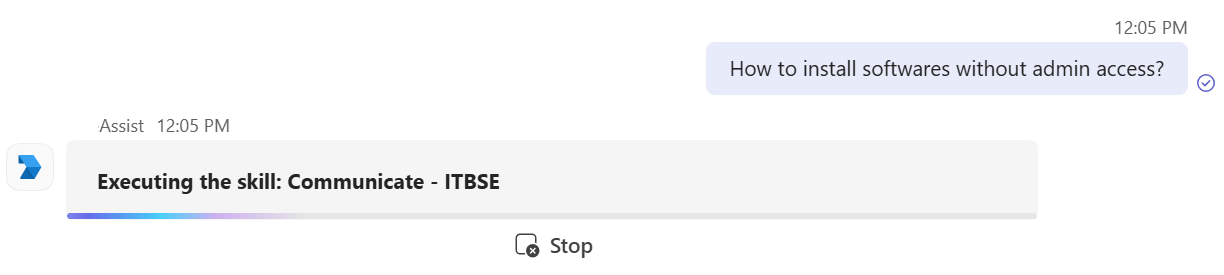 Intermediate tool call
Disable intermediate tool calls
You can disable intermediate tool calls for genies at the project level.
Complete the following steps to disable genie intermediate tool calls within a project:
Go to Projects and select the project where you plan to disable intermediate tool calls.
Click the Settings tab.
Select Project properties and click + Add new property.
Go to the Property name field and enter tool_call_streams_disabled.
Go to the Value field and enter true.
Click the checkmark to save your changes.
Getting started with a chat interface
Refer to Create your first genie for complete steps on how to create a genie with a job description, AI model, chat interface, knowledge base, knowledge base recipe, and skills.
Complete the following steps to create a genie and configure its chat interface:
Complete the following steps to configure your chat interface:
Sign in to Workato.
Go to AI Hub > Agent Studio.
Click Create to build your own genie.
Enter a request or goal for your genie in the What would you like your genie to help with? field.
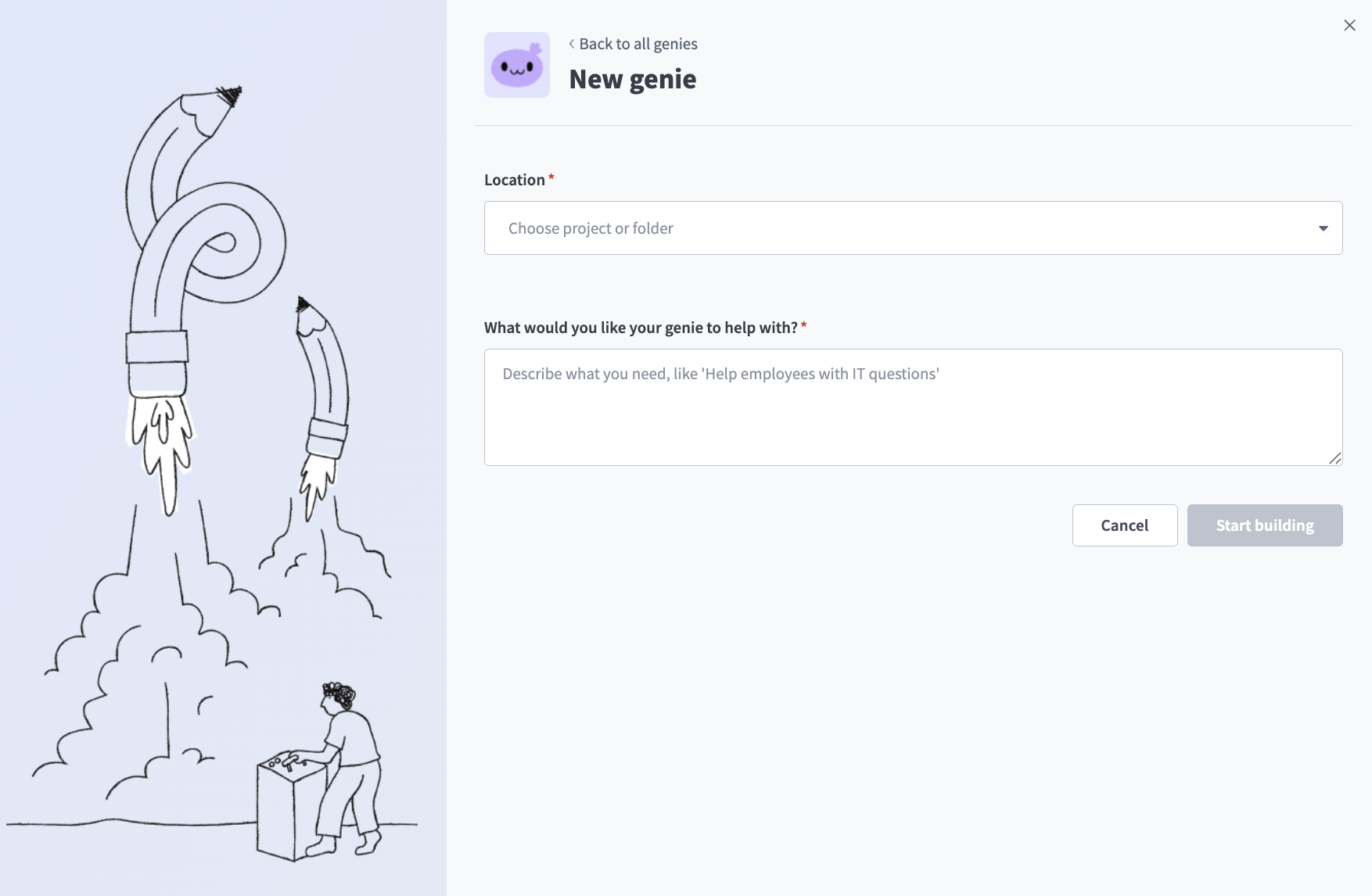 Create a genie
Use the Save genie in drop-down menu to select a location for your genie.
Click Start building. The genie Build page displays.
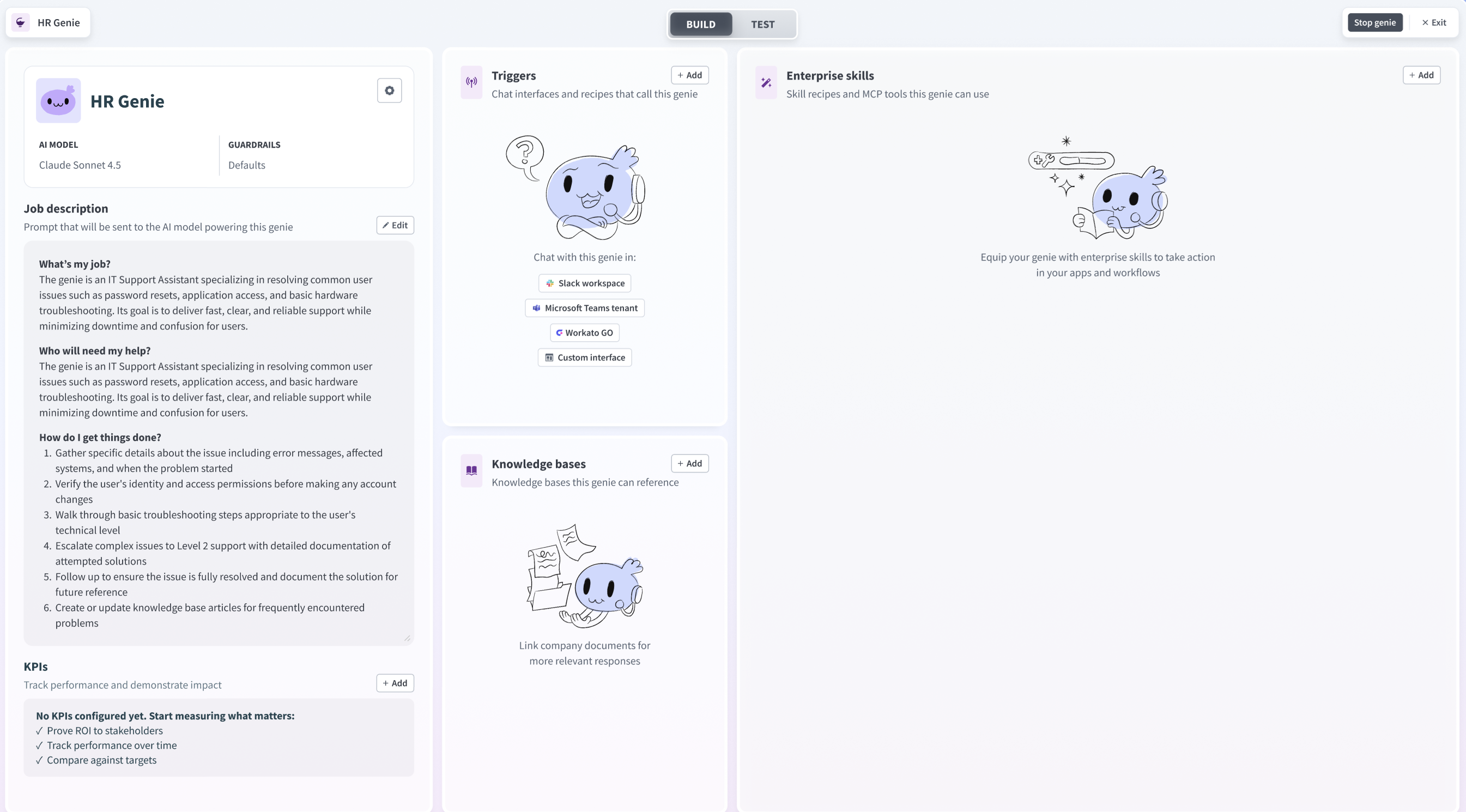 Genie build page
Go to the Triggers section and select the chat interface you plan to use for this genie. You can add additional chat interfaces by clicking + Add.
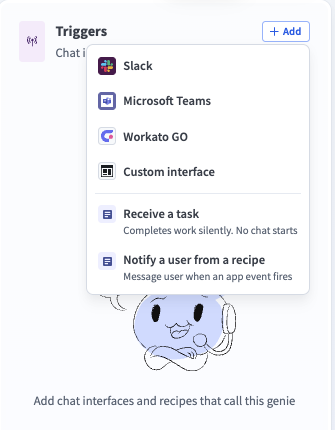 Select your chat interface
Optional. Click + Add to add additional chat interfaces to the genie. Genies support multiple chat interfaces from multiple clients. For example, a genie can have multiple chat interfaces connected, including multiple unique Slack Workspaces, multiple unique Teams Tenants, multiple custom chat interfaces, and a single Workato GO chat interface.
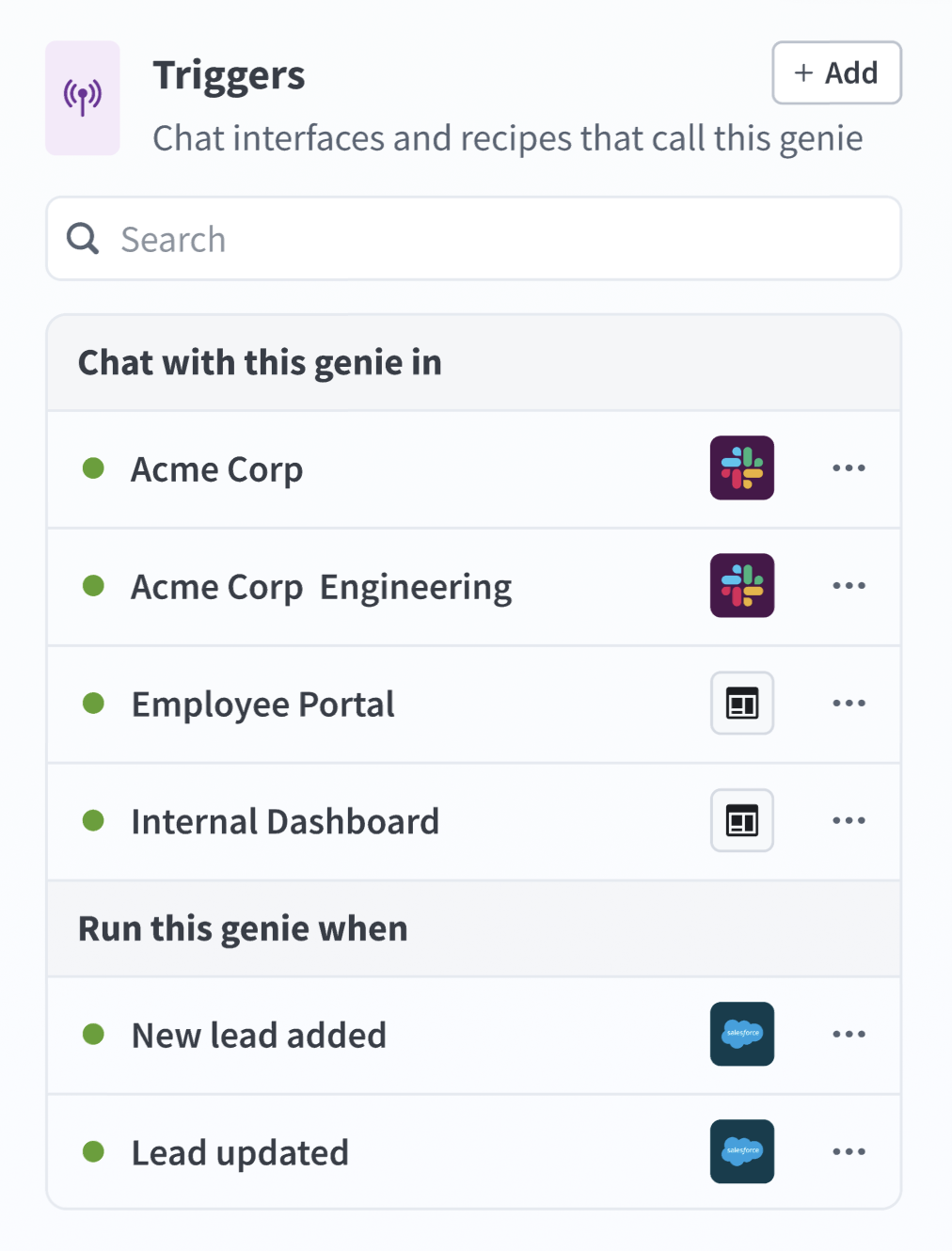 Multiple chat interfaces can be added to a single genie
Slack
Configure Slack as your chat interface
Complete the following steps to configure Slack as your chat interface:
Select Slack as your chat interface.
Go to Step 1 and click Create new app. Workato opens the selected app and prompts you to create a new app. Follow the instructions in Workato to create the Slack app for your genie.
Go to Step 2 and enter your Client ID. Locate this value in the Basic Information or App Credentials section of your app.
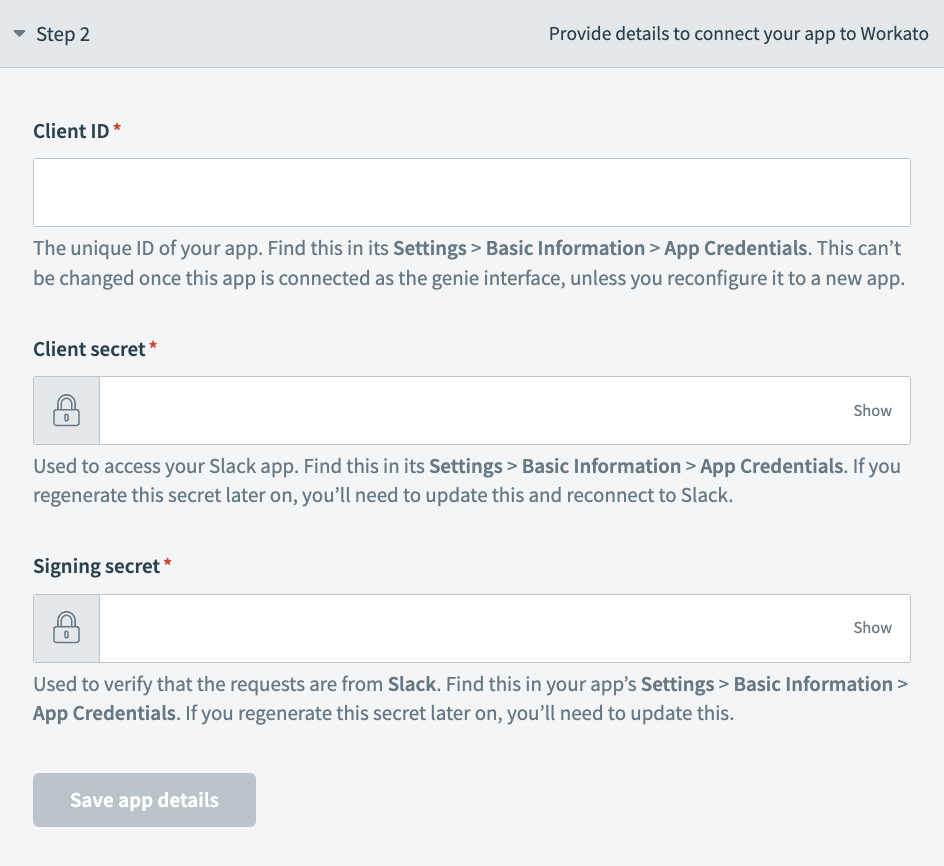 Chat interface Step 2 configuration
Enter your Client Secret. You can find this in the Basic Information or App Credentials section of your app.
Provide your Signing Secret. This is used to verify that interactive messages and events requests originate from your app. You can find this in the Basic Information or App Credentials section of your app.
Click Save app details.
Go to your app's App Manifest and use the Click here to verify link to verify your app's URL for Step 3.
Click Add Slack trigger.
Microsoft Teams
Configure Microsoft Teams as your chat interface
Complete the following steps to configure Microsoft Teams as your chat interface:
Select Microsoft Teams as your chat interface.
Go to Step 1 and click Create new app. Follow the instructions in Workato to create the Microsoft Teams app for your genie.
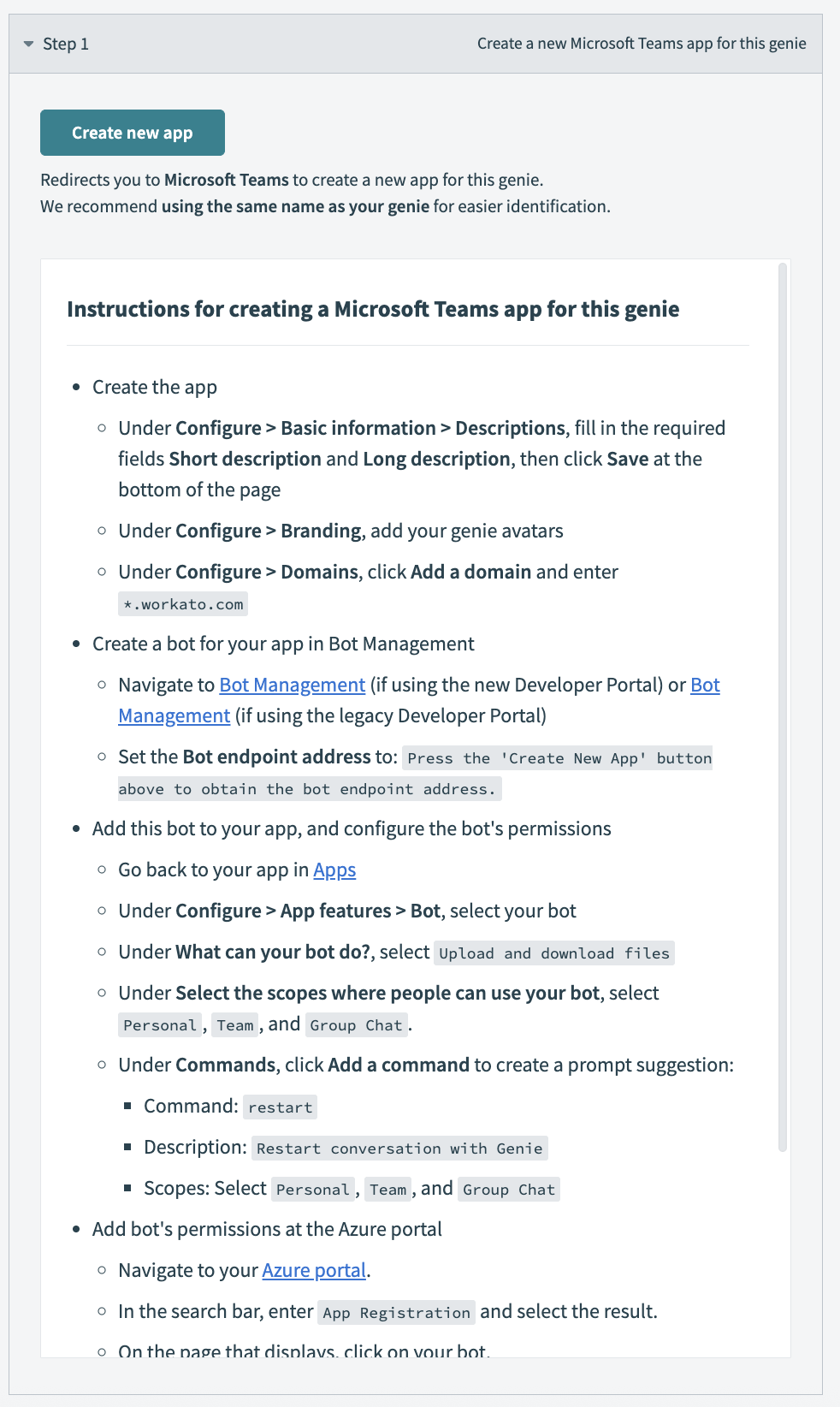 Go to Step 1 and click Create new app
Go to Step 2 and enter your app ID in the App ID field.
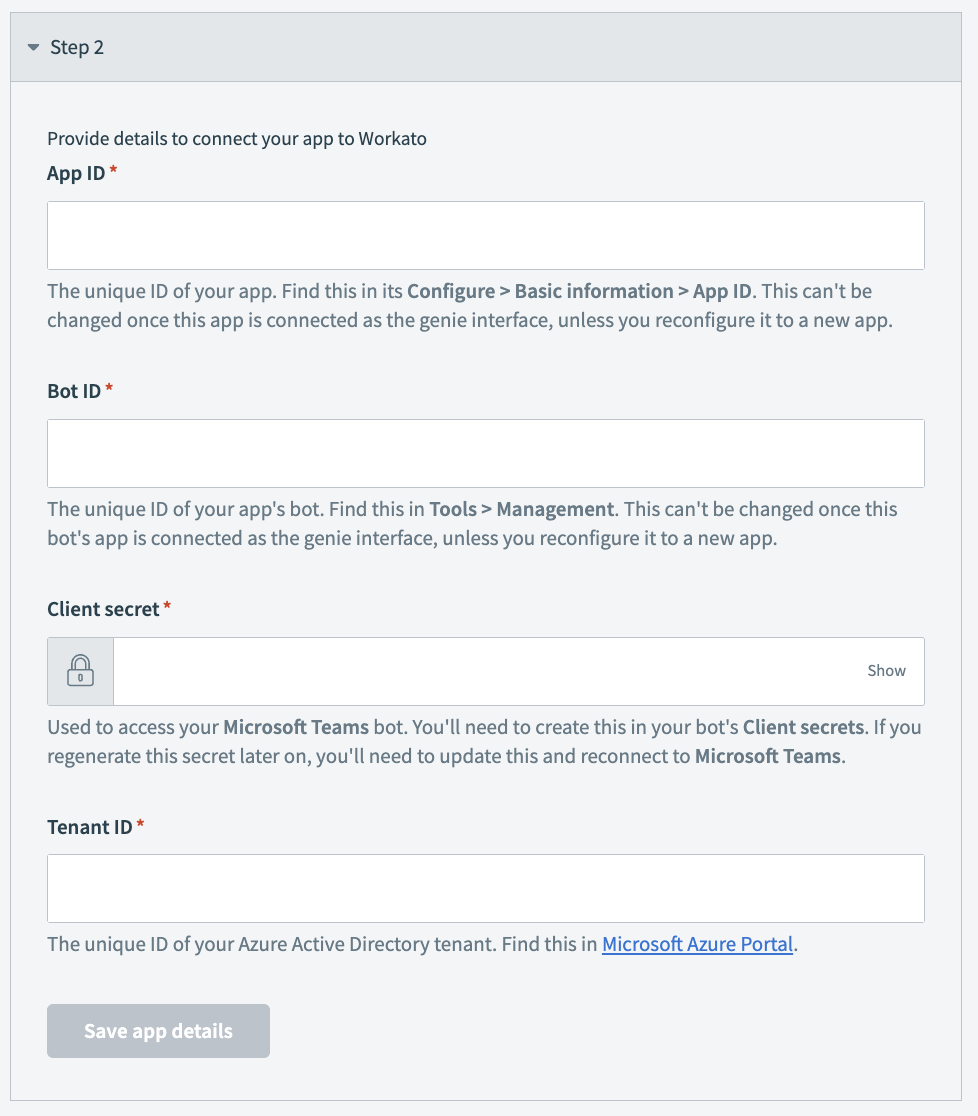 Go to Step 2 and enter your app ID in the App ID field
Enter your bot ID in the Bot ID field. You can find your app's bot ID by going to Tools > Management in Microsoft Teams.
Enter your client secret in the Client secret field.
Enter your tenant ID in the Tenant ID field. This is your unique Azure Active Directory tenant ID. You can find your tenant ID in the Microsoft Azure Portal.
Click Save app details.
Go back to Apps and select your app.
Click Publish > Publish to your org. Your Microsoft Teams admin may need to approve the publish request.
Return to trigger configuration and click Connect Microsoft Teams trigger.
Workato GO
Configure Workato GO as your chat interface
Complete the following steps to configure Workato GO as your chat interface:
Select Workato GO as your chat interface.
Click Connect interface.
Custom chat interface
Configure a custom chat interface
Complete the following steps to configure a custom chat interface:
Select Custom interface.
INTERFACE TYPE CAN'T BE CHANGED
You can't change the chat interface type after you save the app details.
Enter a name for the interface in the Interface name field. This name is visible to builders only and isn't shown to end users.
Use the Authentication method drop-down menu to select the authentication method for the chat interface.
Your app authenticates users via API key
The API key authorizes requests to this genie. End users don't interact with Workato directly if you select this option.
Select Your app authenticates users via API key.
Optional. Enter the IP addresses or ranges allowed to call this genie in the Allowed IPs field. Separate multiple entries with commas. Requests from any IP are permitted if you leave this field empty.
Click Connect interface. The API key generated modal opens.
Click Copy to copy the API key.
Store this API key securely and click Next: Test your interface. Don't share or embed the API key in visible code.
Optional. Complete the steps to test your chat interface.
Click Add chat interface.
Workato authenticates users via OAuth 2.0
End users authenticate through a Workato-hosted login form. End users are redirected to a URL you choose after successful authentication.
Select Workato authenticates users via OAuth 2.0.
Optional. Add allowlisted IP addresses to the Allowed IPs field. Separate multiple entries with commas. Requests from any IP are permitted if you leave this field empty.
Enter the URLs where you plan to redirect users after they authenticate in the OAuth redirect URLs field.
Optional. Enter the IP addresses or ranges allowed to call this genie in the Allowed IPs field. Separate multiple entries with commas. Requests from any IP are permitted if you leave this field empty.
Click Connect interface. The API key generated modal opens.
Copy the Client ID.
Copy the Redirect your user to the authorization URL.
Use the Client ID and Redirect your user to the authorization URL values you copied to configure the OAuth exchange between your app and this genie in your app settings.
Click Add chat interface.
Optional. Enable channel responses for Slack.
Enable channel responses for Slack
You must connect to your Slack account before you can enable channel responses.
Complete the following steps to enable channel responses for Slack:
Click your connected chat interface on the genie build page.
Go to the configured chat interface where you plan to enable responses.
Click the Enable channel responses toggle to enable it.
Add additional scopes in your app settings if prompted. We recommend that you manually add missing Slack scopes in the Slack directory:
Go to the Slack app in the Slack directory.
Add the missing scopes to your app settings.
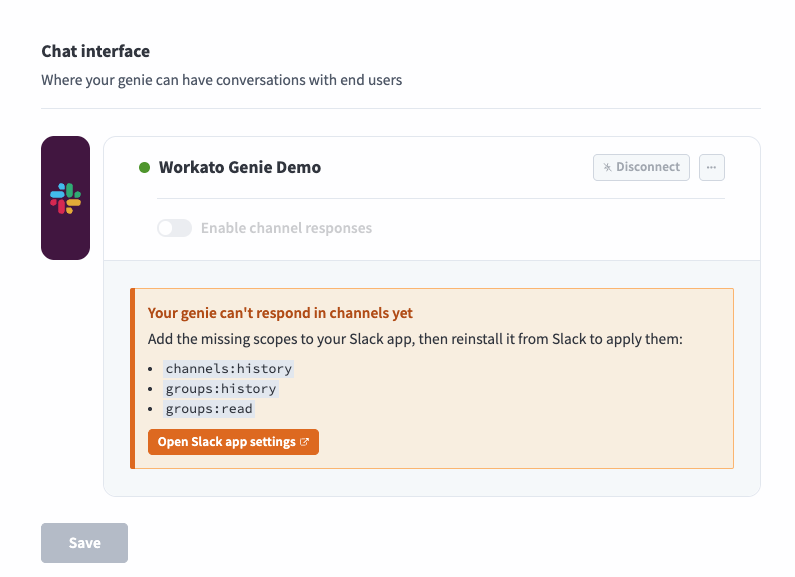 Add additional scopes
Click Install App > Reinstall to [Workspace name].
Return to the channel responses section in Workato and refresh the page to sync the new scopes to your app.
Go to the Genie can chat in section and select Specific channels only or Any channel it's invited to. Refer to Channel support options for more information.
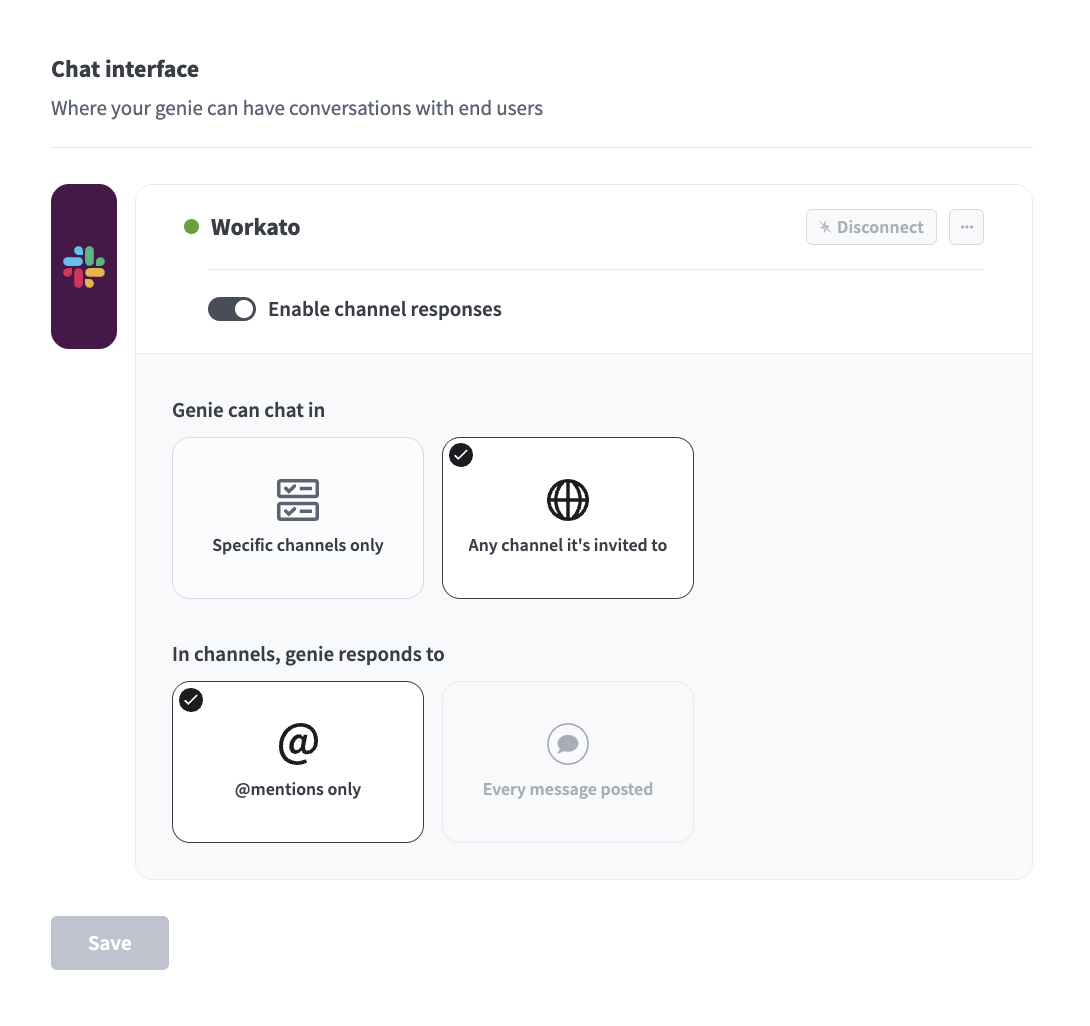 Configure channel responses
Go to the In channels, genie responds to section and select @mentions only or Every message posted. Refer to Channel modes for more information.
EVENT SUBSCRIPTIONS REQUIREMENT FOR EVERY MESSAGE POSTED
You must enable Event subscriptions scopes in Slack if you select Every message posted.
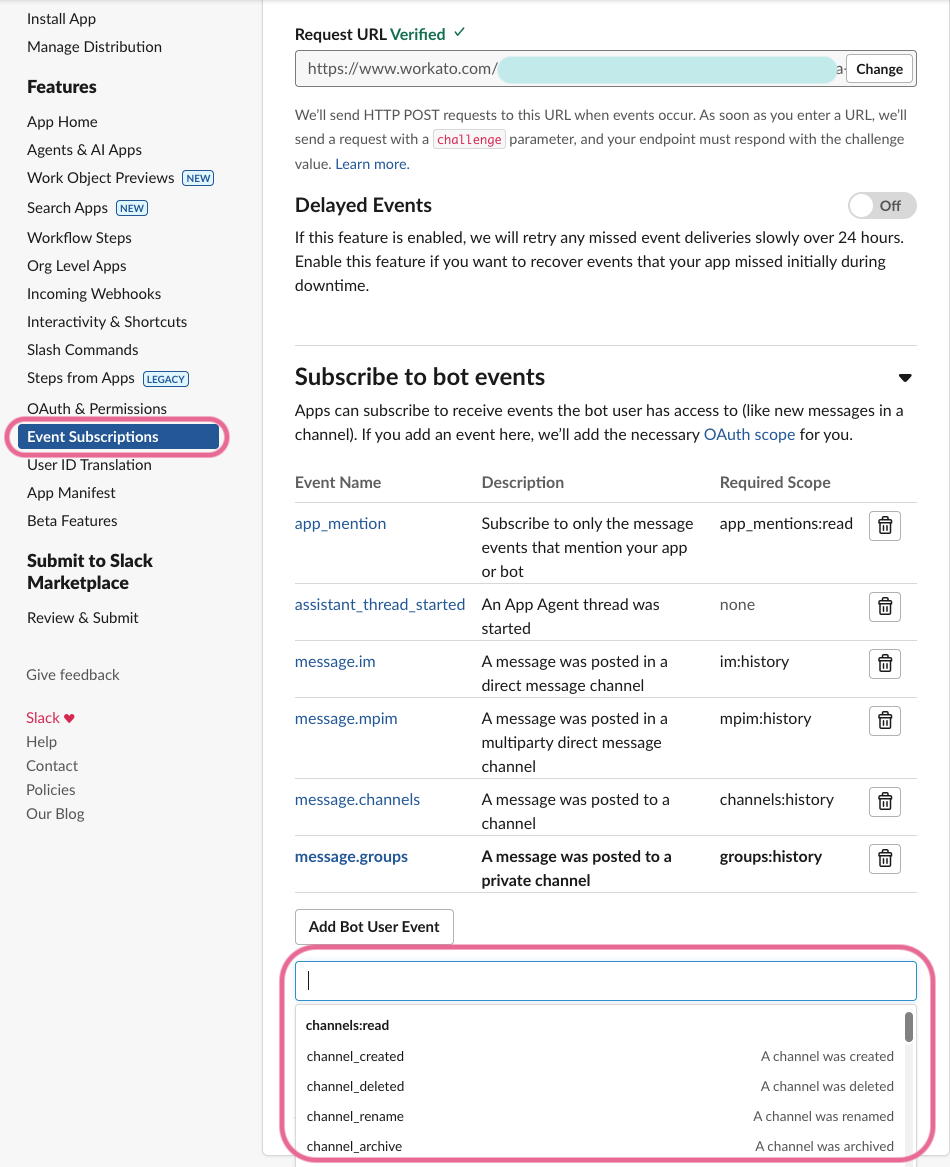 Add Event Subscriptions
Click Save.
Optional. Enable channel responses for Microsoft Teams.
Enable channel responses for Microsoft Teams
You must connect to your Microsoft Teams account before you can enable channel responses.
Complete the following steps to enable channel responses for Microsoft Teams:
Click your connected chat interface on the genie build page.
Select Chat interface in the sidebar.
Click the Enable channel responses toggle to enable it.
Add additional scopes in your app settings if prompted. Refer to the Microsoft Teams required scopes section for more information.
Go to the Genie can chat in section and select Specific channels only or Any channel it's invited to. Refer to Channel support options for more information.
Go to the In channels, genie responds to section and select @mentions only or Every message posted. Refer to Channel modes for more information.
Click Save.
Last updated: